A useful way to understand technical SEO is through analogy: imagine that content is a book, and the author has spent months writing something genuinely excellent.
But the book is printed in an unreadable font, has no table of contents, is bound in a way that prevents the spine from lying flat, and is shelved in a section of the library where the catalog system has no record of it.
The excellence of the content is irrelevant to any reader who cannot find it, open it, or navigate through it.
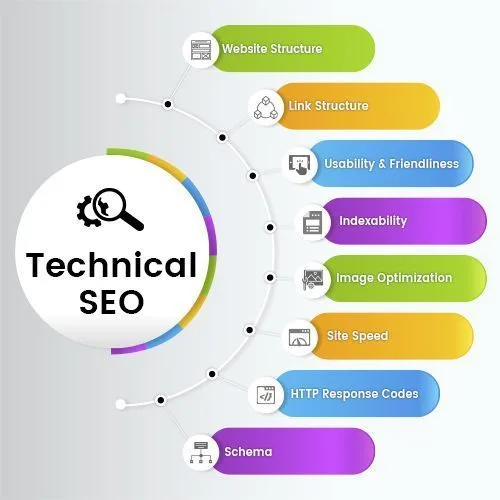
Technical SEO is the set of practices that ensure search engines can find, access, render, understand, and index content. Without this foundation, no amount of content quality, backlink authority, or audience development produces search visibility.
With this foundation in place and functioning correctly, content and authority investments produce their full potential returns.[7]
The failure modes of technical SEO are particularly consequential because they often affect entire sites at once, not individual pages. A misconfigured robots.txt file can make thousands of pages invisible simultaneously. A site migration that does not implement proper redirects can erase years of accumulated ranking authority in days.
A JavaScript rendering problem can leave search engines indexing placeholder text instead of actual content. These are catastrophic, not incremental, failures.
"Technical SEO is the set of practices that ensure search engines can find, access, render, understand, and index content. A single misconfigured robots.txt can make thousands of pages invisible simultaneously. Technical failures are catastrophic, not incremental."
SEO technical audit framework
| HTTP Status Code | Meaning | SEO Impact | Action Required |
|---|---|---|---|
| 200 OK | Page accessible | Positive - content indexed | None |
| 301 Redirect | Permanently moved | Passes authority to new URL | Update internal links |
| 302 Redirect | Temporarily moved | Does not pass authority | Change to 301 if permanent |
| 404 Not Found | Page missing | Removed from index over time | Restore page or redirect |
| 410 Gone | Page permanently deleted | Fast removal from index | Use when intentionally removing |
| 5xx Server Error | Server failure | De-indexing risk if persistent | Fix server issue immediately |
| Noindex | Explicit exclusion | Never indexed | Use only when intentional |
Crawlability: Can Search Engines Reach Your Content?
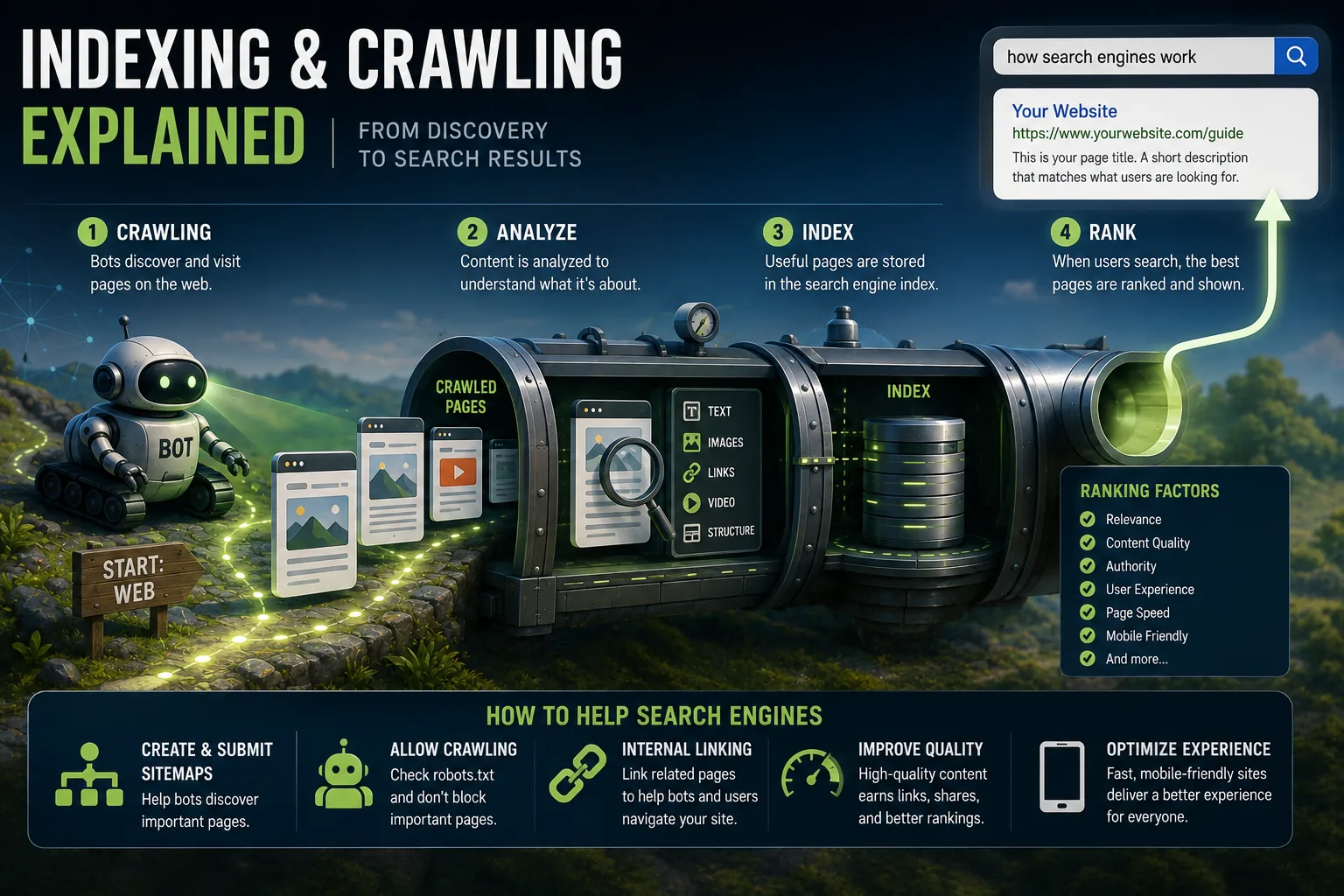
Search engines can only reach content that crawlability allows them to access, controlled primarily through robots.txt configuration and internal linking structure. Before any analysis or evaluation, a search engine's crawler must be able to reach a page. A single overly broad wildcard rule in robots.txt can inadvertently block entire sections of a site, and misconfiguration here is the most common cause of catastrophic traffic loss following site launches or migrations.
The Access Layer
Crawlability is about removing obstacles to access.
Robots.txt configuration is the primary mechanism for communicating with crawlers about which parts of a site they may access. The file, placed at the root of a domain (yoursite.com/robots.txt), uses a simple directive syntax that most major crawlers respect.
Common robots.txt directives:
Disallow: /admin/ blocks the admin section from crawling. Disallow: /*?s= blocks URL patterns matching internal search results. Allow: / explicitly permits crawling of everything not blocked by more specific rules. Sitemap: https://yoursite.com/sitemap.xml points crawlers to the sitemap location.
The most dangerous mistake with robots.txt is blocking content that should be indexed. A single overly broad wildcard rule can inadvertently block entire sections of a site.
The most common cause of catastrophic traffic loss following site launches or migrations is robots.txt misconfiguration - a staging server restriction that was carried to production, or a new developer's misunderstanding of the directive syntax.
Before deploying any robots.txt changes, test using Google Search Console's robots.txt testing tool. After deployment, monitor Search Console's Pages report for unexpected drops in indexed pages, which can indicate that the change blocked more than intended.
A critical distinction: robots.txt blocks crawling, not indexing. If an external site links to a page that is blocked in robots.txt, Google may still know the URL exists and may show it in search results as a URL without a description. To prevent a page from appearing in results entirely, use the noindex meta tag rather than robots.txt.
Server Accessibility and Response Codes
Every URL that a crawler attempts to access receives an HTTP response code. The response code determines whether the crawler considers the page accessible.
200 OK: The page is accessible and content is returned. This is the desired state for any page intended to be indexed.
301 Moved Permanently: The URL has permanently moved to a new location. Crawlers follow the redirect, and ranking authority from the old URL transfers to the new URL. 301 redirects are essential during site migrations to prevent authority loss.
302 Found (Temporary Redirect): The URL has temporarily moved. Crawlers follow it but do not transfer authority as freely, because temporary redirects signal that the original URL will return. Use 301 for permanent URL changes.
404 Not Found: The page does not exist. Crawlers stop following this URL and remove it from the index over time. Internal links pointing to 404 pages waste crawl budget and represent broken user experience.
5xx Server Errors: The server experienced an error processing the request. Crawlers retry these URLs, but persistent server errors cause Googlebot to reduce its crawl rate for the site and eventually de-index affected pages.[2]
Monitoring the distribution of response codes across your site, and ensuring that crawlers are receiving 200 responses for important pages and appropriate redirects for URLs that have moved, is fundamental maintenance.
XML Sitemaps
XML sitemaps are structured files that list the URLs on your site, providing search engines a direct inventory of your content. A sitemap is not a guarantee that listed pages will be crawled or indexed - it is a communication of what you want crawlers to know about.
Sitemaps are most valuable for:
Large sites where the link-following discovery process might not reach all pages quickly. An e-commerce site with 200,000 product pages benefits from sitemaps that ensure systematic coverage.
New content that you want discovered promptly. A sitemap that is updated immediately upon new content publication, combined with Googlebot's periodic sitemap checks, provides faster discovery than waiting for link-following.
Orphaned or deep pages that are not well-linked internally. Including these in sitemaps ensures they are known even if the link graph would not easily reach them.
The sitemap should contain only pages you want indexed. Including pages that are blocked by robots.txt, have noindex tags, or are 404s creates confusion and wastes crawl budget. Sitemaps should be submitted through Google Search Console and updated regularly.[1]
Indexability: Getting Into the Index
Being crawled does not guarantee being indexed. Indexability refers to whether a page, once crawled, is considered suitable for inclusion in the search index.
The Noindex Directive
The <meta name="robots" content="noindex"> tag, placed in a page's <head> section, instructs search engines not to include the page in their index.
This is appropriate for pages that should be accessible but not searchable: administrative interfaces, user account pages, checkout steps, thank-you pages, duplicate versions of canonical content, and low-value archive pages.
The most common technical SEO emergency involving noindex tags is accidental placement on pages that should be indexed. This happens through:
CMS default settings that set noindex on certain templates that should be crawled. Plugins that add noindex tags to pages without obvious indication.
Staging environment configurations (which typically have site-wide noindex to prevent staging content from appearing in results) that persist to production. Theme or design changes that inadvertently modify robots meta tag settings.
Monitoring the Pages report in Search Console for any increase in "Excluded by noindex tag" that is not expected is the early warning system for this category of error.
Canonical Tags and Duplicate Content
The web generates enormous quantities of duplicate and near-duplicate content through technical means that have nothing to do with intent: HTTP versus HTTPS URLs (both accessible before proper redirection), www versus non-www versions, URL parameters that create different URLs for the same content (sorting options, session IDs, tracking parameters), print-friendly URL variants, pagination, and content syndication.
When multiple URLs contain identical or very similar content, search engines must decide which version to index and potentially rank. Without explicit guidance, the decision may not favor the URL you prefer. It can also dilute the ranking authority that would otherwise concentrate on a single authoritative URL.
The <link rel="canonical"> tag provides this explicit guidance:
<link rel="canonical" href="https://www.yoursite.com/the-preferred-url">This tag, placed in a page's <head>, declares which URL should be treated as the authoritative version. Search engines consolidate indexing and ranking signals to the canonical URL.
Self-referencing canonicals - every page including a canonical tag pointing to itself - are recommended as a defensive measure. They prevent other sites from syndicating your content and canonicalizing to a different URL without your knowledge.
The priority of signals: When multiple signals conflict (the canonical tag points one direction, most inbound links point another direction), Google uses its own judgment to determine the actual canonical. A canonical tag that points to a URL that returns an error or is blocked by robots.txt will be ignored.
JavaScript Rendering and Content Visibility
Modern web applications built with React, Vue, Angular, or similar frameworks generate their content dynamically through JavaScript execution. The initial HTML sent by the server may be a near-empty template; the actual content is inserted by JavaScript after the page loads in a browser.
Google's crawling process is two-stage: it first processes the initial HTML response (fast, happens immediately), then queues the page for JavaScript rendering (slower, happens in a secondary queue).
For pages where the initial HTML contains the important content, this distinction is irrelevant. For pages where critical content is only visible after JavaScript execution, the delay in the rendering queue means:
Content may be indexed based on the initial HTML (which lacks the meaningful content) rather than the rendered state. If the rendering queue is congested, some pages may never reach the rendering stage. JavaScript errors that prevent execution cause content to be permanently invisible to the indexer.
The recommended approach for content that search engines need to understand: ensure it is present in the server-rendered HTML, not exclusively dependent on client-side JavaScript.
For applications where this is impractical, server-side rendering (SSR) or static site generation (SSG) solves the problem by rendering JavaScript server-side and sending fully-formed HTML to both users and crawlers.
Site Architecture: The Structural Layer
Hierarchy and Link Equity Distribution
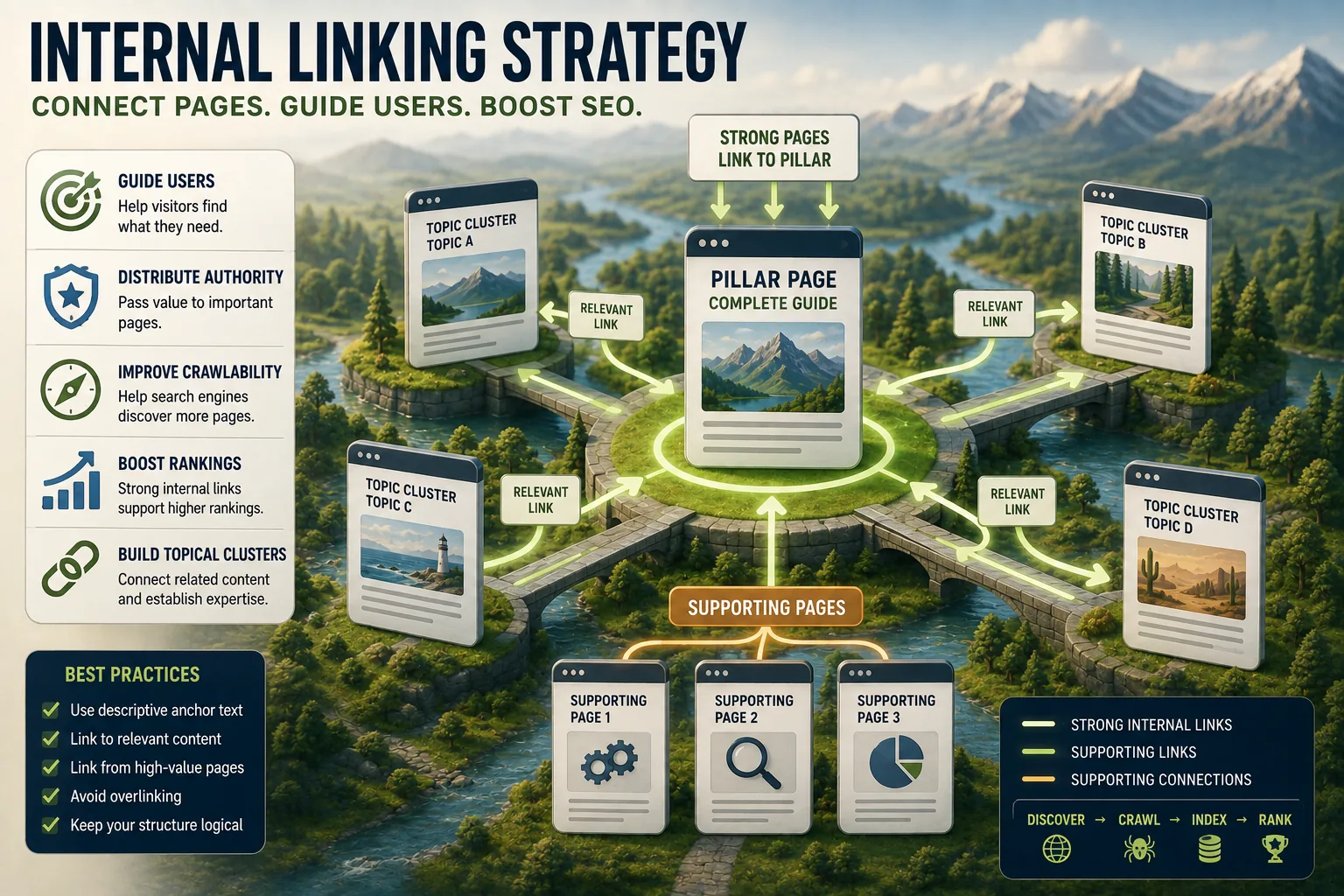
How a website is organized - the relationships between categories, subcategories, and individual pages - directly affects how authority is distributed and how efficiently crawlers can navigate.
The typical recommended structure follows a hierarchy: the homepage at the top, linking to category or section pages, which link to individual content or product pages.
Pages that are closest to the homepage in this hierarchy receive the most internal link authority flowing through them, are crawled most frequently, and tend to have the highest internal authority.
Practical implications for important content: Pages you most want to rank should be accessible within two to three clicks from the homepage, and should receive internal links from multiple other pages. Pages that require six clicks to reach through normal navigation receive minimal crawl attention and minimal internal authority.
When important content exists deep in a site hierarchy, options include: restructuring navigation to surface it higher, adding featured content sections on higher-level pages that link to it, or including it in sitemap files to ensure it is at least known to crawlers even if the link graph does not reach it quickly.
URL Structure
URLs that are descriptive, readable, and logically structured contribute to both usability and SEO. The URL /category/subcategory/topic-name communicates hierarchy clearly; /page?id=7293&cat=4&sort=2&view=grid communicates nothing useful.
Consistency matters more than any specific format. Whatever URL structure you establish should be applied consistently. Changing URL structures requires comprehensive redirect implementation; sites that change URL structures without proper redirects lose the ranking authority accumulated at the old URLs.
URL parameters that create multiple URLs for the same content are one of the most common sources of indexing problems. Product listing pages filtered by color, size, or price; search result pages; sorting options; and session-tracking parameters all create URL variations that may be indexed as separate pages with duplicate content.
The solutions: blocking parameter-based URLs in robots.txt, implementing canonical tags on parametrized URLs pointing to the base URL, or configuring URL parameter handling in Google Search Console.
Redirect Management
Redirects are necessary for URL changes, site migrations, and content consolidation. The redirect practices that matter for technical SEO:
301 redirects for permanent changes. When a URL permanently changes, the 301 redirect signals to search engines that the new URL should inherit the old URL's authority and ranking history. A 302 (temporary) redirect does not transfer authority as readily; using 302 where 301 is appropriate wastes accumulated ranking signals.
Redirect chains. A chain occurs when URL A redirects to URL B, which redirects to URL C. Each hop in the chain adds latency and reduces the authority transfer. Search engines may stop following chains after a certain number of hops.
The correct approach: redirect directly from source to final destination, eliminating intermediate redirects.
Loop detection. A redirect loop (A redirects to B, B redirects to A) is caught by browsers and crawlers, but identifying and fixing loops in large redirect configurations requires audit tools.[11]
Performance as a Technical SEO Signal
Core Web Vitals as Ranking Factors
Google confirmed Core Web Vitals as ranking factors with the Page Experience update in 2021. These metrics - Largest Contentful Paint, Interaction to Next Paint (which replaced First Input Delay in March 2024), and Cumulative Layout Shift - measure the user experience of page loading in terms that map to how users actually perceive performance.[10]
The ranking impact is real but bounded: Core Web Vitals are a "tiebreaker" factor. A page with excellent content, strong authority, and poor Core Web Vitals may still outrank a page with poor content, weak authority, and excellent Core Web Vitals.
But between pages with comparable content and authority, the page with better Core Web Vitals will rank higher.
For sites where many competing pages have similar content quality and authority - which describes most competitive search environments - Core Web Vitals become a meaningful differentiator.
The field data displayed in Google Search Console's Core Web Vitals report - collected from actual Chrome users visiting your pages - is the data Google uses for ranking decisions. This is the authoritative source, more relevant than synthetic testing tools.
Mobile-First Indexing
Google began switching sites to mobile-first indexing in 2018 (default for new sites from July 2019, and completed for all sites by 2024), meaning it uses the mobile version of a page as the primary version for indexing and ranking.[4] The consequences:
Content that exists on the desktop version of a page but is hidden on mobile (through CSS display:none, responsive design that omits elements at small viewports, or JavaScript that loads content only on larger screens) may not be indexed.
Page performance on mobile devices - which are slower and have less memory than desktop machines - is what matters for ranking, not desktop performance. A page that loads in 1.5 seconds on a desktop over fiber may take 6 seconds on a mid-range mobile device on a 4G connection.
Responsive design - a single URL with CSS that adapts the layout to different screen sizes - is the recommended approach because it ensures the same content is always available to both users and crawlers regardless of device.
Structured Data: Explicit Context for Search Engines
What Structured Data Accomplishes
Search engines must infer what content represents based on text and context. An article page contains text, but is it a news article, a how-to guide, a product review, or an academic paper? A business page has an address and phone number, but is it a restaurant, a law firm, or a retailer?
Schema.org structured data vocabulary provides a standardized way to make these distinctions explicit in machine-readable format.[5] Instead of requiring the search engine to infer, structured data declares: this is an Article, authored by this Person, published by this Organization, on this date.
Rich results are the tangible benefit: certain schema types enable enhanced presentations in search results. Article schema enables article rich snippets with date and author information. Recipe schema enables recipe cards with cook time, ratings, and ingredients.
FAQ schema creates expandable question-and-answer dropdowns in search results. Product schema displays price, availability, and rating directly in the result.
Rich results increase click-through rate. A recipe result with a food photo, star rating, and cook time is more compelling than a plain text link to the same page. Higher CTR means more traffic from the same ranking position.
Implementation formats: JSON-LD (JavaScript notation embedded in a <script> tag in the HTML <head>) is Google's recommended format.[3] Microdata (attributes added to existing HTML elements) is an alternative.
JSON-LD is preferred because it separates the structured data from the HTML content, making it easier to implement and maintain.
Validating Structured Data
Google's Rich Results Test (available at search.google.com/test/rich-results) validates structured data implementation and previews how it would appear in search results. Running this test against all pages with structured data markup before deployment catches syntax errors and missing required properties.
Search Console's Rich Results report shows which pages have been detected with structured data, whether it is valid, and whether rich results have been enabled for those pages.
The Technical SEO Audit Process
Crawl-Based Auditing
Crawl tools - Screaming Frog SEO Spider, Sitebulb, Ahrefs Site Audit, or Semrush's Site Audit - systematically request every URL on a site and analyze the responses.[8] The output reveals:
Broken internal links (links to 404 pages): Broken links waste crawl budget, create poor user experience, and lose any authority that should flow through the link.
Redirect chains: Chains longer than one hop should be collapsed to direct redirects.
Missing or duplicate title tags and meta descriptions: Every page should have unique, descriptive title and meta description content.
HTTP pages: Any page not redirecting to HTTPS, or internal links using HTTP URLs, should be corrected.[9]
Orphaned pages: Pages with no internal links pointing to them - potentially discovered only from sitemaps - should be connected to the broader site structure.
Large pages: Pages with excessive HTML size (over 15 MB) may be partially crawled; excessively large pages should be investigated and optimized.
Search Console Monitoring
Google Search Console provides direct data from Google's perspective:
The Pages report shows indexing status for all discovered URLs, with specific reasons for exclusion when pages are not indexed. Any unexpected increase in "Crawled - currently not indexed" or "Excluded by noindex tag" warrants investigation.
The Core Web Vitals report shows field performance data. Pages in the "poor" category are the priority for performance optimization; pages in the "needs improvement" category should be monitored.
The Mobile Usability report identifies pages with mobile-specific issues: text too small to read, clickable elements too close together, content wider than the viewport.
The Links report shows which pages have the most internal links, identifying potential authority concentration or pages that may be under-linked relative to their importance.
Audit Cadence
Monthly: Review Search Console for new errors, significant changes in indexed page counts, and Core Web Vitals trends. Address urgent issues.
Quarterly: Full crawl audit with a crawl tool. Compare current state to previous audit. Identify patterns in errors, orphaned pages, and redirect chains.
After significant changes: Any site migration, major redesign, URL restructuring, platform change, or large content addition warrants an immediate technical audit. These events are the highest-risk moments for technical SEO; catching problems immediately reduces the time to remediation.
See also: Indexing and Crawling Explained, Page Speed Optimization Explained, and Internal Linking Strategy Explained.
What Google's Research and Patents Reveal About Technical SEO
Google's public patents and research papers offer more precise insight into how technical signals are processed than any third-party study. Several patents illuminate specific technical SEO mechanisms that are otherwise opaque.
Google's sitemap guidance describes how Google uses accurate lastmod values in sitemap files.
The patent indicates that sitemaps with inaccurate last-modification dates - common when CMS systems generate sitemaps that report all pages as modified on the same date - receive less weight. The implication is that sitemap accuracy is not merely a courtesy but a signal affecting crawl priority.
Sites that implement accurate, per-page modification timestamps in their sitemaps receive more reliable crawl prioritization than those that do not.
The PageSpeed Insights Technical Infrastructure was described by Googler Ilya Grigorik in multiple public presentations and in his book "High Performance Browser Networking" (O'Reilly, 2013).
Grigorik, who joined Google's web performance team in 2012, documented how Google's infrastructure measures page performance at the network layer, not merely through synthetic testing.
The TCP-level data Google collects from the Chrome browser's field data means that performance signals reflect real network conditions experienced by real users - a more honest picture than controlled lab tests.
Research on JavaScript Rendering Delays: Google's Gary Illyes confirmed at SMX Advanced 2016 and in subsequent Search Central documentation that JavaScript rendering exists in a secondary processing queue.
A 2019 Googlebot update was documented by Martin Splitt (Google Developer Relations) in a Google Search Central blog post, clarifying that the rendering gap had been reduced to days rather than weeks - but that the gap still exists.
Splitt's technical talks at Google I/O have consistently emphasized that server-side rendered HTML remains the most reliable way to ensure important content is indexed promptly.
Patent US9659059 - "Determining Quality Measures for Web Documents" describes a system for evaluating document quality based on signals beyond content text, including page structure, internal link patterns, and whether the page is frequently updated.
The patent, filed by Navneet Panda (the engineer after whom the Panda update is named), reveals that Google's quality evaluation for technical aspects considers the consistency of a site's structural quality signals across multiple pages, not just individual page assessment.
Googlebot's HTTP/2 support, announced officially in November 2020 by Gary Illyes on Twitter and documented in Search Central, means that sites using HTTP/2 can theoretically have Googlebot multiplex multiple requests over a single connection, reducing the latency overhead of crawling.
While Google has not stated HTTP/2 adoption is a direct ranking factor, the reduced crawl overhead benefits sites with large content inventories by allowing more pages to be processed in each crawl session.
Real-World Technical SEO Case Studies
The gap between technical SEO theory and practice is best illustrated through documented case studies of specific sites that experienced significant changes following technical changes.
Merkle and Crawl Budget Recovery (2018): Merkle's technical SEO team published a detailed case study of a major e-commerce client that had over 2 million URLs indexed, of which approximately 1.7 million were parameter-generated duplicates providing no user value.
After a systematic crawl budget cleanup - implementing robots.txt blocks on parameter URLs, consolidating canonical tags, and removing 404 pages from internal links - the site's crawl coverage of its 300,000 valuable product pages improved by 68% over three months, and organic traffic to product pages grew 34%.
The case study demonstrates that crawl budget management, often dismissed as relevant only to massive sites, can materially affect organic visibility for mid-sized e-commerce sites.
HubSpot's Content Audit and Canonicalization (2015): HubSpot's Pamela Vaughan published a detailed account of how HubSpot identified that thousands of historical blog posts were competing with each other for similar queries, diluting rather than concentrating authority.
The technical solution combined canonical tags, 301 redirects for near-duplicate posts, and a content consolidation strategy that merged overlapping content into single comprehensive pages.
The result was a 106% increase in organic traffic to consolidated content over six months. This case established what became known as the "historical optimization" methodology that Backlinko's Brian Dean later documented and popularized.
The Wix JavaScript Rendering Resolution (2021): Wix, the website builder platform used by millions of small businesses, had historically been penalized in technical SEO discussions because its JavaScript-heavy rendering could create indexing delays for sites built on the platform.
Following Wix's investment in server-side rendering in 2021, documented by Google's John Mueller in a Twitter thread, Wix sites began appearing in Core Web Vitals and indexing reports on par with HTML-first sites.
Mueller's public commentary confirmed that Wix had successfully addressed the rendering queue problem by delivering critical content in server-rendered HTML. This case is significant because it demonstrates that JavaScript rendering is a solvable engineering problem, not an intrinsic limitation of JavaScript frameworks.
Airbnb's Canonical Tag Overhaul: Airbnb's engineering blog documented a canonical tag audit in 2020 that discovered self-referencing canonicals pointing to incorrect canonical URLs on a significant portion of their property listing pages.
The issue had accumulated through a series of CMS changes that modified how canonical tags were generated.
Following repair, Airbnb's organic visibility for property-type queries improved measurably, and the number of pages in Search Console's "Duplicate, submitted URL not selected as canonical" status dropped by over 80,000 pages.
The case illustrates that canonical tag errors at scale are not immediately visible in traffic data but accumulate as invisible ranking drag on large catalogs.
Portent's Structured Data Rich Results Analysis (2019): Portent's analysis of a portfolio of e-commerce clients found that pages with valid Product schema markup achieved an average click-through rate 30% higher than equivalent pages without markup, at the same average ranking position.
The structured data displayed pricing and availability directly in search results, making the result more informative before the click. The finding supports the mechanism by which structured data produces SEO benefit: not through direct ranking improvement but through CTR improvement from the same ranking position.
Key Technical SEO Metrics That Actually Matter
Technical SEO generates many potential metrics. The ones with documented connection to ranking outcomes are fewer than the full list suggests.
Indexed Page Count (from Google Search Console): The count of pages in the index versus the count of pages that exist on the site. For most sites, the proportion of submitted pages that are indexed should be above 80%; below 60% indicates systemic quality or technical issues.
John Mueller has stated in multiple Search Central office hours sessions that a high proportion of "Crawled - currently not indexed" pages can indicate that the site is signaling low overall quality, which may affect the indexing treatment of new pages as well.
Core Web Vitals Field Data Pass Rate: Search Console's Core Web Vitals report shows what percentage of page experiences are rated "Good" vs. "Needs Improvement" vs. "Poor." Google's documentation for the Page Experience ranking signal uses the 75th percentile threshold across real user sessions.
A benchmark from Ahrefs' 2022 analysis of Core Web Vitals across their index found that only 33% of pages passed all three Core Web Vitals thresholds simultaneously - meaning two-thirds of pages have at least one metric failing.
Sites achieving 75%+ of page experiences in the "Good" category for all three metrics are in the top tier of competitors on this dimension.
Crawl Coverage Rate: Calculated as (pages Googlebot has crawled in the past 90 days) divided by (total pages in sitemap). Search Console's Crawl Stats report and Sitemaps report together provide the data needed for this calculation.
A crawl coverage rate below 70% for an established site indicates crawl budget limitations or technical accessibility problems that are preventing Googlebot from reaching all content.
Redirect Chain Length Distribution: Crawl tools like Screaming Frog can audit the distribution of redirect chain lengths across a site.[6] Industry benchmarks from Ahrefs' technical SEO data suggest that chains longer than two hops account for measurable authority loss and crawl inefficiency.
For sites that have undergone multiple migrations or URL restructuring over years, chains of three or four hops are common and represent accumulated technical debt worth addressing.
Mobile Usability Error Rate: The Mobile Usability report in Search Console tracks pages with specific mobile rendering failures. Given Google's mobile-first indexing, any mobile usability errors on important pages are potential ranking factors.
Pages with touch target spacing errors, viewport configuration problems, or content wider than the viewport may be processed as lower-quality mobile experiences even if the desktop version is excellent.
TTFB (Time to First Byte) at the 75th Percentile: While LCP is the primary Core Web Vitals loading metric, TTFB is the upstream server-side factor most directly under control through infrastructure changes. Google's documentation for optimizing LCP identifies TTFB above 800ms as a common bottleneck.
The Chrome UX Report API provides TTFB data at the origin level, enabling benchmarking against competitors in the same category.
Sources & Further Reading
- Google Search Central. "Search Engine Optimization (SEO) Starter Guide." developers.google.com. View source
- Google Search Central. "Manage Your Crawl Budget." developers.google.com. View source
- Google Search Central. "Structured Data General Guidelines." developers.google.com. View source
- Google Search Central. "Mobile-First Indexing Best Practices." developers.google.com. View source
- Schema.org. "Organization of Schemas." schema.org. View source
- Screaming Frog. "SEO Spider User Guide." screamingfrog.co.uk. View source
- Moz. "Technical SEO: The Guide to Advanced SEO." moz.com.
- Ahrefs. "Technical SEO: The Definitive Guide." ahrefs.com. View source
- Let's Encrypt. "A Nonprofit Certificate Authority Providing TLS Certificates." letsencrypt.org. View source
- Google. "Core Web Vitals." web.dev. View source
- Sitebulb. "Technical SEO Audit Tool." sitebulb.com. View source