
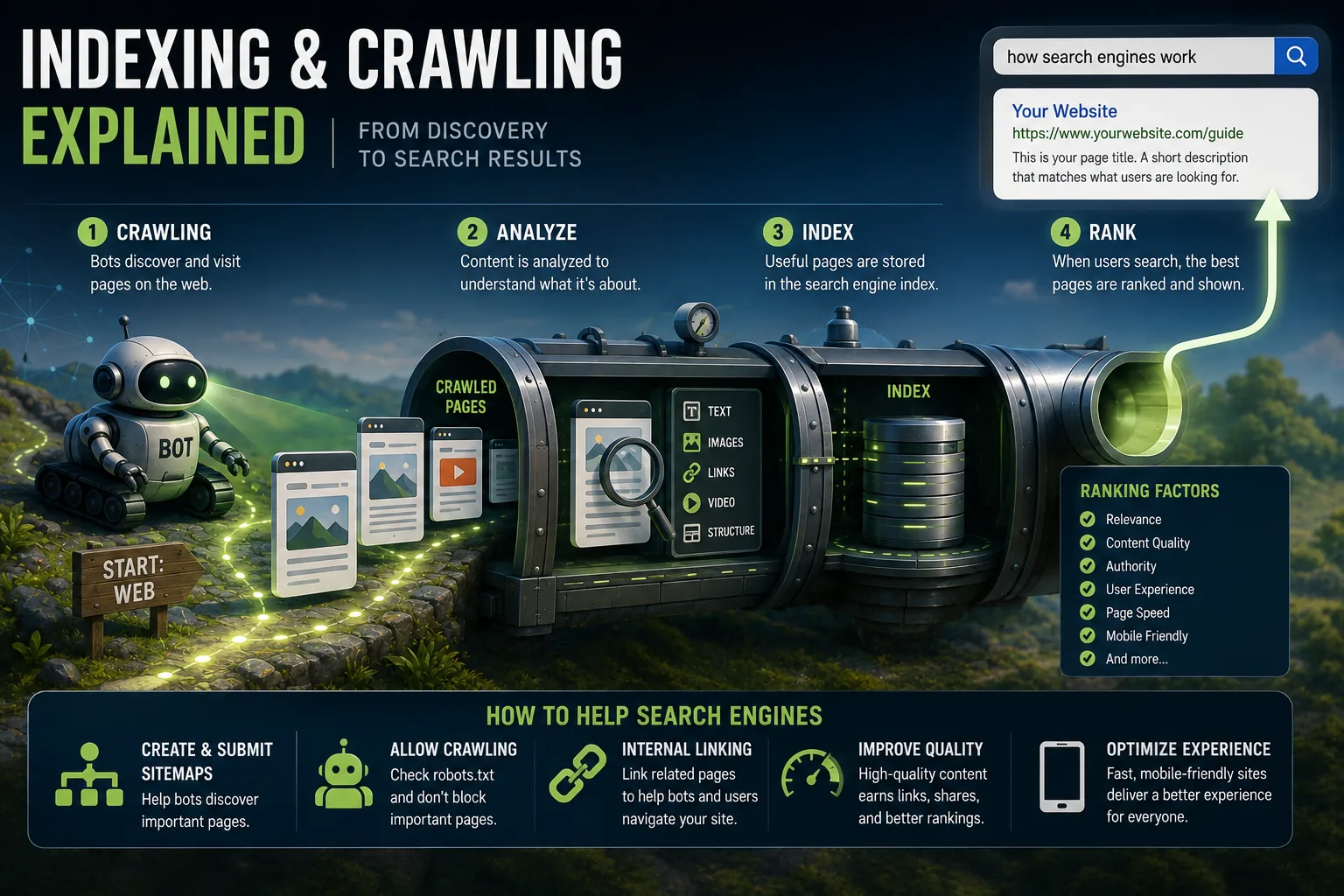
Crawling and indexing are separate search-engine processes: crawlers discover and download a page, while indexing assesses its content and decides whether it belongs in the search database. Pages can be absent because they are unreachable, blocked, erroring, thin, duplicate, canonically excluded, or simply less useful than alternatives. Diagnosis must distinguish these failures from the separate problem of poor rankings.
The largest obstacle most websites face in search is not competition from better content. It is simpler than that: the content exists, but search engines cannot find it, or having found it, have decided not to include it in their index.
This sounds like it should be an unusual edge case. It is not. Google's Search Console data, shared in aggregate at the 2023 Search Central Live conference, showed that among pages submitted via sitemaps for indexing, a substantial percentage are crawled but not indexed - meaning Google visited the page, analyzed it, and decided it did not meet the threshold for inclusion.
For websites with large content libraries, dynamic content, or e-commerce catalogs with faceted navigation, the proportion of content that exists but is not discoverable through search is frequently much higher than site owners realize.
Understanding why this happens, and what can be done about it, requires understanding how the two distinct processes - crawling and indexing - actually work, where each can fail, and what signals determine whether content progresses through the pipeline.
The Distinction Between Crawling and Indexing
These terms are sometimes used interchangeably, which obscures an important technical difference.
Crawling is the act of a search engine bot visiting a URL, downloading the page's content (HTML, images, scripts), and processing the links found within it. Crawling is discovery: it creates awareness that a URL exists and captures its content at a point in time. A crawled page is not necessarily accessible in search results.
Indexing is the subsequent process of analyzing the crawled content, extracting meaning, assessing quality, and - if the page meets the threshold for inclusion - storing a representation of it in the search engine's database. Only indexed pages can appear in search results.
The distinction matters because the failure modes are entirely different:
A page that is not crawled is typically inaccessible to the crawler: it may be blocked by robots.txt, may have no links pointing to it from anywhere the crawler can reach, may be on a server that returns errors, or may be on a domain that is too new or too low-authority to have been discovered yet.
A page that is crawled but not indexed is accessible to the crawler but has been assessed as not meeting the quality threshold for inclusion.
The most common reasons include thin or duplicate content, quality signals that fall below what the surrounding competitive landscape provides, explicit exclusion through meta tags, or canonical tags pointing to a different preferred URL.
A page that is indexed but not ranking is a different category of problem entirely - not a crawling or indexing issue but a relevance and authority issue. The page is in the index and eligible to appear, but the ranking algorithm evaluates it as less relevant or authoritative than competing pages for the queries it would serve.
Diagnosing which problem exists determines which solutions are appropriate. Spending time improving content quality to address an indexing problem when the actual issue is robots.txt blocking (a crawling problem) wastes effort and delays resolution.
| Problem Type | Symptom | Root Cause | Solution |
|---|---|---|---|
| Not crawled | Page absent from Search Console | No inbound links, robots.txt block | Add internal links, fix robots.txt |
| Crawled, not indexed | "Discovered but not indexed" in GSC | Low quality, thin content, duplicates | Improve content quality, merge thin pages |
| Indexed, not ranking | Rankings absent for target queries | Low authority, poor relevance | Build authority, improve content depth |
| Crawled with errors | 4xx/5xx in coverage report | Broken page, server issues | Fix server errors, redirect broken URLs |
| Duplicate content | Multiple URLs, one indexed | Parameter URLs, pagination, www vs non-www | Canonical tags, URL parameters in GSC |
"Among pages submitted via sitemaps for indexing, a substantial percentage are crawled but not indexed - meaning Google visited the page, analyzed it, and decided it did not meet the threshold for inclusion. This is often far more common than site owners realize." - Google Search Central Live 2023
How Crawling Works in Practice
The Link Graph as Infrastructure
The web's link structure is the primary map by which search engine crawlers navigate. Googlebot maintains a large queue of URLs to visit.[1] When it visits a URL, it downloads the page and extracts all the links within it. Those links are added to the queue.
Each link discovered leads to more pages, which contain more links, which lead to more pages.
This process, running continuously across distributed infrastructure at enormous scale, maps a significant portion of the accessible web.
The word "accessible" is important: pages that are not reachable through links from anywhere within Googlebot's reach - pages with no inbound links whatsoever, or pages whose only inbound links are from pages that are themselves blocked - are invisible to this process.
The practical implication: an "orphaned" page - one that exists in your CMS but has no internal links from any other published page on your site - will typically not be discovered through link-following.
The page may exist and may be technically accessible, but without a path to it from the broader link graph, it will not be found.
Internal link architecture is therefore directly consequential for discoverability. Every page on your site that you want indexed should be reachable through a chain of links beginning from your homepage or from pages that are well-linked.
How Crawl Scheduling Works
Googlebot does not visit every URL with equal frequency. The crawl scheduling system considers several factors:
Historical update frequency. If a page changes frequently - because it is a product page with fluctuating inventory, a news article being updated as a story develops, or a dynamic aggregate page - Googlebot will revisit it more frequently than a static page that has not changed in months.
Site authority. High-authority sites receive more frequent and more thorough crawling. The New York Times publishes hundreds of articles daily and has built significant domain authority over decades; its content is crawled essentially in real time. A recently launched personal blog might be crawled weekly or less.
Server responsiveness. Googlebot adjusts its crawl rate based on how your server responds. If your server is slow to respond or returns intermittent errors, Googlebot reduces its request rate to avoid causing problems.
This means server performance issues not only harm user experience and Core Web Vitals rankings - they directly limit how much of your site gets crawled.
Crawl demand signals. Pages that many other pages link to, pages close to the homepage in the site hierarchy, and pages that appear in sitemaps with recent modification dates are all signals of importance that increase crawl priority.
XML Sitemaps as Discovery Infrastructure
The sitemap protocol provides a mechanism for communicating your content inventory directly to search engines, bypassing the link-following discovery process.
An XML sitemap is a structured file listing your URLs, each optionally accompanied by its last modification date and (for image and video sitemaps) additional metadata about embedded media.
Submitting a sitemap through Google Search Console tells Google: here is a list of pages I want you to know about. This does not guarantee crawling or indexing - it guarantees awareness.[4] Google will still assess each URL according to its normal crawl prioritization and indexing quality criteria.
The value of sitemaps is highest for:
Large sites where the link-following process might not reach all pages in a reasonable timeframe. An e-commerce site with 200,000 product pages, even if all pages are internally linked, benefits from sitemaps to ensure systematic coverage.
New content where you want awareness quickly. A news article published today that you want appearing in search results within hours should be submitted through the URL Inspection tool or reflected immediately in a sitemap that Googlebot is monitoring.
Pages that are difficult to reach through navigation. Some pages are intentionally absent from navigation (they exist but are not linked in the main menu) or require deep navigation to reach. Sitemaps provide a direct path.
Robots.txt: The Access Control File
The robots.txt file, placed at the root of every domain (yoursite.com/robots.txt), provides instructions to web crawlers about which parts of the site they may and may not access. The file uses a simple directive syntax:
User-agent: Googlebot
Disallow: /admin/
Disallow: /staging/
Allow: /
This file tells Googlebot it may access all paths except /admin/ and /staging/. Robots.txt is the first thing well-behaved crawlers check before accessing any part of a site.[3]
Several important characteristics of robots.txt:
It is advisory, not enforced. Well-behaved crawlers like Googlebot and Bingbot respect it. Malicious bots and scrapers typically ignore it.
Blocking a URL from crawling via robots.txt does not make it invisible - it prevents Googlebot from reading its content, but if other pages link to it, Google will still know the URL exists and may show it in results as a link without content.
Robots.txt errors are catastrophic when they affect important content. A single misplaced wildcard or incorrect path can block thousands of pages from crawling.[8]
Always test robots.txt changes in Google Search Console's robots.txt tester before deploying, and monitor the Pages report for unexpected drops in indexed pages after deployment.
Common legitimate uses of robots.txt blocking: administrative interfaces, internal search result pages, development or staging sections that should not be indexed, and user-generated content that would be better indexed selectively.
How Indexing Works
The Processing Pipeline
When Googlebot has crawled a page, the indexing pipeline processes it through several stages:
Rendering is the first and increasingly important stage. Modern web pages are built with JavaScript that generates content dynamically after the initial HTML loads. Google's indexing systems can execute JavaScript, but rendering is resource-intensive and happens asynchronously from initial crawling.
The pipeline has two stages: a "crawled, awaiting indexing" state where the initial HTML is processed, and a subsequent rendering queue where JavaScript is executed.
Content that is only visible after JavaScript execution - common in React, Vue, and Angular applications - may not be indexed if the rendering queue does not reach the page, or if the JavaScript contains errors that prevent execution. Important content should be present in the initial server-rendered HTML.
Content extraction identifies the main body content of the page, separating it from navigation, footers, advertisements, and boilerplate. The systems use layout analysis to identify which content regions are the primary body versus supporting elements.
Language processing analyzes the text using natural language understanding models. The current systems identify not just keywords but entities (specific people, places, organizations, products), concepts, the relationships between entities, and the overall topic and subtopics of the page.
Quality assessment evaluates whether the page meets the threshold for inclusion in the index.
This assessment considers content depth, originality, expertise signals, accuracy signals where assessable, user experience factors including page speed and mobile-friendliness, and the competitive landscape of similar content already in the index.
Duplicate detection identifies whether the page is identical or substantially similar to content already in the index. When duplicates are detected, the system selects a canonical version to index and excludes the others.
Why Pages Are Not Indexed
Google Search Console's Pages report categorizes indexed and excluded URLs, with reasons for exclusion. The most common reasons for non-indexing and their implications:
"Crawled - currently not indexed" is the most frustrating status because the page is accessible and has been seen, but has been assessed as not meeting the threshold for inclusion.
The usual causes are thin content (insufficient depth or length for the topic), low content quality, or content that duplicates what is already well-represented in the index.
The resolution requires improving the content substantively: adding depth, adding unique value that is not already covered by better-indexed competitors, improving the expertise signals (author attribution, citations, specific examples), and building internal links that signal the page's importance within the site.
"Duplicate without user-selected canonical" means Google found essentially the same content accessible at multiple URLs, chose one URL as canonical, and excluded the others.
This commonly happens with URL parameters (product pages accessible at /product-name and /product-name?color=blue&size=medium), HTTP/HTTPS versions, www/non-www versions, and trailing slash variants.
The resolution is to implement canonical tags explicitly rather than letting Google choose, and to ensure redirects consolidate canonical URLs rather than leaving multiple versions accessible.
"Blocked by robots.txt" means the page is blocked from crawling. If this appears for pages you want indexed, your robots.txt configuration is incorrect.
"Excluded by noindex tag" means a <meta name="robots" content="noindex"> tag is present on the page. This is often intentional (thank-you pages, checkout steps, admin pages) but sometimes appears on pages where it was added accidentally through CMS settings, theme changes, or plugin behavior.
"Page with redirect" means the URL has a redirect and the destination URL is what would be indexed. Redirected URLs themselves are not indexed; only the destination is.
"Alternate page with proper canonical tag" means the page has a canonical tag pointing to a different URL. This is working correctly if intentional (you declared this page as a duplicate of another) and incorrect if the canonical tag was added erroneously.
Crawl Budget Management for Larger Sites
The Budget Concept
The term "crawl budget" describes the practical limit on how extensively Googlebot will crawl a given site in a given period. It is not a formally defined quota but an emergent result of the interaction between Googlebot's available resources and the signals about a site's importance and crawlability.
For most websites - those with fewer than several thousand pages, reasonable authority, and no major technical issues - crawl budget is not a practical constraint. Googlebot will find and crawl all important content within a normal schedule.
For large sites, crawl budget management becomes a meaningful technical concern.[2] The relevant situations:
Faceted navigation in e-commerce. A clothing retailer with products filterable by size, color, style, and brand may have millions of URL combinations created by filter parameters. Each URL is functionally equivalent to other filter combinations but appears as a distinct URL to crawlers.
Googlebot crawling millions of these URLs provides little value while consuming budget that could be spent on the 50,000 actual product pages.
URL parameter proliferation. Session IDs, tracking parameters, sorting and pagination parameters can create many URLs for the same content. ?sort=price_asc and ?sort=price_desc for the same product listing are distinct URLs representing nearly identical content.
Duplicate content from multiple access paths. Content accessible through multiple navigation paths (tag pages, category pages, search result pages, and the canonical product page) may create many URLs with overlapping content.
Managing Budget Effectively
The goal is ensuring that Googlebot's crawl allocation is spent on valuable, unique content rather than on low-value pages, duplicates, or errors.[10]
Robots.txt blocking for categories of URLs that provide no indexing value: parameter-generated URL variants that duplicate canonical pages, internal search result pages (search results from site search are typically not worth indexing), administrative and account management pages.
Canonical tags on all duplicate or near-duplicate pages to consolidate their value to the preferred version without blocking access.
Pagination handling with the appropriate approach for the site's content: infinite scroll that loads canonical URLs, or traditional pagination with self-referencing canonicals on each page.
Fix server errors aggressively. Every 5xx error response consumes a crawl request without providing any value. Persistent server errors on a significant portion of pages can degrade Googlebot's assessment of the site's crawlability and reduce the crawl rate.
Internal link hygiene. Links to 404 pages, redirect chains longer than two hops, and links to blocked URLs all create crawl waste. Audit internal links regularly and fix broken or inefficient link patterns.
Diagnosing Indexing and Crawling Problems
Google Search Console as Primary Diagnostic Tool
The Pages report (previously called the Coverage report) in Google Search Console is the essential starting point for any crawling or indexing investigation. It categorizes all discovered URLs by status: valid (indexed), error (could not be indexed), warning (indexed with issues), and excluded (not indexed, with reason).
The trends over time in this report are as important as the current state. A sudden drop in valid pages, a spike in a specific error type, or a large number of pages appearing in "Crawled - currently not indexed" that were not previously visible all signal changes requiring investigation.
The URL Inspection tool provides detailed information about any specific URL: whether Googlebot has crawled it, when it was last crawled, how Google rendered it (including a screenshot of the rendered page), whether it is indexed, and if not, the specific reason.
For investigating whether a specific page has indexing issues, this is the most precise tool available.
For a quick first look before diving into Search Console, a free indexability checker is a friendly way to instantly see whether a page is set up to be found, catching the common blockers at a glance.
Sitemaps report shows how many URLs from each submitted sitemap were discovered and how many are indexed. A large ratio of submitted URLs to indexed URLs - submitting 10,000 URLs but having only 3,000 indexed - is a signal that a significant portion of the content is failing the indexing quality threshold.
A Diagnostic Framework
When content is not appearing in search results, the diagnostic sequence:
First, confirm whether the page is indexed: search Google for site:yourdomain.com/the-specific-page. If the URL appears, it is indexed; the issue is a ranking or visibility problem, not an indexing problem. If it does not appear, proceed.
Second, use the URL Inspection tool to determine the page's crawl and index status.[5] The status message identifies which stage in the pipeline the page is failing and why.
Third, address the specific reason:
If blocked by robots.txt: identify the specific directive causing the block, remove or modify it, test in Search Console's robots.txt tester, deploy, then request indexing.
If "Crawled - currently not indexed": improve content depth and quality, build internal links to the page, and revisit after several weeks.
If "Duplicate without canonical": implement explicit canonical tags on all duplicate URL variants pointing to the preferred canonical URL.
If noindex tag: identify where the noindex is being added (page template, CMS setting, plugin), remove it, then request indexing.
After addressing any indexing issue, use the URL Inspection tool's "Request Indexing" button to trigger recrawling. Note that this submits the URL for Googlebot's consideration but does not guarantee immediate crawling - it adds the URL to the priority crawl queue.
Maintaining Ongoing Index Health
The Ongoing Nature of Index Management
Crawling and indexing are not states to be achieved once and maintained passively. They require ongoing attention because:
New content is published that needs to be discovered and indexed. Existing content changes in ways that may change its indexing status. Technical changes (theme updates, CMS upgrades, new plugins) can inadvertently introduce crawling blocks or noindex tags.
Site migrations change URL structures in ways that must be managed carefully. Server issues arise that degrade Googlebot's ability to crawl efficiently.
A regular monitoring cadence prevents small issues from compounding. The minimum useful cadence is checking the Search Console Pages report weekly for anomalies - sudden changes in the number of indexed pages, new error types appearing, or significant shifts in excluded page counts.
These anomalies warrant investigation rather than waiting for the next scheduled audit.
Site Migrations and URL Changes
The highest-risk moment for crawling and indexing health is a site migration: changing domain names, moving from HTTP to HTTPS, restructuring URL patterns, or significantly reorganizing site architecture.
During a migration, maintaining indexing requires that redirects are implemented for every URL that changes (using 301 redirects for permanent changes), that the new URL structure is internally linked correctly, that sitemaps are updated to reflect the new URLs, that Search Console has the new domain verified, and that any canonicals pointing to old URLs are updated.
Migrations that are handled carelessly - broken redirects, missing canonical updates, or new URLs that are not internally linked - can cause significant and lasting damage to search visibility as the index becomes stale while the site changes around it.
See also: How Search Engines Work, Technical SEO Explained, and Content Quality Signals Explained.
What Google's Documentation and Engineers Reveal About Crawling and Indexing
Google's public documentation and the statements of named engineers provide more precision about crawling and indexing mechanisms than most SEO commentary. Several specific sources are particularly valuable for understanding how the system actually operates.
Gary Illyes on Crawl Budget: Gary Illyes, a Webmaster Trends Analyst at Google who became the primary spokesperson for crawling-related topics, wrote a definitive blog post titled "What Crawl Budget Means for Googlebot" on the Google Search Central Blog in January 2017.
Illyes distinguished between "crawl rate limit" (how fast Googlebot crawls without overwhelming the server) and "crawl demand" (how much Google wants to crawl the site based on its perceived importance and freshness).
Illyes explicitly stated that "crawl budget is not something most publishers need to worry about" and that the sites where it matters are those with "very large sites (think 1 million+ pages)," sites with "mass URL parameters," or sites with "duplicate content issues." This clarification from the source is important because crawl budget is frequently over-applied as a concept by SEO practitioners advising small and medium sites where it is irrelevant.
John Mueller on "Crawled, Currently Not Indexed": Mueller addressed the "Crawled, currently not indexed" status in multiple Google Search Central office hours sessions between 2020 and 2023 (available on Google's YouTube channel).
Mueller's consistent explanation: this status indicates that Googlebot visited the page but Google's quality assessment determined the page did not meet the threshold for inclusion in the index.
Mueller clarified that this is not a crawl budget problem but a quality signal: "If we crawl a page and we decide not to index it, it's essentially because we think it's not unique enough or high quality enough relative to the other content in our index." Mueller further explained that having large numbers of pages in this status can signal to Google that the site overall has quality concerns, potentially affecting how the site's other content is evaluated.
Martin Splitt on JavaScript Indexing: Martin Splitt, a Developer Advocate at Google who focuses specifically on JavaScript SEO, provided the most technically precise public explanation of Google's JavaScript rendering pipeline in a 2019 web.dev blog post titled "JavaScript SEO Basics." Splitt described the two-stage processing: initial crawl of server-rendered HTML, followed by a rendering queue where JavaScript is executed.
Splitt noted that the rendering queue introduces a delay between when a page is first crawled and when JavaScript-rendered content is indexed - a delay that was "days to weeks" in 2019 but was reduced substantially following infrastructure investment.
Splitt's guidance on the practical implications remains authoritative: "If your page's content requires JavaScript to render, make sure that the rendered content is equivalent to the non-rendered version. If it's not, users and Googlebot will see different content."
The Crawl Stats Report Documentation: Google added the Crawl Stats report to Search Console in 2020, providing site owners with direct visibility into Googlebot's crawling activity for their domain.
The report shows average daily crawl requests, average response time, and the distribution of response codes - data that was previously accessible only through server logs.
Google's documentation for the Crawl Stats report includes specific guidance: a sudden drop in crawl rate without a corresponding content reduction is a signal worth investigating, as is an increase in the proportion of error responses.
The documentation explicitly states that slow server response times will cause Googlebot to automatically reduce its crawl rate to avoid overloading the server - confirming the mechanism by which server performance directly affects crawl coverage.
The Sitemaps Protocol and Google's Implementation: The Sitemaps Protocol was co-developed by Google, Yahoo, and Microsoft and published as an open standard in 2006.
Google's Search Central documentation for sitemaps includes specific implementation guidance that goes beyond the protocol specification: sitemaps should include only canonical URLs (not alternate URLs that will be marked as duplicates), should use accurate <lastmod> values (Google explicitly states that inaccurate lastmod values reduce its value as a prioritization signal), and should not include URLs blocked by robots.txt or marked with noindex tags.
This last point - that sitemaps should not include pages you have explicitly excluded from indexing - is frequently violated by CMS-generated sitemaps that do not filter for indexing status, creating signal confusion that can affect crawl prioritization.
Real-World Indexing and Crawling Case Studies
Documented histories of specific sites encountering and resolving crawling and indexing problems provide the clearest illustration of how these mechanisms operate in practice.
Expedia's Index Bloat and Recovery (Documented by Patrick Stox, Ahrefs): Patrick Stox, Head of Technical SEO at Ahrefs and previously a technical SEO consultant, published a case study (referenced in his technical SEO presentations) of a large travel site that had accumulated over 30 million indexed URLs, of which approximately 27 million were parameter-generated variants of hotel listing pages providing minimal unique value.[7]
The site's organic traffic had plateaued despite ongoing content investment.
After a systematic campaign to implement robots.txt blocks on parameter-generated URLs, consolidate canonical tags, and add noindex tags to paginated variants beyond the first page, the indexed page count dropped to approximately 5 million over six months.
Organic traffic to the remaining indexed pages grew 28% over the following six months, consistent with the hypothesis that index bloat was diluting the site's overall quality signals and reducing Googlebot's attention to high-value content.
The BBC's Mobile-First Migration: The BBC's digital team documented their migration to a mobile-first publishing architecture in a 2018 technical blog post.
The migration involved changing URL structures for thousands of news articles, implementing AMP (Accelerated Mobile Pages) versions, and consolidating mobile and desktop experiences under single canonical URLs.
The technical challenge was ensuring that 301 redirects were implemented for every URL change, that AMP canonical tags correctly pointed to desktop canonical URLs, and that Search Console's coverage report was monitored for unexpected drops in indexed content.
The BBC reported that despite the scope of the migration (affecting millions of URLs), careful implementation of redirects and canonicals resulted in no measurable loss of organic search visibility during the transition period.
The BBC case is frequently cited as evidence that large-scale URL changes, handled correctly with comprehensive redirect implementation and monitoring, can preserve accumulated indexing value.
Shopify's Handling of Faceted Navigation at Scale: Shopify, whose platform hosts over 1.7 million merchants, documented their approach to faceted navigation indexing in a 2022 merchant resources blog post.
Shopify's recommended approach for product collection pages with filters (color, size, price range) is to use JavaScript-based filtering that does not change the URL - meaning filters are applied client-side without creating new URLs that Googlebot would crawl.
This approach eliminates the faceted navigation indexing problem entirely by ensuring that only the unfiltered collection page is indexed, while users can still use filters interactively.
For merchants who do want faceted navigation URLs indexed (because certain filter combinations have meaningful search volume), Shopify provides canonical tag controls to designate which filtered variants should be indexed.
The documentation reflects a practical resolution of the faceted navigation indexing problem that affects virtually all e-commerce platforms.
How Ahrefs Discovered Millions of Orphaned Pages: Ahrefs' engineering team documented in a 2021 blog post how they built their web crawler and what their crawl data reveals about the structure of the indexed web.
Their analysis found that approximately 26% of pages in their index had no inbound internal links from other pages on the same domain - making them "orphaned" in the sense that link-following alone would not discover them.
These orphaned pages were discoverable only through sitemaps or external links.
Ahrefs found that orphaned pages consistently had lower estimated organic traffic than equivalent pages that were linked internally, and that the gap was widest for pages that were also orphaned from external links (i.e., no internal or external links).
The finding directly supports the SEO practice of conducting internal link audits to identify and connect orphaned content - not just because links pass authority but because link connectivity is a prerequisite for reliable discoverability.
Key Metrics for Diagnosing Crawling and Indexing Health
The metrics that provide actionable diagnostic information about crawling and indexing are distinct from the content quality metrics used to measure SEO performance. Each metric reveals a different layer of the crawling and indexing pipeline.
Indexed-to-Submitted Ratio (Google Search Console Sitemaps Report): Comparing the count of URLs submitted in sitemaps to the count that are indexed provides a direct measure of indexing efficiency. Submitting 10,000 URLs and having 4,000 indexed (a 40% ratio) indicates systemic quality or technical issues preventing indexing.
For reference, Ahrefs' analysis of their crawl data suggests that healthy content sites with established authority typically index 75-90% of submitted sitemap URLs.
E-commerce sites with significant product catalog complexity typically index 50-70%. Below 40% warrants investigation of content quality (thin or duplicate pages), technical accessibility (robots.txt or noindex issues), or site authority (new domain without sufficient external signals).
Crawl Rate Trend (Search Console Crawl Stats Report): A declining crawl rate without a corresponding reduction in content volume is a potential quality signal. Googlebot's crawl frequency for a domain is partly a function of how valuable it perceives the site to be.
Sustained declines in crawl rate over multiple months, absent clear technical causes like server slowness, may indicate that Google's quality assessment of the site has declined.
The benchmark is not an absolute crawl rate (which varies enormously by site size and authority) but the trend: stable or growing crawl rates indicate stable or improving quality assessment.
Error Response Distribution (Crawl Stats Report): The Crawl Stats report shows the distribution of HTTP response codes Googlebot received. The useful benchmark: for a well-maintained site, less than 1% of responses should be error codes (4xx or 5xx).
Error rates above 5% consistently waste crawl budget on requests that return no value.
Specific 5xx error responses are particularly consequential because Googlebot reduces its crawl rate for sites where server errors are frequent, creating a compounding problem where increased server errors lead to reduced crawl frequency which reduces index freshness.
Internal Orphan Detection Rate (Crawl Tool Audit): Regular audits using crawl tools like Screaming Frog or Sitebulb identify pages that are indexable but not reachable through internal links from other crawled pages.[6]
These "internal orphans" may still be discovered through sitemaps but receive no internal authority through link-following.[9]
The target: zero indexable orphaned pages for content you want to rank. For large sites that have accumulated content over years, it is common to discover that 10-20% of indexed content is internally orphaned - representing accumulated link architecture debt that can be addressed through systematic internal link auditing.
Time from Publication to First Crawl: Using Search Console's URL Inspection tool for newly published content, or analyzing the Sitemaps report's crawl frequency, measures how quickly Googlebot discovers and crawls new content.
For established sites with strong authority, new content should be crawled within hours to days of publication.
For sites where new content takes weeks to be discovered, submitting URLs immediately after publication through Search Console's URL Inspection tool ("Request Indexing") or ensuring sitemaps are dynamically updated can accelerate discovery.
Persistent delays in new content discovery, despite correct sitemap implementation, suggest that the site's crawl priority is lower than desired - which typically reflects low site authority or historical quality signals that reduce Googlebot's estimated value of crawling the domain frequently.
Sources & Further Reading
- Google Search Central. "How Google Search Works: Crawling, Indexing, and Serving." developers.google.com. View source
- Google Search Central. "Manage Your Crawl Budget." developers.google.com. View source
- Google Search Central. "Robots.txt Specifications." developers.google.com. View source
- Google Search Central. "Sitemaps Overview." developers.google.com. View source
- Google Search Central. "URL Inspection Tool." support.google.com.
- Screaming Frog. "SEO Spider Tool: Website Crawler." screamingfrog.co.uk. View source
- Ahrefs. "Crawl Budget: What It Is and How to Optimize It." ahrefs.com. View source
- Moz. "Robots.txt Best Practices for Modern Websites." moz.com. View source
- Sitebulb. "Crawl Issues Explained: How to Find and Fix Technical SEO Problems." sitebulb.com. View source
- Search Engine Journal. "A Beginner's Guide to Crawl Budget and SEO." searchenginejournal.com. View source