
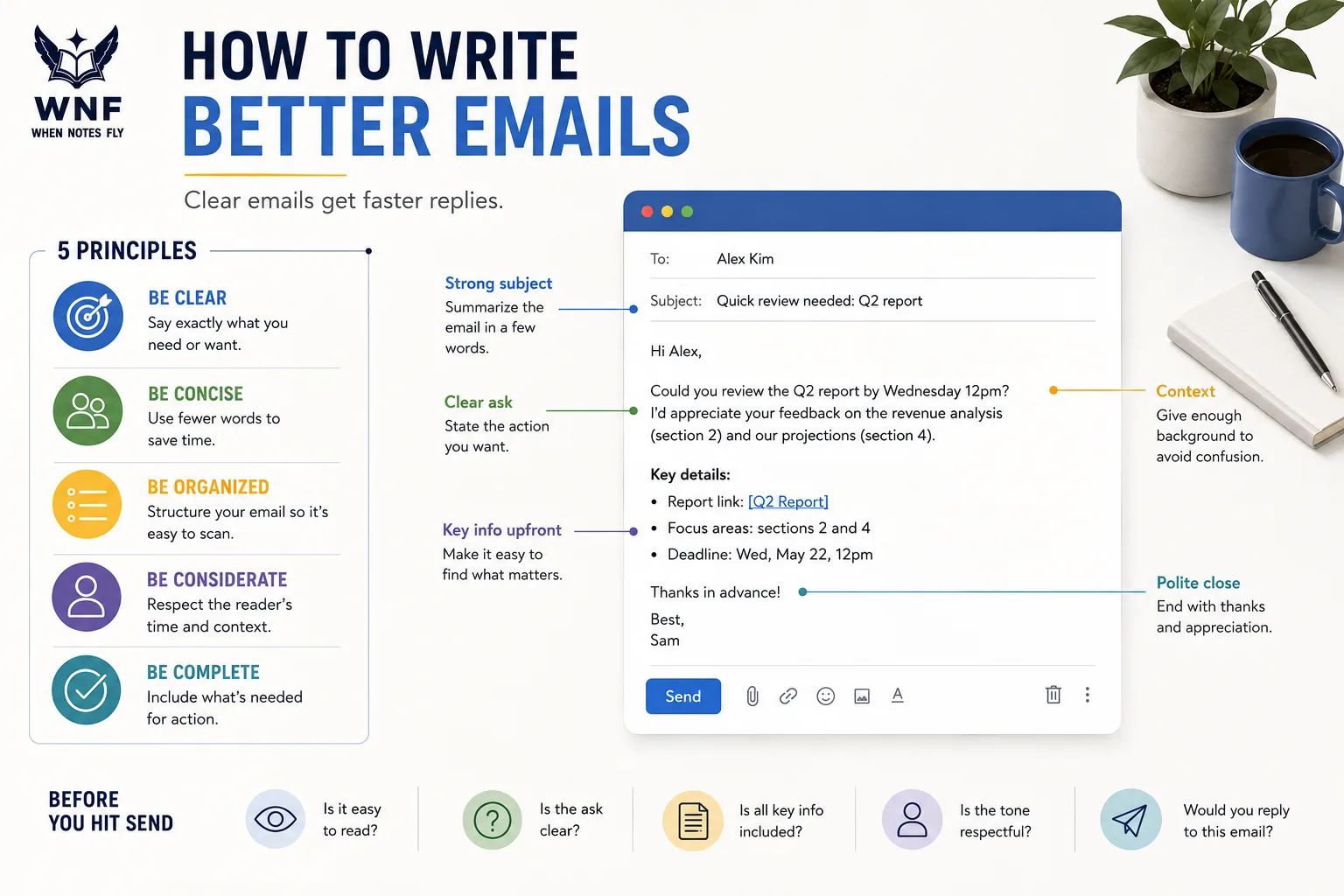
Email is the most universal professional communication tool and one of the most misused. The average knowledge worker receives over 120 emails per day and spends roughly 28% of their workweek reading and responding to them, according to McKinsey research.
Most of these emails are longer than necessary, unclear about what they want, and structured in ways that make it easy to defer or ignore.
Writing emails that actually get responses is a learnable skill, and one with measurable research behind it. This article covers what the data says about subject lines, message length, structure, cold outreach, and workplace email etiquette, along with practical techniques you can apply immediately.
Why Most Emails Fail to Get Responses
Before getting to tactics, it helps to understand the failure modes. Most unanswered emails fail for one of these reasons:
Unclear ask. The email describes a situation, shares context, maybe asks a question, but the recipient is not sure whether they are expected to reply, what specifically is being asked, or how urgent it is. When the required action is unclear, the easiest response is to defer.
Too long. A long email signals to the reader that understanding and responding will require significant effort. In a crowded inbox, long emails are the ones most likely to be flagged for "when I have time", which often means never.
Wrong framing. The email is written from the sender's perspective ("I need...") rather than the recipient's ("You can help by..."). Emails that explain the benefit to the reader, not just the need of the writer, get higher response rates.
Poor subject line. A vague or misleading subject line either fails to signal urgency to busy recipients or trains them not to open your messages.
Wrong medium. Some communications are better handled in a meeting, a Slack message, or a phone call. Choosing email for discussions that require real-time back-and-forth, or for sensitive interpersonal matters, creates unnecessary friction.
The Hidden Cost of Unclear Email
The cost of poor email communication extends far beyond frustrating individual exchanges.
Research published in the journal Academy of Management Review (Byron, 2008) found that email misinterpretation is far more common than senders anticipate: senders overestimate how clearly their tone and intent are understood by a significant margin.
In a study by Kruger, Epley, Parker, and Ng (2005) published in the Journal of Personality and Social Psychology, participants believed recipients would correctly interpret their email tone 78% of the time. The actual accuracy rate was closer to 56%.
This interpretation gap has real organizational consequences. A study commissioned by the software firm Mimecast in 2019 found that employees in large companies (over 1,000 people) spend an average of 3.1 hours per day on email, with a substantial portion of that time spent clarifying misunderstandings created by prior emails.
The McKinsey Global Institute (2012) estimated that if companies could use social technologies to improve communications and collaboration, they could raise the productivity of knowledge workers by 20 to 25 percent, a finding that underlines just how much inefficiency stems from poor written communication.
What the Research Says About Email Length
One of the most cited pieces of email research comes from Boomerang, an email productivity company that analyzed over 40 million emails to identify patterns associated with higher response rates.
Their findings on length:
| Word Count | Response Rate |
|---|---|
| 1-25 words | ~35% |
| 25-50 words | ~39% |
| 50-125 words | ~51% |
| 125-250 words | ~45% |
| 250-500 words | ~39% |
| 500-2,000 words | ~38% |
| 2,000+ words | ~36% |
The peak is in the 50-125 word range, long enough to provide necessary context and a clear ask, short enough to read in 30-60 seconds. After 125 words, response rates decline consistently with length.
This does not mean every professional email should be under 125 words. Detailed proposals, technical specifications, and project briefs require more. But the research highlights the default assumption of most email writers: that more context and more detail produces better responses. The data suggests the opposite.
The practical rule: write your email, then cut it by 30%. Most drafts can lose a third of their words without losing any meaning.
Why Length and Cognitive Load Are Linked
The relationship between email length and response rates reflects a well-documented principle in cognitive psychology: cognitive load theory, developed by John Sweller (1988) and refined through decades of subsequent research.
When the effort required to process information is high, people are more likely to defer, avoid, or reject the task.
A long email is not just inconvenient: it creates measurable cognitive friction that actively reduces the probability of a response.
This is compounded by what behavioral economists call present bias: the tendency to favor immediate, low-effort tasks over future, higher-effort ones. A 400-word email requiring careful reading and a thoughtful response is easily displaced by a 50-word email requiring a one-sentence answer, even if the longer email is more important.
Understanding this bias is not just useful for writing emails; it is the foundation for structuring any workplace communication that requires action.
Subject Lines: The Most Important Sentence You Write
The subject line determines whether your email is opened at all. A strong subject line is honest, specific, and calibrated to the reader's likely scan context.
Research from Return Path (analysis of 2 billion emails) found that subject line length correlated with open rates, with shorter lines performing better on mobile and moderate-length lines performing better on desktop. The practical recommendation is 41-50 characters, which displays completely on most mobile screen views.
More important than length is specificity:
- "Quick question" → "Question about the Q3 pricing proposal"
- "Following up" → "Following up on the vendor contract, need decision by Friday"
- "Checking in" → "Checking in on the Berlin office rollout: two items to resolve"
Specific subject lines serve two functions: they give the recipient immediate context (enabling triage), and they signal respect for the recipient's time by showing you have done the work of summarizing.
Open Rate Research: What the Data Shows
The email marketing platform Campaign Monitor publishes annual benchmarks drawing on billions of email sends across industries. Their research consistently shows average open rates between 17 and 28 percent across business categories, meaning the majority of emails are never opened at all.
The subject line is the single most influential factor in open rate, accounting for more variance than sender name, send time, or email length.
A study by researchers at Carnegie Mellon University (Dabbish et al., 2005) examined how people triage their inboxes and found that subject line, sender identity, and first visible line of text are the three signals used in most triage decisions, in that order.
The implication is that if you lose a reader at the subject line, the quality of the email content is irrelevant.
Data from HubSpot's State of Marketing Report (2023) found that personalized subject lines (those containing the recipient's name or a reference specific to them) generate open rates 26% higher than generic subject lines.
This confirms what common sense suggests: people respond to signals that they specifically are being addressed, not that they are one of many recipients of a broadcast message.
What to Avoid
Urgency theater: Subject lines like "URGENT" or "Important!!" that are not actually urgent train recipients to ignore those signals. Save urgency markers for actual emergencies.
Mystery or clickbait: "You'll want to see this" and similar constructions may improve open rates for a cycle but damage long-term trust and response rates.
Requests framed as topics: "Project update" is a topic. "Project update: three decisions needed before Thursday" is a subject line with an implicit ask.
The Structure of a High-Response Email
The most effective professional emails follow a simple structure: context, ask, close. This can be applied to almost any business email in under 100 words.
Context (1-2 sentences): Enough background for the recipient to understand the situation without having to look anything up.
Ask (1-2 sentences): Exactly what you need, stated specifically and explicitly. Use clear action verbs: "Please review and send me your comments," not "Let me know your thoughts."
Close (1 sentence): Deadline or response expectation, if relevant. If not, a simple courtesy close.
Example:
Hi Sarah,
We're finalizing the vendor contract and need sign-off from Finance before we can proceed. Could you review the attached summary and let me know if you approve the payment terms by Thursday afternoon?
Thank you, James
That is 46 words. It includes context (why this is happening), a specific ask (review the summary and approve payment terms), and a deadline (Thursday afternoon). It respects the reader's time and makes the response easy.
The Boomerang Research on Questions and Asks
Boomerang's dataset analysis found that the number of questions in an email significantly predicts response rates, but not in the way most people expect.
Emails with one to three questions had meaningfully higher response rates than emails with no questions (which often leave the recipient unsure what to do) or emails with more than three questions (which require the recipient to track and answer multiple points, increasing friction and creating choice overload).
The research also found a correlation between reading level and response rates. Emails written at a third-grade reading level received response rates 36% higher than emails written at a college reading level. This is not about condescending to recipients, it is about removing processing friction.
The simplest language that accurately conveys the message is the highest-performing language.
A related finding: positive, but not excessively enthusiastic, language correlates with higher response rates.
Emails that use mildly positive framing ("I appreciate your help") without performative positivity ("I'm so incredibly excited to be reaching out!") outperform both neutral-flat and over-enthusiastic emails.
The Hemingway Principle
Ernest Hemingway developed a prose style built on economy: short sentences, active voice, concrete and specific language, no word that does not carry meaning. The style was partly aesthetic choice and partly a discipline he developed as a wire journalist, where column inches were expensive and editors were unforgiving.
Applied to email, the Hemingway principle means ruthlessly eliminating:
Throat-clearing: "I hope this email finds you well" and "I wanted to reach out to..." add no information. "Hi Michael," followed by the first substantive sentence is better.
Passive voice: "It has been decided that the project will be extended" → "We extended the project deadline." Active voice is shorter, clearer, and assigns accountability.
Corporate jargon and nominalization: "Please leverage your strategic partnerships to facilitate an alignment discussion" → "Please ask your contacts to set up a meeting." Nominalization (turning verbs into nouns: "facilitate an alignment" instead of "align") adds words and removes clarity.
Hedging excess: Some hedging is appropriate ("if possible," "when you have a moment"). Excessive hedging ("I was just wondering if maybe you might possibly have a chance to...") signals lack of confidence and makes the ask harder to see.
A useful test: read your email aloud. Any sentence that sounds unnatural when spoken is probably too dense or jargon-heavy. Plain spoken prose is faster to read and easier to respond to.
The Science Behind Plain Language in Email
The cognitive science of plain language writing has been studied extensively in legal and government communication contexts, with findings that transfer directly to professional email.
A landmark study by the Plain Language Association INternational found that rewriting government documents in plain language reduced reader error rates by an average of 70%.
While this research applied to instructional documents, the underlying mechanism (reduced cognitive load produces better comprehension and correct action) applies equally to email communication.
The Gunning Fog Index, developed by Robert Gunning in 1952, is another readability measure widely used in professional communication research. It calculates the years of formal education required to understand a given text on first reading.
Business communication experts generally recommend a Fog Index of 10-12 for professional email, roughly equivalent to a high school reading level, not because the recipient is less educated, but because clearer writing at all levels produces faster, more accurate comprehension.
Cold Email: What Actually Works
Cold email (unsolicited email to someone with whom you have no prior relationship) is widely used for sales outreach, job searching, research inquiries, and collaboration requests.
The response rates are sobering: industry data from various email analytics platforms suggests average cold email response rates of 1-10%, with the median closer to 3-5%.
However, well-crafted cold emails significantly outperform the average. Research from Yesware and Woodpecker analyzing millions of cold outreach campaigns identifies the consistent differentiators:
Genuine personalization over generic flattery. "I loved your article" is a cold email cliche and instantly signals templating.
"Your article on the energy transition in Germany changed how I'm thinking about our portfolio, I wanted to ask one specific question about your data sources" is specific, credible, and invites engagement.
Short and single-purpose. Cold emails that attempt to accomplish multiple things accomplish none. One ask per email.
The ask must be easy to say yes to. "Can I pick your brain?" is high-effort for the recipient. "Would you be willing to answer one specific question by email?" is low-effort. "Would you have 20 minutes for a call sometime in the next two weeks?" is moderate-effort but time-bounded.
Explain what's in it for them, not just for you. Most cold emails describe the sender's need at length. Recipients respond to their own interests, not yours.
Follow up once. Research consistently finds that a single follow-up after 3-5 days dramatically increases response rates: some studies show it roughly doubles them. Two or more follow-ups produce diminishing returns and increasing annoyance.
Industry Benchmarks for Cold Outreach
A 2023 analysis by Woodpecker covering over 34 million cold emails found clear patterns in what separates high-performing from low-performing campaigns:
| Factor | Low Performers | High Performers |
|---|---|---|
| Email length | 300+ words | 75-125 words |
| Personalization | Generic | Specific reference to recipient's work |
| Number of asks | Multiple | One |
| Subject line type | Vague | Specific, benefit-oriented |
| Follow-up sequence | None or many | 1-2 well-timed follow-ups |
| Average response rate | 1-3% | 15-27% |
The gap between low and high performers is not explained by industry or audience, it is explained almost entirely by writing quality and structural choices. The same prospect, receiving a poorly written versus a well-written cold email, responds at dramatically different rates.
Research by Adam Grant, organizational psychologist at the Wharton School of Business, published in his 2013 book Give and Take, found that what he calls "five-minute favors" (small, low-effort requests that are easy to fulfill) are disproportionately more likely to receive a response than larger, higher-effort requests.
The principle applies directly to cold email ask design: make your first request the smallest possible request that serves your actual goal.
Tone, Sentiment, and Emotional Register
Reading Tone Across the Medium
One of the persistent challenges of email as a medium is the absence of paralinguistic cues: the vocal tone, facial expressions, and body language that carry roughly 93% of emotional meaning in face-to-face communication, according to research by Mehrabian (1971).
This creates a systematic gap between intended and perceived tone that most email writers underestimate.
Byron's research (2008) in the Academy of Management Review documented a robust phenomenon she called email ambiguity: negative emotions are reliably over-attributed in email, while positive emotions are reliably under-perceived.
When a message could be read as either neutral or mildly negative, recipients default to the negative interpretation. This means writers need to explicitly signal positive or neutral intent, not assume it will be inferred.
Practical implications:
- When delivering critical feedback by email, acknowledge complexity and invite dialogue: "I want to share some concerns about the proposal and hear your thinking before we finalize."
- When sending a direct request, frame it as collaborative rather than directive: "Could you help with..." rather than "I need you to..."
- When responding briefly in a way that might read as curt, add a brief affirmative to signal tone: "Got it, thanks for flagging" instead of "Noted."
When Positive Framing Goes Wrong
There is an opposite failure mode that email writers, particularly in North American corporate culture, fall into: performative positivity that is so effusive it reads as hollow or sycophantic.
"I'm so excited to connect with you today and can't wait to dive into this amazing opportunity!" is worse than a neutral greeting because it signals a lack of genuineness.
The optimal register for most professional email is warm and direct: friendly but not gushing, respectful but not deferential, specific but not blunt. This register is achievable by default simply by writing how you would actually speak to the recipient in a professional but collegial meeting.
CC, BCC, and Reply All: The Etiquette That Matters
Email CC practices create more workplace friction than almost any other email behavior.
When to CC
CC should be reserved for people who genuinely need to be informed of the exchange and for whom the information is relevant to their work. Before CC-ing anyone, ask: "Would they be annoyed if they received this?" and "Do they actually need to know this?"
The most common CC abuse is protective CC-ing: copying a manager on an exchange to create a record of compliance or pressure the recipient to respond. This behavior is transparent, slightly coercive, and trains the manager's inbox to be filled with noise.
When to BCC
BCC is appropriate in two main situations: when emailing large external groups where recipients should not see each other's addresses (e.g., an event invitation or newsletter), and when you want to silently inform a colleague of a sensitive exchange without making that visibility known to the primary recipient.
BCC should not be used to secretly involve someone in a conversation and then have them respond visibly, this reveals the BCC and creates awkwardness and trust issues.
Reply All
The reply-all problem is one of the most universally despised email behaviors. Before hitting reply all, ask: does every person on this thread genuinely need to see my response? If you are acknowledging receipt, saying "thanks," or providing information relevant only to the original sender, reply to the sender only.
In large organizations, a single "Reply All: Got it, thanks!" to a 200-person distribution list triggers dozens of additional "Stop replying all!" messages from people who did not read the email carefully enough to avoid doing exactly what they are complaining about.
The Organizational Cost of CC Culture
A 2018 study by Harvard Business School researchers (Perlow et al.) examining email behavior in large professional service firms found that excessive CC-ing creates what they called "always on" work cultures: environments where employees feel constant pressure to monitor their inboxes because important information may arrive at any time, mixed indiscriminately with noise.
The result is a state of continuous partial attention that reduces deep work capacity across the organization.
The same study found that organizations that explicitly negotiated norms around email (who should be CC'd, expected response times, after-hours communication expectations) reported significantly lower burnout rates and higher work satisfaction than those that left email norms implicit and unmanaged.
Email vs Asynchronous Messaging: Choosing the Right Tool
Email was designed for asynchronous, relatively formal communication. The rise of Slack, Teams, and other messaging platforms has not replaced email but has created a decision point that many professionals do not consciously make.
A useful rough framework:
| Situation | Better Tool |
|---|---|
| Formal external communication | |
| Multi-party decision with documentation needs | |
| Quick question within your team | Slack/Teams |
| Discussion that needs back-and-forth | Slack/Teams or meeting |
| Sensitive feedback or difficult conversation | Face-to-face or video call |
| Documenting a decision for the record | Email (or project management tool) |
| Sharing a file for comment | Collaborative document (Google Docs, etc.) |
Using email for conversations that require rapid back-and-forth creates an exhausting sequence of single-sentence emails. Using Slack for formal external communications creates a perception of informality that may not fit the context. The tool choice signals intent and should be made deliberately.
Research on Communication Medium Choice
Media richness theory, developed by Daft and Lengel (1986) and updated in subsequent decades, provides a theoretical framework for matching communication medium to task type.
The theory holds that media vary in their richness: defined as the capacity to convey multiple cues simultaneously (verbal, nonverbal, immediacy) and to provide rapid feedback.
Higher-richness media (face-to-face communication, video calls) are better for ambiguous, complex, or emotionally sensitive communications.
Lower-richness media (email, written memos) are better for straightforward, information-dense communications where documentation is valuable.
The failure mode that media richness theory predicts, and that organizations regularly enact, is using low-richness media (email) for high-ambiguity tasks (resolving conflict, delivering sensitive feedback, handling complex negotiations).
The result is communication that goes badly not because of the content but because the medium cannot carry the cues needed to resolve the ambiguity.
"The most underappreciated business skill is knowing which conversation belongs in which medium. Choosing badly is not just inefficient, it's the primary cause of misunderstanding in professional relationships.", Dacher Keltner, social psychologist, UC Berkeley
Reading and Managing Your Own Inbox
Better email writing is only half the equation. The most effective email communicators also manage their inbox in ways that reduce the volume of incoming noise.
Unsubscribe ruthlessly. The goal of newsletters and marketing emails is to occupy your attention. Unsubscribing from anything you have not read in the past month reduces ongoing cognitive load.
Batch email processing. Constant inbox monitoring fragments attention. Processing email in two or three batches per day, rather than responding to notifications immediately, preserves deep work time and reduces the pressure to respond instantly that encourages rushed, unclear messages.
Use email for things that need to be findable later. Email's searchability is an asset. Important decisions, agreements, and commitments that may need to be referenced later belong in email, even if the discussion happened in another channel.
Write shorter emails to receive shorter emails. Email length is socially contagious. If you write 200-word responses to 50-word emails, your correspondents gradually match your length, creating upward length inflation. Writing shorter responses models a norm that reduces volume over time.
The Inbox Zero Movement and Its Critiques
Merlin Mann popularized the concept of Inbox Zero in 2007, arguing that an empty inbox (achieved through systematic processing, deletion, archiving, and action) produces a clearer mind and better-organized work. The concept attracted both ardent followers and substantial criticism.
The critique from productivity researchers is nuanced. Cal Newport, author of Deep Work (2016) and a computer science professor at Georgetown, argues that the goal of Inbox Zero misses the deeper problem: it focuses on managing incoming email efficiently rather than questioning whether the email-intensive work culture itself is the problem.
Newport's research on the habits of high-performing knowledge workers found that the most productive people he studied were not necessarily fast email responders, they were people who had negotiated, explicitly or implicitly, a work culture with lower real-time communication expectations.
The tension between these perspectives is productive. Inbox Zero provides a useful tactical framework for managing an inbox that already exists.
Newport's critique asks the more fundamental question: what would professional communication look like if it were designed for deep work rather than for immediate responsiveness? The answer to that question requires organizational rather than just individual change.
Response Time Expectations: Setting and Managing Them
One of the least discussed but most consequential aspects of email communication is response time expectation management.
The assumption that professional emails require same-day or same-hour responses is both widespread and largely arbitrary, a norm that emerged from the early days of email when novelty made rapid response feel courteous, and that has since calcified into an unwritten rule that fragments attention across the entire knowledge workforce.
Research by Kostadin Kushlev and Elizabeth Dunn (2015) published in Computers in Human Behavior found that participants randomly assigned to check their email less frequently reported lower stress and higher focus, with no significant negative effects on their work performance or relationships.
The experiment contradicts the anxiety many people feel about not monitoring their inbox in real time.
Organizations that have experimented with explicit email response time policies (the consulting firm Atos famously attempted to eliminate internal email entirely in 2011, while others have implemented "email-free Fridays" or designated response windows) report mixed but generally positive results on focus and satisfaction, with the most important variable being whether the policy was supported by leadership and accompanied by alternative communication channels.
Advanced Strategies for High-Stakes Email
Writing for Multiple Readers
Many professional emails have a primary recipient but may be forwarded to, read by, or referenced by multiple others. Proposals, project updates, and formal requests routinely reach audiences the original sender did not anticipate. Writing for the likely full audience, not just the direct recipient, means:
- Providing enough context that someone without the backstory can follow the argument
- Avoiding in-group references that assume shared context
- Writing in a way that represents you well if quoted or forwarded out of its original context
This is not paranoia: it is the professional habit of treating every email as a semi-public document. The rule of thumb: never write anything in an email that you would be embarrassed to have read aloud at a staff meeting.
The Confirmation Email
One of the most valuable and underused email forms is the post-conversation confirmation email. After a meeting, phone call, or verbal agreement, a brief email summarizing what was decided and who is responsible for what serves several functions:
- It creates a written record that protects all parties if memories diverge
- It catches misunderstandings while they are still easy to correct
- It signals professional discipline and follow-through
- It provides a reference point for future follow-up
The structure is simple: "Following our conversation today, I understand that [summary of decisions and action items]. Please let me know if I've missed anything or if you understand any of this differently." This email is almost always under 100 words and almost always worth writing.
Escalation Emails
When an issue has been unresolved through normal channels and needs to be escalated (to a manager, a senior stakeholder, or an external party), the escalation email has specific structural requirements:
- State the history concisely: What was attempted, when, and what the result was
- State the impact: What is at stake if this is not resolved
- Make a specific request: Who should do what, by when
- Avoid blame language: Escalation is about solving a problem, not assigning fault in email
Escalation emails that are perceived as complaints or attacks create defensiveness and resistance. Escalation emails that are perceived as problem-solving requests, focused on outcomes rather than attribution, generate cooperation.
Summary
Writing emails that get responses requires treating writing as communication engineering, not just composition.
The research is clear on several points: 50-125 word emails have the highest response rates; specific, honest subject lines significantly outperform vague ones; the single most important element of any email is the explicit, easy-to-respond-to ask; and cold outreach performs best when it is short, genuinely personalized, and limited to a single request.
The Hemingway principle, remove every word that does not carry meaning, is the best single heuristic for improving email quality.
Combined with deliberate tool selection (email vs chat vs meeting), thoughtful CC practices, and batched inbox processing, it produces a communication style that respects others' time, gets answers, and builds a reputation for clarity.
Understanding the cognitive science behind email (the role of cognitive load, present bias, tone ambiguity, and media richness) transforms email writing from a matter of personal style into a discipline with empirically grounded best practices.
The gap between a mediocre email and an excellent one is not talent or creativity; it is knowledge of what works and the discipline to apply it.
The professionals who receive the fastest responses tend not to be the ones who write the most eloquent emails. They are the ones who make responding easy. And making responding easy is not a courtesy, it is a craft.