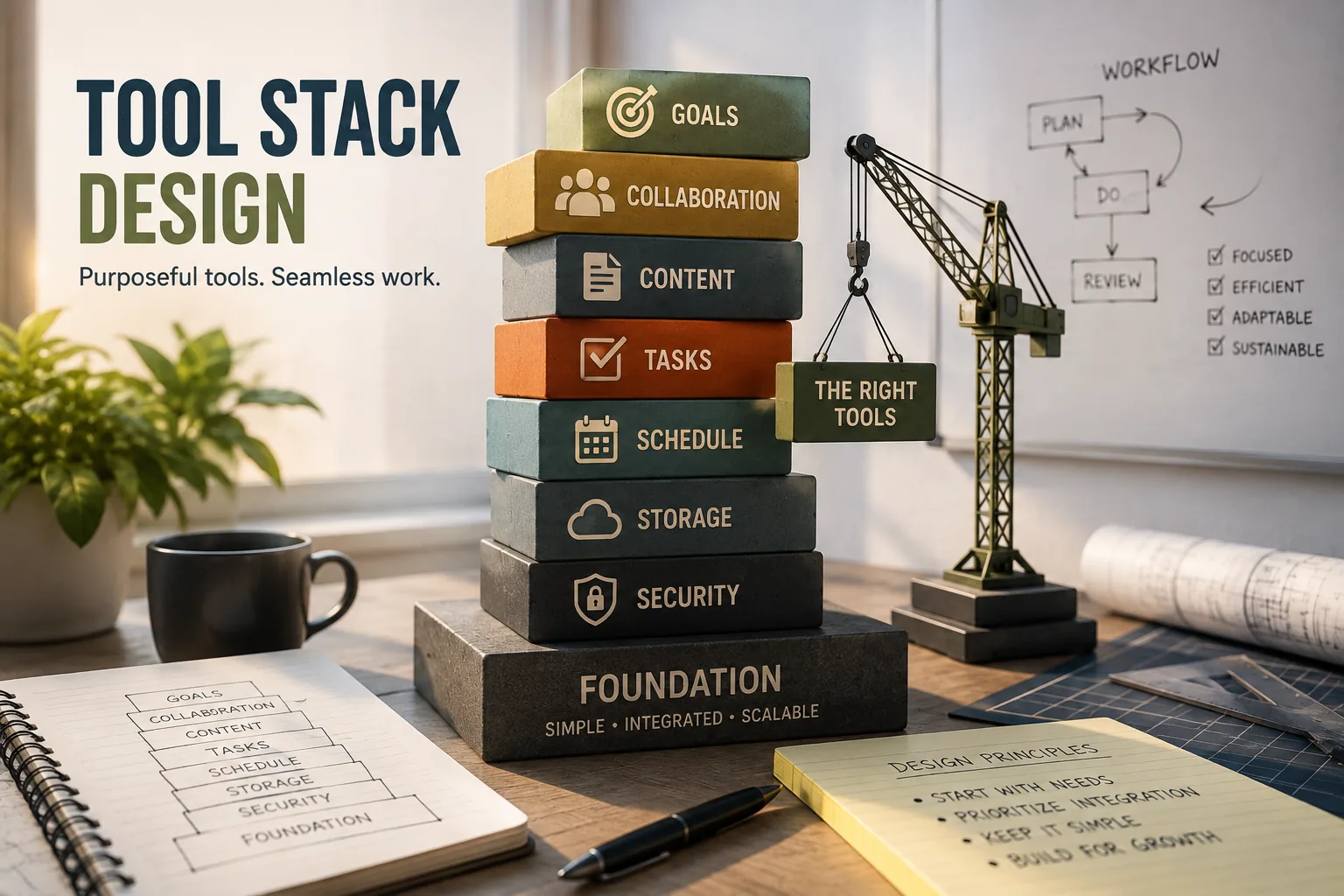
A useful work system is a coherent collection with clear purposes, not an accumulation of apps for every small problem. Tool stack design assigns distinct places for capture, active organization, reference material, and output, with a single source of truth for each category. Limiting overlap lowers cognitive load and makes information easier to find, process, and share.
Sahil Lavingia, founder of Gumroad, has spoken publicly about deliberately keeping his personal tool stack small - a handful of core applications covering communication, notes, and design/development work - rather than accumulating specialized tools for every task. Gumroad runs on a tool stack that founders of much larger companies often assume requires far more infrastructure than it actually does.
The contrast with the average knowledge worker's tool environment is striking. Okta's "Businesses at Work" reports have repeatedly found that large enterprises now run well over 150 distinct software applications on average, a figure that has climbed year over year.[3]
The promise of each individual tool was productivity enhancement; the reality of this much accumulated tooling is overhead that can consume the very productivity gains each tool was supposed to produce.
Tool stack design is the discipline of deliberately choosing, configuring, and maintaining the collection of tools you use to accomplish work - treating the collection as a system to be designed, not a pile of solutions to accumulate.
The difference between a designed tool stack and an accumulated tool pile is not the sophistication of the individual tools but the coherence of the collection: whether the tools work together, whether each tool has a clear purpose, and whether the aggregate overhead of the stack is proportional to the aggregate value.
"A tool stack is like a kitchen. It is not about having every possible appliance - it is about having the right tools for the food you actually cook, arranged so everything is immediately at hand." The professionals with the most effective tool stacks tend to have the fewest tools, not the most.
Treating capture as storage instead of inbox to process
Organization
Track commitments and manage work in progress
Task managers, project boards, calendar
Multiple competing systems; no single source of truth
Reference
Store information to retrieve but not act on
Notion, Obsidian, Evernote
Over-organizing instead of retrieving; note graveyards
Output
Create the deliverables your work produces
Google Docs, Word, Figma, coding environments
Tool friction reducing quality or quantity of output
The Stack vs. the Pile
Most knowledge workers do not design their tool stacks. They accumulate them. A tool is adopted when it solves an immediate problem. It remains when the problem is solved and the next tool is adopted for the next problem.
Over time, the accumulation produces a pile of individually justified tools that collectively produce overhead, overlap, and confusion about what lives where.
The distinction between a designed stack and an accumulated pile is observable in how the user talks about their tools.
A person with a designed stack can answer in thirty seconds: "This is where I capture tasks, this is where project work lives, this is how I communicate with my team, this is where I keep reference information." A person with a pile hesitates, offers multiple qualified answers, and often cannot identify with confidence where a specific category of information lives.
The psychological cost of the accumulated pile extends beyond the time spent on context switching. Cognitive load theory, developed by John Sweller in the 1980s, identifies the load imposed on working memory by managing complex systems as a drain on the same cognitive resources available for substantive work.
Managing a disorganized, overlapping tool stack consumes cognitive resources that could otherwise be applied to the work itself.
The Four Layers of a Work System
A well-designed personal work system has four layers, each with a distinct function. Understanding the layers clarifies what tools you need and which tool category each tool belongs to.
Layer 1: Capture
The first layer is capture: a system for collecting every commitment, task, idea, and piece of information that needs to be processed or retained. The primary requirement is frictionlessness - if capture requires more than a few seconds, things will not be captured.
Every work system needs a capture mechanism that is fast, always accessible, and comprehensive.[1] The specific tool matters less than the consistency with which it is used. Common capture tools:
A dedicated inbox in a task manager (Todoist inbox, Things inbox)
A physical notebook for immediate capture, processed later
A quick-capture note app (Apple Notes, Drafts, Bear) that feeds into other systems
Email drafts as a capture mechanism for desk-bound workers
The capture layer is not where information lives permanently. It is where everything lands before being processed into the appropriate system layer. The failure mode is treating capture as the end of the process rather than the beginning.
Layer 2: Organization
The second layer is organization: the system that holds work in progress, tracks commitments, and ensures nothing is forgotten. This is the core of personal productivity - the task management and project tracking layer.
Organization requirements vary significantly by work type. An individual contributor with a small number of active projects and predictable work needs less organizational infrastructure than a manager with thirty direct reports, cross-functional responsibilities, and constant context switching.
Common organization tools:
Task managers (Todoist, Things, OmniFocus) for individuals
Project management tools (Asana, Linear, Notion databases) for teams
A calendar for time-based commitments and blocking focus time[4]
The critical principle for the organization layer is single source of truth: each category of work should live in exactly one place.
If tasks appear in both a task manager and an email inbox and a Slack channel, the cognitive overhead of maintaining awareness across three systems is greater than the overhead of having one well-used system.
Layer 3: Reference
The third layer is reference: the system that stores information you need to access but do not need to act on immediately.[9] This includes meeting notes, project documentation, research and reading, reference materials, and institutional knowledge.
The reference layer is where most tool stack design fails. The impulse to optimize reference leads to elaborate organizational systems, multiple tools serving overlapping purposes, and time spent organizing notes rather than using them.
Reference layer principles:
Fast retrieval beats perfect organization: The best reference system is the one where you can find what you need in under 30 seconds. Full-text search in a simple system often beats elaborate tagging in a complex one.[8]
Less is more: Not everything needs to be saved. Information you will not realistically retrieve is not an asset; it is noise in your reference system.
One tool per category: Meeting notes in one place, reference documentation in one place, reading highlights in one place.
Layer 4: Output
The fourth layer is output: the tools used to produce work products - writing, design, analysis, code. Output tools are category-specific (a developer's IDE, a designer's Figma environment, a writer's text editor) and are usually determined by professional context rather than personal preference.
Output tools are often the best-chosen tools in the stack, because people invest in them proportionally to how much they use them.
The failure mode in the output layer is under-investment - using generic tools (Google Docs) for tasks where specialized tools (Ulysses for long-form writing, Notion for structured content, specialized data analysis environments) would provide meaningful quality or efficiency improvement.
Design Principles for a Coherent Stack
A designed tool stack applies a small number of principles consistently.
Principle 1: Minimize the Number of Tools
The right number of tools is the minimum number that covers all four layers adequately. "Adequately" is the key word: not optimally, not with best-in-class tools for each micro-function, but adequately.
Reduction in tool count produces compound returns across every working day through reduced context switching, reduced maintenance overhead, and reduced cognitive load of managing the system.
The minimum viable personal stack is smaller than most people believe. Many knowledge workers can operate effectively with:
One note/capture tool
One task manager
One calendar
One communication tool
Category-specific output tools
Six to eight tools is a reasonable upper bound for most individual knowledge workers. Teams add shared tools for project tracking, documentation, and communication - bringing team stacks to ten to fifteen tools in total.
Principle 2: Establish Clear Purpose Boundaries
Every tool in the stack should have a clear, non-overlapping purpose. When two tools in the stack serve overlapping purposes, information fragments across both, and the cognitive load of deciding which tool to use for each new piece of information becomes itself a source of overhead.
Purpose boundaries should be explicit - written down and shared with teammates where relevant. "Slack is for ephemeral team communication. Email is for external communication and formal records. Notion is for reference documentation.
Asana is for project tasks." Ambiguity about purpose boundaries is the primary mechanism through which tool stacks develop overlap.
Principle 3: Design for Integration
Tools that are isolated from each other - that require manual synchronization or duplicate entry - impose ongoing maintenance overhead. Tools that are well-integrated reduce the total overhead of the stack.
Integration questions to ask before adopting any new tool:
How will tasks that originate in communication tools (Slack, email) enter my task manager?
How will calendar events that produce tasks get captured?
How will information that belongs in the reference layer get there without requiring manual reorganization?
If information lives in this tool, how will it be findable when I need it weeks later?
Integration is not the same as complexity. Simple manual conventions ("at the end of every meeting, I take three minutes to transfer action items to my task manager") are integrations. Automated workflows via Zapier are integrations.
The test is whether information flows reliably between system layers without requiring active management of the transitions.
Principle 4: Design for Your Actual Work Patterns, Not Ideal Ones
The most elaborate personal productivity system, designed for an idealized version of the work day, fails when it encounters the actual work day: its interruptions, unexpected priorities, variable energy, and imperfect execution.
A simpler system that works under realistic conditions is more valuable than an optimized system that only works under ideal conditions.
Example: Paul Graham, co-founder of Y Combinator, has written about keeping his tools deliberately simple: a text editor and email for most of his work.[5] The simplicity is not a limitation; it is a feature. Tools with lower maintenance overhead create more time and cognitive space for the substantive work they support.
The Stack Audit: Designing From Current State
Most people will be redesigning an existing stack rather than designing from scratch. The audit process moves from current state to designed state.
Step 1: Inventory
List every tool used with any regularity - daily, weekly, or occasionally. Include both personal and organizational tools. Include tools used for specific projects or clients. The inventory is typically larger than expected.
Step 2: Classify
Assign each tool in the inventory to a layer: capture, organization, reference, or output. Tools that do not clearly belong to one layer are either multi-purpose (and possibly creating overlap) or ambiguous (and contributing to confusion about what lives where).
Step 3: Identify overlap
Find the layer categories with more than one tool. For each category of overlap, determine: which tool is doing the job better? Which could be retired? Is there a genuinely important function that requires two tools, or is the overlap an artifact of accumulation?
Step 4: Identify gaps
Are there layer functions with no tool? Common gaps:
No fast capture mechanism (information is lost before reaching the organization layer)
No systematic review practice (tasks captured but never processed)
No clear reference system (information buried in email or never documented)
Step 5: Design the target state
Define what the stack should look like: which tools, which purposes, which tools will be retired. The target state should be achievable - significant reductions in tool count create transition costs, and attempting to move from 20 tools to 6 in a week is likely to fail.
A phased transition, retiring one or two tools per month, is more sustainable.
Common Stack Archetypes
Different work types produce different appropriate stacks. Understanding common archetypes helps calibrate expectations for what a well-designed stack looks like.
The Solo Knowledge Worker Stack
A writer, researcher, or individual contributor with focused, primarily solo work:
Capture: Quick-capture note app (Drafts, Apple Notes) or physical notebook
Organization: Task manager (Things, Todoist) and calendar
Reference: Single note/knowledge tool (Notion, Obsidian, Bear)
Output: Appropriate writing/production tools
Communication: Email and one messaging app
The Manager Stack
A people manager with extensive relationship and coordination responsibilities:
Capture: Dedicated inbox plus quick-note tool always accessible
Organization: Calendar as primary organizing tool, task manager for commitments, shared project tool for team visibility
Reference: Team documentation tool (Confluence, Notion)
Output: Presentation and communication tools
Communication: Email, team messaging (Slack/Teams), video conferencing
The Consultant/Agency Stack
A professional managing multiple client relationships simultaneously:
Capture: Client-specific capture, carefully labeled at entry
Organization: Project management tool with client separation (Asana, ClickUp)
Reference: Client-segmented reference system
Output: Deliverable production tools
Communication: Client-standard tools (adapting to each client's preferred environment) plus personal email
The differences between archetypes reflect the structure of the work, not personal sophistication. A consultant with twelve clients needs client-segmented organization that a solo writer does not. A manager with thirty direct reports needs more communication infrastructure than an individual contributor.
Copying another person's stack without understanding the work structure it serves is a common source of poor tool adoption.
Research on Cognitive Load and Tool System Design
The science of cognitive load theory provides the neurological basis for why tool stack design matters, and empirical research on information worker performance translates that theory into specific design recommendations.
John Sweller (Emeritus Professor of Educational Psychology at the University of New South Wales) developed cognitive load theory through a series of studies beginning in the late 1980s.[2]
His foundational 1988 paper in Cognitive Science distinguished between three types of cognitive load: intrinsic load (the inherent complexity of the task itself), extraneous load (complexity created by poor system design), and germane load (cognitive effort that builds long-term understanding).
Sweller's subsequent research found that extraneous cognitive load - the load imposed by managing poorly designed systems rather than doing substantive work - directly reduces the cognitive resources available for the task itself.
A cluttered, poorly organized tool stack is a generator of extraneous load, systematically reducing performance on the work the tools are supposed to support.
Okta's "Businesses at Work" reports have tracked enterprise software adoption for years, and the trend is unambiguous: the number of applications a typical organization runs has climbed steadily, with large enterprises reporting well over 150 distinct applications in recent reports, up from roughly that level just a few years earlier.
The reports themselves measure application counts rather than per-worker productivity outcomes directly, but the underlying logic tool stack designers draw on is straightforward: every additional application in active use adds a small amount of context-switching and maintenance overhead, and that overhead compounds across a workday in a way that is easy to underestimate from any single tool's perspective.
Gloria Mark (Professor of Informatics at UC Irvine), whose research on attention and interruption spans two decades, is the source of one of the most widely cited findings in this area: that it takes an average of around 23 minutes and 15 seconds to fully return to a task after an interruption.[7]
Applied to tool stack design, this finding has a direct implication: a professional who moves between many separate applications throughout the day is not just spending the few seconds it takes to open each one - they are repeatedly incurring a much larger, less visible cost in the form of fragmented attention that outlasts the switch itself.
Tool stacks designed around fewer, well-integrated applications that minimize the frequency of necessary switching are the direct, practical response to this research: not because switching itself is inherently bad, but because each switch carries a hidden tax that a coherent stack is designed to minimize.
Organizational Case Studies in Deliberate Stack Design
Several well-known technology companies have publicly discussed deliberately keeping their internal tool stacks small, and their stated reasoning is consistent with the research above even where detailed internal metrics are not publicly disclosed.
Basecamp (37signals) has published the most detailed public account of deliberate tool reduction among technology companies.
Jason Fried and David Heinemeier Hansson, in It Doesn't Have to Be Crazy at Work (2018) and in extensive follow-up writing on the company's blog, have argued that Basecamp deliberately runs on a small core set of tools built largely in-house (Basecamp itself for project management and communication, and later their own email service, HEY, alongside a small number of external tools like GitHub) specifically to avoid the coordination overhead that comes with a sprawling, accumulated tool pile.[6]
Automattic (the company behind WordPress.com and WooCommerce), with thousands of fully distributed employees across many countries, is well known for a deliberately lean internal tooling philosophy under CEO Matt Mullenweg, who has spoken publicly about favoring a small number of tools used well over a large number of tools used poorly, as part of the company's broader distributed-work culture.
Superhuman (the email productivity company) has built its entire product philosophy, under founder Rahul Vohra, around the idea that reducing the number of steps and decisions involved in a workflow - in Superhuman's case, email - produces outsized productivity gains, a philosophy the company has also described applying internally to its own operational tooling.
The United States Digital Service (USDS), the technology team embedded in the federal government to improve digital services, has published extensively on the problem of tool sprawl across federal agencies, where fragmented, legacy, and duplicative software systems are a well-documented source of wasted effort and onboarding friction for new government technologists.
Stripe, under CEO Patrick Collison, has a well-documented internal engineering culture (covered in depth by outlets like Pragmatic Engineer's reporting on Stripe's internal tooling) that emphasizes strong opinions about tool choice and a bias toward tools that measurably reduce friction for the people who have to use them every day, rather than accumulating tools for their own sake.
The Review and Maintenance Habit
A designed stack requires ongoing maintenance to remain designed rather than gradually reverting to accumulation. The maintenance habit is simple but requires discipline.
Monthly: Review tool count. Have any new tools been adopted? Has any old tool been explicitly retired? The net change should be zero or negative - each addition should be paired with a retirement.
Quarterly: Review purpose clarity. Are the purpose boundaries between tools still clear? Are there categories of information that are ambiguously homed across multiple tools? Is there a new work pattern that is not well-served by the current stack?
Annually: Full audit. Does the current stack still match the actual work? Have work patterns changed enough to warrant a redesign? Are there tools that have been retained through inertia rather than through continued usefulness?
The review habit is what separates a designed stack from a temporarily-organized pile. Without it, accumulation resumes. With it, the stack remains coherent over time.
Design cohesive tool stack by starting with core workflow needs not individual tool features, choosing tools that integrate well together, establishing single source of truth for each information type, accepting some redundancy for workflow optimization, and maintaining discipline against tool proliferation, the goal is complementary tools serving unified workflow rather than collection of disconnected apps.
Start with workflow not tools: map your actual work process (how information flows, what you create, who you collaborate with), identify specific friction points or gaps in current approach, define requirements based on workflow needs, and only then evaluate tools solving those requirements. Starting with tool research leads to feature-based choices disconnected from actual workflow.
The integration assessment: evaluate how tools connect (native integrations through app marketplaces like Zapier, API access enabling custom integrations, export/import capabilities for data movement, and shared formats like Markdown or CSV), prioritize tools with strong integration ecosystems (tools isolating data create workflow gaps), test integrations during evaluation (check if data flows as needed, not just whether integration exists), and design information flow between tools (what triggers moves from tool A to tool B, what data needs to sync).
Poor integration means manual copying and context switching destroying workflow. Single source of truth prevents confusion: one tool for task tracking (not tasks scattered across multiple tools), one tool for team communication (not conversations fragmented between Slack and Teams and email), one tool for documentation (not docs spread across Notion and Confluence and Google Docs), and clarity about which tool is authoritative for each information type.
When multiple tools claim same information, conflicts and uncertainty emerge about which is correct. Strategic redundancy for workflow: some information lives in multiple tools for good reason, task might exist in project management tool (team coordination) and personal to-do list (individual workflow), meeting might be in calendar (scheduling) and project tool (coordination), and document might be in creation tool (Google Docs) and storage tool (Dropbox).
This redundancy serves workflow by having information where needed, but should be intentional not accidental, with clear primary source and understood propagation.
The tool stack template: communication platform (one: Slack or Teams), task/project management (one primary tool even if some use personal tool also), document collaboration (Google Workspace or Microsoft 365), calendar (integrated with email system), note-taking/knowledge management (one tool), plus specialized tools for your specific work (developer tools, design tools, CRM, analytics).
The integration map: draw how information flows between tools (new task creates notification, completed project updates dashboard, meeting notes link to project), identify manual steps requiring context switching (these are friction points to optimize), implement automation where valuable (zapier workflows, native integrations), and accept some manual steps for low-frequency activities (monthly report compilation might not warrant automation).
The anti-pattern: tool proliferation: accumulating tools for every specific need without considering overlap (five project tools from different initiatives), trying new tools without removing old tools (16 apps doing overlapping things), and lacking clear ownership per category (multiple tools competing for same purpose). This creates fragmentation, context switching overhead, and confusion.
The discipline principles: one-in-one-out rule (adding tool requires evaluating which tool to remove), tool evaluation process (defined criteria, trial period, team input before adopting), regular tool audits removing unused tools, and resistance to shiny new tool syndrome (impressive features don’t justify adding if current tools adequate).
The team alignment challenge: personal tool preferences vary (some prefer Notion, others prefer traditional wiki; some like Todoist, others like Things), balance individual optimization with team coordination (allow personal tools for individual work, mandate shared tools for collaboration), and avoid forcing one-size-fits-all when personal tools don’t affect others.
The principle: effective tool stack has each tool serving clear purpose with good integration enabling information flow, start from workflow needs not tool features, prioritize integration and single source of truth, implement strategic automation for frequent workflows, maintain discipline against tool proliferation, and balance personal optimization with team coordination needs.
Minimum viable tool stack includes email/calendar (Microsoft 365 or Google Workspace), task management (any simple system), note-taking (any tool you’ll use), communication (org-mandated like Slack/Teams), and document creation (included with email system), expanding only when hitting clear friction that new tool solves, not based on impressive features or others’ recommendations.
The starter stack (individual contributor): email and calendar (Google Workspace or Microsoft 365 providing both plus documents), simple task list (built-in reminders, Todoist free tier, or paper, start simple), note-taking (Notion, Obsidian, or even text files, don’t overthink this), and team communication tool (whatever org uses, no choice here). This covers essential knowledge work functions with minimal complexity and cost, allowing focus on work rather than tool management.
When to add task/project management: simple list becomes overwhelming (50+ active items with no structure), collaborating with others requires shared visibility (team needs to see who’s doing what), or managing complex projects with dependencies and timelines. Then add dedicated project tool (Asana, Notion for teams, or linear for developers). Don’t add prematurely when simple list works.
When to add note/knowledge management: losing information regularly (can’t find notes taken months ago), accumulating substantial knowledge needing organization (researcher, writer building knowledge base), or seeing clear patterns in notes suggesting need for linking or structure. Then add dedicated tool (Obsidian for linking, Notion for structure). Simple notes in documents folder often sufficient for years.
When to add specialized tools: domain-specific needs not met by general tools, developers need code tools (GitHub, development environments), designers need design tools (Figma, Adobe Creative), salespeople need CRM (HubSpot, Salesforce), analysts need data tools (Python, Tableau). These tools serve specific professional needs not general knowledge work.
The red flags for premature tool addition: “tool X looks cool and everyone talks about it” without specific problem it solves, “maybe this will make me more organized” without clear current disorganization, “this tool has impressive features” without needing those features, and “I should probably have proper system” when current informal approach works fine. These lead to tool accumulation without benefit.
The addition decision framework: identify specific friction in current workflow (not vague sense of suboptimal), evaluate if current tools could solve with better use (often yes, people underuse tools they have), consider cost (time, money, learning, maintenance), trial new tool for defined period (2-4 weeks) with actual work, and commit or remove cleanly (don’t let trials linger unused). This prevents accumulation of partially-adopted tools.
The growth pattern: individual starts with minimal stack, adds tools as work complexity grows (managing more projects, coordinating with more people, building deeper knowledge), stabilizes on core stack serving needs, resists adding more unless clear gap, and periodically simplifies removing tools that lost value. The stack evolves with needs rather than growing monotonically.
The organizational context: startups can start minimal and grow stack as needed, but joining established company means adopting their stack (communication tool, project management, documentation mandated). Work within organizational tools before adding personal tools, often the coordination benefit of using same tools as team outweighs optimization from perfect personal tool choice.
The principle: start minimal covering essential functions, add tools only when hitting clear friction current tools can’t solve, resist temptation to add impressive-looking tools without specific need, and accept that simple adequate tools beat complex perfect tools, your minimal viable stack is probably smaller than you think, and adding tools should be reluctant response to demonstrated need not proactive optimization.
Balance personal optimization with team coordination by using team tools for shared work and collaboration (mandatory participation), allowing personal tools for individual workflow (optional optimization), syncing between when valuable (team tool is source of truth, personal tool mirrors for workflow), and accepting that coordination benefits often outweigh marginal personal efficiency gains.
The mandatory-team-tool category includes communication platforms (Slack or Teams, can’t opt out without missing conversations and creating coordination burden), shared project management (team needs visibility into work, can’t refuse participation), document collaboration (creating deliverables together requires shared tool), and organizational systems (HR, expense, required corporate tools, no choice).
Use team tools for these functions even if personal preference differs because coordination value exceeds personal preference. The optional-personal-tool category includes personal task management (your system for organizing your work), note-taking and knowledge management (how you capture and organize information for yourself), writing and thinking tools (where you draft before sharing), and personal productivity tools (time tracking, focus tools, habits).
Use whatever works for you since it doesn’t affect team coordination.
The hybrid approach when both needed: mirror team-assigned tasks to personal task system (team assigns in Asana, you copy to Todoist for your workflow, team tool is source of truth, you update both), take meeting notes in personal tool then transfer key decisions to team wiki (personal notes for your understanding, team wiki for shared record), draft in preferred tool then move to shared tool for collaboration (write in Obsidian, publish to Notion for team access).
This gives personal optimization while maintaining team coordination. The sync automation reduces overhead: zapier or similar can copy tasks from team tool to personal tool automatically, calendar integrations ensure meetings appear in personal calendar, and notification integrations route team tool alerts to your preferred platform. Good automation makes hybrid approach sustainable.
The friction evaluation: sometimes using suboptimal team tool beats maintaining hybrid approach, copying tasks between systems creates overhead, remembering to check both systems creates cognitive load, and sync failures create conflicts. If friction from hybrid exceeds benefit, just use team tool even if not personal preference.
The advocacy approach when team tool truly limiting: provide specific feedback on friction points (not just “I prefer X”), propose alternatives with migration plan, demonstrate value on small scale (“our subteam tried Y and saw benefits”), and accept organizational decision even if you disagree. Sometimes changing team tools is worth effort, but often accepting current tool is pragmatic.
The anti-patterns to avoid: refusing team tool participation creating coordination burden (“I don’t like Slack so message me in email”, forces others to adapt to your preference), maintaining elaborate hybrid system with complex sync (spending significant time managing tool coordination), trying to impose personal preference on team (“everyone should switch to my preferred tool”, ignoring others’ preferences and switching costs), and tool evangelism (constantly advocating for different tools instead of working with current stack).
The decision framework: for shared work and team coordination, use team tools regardless of personal preference (coordination benefits outweigh marginal personal efficiency), for individual work not affecting team, use personal preferences, for hybrid cases, evaluate sync overhead versus personal benefit (sometimes hybrid worth it, sometimes just use team tool), and accept that perfect personal optimization isn’t goal when working in teams, effective collaboration sometimes requires using adequate tools everyone shares rather than perfect tools for your individual preference.
The principle: team coordination requires shared tools even when they’re not everyone’s personal preference, use team tools for collaboration, allow personal tools for individual work, implement thoughtful hybrid approaches when the coordination overhead is worth personal optimization benefit, and recognize that being effective team member sometimes means accepting team’s tool choices over personal preferences, focusing energy on doing great work rather than perfect tool optimization.
Migrate tools successfully through gradual cutover (both systems running during transition), clear migration plan with timeline, data export and import processes, team communication and training, and accepting some loss/cleanup is normal, avoiding big-bang switchovers that disrupt work and create information loss.
The migration timeline: planning phase (why migrate, what tool, how to transition), preparation phase (export existing data, set up new tool, create migration process), parallel phase (both tools active, new work in new tool, old tool read-only for reference), cutover phase (officially move to new tool, archive old tool), and cleanup phase (address issues, train stragglers, optimize new setup). Rushing through these phases guarantees problems.
The parallel running approach: set up new tool while keeping old tool fully operational, start putting new work only in new tool (don’t split new work between tools), keep old tool as read-only reference for historical information, and run parallel for defined period (2-4 weeks typically) building familiarity with new tool before cutover. This provides safety net and gradual adoption reducing shock.
The data migration strategy: export data from old tool (use native export, API extraction, or manual if necessary), evaluate what actually needs migration (not everything, often only active projects and recent information worth migrating), import into new tool using import features or manual recreation for critical items, and accept that perfect migration is impossible (some things will be lost or messy, that’s okay). Perfect migration isn’t worth months of effort.
The team transition process: announce migration with clear reasoning and timeline, provide training or documentation for new tool, designate champions who learn first and can help others, establish clear cutover date (after this date old tool is archived), and support struggling team members during transition (patience and help, not frustration). Cultural resistance is normal change management challenge.
The information triage: critical active information must migrate (current projects, active tasks, essential documents), important reference information should migrate if feasible (templates, key documentation, recent notes), and historical information can be archived in old tool (leave old tool account active in read-only mode for occasional reference, or export bulk archive). Don’t try to migrate everything, focus on what’s actively needed.
The rollback plan: define criteria for rolling back if new tool doesn’t work (complete failure to meet needs, team unable to adapt, critical missing features discovered), maintain old tool capability during parallel phase (can roll back cleanly), and commit to decision after reasonable trial (don’t keep second-guessing, after 4-week trial commit to new tool or roll back). Indefinite uncertainty is worse than either outcome.
Common migration mistakes include big-bang cutover without parallel phase (everyone forced to new tool immediately creating panic and productivity loss), trying to migrate everything perfectly (months-long migration paralysis), no training or support (expecting team to figure it out), unclear cutover date (ambiguity about which tool to use), and premature old-tool shutdown (losing access to historical information before verifying new tool has everything needed).
The communication plan: announce migration and timeline ahead, explain reasoning (why changing and what benefits), provide training before cutover, remind as cutover approaches, clearly communicate cutover date, and follow up helping stragglers after cutover. Clear communication reduces resistance and confusion.
The vendor considerations: export data before canceling old subscription (many tools delete data shortly after cancellation), download backups of critical information (don’t rely on vendor holding your data forever), and maintain old tool access longer than you think necessary (cheap insurance against discovering missed information).
The optimization later philosophy: migrate minimally getting basic functionality working, optimize setup over time after team is comfortable, resist perfectionism during migration (good enough to function is sufficient initially), and accept learning curve (new tool will feel clunky until familiar, that’s normal not fatal).
The principle: successful tool migration requires gradual transition with parallel running period, focused data migration (active information not everything), team support and training, clear timeline and communication, and acceptance that some information loss and messiness is normal cost of migration, big-bang switchovers and perfectionist migrations fail more often than pragmatic gradual approaches accepting imperfection.
Common tool stack mistakes include tool sprawl (too many overlapping tools), poor integration creating manual copying, no single source of truth causing conflicts, premature optimization with complex tools, and vendor lock-in trapping data, avoid through disciplined tool selection, prioritizing integration, establishing clear ownership per category, starting simple, and choosing portable formats.
Tool sprawl creates ongoing pain through cognitive overhead deciding which tool to use for what, information fragmentation requiring checking multiple places, redundant data entry across tools, subscription costs accumulating ($50/month per tool adds to $1000s/month across stack), and maintenance burden updating and managing many tools.
Prevent through one-in-one-out discipline (adding tool requires removing another), regular tool audits (quarterly review removing unused tools), and resistance to shiny new tool syndrome (impressive features don’t justify adding without specific need). Poor integration forces manual work: copying tasks between project tool and communication tool, manually updating multiple systems with same information, context switching between disconnected tools, and information gaps from missed manual copies.
Avoid through evaluating integration during tool selection (check if tools connect well before committing), implementing automation for frequent workflows (Zapier, native integrations), and prioritizing tools with strong integration ecosystems (well-supported APIs, rich app marketplaces).
No single source of truth creates conflicts: tasks in both project tool and personal to-do list getting out of sync, documents in multiple locations with conflicting versions, contact information scattered across systems with inconsistencies, and team uncertainty about which system is authoritative.
Prevent through explicitly designating primary tool for each information type, clearly communicating single source of truth to team, and treating other instances as views or mirrors not independent sources. Premature optimization with complex tools: adopting enterprise tool when simple tool would work (Confluence when simple wiki sufficient), using advanced features nobody needs (complex project tool for simple task tracking), and learning curve exceeding benefit for simple use case.
Avoid through starting with simplest tool solving problem, adding complexity only when hitting clear limitations, and accepting adequate beats perfect (simple tool you’ll actually use beats powerful tool you won’t). Vendor lock-in traps data: proprietary formats making export difficult (data trapped if you want to leave), single-vendor stack creating dependence (if they change pricing or shut down you’re stuck), and tools essential to workflow with no alternatives.
Mitigate through prioritizing tools with good export options (standard formats, complete data export), avoiding proprietary formats for critical data (prefer Markdown over proprietary note formats), and maintaining escape hatches (knowing how you’d migrate if needed).
Other painful mistakes include choosing tool for impressive features not actual needs (pay for complexity never used), no team alignment on tool choices (everyone using different tools preventing coordination), and ignoring mobile experience (if you work mobile, desktop-only tools create friction).
The avoidance principles: maintain discipline in tool additions (clear need, evaluation process, tool removal), prioritize integration enabling workflow over feature completeness in isolation, establish single source of truth preventing conflicts, start simple and add complexity incrementally, and choose portable formats mitigating lock-in.
The recovery from mistakes: conduct tool stack audit listing all tools and usage, identify redundancy and consolidate tools, establish source of truth for each category, implement key integrations reducing manual work, and commit to tool discipline preventing recurrence.
The principle: tool stack mistakes are easier to prevent than fix, exercise discipline in tool selection, prioritize integration, establish clear ownership, start simple, and choose portable formats, avoiding common mistakes of tool sprawl, poor integration, no single source of truth, premature optimization, and vendor lock-in that create ongoing pain exceeding any benefits tools provide.
Tools change, benchmarks move, and research gets superseded. We would rather be corrected than be wrong, so every When Notes Fly guide is open to public correction through CitePep.
Create a free CitePep account and you can file a correction against this page directly. Accepted corrections are published here with your name and a permanent link to your contribution.
CitePep accounts are free and take under a minute.
02
Open this page on CitePep
Every guide has a matching verification page.
03
File the correction
Point at the claim and attach the source that contradicts it.
04
We review against sources
Accepted corrections are published here with your name.
CitePep is an independent verification platform. When Notes Fly does not control which corrections are filed, and contributors are credited under their own names.
New guides and revisions from across six sections. One email, no pitches.
We Value Your Privacy
We use cookies to enhance your experience, analyze site traffic, and provide personalized content. By clicking 'Accept All', you consent to our use of cookies. View our cookie policy
Cookie Preferences
Choose which cookies you want to allow. Essential cookies are required for the website to function properly.
Essential Cookies
These cookies are necessary for the website to function and cannot be disabled. They are usually set in response to actions you take, such as setting privacy preferences or logging in.
Always Active
Analytics & Performance Cookies
These cookies help us understand how visitors interact with our website, allowing us to improve our services and user experience.
Advertising & Marketing Cookies
These cookies are used by Google AdSense to display personalized ads. They help us provide free services by generating revenue from advertisements.
We Value Your Privacy
We use cookies to enhance your experience, analyze site traffic, and provide personalized content. By clicking 'Accept All', you consent to our use of cookies. View our cookie policy
Cookie Preferences
Choose which cookies you want to allow. Essential cookies are required for the website to function properly.
Essential Cookies
These cookies are necessary for the website to function and cannot be disabled. They are usually set in response to actions you take, such as setting privacy preferences or logging in.
Always Active
Analytics & Performance Cookies
These cookies help us understand how visitors interact with our website, allowing us to improve our services and user experience.
Advertising & Marketing Cookies
These cookies are used by Google AdSense to display personalized ads. They help us provide free services by generating revenue from advertisements.