When Priya Krishnamurthy launched her travel YouTube channel in 2023, she spent the first three months convinced that her editing software was the problem. Her videos looked flat compared to the channels she watched.
She upgraded from iMovie to Final Cut Pro, then read forum posts arguing that DaVinci Resolve's color grading was objectively superior, so she spent a week learning that.
A commenter on one of her early videos told her that real creators use Premiere Pro, so she subscribed to Creative Cloud.
By the time her channel hit 500 subscribers eighteen months in, she had spent more time switching tools than learning how to actually edit.
The breakthrough was not a new tool. It was finishing a video every week for two consecutive months in whatever tool was already open, which happened to be CapCut. Her subscriber count tripled in those two months.
The lesson she documented in a video that accumulated 200,000 views: the gap between beginner and intermediate content is almost never caused by editing software.
It is caused by not editing enough. The tool stack question is real (there are genuine capability differences between CapCut and Premiere Pro), but the decision matters far less than the hours spent inside any tool building judgment about pacing, cuts, and story.
That said, the decision does matter for specific reasons. The video editing software market in 2026 spans free mobile apps capable of producing broadcast-quality content to professional subscription platforms used by teams producing television and film.
The tools have converged significantly: CapCut now includes AI features that would have required a professional pipeline three years ago, while DaVinci Resolve's free tier provides Hollywood-grade color tools at no cost.
The question is not which tool is best in the abstract - it is which tool removes friction for your specific workflow, skill level, and content type.
"The best editing tool is the one where you spend 80 percent of your session editing rather than learning the interface. Any professional tool used infrequently will produce worse results than a simpler tool used every day."
Who This Guide Is For
This comparison covers the full spectrum from beginner social media creators to professional production teams.
Each tool is evaluated across four dimensions: capability ceiling (how far the tool can take you as your skills grow), accessibility (how quickly a beginner can produce something watchable), pricing structure (free, subscription, or one-time), and target content type (social media short-form, long-form YouTube, documentary, or professional production).
The tools covered: CapCut, DaVinci Resolve, Adobe Premiere Pro, Final Cut Pro, iMovie, Descript, Runway, InShot, Clipping, and Opus Clip.
Social Media and Short-Form Editing
CapCut
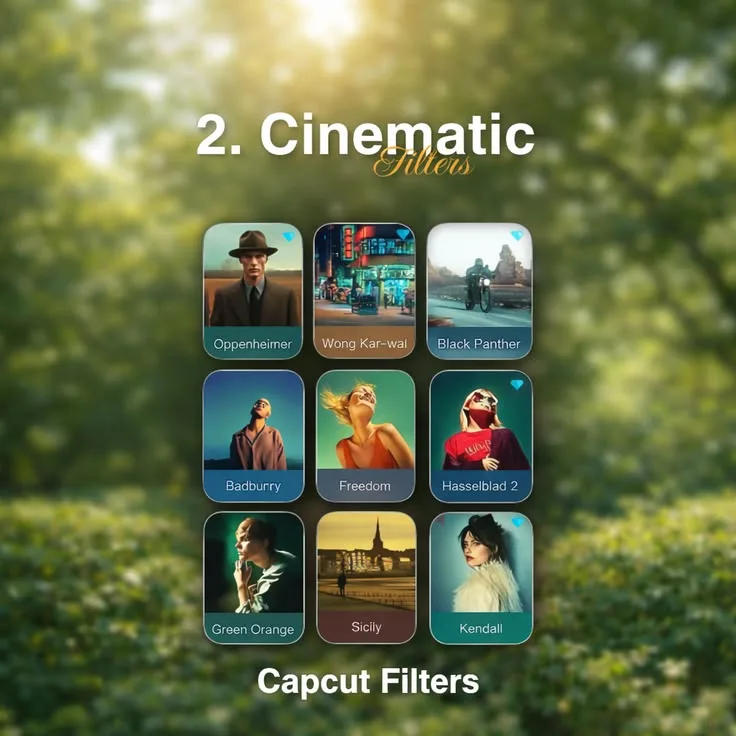
CapCut, developed by ByteDance and available on iOS, Android, and Windows/macOS desktop, has become the dominant tool for short-form social media video.[9] As of 2026, it reports over 300 million monthly active users.
Core features:
- Free on all platforms with no watermark on standard exports
- Auto-captions using on-device and cloud speech recognition, supporting over 40 languages with speaker detection
- Template library with thousands of pre-built formats optimized for TikTok, Instagram Reels, and YouTube Shorts
- Background removal using AI segmentation without a green screen
- Beat-sync that automatically aligns cuts to music tempo
- Speed ramping with smooth interpolation for cinematic slow-motion transitions
- AI text-to-video generation from written scripts
- Green screen, chroma key, and sky replacement
CapCut for Business adds brand kit management, team collaboration, shared asset libraries, and access controls for agencies and marketing teams.[1] Pricing starts at approximately $19/month for the business tier.
Pricing: Free for standard features. CapCut Pro at approximately $9.99/month or $74.99/year adds cloud storage, advanced AI features, and additional effects.
Best for: Solo creators and small teams producing TikTok and Instagram content at high volume. First-time video editors who need to publish something watchable within the first week.
Limitations: Limited multi-track audio mixing compared to professional tools. Export container options are restricted. The mobile app is significantly more capable than the desktop version for most social media workflows. Long-form editing (anything over 20 minutes) is cumbersome.
InShot
InShot is a mobile-first video editor with a clean, single-track timeline designed around vertical video.[8]
Core features:
- Trim, split, and merge clips with frame-accurate control
- Filter and color adjustment library optimized for social media aesthetics
- Text overlays with animated entrance and exit styles
- Speed control from 0.1x to 100x
- Background blur and canvas ratio adjustment for repurposing horizontal footage to vertical
- Music library with licensed tracks
Pricing: Free with a watermark. InShot Pro at $3.99/month or $17.99/year removes the watermark and unlocks the full effects library.
Best for: Creators who want a simple, reliable mobile editor without the social platform integration of CapCut. Good choice for Instagram Stories and Reels when simplicity matters more than trend features.
Limitations: No auto-caption generation in the free tier. Less frequent updates to trending effects compared to CapCut. No desktop version - entirely mobile.
Professional Editing Platforms
DaVinci Resolve
Blackmagic Design's DaVinci Resolve has a legitimate claim to being the most capable video editing software available at any price.[2]
The free tier has no meaningful restrictions: no watermark, no export limitations, and access to the same color grading tools used in Hollywood productions including Everything Everywhere All at Once, The Batman, and Netflix originals.[10]
Core features:
- Multi-track timeline with full keyframe animation on all properties
- Lumetri-competing color grading with primary wheels, curves, qualifiers, and node-based secondary correction
- Fusion visual effects compositing built into the same application - eliminates the need for a separate After Effects subscription for most motion graphics work
- Fairlight audio suite with a full digital audio workstation environment, supporting up to 2,000 tracks
- Collaborative editing where multiple editors work on different parts of the same timeline simultaneously (Studio version)
- Cut page designed for fast assembly editing alongside the full Edit page
- AI tools including Magic Mask for object isolation, Speed Warp for optical flow slow motion, and voice isolation
Paid upgrade: DaVinci Resolve Studio at $295 one-time (no subscription) adds noise reduction, HDR Vivid color tools, AI-powered face enhancement, and multi-user collaboration with full project server support.
Pricing: Free tier with full professional capability. Studio one-time at $295.
Best for: Solo creators serious about color accuracy, documentary filmmakers, travel videographers, YouTube creators who want professional color grading without a monthly subscription, and anyone who has outgrown CapCut and does not want to start paying Adobe's subscription fees.
Limitations: Steep learning curve - the interface has five separate pages (Cut, Edit, Fusion, Color, Fairlight) that beginners find disorienting. GPU-intensive; older hardware will struggle with real-time playback of effects. The learning curve investment is significant but the capability ceiling is as high as any tool on this list.
Adobe Premiere Pro
Adobe Premiere Pro remains the industry standard in professional video production environments, particularly in advertising agencies, broadcast news, documentary production, and large YouTube channels with multiple editors.
Core features:
- Multi-camera editing with automatic sequence syncing based on audio waveform matching
- Productions workflow for team editing, allowing multiple editors to work on different sequences within a shared project without conflict
- After Effects Dynamic Link for motion graphics and visual effects without rendering intermediate files
- Lumetri Color panel with scopes, HSL secondary correction, and curve controls
- Adobe Sensei AI tools: speech-to-text auto-captions, Scene Edit Detection, Auto Reframe for aspect ratio adaptation, and Remix for adjusting music duration to match edit length
- Premiere Extend for third-party plugin integration (Boris FX, Red Giant, Neat Video)
- Essential Sound panel for automated dialogue, music, and sound effects mixing
- Direct export to YouTube, Vimeo, and social media platforms with format presets
Pricing: $55/month as part of Adobe Creative Cloud All Apps, which includes After Effects, Audition, Photoshop, and other tools.[3] Premiere Pro alone is approximately $35/month.
Best for: Teams, agencies, and professional creators who need After Effects integration, collaboration features, and the industry-standard workflow that ensures compatibility with clients and collaborators. Long-form YouTube channels (30+ minutes) with dedicated editors.
Limitations: Expensive subscription that accumulates to over $600/year. Resource-intensive on older hardware. Adobe Premiere Rush (the mobile companion app) is significantly less capable than desktop. The Creative Cloud ecosystem can feel like a lock-in once a project library and assets are organized around it.
Final Cut Pro
Apple's Final Cut Pro is the dominant professional editing choice for Mac-only workflows, backed by deep optimization for Apple Silicon hardware.
Core features:
- Magnetic timeline eliminates traditional track management - clips automatically close gaps when you move or delete, reducing the overhead of timeline housekeeping
- Proxy workflow with automatic media relinking allows editing 4K and 8K footage on older MacBooks without performance degradation
- Apple Silicon optimization provides real-time effects playback on M1 and later chips without rendering[4]
- Roles-based audio organization separates dialogue, music, and effects for mixing clarity
- Multicam editing with automatic sync
- Motion integration for custom motion graphics and titles
- Compressor for batch encoding in broadcast and streaming delivery formats
Pricing: $299 one-time purchase. No subscription. Updates included.
Best for: Mac users who prefer a one-time purchase model, wedding videographers, event filmmakers, YouTube creators on MacBook who want fast performance without the DaVinci Resolve learning curve.
Limitations: macOS only - no Windows version has ever existed. The magnetic timeline is intuitive for beginners but disorienting for editors coming from track-based tools. Collaboration features are limited compared to Premiere Pro's Productions workflow.
iMovie
iMovie is Apple's free, consumer-grade editor included with every Mac and available on iPhone and iPad.
Core features:
- Drag-and-drop timeline with simplified track structure
- Built-in music and sound effects library
- Storyboard mode on iPad for video project planning
- Direct export to YouTube and Vimeo
- Magic Movie on iPhone automatically assembles clips with music and titles
- 4K editing support on recent hardware
Pricing: Free with all Apple devices.
Best for: Absolute beginners making their first videos, families documenting events, students on school projects. A legitimate starting point before graduating to Final Cut Pro or DaVinci Resolve.
Limitations: Single video track limits complex editing. No real color correction tools. Export options are basic. There is a ceiling that most creators will hit within their first year.
Dialogue-Driven and Podcast Video Editing
Descript
Descript approaches video editing from a fundamentally different direction: instead of a timeline, it shows you a text transcript and lets you edit the video by editing the words.[5]
Core features:
- Transcript-based editing - delete a word in the transcript and the corresponding video clip is cut
- Filler word removal detects and removes "um," "uh," and other verbal fillers in a single click
- Overdub AI voice cloning trains on a speaker's voice and generates new speech for corrections, eliminating the need to re-record studio sessions for minor mistakes
- Screen recording built-in for software tutorials and demos
- Storyboard view for visual assembly beyond the transcript
- Automatic captions and SRT export
- Multitrack editing for interview shows with multiple speakers
Pricing: Free tier with limited exports. Creator at $24/month includes Overdub and unlimited exports. Business at $40/month adds team features.
Best for: Podcasters moving to video, interview show hosts, educators creating tutorial content, marketers producing talking-head videos where word accuracy matters more than cinematic precision.
Limitations: Not designed for cinematic or music-driven editing - the transcript model works poorly for content that does not center on spoken word. Overdub voice quality degrades on unusual phrasing. Export quality and format options are narrower than Premiere Pro or DaVinci Resolve.
AI-Powered Video Tools
Runway
Runway is the leading AI video generation and editing platform, best known for its Gen-2 video model.[6]
Core features:
- Text-to-video generation creates short clips from written prompts
- Image-to-video animation brings still images into motion
- Video-to-video style transfer applies visual styles across footage
- Background removal from video without green screen using AI segmentation
- Inpainting removes objects from scenes
- Motion brush applies directional motion to selected areas of an image
- Green screen replacement with AI-generated backgrounds
Pricing: Free tier with limited compute credits. Standard at $15/month for 625 credits. Pro at $35/month for 2,250 credits. Credits are consumed per generation.
Best for: Experimental content creators, advertisers needing footage they cannot film, social media teams exploring AI-generated visuals, and creators wanting to generate B-roll for concepts that would be expensive to produce practically.
Limitations: Generated footage quality varies significantly for photorealistic subjects. Maximum clip length is limited per generation. Credit consumption can be unpredictable. Not a replacement for a conventional timeline editor - Runway generates and processes clips, it does not assemble full edits.
Opus Clip
Opus Clip addresses one of the most common creator bottlenecks: having hours of long-form content that needs to become short-form clips for social media distribution.[7]
Core features:
- Uploads long video from YouTube URL or file and AI identifies the most engaging 30-90 second segments
- Virality score predicts clip performance before publishing based on engagement signals
- Auto-reformats to vertical 9:16 for TikTok and Reels with AI-generated captions
- Batch generates multiple clips simultaneously
- Speaker detection keeps the active speaker centered in the reframed shot
- Direct scheduling to social media platforms from within the tool
Pricing: Free tier with limited clips per month. Pro at $19/month for higher clip volume and advanced features.
Best for: Podcasters, course creators, keynote speakers, and YouTubers who produce long-form content and need a high volume of short clips without manually scrubbing through footage.
Limitations: AI clip selection does not always match the creator's sense of what matters most in their content. Clips sometimes cut awkwardly at sentence boundaries. Limited fine-tuning of the selection criteria. The tool is better as a first pass for review than as a final output without editorial oversight.
Clipping
Clipping is a real-time highlight tool for live streamers, capturing the best moments as they happen rather than in post-production.
Core features:
- Real-time clip capture during live streams on Twitch, YouTube Live, and Kick
- AI detection of peak engagement moments using chat activity signals
- Clip queue management for review and editing
- Direct export and sharing to social platforms
- Integration with streaming software including Streamlabs and OBS
Pricing: Free for basic use. Paid tiers for larger clip volumes and team features.
Best for: Gaming streamers and live content creators who cannot monitor clip creation while broadcasting and need highlights surfaced automatically.
Limitations: Clip quality depends on the quality of the live stream. AI engagement detection based on chat activity can miss moments that are visually compelling but quiet in chat.
Comparison Table
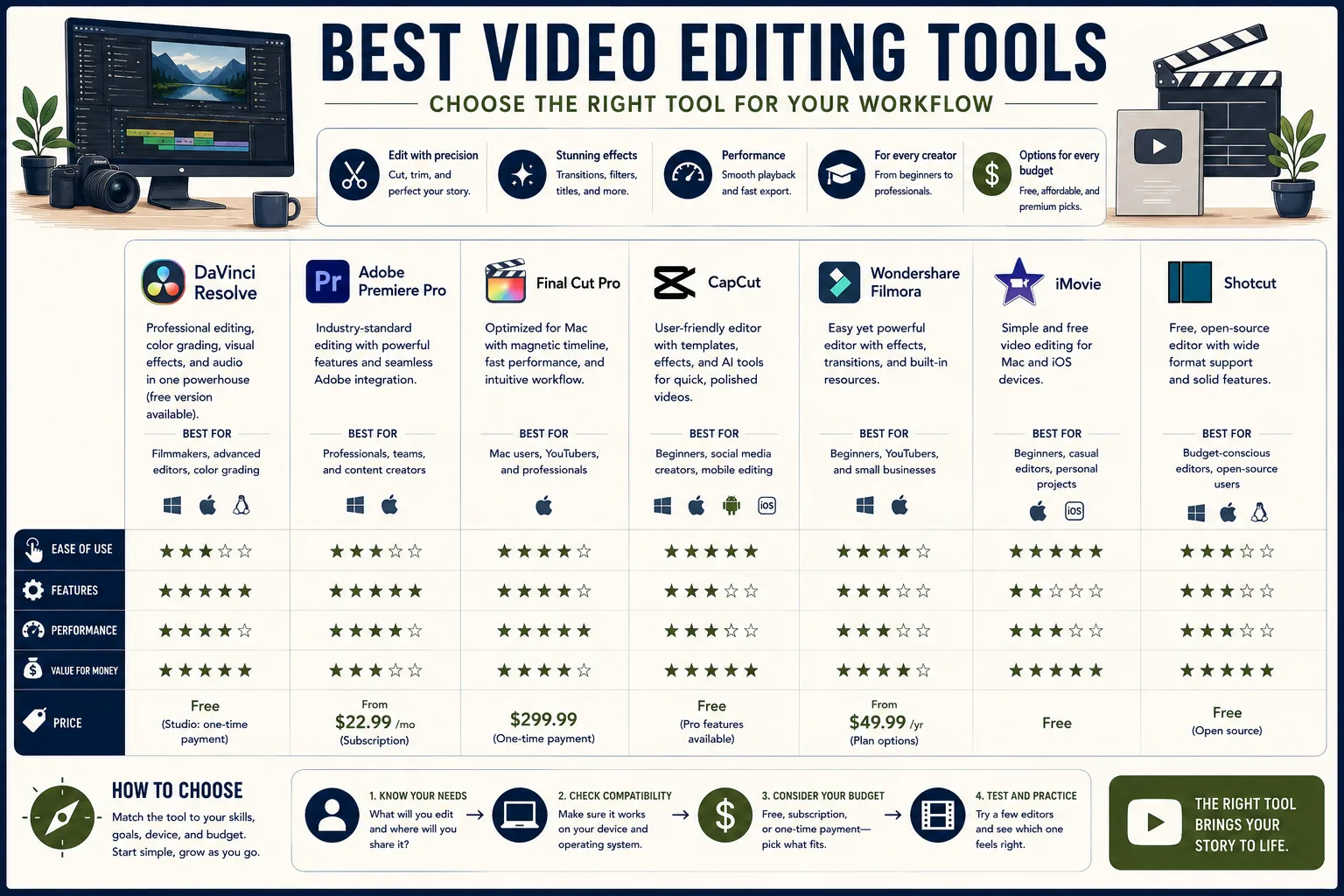
| Tool | Price | Platform | Best For | Skill Level |
|---|---|---|---|---|
| CapCut | Free / $9.99 month Pro | Mobile + Desktop | TikTok, Reels, short-form | Beginner |
| InShot | Free / $3.99 month | Mobile only | Instagram, simple mobile edits | Beginner |
| iMovie | Free | Mac, iPhone | First videos, family content | Beginner |
| DaVinci Resolve | Free / $295 one-time Studio | Windows, Mac, Linux | Professional color, YouTube | Intermediate to Pro |
| Final Cut Pro | $299 one-time | macOS only | Mac workflows, event video | Intermediate to Pro |
| Premiere Pro | $55 month Creative Cloud | Windows + Mac | Teams, agencies, long-form | Professional |
| Descript | Free / $24 month | Windows + Mac | Podcasts, interviews, tutorials | Intermediate |
| Runway | Free / $15 month | Web | AI generation, experimental | Any level |
| Opus Clip | Free / $19 month | Web | Repurposing long to short | Any level |
| Clipping | Free | Web | Live stream highlights | Beginner |
How to Build Your Video Editing Stack
Most creators need at most two tools: one for editing and one for distribution optimization.
The minimal stack: CapCut handles editing, captioning, and export. Opus Clip handles repurposing long-form content. Total cost: $0 to $29/month.
The intermediate stack: DaVinci Resolve for primary editing on desktop. CapCut for quick social media cuts on mobile. Total cost: $0 (or $295 one-time for Studio).
The professional stack: Premiere Pro for primary editing. After Effects for motion graphics. Descript for podcast and interview content. Opus Clip for repurposing. Total cost: approximately $120-$125/month.
The most important principle in tool selection: commit to one primary editor for long enough to develop fluency before evaluating alternatives. Most creators who switch tools mid-project are responding to frustration with their skill level, not genuine limitations of the tool.
DaVinci Resolve on day one feels slower than CapCut. After six months of use, the comparison inverts.
Sources & Further Reading
- CapCut. "CapCut: All-in-one Video Editor." capcut.com. View source
- Blackmagic Design. "DaVinci Resolve 19." blackmagicdesign.com. View source
- Adobe. "Premiere Pro: Video Editing Software." adobe.com.
- Apple. "Final Cut Pro." apple.com. View source
- Descript. "The all-in-one video and podcast editor." descript.com. View source
- Runway. "Advancing creativity with artificial intelligence." runwayml.com. View source
- Opus Clip. "Repurpose long videos into short viral clips." opus.pro. View source
- InShot Inc. "InShot - Video Editor." inshot.com. View source
- Soo, Zo. "How CapCut became the editing app of choice for a generation of creators." Rest of World, 2024.
- Kenreck, Todd. "Why DaVinci Resolve is Hollywood's color grading standard." No Film School, 2024. View source