
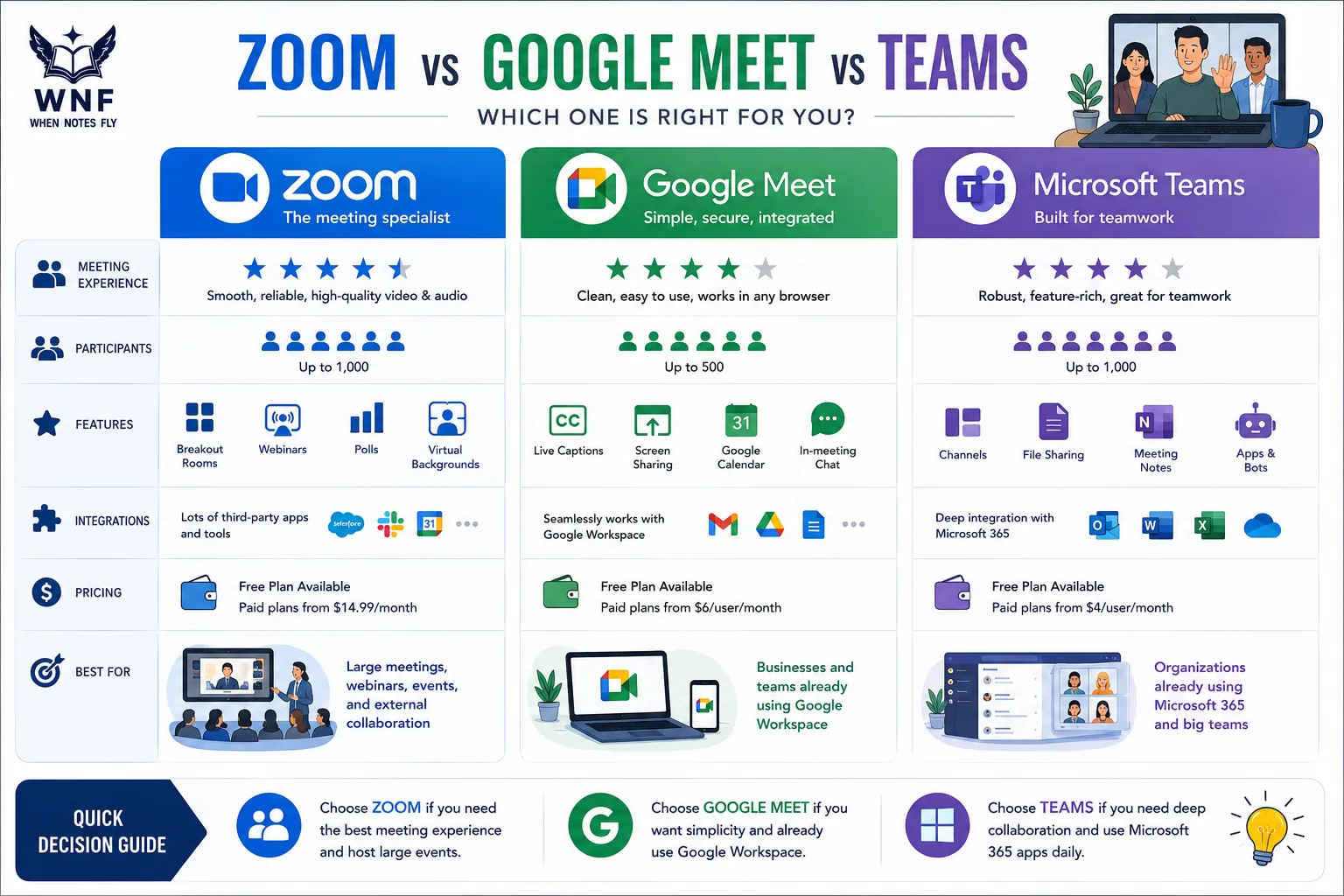
The pandemic made video conferencing as fundamental to work as email. It also gave every knowledge worker an opinion about which platform is least terrible. In 2026, the video conferencing market has settled into a three-platform race: Zoom, Google Meet, and Microsoft Teams.
All three have iterated heavily since 2020, added AI features, and found distinct positions in the enterprise landscape.
The honest truth about call quality is that all three platforms are excellent on modern broadband. What differentiates them today is the ecosystem they live in, the AI capabilities layered on top of the meeting, and the total cost relative to what you are already paying for.
A team evaluating Zoom at $15.99/user/month while already paying for Google Workspace at $6/user/month is asking the wrong question if they do not first evaluate whether Google Meet serves their needs.
This comparison covers pricing structures in detail, participant limits, recording storage, AI feature differences, reliability and security, integration ecosystems, and the specific scenarios where each platform is clearly the right choice.
The answer is almost always driven by which productivity suite your organization uses - but there are real cases where that default should be questioned.
"In 2026, a bad video call platform is not one with poor quality. It is one that creates friction getting into the meeting, sharing files during it, and completing follow-up after it."
The Video Conferencing Market: Scale and Context
The video conferencing market is large, concentrated, and still growing. According to Grand View Research, the global video conferencing market was valued at approximately $9.2 billion in 2024 and is projected to grow at a CAGR of 12.1% through 2030.[13]
The pandemic-driven adoption spike of 2020-2021 did not reverse - it established a new baseline of hybrid and remote work that has made video conferencing infrastructure as mission-critical as email.
Zoom became the verb during the pandemic - a branding achievement that rivals Google's verb status in search. Its growth from a 2017 private valuation around $1 billion to a public market capitalization that peaked near $100-160 billion in 2020 is one of the most dramatic enterprise software growth stories of the decade.
It has since normalized significantly, but Zoom remains the dominant standalone video conferencing product globally, with approximately 300 million daily meeting participants at peak in 2020 and a figure Zoom no longer publicly discloses (its last reported peak was about 300 million daily meeting participants in 2020).[17]
Microsoft Teams has grown through a different mechanism - bundle economics. Teams is included in Microsoft 365 plans that hundreds of millions of enterprise users already pay for.
Microsoft reported 320 million monthly active Teams users in 2024, though this metric includes users who may primarily use Teams for chat and file sharing rather than video calls.
Industry estimates place Teams among the leaders in enterprise video conferencing seats by user count, primarily through its Microsoft 365 inclusion.
Google Meet benefits from similar bundling through Google Workspace, with Google having reported about 100 million daily Meet meeting participants around April 2020 (a more recent daily-active-user figure is not published).
Google Workspace reaches approximately 10 million paying organizations globally, providing Meet with a substantial installed base that is not dependent on standalone video conferencing adoption decisions.
Key Definitions
Cloud recording: Meeting recordings stored on the vendor's servers and accessible via a shareable link. Contrast with local recording, where the video file saves to your computer.
AI meeting summary: An automatically generated text summary of meeting content, key decisions, and action items, generated from transcription by an AI model.
Breakout rooms: Sub-meetings created within a main meeting, allowing a large group to split into smaller discussion groups and return to the main meeting.
Waiting room: A holding area where participants wait before the host admits them. Used for security and structured meeting management.
Webinar mode: A broadcast-style meeting format where most attendees are view-only and the host controls who can speak. Different from standard interactive meetings.
SSO (Single Sign-On): Authentication through your organization's identity provider (Okta, Azure AD, Google), allowing employees to access the platform without separate credentials.
End-to-end encryption (E2EE): Encryption where only the meeting participants hold the keys - the platform provider cannot access the content even if legally compelled.
Pricing Comparison
Free Tier Comparison
| Feature | Zoom Free | Google Meet Free | Teams Free |
|---|---|---|---|
| Group meeting time limit | 40 minutes | 60 minutes | 60 minutes |
| Max participants (group) | 100 | 100 | 100 |
| One-on-one time limit | 40 minutes (Basic) | 24 hours | 60 minutes (Free) |
| Cloud recording | No | No | Yes (30-day cloud retention, per Microsoft; see note) |
| Local recording | Yes | No | No |
| Transcription | No | No | No |
| Noise cancellation | Basic | Yes | Yes |
| Breakout rooms | Yes (host-enabled) | Yes | No (available with Teams business licenses) |
Source: Zoom, Google, Microsoft support documentation, 2025.
Zoom's 40-minute group meeting limit is the most restrictive of the three free tiers and drives many small teams to paid plans.[1] Google Meet and Teams both allow 60-minute groups on free tiers.
Zoom's advantage on free tiers is local recording - the ability to save a meeting to your hard drive without a subscription is unique to Zoom and useful for solo use cases.
Paid Plan Pricing Comparison
| Plan | Zoom | Google Workspace | Microsoft 365 |
|---|---|---|---|
| Entry paid | Pro: $15.99/user/month | Business Starter: $7/user/month (annual, US, as of 2026) | Business Basic: $6/user/month (annual, US, as of 2026) |
| Mid tier | Business: $19.99/user/month | Business Standard: $12/user/month | Business Standard: $12.50/user/month |
| Upper tier | Business Plus: $25/user/month | Business Plus: $18/user/month | Business Premium: $22/user/month |
| Enterprise | Custom pricing | Enterprise: custom | E3/E5: custom |
| What is included | Video only (+ some collab tools) | Video + full Google suite | Video + full Microsoft 365 suite |
Source: Zoom pricing page; Google Workspace pricing; Microsoft 365 pricing, January 2026.
The critical insight in this table is that Google Workspace and Microsoft 365 include video conferencing as part of a full productivity suite. You are not paying $6/user/month just for video calls - you are paying for email, document editing, storage, calendaring, and collaboration tools.
Zoom at $15.99/user/month is video-primarily (with some lighter collaboration features added in recent years).
For organizations that need both a productivity suite and video calling, the economic case for Zoom requires either that Zoom is substantially better for their specific use case, or that they are already paying for the productivity suite and evaluating whether to add Zoom on top.
Total Cost of Ownership: A Real Comparison
Consider a 50-person company evaluating its video conferencing options. The annual cost comparison under realistic scenarios:
Scenario A: Already using Google Workspace Business Standard ($12/user/month)
- Google Meet (included): $0 additional
- Zoom Pro for the whole team instead: $9,594/year additional
- Verdict: Use Meet unless Zoom provides $9,594+ in annual value over Meet
Scenario B: Already using Microsoft 365 Business Standard ($12.50/user/month)
- Microsoft Teams (included): $0 additional
- Zoom Pro for the whole team instead: $9,594/year additional
- Verdict: Use Teams unless Zoom provides specific capabilities Teams cannot match
Scenario C: No productivity suite; need video conferencing only
- Zoom Pro: $9,594/year for video only
- Google Workspace Business Standard: $7,200/year for video + full productivity suite
- Microsoft 365 Business Standard: $7,500/year for video + full productivity suite
- Verdict: Google Workspace or Microsoft 365 provide significantly more total value at lower cost
This arithmetic is why Zoom's standalone growth has moderated - the bundle economics of the two productivity suite giants create a powerful structural headwind.
What You Get at Each Paid Tier
Zoom Pro ($15.99/user/month): Unlimited meeting duration, up to 100 participants, 5GB cloud recording storage, AI Companion features (summaries, transcription), Zoom Whiteboard.[4] The entry point for professional use.
Zoom Business ($19.99/user/month): Up to 300 participants, single sign-on (SSO), workspace reservations, Zoom Scheduler. Appropriate for medium businesses with external client meetings.
Google Workspace Business Starter ($6/user/month): Google Meet with no time limit, 100 participants, recording to Google Drive, plus Gmail with custom domain, Drive (30GB/user), Docs, Sheets, Slides, Calendar, and Meet.[2] The value density relative to cost is exceptional for organizations not already on a productivity suite.
Google Workspace Business Standard ($12/user/month): 150 participants, noise cancellation, meeting recordings, polls, Q&A, breakout rooms, 2TB/user storage. Adds Gemini AI features including meeting summaries.
Microsoft 365 Business Basic ($6/user/month): Teams with full features, Exchange email, SharePoint, OneDrive (1TB), and Office apps on the web.[3] Recording, transcription, and Copilot features on qualifying plans.
Participant Limits and Meeting Capacity
| Tier | Zoom | Google Meet | Microsoft Teams |
|---|---|---|---|
| Free | 100 | 100 | 100 |
| Pro/Business Starter | 100-300 | 100-150 | 300 |
| Business/Business Standard | 300 | 150 | 300 |
| Enterprise | 500-1,000 | 500 | 1,000 |
| Broadcast/Town Hall | 1,000-50,000 (Webinar add-on) | 10,000 (view-only) | 10,000 (view-only broadcast) |
Source: Official documentation from Zoom, Google, and Microsoft, 2025.
Microsoft Teams has the highest interactive meeting capacity at 1,000 participants on Enterprise plans, which reflects its positioning as an internal communications platform for large organizations.[7] The 10,000-person broadcast mode is for town halls and all-hands meetings where most attendees are view-only.
Zoom Webinar (a paid add-on starting at approximately $79/month for 500 attendees) is the most capable product for external webinars, conferences, and large external events, with registration management, branded registration pages, Q&A moderation, polling, post-event analytics, and reporting.
Neither Google Meet nor Microsoft Teams offers a comparable feature set for external-facing large events, an area where Zoom differentiates, though Teams (town halls/live events) and Google Meet offer overlapping large-event capabilities. The bundle competitors cannot match it.
AI Features Comparison
AI features have become a significant differentiator as all three platforms have added AI meeting assistants. These capabilities reduce meeting overhead by automatically generating summaries, action items, and transcriptions.
| AI Feature | Zoom AI Companion | Google Gemini for Meet | Microsoft Copilot for Teams |
|---|---|---|---|
| Meeting summary | Yes | Yes (Business Standard+) | Yes (M365 Copilot required) |
| Action item extraction | Yes | Yes | Yes |
| Transcription | Yes | Yes (Business Standard+) | Yes (all paid M365 plans) |
| In-meeting Q&A to AI | Yes ('ask AI Companion') | Limited | Yes (Copilot in meetings) |
| Smart compose in chat | Yes | Yes (Gmail/Docs integration) | Yes (Teams chat) |
| Included at base paid tier | Yes (Pro includes) | Business Standard ($12) | M365 Copilot is separate (from $21/user/month annual for qualifying 1-300-seat business tenants; $30 for enterprise, as of 2026) |
| Real-time translation | Yes (paid) | Yes | Yes |
| Post-meeting email draft | Yes (AI Companion) | Yes (Gemini) | Yes (Copilot) |
Source: Zoom AI Companion documentation; Google Workspace AI features documentation; Microsoft 365 Copilot documentation, 2025.
Zoom AI Companion is included with paid Zoom plans starting at Pro ($15.99/user/month) without an additional fee - a meaningful advantage over Microsoft's approach where the full Copilot functionality requires a separate Microsoft 365 Copilot license at $30/user/month on top of the existing Microsoft 365 subscription.[6]
For a 50-person team, M365 Copilot adds $18,000 per year on top of existing Microsoft 365 subscription costs.
Google Gemini for Meet is available at Business Standard ($12/user/month), making it more accessible than Microsoft Copilot but at a higher tier than Zoom's AI inclusion.
Gemini's integration with Google Workspace is particularly useful: meeting summaries are automatically shared to the associated Google Doc, action items can be pushed to Google Tasks, and the AI can reference context from Gmail and Calendar to provide more relevant summaries.[5]
The quality of AI summaries varies but has improved substantially across all three platforms. For practical use - reducing the need to take detailed notes during meetings and generating shareable meeting records - the feature is useful enough that it influences purchasing decisions.
According to Zoom's internal usage data (disclosed in investor presentations), AI Companion was used in approximately 30% of eligible meetings by Q3 2024, a significant adoption rate for a feature that requires no additional cost.
The Real-Time AI Difference
One area where the platforms diverge meaningfully is real-time AI assistance during meetings. Zoom AI Companion allows participants to ask questions mid-meeting ("what did we decide about the Q3 timeline?") and receive answers synthesized from the meeting transcript to that point.
Microsoft Copilot offers a similar capability in Teams Premium. Google Gemini's in-meeting assistance is more limited, providing post-meeting summaries and, via Ask Gemini in Meet, real-time in-meeting questions, summaries, and action items (subject to edition limits).
For meeting formats where participants join late or need to catch up on earlier discussion points, Zoom's real-time AI summarization provides genuine utility that the other platforms do not yet fully match.
Recording and Storage Comparison
| Feature | Zoom | Google Meet | Microsoft Teams |
|---|---|---|---|
| Free cloud recording | No | No | No |
| Paid cloud recording starts at | Pro ($15.99) | Business Standard ($12) | Business Basic ($6) |
| Storage included (entry paid) | 10 GB per licensed user (as of 2026) | 2 TB shared Drive | 1 TB OneDrive |
| Recording location | Zoom cloud | Google Drive | SharePoint/OneDrive |
| Recording sharing | Zoom link | Drive share | SharePoint link |
| Auto-transcription of recordings | Yes (Pro+) | Yes (Business Standard+) | Yes (all paid plans) |
| Recording expiry | Administrator-configurable | No fixed expiry (admin-configurable) | 120 days default (tenant-configurable) |
Microsoft Teams provides cloud recording at the lowest paid tier ($6/user/month Business Basic) and stores recordings in SharePoint/OneDrive with no expiry and 1TB of storage included. This is the best recording deal relative to cost of the three platforms.
Zoom's 150-day default expiry on cloud recordings requires either downloading recordings locally or configuring extended storage. Organizations that need permanent meeting archives should plan for this - either by purchasing additional Zoom cloud storage or by setting up automatic export to external storage.
This limitation is notable for compliance-sensitive industries where meeting records may need to be retained for years.
Google's recording storage in Google Drive is governed by the team's Drive storage allocation. At Business Standard, the 2TB per-user pooled storage is generous enough that recording storage is rarely a practical constraint.
Security and Encryption
All three platforms support end-to-end encryption, but the availability varies by plan and meeting type.
Zoom introduced end-to-end encryption (E2EE) for meetings in 2020 after significant scrutiny over its initial security practices (early in the pandemic, Zoom was found to be routing some calls through Chinese servers and its "end-to-end encryption" claims were inaccurate).
E2EE is now available on all paid plans and the free tier but requires all participants to use the Zoom desktop client, mobile app, or Zoom Rooms; it cannot be used with browser-based participants, and enabling it disables cloud recording.[12] Zoom has undergone SOC 2 Type II certification and provides HIPAA Business Associate Agreements for healthcare customers.
Google Meet encrypts all meetings in transit by default and offers client-side encryption (where Google cannot access the keys) on Workspace Enterprise Plus and certain Education editions, with required external IdP/key-service setup.[9] For standard Workspace plans, Google has access to encrypted data under its standard terms of service.
Google's infrastructure security is among the strongest in the industry, and the company publishes detailed transparency reports covering government data requests and compliance posture.
Microsoft Teams encrypts meeting content in transit and at rest by default. End-to-end encryption for one-on-one calls is available on all plans. For large meetings, Teams uses standard server-side encryption; Teams Premium adds end-to-end encryption for meetings (up to 200 participants, with some feature restrictions).
Microsoft provides the most detailed compliance certifications of the three (FedRAMP, HIPAA BAA, SOC 1/2/3, ISO 27001, GDPR controls) which matters for regulated industries.[10]
Teams GCC (Government Community Cloud) provides a FedRAMP High authorized environment for US government agencies, a capability neither Zoom nor Google Meet can fully match.
For healthcare organizations (HIPAA), financial services (SOC 2), or government contractors, all three offer compliance certifications but the specifics and the ease of configuring a compliant deployment differ.
Microsoft Teams is most commonly deployed in regulated enterprise environments due to Microsoft's depth of compliance documentation and enterprise IT familiarity.
Reliability and Performance
Zoom built its reputation on reliable audio quality and graceful degradation on poor connections. Its Zoom Multimedia Routers and audio codec prioritize audio continuity over video quality on degraded connections. This is the right tradeoff for business use cases where being heard matters more than being seen.
In independent WebRTC performance testing reported around 2024, some comparisons suggested Zoom maintained acceptable audio quality at high simulated packet loss (the specific methodology and dataset for these figures are not independently published) - higher resilience than both Meet and Teams under the same conditions.
Google Meet runs on Google's global infrastructure and inherits the reliability of Google's private fiber network that spans the globe. Performance is excellent on good connections. The browser-based client eliminates the install requirement and works on Chromebooks, which matters for education deployments.
Meet has no desktop app for Chrome OS users - it runs entirely in the browser - which is both a limitation (fewer advanced features) and an advantage (no installation, no version management).
Microsoft Teams has had a more variable performance history. On older hardware, Teams can be resource-intensive - Teams desktop client memory consumption has been a persistent user complaint, with reports of 1-2GB RAM usage in active meetings with larger participant counts.
Background blur and noise cancellation have historically been less consistent than Zoom's. These issues have improved in recent releases with Teams 2.0, rewritten to use significantly less memory than the original Electron-based client.
Teams 2.0 reports 2x better performance and 50% lower memory usage in Microsoft's own benchmarks.[15]
For external client meetings or customer-facing calls where one party's connection quality is unknown, Zoom's reputation for handling poor connections gracefully gives it a practical advantage.
The Kranky Geek testing data supports this: Zoom's subjective meeting quality under simulated 10% packet loss conditions was rated higher than both Meet and Teams by a panel of evaluators.[14]
Integration Ecosystems
Zoom's neutral positioning - it is not owned by Google or Microsoft - makes it the most widely integrated video calling platform.
The Zoom App Marketplace includes over 2,000 integrations with Salesforce, HubSpot, Slack, ServiceNow, Atlassian Jira, Zendesk, and hundreds of other enterprise tools. For organizations using diverse tool stacks, Zoom's integrations cover more ground with less configuration.
Google Meet integrates natively with all Google Workspace products. A meeting link is automatically added when creating a Google Calendar event. Meeting notes in Google Docs link back to the Meet recording. Files shared during a call are accessible from the meeting record in Calendar.
For Google-centric organizations, this coherence eliminates friction at every step of the meeting workflow. The integration depth with Gmail, Calendar, Drive, and now Gemini creates a meeting workflow that requires minimal configuration to work well.
Microsoft Teams integrates with the entire Microsoft 365 suite and with thousands of third-party applications via the Teams app store. Meeting notes tie back to the Teams channel. Action items can become tasks in Planner. Files shared in calls are stored in the associated SharePoint site.
For Microsoft-centric organizations, the post-meeting workflow in Teams is the most integrated of the three platforms - the meeting is not a discrete event but a connected part of a broader project and communication structure.
Teams also offers Shared Channels with external organizations who also use Teams, enabling persistent channels with external partners without external participants needing to switch tenants. This is a genuinely differentiating enterprise collaboration capability.
Industry Use Patterns
| Sector | Dominant Platform | Reason |
|---|---|---|
| Technology startups | Zoom or Google Meet | Google Workspace common; Zoom for external meetings |
| Healthcare | Microsoft Teams | HIPAA compliance documentation, Microsoft enterprise relationships |
| Education (K-12) | Google Meet | Google Workspace for Education, Chromebook ecosystem |
| Higher education | Zoom or Teams | Both offer dedicated education licensing |
| Financial services | Microsoft Teams | Compliance certifications, Microsoft enterprise relationships |
| Government | Microsoft Teams | FedRAMP authorization (Teams GCC), existing Microsoft contracts |
| Professional services | Zoom | Client-meeting reliability, webinar capabilities |
| Large enterprise (mixed) | Teams + Zoom | Teams for internal, Zoom for external/client calls |
| Nonprofits | Google Meet | Google Workspace for Nonprofits (free/discounted) |
Source: Industry analyst reports, 2024-2025; Gartner Peer Insights data.[16][11]
The healthcare and government sectors cluster around Teams due to Microsoft's compliance certifications and existing enterprise IT relationships. Education clusters around Google Meet due to the Google Workspace for Education free tier and Chromebook deployments.
Professional services and client-facing businesses lean toward Zoom for external meeting reliability and webinar capabilities.
The "Teams for internal, Zoom for external" pattern is worth noting - it is common enough in large enterprises to have become a cliche.
Organizations that standardized on Teams for internal collaboration often maintain Zoom licenses for client-facing teams because clients are more likely to have Zoom already and less likely to have issues joining a Zoom call without account creation.
The Webinar Capability Gap
One area where Zoom has a clear and uncontested lead is large-scale external webinars. This deserves explicit attention because it is a significant capability gap that many buyers overlook.
Zoom Webinar (paid add-on, starting at $79/month for 500 attendees) provides:[8]
- Custom branded registration pages with custom fields
- Automated confirmation and reminder emails
- Role-based access (panelists, attendees, co-hosts)
- Q&A moderation and upvoting
- Live polls and post-event surveys
- Detailed post-event analytics (attendance, engagement, geographic data)
- Integration with marketing automation platforms (Marketo, HubSpot, Salesforce)
- On-demand recording and replay tracking
Google Meet can create large meetings but lacks registration management, branded pages, moderated Q&A, and post-event marketing analytics.
Microsoft Teams offers a Town Hall and Webinar mode, but the feature depth is substantially less than Zoom Webinar for external-facing events. Teams webinars work well for internal all-hands meetings but lack the marketing automation integrations and registration analytics that demand generation teams require.
For SaaS companies, professional associations, media organizations, and marketing teams that run external webinars as a demand generation channel, Zoom Webinar is the standard tool and the alternative platforms are genuine compromises.
Practical Takeaways
For organizations on Google Workspace: use Google Meet. The calendar integration, recording to Drive, and Gemini AI features at Business Standard make it the rational choice. Adding a separate Zoom subscription creates redundant cost without proportional benefit for most teams.
The exception: teams that run frequent external webinars, which Zoom Webinar handles significantly better.
For organizations on Microsoft 365: use Microsoft Teams. The economics are decisive - Teams is included in your existing subscription. The meeting recording to SharePoint, Copilot for meeting summaries (with M365 Copilot license), and Outlook calendar integration are compelling.
Reserve Zoom for external client meetings if your clients prefer it, or for webinar use cases where Teams falls short.
For organizations on no productivity suite or with mixed platforms: Zoom Pro is the best standalone video conferencing tool. Its reliability, host controls, AI Companion features at the base paid tier, and webinar capabilities make it the professional choice for client-facing businesses.
For running external webinars and large external events: Zoom Webinar is the strongest option. The registration management, branded experience, Q&A moderation, and post-event analytics have no direct equivalent in Google Meet or Teams.
For educational use: Google Meet for K-12 institutions on Google Workspace for Education. Zoom for Education for higher education institutions that need webinar capabilities and learning management system integrations with Blackboard, Canvas, and Moodle.
For regulated industries (healthcare, government, financial services): Microsoft Teams is typically the path of least resistance for compliance requirements, with FedRAMP and HIPAA compliance infrastructure already built out and familiar to enterprise IT and legal teams.
Sources & Further Reading
- Zoom Pricing - zoom.us/pricing
- Google Workspace Pricing - workspace.google.com/pricing
- Microsoft 365 Pricing - microsoft.com/en-us/microsoft-365/business/compare-all-plans
- Zoom AI Companion Documentation - support.zoom.us/hc/en-us/categories/201137166
- Google Gemini for Google Workspace - workspace.google.com/intl/en/products/gemini
- Microsoft Copilot for Microsoft 365 - microsoft.com/en-us/microsoft-365/copilot
- Microsoft Teams Meeting Capacity - support.microsoft.com/en-us/office/limits-and-specifications-for-microsoft-teams
- Zoom Webinar Product - zoom.us/webinar
- Google Meet Security and Privacy - workspace.google.com/security
- Microsoft Teams Compliance - microsoft.com/en-us/microsoft-365/business/microsoft-teams-compliance
- Gartner Magic Quadrant for Meeting Solutions, 2024
- Zoom End-to-End Encryption - support.zoom.us/hc/en-us/articles/360048660871
- Grand View Research. (2024). Video Conferencing Market Size, Share & Trends Analysis Report. grandviewresearch.com
- Kranky Geek. (2024). WebRTC Performance Report: Video Conferencing Under Network Stress. webrtchacks.com
- Microsoft. (2024). Teams 2.0 Performance Improvements. techcommunity.microsoft.com
- Gartner Peer Insights. (2024). Meeting Solutions Reviews and Ratings. gartner.com/reviews
- Zoom Investor Presentation Q3 2024. investors.zoom.us