
Dani Okafor ran social media for a boutique interior design studio in Chicago. She managed six accounts (Instagram, Pinterest, LinkedIn, Facebook, TikTok, and a recently launched YouTube channel) for two principals and three junior designers who each had strong opinions about what should be posted.
She was logging into six different platforms every day, creating posts reactively rather than strategically, and fielding questions from both principals about why a post had not gone up yet at 10am on a Tuesday.
The studio was producing genuinely beautiful work. The online presence looked like it was managed from a phone during a commute.
The first tool Dani introduced was not a scheduling platform. It was a Notion content calendar visible to the whole team. Every post idea, every photo approved by the principals, every caption draft sat in a database that everyone could see.
Once that existed, she added Buffer to move approved posts from the calendar to the schedule with no manual logging in. Analytics she handled through Metricool's free tier, which showed all six platforms in a single dashboard and told her which post types were generating actual profile visits versus just likes.
Within two months, the studio's Instagram went from 2,100 followers to 3,800. Nothing changed about the content. What changed was consistency.
The social media tools market in 2026 is characterized by a split between two audiences: solo creators who need cheap, fast tools for a handful of accounts, and teams and agencies who need structured collaboration, approval workflows, and detailed analytics.
The tools that serve both audiences well are few. Buffer and Later have built their reputations on individual creator workflows. Hootsuite and Sprout Social are enterprise products.
The interesting middle ground (Metricool, Publer, Flick) serves small businesses and boutique agencies who need more than a basic scheduler but cannot justify four-figure monthly enterprise pricing.
"A posting schedule you can actually maintain produces better results than a sophisticated content strategy that collapses after three weeks. The most important thing a social media tool does is reduce the friction between having content ready and getting it published consistently."
Who This Guide Is For
This guide covers the full social media management stack: scheduling tools, analytics platforms, content creation tools, and LinkedIn-specific tools. Each tool is evaluated on its pricing, platform support, target user size, and honest limitations.
The tools covered: Buffer, Hootsuite, Later, Metricool, Canva, CapCut, Sprout Social, Iconosquare, Taplio, Publer, and Flick.
Scheduling Tools
Buffer
Buffer is the simplest and most widely recommended scheduling tool for individual creators and small businesses.[1] Its interface is deliberately minimal: a queue, a composer, and a calendar view.
Core features:
- Schedule posts to Instagram, Facebook, Twitter/X, LinkedIn, Pinterest, TikTok, YouTube, and Mastodon
- Content queue with custom posting schedules per channel
- AI Assistant generates caption suggestions from a topic prompt in multiple tones
- Start Page link-in-bio included on all plans
- Browser extension for adding content to the queue from any website
- Basic analytics showing engagement, impressions, and link clicks per post
- Mobile app for scheduling from iPhone or Android
Pricing: Free (3 channels, 10 queued posts per channel), Essentials $6/month per channel, Team $12/month per channel (collaboration features, approval drafts), Agency $120/month (10 channels per client, client access).
Best for: Freelancers, solo creators, and small businesses managing three to six accounts who want reliable scheduling at minimal cost. The per-channel pricing model is favorable for small account counts and expensive for agencies managing many clients.
Limitations: The social inbox (monitoring replies, mentions, and DMs) is only available on Team plans and above. Analytics are basic - no hashtag analytics, no competitor analysis, no audience demographic data. No social listening. The per-channel pricing scales poorly beyond ten channels.
Hootsuite
Hootsuite is the enterprise-facing tool in the scheduling category, built around team collaboration, multi-account management, and a social inbox that aggregates all social conversations in one view.[2]
Core features:
- Manages Instagram, Facebook, Twitter/X, LinkedIn, Pinterest, TikTok, YouTube, and more
- Social inbox aggregates all replies, mentions, DMs, and comments across connected platforms into a single queue, assignable to team members
- Content approval workflows: team members draft posts, designated approvers review and approve before publication
- Bulk scheduling via CSV upload for managing large post volumes without manual entry
- Team roles and permissions: Admin, Author, Editor, Viewer with granular access control per account
- Social listening for monitoring keywords, hashtags, and brand mentions across public social media
- Custom analytics reports with export for client delivery
Pricing: Professional $99/month (1 user, 10 accounts), Team $249/month (3 users, 20 accounts). Annual discount available.
Best for: Marketing agencies and enterprise teams where client account isolation, a shared social inbox, and content approval workflows are operational requirements. Hootsuite's approval workflow is particularly important in regulated industries (financial services, healthcare) where content must be reviewed before publication.
Limitations: Expensive relative to Buffer and Metricool for solo or small team use cases. Interface complexity creates a real learning overhead for new users. Customer support quality has been a consistent concern in user feedback.
The price jump between Professional and Team plans is steep for small agencies with two to three team members.
Later
Later is the visual scheduling platform built around Instagram's grid aesthetic, with the strongest Instagram-specific feature set of any scheduling tool.[3]
Core features:
- Visual content calendar displays scheduled posts as a preview grid showing how the Instagram feed will look before posts go live
- First-comment scheduling automatically posts hashtags as the first comment at the moment of publication, keeping captions clean
- linkin.bio link-in-bio page with analytics showing which feed posts drive the most link-in-bio clicks
- Instagram Stories scheduling
- Hashtag suggestions and analytics showing which hashtag groups drive the most reach for your account specifically
- TikTok, Pinterest, Facebook, LinkedIn, and Twitter/X scheduling included in addition to Instagram
Pricing: Starter $18/month (1 user, 30 posts per social profile per month), Growth $40/month (3 users, 150 posts/profile/month), Advanced $80/month (6 users, unlimited posts).
Best for: Instagram and Pinterest-focused creators and brands for whom the visual grid preview is a meaningful workflow tool. Lifestyle, fashion, food, travel, and interior design accounts where the aesthetic coherence of the Instagram grid matters to the brand identity.
Limitations: Monthly post limits per plan require monitoring for high-frequency publishers. The per-profile post limit is per platform, not total - 30 Instagram posts and 30 TikTok posts on Starter, which is sufficient for most weekly posting schedules.
Less capable for Twitter/X and LinkedIn-heavy workflows compared to Buffer or Metricool.
Metricool
Metricool is the most versatile mid-range tool in the category, combining scheduling, analytics, competitor analysis, and ads data in a single platform with a genuinely capable free tier.[4]
Core features:
- Schedules to Instagram, TikTok, Twitter/X, LinkedIn, Facebook, Pinterest, YouTube, Google My Business, and Twitch
- Analytics across all connected platforms in a single dashboard including follower growth, engagement rates, reach, and impressions
- Paid ads analytics: Google Ads, Facebook Ads, and TikTok Ads performance alongside organic content in the same view
- Competitor analysis: track competitor account metrics including follower growth, post frequency, and engagement benchmarks
- Best time to post: AI-generated recommendations based on your historical audience activity data
- Auto-reports: generate branded PDF analytics reports for client delivery on a schedule
- Heat map visualizing highest-engagement days and times per platform
- Link-in-bio page included
Pricing: Free (1 brand, limited features), Starter $22/month (1 brand, full analytics, 3 months history), Advanced $59/month (multi-brand), Business $120/month (agencies, white-label reporting).
Best for: Small businesses and boutique agencies that want scheduling combined with multi-platform analytics, competitor tracking, and ads data without paying Hootsuite or Sprout Social's pricing.
Metricool's free tier is the most analytically capable free option in the category, making it a strong starting point before deciding whether paid features are needed.
Limitations: Interface is data-dense and requires acclimation compared to Buffer's simplicity. Collaboration features are less developed than Hootsuite's approval workflows. Some platform-specific analytics are shallower than dedicated tools like Iconosquare for Instagram and TikTok depth.
Publer
Publer is an all-in-one scheduling and analytics tool positioned as a mid-market alternative to Later and Buffer with a straightforward pricing structure.[10]
Core features:
- Scheduling to Instagram, TikTok, Facebook, LinkedIn, Pinterest, Twitter/X, YouTube, and Google My Business
- Visual content calendar with drag-and-drop rescheduling
- Team collaboration with member roles and approval workflows on Business plans
- AI-assisted caption writing integrated into the post composer
- Hashtag manager for saving and reusing hashtag sets
- Link-in-bio page
- Bulk scheduling via CSV
- Recycle posts for automatically re-scheduling evergreen content
Pricing: Free (limited, 3 accounts), Professional $12/month (1 workspace), Business $21/month (3 workspaces), Agency $84/month (10 workspaces).
Best for: Small businesses and freelancers who want a full-featured scheduling tool with AI caption assistance and content recycling at a lower price than Later's equivalent tier. The $12-21/month range provides meaningful features without Hootsuite's complexity.
Limitations: Analytics depth is moderate - better than Buffer but less comprehensive than Metricool or Iconosquare. Brand recognition is lower than Buffer, Later, or Hootsuite, which occasionally creates client communication friction in agency settings.
Content Creation Tools
Canva
Canva is the dominant graphic design tool for social media content creation and one of the most widely used software subscriptions among non-designer content creators worldwide.[5]
Core features:
- Thousands of templates pre-sized for every social media format: Instagram square, portrait, and Stories; TikTok and Reels vertical; LinkedIn banners; Pinterest pins; YouTube thumbnails; Twitter/X headers
- Brand Kit stores logo files, brand colors, and font combinations and applies them consistently across all designs
- Magic Resize converts a finished design to every format simultaneously rather than redesigning for each aspect ratio
- Background Remover removes image backgrounds with AI segmentation
- AI image generation from text prompts for custom visual content
- Animation for transforming static designs into video-format posts
- Team collaboration with shared brand folders, real-time co-editing, and comment threads on designs
- Content Planner for scheduling finished designs directly to social platforms from within Canva
Pricing: Free (limited templates, 5GB storage), Canva Pro $13/month or $120/year (full template library, Brand Kit, Magic Resize, Background Remover, unlimited storage).
Best for: Non-designers producing consistent branded visual content for social media. Canva Pro is one of the most widely recommended tool investments for creators and small businesses because the Brand Kit and Magic Resize features alone save significant time per week for anyone posting across multiple platforms and formats.
Limitations: Canva templates are used widely enough that experienced marketers identify the aesthetic immediately. For brands requiring distinct visual identity that does not look template-derived, a designer using Figma or Adobe Illustrator produces genuinely differentiated results.
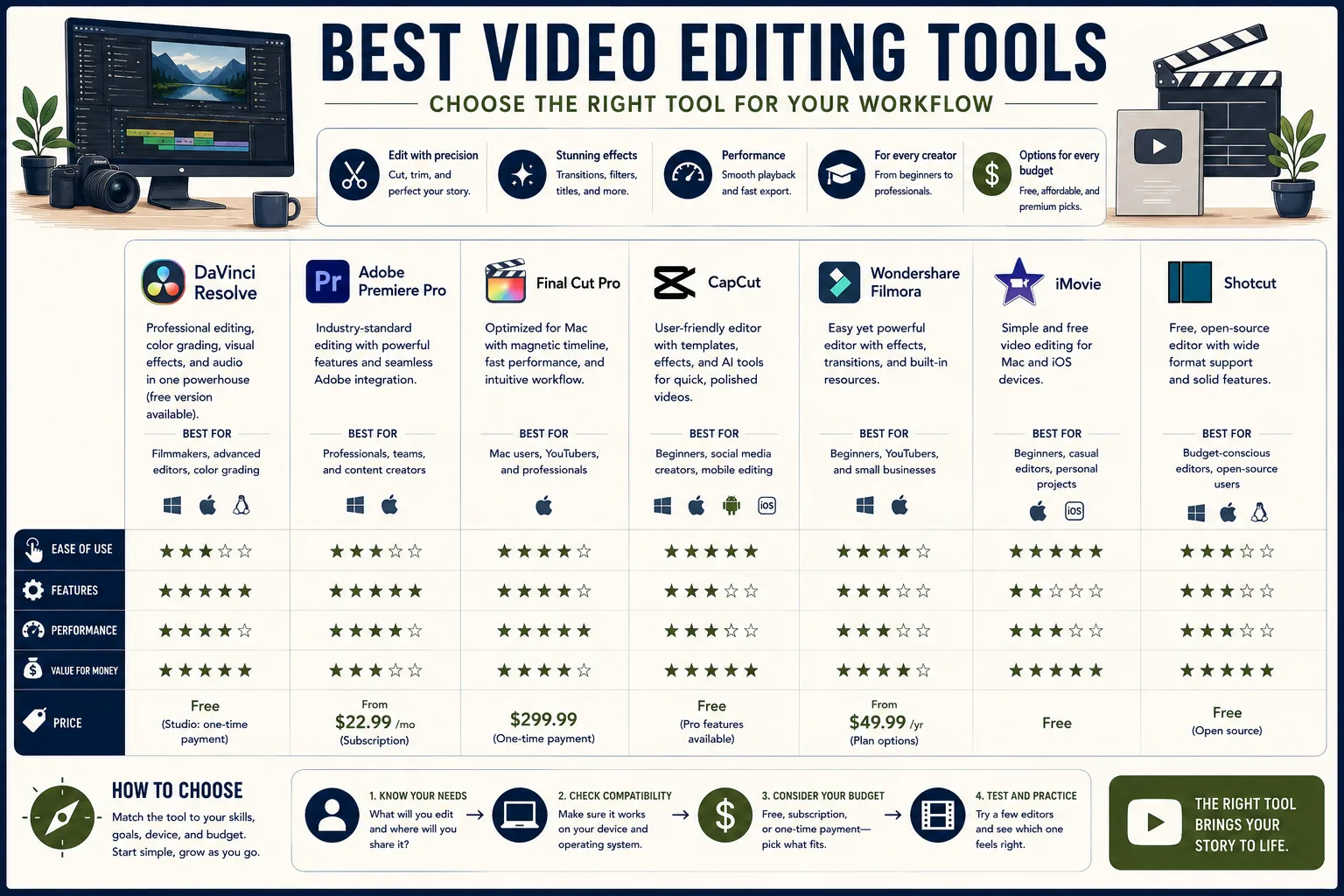
Canva's video editing is functional but not a replacement for CapCut for social video content.
CapCut
CapCut is the standard tool for short-form vertical video creation, used by the majority of creators producing content for TikTok, Instagram Reels, and YouTube Shorts.[6]
Core features:
- Trending templates updated in sync with current viral formats on TikTok and Instagram
- Auto-captions with speaker detection in over 40 languages
- Beat-sync automatically aligns cuts to music tempo
- AI tools: script-to-video, background removal, sky replacement, and text overlay animation
- Speed ramping with smooth interpolation for slow-motion transitions
- Green screen and chroma key
- Available on iOS, Android, and desktop (Windows and macOS)
- No watermark on standard exports
Pricing: Free. CapCut Pro at approximately $9.99/month for advanced AI features and effects.
Best for: Every creator producing short-form social video. CapCut's combination of free, trending templates, and platform-native feature updates makes it the most practical choice for TikTok and Reels content regardless of budget.
Limitations: Long-form editing beyond 20 minutes is cumbersome. Desktop version is less capable than the mobile app for most social media workflows. Some advanced features are gated behind the Pro subscription.
Flick
Flick combines hashtag research, AI caption writing, and post scheduling in a single tool designed specifically for Instagram and TikTok growth workflows.[11]
Core features:
- Hashtag research: engagement score and competition rating per hashtag, showing which hashtags your account size can compete in for reach
- Saves hashtag sets organized by post type, topic, and audience segment for reuse
- AI caption writing generates multiple caption drafts from a topic description with adjustable tone settings
- Caption variation testing for identifying which tone resonates with the account's audience
- Scheduling integration allows publishing AI-generated captions and researched hashtags directly without switching tools
- Analytics showing which hashtag groups and caption styles drive the most reach
Pricing: $14/month (Solo, 1 user, 1 account), $30/month (Team), $65/month (Agency).
Best for: Instagram creators who invest deliberate effort into hashtag strategy and caption quality and want data-driven hashtag selection rather than guesswork. Flick's combination of hashtag analytics with AI caption writing is differentiated from tools that offer either feature alone.
Limitations: At $14/month for one account, Flick is an additional cost on top of a scheduling tool. Creators who do not actively optimize hashtag strategy will get limited value from the research features. AI captions require editing for brand voice.
Analytics Tools
Iconosquare
Iconosquare is the specialist analytics tool for Instagram and TikTok, providing deeper platform-specific data than general-purpose tools like Metricool.[8]
Core features:
- Detailed Instagram analytics: engagement rate tracking, follower demographics, reach and impressions breakdown by content type, Stories analytics, hashtag performance
- TikTok analytics: video views, watch-through rates, follower growth, and profile visit tracking
- Competitor benchmarking: tracks competitor account metrics on Instagram and TikTok specifically
- Custom report templates for client-facing analytics presentations
- Team and agency features with multiple user access
Pricing: $49/month (Starter, 3 social profiles), $79/month (Standard, 5 profiles), $139/month (Advanced, 10 profiles).
Best for: Instagram and TikTok-focused brands and agencies for whom the depth of platform-specific analytics matters more than breadth across many platforms. The competitor benchmarking is particularly valuable for brands tracking specific competitor accounts.
Limitations: Expensive relative to the number of profiles included - $49/month for three profiles is more than Metricool's $22/month Starter which covers an entire brand across all platforms. Limited to Instagram and TikTok, so not useful for LinkedIn-heavy or multi-platform analytics workflows.
Sprout Social
Sprout Social is the enterprise-grade option combining scheduling, analytics, social listening, and CRM integration for large marketing teams.[7]
Core features:
- Smart Inbox aggregates all social mentions, replies, DMs, and comments across platforms into a prioritized queue with team assignment
- Social listening for monitoring brand mentions, competitor activity, and industry keyword trends
- CRM integration links social interactions to customer records across Salesforce, HubSpot, and others
- Detailed analytics with custom dashboard building and executive-ready report templates
- Employee advocacy features for amplifying company content through employee social profiles
- Influencer tracking and identification
Pricing: Standard $249/month per seat, Professional $399/month per seat, Advanced $499/month per seat.
Best for: Enterprise marketing teams where social media management connects to customer service, sales, and CRM workflows. The social inbox and CRM integration are the features that justify the price premium over Hootsuite for teams at this scale.
Limitations: Per-seat pricing at $249+ makes it impractical for teams of fewer than five with significant budget. The full value of Sprout Social requires CRM integration - teams using it solely as a scheduling and analytics tool are paying significantly above market rate for those features alone.
Taplio
Taplio is the LinkedIn-specialist tool in this category, offering content creation, scheduling, analytics, and lead tracking designed specifically for LinkedIn's content conventions.[9]
Core features:
- AI-assisted LinkedIn post writing trained on high-performing LinkedIn content patterns
- Carousel post creator formats multi-page content for LinkedIn's document format
- Lead tracking identifies which LinkedIn followers engage most frequently with posts - useful for B2B sales prospecting
- Scheduling for LinkedIn with first-comment scheduling
- Analytics showing impressions, engagement rate, and follower growth specific to LinkedIn
- Content inspiration from top-performing LinkedIn posts in your niche
Pricing: $49/month (Basic), $99/month (Pro with team features).
Best for: B2B founders, consultants, and sales professionals who use LinkedIn as a primary business development channel and want AI assistance tuned to LinkedIn's specific content conventions.
Taplio's lead tracking feature (identifying which accounts engage most with your content) is a differentiated feature not found in general-purpose schedulers.
Limitations: LinkedIn-only. At $49/month for a single platform, it is expensive unless LinkedIn is the primary revenue-generating channel. General-purpose tools like Buffer or Metricool handle LinkedIn scheduling at a fraction of the cost without the AI assistance and lead tracking.
Comparison Tables
Scheduling Tools
| Tool | Price | Channels | Team Features | Best For |
|---|---|---|---|---|
| Buffer | Free / $6 month per channel | 8+ platforms | Team plan | Solo creators, simple scheduling |
| Later | $18-80 month | 6 platforms | Growth plan+ | Instagram-first, visual grid |
| Hootsuite | $99-249 month | 8+ platforms | All plans | Agencies, social inbox, approvals |
| Metricool | Free / $22-120 month | 9+ platforms | Business plan | Analytics + scheduling combo |
| Publer | Free / $12-84 month | 8+ platforms | Business plan | Mid-market, good value |
Analytics Tools
| Tool | Price | Platforms | Competitor Analysis | Best For |
|---|---|---|---|---|
| Metricool | Free / $22 month | 9+ | Yes (free tier: 3) | Multi-platform, ads + organic |
| Iconosquare | $49-139 month | Instagram, TikTok | Yes | Instagram/TikTok specialists |
| Sprout Social | $249-499 month/seat | 8+ | Yes | Enterprise CRM integration |
| Taplio | $49-99 month | LinkedIn only | No | LinkedIn B2B professionals |
| Native analytics | Free | Per platform | No | Zero-cost baseline |
Content Creation Tools
| Tool | Price | Format | Best For | Limitation |
|---|---|---|---|---|
| Canva | Free / $13 month | Static + video | Graphics, templates | Template aesthetic is identifiable |
| CapCut | Free / $9.99 month Pro | Short-form video | TikTok, Reels | Limited for long-form |
| Flick | $14-65 month | Captions, hashtags | Instagram hashtag research | Additional cost on top of scheduler |
Building an Efficient Social Media Workflow
The most common failure in social media management is not picking the wrong tools - it is posting reactively rather than from a prepared schedule. The tools only help if the underlying planning structure exists.
The weekly workflow:
Planning (30 minutes per week): Decide what posts to create for the upcoming week. Use Metricool's best-time-to-post recommendations or native platform analytics to set optimal publishing windows. Document topics and formats in a shared Notion database or simple spreadsheet.
Creation (90-120 minutes per week): Produce the week's content in a single session. Static graphics in Canva using saved Brand Kit settings. Short-form video in CapCut using saved template presets that eliminate per-video setup.
Caption drafts in bulk using AI tools or writing all captions for the week at once to maintain consistent voice.
Scheduling (30 minutes per week): Load finished content into Buffer, Later, or Metricool for the week ahead. Do not log into each platform separately - the entire point of a scheduling tool is eliminating that daily login overhead.
Review (20 minutes per month): Pull analytics from Metricool or native platform dashboards. Identify which post types generated the most profile visits, link clicks, or follower growth. Adjust next month's content plan accordingly.
Recommended stacks by user type:
Solo creator: Buffer free tier + Canva free + CapCut free. Total cost: $0. Upgrade to Canva Pro ($13/month) when the Brand Kit and Magic Resize pay for themselves in saved time.
Small business: Metricool Starter ($22/month) + Canva Pro ($13/month) + CapCut free + Flick ($14/month for Instagram hashtag research). Total: $49/month.
Boutique agency (under 10 clients): Metricool Business ($120/month) + Canva Pro per team member ($13/month each) + CapCut free. Total: approximately $133-160/month. This covers multi-brand analytics, scheduling, content creation, and PDF client reporting without Hootsuite's pricing.
Enterprise team: Hootsuite Team ($249/month) or Sprout Social Standard ($249/month per seat) for social inbox and CRM integration + Canva for Enterprise ($30/month per user) + Iconosquare ($79/month) for Instagram and TikTok depth. Total: $500+ per month depending on team size ($249 + $30 + $79 = $358 for a single user).
The tool investment only pays off when it reduces the time and friction involved in maintaining a consistent posting schedule. A $22/month Metricool subscription that helps a business post consistently five days per week produces more results than a $249/month Hootsuite subscription used for reactive, irregular posting.
Sources & Further Reading
- Buffer. "Buffer: Social Media Management Software." buffer.com. View source
- Hootsuite. "Hootsuite: Social Media Management." hootsuite.com. View source
- Later. "Later: Social Media Scheduling." later.com. View source
- Metricool. "Metricool: Social Media Analytics and Scheduling." metricool.com. View source
- Canva. "Canva: Visual Suite for Everyone." canva.com. View source
- CapCut. "CapCut: All-in-one Video Editor." capcut.com. View source
- Sprout Social. "Sprout Social: Social Media Management." sproutsocial.com. View source
- Iconosquare. "Instagram and TikTok Analytics." iconosquare.com. View source
- Taplio. "Taplio: Grow on LinkedIn." taplio.com. View source
- Publer. "Publer: Social Media Management Tool." publer.io. View source
- Flick. "Flick: Hashtag Tool and Social Media Assistant." flick.tech. View source