
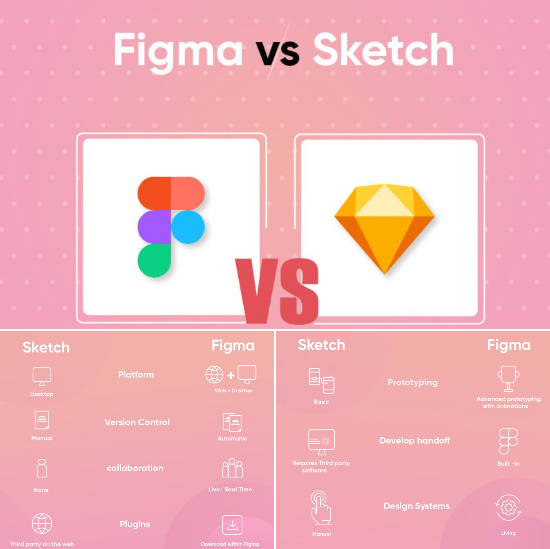
Three years ago this comparison would have been genuinely close. Sketch was the beloved Mac-native design tool that had displaced Adobe's design monopoly. Adobe XD was the well-funded challenger from the company that owns Photoshop and Illustrator.
Figma was the browser-based tool that collaboration-focused teams were adopting rapidly. Today the race is largely over. Figma won - but the story matters because it explains the current state of the market, what remains viable, and where the design tool landscape goes from here.
Adobe's failed $20 billion acquisition of Figma in 2023 changed the competitive landscape permanently. Adobe effectively signaled that XD was not its answer to Figma's growth, and the failed deal left XD in a maintenance state from which it has not recovered.
Sketch has continued developing as a Mac-native alternative with a loyal following and a sharper focus on its core users.
Figma, freed from acquisition uncertainty, has invested heavily in new features, raised its pricing in 2023, and has become the default UI/UX design tool across most of the industry. The UXTools annual design survey found Figma used by over 75% of product designers as their primary tool in 2024.[10]
This comparison gives designers, product teams, and students a direct answer for each tool's current state: what each is actually good for, what happened to Adobe XD and why it matters for existing users, whether Sketch is worth investing time in, and what to learn if you are entering the field.
"Choosing a design tool is choosing a community. The plugin ecosystem, the tutorials, the job listings, and the colleagues you will work with are all shaped by which tool the industry has converged on."
Key Definitions
Component / Symbol: A reusable design element - a button, a card, a navigation bar - that can be placed multiple times across a design. Updating the master component updates all instances.
Auto-layout: A constraint system that makes components resize dynamically based on their content, similar to CSS flexbox. A button stretches to fit its label. A card reflows when its width changes.
Variants: Figma-specific feature that lets you define multiple states of a component (default, hover, disabled, etc.) in a single component set and switch between them in prototypes.
Design token: A named value (a color, a spacing unit, a font size) that is shared between the design tool and the engineering codebase to keep design and code consistent.
Developer handoff: The process of communicating design specifications to engineers. Modern handoff tools auto-generate CSS values, spacing dimensions, and asset export options from the design file.
Prototype: An interactive simulation of a design where clicking elements navigates between screens or triggers animations, allowing user testing without writing code.
Feature and Pricing Comparison
| Feature | Figma | Sketch | Adobe XD |
|---|---|---|---|
| Platform | Web + desktop (Mac, Windows, Linux) | Mac only | Mac and Windows |
| Free tier | Yes (limited files) | 30-day trial only | No (CC subscription required) |
| Free viewer access | Yes (unlimited viewers) | Yes (web viewer) | Yes (limited) |
| Starter/Free plan | 3 projects, unlimited personal files | None | None |
| Professional plan | $15/editor/month (2023 pricing) | $12/editor/month | Part of Adobe CC ($59.99/month full) |
| Organization plan | $45/editor/month | $12/editor/month | N/A (XD not being developed) |
| Real-time collaboration | Yes, native | Yes (Sketch for Teams web) | Limited |
| Offline editing | Limited (desktop app required) | Full (native Mac app) | Yes |
| Auto-layout | Excellent, CSS-comparable | Good (Smart Layout) | Limited |
| Components | Components + Variants | Symbols + Smart Layout | Components |
| Prototyping | Yes, solid | Yes, good | Yes (was strong, now stagnant) |
| Plugin ecosystem | Largest, most active | Large, mature | Stagnating |
| Developer handoff | Excellent (Inspect + Dev Mode) | Good (with plugins) | Functional (no new development) |
| Active development | Very active | Active | Maintenance only |
| Market share among designers | ~75%+ (UXTools 2024) | ~10-15% | ~5% and declining |
| Best for | Most product design work | Mac-native solo/small teams | Existing users only; not for new learners |
Source: UXTools State of Design Tools 2024; Figma, Sketch, Adobe pricing pages, 2025.
What Happened to Adobe XD: A Full Account
Adobe XD launched in 2016 as Adobe's response to Sketch's growing dominance in UI design. Bundled into Creative Cloud subscriptions, anyone paying for Photoshop, Illustrator, or the full Creative Suite already had access to XD.
It developed a genuine user base, strong prototyping capabilities, and integrations with other Adobe products.
In September 2022, Adobe announced it would acquire Figma for $20 billion - a premium that valued Figma at approximately 50x its annual recurring revenue at the time. The strategic message was clear: XD was not going to win on its own merits, so Adobe was buying the winner.
Active development on XD slowed almost immediately after the announcement. The plugin ecosystem, which is highly sensitive to platform momentum, largely stopped growing as developers redirected effort to Figma.
The regulatory process stretched through 2023. In December 2023, both the European Commission and the UK Competition and Markets Authority blocked the acquisition, concluding it would eliminate a nascent competitive threat in the design tool market and harm innovation.[5]
Adobe paid Figma a $1 billion termination fee and was left with a substantially weakened XD, a damaged design strategy, and no acquired asset.[4]
In 2026, XD receives maintenance updates and security patches but no meaningful new features.[3] Adobe has directed enterprise customers toward Adobe Substance 3D and Adobe Illustrator for professional design work, and the experimental Adobe Express for lightweight design tasks.
Neither is a direct replacement for XD's UI design workflow.
For existing XD users: There is no immediate urgency to migrate if you are productive in XD and not hitting limitations. The tool functions. But any team planning for three-plus years should plan for migration, as the plugin ecosystem will continue to atrophy and community support will continue to decline.
Figma is the natural migration destination. The learning curve for experienced XD users is typically two to four weeks.
For new designers: Do not invest learning time in XD. The career costs are real: fewer job listings mention XD proficiency, fewer bootcamps teach it, and the community resources for learning are declining. Every hour spent learning XD is an hour not spent learning Figma.
Figma: Why It Won and What It Does Best
Collaboration as a Foundation, Not an Add-On
Figma's most consequential design decision was building collaboration into the architecture from the beginning rather than adding it later. In Sketch, you save a file and share it. In Figma, there is no file to save because everything lives in the browser and updates in real time.
Multiple designers can work on the same frame simultaneously. A product manager can comment on a wireframe from any device without installing software. A developer can inspect component properties and copy CSS values without an editor seat.
This changes the workflow of product design fundamentally. Design reviews happen inside the file, not in screenshot email threads. Handoff is a continuous state rather than a discrete event. Teams distributed across time zones collaborate on the same design system without merge conflicts or version management overhead.
Auto-Layout: The Technical Superiority
Figma's auto-layout system is the most powerful in the design tool category. It lets designers create responsive components that resize intelligently based on content, with padding, spacing, and direction controls that closely mirror CSS flexbox properties.[11]
A button component stretches to fit its label text. A list component adds space automatically when a new item is added. A card component reflows its internal elements when its container changes width.
This matters for the design-to-engineering handoff: when design components behave like CSS components, the translation to code is more direct. Developers spend less time interpreting design intent and more time implementing known behavior.
Components, Variants, and Design Systems
The component and variant system lets design teams build and maintain a shared design system.
A design system in Figma is a library of components - buttons, inputs, cards, navigation elements - with defined states (default, hover, active, disabled, error) organized as variants within a single component set.
When the design system team updates a component, every instance across all team files updates automatically.
For large product teams maintaining visual consistency across hundreds of screens, this infrastructure is not a luxury but a requirement. It is what makes Figma the right tool for serious product design work rather than individual creative projects.
Developer Handoff and Dev Mode
Figma's Inspect panel and the newer Dev Mode give developers exact dimensions, spacing values, typography properties, color codes, and generated CSS, iOS, and Android code snippets. Developers with view-only access (free of charge) can inspect any component in any team file.
This accessibility - free developer inspection for unlimited viewers - means engineering teams are never blocked by seat costs from accessing design specifications.
Dev Mode, introduced as a separate interface in 2023, provides a code-focused view of designs with additional information for developers: ready-for-development status, component documentation, and links to relevant code repositories.
Figma's 2023 Pricing Change
Figma's 2023 pricing restructure raised the Professional plan from $12 to $15 per editor per month, a 25% increase, and introduced a new Starter plan replacing the free plan.[1]
The change was controversial in the design community, particularly among smaller teams and freelancers who had relied on the free tier. The new pricing moved some capabilities to higher tiers.
| Plan | Old Pricing | New Pricing (2023) | Key Change |
|---|---|---|---|
| Free/Starter | 3 projects, basic features | 3 projects, unlimited personal | Remained free |
| Professional | $12/editor/month | $15/editor/month | 25% price increase |
| Organization | $45/editor/month | $45/editor/month | Unchanged |
| Enterprise | $75/editor/month | $75/editor/month | Unchanged |
Source: Figma pricing page, figma.com/pricing, 2025.
The controversy was amplified by context: the pricing change came amid the failed Adobe acquisition, which had caused Figma's independent future to be uncertain.[6] Post-acquisition-failure, Figma raised prices and invested heavily in new features.
The community response was mixed but the platform's dominance has continued to grow despite the price increase.
Sketch: The Mac-Native Alternative with a Loyal Following
Sketch invented the modern vector design tool workflow that Figma and XD both copied. Symbols, artboards, the Inspector panel, plugin architecture, and the component-based design system approach all originated or were popularized in Sketch.
The native Mac application is genuinely faster and more responsive than a browser-based tool on the same hardware.
Where Sketch Still Wins
For Mac-only designers working primarily alone or on small Mac-only teams who prefer a native app experience, Sketch remains an excellent tool. Performance is superior to Figma on older Mac hardware.
The plugin ecosystem, while no longer growing as fast as Figma's, contains mature, well-maintained tools for icon management, accessibility checking, design token integration, and design system management.
Sketch's pricing at $12/editor/month is lower than Figma Professional.[2] For individual designers who do not need real-time collaboration and work primarily on Mac, the lower price and native performance represent a genuine case for staying with Sketch.
The Sketch team has continued to develop the product with meaningful updates. Sketch for Teams, introduced in 2022, added a web viewer and commenting capability that closes some of the collaboration gap with Figma.[12] Libraries, shared components, and branch-based design workflows have improved significantly.
Where Sketch Cannot Compete
The Mac-only limitation is Sketch's defining structural weakness and the primary reason it will not recover broader market share. In any team where even one person uses Windows or Linux, Sketch cannot be the shared primary design tool.
In an industry where engineering teams run mixed OS environments and product managers often use Windows, this constraint eliminates Sketch from consideration for most product teams.
The collaboration model is structurally different from Figma's. Sketch for Teams added web collaboration after the fact, built on top of a tool designed for individual use. The experience is functional but does not match Figma's native collaboration.
Real-time simultaneous editing, which is a core Figma capability, is not something Sketch can fully replicate without rearchitecting the product.
For designers entering the workforce, Sketch's declining market presence affects hiring. Job listings citing Sketch proficiency are a small fraction of those citing Figma. Design bootcamps and formal training programs primarily teach Figma. Learning Sketch as a primary tool is a career risk for new designers.
Plugin Ecosystems: The Self-Reinforcing Advantage
Plugin ecosystems are a leading indicator of platform health. When developers build plugins for a platform, they signal confidence that users are there. When users find useful plugins, they become more embedded in the platform.
| Dimension | Figma | Sketch | Adobe XD |
|---|---|---|---|
| Total plugins available | 2,000+ | 1,000+ | Declining (no new development) |
| New plugins per month | High growth | Slowing | Effectively zero |
| Community templates | Very large | Large | Declining |
| Notable plugins | Unsplash, Content Reel, Iconify, Figmotion, Variables Import | Abstract, Sketch Measure, Runner, SVGO Compressor | Limited new |
| AI-powered plugins | Growing rapidly | Some | Very few |
Source: Figma Community, Sketch Extensions, Adobe XD Plugin listings, 2024-2025.
Figma's community is the largest and most active. Plugin developers build for Figma first and other platforms sometimes.[7] The AI plugin category - tools that generate design variations, populate content with AI, check accessibility automatically - is developing almost exclusively within Figma because that is where the users are.
Sketch's plugin ecosystem is mature and covers professional needs.[8] Existing plugins are well-maintained, but the pace of new development reflects the platform's reduced growth rate.
Developer Handoff Comparison
| Feature | Figma Inspect / Dev Mode | Sketch (with plugins) | Adobe XD Inspect |
|---|---|---|---|
| CSS generation | Yes, native | Yes (Sketch Measure) | Yes |
| iOS / Swift values | Yes | Yes | Yes |
| Android / Kotlin values | Yes | Limited | Yes |
| Design token export | Yes (Variables + plugins) | Yes (plugins) | Limited |
| Free developer access | Yes (view-only) | Yes (web viewer) | Yes (limited) |
| Component documentation | Dev Mode | Plugin-dependent | No |
| Redline / annotation tools | Dev Mode | Plugin-dependent | Basic |
| Link to code repository | Dev Mode (GitHub link) | No | No |
Figma's developer handoff is the most complete and requires the least plugin configuration. Dev Mode, available to paying teams, provides a purpose-built interface for developers that separates design-in-progress from design-ready-for-implementation.[9]
Learning Curve and Career Considerations
For students and early-career designers, the answer in 2026 is unambiguous: learn Figma first.
Job listings for product designers, UX designers, and UI designers cite Figma in the overwhelming majority of cases. Design bootcamps teach Figma. YouTube tutorials, design system courses, and UX certification programs center Figma. The learning resources are where the community is, and the community is in Figma.
| Role | Recommended Tool | Reasoning |
|---|---|---|
| New to design | Figma | Most learning resources, most job listings |
| Junior designer | Figma | Career applicability and collaboration experience |
| Senior designer with Sketch background | Figma (migrate) | Typically 2-4 weeks to proficiency |
| Senior designer, Mac-only freelance | Sketch or Figma | Performance vs collaboration tradeoff is personal |
| Developer reviewing designs | Figma | Free viewer, Dev Mode, no install required |
| Product manager reviewing designs | Figma | Browser-based, free viewer, commenting |
| Existing XD user | Migrate to Figma | Plan transition in next 12-18 months |
When to Choose Each Tool
Choose Figma if: you work on a product team with more than one designer or frequent collaboration with engineers and product managers; you work in a mixed-OS environment with any Windows or Linux users; you need the strongest plugin ecosystem; you are entering the job market and need the most transferable skill; or your team shares a design system across multiple products.
Keep using Sketch if: you are a Mac-only individual designer who values native app performance; you work on small teams where everyone uses Mac and real-time simultaneous editing is not a requirement; you are already invested in Sketch workflows and the switching cost is not worth the benefit for your specific situation.
Avoid Adobe XD for new work: The trajectory is clear. XD receives no meaningful new features, the plugin ecosystem has stagnated, and the industry has moved on. Existing users with productive workflows have no urgent reason to migrate immediately, but investment in XD-specific skills is not a sound long-term decision.
Practical Takeaways
Figma's dominance is the result of better product decisions made earlier, particularly the collaborative architecture and the auto-layout system. It is not marketing-driven. The survey data, job listings, and plugin ecosystem activity all reflect genuine user preference rather than vendor positioning.
Sketch is not dead. It is a well-maintained, capable tool for a specific user profile: Mac-native designers who value performance and offline capability over cross-platform collaboration. If you fit that profile, Sketch remains a rational choice.
Adobe's design strategy is unclear post-XD. The company retains enormous leverage through Creative Cloud subscriptions and its dominance of image editing, illustration, and video workflows.
Whether it builds a Figma competitor, acquires one, or cedes the UI design market to Figma is an open question. For designers making decisions today, that uncertainty argues for Figma.
Sources & Further Reading
- Figma Pricing - figma.com/pricing
- Sketch Pricing - sketch.com/pricing
- Adobe XD Product Page - helpx.adobe.com/support/xd.html
- Adobe-Figma Acquisition Termination - The Verge, December 2023
- European Commission Decision on Adobe-Figma - ec.europa.eu, 2023
- UK CMA Decision on Adobe-Figma - gov.uk/cma-cases, 2023
- Figma Community Plugin Marketplace - figma.com/community
- Sketch Extensions Directory - sketch.com/extensions/plugins
- Figma Dev Mode Documentation - help.figma.com/hc/en-us/articles/15023124644247
- UXTools State of Design Tools Survey 2024 - uxtools.co/survey
- Figma Auto-Layout Documentation - help.figma.com/hc/en-us/articles/360040451373
- Sketch for Teams Collaboration - sketch.com/for-teams