
Calendly Free covers one event type and one calendar connection. Standard is $10 per seat a month billed yearly and adds unlimited event types and multiple calendars. Teams is $16 per seat a month billed yearly and adds round-robin and team scheduling.[1]
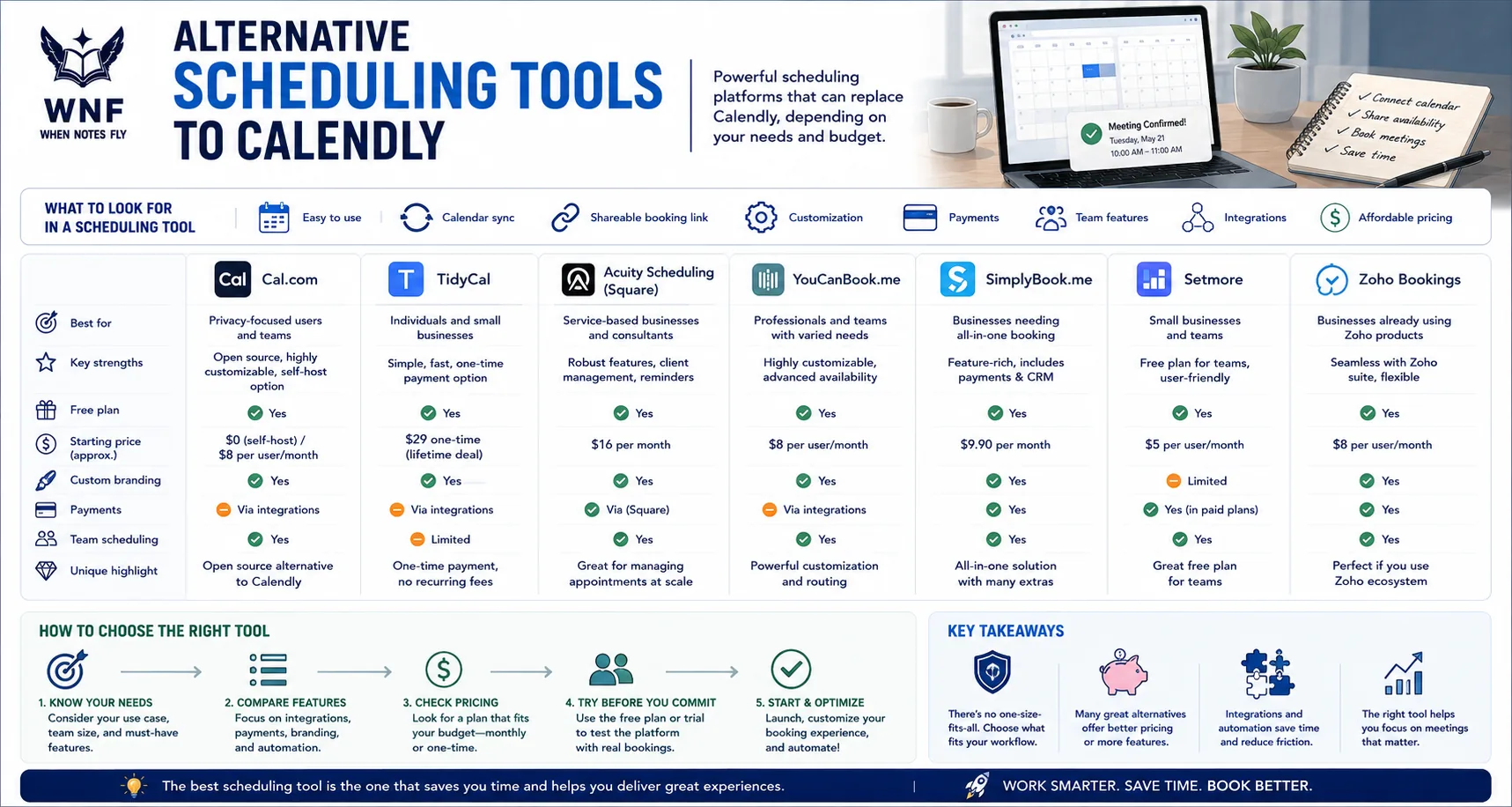
People look elsewhere when they need more event types on a free plan, a lower per-seat price, or a booking flow built for a specific job such as appointments or group polls. The tools below cover those cases.
Quick Picks
- Free for one person: Cal.com, free for 1 user with unlimited links and calendars.[2]
- Overlay booking and personal links: SavvyCal, $10 per user a month billed annually.[3]
- One-time payment: TidyCal, Individual Lifetime $29 on AppSumo, or a free plan.[4]
- Appointment businesses: Acuity Scheduling, from $16 a month paid annually.[5]
- Customizable booking page: YouCanBook.me, free plan with 1 calendar and 30 bookings a month.[6]
- CRM scheduling: HubSpot Meetings, free to start as part of Sales Hub.[7]
- Calendar management: Reclaim.ai, free Lite plan, then $10 per seat a month.[8]
- Group polls: Doodle, free plan with one group poll and one booking page.[9]
Why People Look for Calendly Alternatives
First to market with a polished scheduling link experience and still the most recognized tool in the category, Calendly has been. Pricing, branding and fit rather than fundamental capability explain why people seek alternatives.
The free plan is functionally limited. One event type and one calendar connection covers the minimum case (scheduling one kind of meeting) but does not cover the common reality of someone who needs multiple meeting types (a 15-minute discovery call, a 60-minute consultation, a 30-minute follow-up) or who connects to both Google and Outlook.
The moment a second event type is needed, the free plan runs out.
Calendly branding appears throughout the free tier. On the free plan, the booking page, the confirmation email and the cancellation flow all bear Calendly's branding.
For independent professionals and agencies presenting to enterprise clients, having a scheduling tool's brand appear in the client booking experience is a minor but persistent annoyance. Removing the branding requires a paid plan.
Per-user pricing scales for teams. Billed yearly, a five-seat team pays $50 to $80 a month for scheduling when Standard costs $10 per seat and Teams costs $16 per month.[1]
Business software does not cost an unreasonable amount but when alternatives give comparable functionality at lower prices or as one-time buys, the comparison gets uncomfortable.
Customization is limited on lower tiers. Higher tiers bring custom booking page design, custom confirmation redirects and closer integration with payment tools and CRMs as features. Brands have less ability to build a booking flow that matches their visual identity on Calendly's entry plans than on some other options.
The booking experience can feel impersonal. Because Calendly is so widely used, its booking pages are immediately recognizable to frequent calendar users.
Teams, especially those in high-touch client service businesses, run into trouble when the standard Calendly page format fails to give them the personalized and premium impression they want to make.
Cal.com
Cal.com is an open-source scheduling platform and the strongest direct alternative to Calendly, offering comparable features on its cloud-hosted plan and completely free, unlimited use for self-hosters.
Features: The app supports multiple event types including one-on-one, group, round-robin and collective events. It integrates calendars with Google Calendar, Outlook, iCloud and others and video meetings work through Zoom, Google Meet, Microsoft Teams and Loom. Forms for routing bookings to the appropriate team member depending on answers are included.
Payment collection through Stripe. The workflow includes automation of pre- and post-booking emails as well as reminders. There is team scheduling and management of availability.
The booking page can be customized with a logo, colors and a custom domain. It can be embedded as a widget or popup on any website. Custom integrations have an API available. The full open-source codebase is on GitHub.
Pricing: Free for 1 user, with unlimited links and calendars. Teams is $12 per user a month billed yearly, and adds round-robin scheduling, routing forms and removal of Cal.com branding. Organizations is $28 per user a month billed yearly. Enterprise is custom. The Teams and Organizations plans have a 14 day free trial.[2]
Pros vs Calendly: The self-hosted version is free with no limits and no branding - this alone is decisive for organizations with the technical capability to deploy a Docker container. The open-source model means the code is auditable, customizable, and not subject to pricing changes by a vendor.
At $12 per user a month on the Teams plan, billed yearly, team features are priced close to Calendly Teams at $16.[2]
Cons vs Calendly: Technical know-how and operational work go into self-hosting and the cloud free plan is for one user only. Team features call for a paid plan. The product is excellent and growing quickly but it has a younger ecosystem of community resources and templates.
Best for: Technical teams and developer-friendly organizations that want Calendly-equivalent functionality at no cost by self-hosting and teams that value open-source principles as well as data ownership.
SavvyCal
SavvyCal is a scheduling tool that gives the recipient a booking experience unlike any other. Rather than displaying the recipient a standard calendar grid of available slots, it puts the host's availability on top of the recipient's own calendar. They can see what they already have committed and pick a time.
Features: Recipients get overlay scheduling where they see their own calendar events next to the host's availability. That cuts down the need to go back and forth between a Calendly tab and their own calendar to find a time that works. The features also include personalized scheduling links that have the recipient's name in them.
Make availability preferences that come up most often available first. Group polls for scheduling when there are several parties involved. Connect calendars with Google and Outlook. Integrate video meeting capabilities. Add embed options. Give custom branding to the booking page.
Pricing: Basic is $10 per user a month billed annually, or $12 billed monthly, with unlimited scheduling links, polls and calendars, and team scheduling. Premium is $17 per user a month billed annually, or $20 monthly, and adds booking pages on your own domain, removal of SavvyCal branding and Stripe payments. A 30 day money-back guarantee applies.[3]
Pros vs Calendly: Overlay calendar as a feature is genuinely differentiated and makes the booking experience more considerate as well as cuts the recipient's cognitive load compared to standard calendar grids.
Unlimited scheduling links and team scheduling modes come standard in the $10 Basic plan. That is against Calendly Standard at $10 per seat monthly. It adds team scheduling only on the $16 Teams plan.[3][1] High-touch sales and consulting outreach get a nice touch from personalized links.
Cons vs Calendly: Less well known than Calendly means that recipients are less familiar with the interface. The overlay needs the recipient to authorize calendar access to display their own events and some recipients refuse. To remove SavvyCal branding takes the Premium plan at $17 a month per user billed annually.
Best for: Consultants, sales professionals and anyone in high-touch client relationships where the booking experience itself shows care and consideration and where the recipient's convenience counts most.
TidyCal
Through an AppSumo lifetime deal that brought it major attention, TidyCal is a scheduling tool that gives a one-time payment option and that completely removes the recurring subscription cost.
Features: The app offers several booking types including one-on-one meetings, group events and paid bookings. It syncs with Google Calendar and iCal and gives buffer times before and after meetings. Day-of-week and time-of-day customization is available for availability windows. Bookings can be customized with a basic page that includes a logo and color options.
Automatic meeting link generation through integration with Zoom. Email confirmations and reminders are included. The tool can be embedded on websites. It also allows group booking for several attendees in one slot.
Pricing: Free forever, with unlimited bookings and booking types. Individual Lifetime is a one-time $29 on AppSumo. Agency Lifetime is a one-time $79. Pro is $12 a month, and adds no TidyCal branding, a custom domain and unlimited calendar connections.[4]
Pros vs Calendly: At $10 a month, 3 months of Calendly Standard comes to about $29 one-time. That is the Individual Lifetime price.[4] When scheduling needs are standard for individual users and small teams, the lifetime cost beats ongoing subscription costs. The interface is clean and easy to set up.
Cons vs Calendly: Advanced features are much fewer than on Calendly. There are no routing forms, no advanced team scheduling and no Salesforce integration. Automation capability is less and the product is maintained by a small team that brings some uncertainty about what will be developed long term.
Not suitable for teams that need enterprise scheduling features.
Best for: This is ideal for freelancers, consultants, coaches and individual service providers that need standard scheduling features and want to skip a monthly subscription for a tool they use repeatedly.
Acuity Scheduling
Specifically for service businesses including therapists, coaches, salons, personal trainers, tutors and other appointment-based companies comes Acuity Scheduling as a scheduling tool. Its features for intake forms, payment collection and package management go beyond what Calendly offers.
Features: The service menu lets clients pick a service type that sets the meeting length, the price and which staff members are available for it. Staff management works like this. Every team member has their own availability and services can be given to particular staff members.
Payment is possible at booking through Stripe, Square or PayPal. Packages and subscriptions work by selling a block of sessions and tracking usage. Every intake form has required fields that must be filled in before booking is complete. Automated reminders go out by email and SMS.
There is no-show tracking and rebooking prompts. The custom booking page comes with colors, logo and layout. Clients have a client account portal where they can see and manage their own appointments.
Pricing: Starter is $16 a month with 1 calendar, or $20 paid monthly. Standard is $27 with up to 6 calendars, or $34 monthly. Premium is $55 with up to 36 calendars, or $69 monthly. The lower prices apply when paying annually. All prices are in USD, and there is a 7 day free trial.[5]
Pros vs Calendly: Service-business features including packages, intake forms and payment at booking as well as multiple staff members with different services are much better developed than what Calendly offers for appointment-based businesses.
The client portal for self-service appointment management is a feature Calendly does not offer. Payment collection is a first-class feature rather than an add-on.
Cons vs Calendly: Individual users who do not need the service-business features pay more than they would for Calendly. For simple one-on-one scheduling, the interface is more complex than Calendly's and it is overkill for pure scheduling without payment or staff management.
Best for: Appointment-based service businesses that include coaches, therapists, personal trainers, tutors, salons, wellness companies and any business that takes in intake forms, payments and multiple staff members through booking services.
YouCanBook.me
Many years on the market have made YouCanBook.me a simple, clean scheduling tool recognized for easy setup and a clean booking experience.
Features: A single booking page linked to a Google or Outlook calendar. Availability set up with buffer times, booking windows and minimum notice periods. Custom form fields for collecting information at booking. Automated email reminders come with custom copy as well.
Custom booking page URL. Automatic video links come through integration with Zoom and Google Meet. Team booking is available with shared calendars. The widget can be embedded as an inline widget.
Pricing: The free plan includes 1 calendar connection, 1 booking page and 30 bookings a month. Paid plans are Individual, with 2 calendar connections and unlimited bookings, and Professional, with 6 calendar connections and 10 booking pages. There is a 2 week free trial.[6]
Pros vs Calendly: The free plan gives a booking page that has your own logo and text and that works well for light use. Recipients find the tool has a clean, simple design that is easy for them to use. It has a long market track record with stable functionality.
Cons vs Calendly: Advanced features are fewer than what Calendly has and there are no routing forms, no complex team scheduling logic and less automation. Innovation also moves more slowly than at newer players like Cal.com or SavvyCal.
Best for: Small businesses and individual users who want a simple, affordable scheduling tool that has clean design and no complexity beyond booking a meeting.
HubSpot Meetings
HubSpot Meetings is the scheduling feature built into HubSpot's CRM platform, available on all HubSpot plans including the free tier, with deep integration into HubSpot's contact management, pipeline, and automation features.
Features: Personal meeting links for one-on-one bookings. Group meeting links for round-robin team booking. Sync with Google Calendar and Office 365. No HubSpot branding on the booking page (even on the free plan). Automatic contact creation or update in HubSpot CRM when a meeting is booked.
Data from meetings gets logged to the contact's activity timeline. When a meeting is booked through HubSpot Workflows (paid plans), follow-up sequences get triggered. Embed the tool on websites and landing pages.
Pricing: The meeting scheduler is free to start, as part of Sales Hub. Advanced features, including the AI meeting assistant, are in the Professional and Enterprise editions of Sales Hub.[7]
Pros vs Calendly: The most seamless scheduling-to-CRM integration of any tool in the category for HubSpot users. No branding on the booking page even on the free plan is genuinely unusual and valuable. No additional per-user cost if the team is already on HubSpot.
Cons vs Calendly: It only makes sense if you already use HubSpot, since adopting HubSpot Meetings means moving onto HubSpot CRM. As a standalone scheduler it is less flexible and polished than Calendly and advanced routing or team tools are locked behind paid HubSpot tiers.
Best for: This is best for HubSpot CRM users who want scheduling within their CRM without adding another tool. For teams where creating contacts at booking makes up a large part of the value.
Reclaim.ai
Reclaim.ai approaches scheduling from a different angle: it is an AI scheduling and time management tool that defends focused work time, schedules tasks and habits automatically, and handles meeting scheduling as one part of a broader calendar intelligence system.
Features: Links in smart scheduling that share availability by following intelligent rules on when meetings are appropriate and when focused work gets protection. Habits are automatic schedules for recurring blocks of time that go for activities like exercise, deep work and learning and protect regular practice from meetings.
Task scheduling takes care of syncing tasks from Asana, Todoist, Jira or Linear and has Reclaim set up time for them automatically. Meetings come with built-in buffer management. The calendar analytics show how time is actually being spent. Team scheduling has shared availability and no-meeting zones.
Pricing: The free Lite plan is for a 1 user team, with 1 scheduling link. Starter is $10 per seat a month and Business is $15 per seat a month, as listed on the pricing page. Enterprise is not priced on the page.[8]
Pros vs Calendly: Addresses the fuller problem of calendar management rather than just scheduling links. The habit and task scheduling features are unique in the scheduling tool category.
Knowledge workers whose calendars tend to fill with meetings unless actively protected find that an AI-driven approach to guarding focus time works usefully.
Cons vs Calendly: Setting up the tool is more complex than that of a simple scheduling link tool. To get the full Reclaim.ai value means integrating it with task management tools and setting up habits, priorities and scheduling rules.
One component of a larger tool is the scheduling link feature. It is not the main focus. When the feature overlap mainly covers scheduling links, this tool is more expensive than Calendly at equivalent tiers.
Best for: Knowledge workers and teams that want intelligent calendar management, automated task scheduling and habit protection as well as meeting scheduling. This is not for users who need only a booking link.
Doodle
Doodle is a group scheduling tool that solves a different problem from Calendly: finding a time that works for multiple people, particularly when those people do not share a calendar system.
Features: With group scheduling polls, set up a poll that includes proposed time slots and invite multiple participants to show their availability. The system automatically finds the slot that gets the most acceptances, sends meeting confirmation to all participants and uses calendar integration for automatic detection of availability.
One-on-one Doodle Meet Me links (Calendly-style scheduling) on paid plans. Bookings for scheduling pages for teams.
Pricing: Free: USD 0, with one group poll, one booking page, one 1:1 and one sign-up sheet. Pro has unlimited polls, booking pages, 1:1s and sign-up sheets, and is billed annually per seat. Team is billed annually per seat, for teams of 2 or more, and adds an admin console, custom branding and Stripe payments. Enterprise starts at USD 15k a year.[9]
Pros vs Calendly: Group scheduling polls for multi-party meeting coordination are a capability Calendly does not natively offer. The free plan includes one group poll, enough to try the most common use case (finding a group meeting time) without payment. The familiar poll format is understood by virtually any meeting participant.
Cons vs Calendly: A paid plan is needed for the Calendly-style one-on-one booking link (Meet Me). It is less capable than Calendly for the standard individual booking link use case. Each participant has to manually say what time they are available and that takes more friction than a single click on a calendar link.
Best for: Teams and individuals that regularly set up multi-party meetings across organizations or with external parties that do not use shared calendar systems. They also need a neutral polling tool instead of a link that only one host can book.
Comparison Table
| Tool | Free Plan | Paid Plans | Branding Removal | Self-Host | Calendar Connections | Best Strength |
|---|---|---|---|---|---|---|
| Calendly | Free, 1 event type | $10-16 per seat/mo billed yearly | See pricing page | No | 1 on Free, 6 on paid plans | Polish, ecosystem, recognition |
| Cal.com | Free, 1 user | $12-28 per user/mo billed yearly | Teams plan | Yes | Many | Open-source, self-host |
| SavvyCal | No | $10-17 per user/mo billed annually | Premium plan | No | Google, Microsoft, iCloud, Fastmail | Overlay UX, personalization |
| TidyCal | Free | $29 lifetime (AppSumo), $12/mo Pro | Pro plan | No | Google, iCal | Lifetime pricing |
| Acuity | No, 7-day trial | $16-55/mo paid annually | See pricing page | No | Google, Outlook | Service business features |
| YouCanBook.me | Free, 30 bookings/mo | Not shown on pricing page | See pricing page | No | Google, Apple, Microsoft | Customizable booking page |
| HubSpot Meetings | Free to start | Part of Sales Hub plans | See pricing page | No | Google, Outlook | CRM integration |
| Reclaim.ai | Free Lite plan | $10-15 per seat/mo | See pricing page | No | AI calendar management | |
| Doodle | Free, 1 group poll | Not shown on pricing page | See pricing page | No | Google, Outlook | Group scheduling polls |
Who Should Switch Away from Calendly
If you pay mainly for Calendly's branding removal and basic scheduling features and your team can self-host, move to Cal.com. Equivalence in scheduling functionality comes at zero software cost from the open-source self-hosted version.
If you are an individual user or freelancer who does not need enterprise features and want to get rid of the ongoing monthly cost, switch to TidyCal. The lifetime pricing makes the math simple.
If you run an appointment-based service business as a coach, therapist, personal trainer or salon and Calendly lacks the feature set for intake forms, payments, packages and staff management that your actual booking process needs, switch to Acuity Scheduling.
Switch to HubSpot Meetings if your team is already on HubSpot and you are paying for Calendly as a separate tool - the integrated CRM scheduling is better for HubSpot users even if the raw feature set is slightly less polished.
Who Should Stay with Calendly
If your scheduling needs are mature and tested on Calendly's system and the cost is covered comfortably by the business it enables, stay on the platform. In consulting and service businesses where each booked meeting brings in a lot of revenue, $10 to $16 a month per seat is little compared with what a dependable, polished booking experience is worth.
If you make use of Calendly's more advanced features such as routing forms that send different types of requests to different team members, Salesforce integration, round-robin team scheduling or payment collection then stay. In those areas Calendly's implementation is more mature than most alternatives.
If external clients and prospects regularly book meetings with you, stay. Calendly's wide recognition means that they already know how to work with the booking page without any friction.
For teams managing their broader communication and scheduling workflow, the alternatives to Loom for async video covers the async video tools that complement scheduling for teams working across time zones.
Teams building connected automation around their scheduling data should review the alternatives to Zapier for workflow automation for tools that trigger workflows when meetings are booked.
Sources and Further Reading
- Calendly. Pricing. Checked 17 November 2026.
- Cal.com. Pricing. Checked 17 November 2026.
- SavvyCal. Pricing. Checked 17 November 2026.
- TidyCal. Pricing. Checked 17 November 2026.
- Acuity Scheduling. Pricing. Checked 17 November 2026.
- YouCanBook.me. Pricing. Checked 17 November 2026.
- HubSpot. Free meeting scheduler. Checked 17 November 2026.
- Reclaim.ai. Pricing. Checked 17 November 2026.
- Doodle. Packages. Checked 17 November 2026.