
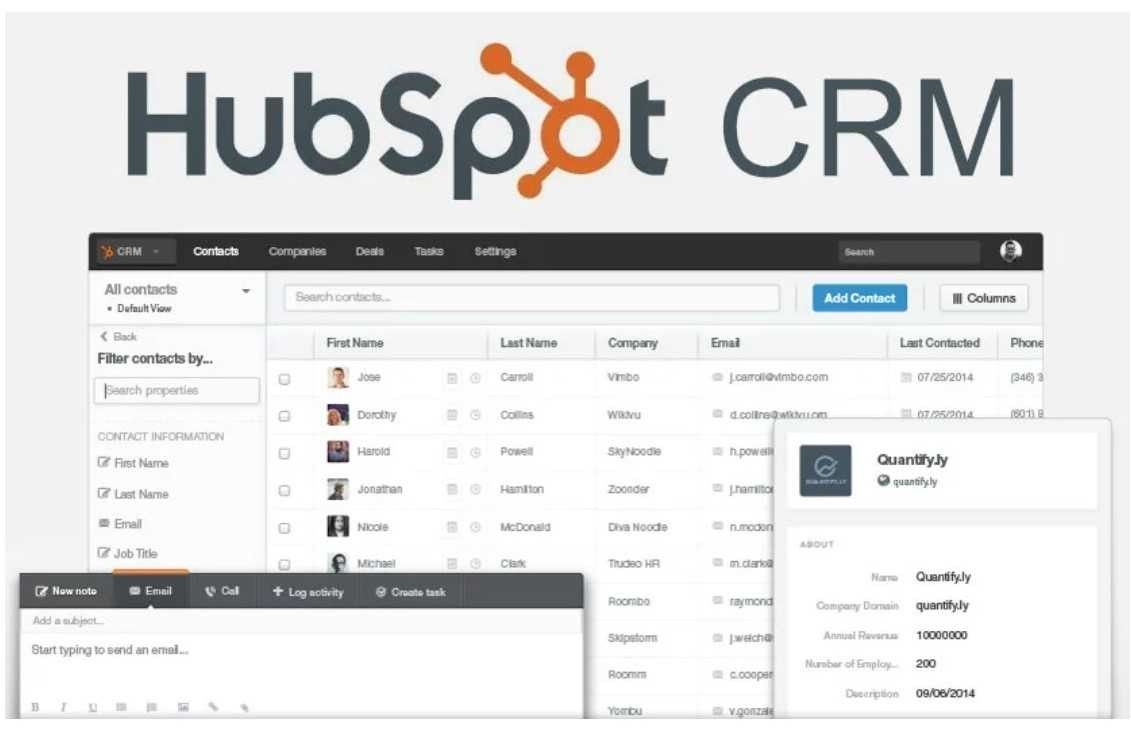
Elena was the head of sales at a Series A startup when the finance team flagged a line item in the monthly software review: HubSpot, $4,200 per month. That was $50,400 per year. The startup had twelve sales and marketing employees.
The math was $4,200 per month for a tool used daily by those twelve people, plus the CEO who reviewed reports.
When Elena dug into what was driving the number, the structure of HubSpot's pricing became clear in a way it had not been when the tools were adopted individually.
The free CRM had led to Sales Hub Starter. Sales Hub Starter had eventually led to Sales Hub Professional for sequences and custom reporting. Then Marketing Hub Professional had been added for marketing automation. Then Operations Hub Starter for data sync.
Each addition had felt incremental and justified at the time. The total had accumulated without a moment where anyone had reviewed the full picture.
The $4,200 per month was not entirely unjustified - the tools worked, the team was trained on them, and the integration between HubSpot's marketing and sales tools was genuinely useful for tracking the lead journey from first touchpoint to closed deal.
But $50,400 per year at a company where every dollar was watched carefully triggered a mandatory evaluation. The alternatives had improved significantly since the original HubSpot adoption three years earlier. The evaluation would take a month.
What Elena discovered during that month was that HubSpot had solved a real problem well - the integration between marketing automation and sales CRM in a single data model, where a contact's entire history from first ad click to closed deal was visible to both teams in one place.
That integration was genuinely hard to replicate. But she also discovered that for most of what the sales team did day-to-day - managing the pipeline, running email sequences, logging calls, producing forecasts - they were paying a significant premium for that integration.
Several alternatives provided the sales-specific features at a third of the cost.
"HubSpot's free CRM is one of the best free products in software. The challenge is that HubSpot's business model begins where the free product ends."
Why People Look for HubSpot Alternatives
HubSpot's CRM itself is not the problem. The contact management, deal pipeline, email tracking, meeting scheduling, and basic reporting available at no cost are genuinely useful and competitive with paid CRM tools at other companies. The reasons companies look for alternatives are primarily about what happens after the free tier.
The Hub pricing model scales aggressively. HubSpot sells its Marketing, Sales, Service, CMS, and Operations capabilities as separate Hubs, each with Starter, Professional, and Enterprise tiers. The Starter tiers are modestly priced.
The Professional tiers - where the automation, custom reporting, and team management features live - are expensive: Marketing Hub Professional is $800/month, Sales Hub Professional is $90/user/month, Service Hub Professional is $90/user/month.
A company that adopts the free CRM, finds it valuable, and needs one paid Hub has a manageable cost. A company that needs three Hubs at Professional tier is paying $2,000-4,000/month or more before enterprise tier considerations.
Contact-based pricing grows with success. Many HubSpot features are priced based on the number of marketing contacts in the database. 1,000 contacts, 10,000 contacts, 50,000 contacts, and 100,000 contacts each trigger higher pricing tiers in the marketing plans.
A successful inbound marketing program that builds a large email database also automatically increases HubSpot's monthly cost. This feels counterintuitive: the better your marketing works, the more you pay for the tool that enables it.
Over-engineering for simpler needs. HubSpot is built for inbound marketing organizations that need content tools, landing pages, email marketing, marketing automation, social publishing, paid ads management, SEO recommendations, and lead scoring in addition to CRM.
A company that has a clear outbound sales motion and does not need the inbound marketing infrastructure is paying for capabilities it does not use. Focused sales CRM tools deliver the pipeline management and outreach features at a lower price without the marketing overhead.
The free tier creates meaningful lock-in. By the time a company discovers that its actual needs require paid HubSpot features, it has often built significant process on the free CRM. Contact records, deal history, email templates, meeting links, and form embeds are all in HubSpot.
Migrating away requires exporting contacts, rebuilding templates, and retraining a team that has learned HubSpot's specific way of doing things. The free tier is generous partly because the exit cost it creates is real.
Salesforce
Salesforce is the enterprise CRM standard, with a flexibility and ecosystem that no other CRM matches for organizations with complex, custom sales processes.
Features: Customizable objects - standard (Contacts, Accounts, Opportunities, Leads, Cases) and custom (any data model your business needs). Workflow automation via Flow, Process Builder, and Apex code. AppExchange with over 5,000 apps and integrations.
Einstein AI for lead scoring, opportunity insights, and forecasting. Reports and dashboards with deep customization. Territory management for complex enterprise sales organizations. Salesforce CPQ for complex quoting.
Integration with every major enterprise system via native connectors or MuleSoft. Role hierarchies and sharing rules for enterprise security. Mobile app with full functionality.
Pricing: Essentials $25/user/month. Professional $75/user/month. Enterprise $150/user/month. Unlimited $300/user/month. Plus costs for add-ons (Marketing Cloud, Service Cloud, CPQ, etc.).
Pros vs HubSpot: Flexibility for custom sales processes that do not fit predefined templates - if your sales process has unique stages, objects, or logic, Salesforce can model it. The AppExchange ecosystem provides integrations and applications for nearly any business need.
Enterprise governance features are more mature than HubSpot's for large organizations with complex permissions, compliance, and audit requirements.
Cons vs HubSpot: Salesforce requires dedicated administration expertise to configure and maintain effectively. A poorly configured Salesforce is significantly worse than a well-configured HubSpot or simpler CRM. Implementation costs for a proper Salesforce setup typically run $10,000-50,000 for mid-market companies.
The user interface is less intuitive than HubSpot's for everyday sales activities. Marketing automation requires Salesforce Marketing Cloud, which is a separate, expensive product rather than an integrated offering.
Best for: Enterprise organizations with complex, multi-product, multi-region sales operations that require a customizable data model, enterprise security, and a rich integration ecosystem.
Pipedrive
Pipedrive is a sales-pipeline-first CRM designed around the needs of salespeople rather than marketing or service teams, with a visual pipeline that makes deal status and required actions immediately obvious.
Features: Visual deal pipeline with drag-and-drop deal management. Rotting deals feature that highlights deals that have been inactive too long. Activity reminders for every deal at the appropriate stage. Email sync with tracking opens and clicks.
Email templates and sequences (Advanced plan). AI Sales Assistant that suggests the next best action for each deal. Revenue forecasting. Custom fields and pipeline stages. Mobile app with business card scanning and geo-located check-ins.
Integration with Google Workspace, Microsoft 365, Zoom, Slack, and over 400 others. LeadBooster add-on for prospecting and chatbot.
Pricing: Essential $14.90/user/month. Advanced $24.90/user/month. Professional $49.90/user/month. Power $59.90/user/month. Enterprise $74.90/user/month.
Pros vs HubSpot: Significantly cheaper than HubSpot's Sales Hub Professional for comparable sales-specific features. The pipeline-first design is more intuitive for salespeople who think in terms of deal stages and activities rather than contact properties and lists.
Onboarding is fast - new team members are productive within a day. The focused scope means there is less to configure, less to maintain, and less to train on.
Cons vs HubSpot: No marketing automation - Pipedrive is a sales CRM, not a marketing platform. Teams that need HubSpot's inbound marketing and CRM integration will need a separate marketing tool if they switch to Pipedrive.
Reporting is less sophisticated than HubSpot's at comparable tiers. Service and support ticket management are absent.
Best for: Small to mid-sized B2B sales teams that need a focused, affordable pipeline CRM without marketing automation complexity. Particularly strong for teams where salespeople are the primary users and simplicity drives adoption.
ActiveCampaign
ActiveCampaign is an email marketing and automation platform with a CRM layer built in, making it a strong alternative for companies that want marketing automation and CRM in a single tool at a lower price than HubSpot.
Features: Email marketing with segmentation, dynamic content, and A/B testing. Marketing automation workflows: visual automation builder with triggers, conditions, and actions including emails, wait steps, deal stage updates, contact scoring, and webhook calls.
CRM with deal pipelines and sales automation. Lead scoring with custom scoring rules. Site tracking to capture web behavior and trigger automations. Conversation inbox for sales and support email.
SMS marketing (higher tiers). Integrations with Shopify, WooCommerce, Stripe, Calendly, and hundreds of others. Predictive sending for email delivery time optimization.
Pricing: Starter $15/month (500 contacts, 1 user, email marketing only). Plus $49/month (1,000 contacts, CRM included). Professional $79/month (2,500 contacts, predictive sending, split automations). Enterprise $145/month (custom contacts, custom features). Note: pricing scales with contact count.
Pros vs HubSpot: Email marketing automation is generally considered stronger than HubSpot's at comparable price points - the visual automation builder is more flexible and the contact segmentation is more sophisticated.
The integrated CRM and marketing automation at lower cost than HubSpot's equivalent is the core value proposition. E-commerce integrations are deeper than HubSpot's for online stores.
Cons vs HubSpot: Contact-based pricing also applies to ActiveCampaign, so large databases face similar scaling cost issues. The CRM component, while capable, is less polished than HubSpot's or Pipedrive's for complex sales pipelines. Sales features are secondary to the marketing automation focus.
Best for: Small to mid-sized businesses where email marketing and automation are the primary revenue driver and the CRM is a secondary need, particularly e-commerce businesses and content businesses with significant email lists.
Attio
Attio is a modern CRM designed for companies that want a flexible, data-enrichment-enabled relationship management tool with a clean interface that contrasts with the legacy UIs of Salesforce and HubSpot.
Features: Object and attribute model that is fully customizable - build the exact data model your business needs rather than adapting to a predefined schema. Automatic data enrichment from public sources: company size, funding, technology stack, and contact information filled in automatically for records.
Real-time sync with email and calendar for automatic activity logging. Reporting and analytics built into the data model. Sequence automation for outbound.
Workspace sharing and collaboration. API for custom integrations. Clean, modern interface designed for frequent use by salespeople and founders.
Pricing: Free (3 users, core features). Plus $29/user/month. Pro $59/user/month. Enterprise pricing on request.
Pros vs HubSpot: The flexible data model is genuinely more adaptable than HubSpot's predefined object structure for companies with non-standard business models. Automatic data enrichment reduces the manual data entry burden that makes CRM adoption difficult.
The modern interface is more pleasant to use daily than HubSpot's increasingly complex UI. Growing fast with strong design quality.
Cons vs HubSpot: Younger product with a smaller integration ecosystem than HubSpot or Salesforce. Marketing automation is not as developed as HubSpot's. Enterprise governance features are less mature.
Best for: Growth-stage companies, venture-backed startups, and B2B SaaS teams that want a flexible, modern CRM with automatic data enrichment and do not need HubSpot's full marketing automation suite.
Close
Close is a CRM built specifically for outbound sales teams, with built-in calling, email sequencing, and SMS that eliminates the need for separate dialer and outreach tools.
Features: Built-in phone system: make and receive calls directly from the CRM, automatic call logging, optional call recording, voicemail drop. Email sequences: automated multi-step outbound sequences with personalization variables. SMS built in for text-based outreach and follow-up.
Power Dialer and Predictive Dialer for high-volume calling. Pipeline management with custom stages. Reporting on call volume, email opens, sequence performance, and rep activity. Lead import and list management. Zoom and Slack integrations. Mobile app with calling support.
Pricing: Startup $49/user/month. Professional $99/user/month. Enterprise $139/user/month.
Pros vs HubSpot: The built-in phone system, email sequencing, and SMS in a single CRM replaces what is otherwise a stack of HubSpot CRM + a separate dialer (Aircall, Dialpad) + a separate outreach tool (Outreach, Salesloft).
The consolidated cost is often lower than this stack and the workflow is more integrated. Call logging is automatic, removing the manual activity logging burden from salespeople.
Cons vs HubSpot: Significantly more expensive per user than HubSpot's CRM for basic pipeline management. No inbound marketing tools. The model is outbound-first and does not suit inbound marketing organizations well. Smaller integration ecosystem than HubSpot.
Best for: Outbound B2B sales teams (SDRs and AEs) who make significant call and email volume and would otherwise use a separate dialer and outreach tool alongside a CRM.
Folk
Folk is a modern relationship management tool designed for founders, investors, freelancers, and small teams that manage professional networks rather than traditional sales pipelines.
Features: Contact management with manual and automatic network syncing from LinkedIn and Gmail. Relationship tracking with interaction history, notes, and reminders to reconnect. Customizable pipelines for any relationship management use case (investor pipeline, partnership pipeline, hiring pipeline, client pipeline).
Group and tag contacts for segmented outreach. Email personalization and mass outreach from within the tool. Templates for common outreach messages. Data enrichment for professional context. Clean, minimal interface designed for daily active use.
Pricing: Standard $20/user/month. Premium $40/user/month. Enterprise pricing on request.
Pros vs HubSpot: Purpose-built for relationship management rather than formal sales pipelines - the model fits founders managing investor relationships, independent consultants managing client pipelines, and anyone whose primary business development is relational rather than transactional.
Clean and fast compared to HubSpot's increasingly complex interface. No contact-based pricing that scales with database size.
Cons vs HubSpot: Not suitable for formal sales organizations with multiple reps, sales management reporting, or marketing automation requirements. Feature scope is intentionally limited compared to HubSpot.
Best for: Founders, investors, freelancers, and small professional service firms that need a tool for managing a professional network and business relationships rather than a formal sales operation.
Streak
Streak is a CRM built entirely inside Gmail, transforming email threads and contact data into pipeline stages and CRM records without requiring a separate application.
Features: Pipelines built inside Gmail with stages displayed alongside email threads. Box (Streak's deal/contact record) created from any email conversation. Automatic email tracking: see when emails are opened and links are clicked. Mail merge for personalized bulk email from Gmail.
Snippets for reusable email templates. Scheduled send and send later. View contacts' full interaction history within Gmail threads. Shared pipelines for team visibility. Google Sheets integration for data export and analysis. Available as a Chrome extension and via mobile app.
Pricing: Free (personal use, 500 contacts, basic pipeline). Solo $15/month. Pro $49/user/month. Enterprise $129/user/month.
Pros vs HubSpot: Zero tool-switching - the entire CRM experience happens inside Gmail, which suits salespeople or founders who live in email. No onboarding required for teams already using Gmail. Free plan covers basic pipeline management for individual users. No new application to learn or maintain.
Cons vs HubSpot: Limited to Google Workspace users - if your team does not use Gmail, Streak is not applicable. Feature depth is lower than HubSpot for formal sales team management, reporting, and automation. Not suitable for teams with more than one or two salespeople sharing pipelines at scale.
Best for: Freelancers, solopreneurs, and small businesses that use Gmail as their primary business tool and want to add pipeline tracking without adopting a separate CRM application.
Freshsales
Freshsales is the CRM product from Freshworks, positioned as a capable, clean HubSpot alternative with built-in phone, email, and AI lead scoring at competitive pricing.
Features: Contact and account management with 360-degree views of all interactions. Built-in phone and email with call recording and email tracking. Freddy AI for lead scoring, deal insights, and next-best-action suggestions. Sales sequences for automated outreach.
Visual pipeline management with multiple pipeline support. Web visitor tracking. Custom modules and fields. Reporting and forecasting. Integration with Freshdesk (help desk), Freshmarketer (marketing automation), and the full Freshworks suite. Google Workspace, Microsoft 365, Slack, and Zapier integrations.
Pricing: Free (unlimited users, 100 contacts). Growth $15/user/month. Pro $39/user/month. Enterprise $69/user/month.
Pros vs HubSpot: Significantly cheaper than HubSpot's Sales Hub Professional for comparable features. Built-in phone and email at lower price tiers than HubSpot.
AI lead scoring (Freddy AI) available at the Pro tier ($39/user/month) versus HubSpot's predictive scoring which requires higher tiers. Clean interface that is easier to navigate than HubSpot's complex sidebar navigation.
Cons vs HubSpot: The Freshworks ecosystem integration is less well-known and less deeply used than HubSpot's, so the benefit of connecting Freshsales to Freshdesk or Freshmarketer requires committing to the Freshworks platform.
Marketing automation in Freshmarketer is less mature than HubSpot's Marketing Hub. Smaller community and fewer third-party resources than HubSpot.
Best for: SMB sales teams that want a clean, affordable CRM with built-in calling and AI features, and teams already considering the broader Freshworks ecosystem for support and marketing.
Zoho CRM
Zoho CRM is part of the extensive Zoho suite of over 45 business applications, providing a feature-rich CRM at prices that undercut HubSpot substantially while offering comparable functionality.
Features: Contact, lead, account, and deal management. Workflow automation with multi-step rules and actions. Blueprint for defining structured sales processes with stage requirements and SLAs. Zia AI for sales predictions, anomaly detection, and conversation analysis.
Email marketing integration via Zoho Campaigns. Social media monitoring and engagement. Territory management. Gamification (sales contests and leaderboards). Custom modules and fields.
CPQ for quoting. Integration with Zoho Books, Zoho Projects, Zoho Desk, and the full Zoho ecosystem. Integration with Google Workspace, Microsoft 365, and over 800 third-party apps.
Pricing: Free (up to 3 users, basic CRM). Standard $14/user/month. Professional $23/user/month. Enterprise $40/user/month. Ultimate $52/user/month.
Pros vs HubSpot: Substantially cheaper than HubSpot at every comparable feature tier. Blueprint for structured sales processes is a distinctive feature that enforces process compliance in a way HubSpot does not.
The Zoho ecosystem covers almost every business function at competitive prices, providing a genuine alternative to the Google/Microsoft/HubSpot/Salesforce combination. Free plan supports up to 3 users.
Cons vs HubSpot: The interface is less polished than HubSpot's and can feel complex to navigate for new users. The breadth of the Zoho ecosystem is also a potential distraction - evaluating which Zoho tools to use requires more decision-making than adopting a single integrated suite.
Customer support response times can be slower than HubSpot's.
Best for: Small to mid-sized businesses that want a feature-rich CRM at a lower cost than HubSpot, particularly teams that would benefit from the broader Zoho ecosystem for accounting, help desk, or project management.
Notion CRM
A Notion CRM is not a product but a workflow built in Notion's database system, providing complete flexibility at the cost of setup time and the absence of native CRM automation and activity tracking.
Features: Contact database with custom properties for company, role, deal size, stage, priority, and any other fields needed. Board view of the contact database functions as a pipeline. Relation properties to link contacts to deals, deals to companies, companies to interactions.
Notes and meeting records as linked pages. Manual task tracking via linked databases. Email and meeting log via manual entry or copied content. Document storage for proposals, contracts, and briefs. Sharing with clients or stakeholders via Notion's guest access.
Pricing: Covered by existing Notion subscription. Free plan covers basic use. Plus $10/user/month for larger teams.
Pros vs HubSpot: Zero incremental cost for existing Notion users. Complete flexibility to build exactly the data model your business needs. Works well alongside Notion's documentation and project management features - the same tool serves CRM, knowledge management, and project tracking.
No contact-based pricing that scales with database size.
Cons vs HubSpot: No automatic email tracking, no built-in calling, no native sequence automation, no lead scoring, no contact enrichment. Everything that a dedicated CRM does automatically must be done manually in Notion. Not scalable for formal sales teams with multiple reps who need management reporting.
Best for: Founders, freelancers, and solo consultants who are already in Notion and want basic relationship and deal tracking without adding another tool or subscription.
Comparison Table
| Tool | Price | Free Tier | Marketing Automation | Built-in Calling | Best Strength |
|---|---|---|---|---|---|
| HubSpot | $0-3600+/mo | Generous CRM | Yes (paid Hubs) | No (add-on) | Inbound marketing + CRM |
| Salesforce | $25-300/user/mo | No | Via Marketing Cloud | No | Enterprise flexibility |
| Pipedrive | $14.90-74.90/user/mo | 14-day trial | No | Via add-on | Pipeline simplicity |
| ActiveCampaign | $15-145/mo | No | Yes (native) | No | Email automation |
| Attio | $0-59/user/mo | 3 users | Limited | No | Modern UX, enrichment |
| Close | $49-139/user/mo | No | Email sequences | Yes (built-in) | Outbound calling + email |
| Folk | $20-40/user/mo | No | Basic | No | Relationship management |
| Streak | $0-129/user/mo | Yes | Basic | No | Gmail-native CRM |
| Freshsales | $0-69/user/mo | 100 contacts | Via Freshmarketer | Yes (built-in) | AI features, clean UI |
| Zoho CRM | $0-52/user/mo | 3 users | Via Zoho Campaigns | Via add-on | Feature value, ecosystem |
| Notion CRM | $0-10/user/mo | Yes | No | No | Flexibility, zero cost |
Who Should Switch Away from HubSpot
Switch to Pipedrive if your team is primarily outbound sales and you are paying for HubSpot Sales Hub Professional primarily for sequences and pipeline management - Pipedrive provides those features at a fraction of the cost without the marketing overhead.
Switch to ActiveCampaign if your primary HubSpot use is email marketing and automation rather than sales pipeline management - ActiveCampaign's automation is more capable at a lower price for marketing-first organizations.
Switch to Close if your team makes high call and email volume and you are currently paying for HubSpot plus a separate dialer and outreach tool - Close's built-in phone and sequences consolidate the stack.
Switch to Attio if you are a growth-stage company that finds HubSpot's interface increasingly complex and wants a modern, flexible data model with automatic enrichment.
Switch to Salesforce only when your sales process complexity genuinely requires Salesforce's custom object model and you have the budget and administration resources to run it effectively.
Who Should Stay with HubSpot
Stay if your organization's primary growth model is inbound marketing - content, SEO, paid acquisition, lead nurturing - and the integration between HubSpot's Marketing Hub and CRM is actively informing how your marketing and sales teams collaborate.
The contact journey tracking from first touchpoint through closed deal is genuinely valuable and hard to replicate with separate tools. Stay if you have invested significantly in HubSpot's automation, workflows, and reporting and those investments are producing measurable efficiency.
The cost of recreating that configuration elsewhere is real. Stay if your team has adopted HubSpot's meeting scheduling, email templates, and document sharing as part of daily sales workflow - these are features that are easier to maintain in HubSpot's integrated suite than to replicate across multiple tools.
HubSpot's free CRM alone is one of the best free products in software, and for companies that have not yet outgrown it, the right answer is often to stay and be thoughtful about which paid upgrades are genuinely necessary.
For teams thinking about their broader operations toolstack, the alternatives to Asana for project management is relevant for sales and marketing operations teams managing complex campaign and project workflows, and the alternatives to Mailchimp for email marketing covers the email marketing layer that often pairs with CRM decisions.