
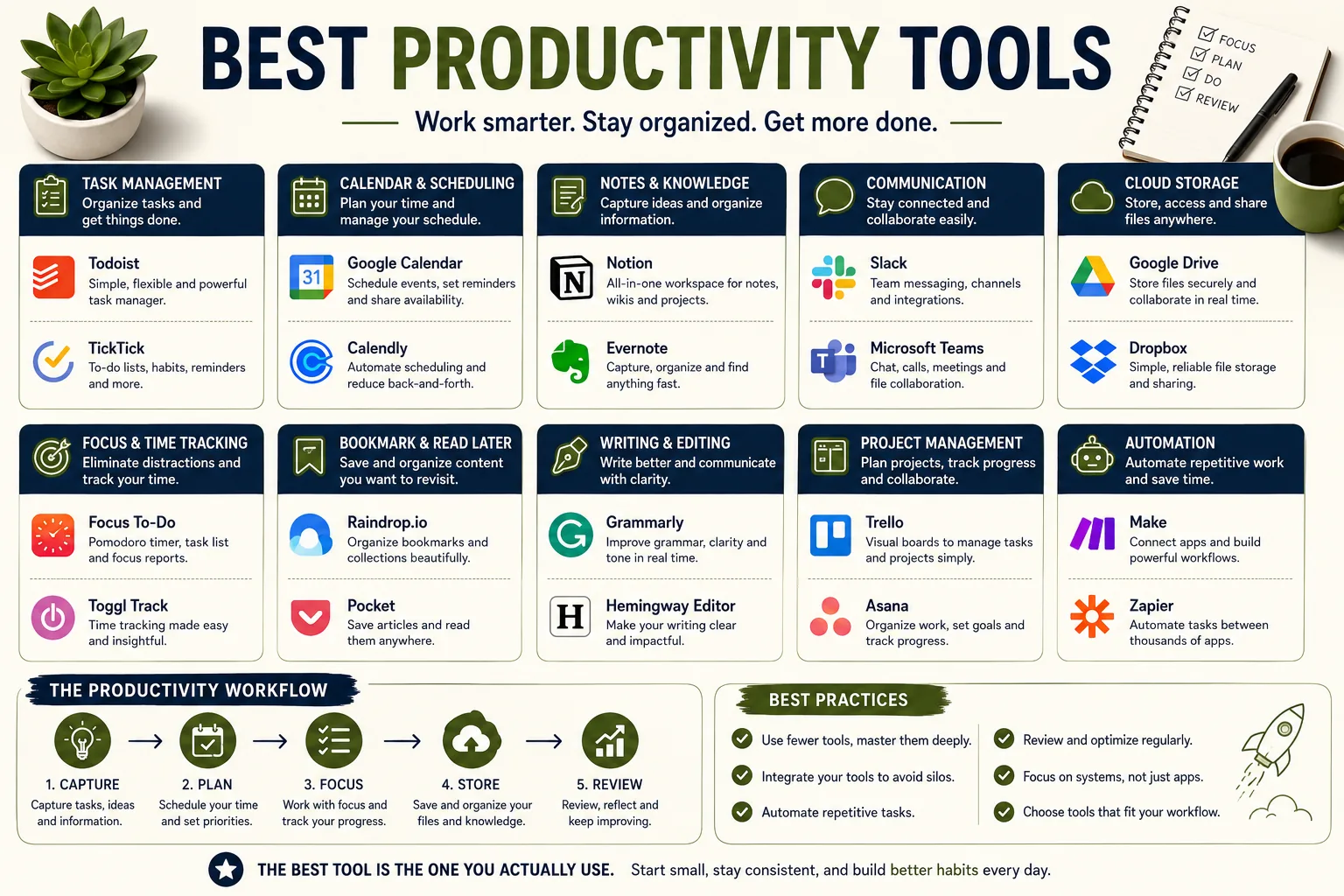
A productivity stack fails when tasks live in several places and no source can be trusted as definitive. From notion to todoist, the useful question is not which app has the most features but which arrangement gives a person or team a reliable view of priorities without creating another layer of management work.
David Park ran a six-person content agency in Seoul and spent the first hour of every Monday morning rebuilding his task list from scratch. Not because tasks had been completed over the weekend. Not because the project landscape had shifted dramatically.
The lists existed - in Asana, in a shared Notion board, in a running thread in Slack - but they existed in three places simultaneously, none of them definitive.
He could not begin Monday with confidence about what was most important because he could not trust any single source to have the complete picture. He had more tools for managing work than he had hours to manage them.
The consultant he hired to diagnose the problem spent two days shadowing his team. Her conclusion was blunt: three people on the team checked Asana regularly, two checked the Notion board, and one checked neither, relying on Slack mentions.
The tools had not created alignment. They had created the appearance of alignment while the actual coordination happened through messages and conversations that left no record anyone could consult later.
The productivity tools had become a tax on the team's attention - something to update, review, and maintain - rather than infrastructure that made work easier.
The paradox of productivity tools in 2026 is that the supply of good ones far exceeds any individual's or team's ability to use them well. There are excellent task managers, sophisticated project tools, smart schedulers, time trackers, focus aids, and personal knowledge systems at every price point.
The challenge is not finding good tools - the challenge is understanding which tools actually reduce friction for a specific workflow, and which tools create new friction while providing the feeling of organization.
This guide examines the best options in each category and, more importantly, the conditions under which each one makes work better rather than more complicated.
"The question is not whether a tool is good. The question is whether it fits the work and the person doing the work."
Task Management: Capturing and Processing Work
Todoist
Todoist has occupied the top tier of task management applications since its 2007 launch, and its continued position there in 2026 reflects consistent execution on the fundamental task manager promise: fast capture, reliable reminders, and clear prioritization across every device a person uses.[4]
The core strength is natural language input. Type "submit quarterly report every Friday at 9am p1" and Todoist parses the recurrence, the time, and the priority level automatically.
Typing a task feels close to writing it on a sticky note - the friction of entering tasks is low enough that the habit forms. When capture is fast enough, the inbox empties regularly rather than accumulating an unbrowsable backlog.
The Karma system tracks completion rates and streaks over time, introducing a mild gamification layer. For writers and knowledge workers who find daily commitment tracking motivating, the karma score provides a visible signal of consistency rather than just task completion.
Filters and labels enable cross-project views. A filter showing every P1 task across every project, or every task labeled "client-A", or every task due this week across all contexts - these views answer the question "what should I do right now" more directly than navigating individual projects.
Integration is broad: Google Calendar, Slack, Gmail, Outlook, Notion, GitHub, and dozens of others via Zapier. For most professional contexts, Todoist connects to the tools already in use.
Pricing: free (up to 5 active projects, 5 collaborators), Pro $4/month, Business $6/month per user.
Best for: individuals who need fast cross-platform task capture, professionals working across Mac and Windows or mixing Apple and Android devices, anyone whose current system involves losing track of commitments.
Things 3
Things 3, developed by Cultured Code, exists in a different design tradition than Todoist.[5] Where Todoist prioritizes speed, feature density, and broad platform support, Things 3 prioritizes craft, visual quality, and an opinionated organizational structure.
The result is a task manager with a smaller user base but among the most loyal: people who use Things tend to stay.
The Areas, Projects, and Tasks hierarchy maps to how people actually organize their work and life. Areas are ongoing roles or responsibilities - Work, Health, Finance, Home - that do not have completion dates. Projects are finite efforts within those areas that have a clear done state.
Tasks live within projects or areas. This three-level structure is simple enough to internalize quickly and flexible enough to accommodate most workflows.
Start dates and deadlines are separate and distinct concepts in Things, and this distinction matters more than it initially appears. A deadline is when a task must be done. A start date is when a task should appear in your view for consideration.
The combination allows scheduling tasks to surface when you intend to work on them rather than burying everything in a list that includes tasks for three months from now alongside tasks for today.
The Today view presents everything scheduled for the current day alongside tasks you have explicitly moved there. The Upcoming view shows what is coming. Anytime shows everything that is available to work on without a specific date. Someday holds ideas and deferred items out of the active workflow.
This four-view structure, drawn from David Allen's Getting Things Done methodology, creates a complete system from the built-in interface.[2]
Pricing: $49.99 Mac, $9.99 iPhone, $19.99 iPad - one-time purchase with no subscription.
Best for: Mac and iOS users who value software craftsmanship, prefer a polished opinionated system over infinite customization, and follow or want to follow a GTD-influenced workflow.
Limitation: no Windows, no Android, no web version. If your workflow crosses platforms or includes Android, Things 3 is not available.
Personal Knowledge Management: Obsidian and Roam Research
Obsidian
Obsidian's position in the productivity tool landscape is specific: it is a personal knowledge management tool, not a task manager.[6]
Its job is to help writers, researchers, and knowledge workers build a usable second brain - a system where information accumulated over months and years remains searchable, connected, and genuinely usable rather than buried in a folder hierarchy no one navigates.[3]
The bidirectional linking system is the foundation. Every note can link to every other note. Obsidian tracks these connections in both directions. The result is a network of related ideas navigable through connections rather than through folder hierarchies.
An article written three years ago about decision-making appears as a backlink in a new note about cognitive biases - the connection is visible, and the older thinking becomes available at the moment it is relevant.
The graph view renders the entire vault as a visual network. Nodes representing notes, edges representing links between them. Dense clusters reveal areas where thinking is most developed. Isolated nodes reveal ideas not yet connected to anything.
Over years of use, the graph becomes a map of a person's intellectual interests and how they relate.
The plugin ecosystem includes over 900 community-developed extensions. The Dataview plugin makes Obsidian function as a database - query notes by metadata, create automatic lists, generate task lists from notes containing specific tags. The Spaced Repetition plugin adds flashcard functionality.
The Kanban plugin adds visual boards. The Calendar plugin creates daily notes navigable by date. Obsidian can be as minimal or as feature-rich as the user builds it.
The local-first architecture means all data lives as plain Markdown files on the user's device. No vendor lock-in, no risk of service discontinuation, readable by any text editor. This is an underappreciated advantage for knowledge accumulated over years.
Pricing: free for personal use. Obsidian Sync $50/year for encrypted cross-device sync. Obsidian Publish $96/year for publishing notes as a website.
Best for: researchers, writers building a personal knowledge base, academics, anyone whose work involves connecting ideas across long time periods.
Roam Research
Roam Research takes the bidirectional linking concept further than Obsidian and applies it to daily workflow. Roam is built around the daily note as the primary entry point: every day begins with a new page for the current date where all thoughts, tasks, and notes flow.
The key innovation is block-level linking. In most note-taking tools, a link points to an entire document. In Roam, a link can point to a specific block - a single bullet point - within any document. This allows building a knowledge structure at a finer granularity than page-level connections allow.
The outliner interface treats every note as a hierarchy of bullet points that can be collapsed, expanded, and rearranged. This structure is either natural or deeply uncomfortable depending on how a person thinks. Roam has strong advocates and many people who found it did not match their mental model.
Pricing: $15/month or $165/year.
Best for: researchers and writers who want maximum flexibility in how they structure and connect knowledge, those who respond well to outliner interfaces.
Project Management: Linear, Trello, and Asana
Linear
Linear was designed to solve a specific problem: project management tools for software teams had become slow, complex, and cluttered. Linear is fast - exceptionally fast - and opinionated.[7] It loads instantly, responds instantly, and is navigable entirely by keyboard for users who prefer not to use the mouse.
The Issues, Projects, and Cycles structure maps to how software teams actually work. Issues are discrete work items. Projects group related issues. Cycles are time-boxed sprints. The workflow is specific and not easily customized to other methodologies - Linear is designed for agile software development, not generic project management.
Integrations with GitHub and GitLab allow issues to update automatically when code is merged or deployed. A developer can link a code branch to a Linear issue, and the issue moves through workflow states as the code progresses. This closes the gap between project tracking and actual development work.
Pricing: free up to 250 issues, $8/month per user paid.
Best for: software engineering teams, product teams, technical teams where the keyboard-driven workflow and development integrations are used.
Limitation: not well-suited to non-technical teams. The opinionated workflow and technical integrations are advantages for software teams and irrelevant or awkward for marketing teams, agencies, or general knowledge work teams.
Trello
Trello's kanban board interface - cards moving through columns representing workflow stages - has been a reliable choice for small teams and simple projects since Atlassian acquired it in 2017.
The visual metaphor is immediately intuitive: a column for "To Do", one for "In Progress", one for "Done". Work flows left to right.
Power-Ups extend Trello's basic functionality: calendar view, voting, custom fields, time tracking, and integrations with dozens of services. The free tier allows unlimited cards and 10 boards per workspace.
Butler automation handles repetitive card movements: when a card is moved to "Done", automatically assign it to an archive list and send a Slack notification. When a card's due date passes, move it to "Overdue". These automations reduce administrative overhead in maintained boards.
As part of the Atlassian ecosystem, Trello integrates with Jira, Confluence, and other Atlassian products.
Pricing: free tier generous, Standard $5/month per user, Premium $10/month, Enterprise $17.50/month.
Best for: small teams, simple project tracking, visual thinkers, teams that find Asana or Jira excessive for their actual complexity.
Asana
Asana offers the most complete feature set of any mid-market project management tool: list view, board view, timeline (Gantt-style), calendar view, and a workload view showing capacity across team members.[8]
The Goals feature connects individual tasks and projects to organizational objectives, making it possible to see how day-to-day work relates to quarterly targets.
Dependencies between tasks allow creating accurate project timelines: task B cannot start until task A is complete, and the schedule adjusts automatically when task A slips. This is meaningful for projects with complex sequential dependencies.
Portfolios show status across multiple projects simultaneously, useful for managers or agency leads who need a cross-project view without opening each project individually.
Pricing: free up to 15 members (limited features), Premium $10.99/month per user, Business $24.99/month per user.
Best for: marketing teams, operations teams, agencies, any non-technical team managing complex projects with dependencies and reporting requirements.
AI-Powered Scheduling: Reclaim.ai
Reclaim.ai
Reclaim.ai addresses a specific problem that affects professionals with heavy meeting loads: by the end of a day of meetings, the time for focused work has been fragmented into segments too short to be useful.
A meeting at 10, a meeting at 2, and a meeting at 4 does not leave two 90-minute focus blocks. It leaves three short gaps that may each be interrupted before deep focus develops.
Reclaim connects to Google Calendar and works actively rather than passively.[9] Instead of showing what is scheduled, it makes scheduling decisions based on rules the user defines.
Habits are recurring commitments: deep work blocks, exercise, lunch, email processing. Tell Reclaim you want three hours of deep work per day and that it should never be scheduled before 9am or after 5pm. Reclaim finds time and books it, rescheduling automatically when meetings are added.
Smart 1:1 meetings find optimal meeting times that protect both parties' focus windows. Rather than booking meeting time in the middle of a focus block, Reclaim surfaces slots at the edges of existing commitments.
Task scheduling connects to Todoist, Asana, and Linear. High-priority tasks automatically get scheduled time on the calendar before lower-priority ones. The gap between "this is important" in a task manager and "this has time to actually happen" in a calendar closes.
The practical effect: professionals using Reclaim typically see an increase in protected focus time per day without working longer hours. The increase comes from the meetings that fill available time being pushed to less productive slots rather than the most productive ones.
Pricing: free basic, Starter $8/month, Business $12/month, Enterprise $16/month.
Best for: professionals with high meeting loads, knowledge workers whose most important work requires sustained attention.
Time Tracking: Clockify and RescueTime
Clockify
Clockify is the most accessible time tracking tool in the category: genuinely free for unlimited users with the core feature set intact.[10] The free tier includes unlimited time entries, unlimited projects, unlimited team members, and basic reporting.
The workflow is manual: click to start a timer when beginning a task, click to stop when finished. Label the time entry with a project and description. At the end of the week, reports show exactly how time was distributed across clients, projects, and task types.
For freelancers billing by the hour and consultants tracking project time for client invoicing, the combination of time tracking and reporting justifies even the paid tier's cost. The ability to export detailed reports and attach them to invoices closes the billing workflow cleanly.
Pricing: free (unlimited users and basic features), paid plans $3.99-11.99/month per user for advanced features.
RescueTime
RescueTime takes a different approach: automatic tracking rather than manual.[11] The desktop application runs in the background and records time spent in every application and website. No timer to start, no entries to create. The tracking happens whether or not the user remembers to do it.
The categorization system assigns applications and websites to Productive or Distracting categories automatically and allows customization. At the end of a day, the dashboard shows exactly where the hours went: 2.3 hours in Google Docs, 47 minutes in Slack, 1.1 hours classified as "News and Opinion", 32 minutes in YouTube.
The gap between perceived and actual focus time that RescueTime reveals is typically significant. Users who believe they work six focused hours per day often discover they average three. This is not a judgment - it is information that allows realistic planning rather than aspirational scheduling.
The FocusTime feature blocks distracting sites during scheduled focus periods, combining tracking with active protection.
Pricing: free limited version, Premium $6.50/month.
Freedom
Freedom is a website and application blocker that works across platforms - Mac, Windows, iOS, Android - with synchronized sessions.[12] Create a blocklist of distracting sites (social media, news, streaming) and schedule Freedom sessions to block them during work hours.
The Locked Mode option prevents turning off a session once it starts. This removes the willpower requirement: the earlier-self's decision to block social media cannot be overridden by the current-self who found the drafting difficult and wanted a brief distraction. The commitment is mechanical rather than motivational.
Pricing: $3.33/month annual, $6.99/month monthly.
Comparison Table
| Tool | Category | Price | Platform | Best For |
|---|---|---|---|---|
| Todoist | Task management | Free / $4/month | All platforms | Fast capture, cross-platform |
| Things 3 | Task management | $49.99-$79.99 one-time | Apple only | GTD, polished design |
| Obsidian | Knowledge management | Free (personal) | Mac, Win, iOS, Android | Second brain, research |
| Roam Research | Knowledge + outliner | $15/month | Web | Block-level linking, outliner |
| Linear | Project management | Free / $8/month per user | Web, Mac, Win | Software teams |
| Trello | Project management | Free / $5-17/month per user | All platforms | Simple visual kanban |
| Asana | Project management | Free / $11-25/month per user | All platforms | Non-technical teams |
| Reclaim.ai | AI scheduling | Free / $8-16/month | Google Calendar | Focus time protection |
| Clockify | Time tracking | Free / $4-12/month per user | All platforms | Billable hour tracking |
| RescueTime | Time tracking | Free / $6.50/month | Mac, Win, iOS, Android | Automatic time awareness |
| Freedom | Focus / blocking | $3.33-6.99/month | Mac, Win, iOS, Android | Blocking distractions |
Recommended Stacks by Workflow Type
Solo creator or freelancer: Todoist ($4/month) for task capture, Clockify (free) for billable hour tracking, Obsidian (free) for knowledge and notes, Freedom ($3.33/month) for focus protection. Total: approximately $7-8/month for a complete individual productivity system.
Software team: Linear ($8/month per user) for project and issue tracking, Notion ($15/month per user) for documentation and knowledge, Slack for communication. The key is keeping project tracking in Linear (where developers live) and documentation in Notion rather than trying to do both in one tool.
Marketing or content team: Asana ($11/month per user) for project management, Notion ($15/month per user) for content planning and knowledge base, Clockify or Toggl for time tracking if billing clients. The combination gives project visibility plus the contextual documentation that content teams need.
Individual professional with meetings: Todoist or Things 3 for personal tasks, Reclaim.ai for calendar management, RescueTime for time awareness, Notion or Obsidian for knowledge. This stack addresses the specific problem of protecting focused work time in a calendar dominated by meetings.
What Research Shows
Gloria Mark, Chancellor's Professor of Informatics at UC Irvine and author of Attention Span (Hanover Square Press, 2023), published research in her 2008 paper "The Cost of Interrupted Work: More Speed and Stress" (Proceedings of CHI 2008) finding that it takes an average of 23 minutes to fully return to a task after an interruption.[1]
Her subsequent research (2023, updated with smartphone data) found that average attention span before self-interruption had dropped from 2.5 minutes in 2004 to 47 seconds by 2020.
Website blockers like Freedom and scheduled focus time tools like Reclaim directly address this by reducing the frequency of interruption events.
Microsoft's 2021 Work Trend Index, based on data from 31,000 workers across 31 countries, found that focus time - blocks of two or more consecutive hours without meetings - had decreased by 37% compared to pre-2019 baselines.
Workers with more than six hours of meeting time per week had measurably lower scores on creative task assessments.
This data provides the business case for AI scheduling tools like Reclaim that protect focus blocks in heavily meeting-loaded calendars.
A 2014 study by Marily Oppezzo and Daniel Schwartz at Stanford ("Give Your Ideas Some Legs: The Positive Effect of Walking on Creative Thinking", Journal of Experimental Psychology, 2014, with Oppezzo's follow-up research) found that creative output increased by 60% during and immediately after walking compared to sitting.
Productivity tools that support time-blocking for non-desk activities - habits in Reclaim, break reminders in RescueTime - connect to a body of research finding that the highest-quality work is not produced by maximizing continuous hours at the desk.
Sources & Further Reading
- Mark, Gloria. Attention Span: A Groundbreaking Way to Restore Balance, Happiness and Productivity. Hanover Square Press, 2023. View source
- Allen, David. Getting Things Done: The Art of Stress-Free Productivity. Penguin Books, 2015. View source
- Forte, Tiago. Building a Second Brain. Atria Books, 2022. View source
- Todoist. "Organize your work and life, finally." todoist.com. View source
- Cultured Code. "Things 3 for Mac, iPhone, and iPad." culturedcode.com. View source
- Obsidian. "Obsidian: A second brain, for you, forever." obsidian.md. View source
- Linear. "The software project management tool." linear.app. View source
- Asana. "Manage your team's work, projects, and tasks online." asana.com. View source
- Reclaim. "AI scheduling automation for Google Calendar." reclaim.ai. View source
- Clockify. "Free Time Tracking Software." clockify.me. View source
- RescueTime. "Understand your digital life." rescuetime.com. View source
- Freedom. "Block Websites, Apps and the Internet." freedom.to. View source
See also: Best Writing Tools in 2026, Best AI Tools for Content Creators, Productivity Tools Compared, and Tool Overload Explained.