Zapier bills by the task, and every action step that runs counts as one. A five-step Zap that runs 1,000 times a month uses 5,000 tasks, so the bill grows with both the number of runs and the length of each workflow.[1]
That is why the best alternative depends on your mix of volume, logic, budget and technical comfort, not on which platform is best in the abstract.
Quick Picks
- Complex logic without code: Make, with a free plan of 1,000 credits a month.[2]
- High volume or strict data rules: n8n, free to self-host, or from €20 a month in the cloud.[3]
- Microsoft 365 organizations: Power Automate Premium, $15 per user a month.[4]
- Open source with a gentler interface: ActivePieces, free for 1,000 credits a month, then $20 a month.[6]
- Multi-step workflows on a budget: Pabbly Connect is free for 100 tasks a month and internal steps are not counted.[9]
- Personal automations: IFTTT is free for 1,000 credits a month and has paid plans starting at $2.09 a month.[8]
- Developers shipping integrations: Pipedream, free to build, then $99 a month billed annually.[7]
- Beginners who need the widest app coverage: stay on Zapier, with more than 9,000 apps and a free plan of 100 tasks a month.[1]
Zapier is the best known platform for workflow automation and it deserves its market leadership. It has the biggest app library, the most beginner-friendly interface and strong reliability.
It is not the right choice for every use case. Its pricing at high automation volumes runs much higher than that of alternatives giving comparable or superior capabilities for specific use cases.
Understanding the landscape of automation platforms (what each does well, what each costs, and when each is appropriate) is increasingly important as automation becomes central to business operations.
Zapier, Make, n8n, Microsoft Power Automate, Workato as well as several specialized platforms get covered in this article. There is specific guidance on which one to pick for different ways an organization can be organized.
Zapier: The Market Leader
What it is: Zapier is the original workflow automation platform for non-developers, founded in 2011. It connects more than 9,000 apps through a visual trigger-action interface. Individual automations ("Zaps") consist of a trigger and one or more action steps.
Strengths:
App library: Zapier's library of more than 9,000 apps is the largest in the automation platform space by a significant margin.
If you are connecting two applications, Zapier is very likely to have native integrations for both, often with more extensive integration coverage (more triggers, more actions, more data fields) than competitor platforms.
Ease of use. True beginners find Zapier's interface the most accessible. New users go through a setup flow that guides them to set up triggers and actions with clear explanations at each step. The learning curve for building a basic Zap measures in minutes, not hours.
Reliability and support. Strong uptime and a responsive support team are what Zapier offers. When an organization needs reliable automation without the resources to fix problems itself, how well Zapier supports it becomes important.
Filter and path features: Zapier's "Filter" and "Paths" features allow basic conditional logic: running an automation only when certain conditions are met, or routing automation logic down different paths based on conditions.
Weaknesses:
Pricing at volume: Zapier's pricing is structured around "tasks" - each action step that executes counts as one task. A five-step Zap that runs 1,000 times per month consumes 5,000 tasks. The Free plan includes 100 tasks a month. Professional starts from $19.99 a month and Team from $69 a month with 25 users, and both rise with the task tier you choose.[1]
For organizations with high automation volumes, Zapier's pricing can reach hundreds or thousands of dollars per month.
Complex logic limitations. Complex automation patterns such as loops for processing each item in an array, parallel branches that merge or multi-step error handling do not get native support in Zapier's workflow model. That model is a linear sequence of trigger plus actions and workarounds are needed for these patterns or they cannot be achieved practically in Zapier.
Data transformation. Reformatting dates, working out values and restructuring JSON as data moves between steps needs either the Formatter tool in Zapier or a third-party intermediary. When the transformation is complex, it becomes awkward.
Best for: Organizations with moderate automation volumes (under 5,000 tasks per month) that need connections to a wide range of applications and value ease of use over cost or complexity capability. Ideal for small teams new to automation.
Pricing: Free for 100 tasks a month with two-step Zaps. Professional starts from $19.99 a month and adds multi-step Zaps, webhooks and premium apps. Team starts from $69 a month with 25 users. Enterprise is custom. Paying yearly saves 33%.[1]
Make (formerly Integromat): The Power User Platform
What it is: Make is a visual automation platform formerly known as Integromat, a Czech Republic-based company founded in 2012 that rebranded as Make in 2022. It competes with Zapier on features while offering significantly lower pricing for high-volume automation.
Strengths:
Visual workflow representation: Make's interface shows data flowing through the automation as a visual diagram. Each module (equivalent to Zapier's actions) appears as a node in the flow, with data passing visually between them.
For complex automations with many steps, this visual representation makes the automation's logic much easier to understand and debug than Zapier's list-based interface.
Complex logic support: Make natively supports iteration (processing each item in an array), aggregation (combining multiple records into one), complex branching with merge points, and sophisticated error handling routes.
Workflows that require multiple passes through data, or that need to process arrays of related records, are dramatically easier to build in Make than in Zapier.
Data transformation: Make includes powerful built-in data transformation tools: JSON parsing, array manipulation, string processing, date calculation, and custom formula evaluation. Complex data transformations that require workarounds in Zapier are native capabilities in Make.
Pricing: Make bills in credits, and most actions use one credit. The Free plan includes 1,000 credits a month. Paid plans are sized by the credits you buy each month, and yearly billing costs less than monthly.[2]
Weaknesses:
Learning curve. Complexity comes with Make's power and the visual diagram interface is helpful once grasped but at first it is more confusing than the guided list format that Zapier uses.
Getting new users through Make's concepts including modules, bundles, routes and aggregators takes 3 to 5 hours most often. That compares to taking 30 to 60 minutes to become competent at the basics of Zapier.
App library: Make lists more than 3,000 native apps, against more than 9,000 for Zapier.[2] For connections between popular business applications, Make likely has coverage. For obscure or niche applications, Zapier may have native coverage where Make requires custom HTTP module connections.
US market presence. Adoption is strong in Europe and among power users worldwide but Make has a weaker presence and brand recognition in the US compared to Zapier that affects how available community resources and third-party tutorials are.
Best for: Organizations with higher automation volumes (above 5,000 tasks/month where Zapier pricing becomes expensive), automations with complex logic that Zapier cannot elegantly express, and technically comfortable users who will invest in learning Make's more powerful but more complex interface.
Pricing: Free for 1,000 credits a month. Core, Pro, Teams and Enterprise plans are priced by monthly credits, and extra credits come in bundles of 1,000 or 10,000.[2]
n8n: The Open-Source Option
What it is: n8n (pronounced "n-eight-n") is an open-source workflow automation tool founded in 2019. It can be self-hosted on your own infrastructure or used as a managed cloud service.
Strengths:
Self-hosting eliminates per-task pricing: When self-hosted, n8n has no per-task or per-operation pricing. An automation that runs 1,000,000 times per month costs the same as one that runs 100 times - the server cost is fixed regardless of automation volume.
For organizations with very high automation volumes, self-hosted n8n is dramatically more cost-effective than Zapier or Make.
Code nodes: n8n includes JavaScript code nodes that allow arbitrary code to be executed within an automation step. This bridges the gap between no-code and custom development for organizations with developers who want the visual workflow interface for overall structure but need code for specific processing steps.
Data privacy and compliance: Self-hosted n8n keeps all automation data within your own infrastructure. For organizations with strict data residency requirements (healthcare data, financial data, data from countries with strict cross-border transfer rules), self-hosted n8n is often the only viable option.
Open-source transparency. The n8n codebase is open to everyone. Technical teams can audit the code, fix what needs fixing and customize behavior in ways that proprietary platforms do not permit.
Weaknesses:
Technical requirements for self-hosting. Technical knowledge of infrastructure is needed to set up, maintain and run a self-hosted n8n instance.
Getting n8n deployed on a cloud server takes a developer or DevOps engineer who configures authentication, sets up SSL, manages updates and monitors for availability. Non-technical organizations find this overhead too much to handle.
Cloud pricing: n8n's cloud-hosted offering is priced by workflow executions, whatever the number of steps. For moderate volumes, n8n cloud is not significantly cheaper than Make. The pricing advantage of n8n is specific to self-hosted deployment.
Interface maturity. Less polished than Zapier or Make, n8n's interface has matured. The workflow builder works well but the overall user experience shows its open-source roots.
Best for. Organizations that have high automation volumes and technical infrastructure to self-host, that need to meet data privacy rules prohibiting cloud automation platforms or developer teams that want code-capable automation along with a visual workflow interface.
Pricing (cloud): Starter is €20 a month billed annually for 2,500 workflow executions. Pro is €50 a month billed annually for 10,000 executions. Business is €667 a month billed annually for 40,000 executions and is self-hosted. Every plan includes unlimited users, workflows and steps, and cloud plans start with a free trial. The self-hosted Community Edition is free, so you pay for infrastructure only.[3]
Microsoft Power Automate: The Enterprise and Microsoft-Centric Option
What it is: Microsoft Power Automate (formerly Microsoft Flow) is Microsoft's workflow automation platform, deeply integrated with Microsoft 365 applications and the broader Microsoft ecosystem.
Strengths:
Microsoft 365 integration: Power Automate has the deepest integrations with Microsoft applications - Teams, SharePoint, Exchange/Outlook, OneDrive, Dynamics CRM, Azure services, and Microsoft Dataverse.
Organizations that use Microsoft 365 as their main productivity suite get much more from Power Automate's Microsoft integrations than from what Zapier or Make offer.
Licensing inclusion. Basic capabilities of Power Automate come built in to many Microsoft 365 licenses and organizations that pay for Microsoft 365 Business or Enterprise plans can use Power Automate at no extra cost for standard flows. That brings down the extra cost of automating.
Enterprise security and compliance. Authentication comes through integration with Azure Active Directory and the platform supports conditional access policies. Compliance certifications appropriate for regulated industries are included as well.
Power Automate's integration with Microsoft's security infrastructure cuts the friction that enterprise security teams face when they approve its use.
Robotic Process Automation: Power Automate's Desktop flows feature enables robotic process automation (UI automation) on Windows, allowing automation of Windows desktop applications and web interfaces in addition to API-based integration. This is a capability that Zapier and Make do not have.
Weaknesses:
Complexity and learning curve: Power Automate has a steeper learning curve than Zapier, particularly for non-technical users. The interface is more complex, the terminology is less intuitive, and the platform attempts to serve both business users and developers with a single interface that is not optimized for either.
Non-Microsoft app integrations: While Power Automate has integrations with hundreds of third-party applications, its coverage is significantly less comprehensive than Zapier's for non-Microsoft services. Integration quality for third-party apps is also often less complete.
Performance at scale. The free tier and standard license of Power Automate come with large throttling and rate limits. When automation at high volume is needed, premium licensing is required and that can be expensive.
Best for: Large organizations with significant Microsoft 365 investment that want automation integrated with Microsoft security and compliance infrastructure, or those that need Windows desktop automation (RPA) in addition to cloud API integration.
Pricing: Standard flows included in Microsoft 365 plans. Power Automate Premium: $15 per user a month, paid yearly. Power Automate Process: $150 per bot a month. Power Automate Hosted Process: $215 per bot a month. A 30-day free trial is available.[4]
Workato: The Enterprise Integration Platform
What it is: Workato is an enterprise integration platform as a service (iPaaS) designed for large organizations with complex integration requirements.[5] It occupies a different price tier and market than Zapier, Make, or n8n - it is an enterprise product with enterprise pricing.
Strengths:
Enterprise governance: Workato provides the access controls, audit logging, change management, and organizational governance features that large enterprises require. Multiple teams can manage their own automations within defined governance boundaries. All automation changes are tracked with version history.
Custom connector development: When Workato does not have a native integration with a system, it provides tools for enterprise customers to build custom connectors without coding. This matters for large organizations with custom or legacy systems that no commercial automation platform natively supports.
Reliability SLAs. Enterprise service level agreements from Workato come with uptime guarantees, priority support and dedicated customer success resources. Contractual reliability means a great deal for business-critical automations.
Advanced logic. Parallel processing, complex conditional logic, sub-flow composition and exception management for enterprise workflow complexity are all automation patterns supported by Workato that are sophisticated enough for what an enterprise needs.
Weaknesses:
Pricing. Enterprise budgets work best with Workato's pricing and prices are not public. Entry-level enterprise agreements most often begin at $10,000 to $25,000 annually and that makes it unsuitable for small and medium businesses.
Complexity. Workato's features bring along corresponding complexity. Putting automation in place in Workato most often calls for more technical expertise than in Zapier or Make.
Best for: Large enterprises with complex integration requirements, governance and compliance needs, custom system integration requirements, and IT budgets appropriate for enterprise software. Not appropriate for most small and medium businesses.
Specialty and Emerging Alternatives
ActivePieces
ActivePieces is an open-source Zapier alternative with cloud and self-hosted options.[6] Its interface is designed to be more accessible than n8n while offering the self-hosting option.
An expanding library of integrations and an active community make it an option for organizations that want open-source automation without the complexity of n8n.
Pricing: Free for 1,000 credits a month, unlimited flows and up to 5 users. Plus is $20 a month with 10,000 credits, then $0.007 per credit. Team is $200 a month with 25 users. Cloud and on-premise hosting are both available, with more than 770 integrations.[6]
Pabbly Connect
Pabbly Connect is a workflow automation tool that takes on the role of a direct Zapier alternative and counts tasks without including internal steps like filters and routers. Its offerings include multi-step workflows, built-in routing and an iterator for handling lists as well as over 2,000 app integrations.[9]
Only when an action runs on an external app does Pabbly count a task so multi-step workflows that use internal steps can cost less than when every step counts. Teams wanting to avoid a recurring automation bill find that the lifetime plans suit them.[9]
Pricing: Free for 100 tasks a month with unlimited workflows and no credit card. Paid plans are billed monthly or yearly, and there are one-time lifetime plans, for example Standard with 3,000 tasks a month and Ultimate with 10,000. Internal tasks are free and unlimited.[9]
Pipedream
Pipedream is a developer-focused automation platform that uses JavaScript code as the native unit of automation composition, with visual workflow structure overlaid.[7] It is most appropriate for developers who want programmatic automation with a visual overview rather than business users who want visual automation without code.
Pricing: Free to build and test. Startup is $99 a month billed annually, or $150 billed monthly, with 10,000 usage credits and 100 users included. Business is custom.[7]
IFTTT
IFTTT (If This Then That) is the consumer-facing end of automation. Its design is for simple single-trigger, single-action rules meant for personal use alone. Business automation that needs complex logic, high volume or reliable error handling is not something IFTTT can do.
Pricing: Free for 1,000 credits a month with unlimited Applets. Starter is $2.09, Pro $5.49 and Pro+ $13.99 a month, each billed annually, with 5,000, 20,000 and 100,000 credits a month.[8]
Comparison Table
| Platform | Best For | App Library | Entry price | Free option | Technical Skill Needed |
|---|---|---|---|---|---|
| Zapier | Beginners, broad app coverage | 9,000+ | From $19.99/month | 100 tasks a month | Low |
| Make | Complex logic, power users | 3,000+ | Priced by credits | 1,000 credits a month | Medium |
| n8n (self-hosted) | High volume, data privacy | 400+ | Infrastructure only | Community Edition | High |
| n8n (cloud) | Developer teams | 400+ | From €20/month, billed annually | Free trial | Medium |
| Microsoft Power Automate | Microsoft 365 organizations | 500+ | $15 per user/month | 30-day trial | Medium |
| Workato | Large enterprises | 1,200+ | Custom quote | No | High |
| ActivePieces | Open-source Zapier alternative | 770+ | $20/month | 1,000 credits a month | Medium |
| Pabbly Connect | Multi-step workflows on a budget | 2,000+ | Paid tiers and lifetime plans | 100 tasks a month | Low |
| Pipedream | Developers | 3,000+ APIs | $99/month, billed annually | Free to build | High |
| IFTTT | Personal automations | Not stated | $2.09/month, billed annually | 1,000 credits a month | Low |
Decision Framework
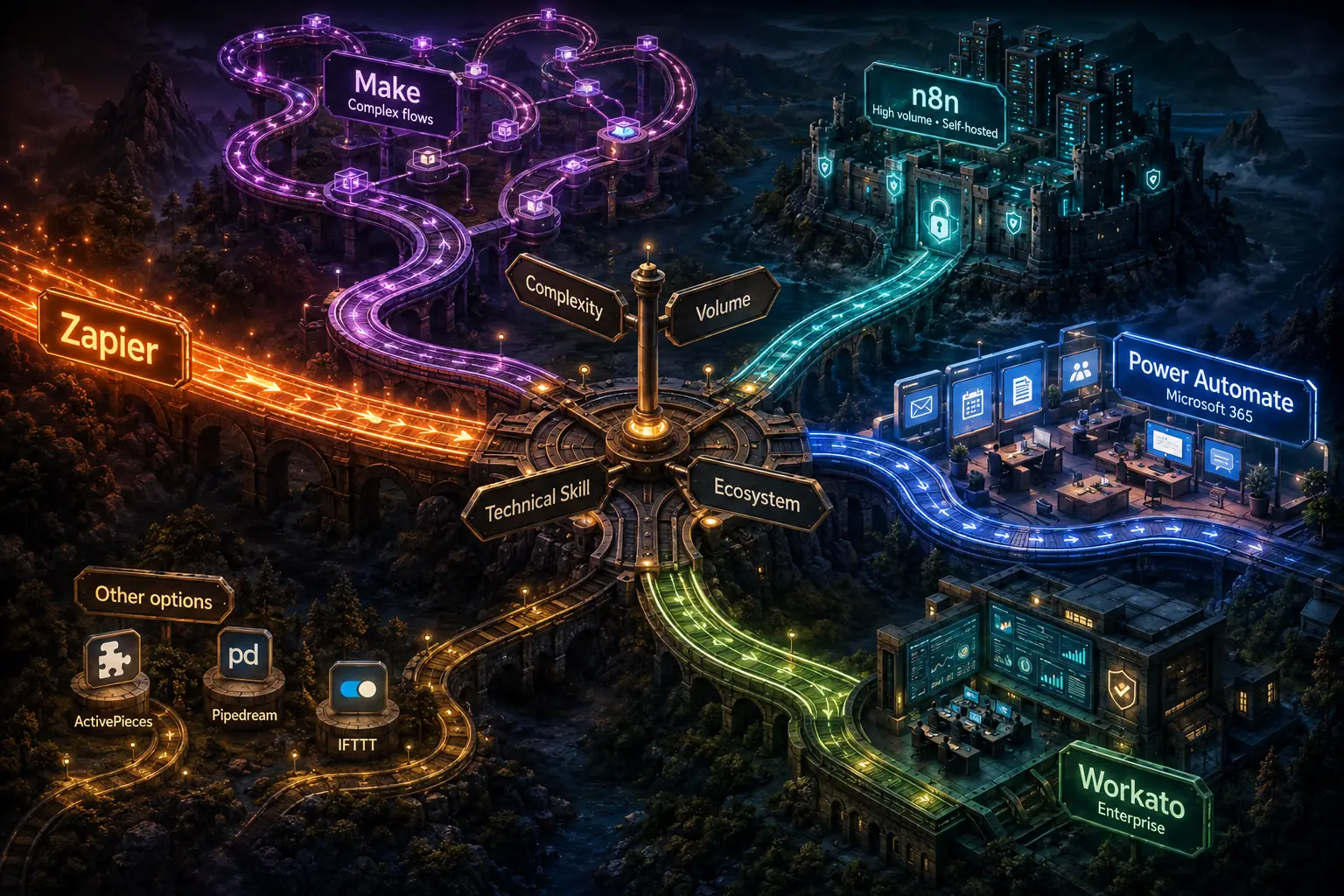
The right choice among these platforms depends on four primary factors:
1. Automation complexity. When your automations consist mainly of simple trigger-action patterns with no branching, iteration or complex data transformation, Zapier or the built-in features of Microsoft Power Automate are enough. When your automations need complex logic, Make or n8n is the better choice.
2. Volume and budget. When automation volumes are low (under 2,000 tasks/month), Zapier's pricing is reasonable. As volumes move to moderate levels (2,000-50,000 operations/month), Make gives better value and once volumes get very high (above 100,000 operations/month), self-hosted n8n is most often the most cost-effective choice.
3. Technical resources. Non-technical users can run Zapier and Make well. n8n self-hosted needs expertise in technical infrastructure. Power Automate calls for knowledge of Microsoft's ecosystem and Workato most often needs dedicated integration specialists.
4. Ecosystem alignment: Organizations deeply invested in Microsoft 365 should strongly consider Power Automate. Organizations with data privacy requirements should strongly consider self-hosted n8n. Organizations connecting primarily popular business SaaS applications will find Zapier's app library most valuable.
Start with Zapier because of its ease of use and range of apps and move complex workflows to Make as automation matures and volume grows. At the same time, evaluate self-hosted n8n if volume pricing starts to be a big operational cost.
Sources & Further Reading
- Zapier. Plans and pricing. Checked 17 November 2026.
- Make. Pricing. Checked 17 November 2026.
- n8n. Plans and pricing. Checked 17 November 2026.
- Microsoft. Power Automate pricing. Checked 17 November 2026.
- Workato. Pricing. Checked 17 November 2026.
- ActivePieces. Pricing. Checked 17 November 2026.
- Pipedream. Pricing. Checked 17 November 2026.
- IFTTT. Plans. Checked 17 November 2026.
- Pabbly. Pabbly Connect pricing. Checked 17 November 2026.