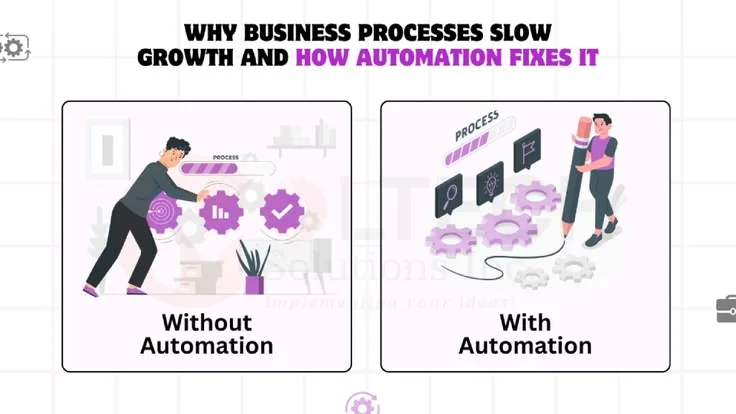
Speed and consistency do not make every repetitive task worth automating, because building, maintaining, and adapting a system also carries costs. Automation vs manual processes should be decided by frequency, effort, stability, and the likely payoff, not by an assumption that computerised work is always superior.
A software team spends three weeks building a script to automate a task that takes 15 minutes to do manually. The task occurs monthly. At that rate, the automation won't break even for about 12 years, and that's assuming the script never needs maintenance or updates.
This scenario repeats across organizations: teams automate reflexively, treating automation as inherently superior to manual work. The underlying assumption seems self-evident: computers are faster, more consistent, and don't get tired. Why wouldn't you automate?
"The first rule of any technology used in a business is that automation applied to an efficient operation will magnify the efficiency. The second is that automation applied to an inefficient operation will magnify the inefficiency."
Bill Gates
But this reasoning ignores costs: the time to build and maintain automation, the inflexibility when requirements change, the difficulty handling edge cases, and the risk that automated errors scale instantly.
Manual processes have their own costs: repetitive time investment, human error, inconsistency, but also advantages: flexibility, judgment, and the ability to handle novel situations.
The question isn't "Should we automate?" but rather "When does automation's value justify its costs?" and "What's the right balance between automated and manual for this specific situation?"
This analysis examines the tradeoffs between automation and manual processes: when each approach makes sense, what costs people typically overlook, common failure modes, and frameworks for making better decisions about where to invest in automation.
The Basic Comparison
Manual Processes
Characteristics:
- Human-performed: Person executes each step
- Flexible: Can adapt to variations on the fly
- Judgment-capable: Can recognize exceptions and adjust
- Immediate: No development time required
- Learning opportunity: Person understands the work through doing it
Costs:
- Time per execution: Person must invest time each occurrence
- Error rate: Human mistakes, inconsistency, fatigue
- Scaling limitations: Adding volume requires adding people or time
- Attention cost: Occupies human cognitive capacity
- Turnover vulnerability: Knowledge walks out when person leaves
Automated Processes
Characteristics:
- Computer-performed: System executes steps without human intervention
- Consistent: Same result every time given same inputs
- Fast at scale: Handles high volume efficiently
- Codified knowledge: Process captured in code/configuration
- Frees human capacity: Liberates attention for higher-value work
Costs:
- Development time: Initial investment to build automation
- Maintenance burden: Updates when requirements, systems, or APIs change
- Edge case handling: Difficulty dealing with unusual situations
- Rigidity: Changes require development work, not just adaptation
- Debugging complexity: Harder to understand why automation fails
- Risk of scaling errors: Mistakes propagate instantly at high volume
The fundamental tradeoff: automation exchanges upfront investment and ongoing maintenance costs for reduced per-execution costs and increased consistency.
When Automation Makes Sense
Automation's value depends on specific characteristics of the work. Look for these indicators:
1. High Frequency
Principle: The more often a task occurs, the faster automation pays back its investment.
Example: Processing incoming customer emails occurs hundreds of times daily. Even crude automation (keyword detection routing to appropriate queues) saves thousands of person-hours annually. The high frequency means payback happens in weeks or months.
Calculation: If a task takes 10 minutes manually and occurs 100 times per week, that's 1,000 minutes (16.7 hours) weekly. Even a full week of development time (40 hours) pays back in under three weeks, and continues saving 16.7 hours every week thereafter.
2. Repetitive and Consistent
Principle: Tasks with identical steps each time are easiest and most valuable to automate.
Example: Generating weekly reports from database queries. The structure is always the same: extract data, apply calculations, format results, send to recipients. This consistency means automation rarely encounters unexpected situations requiring human judgment.
Anti-example: Conducting job interviews. While you ask similar questions, each candidate's responses are unique, requiring adaptive follow-ups and judgment. The "same" task is actually different each time, making automation impractical.
3. Error-Prone When Done Manually
Principle: Tasks where humans make frequent mistakes benefit from automation's consistency.
Example: Data entry from one system to another. Humans transpose numbers, skip fields, or copy-paste incorrectly. Automated data synchronization eliminates these errors entirely (though it introduces its own potential for systematic errors if the automation is wrong).
Case study: A hospital reduced medication dosing errors by 81% by automating dose calculations. Manual calculations were vulnerable to decimal placement errors, unit conversion mistakes, and math errors, all eliminated by automation.
The remaining 19% of errors came from incorrect inputs to the automated system, highlighting that automation shifts where errors occur rather than eliminating error potential entirely.
"To err is human, but to really foul things up you need a computer."
Paul Ehrlich
4. Requires Exact Consistency
Principle: When outcomes must be identical every time, automation enforces that consistency better than humans.
Example: Manufacturing assembly lines. Torque specifications, chemical mixtures, timing sequences: all must be precisely replicated. Automation ensures every product receives identical treatment.
Example: Code formatting. Teams want consistent style across all files. Automated formatters (Prettier, Black, gofmt) apply rules identically every time, while manual enforcement creates inconsistent results despite best intentions.
5. Scales Beyond Human Capacity
Principle: When volume exceeds what humans can handle, automation becomes necessary rather than merely advantageous.
Example: Processing millions of credit card transactions per day. No human workforce could manually verify each transaction, check fraud patterns, and authorize charges in real-time. Automation isn't just more efficient, it's the only viable approach.
Example: Social media content moderation at scale (billions of posts). While humans are better at nuanced judgment, the sheer volume requires automated filtering with humans reviewing only flagged content. Purely manual moderation would require millions of moderators.
6. Occurs at Inconvenient Times
Principle: Tasks that must happen outside normal working hours (nights, weekends, holidays) are especially good automation candidates.
Example: Database backups scheduled for 2 AM minimize impact on system performance during business hours. Automated backups run reliably without requiring anyone to wake up.
Example: Monitoring and alerting systems. Problems can occur anytime; automation watches continuously and alerts humans only when intervention is needed, rather than requiring 24/7 human monitoring.
When Manual Processes Make Sense
Contrary to the automation-always-better mindset, manual approaches are sometimes optimal:
1. Low Frequency
Principle: Infrequent tasks don't justify automation investment.
Example: Quarterly security audits. Occurring four times yearly, even if each takes two hours, that's eight hours annually. Automating might take 20-40 hours initially plus ongoing maintenance. The break-even period stretches to years, during which requirements will likely change.
Rule of thumb: If a task occurs less than monthly, be skeptical of automation unless it's particularly time-consuming or error-prone.
2. High Judgment Requirement
Principle: Tasks requiring contextual understanding, nuance, and adaptive decision-making remain human domains.
Example: Performance reviews. While you could "automate" by collecting metrics and applying formulas, meaningful evaluation requires understanding context, recognizing improvement, balancing quantitative and qualitative factors, and calibrating across different role expectations.
Human judgment is the essence of the task, not an inefficiency to eliminate.
Example: Customer escalations. While chatbots handle routine inquiries, complex customer problems require understanding emotional state, reading between lines, making judgment calls about exceptions, and balancing policy with relationship preservation.
3. Rapidly Changing Requirements
Principle: When the process itself is in flux, automation creates rigidity that slows adaptation.
Example: A startup experimenting with go-to-market strategies. Sales processes, qualification criteria, and follow-up sequences change weekly as the team learns what works. Automating too early locks in approaches before you know they're right. Manual execution provides flexibility to iterate rapidly.
Case study: A company automated their onboarding process elaborately, building a multi-step workflow engine with branching logic. Six months later, they redesigned onboarding completely. The automation became obsolete, wasting the development investment.
Had they kept it manual during the learning phase, they could have iterated freely, automating only after the process stabilized.
4. Exception-Heavy Work
Principle: If most cases are unique or require special handling, automation struggles with the exception-handling logic.
Example: Processing expense reports. While standard receipts fit automation, many require judgment: unclear vendor names, split personal/business expenses, unusual circumstances needing manager override, receipts in foreign languages or missing information.
The effort to handle all exceptions often exceeds the value gained from automating the straightforward cases.
Strategy: Consider partial automation: automate the 80% of standard cases, route the 20% of exceptions to humans. This captures most of automation's value while avoiding excessive complexity.
5. Learning Value
Principle: Sometimes doing work manually builds understanding that's valuable beyond the immediate task.
Example: Junior engineers deploying code manually learn how systems connect, what can go wrong, and how to debug issues. Fully automated deployment is more efficient but removes a learning opportunity. The optimal approach might be: manual initially for learning, then automated once understanding is developed.
Example: Financial analysts building models. While Excel formulas and scripts could automate calculations, manually working through the math develops intuition about the business and catches conceptual errors. Automation removes this sense-making process.
6. Trust and Verification Requirements
Principle: When stakeholders need to see and verify each step, manual processes provide transparency that black-box automation lacks.
Example: Legal document review. While software can flag potential issues, lawyers must read and verify everything personally. The professional responsibility can't be delegated to automation, and clients expect human review even when tools assist.
Example: High-stakes decisions like medical diagnoses. Even with AI assistance, doctors must verify findings and make final determinations because accountability rests with the human, not the tool.
The Hidden Costs of Automation
Organizations consistently underestimate automation costs, leading to regrettable investments:
Development Time
The underestimate: "This will take a few hours to automate."
The reality: Even simple automation takes longer than expected once you account for:
- Understanding the current manual process thoroughly
- Designing the automated solution
- Handling edge cases discovered during development
- Testing various scenarios
- Writing documentation
- Training users on how the automation works
What seems like a two-hour script often becomes a two-day project when done properly.
Maintenance Burden
The underestimate: "Once built, it just runs."
"The most dangerous phrase in the language is, 'We've always done it this way.'"
Grace Hopper
The reality: Automation requires ongoing maintenance burden when:
- APIs change: External services update endpoints, authentication, or data formats
- Requirements evolve: Business needs shift, requiring changes to automated logic
- Dependencies update: Libraries, frameworks, and platforms change, breaking existing code
- Edge cases emerge: Situations not anticipated during development require handling
- Scale changes: What worked for 100 records per day fails at 1,000
Example: A company automated customer data synchronization between CRM and billing systems. Over five years, they updated the automation 23 times due to API changes, new data fields, changed business rules, and bug fixes. The maintenance time exceeded the original development time by 3x.
Edge Case Complexity
The underestimate: "We'll handle the edge cases as they come up."
The reality: The 80% of standard cases are easy to automate. The remaining 20% of edge cases often require 80% of the development effort. These include:
- Missing or invalid data
- Simultaneous updates causing conflicts
- Systems temporarily unavailable
- Unexpected data formats
- Partial failures requiring retry logic
- Error recovery and rollback
The temptation is to automate quickly, ignoring edge cases. But poorly-handled edge cases create mysterious failures, data corruption, and loss of trust in the automation.
Rigidity Cost
The underestimate: "Changing the automation is easy."
The reality: Modifying automated processes requires:
- Developer time (scheduling, context switching)
- Testing changes to avoid breaking existing functionality
- Deployment (which may have its own complexity)
- Documentation updates
- User training on changed behavior
A process change that takes 30 seconds to explain to a human ("start checking the secondary address too") might require hours of development work to implement in automation.
This rigidity has a subtle cost: it slows organizational learning and adaptation. When changing a process is expensive, people resist necessary improvements to avoid the automation change cost.
Skill and Knowledge Loss
The underestimate: "The automation does it now, so we don't need to understand it."
The reality: When automation handles a process for years, institutional knowledge of how the process works fades. Then when:
- The automation breaks, no one knows how to do it manually
- Requirements change, no one understands the original logic
- New employees arrive, they never learn the underlying process
Example: A company automated expense report approvals with complex logic for different expense types, amounts, and approver hierarchies. Five years later, when asked to modify the rules, no one remembered why certain logic existed. The original developer had left.
They spent days reverse-engineering their own automation to understand it before making changes.
Debugging Difficulty
The underestimate: "We can just look at the logs."
The reality: Debugging automated failures is often harder than investigating manual errors because:
- Logs may not capture relevant context
- The failure happened in an overnight batch job without observation
- Multiple systems interact in ways that are hard to trace
- The error manifests far from the root cause
- Reproducing the exact failure conditions is difficult
Manual processes at least have a human who can say "I noticed X seemed weird, so I checked Y." Automated processes fail silently or with cryptic error messages.
Common Automation Failures
Failure Mode 1: Premature Automation
The error: Automating before understanding the process thoroughly.
Example: A team automated their deployment process after two deployments. The third deployment had different requirements the automation couldn't handle. They spent more time working around the automation than it would have taken to just deploy manually.
Lesson: Do something manually several times (10-20 iterations) before automating. You'll discover variations, edge cases, and inefficiencies to address before locking them into code.
Failure Mode 2: Automating a Bad Process
The error: Making an inefficient or broken process faster without fixing it first.
Example: A company automated their invoice approval workflow, which had seven unnecessary approval steps due to historical bureaucracy. They made a bad process more efficient, but it remained bad, invoices still took weeks to process. Better approach: fix the process (reduce to two meaningful approvals), then automate if needed.
Principle: "A fool with a tool is still a fool." Process improvement must come before automation; automation doesn't fix poor processes, it ossifies them.
Failure Mode 3: Over-Engineering
The error: Building overly complex automation when simpler solutions suffice.
Example: A team built an elaborate machine learning model to categorize customer support tickets. After months of development, they achieved 85% accuracy. A simple keyword-matching script took two hours to build and achieved 82% accuracy. The 3% improvement didn't justify the enormous additional complexity and maintenance burden.
Principle: Start with the simplest automation that solves 80% of the problem. Only add complexity if the marginal value clearly exceeds the marginal cost.
Failure Mode 4: All-or-Nothing Thinking
The error: Believing automation must be complete or it's not worth doing.
Example: A company wanted to automate sales forecasting but got stuck because some data inputs required judgment calls they couldn't automate. They abandoned the project entirely. Better approach: automate data collection and calculation, leave the judgment calls to humans interacting with the tool.
Principle: Partial automation often provides most of automation's value with fraction of the complexity. Automate what's automatable; keep human judgment for the rest.
Failure Mode 5: Neglecting Monitoring
The error: Assuming automation works correctly without verification.
Example: An automated data sync process ran for months with a subtle bug that duplicated certain records. No one noticed because there was no monitoring or alerting. By the time they discovered the problem, they had hundreds of thousands of duplicate records requiring manual cleanup.
Principle: Automation without monitoring is automation you can't trust. Build visibility into what the automation does and alerting when it fails.
Failure Mode 6: Ignoring the Human System
The error: Automating without considering how humans interact with the automated system.
Example: A company automated code deployment with a one-click button. Developers started deploying carelessly, creating more production incidents. The automation removed friction that previously caused developers to double-check their work.
They added the friction back by requiring deployment checklists and approval, partially un-automating the process to improve outcomes.
Principle: Automation changes human behavior. Consider the complete human-automation system, not just the automated portion in isolation.
Decision Framework: Should You Automate?
Calculate the break-even point by dividing development plus maintenance time by the manual time saved per period; if the task will continue past that point, automation pays off quantitatively. Then weigh qualitative factors: high volume, high consistency, and rule-based judgment favor automation, while frequently changing requirements, low volume, and context-dependent judgment favor keeping the process manual.
Quantitative Analysis
Calculate the break-even point where automation investment equals manual time savings:
Formula:
Break-even = (Development Time + Maintenance Time per Period × Periods) /
(Manual Time per Execution × Executions per Period × Periods)Example: Task takes 30 minutes manually, occurs daily (250 work days/year):
- Manual annual cost: 30 min × 250 = 7,500 minutes = 125 hours
- Automation development: 40 hours
- Automation maintenance: 5 hours per year
- Break-even: 40 / (125 - 5) = 0.33 years (4 months)
If you'll do this task for longer than 4 months, automation pays off quantitatively.
Warning: These calculations often underestimate:
- Development time (by 2-3x typically)
- Maintenance burden (people assume near-zero, reality is often 10-20% of development time annually)
- Adaptation costs when requirements change
Be conservative in your estimates.
Qualitative Factors
Numbers alone don't tell the whole story. Consider:
Intangible benefits:
- Error reduction: How much does higher consistency matter? In healthcare or finance, enormously; in low-stakes work, less so.
- Freed capacity: What else could the human do with the saved time? If they just browse Reddit, the value is minimal. If they can focus on judgment-heavy work only humans can do, the value is high.
- Speed: How much does faster execution matter? For customer-facing processes, a lot. For back-office work, often less.
- Scalability: Might volume increase dramatically? Automation provides scaling headroom manual processes lack.
- Knowledge capture: Does codifying the process create valuable documentation of how it works?
Intangible costs:
- Flexibility loss: How often do requirements change? Rapidly evolving processes aren't good automation candidates.
- Learning value: Is there benefit to humans doing the work (understanding systems, staying connected to details)?
- Trust and verification: Do stakeholders need to see the human doing the work, or is automated execution acceptable?
- Complexity: Does the automation add cognitive load and debugging difficulty that offsets its value?
Decision Matrix
| Factor | Automation Favored | Manual Favored |
|---|---|---|
| Frequency | Daily or more | Monthly or less |
| Volume | Hundreds+ per period | Dozens per period |
| Consistency | Identical steps each time | Varies significantly |
| Judgment Required | Rule-based decisions | Context-dependent judgment |
| Error Cost | High stakes, errors expensive | Low stakes, errors easily fixed |
| Change Rate | Stable, well-understood | Evolving, experimental |
| Edge Cases | Few, well-defined | Many, require judgment |
| Time Horizon | Long-term (years) | Short-term (months) |
| Development Cost | Low (simple process) | High (complex with many cases) |
| Maintenance Burden | Low (stable dependencies) | High (many moving parts) |
Count where your situation falls. If most factors favor automation, it's likely worthwhile. If most favor manual, stay manual. If it's mixed, consider partial automation.
The Hybrid Approach: Partial Automation
Often the best solution isn't "automate everything" or "do everything manually" but rather automate the routine, keep human judgment for exceptions.
Strategy 1: Automated Execution, Manual Oversight
Pattern: Automation does the work; humans review and approve.
Example: Automated expense report processing. System extracts receipt data, categorizes expenses, checks policy compliance. Flags unusual cases for human review. Approves routine cases automatically.
Value: Captures automation's efficiency for the 80% of standard cases while leveraging human judgment for the 20% of exceptions. Avoids the complexity of handling every edge case in automation.
Strategy 2: Automated Data Collection, Manual Analysis
Pattern: Automation gathers and structures information; humans interpret and decide.
Example: Sales forecasting tool automatically pulls data from CRM, calculates trends, identifies anomalies. Humans review the prepared data and make the actual forecast incorporating market knowledge and strategic context.
Value: Eliminates tedious data gathering while keeping strategic judgment with humans. Avoids the difficulty of automating judgment while capturing automation's data processing strength.
Strategy 3: Manual Triggering, Automated Execution
Pattern: Humans decide when to initiate; automation executes once triggered.
Example: One-click deployment scripts. Developer decides when to deploy (judgment call based on readiness, timing, risk), but once initiated, automation handles the mechanical deployment steps.
Value: Keeps human judgment about whether to act while eliminating manual execution errors. Maintains appropriate control while reducing toil.
Strategy 4: Automated First Pass, Human Refinement
Pattern: Automation does rough work; humans polish and finalize.
"Machines take me by surprise with great frequency."
Alan Turing
Example: AI-assisted writing. Tool generates draft content, human editor revises for accuracy, tone, and quality. Or code generation: AI writes boilerplate, developer reviews and customizes for the specific use case.
Value: Automation handles the time-consuming groundwork; humans add the nuance, judgment, and quality that justify human involvement. Combines their complementary strengths.
Strategy 5: Automated Monitoring, Manual Response
Pattern: Automation watches continuously; alerts humans only when intervention needed.
Example: System monitoring. Automation checks metrics, detects anomalies, alerts on-call engineer. Human investigates and decides how to respond.
Value: Automation's tirelessness combined with human's diagnostic capability and decision-making. Avoids false alarms from fully automated responses while preventing the impossibility of 24/7 human monitoring.
Implementation Principles
When you decide to automate, follow these principles to maximize value and minimize regret:
1. Start Simple
Build the minimum viable automation that solves the core problem. Add sophistication only when justified by clear value.
Bad: Spend three months building a general-purpose workflow engine with branching logic, retry mechanisms, and dashboard monitoring.
Good: Write a 50-line script that handles the most common scenario. Run it manually, observe what fails, add capabilities incrementally based on actual needs.
2. Make It Observable
Automation you can't see into is automation you can't trust. Build in:
- Logging: What did the automation do? What data did it process?
- Monitoring: Is it running? How long does it take? What's the success rate?
- Alerting: When it fails, how do you know? Who gets notified?
- Dashboards: Quick visibility into automation health and behavior
3. Plan for Failure
Assume the automation will fail. Design for graceful degradation:
- Retry logic: Transient failures (network issues, temporary API problems) should retry automatically
- Error handling: Clear error messages that aid debugging
- Rollback capability: When automation causes problems, can you undo it?
- Manual override: Can a human intervene when automation behaves unexpectedly?
- Fallback to manual: If automation breaks, can you do it manually until fixed?
4. Document Thoroughly
Future maintainers (including yourself six months from now) need to understand:
- What does this automation do?
- Why does it work this way? (Capture design decisions)
- What assumptions does it make?
- How do you run it, stop it, or modify it?
- What are known edge cases or limitations?
Poor documentation turns automation into mysterious black boxes that no one dares modify.
5. Test Edge Cases
The 80% of happy paths are easy. Invest in testing the 20% of edge cases:
- Missing data
- Invalid formats
- Simultaneous operations
- System unavailability
- Partial failures
- Scale beyond expected volume
Edge case failures erode trust in automation more than lack of features.
6. Keep Manual Capability
Don't let automation completely replace manual knowledge. Maintain the ability to execute manually when:
- Automation breaks and needs time to fix
- Unusual case falls outside automation's capabilities
- Emergency requires human override
Document the manual process even if you're automating it. Future humans will thank you.
Key Takeaways
When automation makes sense:
- High frequency (daily or more), repetitive, consistent work
- Error-prone manual execution where consistency matters
- Volume that scales beyond human capacity
- Well-understood, stable processes with few exceptions
- Quantitative analysis shows reasonable payback period (under 1-2 years)
When manual processes make sense:
- Low frequency (monthly or less), judgment-heavy work
- Rapidly changing requirements where flexibility crucial
- Exception-rich situations where most cases are unique
- Learning value from doing work manually
- Trust and verification requirements demand human attention
Hidden automation costs often overlooked:
- Development time (usually 2-3x initial estimates)
- Ongoing maintenance as systems, requirements, and dependencies change
- Edge case complexity (the "last 20%" often takes 80% of effort)
- Rigidity cost, changes require development work not just adaptation
- Knowledge loss as no one remembers how to do it manually
- Debugging difficulty when automated processes fail mysteriously
Common automation failures:
- Premature automation before understanding the process
- Automating broken processes rather than fixing them first
- Over-engineering complex solutions when simple ones suffice
- All-or-nothing thinking instead of partial automation
- Neglecting monitoring, making failures invisible
- Ignoring how automation changes human behavior
Hybrid approaches often optimal:
- Automated execution with manual oversight
- Automated data collection with manual analysis
- Manual triggering with automated execution
- Automated first pass with human refinement
- Automated monitoring with manual response
- Captures automation's efficiency with human's judgment
Implementation principles:
- Start with minimum viable automation, add sophistication incrementally
- Make automation observable through logging, monitoring, alerting
- Plan for failure with retry logic, error handling, rollback capability
- Document thoroughly for future maintainers
- Test edge cases that erode trust when they fail
- Keep manual capability as fallback and knowledge preservation
The automation decision isn't binary, it's a spectrum from fully manual to fully automated, with many valuable points in between.
The best approach depends on specific context: how often the task occurs, how consistent it is, how much judgment it requires, how stable requirements are, and whether quantitative and qualitative factors justify the investment.
Resist the reflexive assumption that automation is always better; sometimes the simplest, most flexible, most appropriate solution is a human doing the work thoughtfully.
Historical Context: Industrial Automation and the Productivity Paradox
The automation-versus-manual debate is not new, and the historical record provides essential context for understanding both the genuine gains and the recurring overestimates that characterize each wave of automation enthusiasm.
The first industrial automation: The mechanization of textile production in late 18th-century Britain offers the first large-scale case study. The spinning jenny, power loom, and Jacquard loom automated tasks that had been performed manually for centuries.
The immediate productivity gains were real and dramatic: a single power loom operator could produce cloth that previously required dozens of handloom weavers.
The costs were equally real: displaced workers, the Luddite uprisings of 1811-1816 (where textile workers destroyed machinery that threatened their livelihoods), and decades of labor displacement before new industries absorbed the workers.
Economists studying this transition identified what became a recurring pattern: productivity gains from automation do not automatically create equivalent new employment or broadly shared prosperity.
The gains were concentrated initially among capital owners; workers saw declining wages and worsened conditions for decades before the industrial economy created sufficient new work to restore employment levels.
The adjustment period is often longer and more painful than automation advocates anticipate.
The Productivity Paradox of the 1980s-1990s: Nobel laureate Robert Solow observed in 1987: "You can see the computer age everywhere but in the productivity statistics." Computers were being installed throughout the U.S. economy through the 1980s, but aggregate productivity growth remained sluggish.
Economists debated the causes for years. Partial explanations included measurement problems (productivity statistics failed to capture improvements in service quality), implementation lags (organizations needed time to reorganize around new technology), and the costs of transition itself (workers learning new systems, organizations restructuring, old processes coexisting with new ones).
The productivity gains eventually appeared in the late 1990s, vindicating the technology investments-but only after a roughly 15-year lag.
This historical pattern suggests that automation's productivity benefits require organizational restructuring and workforce adaptation to materialize, and that short-term payback calculations systematically undercount these transition costs.
Toyota Production System: The most influential 20th-century case study in automation-manual balance is the Toyota Production System (TPS), developed from the 1940s through the 1970s.
Toyota's approach was counterintuitive: rather than automating as much as possible, Toyota used what it called "jidoka" (autonomation, or automation with human intelligence), deliberately designing systems that stopped automatically when defects occurred and required human assessment before restarting.
The insight was that fully automated production optimized for speed and volume would propagate defects at high volume. Building in mandatory human checkpoints at failure points meant that automation handled high-volume routine production while humans handled detection, diagnosis, and process improvement.
The result was both higher quality and lower defect rates than fully automated competitors. Toyota's approach remains the template for sophisticated manufacturing automation: automate the routine, preserve human judgment for anomalies and improvements.
The Automation Bias Problem
When automated systems are present, humans systematically over-rely on them-a phenomenon researchers call automation bias. Understanding this bias is essential for designing automation that actually improves outcomes rather than merely shifting where failures occur.
Psychologist Linda Skitka and colleagues studied "automation bias" in 1999 to describe the tendency to over-rely on automated systems even when manual alternatives or human judgment would produce better outcomes. The bias manifests in two forms.
Omission bias: The failure to notice or respond to problems that the automated system fails to flag. Humans monitoring automated systems tend to assume that if the system hasn't raised an alert, everything is fine-even when manual observation would reveal problems.
Air traffic controllers who rely heavily on collision-avoidance systems show reduced rates of manually detecting potential conflicts. Medical professionals monitoring patients through automated vital signs systems show reduced rates of detecting subtle deterioration that falls below alert thresholds.
Commission bias: The tendency to follow automated system recommendations even when they are clearly incorrect or when context suggests they should be overridden. Pilots have followed automated flight management system commands into terrain despite clear visual evidence that the command was wrong.
Drivers have followed GPS navigation into bodies of water. These are extreme examples, but the same dynamic operates more subtly in every domain where automated recommendations are present.
The organizational consequences of automation bias are significant. Companies that automate fraud detection, quality control, or risk assessment often find that the human monitors nominally overseeing the automated system become effectively passive-present for regulatory compliance but not actually functioning as a check on the system's errors.
The human in the loop becomes what researchers call "a monitor who rarely intervenes," whose presence provides the illusion of oversight without its substance.
Designing against automation bias requires deliberate effort: building in regular periods where humans must make independent assessments before seeing the automated recommendation; requiring human operators to maintain manual proficiency through regular practice; designing alert thresholds conservatively to avoid the complacency that comes from systems that almost never trigger; and creating organizational cultures where questioning automated recommendations is rewarded rather than penalized as inefficiency.
The goal is a genuine human-automation partnership, not the false comfort of a human presence watching an automated system operate unchallenged.
What the Research Says: Measuring the Real Costs and Benefits of Automation
Empirical research on automation's costs and benefits consistently reveals that organizations systematically underestimate both the investment required and the organizational changes necessary to capture the promised gains.
Erik Brynjolfsson and Andrew McAfee's productivity research (MIT, 2011-2014): Their studies of US manufacturing and service firms, published in Race Against the Machine (2011) and elaborated in subsequent work, found that firms deploying automation did not achieve productivity gains proportional to their technology investment without corresponding reorganization of work processes and retraining of workers.
Their broader body of work, including the 2014 book The Second Machine Age, argues that companies combining automation with redesigned workflows and organizational change consistently outperform companies that simply layer automation onto existing processes.
The finding aligns with the Bill Gates observation the article opens with: automation amplifies the existing process, good or bad.
The MIT Work of the Future Task Force (2018-2022): Researchers David Autor, David Mindell, and Elisabeth Reynolds led a multi-year study of automation and work.
Their work, summarized in the 2022 book The Work of the Future, argues that the firms getting the best results from automation share common characteristics: they automate specific, high-volume subtasks rather than entire jobs, retain human oversight for exception handling, and invest in worker upskilling alongside the automation deployment - rather than attempting full-process automation without exception-handling protocols in place.
Case study: The mortgage servicing "robo-signing" scandal (2009-2012): Following the 2008 financial crisis, major mortgage servicers including Bank of America deployed automated document processing to handle the surge in foreclosure paperwork.
The automation, built rapidly under regulatory pressure, lacked adequate exception-handling for the large volume of non-standard documents that post-crisis conditions produced.
The result was the "robo-signing" scandal, in which automated systems processed foreclosure documents without valid human review, ultimately leading to a $25 billion National Mortgage Settlement in 2012 involving five major servicers - Ally, Bank of America, Citigroup, JPMorgan Chase, and Wells Fargo - along with 49 state attorneys general and the federal government.
The case is now taught in business schools as a canonical example of premature automation of a judgment-heavy process under conditions where the volume of exceptions far exceeded what the automated system was designed to handle.
Case study: Amazon's fulfillment center robotics (2012-present): Amazon's acquisition of Kiva Systems in 2012 for $775 million and subsequent deployment of warehouse robots across its fulfillment centers represents one of the most studied automation implementations of the 21st century.
Amazon has described the deployment as a gradual, multi-year process rather than an immediate full replacement of human labor, with a transition period during which hybrid human-robot operations were still being tuned for reliability before reaching their eventual throughput gains.
Facilities that attempted rapid full automation before robotic systems reached full operational reliability experienced higher error rates, requiring reintegration of human oversight at the picking and packing stages.
The final settled model-robots handling transport and sorting, humans handling the fine motor tasks of picking items from shelves-is a textbook example of the hybrid approach: automate what is automatable, retain human judgment for what is not.
When Automation Fails at Scale: Three Documented Failure Patterns
Large-scale automation failures share recognizable patterns that have been documented across industries. Understanding these patterns helps organizations anticipate and avoid them.
Pattern 1: Automating a broken process (the "paving the cowpaths" failure)
Eliyahu Goldratt's Theory of Constraints, developed in the 1980s and documented in The Goal (1984), predicts that automating around a bottleneck without addressing the bottleneck worsens overall system performance by accelerating work into the constraint.
Healthcare researchers have applied this framework to electronic health record (EHR) automation, and a substantial body of published research links EHR implementation to increased physician burnout, particularly when documentation workflows are automated without first being redesigned around how clinicians actually work. Hospitals that redesign workflows before automating tend to report better throughput outcomes and lower burnout than hospitals that automate an unchanged, broken process.
The process redesign phase that underperforming hospitals tend to skip typically requires months of process mapping and staff consultation before automation begins.
Pattern 2: The monitoring gap (silent failure)
Software reliability researchers, including work from Carnegie Mellon University's Software Engineering Institute on enterprise software quality, have documented that a significant share of automation deployments experience "silent failures" - extended periods during which the automation produces incorrect outputs without triggering any alert, because the system was built with more investment in the automation logic itself than in monitoring and alerting infrastructure to catch when it goes wrong.
Concretely: a company that spends heavily on building automation but comparatively little on monitoring should expect a meaningfully higher probability of an undetected failure event going unnoticed for an extended period.
Pattern 3: Automation-induced deskilling and recovery failure
In 2013, the FAA-chartered Performance-Based Aviation Rulemaking Committee/Commercial Aviation Safety Team Flight Deck Automation Working Group published "Operational Use of Flight Path Management Systems," an analysis of aviation safety data in which automation-related factors were identified as a recurring concern.
The report documented a pattern in which flight crews, accustomed to highly automated modern cockpits, were sometimes unable to safely manage manual flight when automation failed or behaved unexpectedly.
The most cited cause was the substantial reduction in manual flying hours that high-automation aircraft enabled, with automation handling much of takeoff assist, climb, cruise, descent, and approach on a typical flight.
When automation failed in critical phases of flight, the manual skills needed for recovery had sometimes atrophied. The FAA subsequently pushed for increased manual flying proficiency training specifically to counteract automation-induced deskilling.
The aviation finding parallels the general principle in the article about knowledge loss: when automation handles a critical process for years, the human capacity to execute that process manually degrades, sometimes to a dangerous degree.
Sources & Further Reading
DeMarco, T., & Lister, T. (2013). Peopleware: Productive Projects and Teams (3rd ed.). Addison-Wesley. DOI: 10.1109/MS.2013.124
Kim, G., Humble, J., Debois, P., & Willis, J. (2016). The DevOps Handbook: How to Create World-Class Agility, Reliability, and Security in Technology Organizations. IT Revolution Press.
Gawande, A. (2009). The Checklist Manifesto: How to Get Things Right. Metropolitan Books. DOI: 10.1136/bmj.c6821
Forsgren, N., Humble, J., & Kim, G. (2018). Accelerate: The Science of Lean Software and DevOps. IT Revolution Press. DOI: 10.1016/j.infsof.2019.106213
Spolsky, J. (2000). "The Joel Test: 12 Steps to Better Code." Joel on Software. Available: View source
Ries, E. (2011). The Lean Startup: How Today's Entrepreneurs Use Continuous Innovation to Create Radically Successful Businesses. Crown Business.
Brooks, F. P. (1995). The Mythical Man-Month: Essays on Software Engineering (Anniversary ed.). Addison-Wesley. DOI: 10.1109/MS.2013.86
Reinertsen, D. G. (2009). The Principles of Product Development Flow: Second Generation Lean Product Development. Celeritas Publishing.
Fitzpatrick, N. (2017). "The Cost of Automation." Communications of the ACM 60(7): 28-30. DOI: 10.1145/3105412
Autor, D. H. (2015). "Why Are There Still So Many Jobs? The History and Future of Workplace Automation." Journal of Economic Perspectives 29(3): 3-30. DOI: 10.1257/jep.29.3.3
Davenport, T. H., & Kirby, J. (2016). Only Humans Need Apply: Winners and Losers in the Age of Smart Machines. Harper Business. DOI: 10.1007/s12599-016-0462-4
Munroe, R. (2013). "Automation." xkcd #1319. Available: View source [Classic comic calculating automation payoff periods]
Turing, A. M. "Computing Machinery and Intelligence." Mind, 1950.
Gates, B. "Business at the Speed of Thought." Warner Books, 1999.
Hopper, G. "Oral History of Grace Hopper." Naval Institute, 1994.
Ehrlich, P. "The Population Bomb." Sierra Club/Ballantine Books, 1968.
Autor, D. H. "Work of the Past, Work of the Future." AEA Papers and Proceedings, 2019.
Malone, T. W. "The Future of Work." Harvard Business School Press, 2004.
Norman, D. A. "The Design of Everyday Things." Basic Books, 2013.
Taleb, N. N. "Antifragile: Things That Gain from Disorder." Random House, 2012.