
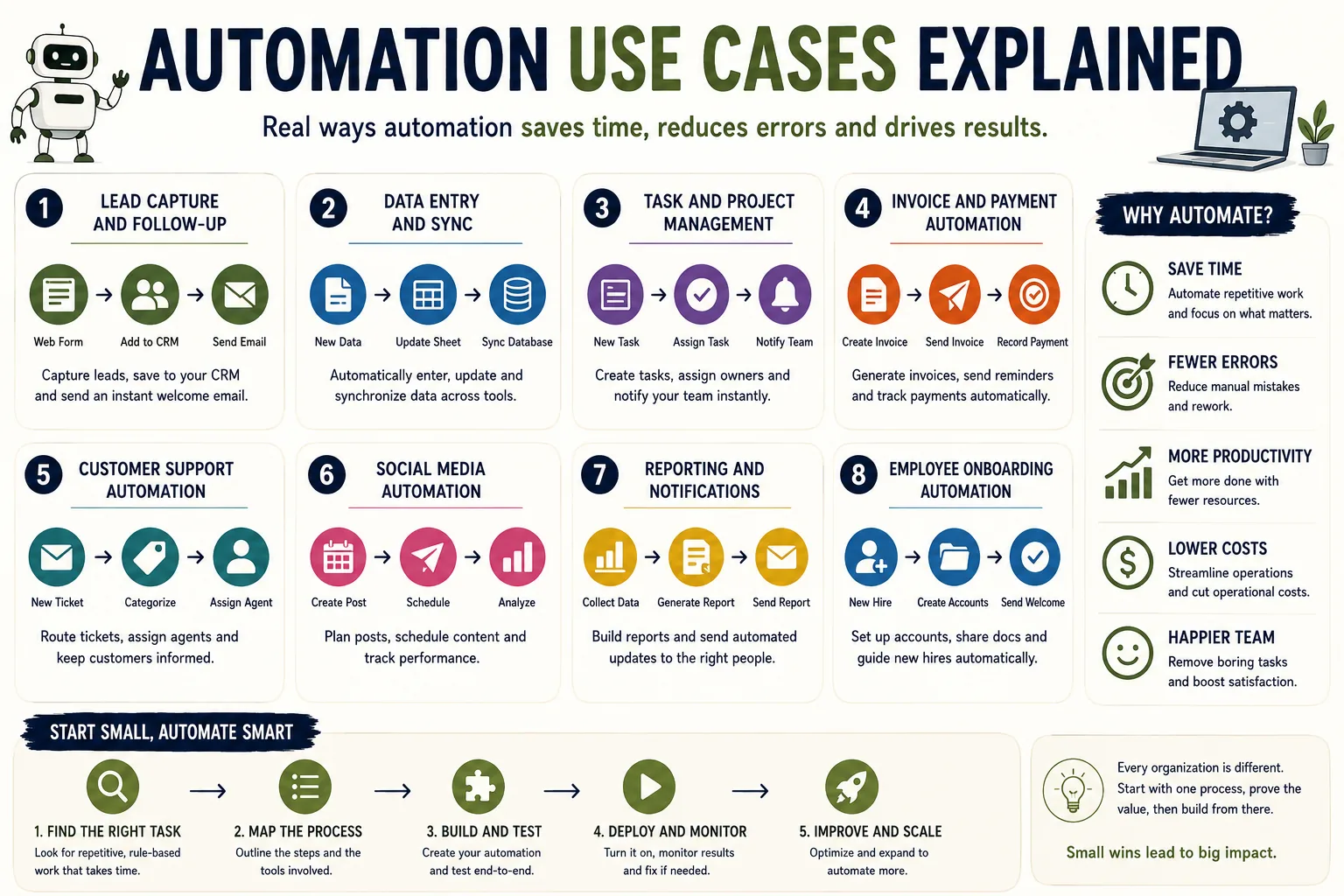
Value: Every week, a project manager at a consulting firm spent roughly four hours copying data from client intake forms into a CRM, updating a shared spreadsheet with project status, and sending templated status update emails to stakeholders. None of these tasks required judgment, creativity, or expertise.
They required only attention and time - two resources that were far better spent on the strategic work that actually justified her salary. When she automated all three tasks, she recovered nearly a full workday each week. The technology was simple. The insight - knowing what to automate - was the hard part.
Automation selection is more consequential than automation implementation. Building a workflow automation on Zapier or Make takes hours; choosing the right things to automate takes judgment.
The highest-return automation targets share identifiable characteristics: high frequency, consistent process, low need for judgment, and high cost of human time relative to automation cost.
Understanding these characteristics - and the specific use cases where they appear - is the foundation of a productive automation strategy.
This article examines automation use cases across business functions, with specific examples of what is being automated, why it works, and what to watch for.
It is organized by business function for practitioners looking for inspiration within their domain, and by automation pattern for those building a cross-functional automation program.
The Automation Selection Framework
Before examining specific use cases, a systematic framework for identifying automation opportunities helps prioritize where to start.
The four criteria for high-value automation:
Frequency: How often does the task occur? Daily or hourly tasks provide far more return on automation investment than weekly or monthly tasks. A task done 100 times per day that saves 2 minutes per instance saves over 3 hours per day; the same task done once per week saves less than 10 minutes per week.
Consistency: How consistent is the process? Tasks with exactly the same steps each time (true rule-based processes) automate cleanly. Tasks with significant variation or that require interpreting context have lower automation ROI.
Error cost: How expensive are errors in this process? High-volume processes with expensive consequences for errors (order processing, invoice matching, compliance reporting) have high automation value because automation reduces both time cost and error cost simultaneously.
Human time value: What is the opportunity cost of human attention on this task? A senior engineer spending three hours per week on data entry has higher automation ROI than a junior administrative assistant spending the same time.
Tasks that score high on all four criteria are the highest-priority automation candidates. Tasks that score low on all four are better left as manual processes.
"The highest-return automation targets are those that are high-frequency, fully consistent, and low on required judgment. Finding these in your organization is the real work of building an automation strategy." - Thomas Davenport, Harvard Business School
| Business Function | High-Value Use Case | Typical Time Saved | Automation Type |
|---|---|---|---|
| Sales | Lead routing and enrichment | 10-30 min/lead | Integration automation |
| Marketing | Behavioral email triggers | 2-5x open rate improvement | Workflow automation |
| Finance | Accounts payable processing | 50-80% time reduction | RPA + OCR |
| Customer Success | Onboarding sequences | 4+ hours/new customer | Workflow automation |
| HR | Employee onboarding provisioning | 8 days to < 1 day | Integration automation |
| IT/Operations | Incident alerting and routing | 50-70% faster MTTR | Monitoring automation |
Sales and Revenue Operations
Lead Processing and Routing
One of the highest-frequency, most consistent automation opportunities in revenue operations is lead processing: the sequence of steps from a new lead's first interaction to being assigned to a salesperson and entered into the appropriate workflow.
What gets automated:
- Form submission data is automatically created as a CRM contact and lead record
- The contact is enriched with company information (employee count, industry, revenue, technology stack) from data providers like Clearbit or ZoomInfo[10]
- A lead score is calculated based on fit (company characteristics) and intent (behavioral signals)
- The lead is routed to the appropriate salesperson based on territory, company size, or industry rules
- A task is created in the CRM for the assigned salesperson with a deadline
- A personalized introduction email is sent from the assigned salesperson's email address
The value: Without automation, each of these steps requires human action, typically taking 10-30 minutes per lead and often not happening until hours or days after the lead arrives. With automation, the entire sequence happens within seconds of the form submission.
For high-volume lead businesses, this speed advantage is significant: research consistently shows that response speed is among the strongest predictors of lead conversion.
Example: Lead Response Management research led by James Oldroyd (originally with MIT and InsideSales.com), widely cited in marketing operations, found that leads contacted within five minutes of form submission are 21 times more likely to be qualified than those contacted after 30 minutes (Oldroyd, McElheran, Elkington, MIT/InsideSales.com).[2]
The speed advantage, which requires automation to achieve at volume, is a material factor in their sales conversion rates.
Common variations:
- Leads that meet certain criteria (company size above threshold, specific industries) are routed to high-touch sequences with direct phone outreach; others go to email sequences
- Leads from existing customer domains are routed to account management rather than sales
- Leads from specific geographic regions are routed to regional sales representatives or partners
Pipeline and Deal Management Automation
Sales CRMs contain valuable data about deal progress, but keeping that data current is a significant administrative burden on salespeople who would rather be in front of customers. Automation can handle a substantial portion of CRM maintenance.
Automated CRM updates:
- When an email from a prospect is sent or received, the activity is automatically logged in the CRM
- When a meeting is scheduled via a scheduling tool, the meeting is automatically added to the deal timeline
- When a contract is sent for signature, the deal stage is automatically updated
- When a contract is signed, the deal is automatically moved to "Closed Won," a new customer onboarding record is created, and the revenue is added to the reporting pipeline
Automated follow-up reminders:
- Deals that have not had activity for a defined period trigger reminders to the deal owner
- Proposals that have been sent but not signed after seven days trigger a follow-up task
- Deals that have not moved through stages in a defined period are automatically flagged for review
Marketing Operations
Email Marketing and Nurture
Email marketing automation is one of the most mature and well-documented automation use cases, with a rich ecosystem of tools and established best practices.
Behavioral trigger sequences: Rather than sending the same emails to all subscribers at the same time, behavioral trigger sequences send emails based on what each subscriber has done:
- A subscriber who downloads a specific ebook receives a follow-up sequence relevant to that ebook's topic
- A subscriber who visits the pricing page three times in a week without converting receives a targeted email with a special offer or an invitation to speak with sales
- A subscriber who has not opened any emails in 90 days receives a re-engagement sequence and is removed from the list if they do not re-engage
The performance advantage of behavioral triggers over broadcast email is well-established: triggered emails typically achieve two to five times higher open rates and click-through rates than broadcast emails, because they are relevant to the recipient's demonstrated interests and sent at a moment when the recipient has demonstrated engagement.
Example: Drip, an email marketing platform focused on e-commerce, documented case studies showing that customers who implemented behavioral trigger sequences typically saw revenue per email increase by 50-100% compared to broadcast email alone. The improvement came not from higher email volume but from better timing and relevance.
Content Distribution Automation
Once content is published, its distribution across multiple channels is time-consuming and repetitive - a clear automation target:
- A blog post is published in the CMS, triggering automatic creation of social media posts across LinkedIn, Twitter/X, and Facebook
- The social media posts are scheduled across different days and times to maximize reach
- The blog post is automatically added to the weekly newsletter digest
- Internal team members receive a notification in Slack with a link to the new content
- Relevant contacts in the CRM who have engaged with similar content receive a personalized email sharing the new post
Each of these steps is individually simple; collectively, they represent 30-60 minutes of manual work per content piece that can be reduced to near zero through automation.
Ad Performance Monitoring and Reporting
Marketing teams managing paid advertising across multiple platforms (Google Ads, Meta Ads, LinkedIn Ads) spend significant time gathering performance data from each platform and compiling it into unified reports. Automation can replace most of this work:
- Data from each advertising platform is automatically pulled via API to a central data store
- Consolidated performance reports are generated and distributed to stakeholders on a defined schedule
- Alerts are sent when a campaign's cost-per-acquisition exceeds a defined threshold or when ad spend is pacing significantly ahead of or behind budget targets
The monitoring value: The alert component of advertising automation often delivers the highest value. Advertising problems (ads that are not serving, costs that are escalating, conversions that have dropped) can accumulate significant wasted spend before a human reviewing reports notices them.
Automated monitoring that detects anomalies and alerts in real time limits the damage.
Finance and Accounting
Accounts Payable Automation
Accounts payable - the processing of vendor invoices - is a labor-intensive, error-prone, high-volume process that is among the most automatable in finance operations.
The AP automation sequence:
- Invoices arrive via email or AP portal
- Optical character recognition (OCR) and AI extraction pulls structured data from the invoice (vendor, date, amount, line items, purchase order reference)
- Extracted data is matched against purchase orders in the ERP system
- Invoices that match and are within approval thresholds are automatically approved and scheduled for payment
- Invoices outside thresholds or that do not match purchase orders are routed to the appropriate approver with the relevant context
- Payment runs are scheduled and executed according to payment terms
The ROI of AP automation is well-documented. Studies by AIIM (the Association for Intelligent Information Management) have found that organizations processing invoices manually spend an average of $13-17 per invoice; automated systems reduce this to $3-6 per invoice.[3]
For organizations processing thousands of invoices monthly, the savings are substantial.
Example: Tipalti, an AP automation platform, reports that clients processing more than 100 invoices per month see average time savings of 50-80% on accounts payable operations.[4]
More importantly, error rates drop dramatically: manual AP processes typically have error rates of 1-5%; automated processes with proper validation typically see error rates under 0.5%.
Expense Report Processing
Employee expense reports follow a consistent, rule-based process that is well-suited to automation: submission, policy check, approval routing, and reimbursement.
Automated expense workflows:
- Employees photograph receipts with a mobile app; OCR extracts the merchant, date, and amount
- Expenses are automatically checked against policy rules (per diem limits, approved categories, required documentation)
- Policy-compliant expenses under approval thresholds are automatically approved
- Expenses above thresholds or in restricted categories are routed to the appropriate approver
- Approved expenses are automatically added to the payroll reimbursement or paid via company card settlement
What automation cannot replace: Policy violations that require judgment (the receipt that technically exceeds the per diem limit for a city but was incurred during a customer entertainment expense that policy allows), travel expenses where the business purpose requires context that the receipt does not provide, and expenses that look anomalous but have legitimate explanations are all cases where human review adds value.
The automation handles the clear cases; humans handle the ambiguous ones.
Customer Operations
Customer Onboarding
For software companies, customer onboarding - getting a new customer from signed contract to actively using the product - involves dozens of repetitive steps that can be substantially automated without reducing the quality of the customer experience.
Automated onboarding components:
- A new contract in the CRM triggers creation of a customer onboarding project in the project management system
- The customer receives a welcome email with account setup instructions
- A kickoff meeting scheduling link is sent to the customer
- Internal provisioning tasks are created and assigned to technical team members
- Product access is created when provisioning is complete
- The customer receives a series of onboarding educational emails timed to their activation milestones (account created, first user added, first project started)
- The customer success manager is notified of activation milestones and flagged when milestones are not completed within expected timeframes
The activation signal: The most sophisticated onboarding automations track customer product usage and trigger interventions when usage indicates friction or disengagement.
A customer who creates an account but does not complete the first key action within 48 hours triggers an automated outreach offering help; a customer who completes the key action triggers an automated congratulatory message and invitation to the next step.
This behavioral automation replicates the personalized outreach of a well-staffed customer success team at a fraction of the cost.
Customer Support Automation
Customer support has been among the earliest domains of automation investment, with a long history from early interactive voice response systems to modern AI-powered chatbots.
Current capabilities: AI-powered customer support automation can handle a significant portion of standard inquiries:
- Status inquiries (order status, account status, subscription information) where the answer can be looked up and returned
- Common troubleshooting steps where the resolution is well-documented
- Refund and cancellation processing where clear policies govern the decision
- Escalation routing based on inquiry type and customer characteristics
Realistic performance expectations: Well-designed customer support automation handles 30-60% of inbound volume autonomously in most implementations, with customer satisfaction scores comparable to or better than human agents for the cases it handles.
The performance depends heavily on the nature of the inquiries: customer support for a simple consumer product with standardized processes automates more completely than support for complex enterprise software where inquiries often require deep product knowledge and judgment.
Example: Intercom's Fin AI agent, built on large language model technology and trained on a company's support documentation, typically handles 40-60% of inbound support inquiries for customers with good documentation coverage.[7]
For the 40-60% that require human handling, the AI captures the conversation context and handoff notes, reducing the time human agents spend understanding the customer's situation before being able to help.
Human Resources and People Operations
Recruiting Process Automation
Recruiting involves high-volume, repetitive processes that are well-suited to automation, combined with high-judgment decisions (hiring decisions themselves) that are not. The automation of the high-volume components allows recruiting teams to focus on the judgment-intensive parts.[8]
Automated recruiting components:
- Job postings are simultaneously published to multiple job boards when a requisition is approved
- Application acknowledgments are sent to all applicants immediately upon application
- Resume screening based on defined criteria produces a ranked applicant list (though this requires careful bias monitoring)
- Candidates who pass initial screening receive automated scheduling links for phone screens
- Reminder emails are sent before scheduled interviews
- Rejection notifications are sent to candidates who are not selected, with customizable timing to avoid immediate rejection that feels perfunctory
Hiring manager self-service: Automation can serve hiring managers as well as candidates.
When a candidate is moved to a specific stage in the ATS (applicant tracking system), the hiring manager receives an automated notification with the candidate's information and the scheduled interview time, eliminating the need for recruiter coordination for routine stage transitions.
Employee Onboarding and Offboarding
New employee onboarding involves dozens of identical steps each time: account creation across multiple systems, equipment provisioning, policy acknowledgment collection, training assignment, introductions to key team members. Automation handles the consistent components while leaving the relationship-building components to humans.
System provisioning triggers: When an HR system records a new hire with a start date, an automated sequence initiates:
- IT receives a provisioning request for the new hire's equipment and accounts
- Each system administrator receives specific provisioning tasks with deadlines
- The new hire receives pre-arrival emails with first-day instructions and required paperwork
- A buddy or onboarding partner is assigned and notified
- New hire training modules are assigned in the learning management system
- A 30-day check-in is scheduled automatically on the hiring manager's calendar
The same sequence in reverse handles offboarding: when a termination is recorded, access revocation tasks are created across all systems, equipment return is coordinated, and appropriate knowledge transfer steps are initiated.
IT and Operations
Infrastructure Monitoring and Incident Response
IT operations automation has the longest history and most mature tooling of any automation domain. The monitoring, alerting, and response automation that keeps production software systems running is a well-established discipline.[9]
Automated monitoring:
- System metrics (CPU, memory, disk, network) are collected continuously from all infrastructure components
- Anomaly detection identifies deviations from normal patterns before they become failures
- Alerts are sent to appropriate on-call engineers when metrics exceed thresholds
- Automated remediation actions (restarting failed services, scaling infrastructure capacity) handle common issues without human intervention
Incident management automation:
- A critical alert automatically creates an incident record
- The appropriate on-call engineer is paged and provided with relevant context
- A dedicated communication channel is created for the incident
- Automated status page updates are published as incident status changes
- A post-incident review is scheduled automatically after resolution
Example: PagerDuty, the incident response platform, has documented that customers using their automation capabilities reduce mean time to resolution (MTTR) by 50-70% compared to manual incident response processes.[5] The acceleration comes primarily from faster detection (continuous monitoring vs. human review of dashboards) and faster notification and escalation (automated paging vs. human judgment about who to contact).
The diversity of automation use cases across these domains illustrates the breadth of opportunity available to most organizations.
The common thread is not the technology - Zapier, Make, Workato, custom scripts, and enterprise platforms all appear across these use cases - but the underlying characteristics: high-frequency, consistent, rule-governed processes where human judgment is not required for the standard case.
Finding these processes within an organization's operations, prioritizing by the criteria described at the start of this article, and building automation with appropriate error handling and monitoring is the practical work of a productive automation program.
See also: What Is Workflow Automation, Workflow Automation Ideas, and No-Code Tools Explained.
What Research Shows About High-Value Automation Use Cases
The research on where automation delivers the highest returns has become more specific and function-specific since the general-purpose automation studies of the 2010s. The most actionable findings come from domain-specific research rather than cross-industry averages.
McKinsey Global Institute has published function-specific automation analyses that go deeper than their cross-industry workforce studies.
Their analysis of finance function automation, Finance 2025: Digital Transformation in Finance (2019), found that 56 percent of standard reporting, 45 percent of data collection, and 30 percent of advanced analytics tasks in corporate finance departments were automatable with technology available at the time of writing.[6]
The finance function was identified as having the highest automation potential of any corporate function, because finance work is disproportionately composed of data processing, reconciliation, and rule-based reporting - exactly the task categories that automation handles best.
For sales and marketing, McKinsey's analysis found that 40 percent of sales activities could be automated with current technology, primarily in lead qualification, customer data management, and routine customer communication.
The research found that sales representatives at organizations with automated CRM update and activity logging spent 34 percent more time in direct customer interaction than those without automation - a direct measure of the time that automation returns to high-value activities.
Harvard Business Review's research on marketing automation outcomes, published in 2021 and based on a study of 347 B2B companies, found that companies using behavioral trigger-based email automation reported 320 percent higher revenue from email marketing than those using broadcast email alone.
The effect was attributed to both timing (triggered emails sent at moments of demonstrated engagement) and relevance (content matched to demonstrated interests).
V. Kumar and Werner Reinartz, who have researched customer relationship management for over two decades, have documented similar effects in academic research on customer engagement automation.
AIIM (Association for Intelligent Information Management) has conducted annual surveys of accounts payable automation adoption since 2012.
Their most recent data shows that organizations using end-to-end AP automation process invoices at an average cost of $3.34 per invoice, compared to $12.44 per invoice for organizations using fully manual processes - a 73 percent cost reduction.
More significant from a business performance perspective, organizations with automated AP processes report average payment cycle times of 3.3 days compared to 14.4 days for manual processes, an improvement that reduces early payment discount capture and improves supplier relationship management.
Deloitte's Global Shared Services Survey, which tracks business process automation adoption in shared service centers, found that organizations using RPA for HR process automation reduced transactional HR processing costs by an average of 43 percent while improving process accuracy from an average 96.5 percent to 99.7 percent.
The accuracy improvement matters most in compliance-sensitive processes like benefits enrollment and payroll calculation, where errors have direct cost implications and regulatory risk.
Real-World Case Studies by Business Function
The most instructive cross-functional case studies are those that reveal not just what was automated but why specific automation choices produced specific outcomes.
Salesforce's own internal revenue operations team is a documented case study in sales automation. The company uses its own platform (Salesforce Sales Cloud) combined with Slack and internal tools to automate the entire sequence from marketing-qualified lead to sales-accepted opportunity.
Their documented outcome: sales development representatives at Salesforce can process 4x more leads per day compared to companies using manual lead management, because every administrative step - contact creation, account research, activity logging, follow-up scheduling - is either automated or surfaced automatically in the representative's workflow.
Bret Taylor, former co-CEO of Salesforce, has cited this internal case as demonstrating the productivity multiple available from systematic sales process automation.
Stripe, the payments infrastructure company, has documented its use of machine learning-augmented automation in fraud detection - a specific automation use case within financial operations.
Stripe's fraud detection system processes every transaction in real time, applying over 4,000 signals to distinguish legitimate from fraudulent transactions.
This automation replaced a manual review process for suspicious transactions that would have been completely unscalable at Stripe's transaction volume.
The system's publicly reported false positive rate (blocking legitimate transactions) is below 0.1 percent, significantly better than manual review teams achieve at high volume.
Shopify's merchant success team uses automation extensively for customer support triage.
Their published case studies show that automated first-response systems handle 60-70 percent of incoming merchant support inquiries autonomously, with the remaining 30-40 percent escalated to human agents with full conversation context preserved.
The automation was implemented using Intercom with custom workflows built on Shopify's internal customer data.
Support team capacity effectively doubled without headcount increases, because human agent time was concentrated on the complex, high-value interactions that require genuine expertise.
Workday's human resources automation platform is used by over 9,500 enterprises and has produced well-documented case studies in employee onboarding and offboarding automation.
A published case with a global professional services firm (800 employees across 12 countries) documented that automating new hire provisioning - creating accounts across 17 different systems, assigning training modules, scheduling orientation - reduced the average time-to-productivity for new hires from 12 days to 4 days.
The automation ran the same provisioning sequence for every new hire within minutes of offer acceptance recording in the HR system, replacing a manual process that ran in batch weekly.
Klaviyo's research on e-commerce email automation, based on analysis of outcomes across 100,000+ customer accounts on their platform, provides the most detailed data available on behavioral trigger email effectiveness.
Their 2022 data shows that abandoned cart emails (triggered when a shopper adds items to their cart but does not complete purchase) generate an average of $5.81 per email recipient - approximately 10x the revenue per email of broadcast promotional emails.
The automation requires no ongoing human work once configured, running continuously and generating revenue from every abandoned cart automatically.
Evidence-Based Approaches to Automation Use Case Prioritization
The research on how organizations should prioritize which use cases to automate first provides actionable guidance that goes beyond the general "automate high-frequency, rule-based processes" advice.
Calculate the full cost of errors, not just the time cost. The standard ROI framework for automation prioritization focuses on time saved: frequency times duration times hourly cost.
This calculation systematically undervalues automation in processes where errors have significant downstream costs - financial processes, compliance processes, customer-facing processes where service failures damage retention.
Thomas Davenport and colleagues at Babson College have documented that error cost is typically the largest single component of automation ROI in finance and compliance automation, often exceeding time cost by a factor of 3-5x.
Including error costs in the prioritization calculation consistently shifts priorities toward finance and compliance use cases relative to purely time-based calculations.
Automate cross-system data movement first. Research on automation ROI by use case type consistently finds that automations involving data movement between systems - copying data from one application into another - produce the highest ROI relative to implementation complexity.
The reason is that these tasks are fully rule-based (the data goes from field A in system 1 to field B in system 2), high-frequency, and error-prone when done manually.
Zapier's 2022 automation data shows that cross-system data synchronization automations have the highest deployment rate (most common first automation) and the highest reported satisfaction among all automation types.[1]
Match automation sophistication to process stability. One of the most consistently documented failure modes in automation prioritization is applying sophisticated automation (complex conditional logic, AI-augmented processing) to processes that are not yet stable.
Michael Hammer's research on business process reengineering found that the value of process standardization - making a process consistent before automating it - is often larger than the value of the automation itself.
Organizations that applied automation to standardized, stable processes consistently reported higher ROI than those that applied automation to processes that were still evolving, because automation of an evolving process must be rebuilt each time the process changes.
Sources & Further Reading
- Zapier. "The State of Business Automation." Zapier, 2022.
- HubSpot. "The Impact of Response Time on Lead Conversion." HubSpot Research.
- AIIM. "Accounts Payable Automation: Benchmarks and Best Practices." AIIM. View source
- Tipalti. "AP Automation ROI Calculator." Tipalti. View source
- PagerDuty. "The State of Digital Operations." PagerDuty, 2023. View source
- McKinsey Global Institute. "A Future That Works: Automation, Employment, and Productivity." McKinsey and Company, 2017.
- Intercom. "The Ultimate Guide to Customer Service Automation." Intercom.
- Greenhouse. "Recruiting Automation Guide." Greenhouse.
- Google. "Site Reliability Engineering." O'Reilly Media, 2016. View source
- Clearbit. "B2B Data and Lead Intelligence." Clearbit. View source