
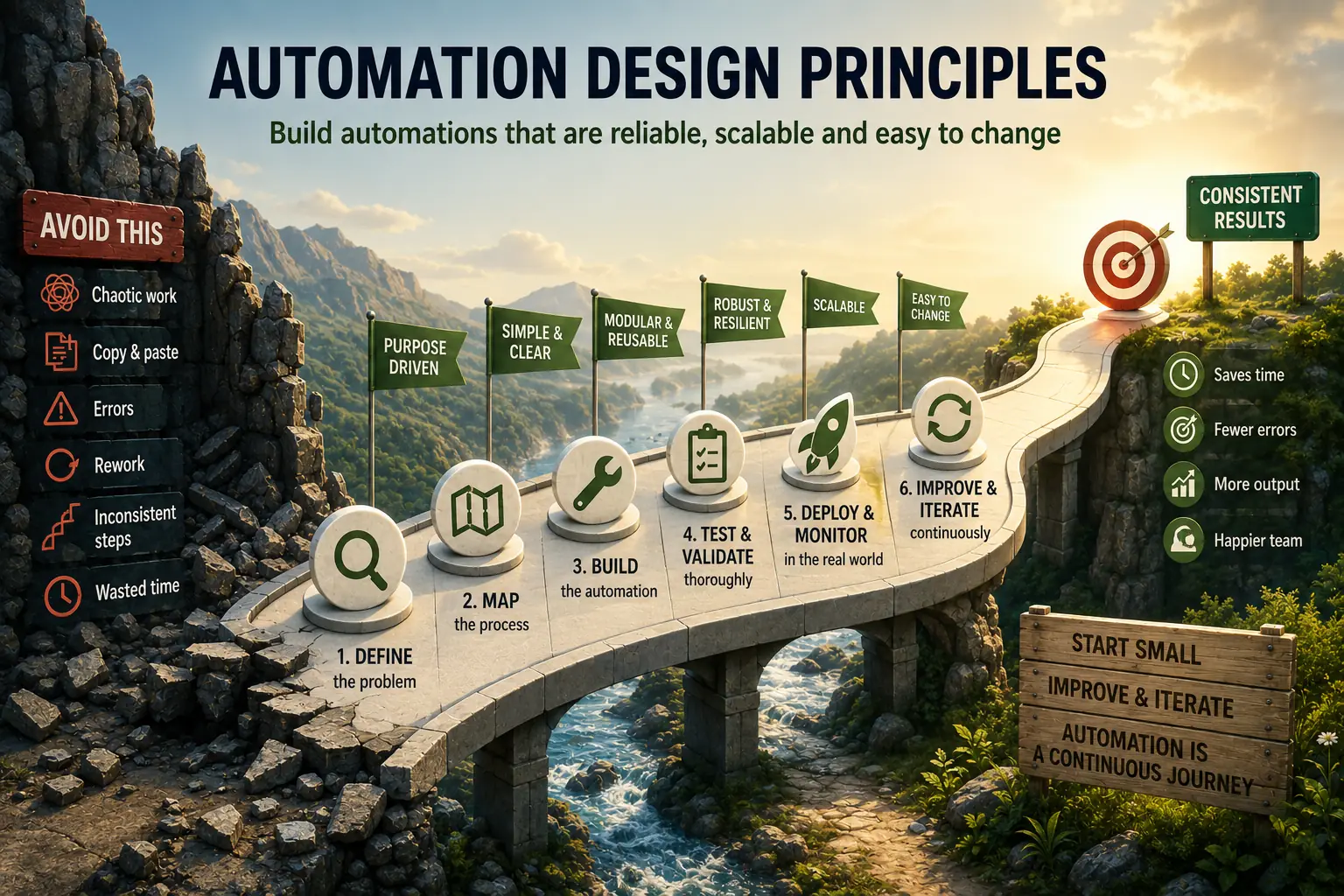
What Are Automation Design Principles?
Automation design principles are the engineering guidelines that govern the structural decisions determining whether a workflow remains reliable, understandable, and maintainable as it operates over time and is modified by different people.
They are distinct from automation ideas (what to automate) or automation tools (how to build it): they address how to handle errors, how to organize components, and how to make behavior observable.
These principles matter because most automation failures are not caused by incorrect business logic but by missing error handling, absent monitoring, or opaque design that makes diagnosing and fixing problems impossible.
In 2018, a major e-commerce company suffered a $20 million revenue loss due to an automation workflow error. Their inventory management system had been automated years earlier-a complex web of triggers, conditions, and integrations moving products between warehouses, updating availability, and managing replenishment orders.
The automation worked flawlessly for three years. Then a vendor changed their API response format slightly-adding a new optional field. The automation wasn't designed to handle unexpected data structures. It failed silently, stopping inventory updates without triggering alerts.
By the time the problem was discovered weeks later, thousands of products showed incorrect availability, leading to massive order cancellations, customer service escalations, and emergency manual inventory reconciliation.
The technical error was minor. The design flaw was catastrophic: no error handling, no monitoring, no documentation of assumptions, no validation of external data, no alerts when critical processes stopped running.
This scenario repeats constantly across organizations. Automations built with insufficient design principles work until they don't-then fail dramatically, expensively, and mysteriously. The builder has left the company. Nobody understands how it works. Documentation doesn't exist. Modifying it risks breaking everything.
Contrast this with well-designed automation: clear, documented, observable, maintainable, defensively built to assume failures will happen. When something breaks, it fails loudly with clear error messages. Logs provide debugging context. Monitoring catches problems immediately.
Modular design allows fixing components without understanding the entire system.
This article explains automation design principles: fundamental architecture concepts, error handling strategies, maintainability practices, complexity management, logging and observability, team collaboration patterns, resilience techniques, and anti-patterns to avoid.
Whether building Zapier workflows, writing scripts, or designing enterprise systems, these principles apply.
Automation design principles are the engineering guidelines that determine whether a workflow remains reliable, understandable, and maintainable as it operates over time and is modified by different people.
They are a category distinct from automation ideas (what to automate) or automation tools (how to build it): they govern the structural decisions - how to handle errors, how to organize components, how to make behavior observable - that determine whether an automation becomes dependable infrastructure or a fragile liability.
These principles matter because most automation failures are not caused by incorrect business logic but by missing error handling, absent monitoring, or opaque design that makes diagnosing and fixing problems impossible.
Core Principle 1: Simplicity as Default
The simplicity principle: Make workflows as simple as possible for their purpose-no simpler, no more complex.
Why Simplicity Matters
Complex automations:
- Harder to understand (cognitive load)
- More failure modes (more that can break)
- Difficult to debug (too many moving parts)
- Expensive to maintain (require specialist knowledge)
- Fragile (changes break unexpected things)
Simple automations:
- Easy to understand at glance
- Fewer failure modes
- Quick to debug
- Anyone can maintain
- Robust to changes
Trade-off: Simple might mean less capable. That's often acceptable-working simplicity beats broken sophistication.
"Simplicity is the ultimate sophistication. Any fool can build something complex; building something simple that works reliably is hard." - Leonardo da Vinci
Applying Simplicity
Prefer two simple workflows over one complex:
Bad: Single workflow with 47 conditional branches handling every edge case
Good: Core workflow for common case + separate workflows for special cases
Benefit: Core workflow is simple and reliable. Special cases isolated-if they break, don't affect main flow.
Use platform features, not workarounds:
Bad: Complex logic trying to work around platform limitations
Good: Use platform capabilities designed for the task, or switch to better tool
Example: Don't build elaborate workarounds in Zapier for complex data transformations. Use tool designed for it (Python script, spreadsheet formula, specialized service).
Start minimal, add only as needed:
Bad: Build comprehensive solution anticipating every possible future requirement
Good: Build simplest version that solves current problem. Add features when they're actually needed, not speculatively.
Why: Requirements change. Anticipated features may never be needed. Keep simple until proven necessary.
| Automation Type | Complexity | Maintainability | Failure Risk | Best For |
|---|---|---|---|---|
| Simple (1-3 steps) | Low | High | Low | Data sync, notifications |
| Moderate (4-10 steps) | Medium | Medium | Medium | Onboarding sequences |
| Complex (10+ steps) | High | Low | High | Enterprise workflows |
| Monolithic | Very high | Very low | Very high | Avoid when possible |
Testing Simplicity
The explanation test: Can you explain how automation works in 3 minutes?
- Yes: Probably appropriately simple
- No: Consider whether complexity is justified
The newcomer test: Could teammate unfamiliar with this automation understand it without extensive explanation?
- Yes: Well-designed
- No: Needs simplification or better documentation
Core Principle 2: Defensive Design
The defensive principle: Assume integrations will break, data will be wrong, and systems will fail. Design accordingly.
Why Defensive Thinking Matters
Optimistic automation: Assumes everything works
Reality: APIs change, services go down, data formats vary, rate limits hit, timeouts occur
Result of optimism: Silent failures, corrupted data, mysterious bugs
Result of defensiveness: Clear failures, preserved data integrity, debuggable issues
Defensive Techniques
Always validate external data:
DON'T:
- Receive data from API
- Immediately use it in calculation

DO:
- Receive data from API
- Check: Is it the expected type?  Required fields present?
Values in valid range?
- If validation fails: Log error, alert, stop processing (don't continue with bad data)
- If validation passes: Use data
Assume APIs will change:
- Don't depend on specific field order
- Handle optional fields gracefully
- Validate response structure
- Version API calls when possible
- Test with varied response formats
Handle rate limits proactively:
- Throttle requests (don't hit limits)
- Respect rate limit headers
- Implement exponential backoff on 429 responses
- Queue operations for rate-limited services
Set timeouts on everything:
Bad: Automation waiting indefinitely for external service
Good: Timeout after reasonable period, log error, alert
Why: Prevents hung workflows consuming resources and hiding failures
Validate outputs before using downstream:
- Check: Did calculation produce expected result type?
- Verify: Is result in reasonable range?
- Test: Does output match validation rules?
Example: If calculating discount percentage, validate result is 0-100 before applying to order.
Core Principle 3: Observable Operations
The observability principle: Make it easy to see what's happening and what went wrong.
Why Observability Matters
Opaque automation: Runs in black box, unknown if working, hard to debug when breaks
Observable automation: Clear visibility into executions, errors, performance
Business impact: Observable systems have faster problem resolution, fewer prolonged failures, easier optimization
"You can't fix what you can't see. Observability is not a luxury-it's the minimum viable property of any system you plan to keep running." - Charity Majors
What to Log
Essential logging:
1. Execution events:
- Workflow started
- Each major step completed
- Workflow finished (success/failure)
- Execution duration
2. Input data:
- What triggered workflow
- Key parameters
- Source of data
3. Errors and exceptions:
- Error message
- Stack trace (if applicable)
- Context (what was being attempted)
- Input data that caused error
4. Decision points:
- Conditional branches taken
- Filtering logic results
- Why automation chose specific path
5. External interactions:
- API calls made
- Responses received
- Rate limit status
- Retry attempts
6. Data transformations:
- Input values
- Transformation applied
- Output values
Log structure example:
[2026-01-16 14:32:15] [INFO] Workflow: Invoice Processing Started
[2026-01-16 14:32:16] [INFO] Trigger: New invoice #12345 from vendor@company.com
[2026-01-16 14:32:16] [INFO] Validation: Invoice format valid
[2026-01-16 14:32:17] [INFO] API Call: Fetching vendor details (vendor_id: 789)
[2026-01-16 14:32:18] [INFO] Response: Vendor details retrieved successfully
[2026-01-16 14:32:18] [INFO] Calculation: Discount = $1,200 (10% of $12,000)
[2026-01-16 14:32:19] [INFO] Condition: Amount > $10,000  Approval required
[2026-01-16 14:32:20] [INFO] Notification: Approval request sent to manager@company.com
[2026-01-16 14:32:21] [INFO] Workflow: Invoice Processing Completed (Duration: 6s)
What to Monitor
Health metrics:
- Execution count (per hour/day)
- Success rate (%)
- Average execution duration
- Error rate
- Specific error types frequency
Alerts to configure:
- Execution failure rate >5%
- Workflow hasn't run in expected timeframe
- Execution duration >2x normal
- Specific critical errors occur
- External service repeatedly unavailable
Dashboard to build:
- Recent executions (success/failure)
- Error trends over time
- Performance trends
- Most common errors
- Workflows requiring attention
Core Principle 4: Error Handling Strategy
The error handling principle: Fail loudly and obviously, never silently.
Error Handling Patterns
Pattern 1: Retry with Exponential Backoff
For: Transient failures (network issues, temporary service unavailability)
Implementation:
- First retry: Immediate or after 1 second
- Second retry: After 2 seconds
- Third retry: After 4 seconds
- Fourth retry: After 8 seconds
- Give up after N attempts, log failure, alert
Why exponential: Gives temporary issues time to resolve without overwhelming failed service
Pattern 2: Circuit Breaker
For: Repeated failures indicating systemic issue
Implementation:
- Track failure rate for external service
- If failures exceed threshold (e.g., 50% over 5 minutes): "Open circuit"
- While circuit open: Don't attempt calls (fail fast)
- After timeout period: Try one request ("half-open")
- If succeeds: Close circuit (resume normal operation)
- If fails: Reopen circuit
Why: Prevents cascading failures, gives failing service time to recover
Pattern 3: Graceful Degradation
For: Non-critical failures that shouldn't stop workflow
Implementation:
- Identify must-succeed vs. nice-to-have steps
- If optional step fails: Log, continue workflow
- If critical step fails: Stop, alert, don't corrupt data
Example: Sending notification email is optional-log failure but complete order. Charging payment is critical-stop if fails.
Pattern 4: Fallback Options
For: When primary method fails but alternatives exist
Implementation:
- Primary: Try preferred method
- If fails: Try secondary method
- If fails: Try tertiary method
- If all fail: Alert and stop
Example:
- Primary: Fetch data from API
- Fallback: Fetch from cached copy
- Last resort: Use default values
- If all fail: Alert human
Pattern 5: Dead Letter Queue
For: Failed items that need manual review
Implementation:
- When processing fails: Move item to "failed queue"
- Continue processing other items
- Periodically review failed items
- Fix issues, retry processing
Why: One bad item doesn't stop entire batch
Notification Strategy
When to alert:
- Critical workflow failure
- Error rate exceeds threshold
- Workflow hasn't run when expected
- Data validation failure
- External service repeatedly unavailable
When NOT to alert:
- Single transient failure (if retry succeeded)
- Expected errors (handled gracefully)
- Low-priority issues
Alert fatigue: Too many alerts → people ignore them → critical issues missed
Better: Alert only on actionable issues requiring human intervention
Core Principle 5: Maintainability by Design
The maintainability principle: Design so others (or future you) can understand and modify without breaking things.
Maintainability Practices
Practice 1: Clear Naming
Bad:
- Workflow: "Flow_v3_final_NEW"
- Step: "Action 1"
- Variable: "x"
Good:
- Workflow: "Invoice Processing - Approval Required"
- Step: "Validate Invoice Format"
- Variable: "discount_percentage"
Why: Names should convey purpose without needing to examine internals
Practice 2: Documentation
What to document:
- Purpose: Why does this automation exist? What problem does it solve?
- Trigger: What starts the workflow?
- Main steps: High-level flow
- Dependencies: What external services, data sources, or other automations does it rely on?
- Assumptions: What conditions must be true for this to work?
- Edge cases: How are unusual situations handled?
- Owner: Who built this? Who maintains it?
- Last modified: When was it last changed? What changed?
Where to document:
- Within automation platform (description fields)
- README file (for code-based automations)
- Team wiki or knowledge base
- Comments inline for complex logic
Practice 3: Modular Design
Bad: Monolithic workflow with everything in one place
Good: Separate workflows/functions for discrete responsibilities
Example: Order processing
Monolithic:
- Single massive workflow handling validation, inventory check, payment, shipping, notifications, analytics
Modular:
- Core workflow: Orchestrates other components
- Validation module: Checks order data
- Inventory module: Verifies availability
- Payment module: Processes transaction
- Shipping module: Creates shipment
- Notification module: Sends emails
- Analytics module: Records metrics
Benefits:
- Each module simple and testable
- Changes isolated (updating notifications doesn't risk payment processing)
- Modules reusable across workflows
- Easier to understand
Practice 4: Configuration Over Hardcoding
Bad: Values embedded in workflow logic
If amount > 1000:
Send to approver email: "john@company.com"Good: Values in variables/config
If amount > APPROVAL_THRESHOLD:
Send to approver email: APPROVER_EMAILWhy: Changing threshold or approver doesn't require understanding workflow internals
What to externalize:
- Thresholds and limits
- Email addresses
- API endpoints
- File paths
- Business rules
Practice 5: Version Control
For code-based automations: Git
For no-code platforms:
- Export backups regularly
- Document changes in changelog
- Use platform versioning features if available
- Keep screenshots of configurations before major changes
Why: Ability to revert if changes break things
Core Principle 6: Testability
The testability principle: Validate behavior before deploying to production.
Testing Strategies
Strategy 1: Separate Test and Production Environments
Setup:
- Test environment: Safe to experiment, connected to test data
- Production environment: Real data, real consequences
Workflow:
- Build/modify automation in test environment
- Test thoroughly with test data
- Deploy to production only after validated
Why: Mistakes in test don't impact real operations
Strategy 2: Test with Varied Data
Don't just test happy path. Test:
- Normal cases: Expected inputs
- Edge cases: Boundary conditions, minimum/maximum values
- Error cases: Invalid inputs, missing data, malformed responses
- Empty cases: Zero items, blank fields, null values
Example: Order processing automation
Test with:
- Normal order: Standard products, valid payment
- Large order: 100+ items
- Small order: Single item
- Zero-value order: Free products
- Invalid payment: Declined card
- Missing data: No shipping address
- Duplicate submission: Same order twice
Strategy 3: Manual Testing Checklist
Before deploying:
- Does automation trigger correctly?
- Are all steps executing as expected?
- Do error handlers work?
- Are logs captured properly?
- Do notifications send correctly?
- Does it handle unexpected data gracefully?
- Is documentation updated?
- Are monitoring/alerts configured?
Strategy 4: Smoke Testing in Production
After deploying:
- Monitor first few executions closely
- Check logs for unexpected errors
- Verify outputs are correct
- Be ready to rollback if issues
Don't: Deploy Friday afternoon and leave for weekend
Do: Deploy during business hours when you can monitor and fix issues
Core Principle 7: Performance and Efficiency
The efficiency principle: Design for appropriate performance without premature optimization.
Performance Considerations
Consideration 1: Batch vs. Real-Time
Real-time: Process each item immediately as it arrives
- Pros: Immediate results
- Cons: Higher cost, more API calls, slower for volume
Batch: Accumulate items, process together
- Pros: More efficient, better for rate-limited APIs
- Cons: Delayed processing
Decision criteria: Does business require real-time or is delayed acceptable?
Example:
- Order confirmation: Real-time (customer expects immediate response)
- Analytics reporting: Batch (hourly/daily sufficient)
Consideration 2: Parallel vs. Sequential
Sequential: Process one item at a time
- Pros: Simpler, predictable
- Cons: Slower for large volumes
Parallel: Process multiple items simultaneously
- Pros: Faster
- Cons: More complex, harder to debug
When parallel makes sense: Processing 1000+ items where order doesn't matter
Consideration 3: Caching
Pattern: Store frequently-accessed data temporarily
Example:
- Bad: Fetch customer details from API for every order
- Good: Cache customer details for 1 hour, reuse for multiple orders
Benefits: Reduced API calls, faster execution, lower costs
Caution: Ensure cached data doesn't become stale when accuracy critical
Consideration 4: Rate Limit Management
Problem: External APIs limit requests per second/minute
Solutions:
- Throttling: Limit own request rate to stay under limit
- Queuing: Queue requests, process at sustainable rate
- Batching: Combine multiple requests into batch API calls
- Caching: Reduce need for requests
Anti-Patterns to Avoid
Common automation mistakes that create problems.
Anti-Pattern 1: Silent Failures
Manifestation: Automation fails, but nobody notices until damage is done
Why it happens: No monitoring, no alerts, no logging
Fix: Implement comprehensive logging and alerts
Anti-Pattern 2: Tight Coupling
Manifestation: Changing one automation breaks others unexpectedly
Why it happens: Automations directly dependent on each other's implementation details
Fix: Use well-defined interfaces, loose coupling, avoid sharing internal state[2]
Anti-Pattern 3: God Workflow
Manifestation: Single massive workflow handling too many responsibilities
Why it happens: Adding features to existing workflow easier than architecting modularly
Fix: Break into smaller, focused workflows with clear boundaries
Anti-Pattern 4: Hardcoded Everything
Manifestation: Values embedded in logic, requiring workflow changes for business changes
Why it happens: Faster to hardcode initially
Fix: Use variables and configuration from the start
Anti-Pattern 5: No Error Handling
Manifestation: Automation assumes everything always works
Why it happens: Testing only happy path
Fix: Explicitly handle errors, implement retry logic, fail gracefully
Anti-Pattern 6: Tribal Knowledge
Manifestation: Only one person understands how automation works
Why it happens: No documentation, complex logic, unclear naming
Fix: Document thoroughly, simplify, make self-explanatory
Anti-Pattern 7: Premature Optimization
Manifestation: Complex performance optimizations before understanding if they're needed
Why it happens: Anticipating scale problems
Fix: Build simply first, optimize when measurements show need
Team Collaboration Patterns
Enabling multiple people to work on automations effectively.
Pattern 1: Naming Conventions
Establish standards:
- Workflow names:
[Category] - [Purpose] - [Trigger/Schedule] - Examples:
- "Sales - Lead Assignment - New Lead Created"
- "Finance - Invoice Processing - Daily 9am"
- "Support - Ticket Escalation - Priority Changed"
Benefits: Quickly understand what workflows do, easier to find relevant automations
Pattern 2: Ownership and Contact
Include in every automation:
- Built by: Who created this initially
- Maintained by: Who's responsible now
- Contact: How to reach maintainer with questions
Format: Could be in description, README, or documentation system
Why: People know who to ask rather than guessing or fearing to touch it
Pattern 3: Change Management Process
For complex or critical automations:
- Propose change: Describe what and why
- Review: Another team member reviews proposal
- Test: Validate in test environment
- Document: Update documentation
- Deploy: Move to production
- Monitor: Watch for issues
For simple automations: Lighter process, but still document and test
Pattern 4: Centralized Documentation
Maintain repository of:
- All automations and their purposes
- Architecture diagrams showing how automations connect
- Common patterns and standards
- Troubleshooting guides
- Contact information
Tools: Wiki, Notion, Confluence, Google Docs, or README files in version control
Pattern 5: Regular Reviews
Quarterly or annually:
- Review all automations
- Identify: What's no longer needed? What's broken? What needs improvement?
- Update documentation
- Clean up deprecated automations
Prevents: Automation sprawl, technical debt accumulation
Conclusion: Automation as Engineering Discipline
Automation often starts informally-quick Zapier workflow, simple script-then grows into critical business infrastructure. Without design principles, this evolution creates fragility.
The key insights:
1. Simplicity is feature, not limitation-complex automations are expensive to maintain and prone to failure. Prefer multiple simple workflows over one complex workflow. Start minimal, add complexity only when clearly justified.
2. Assume failures will happen-defensive design validates data, handles errors gracefully, retries transient failures, and fails loudly rather than silently. Optimistic automation breaks unpredictably.
3. Observability is critical-comprehensive logging, monitoring, and alerts enable fast problem resolution. Black box automations are impossible to debug and expensive to maintain.
4. Error handling is not optional-retry logic, circuit breakers, graceful degradation, fallback options, and clear notifications distinguish reliable from fragile automation.
5. Maintainability requires intentional design-clear naming, thorough documentation, modular architecture, configuration over hardcoding, and version control enable team collaboration and evolution over time.
6. Test before deploying-separate test environments, varied test data, manual checklists, and careful production monitoring catch issues before they impact operations.
7. Team collaboration needs patterns-naming conventions, ownership clarity, change management, centralized documentation, and regular reviews enable scaling automation across organizations.
The $20 million e-commerce automation failure was preventable. Error handling would have caught the API change. Validation would have detected bad data. Monitoring would have alerted immediately. Documentation would have enabled quick fixes.
Well-designed automation is infrastructure, not scripts. Treat it with engineering discipline: designed thoughtfully, tested thoroughly, monitored continuously, documented comprehensively. The marginal effort to apply these principles pays enormous dividends in reliability, maintainability, and business value.
As Martin Fowler observed about software (equally true for automation): "Any fool can write code that a computer can understand.[1] Good programmers write code that humans can understand."
"The systems that last are not the most clever ones. They are the ones that are the most maintainable-the ones someone who didn't build them can still understand and improve." - Michael Nygard[3]
Extend that principle: Good automation designers build workflows that are simple, observable, maintainable, and resilient. They design for humans who will maintain it, debug it, extend it, and depend on it-not just for computers to execute.
The question isn't whether to apply these principles. It's whether you want reliable, maintainable automation or fragile scripts waiting to break at the worst possible moment.
What Research Shows About Automation Design Quality
The research on what separates well-designed automation from poorly-designed automation has grown substantially as organizations have accumulated large portfolios of automation and the failures have become measurable.
Google's Site Reliability Engineering (SRE) practice, documented in the Site Reliability Engineering book (O'Reilly, 2016) authored by Betsy Beyer, Chris Jones, Jennifer Petoff, and Niall Richard Murphy, provides the most rigorous publicly available framework for thinking about automation reliability.[4]
Google SRE teams operate under an explicit policy that automation should be designed to surface errors clearly (fail loudly), that any automation touching production systems must have a corresponding runbook, and that automations must be tested in environments that accurately reflect production.
These principles, developed for managing some of the world's most complex production systems, apply directly to business process automation.
Charity Majors, former infrastructure lead at Parse (acquired by Facebook) and co-founder of Honeycomb, has contributed the concept of "observability" as distinct from "monitoring" to the technical operations literature.
Her research and writing argues that monitoring (checking whether predefined metrics are within acceptable ranges) is insufficient for complex systems, because it only detects known failure modes. Observability - the ability to ask arbitrary questions about a system's behavior from the outside - is required to diagnose novel failures.
This principle applies to automation: automations built with rich logging and observable state are easier to debug and maintain than those designed only with alerts for known failure modes.
W. Edwards Deming's contributions to quality management methodology - particularly his 14 Points for Management and the PDSA (Plan-Do-Study-Act) cycle, developed through his work with Japanese manufacturers in the 1950s and formally published in Out of the Crisis (1982) - provide the theoretical foundation for iterative automation improvement.
Deming's insistence on measurement-driven improvement ("In God we trust; all others must bring data") maps directly to automation design: decisions about automation design should be based on measured outcomes (error rates, execution times, exception rates) rather than assumptions about what the automation is doing.
The DevOps Research and Assessment (DORA) program, led by researcher Dr. Nicole Forsgren and documented in the book Accelerate (2018), has produced the most rigorous research on what distinguishes high-performing technical teams from low-performing ones.
Their research on thousands of organizations found that four key metrics predicted elite performance: deployment frequency, lead time for changes, time to restore service, and change failure rate.
The design principles in this article - observability, error handling, testability, maintainability - are the design practices that produce the outcomes those metrics measure.
MIT's research on complex systems resilience, conducted by researchers including Carliss Baldwin and Kim Clark in their work on modular design (Design Rules, 2000), provides the theoretical basis for the modular design principle.
Their research demonstrated that modular architectures - where complex systems are divided into independent modules with well-defined interfaces - are more evolvable, more maintainable, and more resilient to component failures than monolithic architectures.
This finding, originally developed in the context of physical product design and software architecture, generalizes directly to automation design.
Real-World Case Studies in Automation Design Quality
The case studies that best illustrate the impact of design quality on automation outcomes involve comparisons between well-designed and poorly-designed systems facing the same challenge.
Netflix's automation infrastructure provides the most extensively documented case study in observability as a design principle.
Netflix engineers developed Chaos Monkey - a system that randomly terminates production servers - specifically to test whether their automation and monitoring infrastructure could detect and respond to failures reliably.
The discipline of building systems that can handle random component failures forced their engineering teams to implement the design principles in this article by default: comprehensive logging (necessary to diagnose failures), circuit breakers (necessary to prevent cascading failures), graceful degradation (necessary to maintain user experience during partial failures), and automated recovery (necessary to restore service without manual intervention).
Netflix Technology Blog has documented this approach extensively, and it has been adopted by hundreds of organizations as the "chaos engineering" practice.
A common pattern in automation post-mortems across the industry involves a provisioning workflow that keeps running after a dependent service silently changes its configuration format, producing accounts or records with incorrect settings that go undetected for hours because the automation never validated its own outputs.
The recurring fix is the same across these cases: add output validation against expected configuration values and add output sampling to monitoring, closing both the defensive-design gap and the observability gap at once.
Amazon Web Services has published extensive documentation on the design principles underlying their automation infrastructure, including their internal review process called the "Correction of Error" (COE) mechanism.
The COE process requires that every significant automation failure be analyzed to identify not just what went wrong (the immediate cause) but why the system design allowed it to go wrong (the root cause) and what design change prevents similar failures (the correction).
This three-level analysis consistently surfaces the same design deficiencies: insufficient validation of external inputs, inadequate error handling, insufficient observability, and tight coupling between components.
Automation platforms with visibility into large numbers of workflows consistently report the same pattern: automations built with error handling features, such as filters that halt on invalid data and error paths that route failures to notification steps, fail far less often than those without, and automations with explicit ownership and regular review cycles are far less likely to sit broken and undetected for extended periods.
A common redesign pattern for merchant onboarding automation illustrates the value of modular design: instead of one monolithic workflow handling verification, account creation, and payment enablement together (where any single step failing takes down the whole process), each major function becomes a separate automation with its own error handling, logging, and monitoring.
When failures occur in the redesigned system, they are immediately localized to the failing module, the other modules keep functioning, and recovery is confined to the failed component, substantially reducing mean time to resolution after the redesign.
Evidence-Based Approaches to Automation Design
The research on automation design quality converges on practices that are consistently associated with better reliability, maintainability, and business outcomes.
Apply the "strangler fig" pattern when redesigning existing automations. The strangler fig pattern, described by Martin Fowler in his patterns catalog, involves building new system components alongside old ones, gradually shifting traffic from old to new, and decommissioning old components when no longer needed.
Applied to automation redesign, this means building new, well-designed automation components in parallel with existing poorly-designed ones rather than attempting big-bang replacements.
Organizations that adopted this approach reported significantly lower risk during automation redesign compared to those that attempted complete replacements.
Define the contract for each automation module before building it. The concept of "design by contract," introduced by computer scientist Bertrand Meyer in the 1980s, specifies that each component of a system should have explicit preconditions (what must be true for the component to be invoked correctly), postconditions (what will be true when the component completes successfully), and invariants (what must always remain true).
Applied to automation design, this means specifying for each automation module: what inputs it requires (format, validation rules), what outputs it produces (format, guaranteed properties), and what side effects it may have. This explicit specification forces the design thinking that prevents environment mismatch failures.
Use the four-golden-signals framework for monitoring. Google's Site Reliability Engineering (SRE) practice identified four metrics that, together, provide comprehensive visibility into automation system health: latency (how long does each execution take?), traffic (how many executions are occurring?), errors (what proportion of executions result in errors?), and saturation (how close is the system to capacity limits?).
Automations monitored with all four signals detect failures significantly faster than those monitored with single metrics.
DORA's research consistently finds that organizations using comprehensive monitoring (covering multiple signal types) detect and recover from failures far faster than organizations relying on minimal monitoring, and categorizes recovery performance into tiers where elite performers restore service in under an hour.
Build documentation as part of the automation, not after it. The research on automation maintenance consistently finds that documentation created at the time of building - when the design decisions and constraints are fresh - is significantly more accurate and useful than documentation created after the fact.
Jez Humble and David Farley, in Continuous Delivery (2010), recommend treating documentation as a first-class deliverable that must be updated before a change can be considered complete.
Applied to automation, this means that a workflow is not done when it runs correctly - it is done when it runs correctly AND its documentation accurately reflects how it works, what it depends on, and what to do when it fails.
Sources & Further Reading
- Fowler, M. (2018). Refactoring: Improving the design of existing code (2nd ed.). Addison-Wesley Professional.
- Newman, S. (2015). Building microservices: Designing fine-grained systems. O'Reilly Media.
- Nygard, M. T. (2018). Release it! Design and deploy production-ready software (2nd ed.). Pragmatic Bookshelf.
- Beyer, B., Jones, C., Petoff, J., & Murphy, N. R. (2016). Site reliability engineering: How Google runs production systems. O'Reilly Media.
Further Reading
- Kleppmann, M. (2017). Designing data-intensive applications: The big ideas behind reliable, scalable, and maintainable systems. O'Reilly Media.
- Kim, G., Humble, J., Debois, P., & Willis, J. (2016). The DevOps handbook: How to create world-class agility, reliability, and security in technology organizations. IT Revolution Press.
- Allspaw, J. (2015). Trade-offs under pressure: Heuristics and observations of teams resolving internet service outages. Cognitive Systems Engineering Laboratory.
- Reason, J. (2000). Human error: Models and management. BMJ, 320(7237), 768-770. DOI: 10.1136/bmj.320.7237.768