
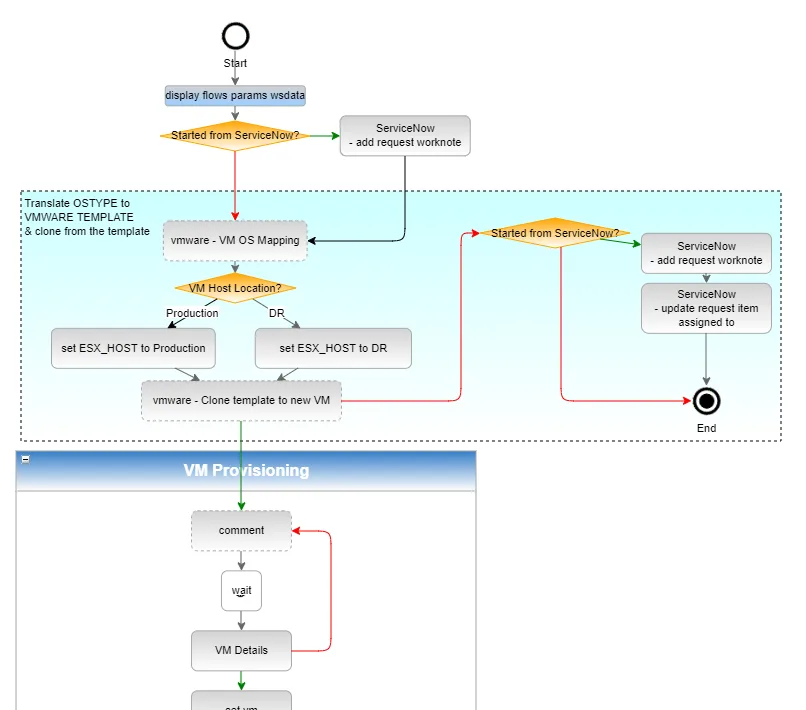
Workflow automation moves predictable, rules-based steps from people to software so that human attention can focus on judgment-intensive work. A workflow connects an event or condition to actions such as updating records, routing tasks, sending messages, transforming data, or calling another system. Chaining triggers and actions can make routine processes faster, more consistent, traceable, and capable of operating without continuous human initiation.
Every morning, a customer support manager at a growing e-commerce company opened her email, manually sorted incoming support tickets by category, copied the urgent ones into a spreadsheet, assigned them to team members via Slack messages, and updated a shared dashboard with the daily numbers.
The entire process took 45 minutes and was the first thing she did every day. It was also, she eventually realized, the least valuable thing she did every day - because every step followed a predictable pattern that required no judgment, creativity, or expertise. It required only her time.
Workflow automation replaced all of it. New support tickets arriving in the helpdesk are automatically classified by type and urgency based on keywords and sender information. Urgent tickets trigger immediate Slack notifications to the appropriate team member.
The dashboard updates in real time as tickets are created, assigned, and resolved. The 45-minute morning ritual became five minutes of reviewing what had happened overnight rather than manually creating the picture of what had happened.
This is what workflow automation does at its most practical: it takes processes that are predictable and repetitive - where every step follows defined rules - and configures software to execute those steps automatically, without human initiation or supervision.
The human attention that was consumed by executing the process is freed for work that actually requires human judgment.
What Is a Workflow, Exactly?
Before understanding automation, it helps to be precise about what a "workflow" is.
A workflow is a sequence of steps that accomplishes a defined goal. The steps are performed in a specific order, by specific people or systems, triggered by specific events.[9] Workflows exist in every organization, in every function:
- When a sales lead fills out a web form, someone processes the lead: creates a record, assigns it to a salesperson, sends a welcome email. That is a workflow.
- When an employee submits an expense report, someone approves it: checks the amount, verifies the policy compliance, routes it to the appropriate approver, records the approval, initiates reimbursement. That is a workflow.
- When a new customer signs a contract, someone onboards them: provisions their account, sends setup instructions, schedules a kickoff call, creates tasks for the implementation team. That is a workflow.
Every step in each of these workflows is currently performed either by a human or by a software system. Workflow automation is the practice of shifting steps from human execution to software execution - using software to trigger, process, and complete workflow steps that previously required human initiation or action.
How Workflow Automation Works: The Trigger-Action Model
The conceptual framework underlying most workflow automation is simple: triggers cause actions.
A trigger is an event that starts an automation or a step within an automation. Triggers can be:
- Time-based: At 9 AM every weekday. On the first of each month. Every 15 minutes.
- Event-based: When a new record is created in a database. When a form is submitted. When a file is added to a folder. When an email is received from a specific sender.
- Condition-based: When a record's status changes to "Approved." When a deal's value exceeds a threshold. When a metric crosses a defined limit.
An action is what happens in response to the trigger. Actions can be:
- Creating or updating records: Adding a new entry to a database. Updating a customer's status in a CRM.
- Sending communications: Sending an email, Slack message, or SMS notification.
- Creating tasks or assignments: Adding a task in a project management tool. Assigning work to a team member.
- Transforming data: Extracting information from a document. Converting one format to another. Calculating a derived value.
- Calling external systems: Triggering an action in another application through its API. Submitting a form in an external system.
A complete automated workflow chains triggers and actions: a trigger initiates the workflow, an action executes, that action may produce output that serves as a trigger for the next step, and so on until the workflow completes.
Example: A new customer account is created in a SaaS application (trigger: record created). The automation creates a customer record in the CRM (action: create record). The customer record creation triggers a welcome email sequence (trigger: record created with type "customer").
The first email in the sequence is sent (action: send email). Three days later, a follow-up email is sent (trigger: 3 days after previous email, if customer hasn't logged in).
If the customer logs in (trigger: customer login event), the follow-up sequence is cancelled and a "getting started" sequence is initiated instead.
This chain of triggers and actions executes entirely without human involvement after the initial configuration.
| Automation Benefit | Manual Process | Automated Process | Improvement |
|---|---|---|---|
| Speed of response | Hours to days | Seconds to minutes | 100x-1000x |
| Error rate | 1-5% (human error) | 0.1-0.5% (validation) | 5-50x lower |
| Processing capacity | Linear with headcount | Near unlimited | Exponential |
| Consistency | Variable by person/time | 100% consistent | Eliminates variation |
| Audit trail | Incomplete, informal | Complete, timestamped | Full visibility |
| After-hours operation | Not possible | Continuous | 24/7 coverage |
"The highest-value thing workflow automation does is not save time on the automated tasks - it is return that time to the judgment-intensive work that only humans can do well." - McKinsey Global Institute
Types of Workflow Automation
Workflow automation tools fall into several categories based on what they automate and how.
Integration Automation
Integration automation connects software applications that were not designed to communicate with each other, allowing data to flow automatically between them when specific events occur.
The classic use case: a web form built in Typeform needs to create a record in an Airtable database, add the person to a Mailchimp email list, and notify the sales team in Slack. These three applications have no native connection, but a tool like Zapier can connect them through a simple visual interface without requiring any code.[1]
Integration automation is the most accessible category of workflow automation for non-technical users. Tools like Zapier, Make, and n8n provide pre-built connectors for thousands of popular applications, and the visual "if this, then that" interface is understandable without programming experience.[2]
What it's best for: Moving data between applications, triggering actions in one system when events occur in another, synchronizing records across multiple tools.[8]
Business Process Automation
Business process automation addresses more complex, multi-step workflows that often involve human decision points alongside automated steps.
Example: An invoice approval workflow where invoices below $1,000 are automatically approved, invoices between $1,000 and $10,000 require a department head approval, and invoices above $10,000 require both department head and CFO approval.
The automation routes each invoice to the appropriate approver, sends reminders if approval is not received within 48 hours, escalates to the approver's manager if still unaddressed after 72 hours, and records the approval in the accounting system when complete.
Business process automation tools (including Microsoft Power Automate, Nintex, and purpose-built platforms like ServiceNow) handle these approval workflows, form-based processes, and multi-participant workflows more naturally than simple integration automation tools.[10]
What it's best for: Approval processes, multi-step workflows with human decision points, processes where different scenarios require different paths.
Robotic Process Automation (RPA)
Robotic Process Automation automates interactions with graphical user interfaces - the actual click sequences and keyboard inputs that a human would use to operate a desktop or web application.[4] RPA tools "watch" how a human performs a task on their computer and then replicate those interactions automatically.
RPA is valuable when the data or systems being automated do not have APIs - when the only way to interact with a system is through its user interface. Legacy enterprise applications, internal systems without modern APIs, and web-based workflows that lack automation support are all candidates for RPA.
The limitations: RPA is fragile. Any change to the user interface (a button moving, a new screen added, a color change that the automation recognizes as a different element) can break the automation. RPA requires more maintenance than API-based automation and is typically more expensive to build.
Example: A healthcare company's legacy electronic health records system from the 1990s has no API and no way to export data programmatically. An RPA tool automates the process of opening the application, navigating to each patient record, copying the required fields, and entering them into the new system.
This automation works, but requires updating whenever the legacy application changes - which healthcare systems do more often than their age might suggest.
What it's best for: Automating interactions with legacy systems that have no API. Not appropriate as a first choice when API-based automation is possible.
Artificial Intelligence-Augmented Automation
The integration of AI capabilities into workflow automation is one of the most significant developments in the automation landscape since 2022. AI augmentation allows automations to process unstructured information - text, images, documents - in ways that traditional rule-based automation cannot.
Examples:
- An email arrives with a PDF invoice attached. An AI step extracts the vendor name, invoice number, date, and amount from the PDF (even if the format is not standardized), and creates a structured record in the accounting system.
- A customer support ticket arrives. An AI step classifies the issue, assesses urgency, and drafts a response using information from the knowledge base. A human reviews the draft and sends it with any modifications.
- Social media mentions of the company arrive. An AI step assesses sentiment (positive, negative, neutral) and flags negative mentions for immediate review.
These AI-augmented automation patterns blur the line between automation and artificial intelligence, requiring judgment (interpreting unstructured input) alongside the rule-following that traditional automation excels at.
The Benefits of Workflow Automation
The benefits of workflow automation compound across several dimensions.
Time savings: The most immediate and visible benefit is the elimination of human time spent on repetitive steps. Time savings are most visible when the automated task was consuming hours per week - but the cumulative value of saving minutes per day across many tasks is equally real.
Error reduction: Human execution of repetitive processes is prone to errors: missing steps, entering data incorrectly, applying inconsistent judgment. Automation executes the same steps the same way every time, eliminating the human error component from the process.[7]
For processes where errors have significant consequences (financial data, compliance records, customer communications), error reduction is often the primary value driver.
Speed: Automation executes immediately when triggered, without the delays inherent in human processing. A customer who submits a form at 2 AM receives an immediate automated confirmation rather than waiting until business hours.
An urgent support ticket is routed to the on-call team member within seconds rather than waiting for someone to check the queue. For time-sensitive processes, automation's speed advantage is significant.
Scalability: Manual processes scale linearly with volume: twice the work requires twice the people. Automated processes scale much more cheaply: a workflow automation that processes 100 records per day can typically process 10,000 records per day with no additional human effort, just additional compute.
This scalability advantage is what allows automation to be a strategic tool for growth rather than just an efficiency tool for existing operations.
Consistency: Automated processes apply the same rules to every case without variation due to who is processing it, what time of day it is, how busy the processor is, or whether they understood a policy the same way as their colleague.
Consistency is particularly valuable in compliance contexts, customer experience contexts, and quality assurance contexts.
Auditability: Automated workflows typically produce detailed logs of what happened, when, and what inputs and outputs were involved. This audit trail is far more complete than the equivalent documentation of manual processes, making it easier to investigate problems and demonstrate compliance.
What Workflow Automation Cannot Do
Understanding the limitations of automation is as important as understanding its capabilities.
Automation cannot replace judgment: Decisions that require weighing context, applying ethical considerations, interpreting ambiguous situations, or anticipating consequences that are difficult to specify in advance require human judgment.
Automation can surface these decisions and provide context for human decision-makers, but the judgment itself must remain human.
Automation cannot handle truly novel situations: Automated workflows handle cases within the range of what they were designed for.
Novel situations - edge cases outside the designed parameters, new types of requests that didn't exist when the automation was built, unexpected inputs from unusual sources - require human handling.
Well-designed automations route these novel cases to humans rather than attempting to process them incorrectly.
Automation requires stable processes: Processes that change frequently are poor automation targets, because each change requires updating the automation. The investment in automation only pays off when the process is stable enough to justify the upfront configuration cost.
Automation must be maintained: Automated workflows are not set and forget. APIs change and connections break. Business processes evolve and automations become outdated. The systems being automated update and the automation must be updated in response.
Automation requires ongoing maintenance from someone who understands what the automation does.
Getting Started with Workflow Automation
The path from understanding automation conceptually to implementing it practically follows a predictable sequence.
Step 1: Identify the right first automation. The best first automation is a process that is high-frequency (done daily or multiple times per week), fully consistent (the same steps every time), low-stakes (not catastrophic if the automation makes a mistake initially), and not too complex (one or two clear steps).
A process that data is manually copied from one system to another is a classic first automation.
Step 2: Document the process before automating it. Write down every step in the process, who or what performs it, what the inputs and outputs are, and what should happen when something goes wrong. Documentation reveals the ambiguities that will need to be resolved in the automation.
Step 3: Choose the right tool. For simple integration automation between popular applications, Zapier or Make is typically the fastest path. For more complex business process automation, consider Microsoft Power Automate (for Microsoft-centric organizations) or a purpose-built process automation tool.[3]
Step 4: Build a simple version and test it. Start with the minimum viable automation that handles the most common case. Test it with representative real data before deploying to production. Build in error handling for the most likely failure modes.
Step 5: Monitor and iterate. Review automation performance in the first weeks after deployment. Are errors occurring? Are edge cases falling through? Is the automation producing the intended results? Adjust based on what you observe.
Workflow automation, at its best, is not a complex technical discipline requiring specialized expertise - it is systematic application of the insight that rule-based repetitive work is better done by software than by humans, freeing human attention for the work that software cannot do.
Starting small, learning from experience, and building a library of working automations over time is the practical path to an organization where human effort is directed toward its highest-value uses.
See also: Workflow Automation Ideas, Automation Use Cases Explained, and Zapier Alternatives Explained.
What Research Shows About Workflow Automation Impact
The empirical research on workflow automation outcomes has grown substantially more rigorous over the past decade, moving from anecdotal productivity claims to controlled studies and large-scale survey data.
McKinsey Global Institute's landmark 2017 report A Future That Works: Automation, Employment, and Productivity, authored by researchers including James Manyika, Michael Chui, and Mehdi Miremadi, analyzed the automation potential of 2,000-plus work activities across 800 occupations.[6]
Their finding - that 60 percent of occupations have at least 30 percent of activities that are technically automatable with current technology - established the empirical foundation for understanding the scale of the workflow automation opportunity.
Critically, the research distinguished between technical automability and economic viability: many automatable activities are not automated because the cost of automation exceeds the cost of human labor for small volumes, a calculation that shifts as automation tools become cheaper and easier to deploy.
The same McKinsey research identified data collection and data processing as the highest-automation-potential activity categories - precisely the kinds of tasks that workflow automation platforms like Zapier and Make excel at.
These categories represent 51 percent of activities across all occupations, making workflow automation tools particularly well-positioned to address the largest slice of automatable work.
MIT's Work of the Future Task Force, co-chaired by Professors David Autor and David Mindell, has produced a series of reports examining how automation affects work quality as well as work quantity.
Their 2020 report The Work of the Future: Building Better Jobs in an Age of Intelligent Machines found that automation tools, when deployed thoughtfully, tend to shift work toward higher-skill, higher-judgment activities rather than eliminating work entirely.
Organizations that combined workflow automation with deliberate redesign of the roles affected reported higher job satisfaction among employees whose routine tasks were automated than those whose tasks were automated without role redesign.
The World Economic Forum's Future of Jobs Report 2023, drawing on surveys of over 800 companies across 27 industries, found that a large majority of surveyed companies planned to adopt big data, cloud and AI technologies in the following five years, with workflow automation (connecting systems and automating routine processes) cited as the highest-adoption category ahead of AI and robotics.
Companies that had already deployed workflow automation reported meaningful time savings on routine coordination tasks.[5]
W. Edwards Deming's systems thinking methodology, developed through his work with Japanese manufacturing in the 1950s and 1960s and later formalized in books including Out of the Crisis (1982), provides the theoretical foundation for understanding why workflow automation is most effective when combined with process improvement.
Deming's insight that "variation is the enemy of quality" applies directly to manual workflows: human execution of multi-step processes introduces variation at each step, and that variation compounds across the workflow.
Automation eliminates step-level variation, which is why automated workflows typically achieve error rates an order of magnitude lower than equivalent manual processes.
Real-World Case Studies in Workflow Automation
The workflow automation case studies that provide the clearest evidence of impact are those that include before-and-after measurement, not just testimonials.
Zapier's 2022 State of Business Automation report, based on surveys of 2,000 business professionals, documented specific automation implementations with measured outcomes.
The highest-impact category across all respondents was lead processing automation: companies that automated the sequence from web form submission to CRM entry to salesperson notification and follow-up reported an average of 41 hours saved per week per sales team.
The speed improvement - reducing lead response time from hours to seconds - was associated with a 21 percent improvement in lead-to-qualified-opportunity conversion rates, consistent with independent research on response speed and conversion.
HubSpot's marketing and sales operations team has documented their automation stack extensively through their own blog and reports.
Their implementation of behavioral trigger sequences - emails sent based on specific actions prospects take rather than on broadcast schedules - produced a 3x improvement in email engagement rates compared to broadcast email.
The trigger-based approach relies entirely on workflow automation: each trigger (page visit, content download, pricing page visit) fires a specific workflow that routes the contact to the appropriate follow-up sequence.
Shopify has published case studies with merchants who deployed workflow automation for order processing, inventory management, and customer communication.
One documented case involved a mid-size fashion retailer that automated the sequence from order placement to warehouse pick-list generation to shipping notification - a process that previously required manual data entry at three separate handoff points.
After automation, order processing errors dropped from approximately 2.3 percent to 0.1 percent, and the time from order placement to warehouse action dropped from an average of 47 minutes to under three minutes.
ServiceNow's enterprise workflow automation platform has documented cases in healthcare, financial services, and government where automated approval workflows produced dramatic cycle time reductions.
A published case with a large health system documented reduction in IT service request cycle times from an average of 12 days (with manual routing and approval tracking) to 2.1 days (with automated routing, reminder escalations, and parallel approval processing).
The reduction came not from eliminating the human approval decisions but from eliminating the wait time between steps caused by manual handoffs.
Evidence-Based Approaches to Workflow Automation
The research and practitioner experience on workflow automation implementation converge on several principles that distinguish high-impact deployments from low-impact ones.
Process documentation before automation, always. The single most robust finding across research on automation outcomes is that implementations preceded by thorough process documentation consistently outperform those that jump directly to tool configuration.
Michael Hammer and James Champy, in their foundational work Reengineering the Corporation (1993), argued that process redesign before automation is not optional but prerequisite: "Don't automate, obliterate" was Hammer's formulation - meaning that the first step is eliminating unnecessary process steps, and automation should only be applied to what remains.
This principle has been validated repeatedly in subsequent research.
Start with the trigger, not the action. Effective workflow automation design starts from a precise definition of the triggering event: exactly what condition must be true for the workflow to start?
Ambiguity in trigger definition leads to over-triggering (the workflow runs when it should not) or under-triggering (the workflow misses cases it should handle).
Research on automation failure modes consistently identifies trigger ambiguity as a leading cause of automation errors, because it creates classes of cases that the workflow handles incorrectly rather than the easier-to-detect complete failures.
Design exception handling before deploying. Every real-world workflow encounters inputs that fall outside its designed parameters.
Automation that handles 95 percent of cases correctly but crashes or produces wrong outputs on 5 percent creates a specific kind of problem: the 5 percent failures are invisible until they accumulate enough damage to be noticed.
Research from the Association for Intelligent Information Management (AIIM) on business process automation outcomes found that implementations that explicitly designed exception handling - routing edge cases to human review rather than processing them incorrectly - reported significantly higher user satisfaction and lower error remediation costs than implementations that did not.
Measure the right outcomes. The temptation in workflow automation is to measure the automation itself - number of tasks automated, hours saved - rather than the business outcomes the automation is supposed to improve.
Research on technology ROI consistently shows that teams which define outcome metrics before deploying automation (lead conversion rate, order error rate, invoice cycle time) and track those metrics after deployment are able to identify and fix automation designs that save time but do not improve the underlying outcome.
Time savings and business outcome improvement are not the same thing, and measuring only time savings produces automations that optimize for efficiency at the expense of effectiveness.
Sources & Further Reading
- Zapier. "What Is Workflow Automation? (And How to Use It)." Zapier Learn.
- Make. "What Is Automation?" Make Blog. View source
- Microsoft. "Introduction to Power Automate." Microsoft Learn. View source
- UiPath. "What Is Robotic Process Automation?" UiPath. View source
- Forrester. "Total Economic Impact of Automation." Forrester Research, 2022. View source
- Manyika, J., Chui, M., Miremadi, M., et al. A Future That Works: Automation, Employment, and Productivity. McKinsey Global Institute, 2017.
- Automation Anywhere. "Automation 360." Automation Anywhere. View source
- n8n. "What Is n8n?" n8n Documentation. View source
- Process Street. "What Is a Workflow?" Process Street Blog.
- Nintex. "What Is Business Process Automation?" Nintex. View source