
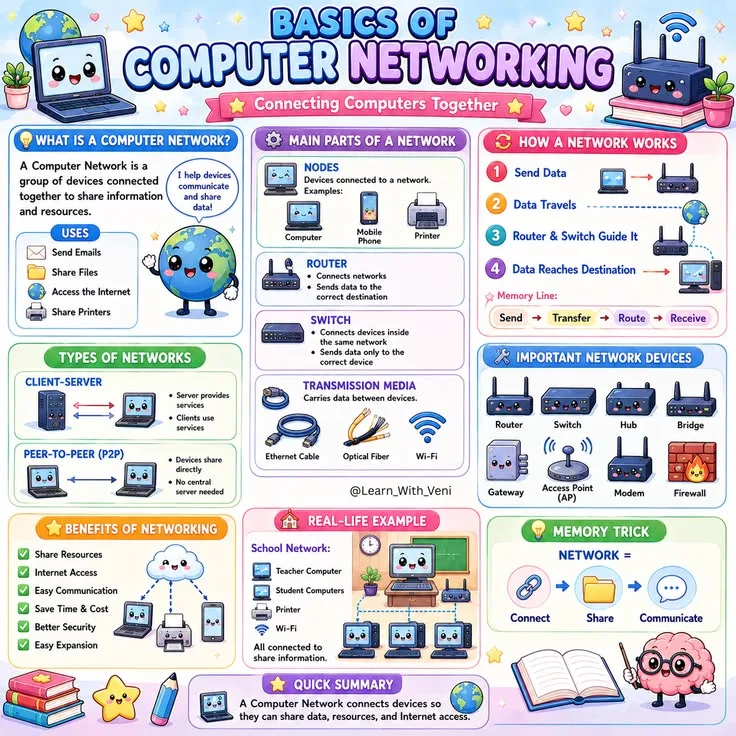
Computing devices exchange data through layered protocols that separate physical transmission, local links, routing, transport, and application services. Understanding computer networking means seeing how each layer adds and removes information while remaining modular enough for one layer to change independently. IP addressing locates devices, while TCP/IP protocols enable the internet to operate as connected networks.
Computer networking is the practice of connecting computing devices to share resources, exchange data, and communicate - the foundational infrastructure behind every webpage, message, video call, and cloud application.
Every time you load a webpage, send a message, or stream a video, data is flying across a global mesh of cables, routers, and protocols in fractions of a second.
Understanding how it works is not just for network engineers - it is foundational knowledge for anyone building software, managing infrastructure, or simply trying to understand how the modern internet functions.
As of 2024, there are approximately 5.4 billion internet users worldwide (Statista), generating over 400 exabytes of data per day, all moving through the networking systems described in this guide.
This guide covers the full picture: from the physical cables in the ground to the HTTP requests your browser sends, with a focus on the concepts that matter most in practical engineering.
"The internet is not a single network but a network of networks - autonomous systems that agree to exchange traffic through a shared set of protocols.
This cooperative architecture is both its greatest strength and its most persistent engineering challenge." - Vint Cerf, co-designer of TCP/IP, often called the "father of the internet"
The OSI Model: A Framework for Understanding Networks
The OSI (Open Systems Interconnection) model is a conceptual framework that divides network communication into seven distinct layers. It was developed by the International Organization for Standardization (ISO) in 1984, based on work begun in the late 1970s by Hubert Zimmermann and Charles Bachman.
The model remains the standard mental model for reasoning about network protocols and troubleshooting, even though the real internet runs on the simpler four-layer TCP/IP model. Understanding OSI helps because it provides a more granular vocabulary for diagnosing where problems occur.
| Layer | Name | Key Protocols/Concepts | What It Does |
|---|---|---|---|
| 7 | Application | HTTP, DNS, FTP, SMTP | Provides services directly to user applications |
| 6 | Presentation | TLS/SSL, JPEG, MP4 | Handles encryption, compression, data formatting |
| 5 | Session | NetBIOS, RPC | Manages connection sessions between applications |
| 4 | Transport | TCP, UDP | Ensures end-to-end delivery with ports and reliability |
| 3 | Network | IP, ICMP, BGP | Routes packets between networks using IP addresses |
| 2 | Data Link | Ethernet, Wi-Fi (802.11) | Transfers frames between directly connected nodes |
| 1 | Physical | Cat6, fiber optic, radio | Transmits raw bits as electrical, optical, or radio signals |
In practice, most software engineers interact most frequently with Layers 3 through 7. Network and systems engineers also work deeply with Layers 1 and 2. The TCP/IP model, developed by Vint Cerf and Bob Kahn in 1974 and formalized in RFC 1122 (1989), collapses these seven layers into four: Link, Internet, Transport, and Application.
How Layers Work Together
When you send data, each layer encapsulates the data from the layer above, adding its own header information. By the time an HTTP request becomes a stream of electrical signals on a cable, it has been wrapped in headers from at least four different layers.
On the receiving end, each layer strips its header and passes the payload upward. This process is sometimes called the "protocol stack" - each layer stacked on top of the one below.
This design principle - that each layer only communicates with its immediate neighbors - is what makes the internet modular. You can replace Ethernet with Wi-Fi at Layer 2 without changing how HTTP works at Layer 7. You can switch from IPv4 to IPv6 at Layer 3 without rewriting your web application.
David Clark of MIT, one of the internet's chief architects, described this as the "end-to-end principle" in a 1981 paper: keep the network simple and push complexity to the edges.
This principle has proven remarkably durable and is one reason the internet has scaled from a few hundred hosts in 1983 to over 30 billion connected devices today.
IP Addressing: How Devices Are Located
Every device on a network has an IP address - a numerical label that identifies its location in the network topology. There are two generations of IP addressing in active use, and understanding both is essential for modern networking.
IPv4
IPv4, defined in RFC 791 (1981) by Jon Postel at USC's Information Sciences Institute, uses 32-bit addresses written in dotted decimal notation: 192.168.1.1. This gives about 4.3 billion possible addresses.
Because the internet has far more than 4.3 billion connected devices, NAT (Network Address Translation), standardized in RFC 3022, allows multiple devices on a private network to share a single public IP address.
NAT was designed as a temporary stopgap in the mid-1990s when IPv4 exhaustion was first predicted; it remains ubiquitous three decades later.
Private address ranges (defined in RFC 1918, not routable on the public internet):
10.0.0.0/8- used in large corporate networks (16.7 million addresses)172.16.0.0/12- used in cloud infrastructure (AWS, GCP) (1 million addresses)192.168.0.0/16- used in home networks (65,536 addresses)
The Internet Assigned Numbers Authority (IANA) allocated the last blocks of IPv4 addresses in February 2011. Regional Internet Registries have since exhausted their pools, making IPv4 addresses a scarce commodity - individual addresses now trade for approximately $35-50 each on secondary markets.
IPv6
IPv6, defined in RFC 2460 (1998) and updated in RFC 8200 (2017), uses 128-bit addresses written in hexadecimal: 2001:0db8:85a3::8a2e:0370:7334. This provides approximately 3.4 x 10^38 possible addresses - enough to assign trillions of addresses to every person on Earth.
As of 2024, IPv6 adoption has reached roughly 45% of Google traffic globally, with India and the United States leading adoption at over 60% and 50% respectively. Major cloud providers including AWS, Google Cloud, and Azure now offer full IPv6 support.
Subnetting and CIDR
CIDR (Classless Inter-Domain Routing) notation like 192.168.1.0/24 describes a network block. The number after the slash indicates how many bits are the network portion. A /24 subnet contains 256 addresses (254 usable, since one is the network address and one is the broadcast address), a /16 contains 65,536 addresses.
Cloud engineers encounter CIDR constantly when configuring VPCs and security groups.
Misunderstanding CIDR is one of the most common sources of cloud infrastructure misconfiguration - an overly permissive /0 CIDR block (meaning "all addresses") in a security group has been the root cause of numerous data breaches, including the 2019 Capital One breach that exposed 100 million customer records.
TCP vs UDP: The Two Workhorses of the Transport Layer
The Transport Layer has two primary protocols, each optimized for different use cases. Understanding when to use each is one of the most practical networking decisions software developers make.
TCP: Reliability First
TCP (Transmission Control Protocol), defined in RFC 793 (1981), provides guaranteed, ordered delivery of data. Before sending application data, TCP performs a three-way handshake:
- Client sends SYN (synchronize)
- Server responds with SYN-ACK (synchronize-acknowledge)
- Client sends ACK (acknowledge)
After this handshake, data flows with acknowledgments. If a packet is lost, TCP detects the gap and retransmits. TCP also implements flow control (preventing the sender from overwhelming the receiver using a sliding window mechanism) and congestion control (slowing transmission when the network is congested).
The evolution of TCP congestion control algorithms represents decades of networking research.
The original algorithm by Van Jacobson (1988) has been succeeded by increasingly sophisticated approaches: TCP Reno, TCP CUBIC (developed by Sangtae Ha at North Carolina State University in 2008, now the default in Linux), and BBR (Bottleneck Bandwidth and Round-trip propagation time), developed by Neal Cardwell and Yuchung Cheng at Google in 2016.
BBR can achieve near-optimal throughput even on high-latency satellite links, and Google reported a 4-14% improvement in YouTube throughput after deploying it.
TCP is used for: HTTP/HTTPS, email (SMTP), file transfers (FTP/SFTP), SSH, database connections, and any application where data integrity is critical.
UDP: Speed First
UDP (User Datagram Protocol), defined in RFC 768 (1980) by Jon Postel, sends packets with no connection setup, no acknowledgment, and no retransmission. It is essentially "fire and forget." Lost packets stay lost.
This sounds like a flaw, but for many applications it is a feature. A video call that retransmits a dropped frame is more disruptive than one that skips a frame - by the time the retransmission arrives, the conversation has moved on.
A DNS lookup that waits for TCP handshakes would be noticeably slower for what is typically a single-packet exchange.
UDP is used for: video streaming, online gaming (where a 200ms retransmission delay is unacceptable), VoIP (voice calls), DNS queries, NTP (time synchronization), and modern protocols like QUIC.
QUIC and HTTP/3
HTTP/3, standardized in RFC 9114 (2022) and now used by over 30% of websites according to W3Techs, uses QUIC, a protocol built on UDP rather than TCP. QUIC was originally developed by Jim Roskind at Google in 2012 and has become one of the most significant networking innovations in decades.
QUIC implements its own reliability and multiplexing at the application layer, solving several long-standing problems with TCP:
- Head-of-line blocking elimination: In HTTP/2 over TCP, a single lost packet blocks all streams on that connection. QUIC multiplexes streams independently, so a lost packet on one stream does not affect others.
- Faster connection setup: QUIC combines the transport handshake and TLS handshake into a single round trip (0-RTT for repeat connections).
- Connection migration: QUIC connections survive IP address changes (important for mobile devices switching between Wi-Fi and cellular).
Google reported that QUIC reduced search latency by 8% on desktop and 3.6% on mobile in their initial deployment. Cloudflare, Meta, and Apple have all adopted QUIC extensively across their infrastructure.
DNS: The Internet's Phone Book
The Domain Name System (DNS) is the distributed, hierarchical database that maps human-readable domain names to IP addresses. Without DNS, you would need to memorize IP addresses to visit any website.
DNS was designed by Paul Mockapetris in 1983 (RFC 882 and 883, later updated as RFC 1034 and 1035) to replace the previous system of manually maintained host files. Today, DNS handles an estimated 2 trillion queries per day globally.
How a DNS Lookup Works
- You type
www.example.comin your browser - Your browser checks its local cache - if it has a recent answer, it uses it
- If not, it queries your OS resolver, which checks
/etc/hosts(or equivalent) - If still not found, it queries your configured recursive resolver (often your ISP's or a public resolver like Google's
8.8.8.8or Cloudflare's1.1.1.1) - The recursive resolver queries a root name server (there are 13 root server clusters globally, operated by organizations including ICANN, Verisign, NASA, and the U.S. Army, distributed across over 1,700 anycast instances worldwide)
- The root server directs the resolver to the TLD name server (e.g.,
.com, managed by Verisign) - The TLD server directs the resolver to the authoritative name server for
example.com - The authoritative server returns the IP address
- The resolver caches the result per the TTL (Time to Live) value and returns it to your browser
The entire process typically takes 20-120 milliseconds for an uncached lookup. Most lookups are cached and resolve in under 5 milliseconds. Cloudflare's 1.1.1.1 resolver averages approximately 11ms response time globally, according to DNSPerf benchmarks.
Key DNS Record Types
| Record Type | Purpose | Example |
|---|---|---|
| A | Maps domain to IPv4 address | example.com -> 93.184.216.34 |
| AAAA | Maps domain to IPv6 address | example.com -> 2606:2800:21f:... |
| CNAME | Alias to another domain | www -> example.com |
| MX | Mail server for domain | @ -> mail.example.com |
| TXT | Arbitrary text (SPF, DKIM, verification) | SPF records for email authentication |
| NS | Authoritative name servers | Lists which servers hold DNS records |
| SRV | Service location (port and host) | Used by VoIP, XMPP, game servers |
DNS Security
Plain DNS sends queries in cleartext over UDP port 53, allowing ISPs and network operators to see every domain you visit. DNS over HTTPS (DoH), standardized in RFC 8484 (2018), and DNS over TLS (DoT), standardized in RFC 7858 (2016), encrypt DNS queries to prevent surveillance.
Firefox and Chrome now support DoH, and it is increasingly enabled by default in consumer operating systems. Apple added encrypted DNS support in iOS 14 and macOS 11 (2020).
DNSSEC (DNS Security Extensions), defined in RFC 4033-4035, adds cryptographic signatures to DNS records to prevent DNS hijacking and cache poisoning attacks. However, DNSSEC adoption remains limited - as of 2024, only about 30% of domains support DNSSEC validation, according to APNIC measurements.
HTTP and HTTPS: How Web Communication Works
HTTP (Hypertext Transfer Protocol) is the application-layer protocol that powers the web. Designed by Tim Berners-Lee at CERN in 1989 and formalized in RFC 1945 (HTTP/1.0, 1996) and RFC 2616 (HTTP/1.1, 1999), an HTTP transaction consists of a request from client to server and a response from server to client.
HTTP Request Structure
GET /articles/networking HTTP/2
Host: whennotesfly.com
Accept: text/html
Accept-Encoding: gzip, br
User-Agent: Mozilla/5.0 ...
The key components are:
- Method: GET (retrieve), POST (submit), PUT (replace), PATCH (update), DELETE (remove)
- Path: the resource being requested
- Headers: metadata about the request (authentication, content type, caching directives)
- Body: data sent with POST/PUT requests (JSON, form data, file uploads)
HTTP Response Structure
HTTP/2 200 OK
Content-Type: text/html; charset=utf-8
Content-Encoding: gzip
Cache-Control: max-age=3600
HTTP status codes communicate the result:
2xx- Success (200 OK, 201 Created, 204 No Content)3xx- Redirect (301 Permanent, 302 Temporary, 304 Not Modified)4xx- Client error (400 Bad Request, 401 Unauthorized, 403 Forbidden, 404 Not Found)5xx- Server error (500 Internal Server Error, 502 Bad Gateway, 503 Service Unavailable)
The Evolution of HTTP
HTTP has evolved significantly since 1.0:
- HTTP/1.1 (1997): Persistent connections, chunked transfer encoding, host headers enabling virtual hosting
- HTTP/2 (2015, RFC 7540): Binary framing, multiplexing (multiple requests over one connection), header compression (HPACK), server push. Developed from Google's SPDY protocol.
- HTTP/3 (2022, RFC 9114): Built on QUIC/UDP, eliminates head-of-line blocking, faster connection establishment
HTTPS: HTTP with TLS
HTTPS encrypts HTTP traffic using TLS (Transport Layer Security). The TLS handshake:
- Client sends supported cipher suites and a random value
- Server responds with its chosen cipher, its SSL certificate (containing its public key), and a random value
- Client verifies the certificate against trusted Certificate Authorities (CAs)
- Both sides derive the same symmetric encryption key using the exchanged values
- All subsequent communication is encrypted with symmetric encryption (much faster than asymmetric)
Modern TLS 1.3 (released 2018, RFC 8446), designed with input from cryptographer Eric Rescorla, reduced the handshake from 2 round trips to 1, significantly reducing connection setup time. TLS 1.3 also removed support for older, insecure cipher suites, making misconfiguration harder.
As of 2024, browsers display a warning for any HTTP site and may refuse to load mixed content (HTTPS page loading HTTP resources).
The free Certificate Authority Let's Encrypt, launched in 2016, has issued over 4 billion certificates and was a major driver of HTTPS adoption, which rose from approximately 40% of page loads in 2016 to over 95% in 2024.
How Data Actually Travels: From Browser to Server and Back
When you click a link, the following chain of events occurs in rapid succession, typically completing in under one second for a well-optimized site:
Step 1: DNS Resolution
Your browser resolves the domain name to an IP address using the process described above. For frequently visited sites, this is a cache hit taking under 1ms.
Step 2: TCP Connection (or QUIC)
Your browser establishes a TCP connection to the server's IP address on port 443 (HTTPS). This involves the three-way handshake, taking one round trip. For HTTP/3, a QUIC connection is established instead, which can combine the transport and security handshakes into a single round trip.
Step 3: TLS Handshake
If using HTTPS (which is almost always the case), TLS negotiation occurs over the established TCP connection. With TLS 1.3 and modern session resumption (using pre-shared keys from a previous connection), this adds approximately one round trip - or zero for resumed connections.
Step 4: HTTP Request and Response
The browser sends the HTTP request; the server processes it and returns a response. The response body (HTML, JSON, etc.) is sent in segments, with TCP ensuring ordered, reliable delivery.
Step 5: Rendering and Additional Requests
The browser parses the HTML and discovers additional resources: CSS stylesheets, JavaScript files, images, fonts. Each triggers additional DNS lookups, TCP connections, and HTTP requests - though modern browsers reuse connections (HTTP keep-alive and HTTP/2 multiplexing) and parallelize requests aggressively.
Chrome, for example, opens up to 6 TCP connections per host and can multiplex hundreds of streams over a single HTTP/2 connection.
The Role of Routing
Between your browser and the server, data travels through many routers. Each router examines the destination IP address and forwards the packet toward the destination using routing tables maintained by protocols like BGP (Border Gateway Protocol) - the protocol that lets different networks (autonomous systems) exchange routing information.
BGP, defined in RFC 4271, is effectively what holds the internet together. There are approximately 75,000 autonomous systems on the internet, and BGP manages the routing between all of them.
You can observe this path with the traceroute command (tracert on Windows), which shows each hop and its latency. A typical request from the U.S. East Coast to a server in Europe traverses 12-20 hops, crossing undersea fiber optic cables that carry over 95% of intercontinental internet traffic.
CDNs: Bringing Content Closer to Users
A CDN (Content Delivery Network) is a geographically distributed network of servers designed to serve content from locations close to end users. The concept was pioneered by Tom Leighton and Danny Lewin at MIT in the late 1990s, leading to the founding of Akamai Technologies. Today, CDNs serve the majority of all web traffic.
How CDNs Work
When you request https://example.com/logo.png:
- DNS returns the IP of the nearest CDN edge node rather than the origin server (using anycast or GeoDNS)
- If the edge node has the file cached (a cache hit), it serves it immediately
- If not (a cache miss), the edge node fetches from the origin server, caches it, and serves it
The result: a user in Tokyo requesting content from a server in Virginia might experience 180ms of latency without a CDN. With a CDN edge node in Tokyo, the same request takes 5ms.
This difference is perceptible to users and measurable in conversion rates - Amazon found that every 100ms of additional latency cost them 1% in sales revenue, a finding that has become foundational to web performance optimization.
What CDNs Provide Beyond Caching
- DDoS protection: absorb and filter attack traffic across a distributed network (Cloudflare reported mitigating a 71 million request-per-second DDoS attack in February 2023)
- TLS termination: handle SSL certificates at the edge, reducing origin server load
- Image optimization: serve WebP/AVIF to browsers that support it, compress on-the-fly
- Edge computing: run code at CDN nodes with products like Cloudflare Workers, AWS Lambda@Edge, and Fastly Compute
- HTTP/2 and HTTP/3: edge nodes speak modern protocols even if the origin server does not
Major CDN providers include Cloudflare, Akamai, Fastly, AWS CloudFront, and Google Cloud CDN. As of 2024, Cloudflare alone serves traffic to over 20% of all websites, operating over 300 data centers in more than 100 countries.
Ports and Sockets: The Addressing Within a Host
An IP address identifies a host; a port number identifies a specific process on that host. Together, an IP and a port form a socket (e.g., 93.184.216.34:443).
Port numbers range from 0 to 65535, divided into well-known ports (0-1023), registered ports (1024-49151), and dynamic/ephemeral ports (49152-65535) used for client-side connections.
Well-known port assignments (standardized by IANA):
| Port | Protocol | Service |
|---|---|---|
| 22 | TCP | SSH (Secure Shell) |
| 25 | TCP | SMTP (email sending) |
| 53 | TCP/UDP | DNS (name resolution) |
| 80 | TCP | HTTP (unencrypted web) |
| 443 | TCP | HTTPS (encrypted web) |
| 3306 | TCP | MySQL |
| 5432 | TCP | PostgreSQL |
| 6379 | TCP | Redis |
| 27017 | TCP | MongoDB |
When a server listens on port 443, the OS routes incoming TCP connections on that port to the web server process.
Firewalls and cloud security groups control which ports are accessible from which sources - a misconfigured security group is one of the most common causes of "it works locally but not in production" debugging sessions.
Network Security Fundamentals
Understanding networking requires understanding its attack surface. Every protocol and layer presents potential vulnerabilities that attackers exploit.
Firewalls filter traffic by IP address, port, and protocol. Stateful firewalls track connection state and can distinguish legitimate responses from unsolicited inbound connections.
Modern next-generation firewalls (NGFWs) from companies like Palo Alto Networks and Fortinet add application-layer inspection, intrusion prevention, and threat intelligence feeds.
TLS/HTTPS prevents eavesdropping and man-in-the-middle attacks on data in transit, but only if certificates are properly validated.
Certificate Transparency logs, introduced by Google in 2013, make it possible to detect fraudulently issued certificates - a real concern after incidents like the DigiNotar compromise in 2011, where attackers issued fake Google certificates used to intercept Iranian users' Gmail traffic.
DDoS (Distributed Denial of Service) attacks overwhelm a target with traffic from many sources. The largest recorded DDoS attacks have exceeded 3 Tbps (terabits per second). Mitigation requires filtering at network scale, which is why CDNs and cloud providers are increasingly the first line of defense.
DNS hijacking redirects legitimate domain lookups to malicious IPs. DNSSEC adds cryptographic signatures to DNS records to prevent this, though adoption remains incomplete. The 2019 Sea Turtle DNS hijacking campaign, documented by Cisco Talos, successfully redirected traffic for government and military targets across the Middle East.
Why Networking Knowledge Matters for Software Engineers
A developer who understands networking writes better code and debugs production issues faster:
- They know why a 500ms database query can cascade into a 2-second page load due to TCP connection setup, TLS handshakes, and serialization overhead
- They configure connection pools appropriately rather than opening a new connection per request - a mistake that has brought down production databases at companies of every size
- They understand why API calls in a tight loop are slow and how to use batch endpoints or HTTP/2 to parallelize them
- They interpret
curl -vandtracerouteoutput when debugging production issues, reading headers and latency measurements rather than guessing - They design microservices with network latency and failure modes in mind, implementing circuit breakers and retry logic with exponential backoff
- They understand that "the network is reliable" is the first of the Eight Fallacies of Distributed Computing, identified by Peter Deutsch and James Gosling at Sun Microsystems in 1994 - assumptions that continue to cause production outages three decades later
Key Concepts Summary
Protocol layering allows independent evolution of different network components. IP routing delivers packets across the global internet through autonomous systems connected via BGP. TCP provides reliable, ordered delivery at the cost of latency; UDP provides low-latency unreliable delivery.
DNS is a distributed, hierarchical, cached database of name-to-address mappings. TLS provides encryption and authentication for application protocols. CDNs reduce latency and increase reliability by serving content from nodes close to users.
QUIC and HTTP/3 represent the most significant architectural change in recent years, moving transport-layer innovation to user space.
These concepts have been stable for decades and will remain foundational for the foreseeable future, even as specific implementations evolve. For anyone working in technology - whether as a developer, a product manager who communicates with engineers, or a technical writer - this foundation makes the rest of the stack comprehensible.
Sources & Further Reading
- Cerf, Vint and Robert Kahn. "A Protocol for Packet Network Intercommunication." IEEE Transactions on Communications, vol. 22, no. 5, 1974, pp. 637-648. DOI: 10.1109/TCOM.1974.1092259
- Clark, David. "The Design Philosophy of the DARPA Internet Protocols." ACM SIGCOMM Computer Communication Review, 1988. DOI: 10.1145/52324.52336
- Kurose, James and Keith Ross. Computer Networking: A Top-Down Approach. 8th ed., Pearson, 2021. View source
- Tanenbaum, Andrew and David Wetherall. Computer Networks. 6th ed., Pearson, 2021.
- Cardwell, Neal et al. "BBR: Congestion-Based Congestion Control." ACM Queue, vol. 14, no. 5, 2016. View source
- Langley, Adam et al. "The QUIC Transport Protocol: Design and Internet-Scale Deployment." ACM SIGCOMM, 2017. View source
- Mockapetris, Paul. "Domain Names - Concepts and Facilities." RFC 1034, 1987.
- Rescorla, Eric. "The Transport Layer Security (TLS) Protocol Version 1.3." RFC 8446, 2018.
- Cloudflare. "Cloudflare Radar." View source
- W3Techs. "Usage Statistics of HTTP/3 for Websites." View source
- Let's Encrypt. "Statistics." View source