
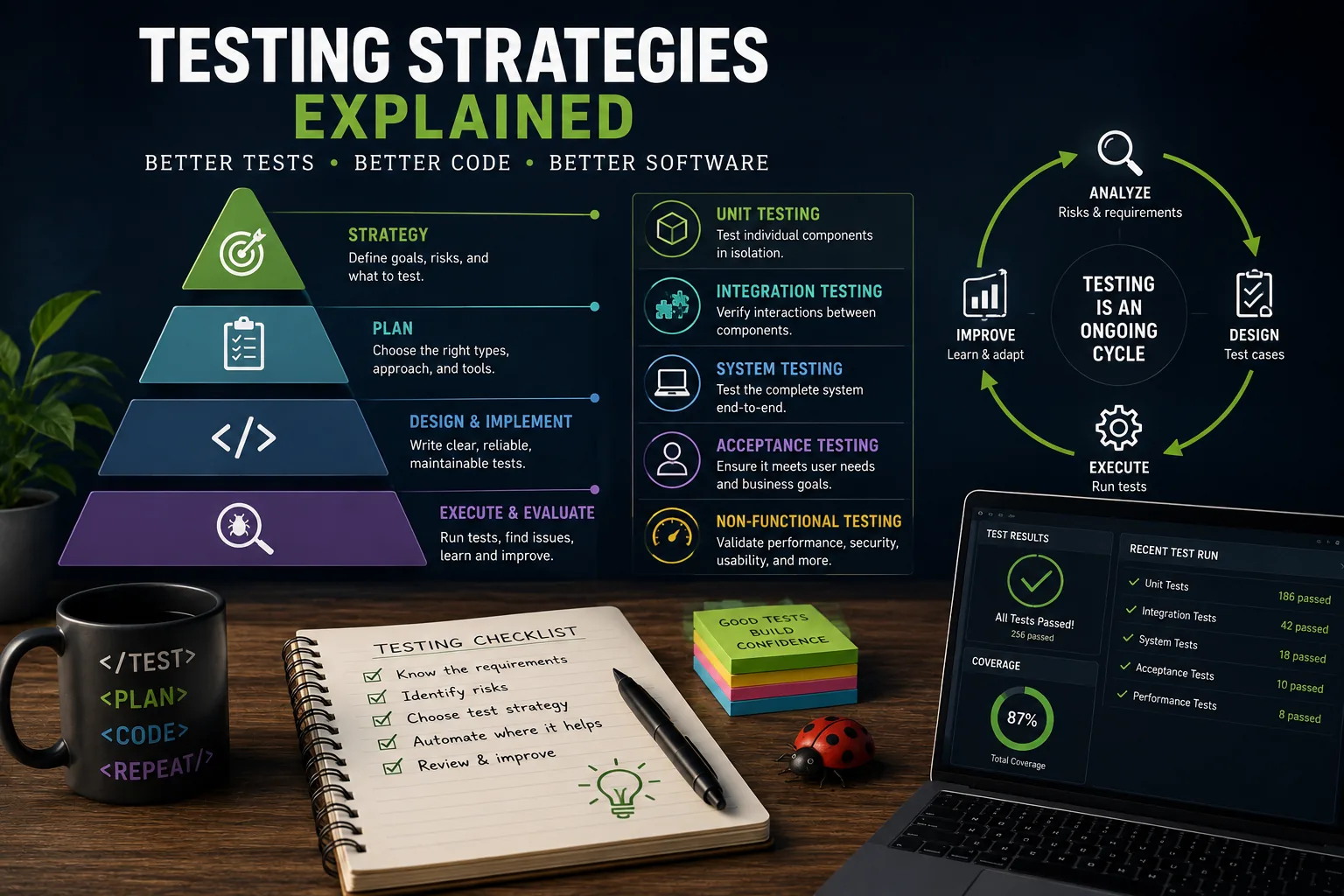
Testing strategies explained means balancing many fast unit tests with fewer integration tests and still fewer end-to-end checks. Unit tests isolate important logic and edge cases, integration tests verify system boundaries, and end-to-end tests cover complete workflows but cost more and fail more easily. A useful suite prioritizes speed, reliability, diagnostic value, behavior over implementation details, and confidence as software changes.
On June 4, 1996, the European Space Agency launched the Ariane 5 rocket. Thirty-seven seconds into flight, a software exception caused the guidance system to fail. The rocket veered off course and self-destructed, destroying $370 million worth of cargo.
The root cause was a data conversion error: a 64-bit floating-point number was converted to a 16-bit integer, causing an overflow.[9] The code that failed had been reused from the Ariane 4, where the values never exceeded 16-bit range. No one tested whether the same assumption held for the Ariane 5's different flight profile.
A single missing test destroyed nearly four hundred million dollars in forty seconds.
Software testing is not bureaucracy. It is not a phase that happens after the "real work" of coding.
Testing is the engineering discipline that determines whether software works correctly, handles edge cases gracefully, and continues working as the system evolves. Organizations that treat testing as optional consistently produce more bugs, ship more slowly (because they spend more time debugging), and lose user trust through preventable failures.
The Testing Pyramid: A Framework for Balance
Structure of the Pyramid
Mike Cohn introduced the testing pyramid in Succeeding with Agile (2009) as a model for how to allocate testing effort:[1]
Base --- Unit Tests (many, fast): Test individual functions or methods in isolation. Run in milliseconds. A well-tested application might have thousands of unit tests. They catch logic errors immediately and run on every save or commit.
Middle --- Integration Tests (some, medium speed): Test that components work together correctly. Verify database queries, API calls, service interactions. Run in seconds. Catch interface mismatches and configuration errors that unit tests miss.
Top --- End-to-End Tests (few, slow): Test complete user workflows through the real application. Simulate clicking buttons, filling forms, navigating pages. Run in seconds to minutes. Catch system-level issues that only appear when all components interact.
Why the Pyramid Shape Matters
The pyramid is wide at the base and narrow at the top for practical reasons:[2]
Speed: Unit tests run in milliseconds; E2E tests run in minutes. A suite of 5,000 unit tests completes in under a minute. A suite of 500 E2E tests might take an hour.
Reliability: Unit tests are deterministic---same input, same output, every time. E2E tests are inherently flaky: network timeouts, rendering delays, and browser inconsistencies cause intermittent failures.
Diagnostic precision: When a unit test fails, you know exactly which function is broken. When an E2E test fails, you know something is wrong somewhere in the entire system.
Maintenance cost: Unit tests are cheap to write and maintain. E2E tests are expensive: they break when the UI changes, require complex setup, and take developer time to diagnose when they fail.
Example: Google runs over 4.2 million tests daily across its codebase, according to John Micco's 2017 talks. The vast majority are unit tests.
John Micco, a Google engineer, reported that their flaky test rate of approximately 1.5% of test runs still produced enormous noise at scale, costing thousands of engineering hours per year to investigate false failures.
Unit Testing: The Foundation
What Unit Tests Cover
A unit test verifies that a single function or method produces the correct output for a given input. The "unit" is typically the smallest testable piece of code.
Effective unit tests follow the AAA pattern:
- Arrange: Set up the test data and conditions
- Act: Execute the function being tested
- Assert: Verify the result matches expectations
Writing Useful Unit Tests
Test behavior, not implementation. A test that verifies "the function returns the correct total" survives refactoring. A test that verifies "the function calls multiply on line 17" breaks whenever internal structure changes.
One concept per test. Each test should verify one thing. If a test fails, you should know immediately what broke. A test named testCalculateOrderTotal that checks tax calculation, discount application, and currency formatting tests three things---any of which might fail, making diagnosis harder.
Descriptive test names. testCalculateTotal tells you nothing about what went wrong when it fails. shouldApplyPercentageDiscountBeforeTax tells you exactly what is broken.
Cover edge cases. The interesting bugs live at boundaries:
- Empty inputs (empty arrays, null values, blank strings)
- Boundary values (zero, negative numbers, maximum integers)
- Invalid inputs (wrong types, malformed data)
- Special characters (unicode, emoji, SQL injection attempts)
What Not to Unit Test
Not everything benefits from unit testing:
- Trivial code: Simple getters and setters that contain no logic
- Framework code: Trust that React, Django, or Rails work correctly
- Configuration: Constants, environment variables, static mappings
- External services: These belong in integration tests
The goal is not 100% line coverage. The goal is confidence that the important logic works correctly.
Understanding unit testing foundations enhances code quality practices by catching defects at the earliest and cheapest point in the development cycle.
Integration Testing: Verifying Boundaries
What Integration Tests Verify
Integration tests check that components work together correctly. They verify the boundaries between your code and external systems:
- Does the database query return the expected results?
- Does the API endpoint accept the right request format and return the right response?
- Does the authentication middleware correctly block unauthorized requests?
- Does the message queue consumer process events as expected?
Database Integration Tests
Testing database interactions requires a real database (or a close approximation):
Test database: A dedicated database instance that is reset between test runs. Tests create their own data, verify behavior, and clean up afterward.
Transaction rollback: Each test runs inside a database transaction that is rolled back after the test completes, leaving the database unchanged.
In-memory databases: SQLite or H2 provide fast alternatives for simple queries, though they may behave differently from production databases on complex operations.
API Integration Tests
For testing HTTP APIs:
- Start the application server
- Send real HTTP requests to endpoints
- Verify response status codes, headers, and body content
- Check that side effects occurred (data saved, email queued)
Example: Stripe tests their payment API with integration tests that simulate the complete lifecycle of a payment: creating a customer, attaching a payment method, charging the card, handling the response, and processing webhooks.
Their test suite catches regressions that would result in lost or duplicate charges---errors with immediate financial consequences.
Mocking vs. Real Dependencies
Mocks replace real dependencies with programmable substitutes. A mock database returns predefined results without querying a real database. A mock HTTP client returns predefined responses without making real network calls.
When to mock:
- External services you do not control (third-party APIs)
- Slow operations (heavy computation, file I/O)
- Non-deterministic behavior (current time, random numbers)
- Expensive operations (SMS sending, payment processing)
When not to mock:
- Your own code (test the real interaction)
- The system under test (that defeats the purpose)
- Simple objects (mocking adds complexity without value)
Over-mocking produces tests that verify your mocks work correctly rather than verifying your code works correctly.[4] If a test has more mock setup than actual assertions, reconsider the approach.
End-to-End Testing: The User's Perspective
What E2E Tests Cover
End-to-end tests simulate real user behavior through the complete application stack:
- Open a browser (or browser simulation)
- Navigate to the application
- Interact with UI elements (click, type, scroll)
- Verify that the correct content appears
- Check that backend effects occurred (data saved, email sent)
The E2E Testing Challenge
E2E tests are valuable because they test what users actually experience. They are also the most expensive tests to write, maintain, and debug:
Slow execution: A single E2E test might take 30-60 seconds. A suite of 200 tests could take hours.
Flaky by nature: Network latency, animation timing, asynchronous rendering, and browser differences cause tests to fail intermittently even when the code is correct.
Expensive maintenance: When the UI changes---a button moves, a CSS class changes, a page reorganizes---E2E tests break and need updating.
Difficult diagnosis: When an E2E test fails, the failure could be in the frontend, the API, the database, the test environment, or the test itself. Finding the actual cause requires investigation.
When E2E Tests Are Worth It
Reserve E2E tests for critical user paths:
- User registration and login
- Payment and checkout
- Core product functionality (the primary thing users do)
- Data integrity workflows (creating, editing, deleting important records)
These paths justify the cost of E2E testing because failures in them directly affect revenue, user trust, or data integrity.
E2E Testing Tools
Cypress: Modern, developer-friendly. Runs in the browser alongside the application. Excellent debugging with time-travel snapshots. Popular for web applications.
Playwright: Microsoft's cross-browser testing framework.[8] Supports Chromium, Firefox, and WebKit. Built for reliability with auto-waiting and actionability checks.[7]
Selenium: The original browser automation tool. Supports many languages and browsers. More verbose than modern alternatives but deeply integrated into many CI systems.
The choice of E2E framework ties into broader development workflow decisions about how the team structures their testing pipeline.
'Whenever you are tempted to type something into a print statement or a debugger expression, write it as a test instead.'
Martin Fowler, from 'Refactoring: Improving the Design of Existing Code' (1999)
Test-Driven Development: Tests First
The TDD Cycle
Test-Driven Development (TDD) inverts the traditional order: write the test before writing the code.
The cycle, described by Kent Beck in Test-Driven Development: By Example (2002):
- Red: Write a test for functionality that does not exist yet. Run it. It fails (red).
- Green: Write the minimum code necessary to make the test pass. Run it. It passes (green).
- Refactor: Improve the code's structure without changing its behavior. Run the test. It still passes.
- Repeat.
Why TDD Works
Forces clear thinking: Writing a test first requires understanding exactly what the code should do before writing it. This prevents the common mistake of "coding your way to understanding."
Produces testable code by design: Code written to pass a test is inherently testable. If a function is difficult to test, TDD signals the design problem before the code is committed, not after.
Creates living documentation: Tests describe how the code is intended to work. Unlike comments, tests are verified on every run---they cannot become outdated without triggering failures.
Builds confidence: After practicing TDD, developers report higher confidence in refactoring because the test suite immediately catches regressions.
When TDD Is Not the Best Fit
TDD is not universally optimal:
- Prototyping and exploration: When you do not yet know what you are building, writing tests first is premature
- UI development: Visual components are difficult to test-drive because the desired output is subjective
- Legacy code: Code without tests is often untestable; adding tests requires refactoring first, creating a chicken-and-egg problem
Example: Pivotal Labs (now VMware Tanzu Labs), one of the most rigorous TDD practitioners in the industry, pair-programmed using strict TDD on every project for over a decade.
Their internal data showed that TDD projects had approximately 40% fewer production defects than comparable non-TDD projects, though initial development velocity was 15-25% slower. The net effect---fewer bugs reaching users, less time spent debugging---was strongly positive.
Test Coverage: How Much Is Enough?
There is no single correct percentage. Practical targets vary by context: 90%+ for critical paths like payments and auth, 70-85% for core business logic, 60-75% for utilities, and 40-60% for UI components. The real goal, as Martin Fowler puts it, is confidence that bugs rarely escape into production and that changing code rarely feels risky, not a specific coverage number.
What Coverage Measures
Test coverage measures the percentage of code that is executed when tests run. Common metrics:
- Line coverage: Percentage of lines executed
- Branch coverage: Percentage of conditional branches (if/else paths) executed
- Function coverage: Percentage of functions called
The Coverage Trap
High coverage does not guarantee good tests. Consider a function that calculates shipping cost based on weight and destination:
A test that calls calculateShipping(5, "US") and asserts the result is a number achieves high line coverage. But it does not verify:
- Correct calculation for different weights
- Correct rates for different destinations
- Handling of zero or negative weights
- Behavior for unknown destinations
- Edge cases at rate boundaries
The test passes. Coverage is high. The function could return any number and the test would not catch it.
Practical Coverage Targets
| Context | Target | Rationale |
|---|---|---|
| Critical paths (payments, auth) | 90%+ | Failures have severe consequences |
| Core business logic | 70-85% | Bugs here affect users directly |
| Utilities and helpers | 60-75% | Lower risk, simpler code |
| UI components | 40-60% | Visual testing often more effective |
| Generated or configuration code | 0-20% | Low value, high maintenance cost |
The goal is not a number. It is confidence that the important code works correctly. Coverage is an indicator, not a target.
Martin Fowler observes: "I would say you are doing enough testing if the following statements are true: you rarely get bugs that escape into production, and you are rarely hesitant to change some code for fear it will cause production bugs."
Testing External Dependencies
Contract Testing
When your application depends on an external API, contract tests verify that both sides agree on the interface:
- The consumer defines what requests it sends and what responses it expects
- The provider verifies that it can satisfy those expectations
- If either side changes in an incompatible way, tests fail
Pact is the most widely used contract testing framework.[6] It generates a "contract" from consumer tests, which is then verified against the provider. This catches integration failures before deployment rather than in production.
Test Doubles
Test doubles replace real dependencies during testing:
| Type | Behavior | Use Case |
|---|---|---|
| Stub | Returns predefined responses | "When called with X, return Y" |
| Mock | Records interactions for verification | "Verify this was called twice with these arguments" |
| Fake | Simplified working implementation | In-memory database instead of PostgreSQL |
| Spy | Wraps real implementation, records calls | "Call the real function but also track invocations" |
Example: When Airbnb tests their search functionality, they use fakes for the pricing engine (which depends on dozens of external factors) while using real database queries for availability. This balances test speed (fakes are instant) with accuracy (real database behavior catches schema issues).
Testing in CI/CD Pipelines
Automated Quality Gates
Tests become most valuable when they run automatically on every code change:
- Pre-commit: Linting and formatting checks (instant feedback)
- On push: Unit tests run (seconds)
- On pull request: Full unit + integration test suite (minutes)
- Pre-deploy: E2E tests against staging environment (minutes)
- Post-deploy: Smoke tests verify production deployment (seconds)
The Fast Feedback Imperative
Test suite speed directly affects team productivity. Research from the DORA team (Accelerate, 2018) found that elite-performing teams have test suites that complete in under 10 minutes. Teams with 30+ minute test suites ship less frequently and have higher change failure rates.
Techniques for keeping tests fast:
- Parallelize: Run independent tests simultaneously across multiple machines
- Optimize slow tests: Profile and improve the slowest tests
- Test selection: Run only tests affected by the changed code
- Cache dependencies: Avoid re-downloading packages on every run
Dealing with Flaky Tests
Flaky tests---tests that pass sometimes and fail sometimes without code changes---are one of the most destructive forces in software development. They erode trust in the test suite, cause developers to ignore failures, and waste investigation time.
Google's engineering team found that 1 in 7 tests at Google exhibited some level of flakiness.[5] Their approach:
- Detect: Automatically identify flaky tests by running them multiple times
- Quarantine: Move flaky tests to a separate suite that does not block deployment
- Fix: Treat flaky test fixes as high-priority work
- Prevent: Establish patterns that avoid common flakiness causes (timing dependencies, shared state, non-deterministic ordering)
Integrating robust testing into deployment pipelines ensures that automated quality gates catch problems before they reach users.
Introducing Testing to a Project Without Tests
The Pragmatic Approach
Many teams inherit codebases with no tests. Attempting to add comprehensive tests retroactively is impractical and demoralizing. A pragmatic strategy:
1. Test new code. Every new feature, bug fix, or refactoring includes tests. This establishes the testing habit and gradually increases coverage.
2. Test bug fixes. When a bug is reported, write a test that reproduces it before fixing it. This ensures the bug cannot recur silently.
3. Test before refactoring. Before modifying existing code, add tests that verify its current behavior. Then refactor with confidence that the tests will catch regressions.
4. Test critical paths first. Identify the most important user workflows---the ones where bugs would cause the most damage---and add tests for those first.
5. Celebrate progress. Track coverage over time. A codebase that moved from 0% to 30% coverage in three months has materially reduced risk.
Getting Buy-In
Testing costs time upfront. Teams under pressure to ship features resist the investment. Arguments that work:
- Bug cost data: Track how much time the team spends fixing production bugs. Testing reduces this.
- Deployment confidence: "Would you feel comfortable deploying on Friday afternoon?" Tests make the answer yes.
- Refactoring safety: Without tests, every code change is a gamble. With tests, refactoring becomes routine.
- Developer satisfaction: Studies consistently show that developers prefer working in tested codebases. Hiring and retention improve.
Example: When Etsy moved from quarterly releases to continuous deployment (50+ deployments per day), their investment in automated testing was the enabling factor. Chad Dickerson, Etsy's CTO at the time, described testing as "the foundation that made continuous deployment psychologically possible" for the engineering team.
Connecting testing strategy to broader developer productivity practices helps teams understand that the time invested in tests pays dividends in speed, confidence, and sustainability.
The Testing Mindset
Testing is not about proving that code works. It is about finding the conditions under which code fails. Dijkstra wrote in 1969/1970: "Testing shows the presence, not the absence, of bugs." No amount of testing proves correctness.
But systematic, thoughtful testing dramatically reduces the likelihood and severity of defects that reach users.
The teams that ship most reliably are not the ones with the most tests. They are the ones with the right tests---comprehensive unit tests catching logic errors quickly, targeted integration tests verifying critical boundaries, and a small suite of E2E tests covering the paths where failures would be most costly.
Testing is an investment, not an expense. Every bug caught by a test is a bug that did not wake someone up at 3 AM, did not lose a customer's data, and did not require an emergency deployment on a Sunday. The Ariane 5 engineers learned this lesson at a cost of $370 million. The rest of us can learn it more cheaply.
What Research Shows About Testing Strategies
The DORA research program, documented in Accelerate by Nicole Forsgren, Jez Humble, and Gene Kim (2018), identified comprehensive automated test coverage as one of the strongest technical predictors of elite software delivery performance.[3]
The research, based on surveys of more than 23,000 respondents over the first four years of the research (2014-2017), found that teams with thorough automated testing deployed 208 times more frequently and had 2,604 times faster time to recover from incidents than low-performing teams (2017 State of DevOps figures).
Crucially, the research showed that testing investment and deployment speed reinforce rather than trade off against each other: the practices that enable fast, safe deployment are the same practices that produce reliable systems.
Kent Beck's formalization of test-driven development in Test-Driven Development: By Example (2002) built on earlier work by Beck himself, Ward Cunningham, and Ron Jeffries in Extreme Programming.
Beck's key empirical claim - that writing tests before code improves design quality, not just test coverage - was later supported by several academic studies.
A 2008 study by Nachiappan Nagappan, E. Michael Maximilien, Thirumalesh Bhat, and Laurie Williams, "Realizing Quality Improvement Through Test-Driven Development: Results and Experiences of Four Industrial Teams," found that teams practicing TDD had 40-90% fewer production defects than control groups, with only 15-35% longer development time.
The net economics were strongly positive.
Michael Feathers, in Working Effectively with Legacy Code (2004), addressed the practical challenge that most testing research ignores: how to test systems that were not built to be tested.
Feathers documented a catalog of techniques for introducing tests into legacy systems - systems where the absence of tests makes change risky, which makes adding tests difficult.
His observation that "legacy code is code without tests" reframed the problem: technical debt is not primarily old code but untested code, regardless of age.
Research by Alberto Bacchelli and Christian Bird at Microsoft, published as "Expectations, Outcomes, and Challenges of Modern Code Review" (ICSE 2013), found that code reviews that include test review - inspecting the tests as part of reviewing a code change - caught different defect categories than code review alone.
Test review caught specification errors (the tests described incorrect behavior) while code review caught implementation errors. The combination was more effective than either alone.
Real-World Case Studies in Testing
Google's testing at scale is documented in the book "Software Engineering at Google" (2020) by Titus Winters, Tom Manshreck, and Hyrum Wright. Google runs over 4.2 million automated tests daily across its monorepo.
Their testing infrastructure, including the build system Bazel and the test selection system that runs only tests affected by a given code change, enables them to maintain test suite speed despite enormous scale.
Google engineer John Micco published findings that approximately 1 in 7 Google tests exhibited some degree of flakiness - intermittent failures unrelated to code correctness - and that their team invested significant engineering resources in flakiness detection and remediation.
At Google's scale, even a small false failure rate represents thousands of wasted engineering hours.
Spotify's testing culture, documented in their engineering blog, evolved significantly as the company scaled from a small Swedish startup to a global platform with hundreds of engineering teams.
Spotify moved from a traditional testing pyramid to what they call a "testing honeycomb" for their microservices architecture: fewer unit tests at the individual service level (where each service is simple enough that unit tests add limited value), more integration tests at the service boundary level (where most complexity lies), and targeted end-to-end tests for critical user journeys.
The shift reflects genuine learning from operating a microservices architecture at scale: where tests provide the most value depends on where complexity actually resides.
Stripe's approach to API testing, described in their engineering blog posts by engineers including Bryan Helmkamp and Michelle Tilley, centers on their finding that their APIs - the interface between Stripe and millions of developers worldwide - require the highest density of testing investment.
A bug in a payment processing API has consequences measured in real financial transactions.
Stripe's test suite for their payments infrastructure runs more than one million tests per day, with specific test categories focused on financial correctness, idempotency (processing a payment twice should produce the same result as processing it once), and edge cases in currency handling and fraud detection.
Airbnb's testing evolution, documented in conference talks by engineers including Lola Oyelaran, involved a significant shift after a production incident in 2016 caused by an inadequately tested interaction between their search ranking system and their pricing system.
The incident prompted Airbnb to invest in what they call "integration test confidence" - a metric tracking whether their integration test suite would have caught recent production incidents.
The retrospective analysis found that their existing tests would have caught 67% of recent incidents; subsequent investments raised that figure to above 90%. The exercise made abstract "test coverage" concrete by tying it to specific failure modes.
Key Metrics and Evidence in Testing
The cost multiplication for defects discovered at different development stages, originally measured by Barry Boehm in Software Engineering Economics (1981) and replicated by the IBM Systems Sciences Institute, remains the fundamental economic argument for early testing.
The IBM data found a 100:1 cost ratio between production and requirements-phase defect removal.
More recent data from the Consortium for IT Software Quality (CISQ) estimated that poor software quality cost US organizations approximately $2.41 trillion in 2022, with the largest component being the cost of identifying and remediating technical debt and defects in operational systems.
Acceptance test coverage requirements vary by domain. Regulatory frameworks for safety-critical software provide explicit guidance.
The DO-178C standard for aviation software requires that software at the highest safety level (DAL A, where failure could cause catastrophic failure of the aircraft) must demonstrate 100% modified condition/decision coverage - every condition in every decision must be exercised in both true and false states by the test suite.
The aerospace industry's testing rigor reflects calculated economics: the cost of comprehensive testing is vastly less than the cost of in-flight failures.
Stack Overflow's annual developer surveys from 2019 to 2023 consistently find that unit testing and continuous integration are among the most widely adopted practices, with adoption rates above 70% at organizations with more than 100 developers.
The surveys also find that developers at organizations with comprehensive automated testing rate their job satisfaction higher and report higher confidence in deploying changes - consistent with the DORA finding that technical practices and organizational outcomes are connected.
Research on test maintenance costs, published by Bogdan Vasilescu and colleagues, found that test code requires maintenance at roughly 25-30% of the rate of production code - the tests must be updated when the behavior they describe changes.
This maintenance cost is frequently cited by teams that have underinvested in tests as justification for not testing. The research also found the inverse: teams with robust test suites spent proportionally less time debugging production issues, making the net economics of testing strongly positive in every studied context.
Sources & Further Reading
- Cohn, Mike. Succeeding with Agile. Addison-Wesley, 2009.
- Fowler, Martin. "Test Pyramid." martinfowler.com. View source
- Forsgren, Nicole, Humble, Jez, and Kim, Gene. Accelerate: The Science of Lean Software and DevOps. IT Revolution Press, 2018.
- Meszaros, Gerard. xUnit Test Patterns: Refactoring Test Code. Addison-Wesley, 2007.
- Google Testing Blog. "Flaky Tests at Google." testing.googleblog.com. View source
- Pact Foundation. "Introduction to Pact." pact.io. View source
- Cypress. "Why Cypress?" cypress.io. View source
- Playwright. "Playwright Documentation." playwright.dev. View source
- Lions, J.L. "Ariane 5 Flight 501 Failure Report." European Space Agency, 1996. View source
Further Reading
- Beck, Kent. Test-Driven Development: By Example. Addison-Wesley, 2002.