
Software architecture basics concern the costly-to-change structural choices that organize components, communication, data, quality goals, and constraints. A monolith can be the fastest and safest option for a small team, while microservices or other distributed patterns add flexibility at substantial operational cost. Good architecture matches present scale, team, change rate, and business needs instead of copying a pattern designed for a hypothetical future.
When Sam Newman joined ThoughtWorks in the mid-2000s, he encountered a recurring pattern: teams would build monolithic applications that worked beautifully at first, then gradually became impossible to change.[1] Adding a feature that should take a day took a week.
Deploying a minor fix required redeploying the entire system. Testing one component meant testing everything. His observations, later published in Building Microservices (2015), described a problem as old as software itself: the architecture you choose on day one shapes every decision you make for years afterward.
Software architecture is the high-level structure of a system---how its components are organized, how they communicate, and what responsibilities each one carries. It is the blueprint that determines whether an application will gracefully accommodate growth or buckle under its own weight.
Architecture decisions are among the most consequential and least reversible choices in software development. Choosing the wrong database, the wrong communication pattern, or the wrong boundary between services can cost months of engineering time to correct.
Yet architecture is rarely taught systematically. Most developers learn it the hard way: by building systems that fail to scale, then rebuilding them with hard-won understanding.
What Architecture Means in Practice
Beyond Code Organization
Architecture is not folder structure. It is not which framework you use. It is the set of fundamental structural decisions that are expensive to change later:
- How the system is divided into components, services, or modules
- How those components communicate with each other
- Where data lives and how it flows through the system
- What quality attributes the system optimizes for (speed, reliability, scalability, simplicity)
- What constraints the system operates within (budget, team size, regulatory requirements)
Example: When Instagram launched in 2010, two engineers built the entire backend as a single Django application running on a handful of servers. That architecture---a monolith deployed on EC2 instances, backed by PostgreSQL and Redis---supported the application through explosive growth to roughly 14 million users within its first year (launched October 2010).
The architecture was not sophisticated, but it was appropriate. It let a tiny team build and iterate faster than competitors.
By contrast, when eBay attempted to rebuild its platform as microservices in the early 2000s, the transition took years and required hundreds of engineers. The architectural complexity that was necessary for eBay's scale would have destroyed a two-person startup.
The Architecture Trade-Off
Every architectural decision involves trade-offs. There is no universally correct architecture. The right architecture depends on:
- Team size: A 3-person startup needs different architecture than a 300-person engineering org
- Scale requirements: 1,000 users per day versus 1,000,000 per day
- Change velocity: How frequently the product needs to evolve
- Operational maturity: Whether the team can manage distributed systems
- Business constraints: Budget, time-to-market, regulatory compliance
The most dangerous architectural mistake is not choosing the wrong pattern. It is choosing a pattern that is wrong for your current context because it might be right for a future context that may never arrive.
| Architecture Style | Best For | Main Trade-off |
|---|---|---|
| Monolith | Teams under 15, early-stage products | Simplicity now vs. scaling constraints later |
| Microservices | Large teams, independent scaling requirements | Power and flexibility vs. operational complexity |
| Layered (n-tier) | Business applications with clear separation of concerns | Clean separation vs. potential performance overhead |
| Event-driven | Loose coupling, async communication between services | Decoupled components vs. complex debugging and tracing |
| Serverless | Variable workloads, minimal operational overhead | Low ops burden vs. cold starts and vendor lock-in |
'Architecture represents the significant design decisions that shape a system, where "significant" is measured by cost of change. Good architecture is not about choosing the most sophisticated pattern - it is about choosing the pattern whose constraints match the constraints of the problem you are solving.'
Ralph Johnson, co-author of 'Design Patterns: Elements of Reusable Object-Oriented Software' (1994)
Monolithic Architecture: Start Here
What a Monolith Is
A monolithic application is a single unified codebase where all functionality---user interface, business logic, data access---lives in one deployable unit. All code shares one process, one database, and one deployment pipeline.
Monoliths are the default architecture, and for good reason:
Simplicity: One codebase to understand, one build to manage, one deployment to orchestrate. New team members onboard faster. Debugging crosses no network boundaries.
Performance: Components communicate through function calls within the same process---nanoseconds, not the milliseconds that network calls require.
Consistency: Transactions span the entire database. If a user registration should create a profile and send a welcome email atomically, a monolith can do this in a single transaction.
Development speed: For teams under 10-15 developers, a well-structured monolith enables faster feature delivery than any distributed architecture.
When Monoliths Struggle
Monoliths encounter friction as they grow:
Deployment coupling: Changing one line in the checkout module requires redeploying the entire application, including the user management module, the search module, and the analytics module.
Scaling limitations: If the search feature needs 10x more computing power than the checkout feature, you must scale the entire application 10x. You cannot scale individual components independently.
Team coordination: When 50 developers work in one codebase, merge conflicts multiply, unintended interactions between modules increase, and deployment becomes a coordination bottleneck.
Technology lock-in: The entire application uses one language, one framework, and one database. If a specific component would benefit from a different technology, tough luck.
Example: Shopify, powering over $444 billion in commerce by 2023, runs on one of the world's largest Ruby on Rails monoliths.
Rather than decomposing into microservices, Shopify invested in modularizing their monolith---dividing it into clearly bounded components that can be developed independently while sharing the same deployment. Their approach demonstrates that a well-structured monolith can scale to enormous size.
Understanding how monoliths are structured ties directly into how software is actually built in professional development teams.
Microservices: Distributed by Design
The Microservices Model
Microservices architecture decomposes an application into small, independently deployable services, each owning its own data and communicating through well-defined APIs.[10]
Each microservice:
- Runs in its own process
- Owns its own database (or data store)
- Can be deployed independently
- Can use different technologies than other services
- Is maintained by a single team
Advantages at Scale
Independent deployment: The checkout service can be updated without touching the search service. Teams deploy on their own schedules.
Independent scaling: If search traffic spikes, scale only the search service. The checkout service remains unchanged.
Technology diversity: Use Python for machine learning, Go for high-performance APIs, and Node.js for real-time features---each service uses the best tool for its specific job.
Fault isolation: If the recommendation engine crashes, users can still browse products, search, and check out. A monolith crash takes everything down.
Team autonomy: Teams own services end-to-end, from development through deployment and monitoring. This reduces coordination overhead and increases ownership.
The Hidden Costs
Microservices introduce categories of problems that monoliths simply do not have:
Network complexity: Every service-to-service call traverses the network. Networks are unreliable: calls fail, latency spikes, packets are lost.[8] Code must handle retries, timeouts, and circuit breaking.
Data consistency: With each service owning its own database, transactions cannot span services. If the order service creates an order and the payment service charges the card, what happens if the payment succeeds but the order creation fails? Distributed transactions are notoriously difficult to implement correctly.
Operational overhead: Instead of monitoring one application, you monitor dozens or hundreds. Each needs its own logging, alerting, deployment pipeline, and health checks. The operational burden grows linearly with service count.
Debugging complexity: A user request might traverse five services. When something goes wrong, which service failed? Distributed tracing tools (Jaeger, Zipkin) help but add their own complexity.
Example: Amazon's transition from monolith to microservices, beginning around 2001, took over a decade. Werner Vogels, Amazon's CTO, has described how the two-pizza team rule (every service should be owned by a team small enough to feed with two pizzas) shaped their architecture.
But Amazon had thousands of engineers and could absorb the operational cost. For most companies, the overhead of microservices outweighs the benefits.
The Distributed Monolith Anti-Pattern
The worst outcome is a distributed monolith: services that are deployed independently but are so tightly coupled that a change in one requires coordinated changes in several others. You get the operational complexity of microservices with none of the benefits of independent deployment.
Warning signs:
- Services share a database
- Deploying one service requires simultaneously deploying others
- A change in service A breaks service B
- Services communicate through shared data structures rather than stable APIs
Layered Architecture: Separating Concerns
The Classic Layers
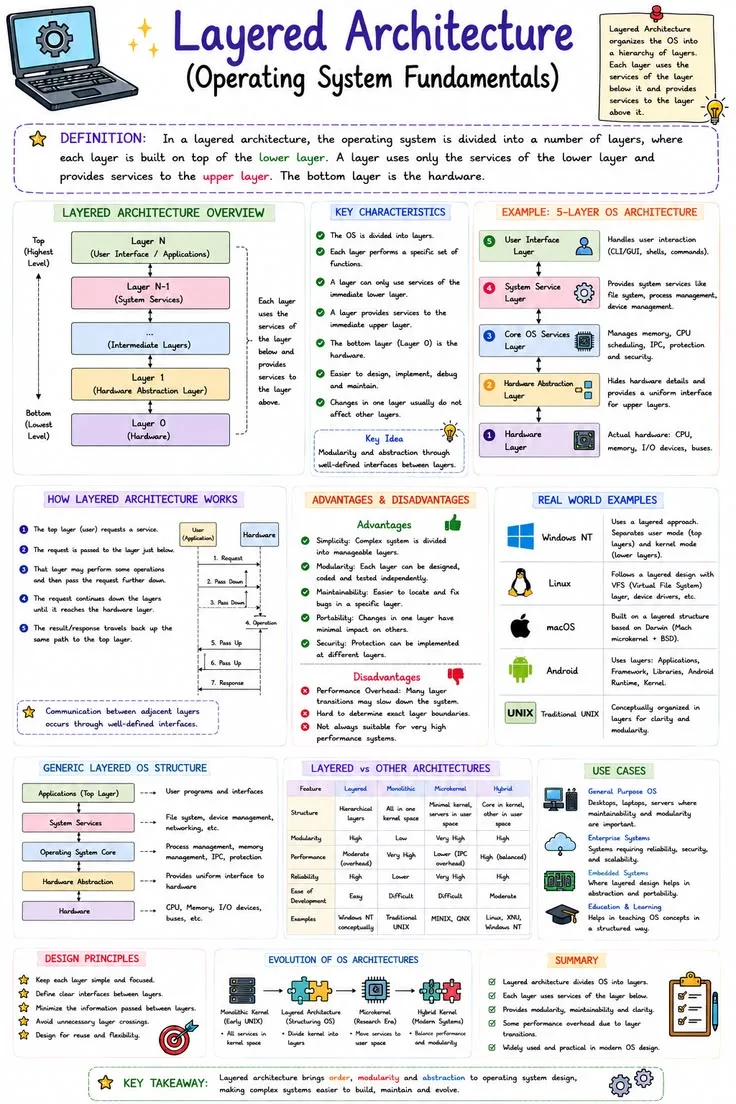
Layered architecture organizes code into horizontal layers, each with a specific responsibility:
Presentation layer: User interface. Handles HTTP requests, renders HTML, serves API responses. Knows nothing about databases or business rules.
Business logic layer (also called domain or service layer): Implements the rules and operations that define what the application does. Knows nothing about how data is stored or how the UI works.
Data access layer: Manages persistence. Queries databases, reads files, communicates with external data sources. Knows nothing about business rules or user interfaces.
Each layer depends only on the layer directly below it. The presentation layer calls the business logic layer. The business logic layer calls the data access layer. No layer skips levels.
Benefits of Layering
Separation of concerns: Each layer has a single, well-defined responsibility. Changes to the database schema affect only the data access layer. Changes to the UI affect only the presentation layer.
Testability: Business logic can be tested without a database or a web server. Data access can be tested without a user interface.
Team specialization: Frontend developers work in the presentation layer. Backend developers work in the business logic and data access layers. Database administrators focus on the data layer.
Limitations
Rigidity: Not every operation fits neatly into layers. A feature that requires a minor data change and a corresponding UI change requires modifications across all three layers.
Performance: Data passes through every layer even when intermediate layers add no value. A simple "get user by ID" request traverses presentation, business logic, and data access when a direct database query would suffice.
Event-Driven Architecture: Reacting to Change
The Event Model
In event-driven architecture, components communicate by producing and consuming events---notifications that something has happened. Instead of service A directly calling service B, service A publishes an event ("order created"), and any interested service subscribes to it.
Producers emit events without knowing who consumes them. Consumers react to events without knowing who produced them. This decoupling means producers and consumers can evolve independently.
Message Brokers
Events flow through a message broker (Apache Kafka, RabbitMQ, Amazon SQS):
- Producer publishes event to broker
- Broker stores and distributes event
- Consumer(s) receive and process event
Kafka, created at LinkedIn around 2010 and open-sourced in 2011, processes trillions of events per day across many organizations. Its durability (events are persisted to disk) and scalability (partitioned across clusters) made it the standard for high-throughput event streaming.
When to Use Events
Event-driven architecture excels when:
- Multiple systems need to react to the same occurrence
- Components should be loosely coupled
- Processing can happen asynchronously (user does not wait for completion)
- Audit trails are important (events provide a complete history)
Example: When a user places an order on an e-commerce platform, the event "order.placed" might trigger: payment processing, inventory reservation, email confirmation, analytics tracking, and fraud detection---all independently, all concurrently.
If the recommendation engine is down, orders still process. If a new service needs to react to orders, it subscribes to the existing event without modifying any existing service.
Understanding event-driven patterns complements development workflows by enabling teams to build and deploy services independently.
Design Patterns: Proven Solutions to Recurring Problems
What Patterns Are (and Are Not)
Design patterns are reusable solutions to common software design problems. They are not libraries or frameworks---they are templates for structuring code to solve specific categories of problems.
The Gang of Four (Gamma, Helm, Johnson, Vlissides) cataloged 23 patterns in Design Patterns: Elements of Reusable Object-Oriented Software (1994).[3] Not all remain equally relevant, but several appear constantly in modern development.
Patterns That Matter Most
Repository Pattern: Abstracts data access behind a clean interface. The business logic calls userRepository.findByEmail(email) without knowing whether the data comes from PostgreSQL, MongoDB, or an in-memory cache.
Benefits: Testable (substitute a fake repository in tests), flexible (swap databases without changing business logic), clean (data access details do not leak into business code).
Observer Pattern: When an object's state changes, all registered observers are notified automatically. This is the foundation of event systems, UI frameworks (React's state management), and pub/sub messaging.
Strategy Pattern: Defines a family of algorithms and makes them interchangeable. A payment processor might support multiple strategies---Stripe, PayPal, bank transfer---selected at runtime based on user preference.
Dependency Injection: Instead of a class creating its own dependencies, they are provided ("injected") from outside. This makes classes testable (inject mock dependencies in tests) and flexible (swap implementations without modifying the class).
Factory Pattern: Creates objects without specifying their exact class. A notification factory might create email notifications, SMS notifications, or push notifications based on user preferences, without the calling code knowing which type was created.
When Not to Use Patterns
Patterns add complexity. If a simple function solves the problem, using a pattern is over-engineering. The goal is solving problems, not demonstrating pattern knowledge.
Martin Fowler warns against "pattern fever"---the tendency to apply patterns wherever possible rather than where necessary. A pattern should be introduced when the problem it solves actually exists, not in anticipation of problems that might never arrive.
Designing for Scalability
Vertical vs. Horizontal Scaling
Vertical scaling (scaling up): Add more power to an existing machine---more CPU, more RAM, faster storage. Simple but limited by hardware maximums and increasingly expensive at the margins.
Horizontal scaling (scaling out): Add more machines and distribute the workload. Theoretically unlimited but requires the application to be designed for distribution.
Statelessness: The Foundation of Horizontal Scaling
An application is stateless if any server can handle any request without knowing about previous requests. Session data, user preferences, and temporary state must be stored externally (database, Redis, cookies) rather than in server memory.
Statelessness enables horizontal scaling because requests can be distributed across any number of servers by a load balancer. If a server fails, other servers handle its traffic seamlessly.
Caching: Trading Memory for Speed
Caching stores frequently accessed data in fast storage (memory) to reduce expensive operations (database queries, API calls, computations).
Caching layers:
- Browser cache: Static assets (images, CSS, JS) cached locally
- CDN cache: Static and semi-static content cached at edge locations worldwide
- Application cache: Frequently queried data cached in Redis or Memcached
- Database cache: Query results cached within the database engine
The challenge is cache invalidation---knowing when cached data is stale. Phil Karlton famously said: "There are only two hard things in Computer Science: cache invalidation and naming things."
Database Scaling Strategies
The database is typically the first scalability bottleneck:
Read replicas: Route read queries to copies of the primary database. Most applications read far more than they write, so this multiplies read capacity.
Sharding: Divide data across multiple database instances. Users A-M on shard 1, N-Z on shard 2. Dramatically increases both read and write capacity but adds significant complexity.[7]
Connection pooling: Reuse database connections rather than creating new ones for each request. Reduces overhead dramatically.
These scalability strategies directly relate to the cloud infrastructure decisions that modern applications depend on.
Architecture Decision Records: Documenting the Why
Why Document Decisions
Architecture decisions are among the most important and least documented aspects of software systems. Teams routinely encounter code or infrastructure choices and ask "why was it done this way?" without finding any record of the reasoning.
Architecture Decision Records (ADRs) capture the context, decision, and consequences of significant architectural choices.
ADR Format
A lightweight ADR contains:
- Title: Short description of the decision
- Status: Proposed, accepted, deprecated, or superseded
- Context: What situation or problem prompted this decision?
- Decision: What was decided and why?
- Consequences: What are the expected effects---both positive and negative?
What to Document
Document decisions that are:
- Expensive to reverse: Database choice, programming language, cloud provider
- Cross-cutting: Affect multiple components or teams
- Controversial: Where reasonable people disagreed
- Non-obvious: Where the reasoning would not be apparent to someone encountering the system for the first time
Do not document decisions that are obvious, trivial, or easily reversible. ADRs are not meeting minutes---they capture strategic choices, not tactical details.
Example: Spotify maintains ADRs for their major architectural decisions, including their choice of Google Cloud Platform, their migration strategy from on-premises infrastructure, and their approach to data mesh. These records help new engineers understand not just what the system does but why it was designed that way.
Common Architecture Mistakes
Building for Scale You Do Not Have
The most pervasive architecture mistake is premature optimization: building for millions of users before finding the first hundred. A startup that spends three months designing a horizontally scalable microservices architecture before validating that anyone wants the product has optimized for the wrong problem.
Start with the simplest architecture that could work. Add complexity only when concrete evidence---not speculation---demands it.
Ignoring Non-Functional Requirements
Teams naturally focus on features (what the system does) and neglect non-functional requirements (how well the system does it):
- Performance: Response time, throughput, resource usage
- Reliability: Uptime, error rates, recovery time
- Security: Authentication, authorization, encryption, audit trails
- Observability: Logging, monitoring, alerting, tracing
- Maintainability: Code clarity, modularity, documentation
A system that delivers features but crashes under load, leaks data, or takes days to debug is architecturally failed regardless of its functional completeness.
Resume-Driven Development
Choosing technologies because they look impressive on a resume rather than because they solve the problem at hand is surprisingly common.
Using Kubernetes for an application that runs on a single server, choosing a NoSQL database when your data is relational, or implementing microservices for a five-page web application all introduce unnecessary complexity.
The best architects choose boring technology. Dan McKinley's essay "Choose Boring Technology" (2015) argues that every organization has a limited budget for complexity.[5] Spending that budget on proven, well-understood tools frees capacity for the areas where innovation actually creates value.
Avoiding these pitfalls requires the same kind of disciplined thinking involved in managing technical debt across a software system's lifetime.
The Architect's Real Job
Architecture is not a one-time activity performed at the beginning of a project. It is an ongoing practice of observing how the system behaves under real conditions and evolving its structure to meet changing demands.
Martin Fowler describes this as evolutionary architecture: designing systems that can be easily modified as requirements and understanding evolve. The goal is not to predict the future but to create a structure flexible enough to accommodate futures you cannot predict.
The best architectures share a quality that is deceptively difficult to achieve: they are boring. They use well-understood patterns, avoid unnecessary complexity, and make the system's behavior predictable.
A boring architecture lets the team focus on the interesting problems---the business challenges, the user experiences, the innovations that actually differentiate the product.
Frederick Brooks wrote in The Mythical Man-Month (1975) that the most important function of a software architect is "conceptual integrity"---ensuring the system feels as if it was designed by a single mind, even when built by many hands.[4]
That coherence---the sense that every part of the system follows a consistent logic---is what separates architectures that endure from those that collapse under their own weight.
What Research Shows About Software Architecture
The most cited foundational research on software architecture comes from the domain of software maintainability and the cost of architectural decisions made early in a project's life.
David Parnas, in his 1972 paper "On the Criteria to Be Used in Decomposing Systems into Modules," established the principle of information hiding: modules should be designed so that the decisions most likely to change are hidden behind stable interfaces.
This principle - published more than fifty years ago - remains the foundation of modern component design, microservices boundaries, and API design. Parnas's insight was that the right decomposition criterion is not functional similarity but changeability: group things that change together, separate things that change independently.
Martin Fowler and his colleagues at ThoughtWorks have contributed extensively to practical architecture research through the ThoughtWorks Technology Radar, published twice annually since 2010.[11]
The Radar tracks adoption of technologies, techniques, and tools across ThoughtWorks' projects globally and serves as a longitudinal study of what architectural practices actually gain traction in production environments.
Fowler's work on patterns of enterprise application architecture, documented in Patterns of Enterprise Application Architecture (2002), codified recurring solutions to structural problems in large-scale business systems that had previously been transmitted informally.[2]
The academic research on software architecture quality has been advanced significantly by Robert Martin (known as "Uncle Bob"), whose formulations of the SOLID principles - Single Responsibility, Open/Closed, Liskov Substitution, Interface Segregation, and Dependency Inversion - provided testable heuristics for evaluating whether a design was likely to be maintainable.
Martin's 2000 paper "Design Principles and Design Patterns" (which introduced the SOLID principles, with the acronym coined later by Michael Feathers) translated abstract architectural goals into specific structural constraints that developers could apply to individual classes and modules.
Research on the relationship between architectural structure and defect rates was published by Nachiappan Nagappan and colleagues at Microsoft Research in "Using Software Dependencies and Churn Metrics to Predict Field Failures" (ESEM 2007).
The study found that modules with high coupling - many dependencies on other modules - had substantially higher defect rates than loosely coupled modules, providing empirical support for the coupling-quality relationship that architecture practitioners had long assumed.
Real-World Case Studies in Software Architecture
Netflix's microservices migration, begun in 2008 after a major database corruption event took Netflix offline for three days, is the most thoroughly documented microservices transformation in the industry.
Netflix engineers, including Adrian Cockcroft and his team, wrote extensively about the migration from a monolithic DVD rental system to a cloud-native streaming architecture composed of hundreds of independent services.
The transition took five years and was never a clean cutover - Netflix ran hybrid architectures throughout, gradually decomposing the monolith as individual services proved stable.
The result was an architecture capable of sustaining 100 million subscribers with 99.99% availability, but the path involved building and discarding multiple intermediate architectures.
Amazon's service-oriented architecture transformation, beginning around 2001, is described in a 2011 public Google+ post by Steve Yegge (an accidentally public post written while he worked at Google) as an account of how Jeff Bezos mandated that all Amazon teams expose their functionality through service interfaces, with no direct database sharing and no backdoor access.[9]
The memo, now widely circulated, describes teams that had been sharing databases having to redesign their systems entirely to communicate through APIs.
The transformation was painful and took years, but produced the internal infrastructure that became Amazon Web Services - the most profitable division of one of the world's most valuable companies.
Shopify's modular monolith approach, documented by their engineering team in multiple conference talks between 2019 and 2023, challenges the assumption that scaling engineering organizations requires microservices.
Shopify powers over $444 billion in commerce annually from a Ruby on Rails monolith that their engineering team has deliberately kept unified while adding internal modularity.
Their approach - called "shopify-modulith" internally - enforces component boundaries through code-level access controls rather than network boundaries, preserving monolith simplicity while gaining component isolation.
The choice saved them from the operational complexity of microservices during their period of most rapid growth.
Google's internal service mesh research, which produced the Istio project (open-sourced in 2017), demonstrates how organizations at extreme scale address the operational complexity of microservices.
Google's Site Reliability Engineering teams documented in the SRE Book (2016) how service-to-service communication, load balancing, circuit breaking, and distributed tracing are handled at Google scale.
The patterns they codified - eventually released as open-source infrastructure - became standard architecture components for organizations adopting microservices, lowering the operational knowledge barrier for distributed systems.
Key Metrics and Evidence in Software Architecture
The relationship between architectural complexity and defect rates was quantified in research by Yuanfang Cai and colleagues.
A 2019 study, "Identifying and Remediating Architectural Smells," found that architectural anti-patterns - cyclic dependencies, unstable interfaces, excessive coupling - were strongly correlated with defect concentration.
Modules involved in architectural violations had defect rates 3 to 7 times higher than clean modules, and changes to those modules took 3 to 5 times longer to implement safely.
Technical debt cost estimates from the Software Engineering Institute (SEI) at Carnegie Mellon University suggest that architectural debt - debt incurred through poor structural decisions - is the most expensive category of technical debt to repay.
SEI research found that architectural debt typically costs 15-20% of total project budget to address after the fact, and that the cost increases non-linearly as the system ages and more code is built on flawed foundations.
The DORA research program's findings on trunk-based development versus long-lived feature branches have direct architectural implications. Elite-performing teams practice trunk-based development with short-lived branches (typically less than a day), which requires architectures that support feature flags and incremental deployment.
The research found that trunk-based development was one of the strongest technical predictors of high performance - teams that maintained long-lived branches had significantly higher change failure rates and longer lead times, regardless of their other practices.
Research by Mark Richards and Neal Ford, published in Fundamentals of Software Architecture (2020), surveyed architects across 26 architectural characteristics - availability, reliability, testability, agility, fault tolerance, elasticity, scalability, performance, deployability, learnability, security, simplicity - and found that no architecture optimizes for all of them simultaneously.[6]
Every architectural style involves explicit trade-offs that must be chosen based on the specific needs of the system.
Their research found that the most common architectural failure mode was not choosing the wrong style but failing to identify which characteristics mattered most before choosing an architecture.
Sources & Further Reading
- Newman, Sam. Building Microservices. O'Reilly Media, 2015.
- Fowler, Martin. Patterns of Enterprise Application Architecture. Addison-Wesley, 2002.
- Gamma, Erich et al. Design Patterns: Elements of Reusable Object-Oriented Software. Addison-Wesley, 1994.
- Brooks, Frederick P. The Mythical Man-Month. Addison-Wesley, 1975.
- McKinley, Dan. "Choose Boring Technology." mcfunley.com, 2015. View source
- Richards, Mark and Ford, Neal. Fundamentals of Software Architecture. O'Reilly Media, 2020.
- Kleppmann, Martin. Designing Data-Intensive Applications. O'Reilly Media, 2017.
- Nygard, Michael T. Release It! Design and Deploy Production-Ready Software. Pragmatic Bookshelf, 2018.
- Amazon. "Amazon Architecture." All Things Distributed. View source
- Fowler, Martin. "Microservices Guide." martinfowler.com. View source
- ThoughtWorks. "Technology Radar." thoughtworks.com. View source