
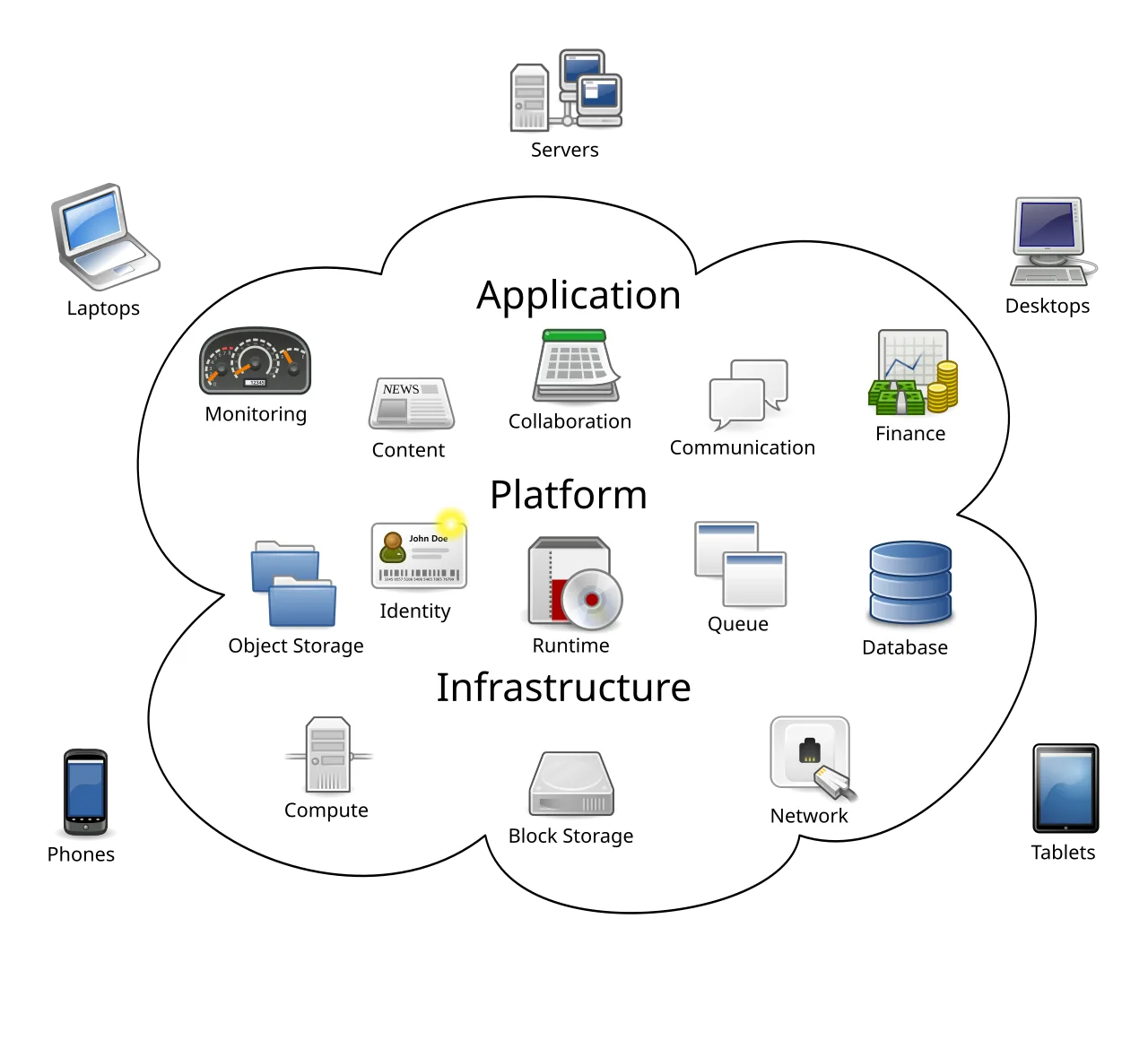
In March 2006 (S3) and August 2006 (EC2), Amazon launched AWS services; Andy Jassy led the effort and proposed renting out the computing infrastructure the company had built for its own e-commerce operations. The pitch seemed strange: Amazon was a bookstore turned retailer, not a technology services company.
Why would other businesses rent servers from the same company that competed with them for customers?
Jassy's answer was that Amazon had accidentally built world-class infrastructure competency in solving its own scaling problems, and that infrastructure was now underutilized outside of peak shopping seasons. The service launched as Amazon Web Services.
By 2023, AWS generated about $91 billion in annual revenue---and became the most profitable division of one of the world's most valuable companies.
The shift from owning computers to renting computing power has been one of the most consequential transformations in the history of business technology. Netflix, Airbnb, Spotify, and NASA all run on rented computing infrastructure.
Startups that in 2000 would have spent months and hundreds of thousands of dollars building server infrastructure now provision it in minutes for cents per hour.
Understanding cloud computing is no longer optional for anyone making decisions about software, infrastructure, or digital products.
What Cloud Computing Actually Means
Cloud computing means using computing resources---servers, storage, databases, networking, software---over the internet, on demand, instead of owning and maintaining physical hardware.
Rather than purchasing servers and installing them in your office or data center, you rent capacity from providers who maintain massive, globally distributed infrastructure.
The analogy to utilities clarifies the transformation. You do not build a power plant to light your office. You connect to the electrical grid and pay for what you consume. Cloud computing applies the same principle to computing: connect to a provider's infrastructure, use what you need, and pay based on consumption.
Like electricity, the underlying infrastructure is extraordinarily complex, but the consumer experience is deliberately simple.
The Defining Characteristics
The National Institute of Standards and Technology (NIST) published a definition of cloud computing in 2011 that the industry has largely adopted. Five essential characteristics distinguish cloud computing from traditional hosting or data center services:
On-demand self-service means you can provision computing resources instantly through a web interface or API, without any human interaction with the provider's staff. Need a new server? Click a button. Need 50 servers? Click 50 times, or run a script.
This contrasts with traditional infrastructure procurement, where provisioning physical hardware required purchase orders, shipping, installation, and configuration---a process measured in weeks or months.
Broad network access means capabilities are available over the network and accessible through standard mechanisms (HTTPS, standard APIs) from any device---laptops, phones, tablets, other servers.
Resource pooling means the provider's computing resources serve multiple customers simultaneously, with different physical and virtual resources dynamically assigned and reassigned based on demand.
Individual customers do not know or care which physical machine is running their workload; they see only the logical resource they provisioned.
Rapid elasticity means resources can be provisioned and released rapidly---in some cases automatically---to scale with demand. From the customer's perspective, the available capacity appears unlimited and can be appropriated in any quantity at any time.
A system that handles 1,000 requests per minute can, in principle, scale to handle 1,000,000 requests per minute within minutes.
Measured service means resource usage is monitored, controlled, and reported, providing transparency for both the provider and customer. You pay for what you use, measured at appropriate granularity---per hour, per second, per request, or per gigabyte.
"Cloud computing is the electricity of the 21st century - a utility that enables innovation at every level, from startups to enterprises, without requiring you to build your own power plant."
The Service Models: IaaS, PaaS, SaaS
Cloud services are categorized by how much the provider manages versus how much the customer manages. The three main models represent a spectrum from more control (and more responsibility) to less control (and less responsibility).
Infrastructure as a Service (IaaS)
The provider gives you virtual machines, storage, and networking. You manage everything above that: operating systems, runtime environments, applications, and data. This is like renting an empty warehouse---the building is maintained, but you equip and operate it.
What the provider manages: Physical hardware, hypervisors, networking fabric, power, cooling, physical security.
What you manage: Operating system, installed software, runtime environments, application code, data, network configuration, security groups.
Examples: AWS EC2 (Elastic Compute Cloud), Azure Virtual Machines, Google Compute Engine.
Use when: You need maximum control, you are running specialized software with specific OS requirements, or you are lifting and shifting existing applications to the cloud without redesigning them.
Example: When NASA's Jet Propulsion Laboratory processed data from the Mars Curiosity rover landing in 2012, they used AWS EC2 to burst to hundreds of instances for the computationally intensive analysis periods, then release the capacity.
The flexibility to scale to hundreds of servers overnight would have been impossible with owned infrastructure.
Platform as a Service (PaaS)
The provider additionally manages runtime environments, middleware, and often databases. You deploy your application code, and the platform handles the infrastructure underneath. This is like renting a furnished office---you bring your people and start working, without worrying about the building management.
What the provider manages: Hardware, operating systems, runtime environments, middleware, often databases, security patching, scaling.
What you manage: Application code, data, some configuration.
Examples: Heroku, Google App Engine, AWS Elastic Beanstalk, Fly.io.
Use when: You want to focus entirely on application code without managing infrastructure, and your application fits the platform's supported configurations. PaaS is particularly well-suited for web applications and APIs.
Example: Heroku's PaaS offering enabled the early Twitch (then Justin.tv) team to focus on building live streaming features rather than managing servers. The platform handled auto-scaling during traffic spikes around popular streams, allowing a small engineering team to maintain a service with rapidly growing user numbers.
Software as a Service (SaaS)
The provider delivers complete, ready-to-use applications accessed through a browser or API. You use the software; the provider handles everything else: infrastructure, platform, application code, maintenance, updates.
What the provider manages: Everything.
What you manage: Your data, user configuration, and integrations with other systems.
Examples: Gmail, Salesforce, Slack, Microsoft 365, Zoom, Shopify.
Use when: A standard application meets your needs and you do not require customization beyond what the platform offers. The total cost of SaaS typically includes less operational overhead than running equivalent software yourself.
| Model | You Manage | Provider Manages | Analogy |
|---|---|---|---|
| IaaS | OS, runtime, app, data | Hardware, networking | Empty warehouse |
| PaaS | App code, data | OS, runtime, hardware | Furnished office |
| SaaS | Configuration only | Everything | Hotel room |
The Major Cloud Providers
Three providers dominate global cloud infrastructure, though the landscape includes dozens of regional and specialized providers.
Amazon Web Services (AWS)
AWS launched in 2006 and maintained a significant head start over competitors. Today it is the world's largest cloud provider by revenue and market share (consistently 30-33% of the market as of 2024).
AWS has the broadest service catalog, with over 200 services covering computing, storage, databases, analytics, machine learning, IoT, and more. Its global infrastructure spans 33 geographic regions and 105 availability zones.
Strengths: Broadest service selection, largest community and ecosystem, most third-party integrations, best documentation, largest talent pool. The default choice for many technology companies.
Weaknesses: Pricing complexity, occasionally confusing service naming, and sometimes slower to adopt industry-standard tools compared to competitors.
Example: Netflix runs almost entirely on AWS, having completed its migration from owned data centers in 2016. Netflix uses AWS in multiple regions simultaneously, actively routing traffic away from any region experiencing problems. Their architecture deliberately assumes infrastructure failures and routes around them.
Microsoft Azure
Azure launched in 2010 and has grown to be the second-largest provider, with particular strength in enterprise markets.
Azure's tight integration with Microsoft's existing enterprise products---Active Directory, Office 365, SQL Server, Windows Server---makes it the natural choice for organizations already invested in Microsoft technology.
Strengths: Best hybrid cloud capabilities (connecting on-premises infrastructure with cloud), strong enterprise support and compliance offerings, seamless integration with Microsoft products, strong government cloud offerings.
Weaknesses: User experience for non-Microsoft workloads can be less polished, some services lag behind AWS and GCP in features.
Example: LinkedIn (acquired by Microsoft in 2016) runs on Azure, using its massive data processing capabilities to power features like People You May Know, job recommendations, and content relevance ranking.
The integration with Microsoft's Office 365 for enterprise customers also makes Azure the natural backend for LinkedIn's Sales Navigator product.
Google Cloud Platform (GCP)
Google Cloud Platform (App Engine 2008, Compute Engine GA 2013) launched later than competitors, but brought distinctive advantages: Google's network infrastructure (one of the world's largest private networks), leadership in Kubernetes (which Google invented and open-sourced in 2014), and advanced machine learning capabilities.
Strengths: Network performance, Kubernetes and container tooling (Google invented Kubernetes), BigQuery for large-scale analytics, TensorFlow and Vertex AI for machine learning, competitive pricing with sustained use discounts applied automatically.
Weaknesses: Smaller service catalog than AWS, smaller ecosystem, and historical uncertainty about Google's long-term commitment to enterprise products (Google has deprecated services before).
Example: Spotify processes billions of events daily through Google Cloud's BigQuery and Dataflow services, using the data to generate personalized recommendations, power Discover Weekly playlists, and analyze listening patterns across its 600 million users worldwide.
Other Providers
Cloudflare has built significant cloud infrastructure focused on edge computing and security services. DigitalOcean targets developers and small businesses with simpler, more predictable pricing. Oracle Cloud competes specifically in enterprise database workloads.
Alibaba Cloud dominates in China and Southeast Asia. IBM Cloud focuses on hybrid cloud and regulated industries.
Cloud Deployment Models
Beyond service models (IaaS/PaaS/SaaS), cloud deployments are classified by who can access the infrastructure.
Public Cloud
Infrastructure is owned and operated by a cloud provider and shared among multiple customers (tenants). This is the standard model described throughout this article. Resources are isolated per tenant through virtualization, but the underlying physical infrastructure is shared.
Advantages: No capital expenditure, instant scalability, access to advanced services, global reach.Disadvantages: Data sovereignty concerns, shared infrastructure (even if isolated), compliance complexity for regulated industries.
Private Cloud
Infrastructure is provisioned exclusively for a single organization, either on-premises or hosted by a provider. The organization gets cloud-like capabilities (self-service provisioning, elasticity, measured service) but with dedicated hardware.
Advantages: Maximum control, data sovereignty, can meet strict compliance requirements.Disadvantages: Requires capital investment, limited by owned capacity, requires internal operational expertise.
Example: Many financial institutions (JPMorgan Chase, Goldman Sachs) operate private clouds using technologies like VMware, OpenStack, or Red Hat OpenShift to provide cloud-like capabilities while maintaining control over physical infrastructure for regulatory compliance.
Hybrid Cloud
A combination of public and private cloud, with data and applications flowing between them. Organizations might run sensitive workloads on private cloud while bursting to public cloud for variable demand, or maintaining legacy applications on-premises while developing new applications on public cloud.
Advantages: Flexibility to optimize placement of each workload.Disadvantages: Complexity of managing multiple environments and ensuring consistent security policies across them.
Example: Healthcare systems often run a hybrid cloud model: patient records and clinical systems remain on private cloud or on-premises for HIPAA compliance, while analytics workloads, machine learning model training, and patient-facing apps run on public cloud.
Multi-Cloud
Using services from multiple public cloud providers simultaneously. Different workloads might run on different providers, chosen for best-fit capabilities or to avoid vendor lock-in.
Example: A company might use AWS for its primary application infrastructure, Google Cloud for BigQuery analytics, and Cloudflare for edge security---choosing each for its specific strength.
Serverless Computing: The Next Abstraction
Serverless computing represents the extreme end of the cloud abstraction spectrum. You write functions, and the cloud provider handles absolutely everything else: provisioning servers, scaling them to zero when not in use and to hundreds of instances during spikes, patching, monitoring.
You pay only when your code executes, measured in milliseconds and memory used. A function that runs 10,000 times per day for 200ms each costs roughly $0.002 per day on AWS Lambda at current pricing---compared to the minimum $15-20 per month for the smallest dedicated server.
When serverless excels:
- Intermittent workloads: Functions that run occasionally, triggered by events
- Variable traffic: Systems with dramatic swings between peak and quiet periods
- Event processing: Reactions to file uploads, database changes, API calls
- Scheduled tasks: Nightly reports, hourly data processing, cleanup jobs
- API backends: REST APIs with variable request rates
Serverless limitations:
- Cold starts: Functions not recently invoked take 100-1000ms to initialize before handling requests. Mitigated by keeping functions "warm" but adds latency complexity.
- Maximum execution time: AWS Lambda limits function execution to 15 minutes. Long-running processes must be redesigned.
- Statelessness: Each invocation is independent. State must be stored externally in databases or caches.
- Vendor lock-in: Serverless functions use provider-specific APIs and deployment formats. Migrating between Lambda and Azure Functions requires rewriting deployment configuration and potentially application code.
- Observability challenges: Debugging distributed, ephemeral functions is harder than debugging persistent servers.
Example: Coca-Cola replaced its vending machine backend---which had to handle variable loads from millions of machines worldwide---with AWS Lambda serverless functions. The system scales automatically with demand, costs nothing when no machines are active, and eliminated the need to manage server infrastructure for a non-core capability.
Cloud Security: The Shared Responsibility Model
Security in the cloud operates under a shared responsibility model: the cloud provider secures the infrastructure; you secure what you build on it.
Provider's responsibility: Physical security of data centers, hardware, hypervisor security, network security within the provider's infrastructure, security of managed services.
Customer's responsibility: Data encryption, access management (who can access what), network configuration, application security, operating system patching (for IaaS), compliance with relevant regulations.
Most high-profile cloud security breaches result from customer misconfiguration, not provider failures. Common misconfiguration patterns:
- Public S3 buckets: Amazon S3 storage buckets set to public access when they should be private. In 2017, thousands of S3 buckets belonging to organizations including Verizon, WWE, and the Republican National Committee were found publicly accessible due to misconfiguration.
- Overly permissive IAM roles: Service accounts with administrator-level permissions when they need read access to a single bucket.
- Unencrypted databases: Database instances launched without encryption, storing sensitive data in plaintext.
- Missing security groups: Network access controls that allow inbound traffic from 0.0.0.0/0 (the entire internet) to sensitive services.
The relationship between cloud infrastructure and security deserves dedicated attention; the shared responsibility model means organizations cannot outsource security thinking to their cloud provider.
Cloud Cost Management: The Invisible Problem
Cloud bills surprise organizations reliably. The ease of provisioning resources is a feature---but it means resources can be created and forgotten just as easily.
The Cost Optimization Hierarchy
1. Eliminate waste first: Before optimizing what you use, stop using what you do not need.
- Delete unattached volumes and snapshots
- Terminate stopped instances that are not serving a purpose
- Remove idle load balancers, unused IP addresses, and forgotten test environments
- Delete old container images from registries
2. Right-size running resources: Most cloud resources are over-provisioned.
- CPU utilization below 10-20% suggests the instance is too large
- Memory utilization below 30-40% suggests the instance type should change
- AWS Compute Optimizer, Azure Advisor, and GCP Recommender provide automated right-sizing recommendations[5]
3. Purchase reserved capacity for stable workloads: For infrastructure running continuously (production databases, core application servers), reserved instances offer 30-70% discounts versus on-demand pricing in exchange for 1-3 year commitments.
4. Use spot or preemptible instances for interruptible workloads: Cloud providers offer spare capacity at 60-90% discounts, with the caveat that instances can be reclaimed with short notice. Batch processing, data analysis, and CI/CD build runners are natural candidates.
Example: Lyft reduced their AWS spend by $10 million annually by implementing reserved instances, eliminating idle resources, and implementing automated scaling policies that shut down non-production environments during off-hours.
Cost Attribution and Visibility
What gets measured gets managed. Cloud cost management requires:
- Resource tagging: Every resource tagged with project, team, environment, and cost center. Untagged resources cannot be attributed and are often wasted.
- Billing alerts: Configured at 50%, 75%, and 100% of expected monthly spend. The goal is no surprise bills.
- Cost dashboards: Regular reporting on spend by team, project, and service. Most cost overruns result from nobody reviewing the bill until it arrives.
- Reserved instance tracking: Monitoring utilization of committed capacity to ensure commitments are being used.
For detailed strategies on controlling cloud spending, cloud cost optimization covers the full spectrum of techniques from tagging to architectural patterns.
Cloud Architecture Patterns
Moving to cloud computing is not merely moving existing systems to different infrastructure. The most successful cloud architectures leverage cloud-specific capabilities.[4]
Stateless Services
Traditional applications often stored session state in the application server's memory. In the cloud, where instances can be added, removed, or replaced at any time, state stored in a single instance is lost when that instance dies.
Cloud-native pattern: Store session state in a distributed cache (Redis, Memcached) or database. Any instance can serve any request because no state lives in the instance itself. This enables auto-scaling: add instances during traffic spikes, remove them during quiet periods, without disrupting user sessions.
Decoupling with Message Queues
Tightly coupled systems---where Service A calls Service B directly---create fragility. If Service B is slow or unavailable, Service A is affected.
Cloud-native pattern: Introduce a message queue (AWS SQS, Azure Service Bus, Google Pub/Sub) between services. Service A places a message in the queue and continues. Service B reads from the queue when ready. Services can scale independently, fail independently, and be updated independently.
Multi-Region Architecture
Single-region deployments mean a regional outage (AWS had significant outages in us-east-1 in December 2021) takes down your service. Multi-region architecture distributes load and failure risk.
Cloud-native pattern: Deploy to multiple regions with a global load balancer (AWS Global Accelerator, Cloudflare Load Balancing) routing users to the nearest healthy region.
Data replication between regions is complex and represents a real cost in both money and engineering effort, but for critical services, the availability improvement is worth it.
Understanding Scaling Strategies
How systems grow to handle increasing load is one of the fundamental architectural decisions in cloud deployments. Scaling cloud systems requires understanding horizontal vs. vertical scaling, database scaling patterns, caching strategies, and the limits of each approach.
When Cloud Is Not the Answer
Cloud computing is not universally superior to owned infrastructure. Honest evaluation requires considering specific workloads.
High-Utilization Stable Workloads
For workloads running 24/7 at consistently high utilization, owned hardware is often cheaper over a 3-5 year period.
The breakeven depends on utilization rates and the specific instance types, but organizations that have done the math---including companies like Dropbox---have moved workloads back to owned infrastructure after finding cloud too expensive at scale.
Dropbox famously "un-clouded" between 2015 and 2016, migrating storage infrastructure from AWS to their own data centers, saving approximately $74.6 million over two years. The move made sense for Dropbox because their storage workload is predictable and high-utilization---exactly the conditions where ownership is competitive with rental.
Data Sovereignty and Residency Requirements
Some regulations require data to remain within specific geographic jurisdictions. While major cloud providers offer region choices and data residency guarantees, some requirements go further than providers can accommodate, requiring on-premises storage.
Specialized Hardware Requirements
Some workloads require specialized hardware---GPU clusters for machine learning, FPGAs for specific signal processing, or custom ASICs for particular applications. Cloud providers increasingly offer specialized hardware, but the selection is limited compared to building custom hardware.
The Cloud's Second Decade
Cloud computing's first decade was about migration: moving existing workloads from data centers to cloud infrastructure. The second decade is about transformation: redesigning systems to leverage cloud-native capabilities that did not exist before.[8]
Generative AI infrastructure: The computational requirements for training and running large language models have driven enormous investment in specialized cloud infrastructure.
AWS, Azure, and Google Cloud all offer managed AI services (SageMaker, Azure OpenAI Service, Vertex AI) that make previously research-only capabilities accessible to any organization.
Edge computing: Rather than centralizing all computation in a few large data centers, edge computing pushes computation closer to users and devices. Cloudflare Workers, AWS Lambda@Edge, and Fastly Compute@Edge run code at hundreds of locations globally, enabling latency-sensitive applications impossible with centralized architectures.
Sustainability pressure: Cloud providers have made significant commitments to renewable energy, often achieving better carbon efficiency than individually operated data centers. Microsoft pledged carbon negativity by 2030; Google operates carbon-free for some data centers.
For organizations with sustainability mandates, cloud can be the more environmentally responsible choice.
Understanding how cloud infrastructure intersects with DevOps practices reveals how organizational processes must also evolve alongside technical infrastructure---the technology alone does not deliver the full benefit.[6]
What Research and Industry Reports Show About Cloud Adoption
The scale of cloud adoption and its measurable business impact have been rigorously documented across multiple independent research streams.
The NIST definition of cloud computing (Mell and Grance, SP 800-145, 2011) established five essential characteristics that remain the industry standard: on-demand self-service, broad network access, resource pooling, rapid elasticity, and measured service.[1]
This formal definition, created by Peter Mell and Timothy Grance at the National Institute of Standards and Technology, gave procurement officers, regulators, and engineers a shared vocabulary and underpins most government and enterprise cloud policy worldwide.
Gartner's annual "Magic Quadrant for Cloud Infrastructure and Platform Services" has tracked provider capabilities since 2015.
The 2023 report found AWS, Microsoft Azure, and Google Cloud occupying the Leaders quadrant for the twelfth consecutive year, with AWS holding the broadest service breadth and Azure showing the strongest enterprise customer satisfaction scores.
Gartner also forecast worldwide cloud services revenue exceeding $590 billion in 2023, up from $490 billion in 2022.
The DORA (DevOps Research and Assessment) "State of DevOps" reports, led by Nicole Forsgren, Jez Humble, and Gene Kim, consistently show a correlation between cloud-native infrastructure adoption and elite software delivery performance.
The 2023 DORA report found that organizations using cloud computing with loosely coupled architectures were 3.5 times more likely to achieve elite performance on deployment frequency and lead time metrics than those running on-premises monolithic infrastructure.
Michael Armbrust et al.'s foundational 2010 paper "A View of Cloud Computing" (Communications of the ACM) identified the top ten cloud computing obstacles, including data confidentiality, data transfer bottlenecks, and performance unpredictability.[2]
By 2024, most of these obstacles had been addressed by provider investments in encryption, dedicated interconnects (AWS Direct Connect, Azure ExpressRoute), and performance-isolated instance types.
Flexera's "State of the Cloud" report (2024) surveyed 750 cloud decision-makers and found 87% running multi-cloud strategies, up from 81% in 2021. The top reported challenge was cloud cost management (cited by 82% of respondents), followed by security (79%) and lack of cloud expertise (78%).
Real-World Case Studies in Cloud Migration
The most instructive cloud migrations reveal both the potential and the pitfalls of large-scale infrastructure transformation.
Netflix's AWS Migration (2008-2016): Netflix began migrating from its own data centers to AWS in 2008, following a major database corruption incident in August 2008 that halted DVD shipments for several days.
Adrian Cockcroft, then Netflix's cloud architect, led an eight-year migration that completed in 2016 when the last data center was decommissioned.
Netflix's approach was not a simple lift-and-shift but a complete re-architecture: they rebuilt services as stateless microservices, adopted the Chaos Engineering methodology (creating Chaos Monkey in 2011 to randomly terminate production instances), and pioneered techniques like circuit breakers and bulkheads.
The result: Netflix went from managing physical infrastructure to deploying code thousands of times per day across multiple AWS regions, maintaining service even during significant AWS regional outages by routing around failures in real time.
NASA's Jet Propulsion Laboratory and Curiosity Rover (2012): When the Mars Curiosity rover landed on August 5, 2012, JPL processed the telemetry data using AWS EC2. The landing generated enormous compute demand for a brief period, followed by a return to normal research workloads.
AWS allowed JPL to scale to hundreds of high-memory instances for the computationally intensive landing analysis, then release that capacity. The total compute cost for the burst was a fraction of what owning equivalent hardware would have cost.
Dropbox's Cloud Exit (2016): Dropbox's widely cited "Magic Pocket" project moved exabytes of user data from AWS S3 to their own custom-built storage infrastructure, saving approximately $75 million over two years.
Dropbox's case is instructive precisely because it represents the exception: their storage workload is uniquely predictable and high-utilization, exactly the conditions where ownership becomes competitive with rental at scale.
Dropbox engineers built custom hardware, custom software (Orca, their storage system), and custom network infrastructure.[10] For the vast majority of companies without Dropbox's scale and engineering capacity, cloud remains more economical.
Capital One's Cloud-First Strategy (2015-2020): Capital One became the first major US bank to announce a cloud-first strategy in 2015, under CTO Rob Alexander. By 2020, Capital One had exited all eight of its owned data centers and migrated entirely to AWS.
The transformation required renegotiating regulatory frameworks with the OCC (Office of the Comptroller of the Currency), retraining thousands of engineers, and rebuilding core banking applications as cloud-native services.
The outcome included dramatically faster product iteration and the launch of Capital One's developer platform, which would not have been feasible on owned infrastructure.
Knight Capital Group's Lesson (2012): While not a cloud story directly, the Knight Capital Group disaster on August 1, 2012, illustrates what inadequate infrastructure governance produces. A botched software deployment to trading servers caused $440 million in losses in 45 minutes.
The absence of deployment automation, staged rollouts, and automated rollback mechanisms---practices that cloud-native CI/CD pipelines provide by default---meant that a single misconfiguration propagated to all servers simultaneously with no containment.
Modern cloud deployment tools (AWS CodeDeploy, automated rollback based on CloudWatch alarms) are specifically designed to prevent this failure mode.[3]
Key Cloud Computing Metrics and Evidence
Concrete benchmarks help organizations set realistic expectations for cloud adoption benefits.
Provisioning speed: Traditional on-premises server procurement took four to twelve weeks from purchase order to operational server (hardware procurement, shipping, racking, networking, OS installation). AWS EC2 instances are available within 60-90 seconds of API call.[7]
Google Cloud Compute Engine instances start in approximately 30 seconds. This represents a 99%+ reduction in provisioning lead time.
Availability benchmarks: AWS S3 has maintained 99.99% availability (four nines) since 2010, with eleven nines of object durability. AWS EC2 region-level SLAs guarantee 99.99% availability. During 2023, AWS reported achieving 99.995% availability across its global infrastructure, exceeding its contractual commitments.
Individual availability zones have experienced outages, but multi-AZ architectures have maintained availability throughout all known AWS region incidents.
Cost model: Synergy Research Group (2024) measured AWS at 31% of the worldwide cloud infrastructure market, Azure at 25%, and Google Cloud at 11%, with remaining share spread across Alibaba Cloud, Salesforce, IBM, and others.[9]
Combined, the top three providers generated approximately $230 billion in annual cloud infrastructure revenue in 2023.
Migration ROI: IDC's "Business Value of Cloud" study (2021), sponsored by Microsoft but audited independently, surveyed 1,200 organizations across 11 countries and found median annual benefits of $11.39 million per organization from cloud migration, against costs of $2.03 million, yielding a median 5-year ROI of 219%.
The largest benefits came from increased developer productivity (54% of total benefit), reduced infrastructure costs (30%), and faster time to market (16%).
Energy efficiency: The Lawrence Berkeley National Laboratory's 2016 "United States Data Center Energy Usage Report" found that cloud data centers operated at power usage effectiveness (PUE) of 1.2, compared to 1.7 for typical enterprise data centers---a 30% improvement in energy efficiency.
Hyperscale cloud providers operate custom hardware, optimized cooling, and renewable energy purchasing at scales that individual organizations cannot achieve.
Cloud Computing and Sustainability: Energy Research and Environmental Impact
The environmental footprint of cloud computing has become a material consideration for organizations with sustainability mandates, and the research comparing cloud versus on-premises energy efficiency offers significant and often surprising findings.
Lawrence Berkeley National Laboratory's Evan Mills and colleagues published "United States Data Center Energy Usage Report" (2016), the most comprehensive federal analysis of data center energy consumption.
The report found that hyperscale cloud providers (AWS, Azure, Google) operated at a power usage effectiveness (PUE) of 1.2 on average, compared to 1.7 for typical enterprise data centers and 2.0 for small server rooms.
PUE measures total facility energy divided by IT equipment energy; a PUE of 1.0 would be theoretically perfect.
The 30% efficiency advantage of hyperscale facilities translates directly to lower carbon emissions per unit of compute work performed.
Google published its "24/7 Carbon-Free Energy" commitment in 2020, reporting that its data centers had matched 100% renewable energy purchases since 2017 and were working toward continuous carbon-free operation (meaning no fossil fuel use at any hour of any day, not just annual matching).
Google's 2023 Environmental Report documented that its data centers consumed 17.8 terawatt-hours of electricity and operated at a global PUE of 1.10, well below the industry average.
For organizations selecting cloud providers on sustainability grounds, Google's published carbon metrics provide comparatively strong evidence of carbon efficiency.
Anders Andrae and Tomas Edler's 2015 study "On Global Electricity Usage of Communication Technology: Trends to 2030" (Challenges journal) projected that global data center electricity usage could reach 8% of total global demand by 2030 under high-growth scenarios.
Subsequent research, including work by Eric Masanet at Northwestern University, refined these projections downward by demonstrating that efficiency improvements at hyperscale facilities offset the growth in compute demand---a finding that makes cloud consolidation from less-efficient on-premises facilities an environmental positive, not merely a commercial one.
Microsoft's 2030 carbon negativity pledge, announced in January 2020 by CEO Satya Nadella and Chief Environmental Officer Lucas Joppa, committed to removing more carbon than the company emits by 2030 and eliminating all historical emissions by 2050.
The pledge included specific investments in carbon-capture technology and sustainable aviation fuel. For Microsoft Azure customers, the carbon accounting benefits of operating on Azure's renewable-powered infrastructure became part of their own sustainability reporting under Scope 3 emissions frameworks.
Workload Optimization and Reserved Instance Economics: Documented Case Studies
The economic case for cloud is not static---it varies substantially by workload type and purchasing strategy. The research on cloud cost optimization reveals that most organizations significantly overpay in their early cloud usage, with mature optimization driving 30-50% cost reductions.
Cody Bumgardner and colleagues at the University of Kentucky published "Cloud vs. In-House Infrastructure for Bioinformatics" (2017, Briefings in Bioinformatics), a rigorous cost comparison for genomics research workloads.
The study found that spot instances on AWS enabled the university to reduce per-genome analysis costs from $12 (on-premises cluster) to $4.70 (AWS spot instances), a 61% reduction.
Crucially, the cost advantage only materialized when researchers shifted from always-on on-premises hardware to burst-on-demand cloud compute; organizations that migrated to cloud without changing their usage patterns saw cost increases, not reductions.
Spotify's 2017 engineering blog post documented their migration from private data centers to Google Cloud. The migration was completed in approximately two years (2015-2017) and involved moving over 1,200 microservices.
Spotify's lead infrastructure engineer, Nicolas Harteau, documented specific cost outcomes: total infrastructure cost fell 17% despite a 50% increase in user base over the same period.
The cost reduction resulted from Google Cloud's sustained use discounts (applied automatically without reservation commitments) and elimination of underutilized owned hardware.
Spotify retained the migration work as a case study demonstrating that cloud migration economics improve significantly when architectures are redesigned rather than lifted-and-shifted.
The Cloud Native Computing Foundation's "FinOps Foundation State of FinOps" survey (2023, n=1,400 practitioners) found that organizations with mature cloud financial operations practices (dedicated FinOps teams, automated cost allocation, regular optimization reviews) reduced cloud waste by an average of 28% compared to organizations without structured cost management.
The survey found that the most impactful single intervention was implementing automated rightsizing (using AWS Compute Optimizer, Azure Advisor, or equivalent tools): organizations that acted on rightsizing recommendations reduced compute costs by a median of 24% without any application code changes.
Goldman Sachs's technology strategy team published an equity research report in 2023 analyzing the "cloud repatriation" trend, examining whether significant workloads were migrating back from cloud to on-premises.
Their analysis of public statements from 150 large enterprises found that fewer than 5% had undertaken significant repatriation, and those that did (Dropbox, 37signals, Basecamp) had workloads with characteristics---extremely high storage volumes, very predictable utilization---that deviate sharply from typical enterprise applications.
The report concluded that the economic case for cloud remains favorable for the vast majority of enterprise workloads when total cost of ownership is calculated across compute, network, storage, facilities, and operational staffing.
Sources & Further Reading
- Mell, Peter and Grance, Timothy. "The NIST Definition of Cloud Computing." NIST Special Publication 800-145, 2011. View source
- Armbrust, Michael et al. "A View of Cloud Computing." Communications of the ACM, 2010. View source
- Amazon Web Services. "AWS Well-Architected Framework." aws.amazon.com. View source
- Google Cloud. "Google Cloud Architecture Framework." cloud.google.com. View source
- Microsoft. "Azure Well-Architected Framework." learn.microsoft.com. View source
- Kim, Gene et al. The Phoenix Project: A Novel about IT, DevOps, and Helping Your Business Win. IT Revolution Press, 2013.
- Wittig, Michael and Wittig, Andreas. Amazon Web Services in Action. Manning Publications, 2019.
- Garrison, Justin and Nova, Kris. Cloud Native Infrastructure. O'Reilly Media, 2017. View source
- Synergy Research Group. "Cloud Market Share Q4 2023." srgresearch.com, 2024.
- Dropbox. "Scaling to Exabytes." Dropbox Tech Blog, 2017. View source