
Automate: Sarah managed operations for a 40-person consulting firm. Every Friday, her team manually pulled data from three different systems, combined it in a spreadsheet, formatted it into a status report, and emailed it to twelve stakeholders. The process took four hours each week, involved six people, and was universally despised.
When Sarah finally automated the workflow using a combination of Zapier and an AI summarization step, those four hours dropped to eleven minutes - and the report quality actually improved because it was no longer dependent on whoever was least swamped that Friday.
This is what AI-driven automation actually looks like in most workplaces: not robots replacing staff, but tedious, repetitive, multi-step processes becoming invisible.[4] The technology to build these workflows has become accessible to non-developers over the past three years.
You do not need to write code to automate meaningful work. You need to understand how to identify automatable tasks, choose the right tools, and connect them correctly.
This guide walks you through the complete process - from identifying what to automate, to building your first workflow, to scaling.
What Makes a Task Worth Automating With AI
Not all repetitive tasks are worth automating. Before touching any tool, the right question is: what should I actually automate?
The best candidates for AI-assisted automation share several characteristics:
High frequency: Tasks that happen daily, weekly, or on a predictable trigger are far better automation candidates than tasks that happen once a year. The payoff compounds over time.
Consistent inputs and outputs: If the same type of input consistently requires the same type of transformation, automation can handle it reliably. Variable, judgment-heavy tasks are harder to automate well.
Clear success criteria: You need to be able to tell whether the automation worked. If the output quality is too subjective to evaluate consistently, automation introduces risk.
Low error tolerance for manual execution: Repetitive manual tasks are prone to human error - especially late in the day or during busy periods. Automation eliminates that source of error.
The ideal automation target: a task that is boring enough that people rush through it carelessly, important enough that errors matter, and regular enough that the setup cost pays back quickly.
Tasks that are poor candidates for automation include those requiring nuanced judgment, tasks involving novel situations each time, tasks where the human relationship is the point, and anything where a mistake would be high-stakes and hard to catch.
The Automation Stack: Understanding the Layers
Modern AI automation typically involves three layers working together:
1. Trigger layer - Something detects that a task needs to happen: a new email arrives, a form is submitted, a calendar event fires, a file appears in a folder, a time schedule is reached.
2. Logic and AI layer - The workflow decides what to do, routes data, and applies AI processing (summarization, classification, writing, extraction, transformation).
3. Action layer - The results are sent somewhere: an email is sent, a document is updated, a row is added to a spreadsheet, a Slack message is posted, a ticket is created.
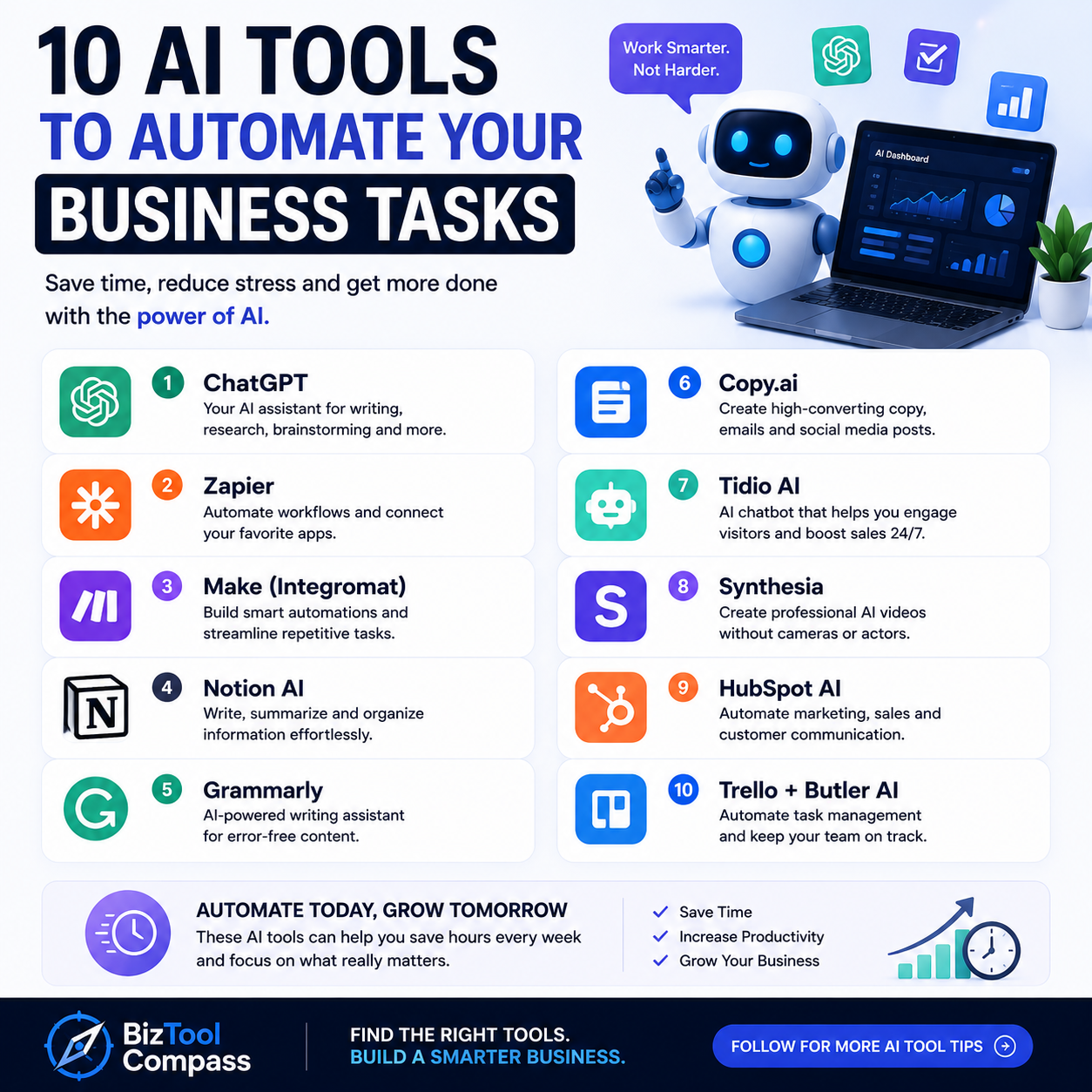
The most popular tools for building this stack are:
| Tool | Best For | AI Integration | No-Code Friendly |
|---|---|---|---|
| Zapier | Broad app ecosystem, quick setup | GPT-4 via built-in action | Yes, excellent |
| Make (Integromat) | Complex multi-step workflows | OpenAI, Claude via HTTP | Yes, visual builder |
| n8n | Self-hosted, developer-friendly | Any API | Moderate |
| Microsoft Power Automate | Microsoft 365 environments | Azure OpenAI, Copilot | Yes |
| Activepieces | Open-source, growing ecosystem | OpenAI built-in | Yes |
| Pipedream | Developer-heavy, powerful | Any API | Moderate |
For most professionals without coding experience, Zapier or Make are the right starting points. Power Automate is the right choice if your organization is heavily invested in Microsoft 365.
Step 1: Map Your Current Process Before Touching Any Tool
The most common mistake in automation projects is jumping to tools before understanding the process. Before opening Zapier or any other platform, spend thirty minutes mapping what the current task actually involves.
Walk through a recent example of the task and document:
- What event starts it (trigger)
- What information is required for it to run
- What decisions or transformations happen in the middle
- What the output looks like and where it goes
- How you know it has been done correctly
Write this as a simple numbered list. For example:
Report generation process:
- Every Monday at 9am, collect last week's sales figures from Salesforce
- Combine with support ticket count from Zendesk
- Write a three-paragraph summary of performance vs. targets
- Send summary email to the management team
Once you have this map, you can see exactly where each tool fits. The Monday at 9am is your trigger. The collect from Salesforce and Zendesk steps are data retrieval. The write a three-paragraph summary is the AI step. The send email is the action.
Step 2: Build Your First Automation - A Practical Walkthrough
Start with the simplest possible version of the workflow. Do not try to automate the full complex process on your first attempt. Build the skeleton, verify it works, then add complexity.
A concrete starter automation: Email classification and routing.
The problem: A shared inbox receives dozens of emails daily that need to be triaged - customer questions, vendor invoices, support requests, and spam all mixed together. Someone manually reads each one and routes it.
The automation:
- Trigger: New email arrives in Gmail/Outlook inbox
- AI step: Send the email subject and first 200 characters to GPT-4 via Zapier's built-in action. Prompt: "Classify this email as one of: customer_question, vendor_invoice, support_request, internal, spam. Return only the category label, nothing else."
- Router: Based on the returned label, route to different actions
- Actions: Add customer_question to a Notion database, forward vendor_invoices to accounting, create a Zendesk ticket for support_requests
This workflow involves no custom code, uses built-in Zapier integrations, and saves 2-3 hours of manual triage per week in a typical business mailbox.[5]
Step 3: Integrate AI for Content Generation and Transformation
AI earns its place in automation workflows by handling the tasks that previously required a human: writing, summarizing, classifying, and transforming unstructured content.
Common AI automation patterns:
Summarization pipeline: Long documents, meeting transcripts, or email threads are automatically summarized and appended to a database or sent to a team channel. This is particularly valuable for organizations with high volumes of recorded meetings.
Content generation at scale: When a new product is added to a database, an AI workflow automatically generates a product description, a social media caption, and a meta description - saving three separate manual writing tasks.
Sentiment and classification routing: Customer feedback forms are automatically classified by sentiment and category, with negative feedback immediately creating a high-priority task for the customer success team.
Data extraction from unstructured text: Invoices, contracts, or intake forms are processed through an AI step that extracts structured fields (amounts, dates, party names) and populates a database - replacing manual data entry.
The key to reliable AI steps in automation workflows is constrained outputs: instead of asking the AI to "summarize this email," ask it to return a JSON object with specific fields. This makes downstream routing predictable and avoids the variable formatting that breaks automations.
What Research Shows About AI Automation Adoption and Impact
The evidence on workplace automation with AI tools has moved well beyond executive surveys into measurable operational data.
A major longitudinal study by Erik Brynjolfsson, Danielle Li, and Lindsey Raymond at MIT, Stanford, and the National Bureau of Economic Research, titled "Generative AI at Work" (NBER Working Paper 31161, 2023), tracked 5,179 customer service agents at a Fortune 500 company over 18 months as AI assistance was progressively rolled out.[1]
Workers using AI assistance resolved 14% more customer contacts per hour than the control group. New employees - those with fewer than two months of experience - saw a 35% productivity gain compared to unsupported peers.
The AI was effectively transferring tacit organizational knowledge to newer staff at scale, compressing the experience curve dramatically.
Critically, the study found that the AI assistance had its largest effect when it operated as an automation layer that pre-processed customer intent and suggested responses - rather than a manual lookup tool.
Workers who engaged with the automation as a background system (rather than consciously querying it) showed the highest productivity gains.
Research from McKinsey Global Institute's 2023 report on generative AI, involving analysis of over 850 occupations across 47 countries, estimated that 60-70% of time currently spent on knowledge worker tasks could be impacted by AI automation - not replaced, but augmented with tools that handle the formulaic portions.[2]
The report identified the highest automation potential in tasks involving data collection and processing (78% potential), responding to communications (75%), and document preparation (72%).
"The largest productivity gains from AI automation come not from replacing workers but from automating the formulaic connective tissue of knowledge work - the data gathering, formatting, routing, and summarizing that surrounds high-judgment tasks." - McKinsey Global Institute, 2023
A 2024 study by Accenture Research examining 1,200 organizations across 12 industries found that companies that had built automation workflows combining AI with existing enterprise software achieved an average 32% reduction in process cycle time within the first year of deployment.[3]
Healthcare organizations using AI-assisted clinical documentation automation reported that physicians saved an average of 90 minutes per day previously spent on administrative writing tasks.
Step 4: Test, Monitor, and Handle Failures
Automation workflows fail in ways that human processes do not: silently, at scale, and on edge cases. A workflow that runs successfully 95% of the time will still produce hundreds of errors per month if it runs hundreds of times.
Build in error handling from the start:
- Add error notification steps that alert you when a workflow fails - most platforms support this natively
- Log inputs and outputs for the first few weeks to spot patterns in failures
- Build explicit handling for common edge cases (empty fields, unexpected formats, API timeouts)
Test with real data, not hypothetical examples:
Use actual recent examples of the task to test your automation before deploying it. Edge cases that would never appear in a sanitized test dataset appear constantly in production.
Review AI outputs periodically:
AI steps in automation workflows can drift in quality - particularly if the model is updated or if the distribution of inputs shifts. Schedule a monthly review of a sample of AI-generated outputs to catch degradation before it causes problems.
Establish a rollback plan:
For any automation handling important tasks, document how to manually perform the task so the team can fall back to manual operation if the automation breaks unexpectedly.
Step 5: Scale - Building a Culture of Automation
Individual automation wins compound into organizational capability when a culture of process improvement becomes embedded in how teams work.
Document every automation: Keep a simple log of what each workflow does, when it was built, what it connects, and who owns it. This prevents the "automation debt" problem where workflows break and no one remembers what they were supposed to do.
Create a shared prompt library: For teams using AI in workflows, standardize the prompts used for common AI steps. Consistent prompts produce consistent outputs - critical for workflows that downstream processes depend on.
Establish ownership: Every automated workflow should have a named owner who is responsible for monitoring it, maintaining it, and updating it when the connected tools change.
Start a "candidate backlog": Encourage team members to suggest automation candidates whenever they find themselves doing the same thing for the third time. Treat this backlog the way a product team treats a feature backlog - prioritize, estimate, and build incrementally.
The organizations that see the largest long-term productivity gains from automation are not those that deploy the most ambitious workflows first.[6] They are those that build the discipline to continually identify, automate, and monitor small inefficiencies - creating a flywheel that accelerates over time.
Tools Comparison: Which Automation Platform Should You Start With
| Factor | Zapier | Make | Power Automate | n8n |
|---|---|---|---|---|
| Learning curve | Low | Medium | Medium | High |
| App integrations | 6,000+ | 1,000+ | 400+ (Microsoft focus) | 400+ |
| AI capabilities | Built-in GPT steps | OpenAI via module | Azure OpenAI, Copilot | Any API |
| Pricing | Free tier; paid from $20/mo | Free tier; paid from $9/mo | Included in M365 plans | Free self-hosted |
| Best for | Quick starts, wide app needs | Complex logic, branching | Microsoft-heavy orgs | Technical users, data privacy |
For most professionals starting out, Zapier offers the fastest path to a working workflow. For teams with more complex logic requirements and budget consciousness, Make is worth the additional learning investment. Organizations within the Microsoft ecosystem should evaluate Power Automate first given its native integrations.
The Theory Behind Automation: Why Repetition Is the Precondition
The practical guidance in this article works because it follows a set of structural principles that are not specific to any tool or workflow platform. Understanding those principles helps you make better decisions when you encounter situations the guide does not cover.
What automation actually is
Automation, stated precisely, is the substitution of human cognitive or physical effort with a system that performs the same transformation predictably. The operational key word is transformation: every automated task involves converting an input into an output according to some rule.
An email arrives (input), is classified as a support request (transformation), and a ticket is created (output). A weekly dataset is pulled (input), combined and formatted (transformation), and a report is sent (output).
The reason this definition matters is what it excludes. A task that cannot be expressed as a transformation of inputs to outputs - a conversation where the goal shifts as it unfolds, a decision that requires weighing considerations that were not known in advance - is not a candidate for deterministic automation.
The question "can this be automated?" is really the question "can the transformation this task performs be fully specified?"
The decomposition principle
Any task that can be decomposed into discrete, predictable steps can be automated. The inverse is equally important: tasks that appear complex but resist decomposition are usually complex because they contain a step where the output depends on context that cannot be fully specified in advance - and that step is where human judgment lives.
This is why process mapping (Step 1 in this guide) is not optional overhead. When you write out the numbered steps of a process, you are performing decomposition.
The step that you find yourself describing with words like "assess," "decide," "figure out," or "it depends" is the step that either requires human oversight or is the specific step where AI changes the equation.
Why AI changes the automation threshold
Traditional automation required explicit rules: if the email subject contains "invoice," route to accounting. The rule had to be written precisely, and any input that fell outside the rule's explicit conditions produced incorrect or undefined behavior.
This worked well for fully structured data but failed on the ambiguous, messy inputs that constitute most real knowledge work.
AI - specifically, large language models trained on pattern recognition - allows automation of tasks that previously required human judgment precisely because they could not be specified as explicit rules.
Classifying an email as a support request versus a sales inquiry is not a rule-based problem; it requires understanding language in context.
AI performs this classification reliably enough to automate at scale, even though no explicit rule could accomplish the same result.
The result is a shift in what falls inside the automation boundary. Consider an explicitness gradient:
| Zone | Example | Automation Approach |
|---|---|---|
| Fully explicit | Spreadsheet formula: =SUM(A1:A10) | Deterministic code, zero AI needed |
| Semi-explicit | Rule-based workflow: if form submitted, create CRM record | No-code platforms, branching logic |
| Fuzzy | AI classification: categorize this email | LLM-based step, probabilistic output |
| Judgment-dependent | Strategic decision: which market to enter next | Human, with AI as research support |
Most knowledge work lives in the semi-explicit and fuzzy zones. The semi-explicit zone has been automatable for years but required technical expertise. The fuzzy zone became automatable only after 2020, with the widespread availability of capable language models.
This is why the current wave of automation feels qualitatively different from previous ones - it has expanded the boundary into territory that was previously reserved for human cognition.
"The question is not whether intelligent machines can think. The question is whether men do." - B.F.
Skinner, but more relevantly for automation: Peter Drucker, who observed decades before AI that "efficiency is doing things right; effectiveness is doing the right things" - automation addresses efficiency, freeing humans for effectiveness.
The reliability paradox
There is a structural tension in automation investment that catches organizations off guard. The tasks most worth automating are high-frequency tasks - they run hundreds or thousands of times, so even a small time saving per instance compounds significantly.
But high-frequency tasks are also the tasks where automation failure has the highest aggregate impact. A workflow that fails 2% of the time runs silently incorrect on two of every hundred executions; at high volume, that represents a substantial error count.
This is not an argument against automating high-frequency tasks - it is an argument for investing proportionally in monitoring and error handling for those workflows. The expected value of automation is positive; the variance requires management.
A rollback plan and error alerting are not optional extras for important automations. They are what separates a reliable system from one that fails invisibly until someone notices the downstream damage.
Transaction costs and the economics of repetitive work
Ronald Coase, in his 1937 paper "The Nature of the Firm," argued that firms exist because organizing activity within a company has lower transaction costs than negotiating every interaction across a market.
Hiring an employee to perform recurring work is more efficient than contracting externally for each instance of that work, because coordination overhead dominates at scale.
The same logic applies to automation within organizations. Every repetitive task has an internal transaction cost: the time to initiate it, the communication required to hand off inputs, the verification required to confirm the output, the error recovery when something goes wrong.
These costs are invisible because they are diffuse - no individual instance is expensive enough to notice. But multiplied across frequency and headcount, they constitute a meaningful portion of organizational overhead.
Automation reduces these internal transaction costs structurally. It eliminates the initiation step (the trigger fires automatically), removes the handoff cost (inputs are pulled directly from source systems), and standardizes verification (success criteria are codified into the workflow).
This is the mechanism behind the 32% reduction in process cycle time that Accenture's 2024 research identified - not that the core work became faster, but that the coordination overhead surrounding it was eliminated.
Sources & Further Reading
- Brynjolfsson, E., Li, D., & Raymond, L. (2023). Generative AI at Work. NBER Working Paper 31161. National Bureau of Economic Research. View source
- McKinsey Global Institute. (2023). The Economic Potential of Generative AI: The Next Productivity Frontier. McKinsey & Company.
- Accenture Research. (2024). Reinventing the Enterprise With AI: Automation Impact Study. Accenture.
- World Economic Forum. (2023). The Future of Jobs Report 2023. World Economic Forum. View source
- Zapier. (2024). State of Business Automation Report. Zapier.
- Davenport, T. H., & Ronanki, R. (2018). Artificial Intelligence for the Real World. Harvard Business Review. View source