
Digital products work better when research, structure, prototypes, and testing reflect how people actually use them. Understanding what a UX designer does means following a process that includes user research, information architecture, wireframes, interactive prototypes, and usability testing before engineering builds the product. The discipline connects psychology, design, and technology while measuring usability, accessibility, efficiency, and satisfaction through real user behavior.
A UX designer is a professional who shapes how people experience digital products - researching user needs, structuring information, building interactive prototypes, and testing designs with real people before engineers write a single line of production code.
The role sits at the intersection of psychology, design, and technology, and its purpose is deceptively simple: make products that work the way humans actually think, not the way engineers assume they think.
If you have ever used an app that felt effortless - where you found what you needed without a tutorial, completed your task without frustration, and left feeling that the experience respected your time - you were using a product where a UX designer did their job well.
The field has grown dramatically over the past two decades. According to the U.S. Bureau of Labor Statistics (2024), employment of web and digital designers - a category encompassing UX professionals - is projected to grow 16 percent from 2022 to 2032, significantly faster than the average for all occupations.
A 2023 report from the World Economic Forum listed user experience design among the top 20 fastest-growing job roles globally.
The growth reflects an irreversible shift: healthcare, finance, government services, education, retail, and manufacturing all now compete partly on the quality of their digital experiences, and all need people who understand how to design those experiences for human beings.
"Design is not just what it looks like and feels like. Design is how it works." - Steve Jobs, in a 2003 interview with the New York Times
This guide explains what UX designers actually do across the full project lifecycle - from initial user research through wireframing, prototyping, and usability testing - along with the tools of the trade, salary data at different career levels, portfolio guidance, and an honest account of how UX relates to the adjacent titles of UI designer and product designer.
Key Definitions
Before examining the process, it helps to establish precise definitions for the terminology that structures the field.
| Term | Definition |
|---|---|
| User experience (UX) | The overall quality of a person's interaction with a product or system, encompassing usability, accessibility, efficiency, and satisfaction |
| Wireframe | A low-fidelity visual representation of a screen or interface, showing layout and structure without visual styling |
| Prototype | An interactive simulation of a design, used to test user flows before engineering builds the actual product |
| Usability testing | A research method in which real users attempt tasks with a product while a researcher observes where they succeed, struggle, or fail |
| Design system | A shared library of reusable components, patterns, and guidelines ensuring visual and interaction consistency across a product |
| Information architecture (IA) | The structural design of shared information environments - how content is organized, labeled, and connected so users can find what they need |
| Interaction design (IxD) | The design of the behavior of interactive products - what happens when a user clicks, swipes, hovers, or types |
These terms are not academic abstractions. They describe the specific deliverables and methods a UX designer produces and practices daily. Understanding them is the foundation for understanding the work.
The Origin of UX Design as a Discipline
The phrase "user experience" was coined by Don Norman in the early 1990s while he was Vice President of the Advanced Technology Group at Apple. Norman, a cognitive scientist by training, had spent decades studying how humans interact with objects and systems.
His 1988 book The Design of Everyday Things - originally titled The Psychology of Everyday Things - argued that when people struggle with a product, the fault lies with the design, not the user. This idea, radical at the time, became the philosophical foundation of the entire UX field.
Norman joined Apple in 1993 and insisted on the title "User Experience Architect," making him arguably the first person to hold a UX-specific role in a major technology company.
He later reflected that he chose the term "user experience" because existing labels like "usability" and "human-computer interaction" were too narrow: "I wanted to cover all aspects of a person's experience with a system, including industrial design, graphics, the interface, the physical interaction, and the manual."
The field grew slowly through the late 1990s and early 2000s, accelerated by the rise of web applications that replaced desktop software.
The launch of the iPhone in 2007 and the subsequent explosion of mobile apps created a massive demand for people who could design touch interfaces for small screens - a fundamentally different challenge from designing desktop software.
By 2015, UX design had become one of the most sought-after roles in the technology industry.
Jakob Nielsen, co-founder of the Nielsen Norman Group and author of dozens of foundational usability studies, formalized many of the heuristic principles that UX designers still use today. His 10 Usability Heuristics, first published in 1994, remain the most widely referenced evaluation framework in the profession.
Nielsen's research demonstrated empirically what Norman had argued theoretically: that design quality could be measured by observing real users, and that even small usability improvements could produce substantial business outcomes.
What a UX Designer Does: The Full Process
A UX designer moves a product through six connected phases: discovery and user research, synthesis and problem definition, wireframing, prototyping and interaction design, usability testing, and handoff to engineering. Each phase has its own methods and deliverables, and the designer typically owns the work from initial research through the point engineers begin building.
Unlike roles defined by a single repeating task, UX design work varies substantially across the project lifecycle. A product manager might describe the role as "figuring out what to build and validating that it works." That description is accurate but incomplete.
The process involves distinct phases, each with its own methods, deliverables, and cognitive demands.
Phase 1: Discovery and User Research
Every serious UX project begins with research. Before designing anything, the UX designer needs to understand who the users are, what tasks they are trying to accomplish, what problems they currently encounter, and what mental models they bring to the interaction.
User interviews are structured conversations with people who represent the target audience. A skilled UX researcher does not ask "what features do you want?" - a question that reliably produces a list of disconnected feature requests.
Instead, they ask about context and behavior: "Walk me through the last time you had to do X." "What felt frustrating about that experience?" "What did you try before settling on this approach?" The goal is to understand the underlying need, not the surface request.
Steve Portigal, author of Interviewing Users (Rosenfeld Media, 2nd edition, 2023), describes the core interviewing discipline as "being genuinely curious about someone else's experience without projecting your own assumptions onto it." This sounds simple.
In practice, it requires training to suppress the natural tendency to lead, suggest, or interpret prematurely.
Contextual inquiry involves observing users in their actual environment - at their desk, on their phone during a commute, in the physical setting where the product gets used. What people say they do and what they actually do differ significantly, and observation captures the gap.
A landmark 1983 study by Lucy Suchman at Xerox PARC demonstrated that users' actual workflows bore little resemblance to the procedures they described in interviews, a finding that helped establish observation as an essential research method.
Competitive analysis examines how similar products have approached the same design problems, identifying patterns that users may already expect and gaps that represent design opportunities.
Analytics review - examining quantitative data on how users currently behave in an existing product - grounds the qualitative research in actual usage patterns. Google Analytics, Mixpanel, Amplitude, and Hotjar provide behavioral data that reveals what users do; research methods reveal why.
"You can observe a lot just by watching." - Yogi Berra
The line is humorous, but the principle is serious. Nielsen Norman Group research (2022) found that 85 percent of usability problems can be discovered by observing just five users attempting realistic tasks - a finding that makes user research surprisingly efficient for organizations willing to invest even modest time in it.
Phase 2: Synthesis and Problem Definition
Research produces raw material: interview transcripts, observation notes, behavioral data, patterns, anomalies. The synthesis phase converts this into design inputs. This is the most intellectually demanding part of the process and the hardest to teach.
Synthesis typically produces several artifacts:
- Personas: Archetypical user profiles based on research patterns, representing distinct user segments with different goals, behaviors, and pain points
- Journey maps: Visualizations of a user's experience across multiple touchpoints over time, revealing where friction, confusion, or delight occurs
- Affinity diagrams: Clustered groupings of related research findings, physically organized on a wall or in Miro/FigJam to reveal themes
- Problem statements or "how might we" questions that frame the design challenge in actionable terms
The output of synthesis is not a solution. It is a clearly articulated problem.
Alan Cooper, author of About Face: The Essentials of Interaction Design (Wiley, 4th edition, 2014), argues that "the most dangerous moment in a design project is when the team believes it already knows what to build." Synthesis is the discipline that prevents premature convergence on solutions.
Phase 3: Wireframing
With a clear problem definition, the designer begins exploring solutions structurally - before any visual styling. Wireframes are intentionally rough, using grey boxes and placeholder text to focus attention on layout, hierarchy, and flow rather than color or typography.
This roughness is deliberate and strategically important. Bill Buxton, in Sketching User Experiences (Morgan Kaufmann, 2007), explains that low-fidelity representations invite feedback in a way that polished designs do not. When a stakeholder sees a rough wireframe, they comment on the structure and logic.
When they see a polished mockup, they comment on the colors. The wireframe stage is where structural problems need to surface.
Wireframes are typically created in Figma, though some designers use Balsamiq for particularly low-fidelity work or start with pencil sketches on paper. The key is communicating structure and logic quickly enough to iterate without sinking time into visual polish that may need to be discarded.
A mid-level UX designer might produce 3-5 wireframe variations for a single screen, exploring different information hierarchies, navigation patterns, and interaction models before converging on a direction.
This exploration phase is where the designer's knowledge of information architecture and interaction design patterns is most visible.
Phase 4: Prototyping and Interaction Design
Once the structure is agreed upon, the designer builds interactive prototypes - versions of the design that can be clicked or tapped to simulate the user experience.
Prototypes range from low-fidelity paper sketches to high-fidelity clickable interfaces in Figma that approximate the finished product with actual colors, typography, and animation.
Prototyping surfaces problems that static wireframes cannot: confusion about what is interactive, unexpected flows, errors in multi-step processes, moments where users need feedback the design does not provide.
A 2019 study by Forrester Research estimated that every dollar invested in UX design returned between $2 and $100 in business value, largely because prototyping catches problems before engineering commits resources - where the cost of fixing a design problem is 10-100 times lower than fixing it after code is written.
Figma's prototyping features allow designers to create complex interaction flows with transitions, conditional logic, and component variants that closely simulate real application behavior. This capability has made the "high-fidelity prototype" the standard deliverable for usability testing at most technology companies.
Phase 5: Usability Testing
UX designers conduct moderated or unmoderated usability tests to evaluate whether their designs work for actual users. In a moderated test, the designer (or a dedicated researcher) observes a participant attempting specific tasks with the prototype, noting where they succeed, hesitate, and fail.
The researcher does not guide or assist - observing natural behavior is the point.
Nielsen and Landauer's mathematical model (1993) demonstrated that testing with five users uncovers approximately 85 percent of usability issues, while 15 users uncover virtually all of them.
This finding, replicated across dozens of subsequent studies, means that usability testing does not require large samples or large budgets - it requires discipline and regularity.
Tools like Maze and UserTesting automate unmoderated testing at scale, allowing dozens or hundreds of users to attempt tasks while the platform records success rates, time-on-task, click paths, and drop-off points. This provides quantitative data that complements the qualitative richness of moderated observation.
Testing results feed directly back into design iteration. The cycle of design-test-refine is the core loop of UX work. It is not a linear process ending in a handoff; it is a continuous loop that produces progressively better solutions.
Phase 6: Handoff to Engineering
Once a design is tested and approved, the designer prepares engineering handoff documentation - detailed specifications in Figma (using Dev Mode) that specify component dimensions, spacing, typography, colors, interaction states, responsive breakpoints, and accessibility requirements.
The quality of handoff documentation significantly affects how accurately engineers implement the design and how many clarification conversations are needed during development.
Senior UX designers stay involved through the engineering build phase, reviewing implementations against the design intent and flagging discrepancies before they reach production. This is not micromanagement; it is quality assurance for the user experience.
Tools of the Trade
| Tool | Primary Use | Why It Matters |
|---|---|---|
| Figma | Wireframing, prototyping, design systems | Industry standard; collaborative, browser-based, real-time multiplayer editing |
| Maze | Unmoderated usability testing | Automated task-completion testing integrated with Figma prototypes |
| UserTesting | Moderated and unmoderated testing | Access to participant panels; records screen, voice, and facial expressions |
| Miro / FigJam | Workshops, journey mapping, affinity diagramming | Collaborative whiteboarding for distributed teams |
| Optimal Workshop | Information architecture testing | Card sorting, tree testing, first-click analysis for navigation structures |
| Hotjar | Behavioral analytics | Heatmaps, session recordings, and surveys on live products |
| Dovetail | Research repository | Centralized storage and analysis of qualitative research data |
Figma deserves particular mention because of its dominance. A 2023 survey by uxtools.co found that Figma was used by over 80 percent of professional designers for UI design, up from under 40 percent in 2019.
Adobe's attempted $20 billion acquisition of Figma in 2022 (later blocked by EU and UK regulators) underlined the tool's market position. Most UX job postings now list Figma proficiency as a requirement rather than a preference.
Salary Ranges by Level
United States (Glassdoor, LinkedIn Salary, levels.fyi, 2024)
| Level | Annual Compensation (USD) | Typical Experience |
|---|---|---|
| Entry-level UX Designer | $65,000 - $90,000 | 0-2 years |
| Mid-level UX Designer | $90,000 - $130,000 | 2-5 years |
| Senior UX Designer | $130,000 - $175,000 | 5-8 years |
| Lead / Staff UX Designer | $170,000 - $230,000 | 8-12+ years |
| UX Manager / Director | $180,000 - $280,000+ | 10+ years with management |
At large technology companies (Google, Apple, Meta, Amazon, Microsoft), total compensation including equity can substantially exceed these base figures at senior levels. A Staff Product Designer at Google, for example, may earn $300,000-$450,000 in total compensation according to levels.fyi data from 2024.
United Kingdom: Entry-level GBP 28,000-42,000. Senior UX designers in London earn GBP 70,000-95,000. Lead/principal roles at major tech companies reach GBP 100,000-130,000.
Germany: Mid-level EUR 55,000-75,000. Senior roles EUR 75,000-100,000 at larger tech companies.
Freelance rates vary significantly: $50-100 per hour for early-career work, $120-200+ per hour for specialists with strong portfolios and proven client outcomes. A 2023 survey by Toptal found that experienced UX freelancers billing $150+ per hour typically had 8+ years of experience and portfolios demonstrating measurable business impact.
Portfolio Tips for UX Designers
A UX portfolio is the primary evaluation tool for hiring managers, and the most common mistake is confusing it with a gallery of polished visuals. Hiring managers at companies like Google, Spotify, and Airbnb have publicly stated that they care far more about the thinking behind the design than the visual quality of the final screens.
Show the Process, Not Just the Output
A portfolio case study that includes only final screen designs tells a hiring manager very little. One that walks through the research findings, the wireframe alternatives considered, the usability test results, and the resulting iterations demonstrates the thinking that the job actually requires.
Jared Spool, founder of UIE (now part of Center Centre), advises portfolio builders: "Show me the mess. Show me the wrong turns. Show me what you learned from them."
Quantify Outcomes Where Possible
"Redesigned onboarding flow, reducing drop-off rate by 23%" is dramatically more compelling than "redesigned onboarding flow." A 2022 analysis by Hired.com found that UX portfolios containing quantified business outcomes received 2.4 times more interview invitations than those without measurable results.
Three Strong Case Studies Beat Ten Thin Ones
Depth demonstrates rigor; breadth alone demonstrates exposure. Each case study should follow a clear structure:
- Context: What was the product, the team, and your role?
- Problem: What user problem did the research reveal?
- Process: What methods did you use? What alternatives did you explore?
- Testing: What did you learn from usability tests?
- Outcome: What changed as a result? What metrics improved?
Side Projects Are Legitimate
Do not wait for employer projects. Redesigning an existing app you find frustrating, contributing to open-source civic technology, or volunteering UX support for a nonprofit are legitimate portfolio material when framed with a clear problem statement and methodology.
Many successful UX designers broke into the field with entirely self-initiated case studies.
UX Designer vs. UI Designer vs. Product Designer
These three titles are used inconsistently across the industry, which creates genuine confusion for practitioners and hiring managers. Understanding the distinctions - and the overlaps - matters for career planning.
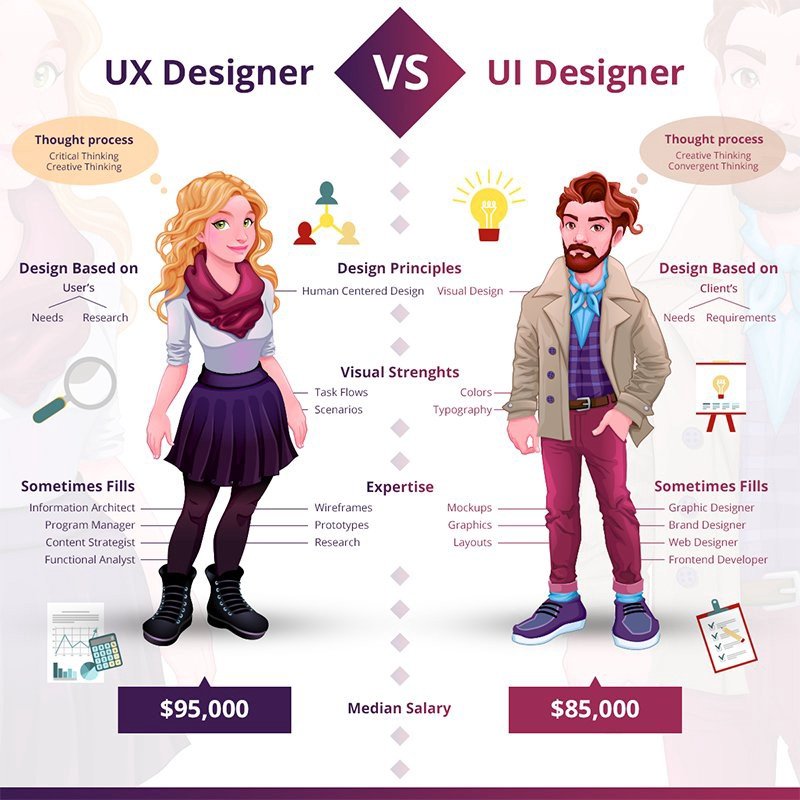
UX designer emphasizes the research, strategy, and problem-definition end of the work. UX roles in large companies may be almost entirely research-focused, with dedicated visual designers handling the interface layer.
UI designer (user interface designer) focuses on the visual and interactive layer - the specific visual design of components, the color system, typography, iconography, and micro-interactions. At smaller companies, this is often the same person as the UX designer; at larger companies, it may be a separate specialization.
Product designer is the most common title in technology companies for someone doing the full scope of work - research, wireframing, visual design, prototyping, and testing.
The title reflects the expectation that this person is a full partner in the product development process, not a specialist brought in only for visual work or only for research.
| Dimension | UX Designer | UI Designer | Product Designer |
|---|---|---|---|
| Primary focus | Research, flows, usability | Visual design, components, aesthetics | Full scope: research through visual design |
| Key deliverables | Personas, wireframes, test results | Design systems, visual specs, icons | All of the above plus strategic input |
| Typical company size | Large (specialized teams) | Large or agency | Startups and mid-size tech companies |
| Research involvement | Heavy | Light | Moderate to heavy |
| Common tools | Figma, Maze, Miro, Dovetail | Figma, Illustrator | Figma, Maze, Miro, analytics platforms |
In practice, most working designers at technology companies operate as product designers regardless of title, with the UX/UI distinction being more meaningful in industries where large design teams have enough scale to specialize.
How to Start a UX Career
Starting a UX career has three common paths: structured bootcamps and certificates like General Assembly, Springboard, CareerFoundry, or Google's UX Design Certificate, which build a portfolio directly; formal degree programs in interaction design, HCI, psychology, or computer science; or transitioning from an adjacent role such as graphic design, front-end development, or product management, where existing skills carry over.
Bootcamps and Certificates
Structured programs provide curriculum, portfolio projects, and career support. Notable options include General Assembly, Springboard, CareerFoundry, and Google's UX Design Certificate on Coursera (completed by over 500,000 learners since its 2021 launch). The certificate matters less than the portfolio you build through the program.
Degree Programs
Degrees in interaction design, human-computer interaction (HCI), graphic design, psychology, or computer science provide relevant foundations. HCI programs at Carnegie Mellon, Georgia Tech, and University College London are particularly well-regarded.
A degree is not required to work in UX but provides stronger foundations for research-heavy roles and can accelerate progression to senior positions.
Transition from Adjacent Roles
Graphic designers, front-end developers, product managers, and researchers from psychology or anthropology backgrounds frequently transition into UX. The jump is more natural than it seems - the skills are adjacent, and companies value the cross-domain perspective.
A developer who understands implementation constraints makes better design decisions; a psychologist who understands cognitive biases designs better research studies.
The Future of UX Design in the Age of AI
The emergence of AI-powered design tools has raised questions about the future of UX design careers. Tools like Galileo AI, Uizard, and Figma's own AI features can generate layout suggestions, auto-populate design systems, and even produce initial wireframes from text prompts.
These tools will change the work but are unlikely to replace the role. The parts of UX work most amenable to AI automation - generating layout variations, creating component libraries, producing responsive adaptations - are the production tasks that already occupy the smallest portion of a senior designer's time.
The parts that define the role's value - understanding user needs through research, framing the right problems, making judgment calls about competing priorities, and navigating organizational politics to ship good design - remain fundamentally human activities.
A 2024 survey by Nielsen Norman Group found that 72 percent of UX professionals were already using AI tools in their workflow, primarily for content generation, research synthesis, and ideation. But only 8 percent reported that AI had reduced the overall complexity of their work.
The tools are accelerating specific tasks while the strategic and interpersonal demands of the role continue to grow.
Practical Takeaways
The most impactful thing a UX designer can do is establish and maintain a direct relationship with real users throughout a project. Designs that skip research or substitute assumed knowledge for actual user observation reliably produce products that engineers build correctly but users do not want.
The research disciplines of the role - interviewing, observing, testing - are what prevent expensive mistakes during engineering.
If you are building a portfolio to enter the field, resist the temptation to make everything look polished. A case study showing a messy, real discovery process is more credible to experienced hiring managers than a case study with nothing but high-fidelity screens and no visible thinking.
And if you are a manager or executive evaluating whether to invest in UX, consider the data: Forrester Research (2019) found that companies with mature UX practices saw customer retention rates 15-25 percent higher than competitors, and McKinsey's Design Index (2018) found that companies in the top quartile for design performance outperformed their industry benchmarks in revenue growth by a factor of two.
The evidence is clear. The question is not whether UX design matters but whether your organization takes it seriously enough to let it do its work.
Sources & Further Reading
- Norman, D. "The Design of Everyday Things." Basic Books, revised edition, 2013.
- Bureau of Labor Statistics. "Occupational Outlook Handbook: Web and Digital Interface Designers." BLS.gov, 2023-24 edition.
- Krug, S. Don't Make Me Think, Revisited. New Riders, 3rd edition, 2014.
- Gothelf, J., & Seiden, J. Lean UX. O'Reilly Media, 3rd edition, 2021.
- Figma. "State of Design Report." Figma, Inc., 2023.
- Nielsen, J., & Landauer, T. K. "A Mathematical Model of the Finding of Usability Problems." Proceedings of ACM CHI, 1993.
- Portigal, S. Interviewing Users. Rosenfeld Media, 2nd edition, 2023.
- Buxton, B. Sketching User Experiences. Morgan Kaufmann, 2007.
- Cooper, A., Reimann, R., Cronin, D., & Noessel, C. About Face: The Essentials of Interaction Design. Wiley, 4th edition, 2014.
- Suchman, L. Plans and Situated Actions. Cambridge University Press, 1987.
- McKinsey & Company. "The Business Value of Design." McKinsey Quarterly, October 2018.
- Forrester Research. "The Six Steps for Justifying Better UX." Forrester, 2019.
- Glassdoor. "UX Designer Salary Data." Glassdoor.com, 2024.
- LinkedIn Economic Graph. "Fastest Growing Design Jobs." LinkedIn, 2023.
- uxtools.co. "Design Tools Survey 2023." uxtools.co, 2023.
- Nielsen Norman Group. "AI in UX Design: Current Adoption and Impact." nngroup.com, 2024.
- Rubin, J., & Chisnell, D. Handbook of Usability Testing. Wiley, 2nd edition, 2008.