
In January 2024, Amelia Torres spent two weeks building a website. She was a freelance interior designer who had been running her business entirely through Instagram and word of mouth. A client had asked for her website address, she had none to give, and the conversation had ended awkwardly.
She signed up for a Wix trial, spent four evenings moving text boxes around a canvas, built something she was not happy with, deleted it, started over in a different template, and eventually had something she could send to the next person who asked.
She did not love it. The text was slightly off-center in a way she could not fix. On mobile, two sections overlapped. She had spent fourteen hours on something that looked like she had spent fourteen hours on something.
A colleague who ran a ceramics studio had a different story. She had signed up for Squarespace on a Sunday afternoon, chosen a template called "Fillmore," swapped in her own photos, written her bio, added a contact form, and had a published site by dinner.
The site looked exactly as professional as the template it was built from, which was designed by people who think about this for a living. She had made it look like hers in three hours. She paid $16/month and did not think about it again.
A third designer in the same professional circle had taken a different path entirely. He had learned Webflow over three months, watched tutorial videos on his lunch breaks, practiced building hypothetical client sites on evenings, and eventually rebuilt his own portfolio from scratch.
The result was precise, animated, and portfolio-grade. It demonstrated his design abilities as visibly as any project he had done for a client. He had invested significantly more time and gotten significantly more back.
None of these three choices was wrong. All three reflect a real trade-off between effort, control, and output quality that the website builder market has never fully collapsed into a single correct answer.
"The website builder you choose is the first design decision you make. It sets the ceiling on what is achievable without additional skill, time, or money - and that ceiling varies enormously between platforms."
The Hosted Builders: Design Without Code
Squarespace
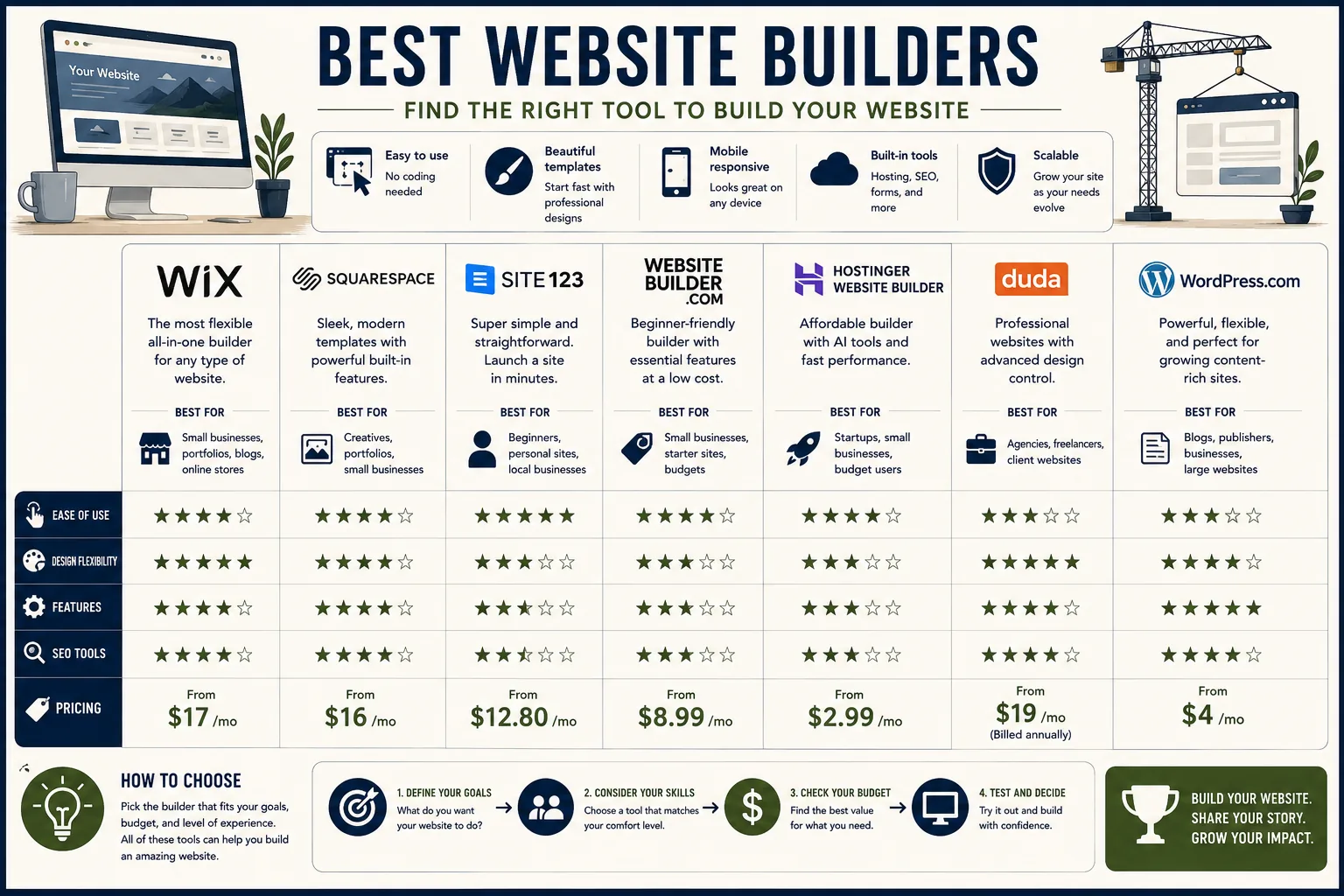
Squarespace occupies the premium end of the no-code website builder market.[1] Its reputation for visual quality is genuine and earned: the template library is designed by professionals, every template is mobile-responsive by default, and the design system governing typography, spacing, and color is coherent enough that a non-designer choosing their own photos and writing their own copy still ends up with a site that looks professional.
The section-based editor builds pages from vertical sections, each containing one of dozens of pre-designed layouts: an image and text side by side, a three-column feature block, a full-width image with an overlay heading, a team grid, a testimonial carousel.
You add sections, rearrange them, and customize the content within each. You do not move elements pixel by pixel. This constraint is deliberate, and for its target audience it is a feature: fewer choices means fewer ways to make a mess.
Design system controls are global. Set your heading font and body font once. Choose a color palette once. Every page across the site inherits those choices automatically. Changing the primary color on a site with twenty pages takes thirty seconds.
This is the kind of coherent system management that takes a developer hours to implement in WordPress.
Squarespace Scheduling (formerly Acuity) integrates appointment booking directly into any Squarespace site. Clients can book services, choose times from your availability calendar, pay for sessions, and receive automated confirmation and reminder emails - without any third-party booking tool.
E-commerce is well-implemented: physical products, digital downloads (ebooks, design files, courses), and service-based subscriptions. Product pages, checkout, order management, and inventory tracking are all handled within the platform.
Abandoned cart recovery (available on Commerce plans) recovers orders that were started but not completed.
Pricing: Personal $16/month (no e-commerce), Business $23/month (basic e-commerce, third-party scripts), Commerce Basic $28/month, Commerce Advanced $52/month. Billed annually; monthly billing is approximately 30% higher.
Best for: photographers, designers, small businesses, professional services, and anyone who needs a polished, credible web presence without learning technical tools or hiring a developer.
Limitations: design constraints frustrate users who know exactly what they want but cannot achieve it within the section system. Template switching requires rebuilding page layouts. Advanced SEO customization (custom schema markup, server-side rendering control) is limited compared to WordPress or Webflow.
Wix
Wix is the most widely used website builder in the world by number of sites, with over 250 million users.[2] The free-placement drag-and-drop editor is genuinely free: any element can be positioned anywhere on the canvas. This maximum flexibility is what separates Wix from Squarespace's more constrained system.
ADI (Artificial Design Intelligence) generates a complete site from a brief questionnaire: your business type, design preferences, and key information. The result is a fully structured site that can be edited immediately. For users who find a blank template intimidating, ADI provides a credible starting point.
The App Market contains over 500 applications built for Wix sites: reservation and booking systems, event management, loyalty programs, forums, live chat, restaurant menus, real estate listings, and subscription services.
Functionality that Squarespace lacks natively often exists as a Wix App, making Wix more adaptable to unusual business models.
Wix Studio (formerly Editor X) is a separate product within the Wix ecosystem designed for professional designers and agencies. It offers CSS grid and flexbox control, responsive design breakpoints, and component-based design - closer to Webflow's level of control while maintaining the Wix backend and App Market.
Pricing: free (Wix subdomain, Wix branding), Light $17/month, Core $29/month, Business $36/month, Business Elite $159/month.
Best for: small businesses that need specific functionality from the App Market, businesses that want maximum layout freedom, and professional designers using Wix Studio for client work.
Limitations: free-placement editing creates mobile responsiveness issues when elements are not carefully managed. Performance is generally slower than Squarespace or Webflow.
Design quality varies more widely because the editor's flexibility allows more ways to produce visually inconsistent results. The mobile editor requires separate customization from the desktop version, adding time to responsive design work.
Webflow
Webflow is the most technically sophisticated no-code website builder available.[3] Where Squarespace abstracts away CSS and Wix approximates it, Webflow exposes every CSS property through a visual interface.
Box model, flexbox, CSS grid, transitions, animations, and interactions are all controllable without writing code - but understanding what you are controlling requires familiarity with how CSS works.
The result is a design tool that professional web designers use not as a compromise but as a preference. Webflow generates clean, semantic HTML that performs well in search engines and loads quickly. The design output is limited only by the designer's skill, not by the platform's template library.
The CMS allows building dynamic content structures: a blog with custom fields for author, category, featured image, reading time, and related posts. A portfolio with fields for client name, project type, tools used, and case study link. A team page where each member is a CMS item with photo, bio, role, and social links.
Each CMS collection has a visual template that Webflow's editor builds like any other page, with the dynamic fields mapped to design elements.
Interactions and Animations allow building scroll-triggered animations, hover effects, page load sequences, and parallax elements without JavaScript. A heading that slides up on scroll. A card that expands on hover.
A navigation menu that changes appearance when the user scrolls past a certain point. These effects are native to Webflow and do not require coding or third-party scripts.
Webflow Hosting serves sites from a global CDN with strong performance scores. Sites built in Webflow consistently outperform equivalent Squarespace and Wix sites in Core Web Vitals benchmarks.
Pricing: Basic $14/month (no CMS), CMS $23/month (up to 2,000 CMS items), Business $39/month (up to 10,000 CMS items), Enterprise $212+/month. E-commerce plans start at $29/month.
Best for: web designers who understand CSS fundamentals and want precise visual control without writing code; agencies building client sites to a professional standard; developers who want design-layer control without hand-coding HTML and CSS.
Limitations: the learning curve is steep. Webflow University estimates 40+ hours of practice before the editor feels natural. This is not a tool for beginners or for anyone who wants to launch a site this weekend.
The investment is worthwhile for professionals who will build multiple sites; it is difficult to justify for a single site with no design background.
WordPress: The Open-Source Foundation
WordPress.org (Self-Hosted)
WordPress.org is the open-source content management system that powers approximately 43% of all websites on the internet.[4] The software is free. You provide the hosting.
The power of WordPress relative to any hosted website builder is the plugin ecosystem: over 60,000 plugins in the official WordPress repository, covering every imaginable website function.
The comparison to hosted builders is direct: where Squarespace includes blogging, e-commerce, forms, and scheduling natively, WordPress includes nothing natively except the core CMS - but all of those capabilities exist as plugins, and the plugin ecosystem also covers thousands of functions no hosted builder offers at all.
A WordPress site can be a magazine-style publication, an e-commerce store with 50,000 products, a membership community with tiered access levels, a job board with employer and candidate portals, a real estate listing site with map search, a course platform with video hosting and quizzes, and a newsletter distribution platform all simultaneously.
No hosted website builder approaches this range.
The tradeoff is ownership of complexity. A WordPress site requires hosting configuration, WordPress installation and updates, plugin management and updates, security monitoring, and regular backups. None of these are technically demanding, but all require time and attention.
A compromised WordPress installation running outdated plugins is a real security risk. This is why many users who choose WordPress for its power end up spending meaningful time on platform maintenance rather than content.
WordPress Block Editor (Gutenberg) provides a page builder experience for content creation: columns, image blocks, video embeds, custom HTML, quote blocks, and galleries are dragged into page layouts without installing additional plugins.
The third-party page builder ecosystem (Elementor, Beaver Builder, Divi) provides Wix-style drag-and-drop editing on top of the WordPress core.
Yoast SEO and Rank Math provide technical SEO controls that no hosted builder matches: custom meta tags on any page, XML sitemap generation and configuration, schema markup for articles, products, and local businesses, canonical URL management, breadcrumb schema, and integration with Google Search Console.
Pricing: free software. Hosting: $5-30/month depending on provider. Domain: $15/year. Premium theme: $0-200 one-time. Total annual cost: $75-500/year depending on hosting quality and premium tool use.
Best for: content publishers with SEO ambitions, businesses with complex content structures, developers and technical users, anyone who needs functionality that hosted builders do not support, and organizations that prioritize long-term platform independence.
WordPress.com (Hosted)
Automattic (the company behind WordPress.com) hosts WordPress on managed infrastructure, removing the server administration requirement while retaining much of the platform's flexibility.
The Business plan ($45/month) unlocks the full WordPress plugin ecosystem on managed hosting - effectively combining the power of self-hosted WordPress with the convenience of managed hosting. Below Business, plugin installation is restricted and the platform more closely resembles a limited hosted builder.
Best for: users who want WordPress's plugin ecosystem without managing their own hosting. The Business plan is a reasonable option for non-technical users who need WordPress-level capability.
Framer: Design-to-Code for Modern Sites
Framer has become the preferred website builder for product designers, UX professionals, and developers who want a modern, component-based design system without the learning curve of Webflow.
Built on React, Framer generates clean component-based code behind the scenes.[6] The visual editor works with components - reusable design building blocks that maintain consistency across pages. Change the design of a button component once, and every button on every page updates automatically.
AI Site Generation from a text prompt generates a complete first-draft site in under a minute. Describe your business, your aesthetic preferences, and the pages you need. Framer produces a complete site with content, layout, and design. Editing from the AI draft is faster than building from a blank template.
Animations are first-class in Framer: entrance animations, scroll-triggered effects, hover interactions, and component transitions are all built into the editor. The result is sites that feel notably more dynamic than typical Squarespace or Wix builds.
The CMS handles blog posts, portfolio projects, and any other content collection. Dynamic pages inherit CMS item data automatically.
Pricing: free (Framer subdomain), Mini $10/month (custom domain, 1 site), Basic $20/month, Pro $30/month (multiple sites).
Best for: designers who want React-quality output without writing React; portfolios and marketing sites for design-forward brands; anyone who has seen Framer sites and wants that aesthetic.
Specialized Builders
Shopify
Shopify is not a general-purpose website builder - it is an e-commerce platform that includes a website.[7] This distinction matters: every feature in Shopify is oriented around selling products. The homepage, collection pages, product pages, cart, and checkout are all optimized for conversion.
Content pages and blog functionality are secondary.
The App Store contains over 8,000 applications. Subscriptions, print-on-demand, dropshipping, product bundles, affiliate programs, loyalty systems, advanced inventory management, and multi-warehouse fulfillment - all are available through apps. The depth of the ecosystem means virtually any retail business model is achievable on Shopify.
Shopify Payments is a built-in payment processor that eliminates the 0.5-2% transaction fee Shopify otherwise charges when you use a third-party processor. For US merchants, Shopify Payments is typically the right choice unless your product category is not eligible.
Shopify Markets handles multi-currency pricing, automatic translation, country-specific domain routing, and cross-border tax and duty compliance from a single Shopify admin - making international expansion significantly less complex than it would be on a self-managed platform.
Pricing: Starter $5/month (social selling only), Basic $29/month, Shopify $79/month, Advanced $299/month, Plus $2,300+/month.
Best for: any business whose primary purpose is selling products online. For pure e-commerce, Shopify's breadth of features, app ecosystem, and payment infrastructure is the standard against which other platforms are measured.
Ghost
Ghost is a content management system built specifically for independent publications: blogs, newsletters, and membership-based content businesses.[5]
The writing experience is clean and distraction-free. Each post is a focused writing surface - no cluttered sidebars, no meta boxes competing for attention. Images are added inline. The formatting toolbar appears when you need it and disappears when you do not.
Memberships are built into Ghost without a plugin or third-party integration: free members, paid members at any price point, and access controls that restrict content by tier. Revenue from paid memberships goes directly to the publisher minus Stripe's payment processing fees (approximately 2.9% + $0.30). Ghost takes no percentage.
Email newsletters are sent directly from Ghost to your member list - no separate email platform required. Compose a post in the Ghost editor, mark it for email delivery, and Ghost sends it to the appropriate member tier.
Pricing: Ghost (Pro) Starter $9/month (500 members, 1 staff), Creator $25/month (1,000 members), Team $50/month, Business $199/month (10,000 members, priority support).
Best for: independent publishers and writers who want a combined blog and newsletter platform with direct member monetization and no platform revenue share.
Carrd
Carrd builds one-page websites. Nothing more, nothing less. It does this extremely well, at an extremely low price.
A Carrd site is a single scrollable page: sections for an introduction, features or services, a portfolio grid, a contact form, or a call-to-action. Templates are clean and minimal. The editor is simple. The price is $9/year for a Pro Lite plan that allows one custom domain.
For use cases that fit within one page - a personal landing page, a product launch page, a link-in-bio page, an event announcement, a basic service offering - Carrd is the most cost-effective solution available.
Pricing: free (Carrd subdomain), Pro Lite $9/year (1 custom domain), Pro Standard $19/year (3 sites), Pro Plus $49/year (10 sites).[8]
Best for: landing pages, link-in-bio pages, event pages, coming-soon pages, and any simple single-page web presence.
Comparison Table
| Builder | Price | Free Tier | Best For | Skill Level |
|---|---|---|---|---|
| Squarespace | $16-52/month | No | Portfolios, small business, design quality | Beginner |
| Wix | $17-159/month | Yes (with branding) | Layout flexibility, App Market functionality | Beginner |
| Webflow | $14-212/month | Yes (subdomain) | Design precision, CMS, performance | Advanced |
| WordPress.org | $5-30/month (hosting) | Free software | Unlimited flexibility, SEO, complex sites | Intermediate |
| WordPress.com | $4-45/month | Free (limited) | Managed WordPress, Business plan plugin access | Beginner-Intermediate |
| Framer | $10-30/month | Yes (subdomain) | Modern design, animations, React output | Intermediate |
| Ghost | $9-199/month | No | Publishers, newsletters, memberships | Beginner-Intermediate |
| Shopify | $29-299/month | No | E-commerce, online stores | Beginner |
| Carrd | $9-49/year | Yes (with branding) | Single-page sites, landing pages | Beginner |
The True Cost of Each Option
Advertised pricing and actual total cost often diverge. Several factors inflate costs beyond the base plan.
Custom domains cost $10-20/year depending on the registrar and top-level domain. Most website builders require you to purchase a domain separately or renew one already registered. Squarespace and Wix both include a free custom domain for the first year on annual plans.
Email hosting is separate from website hosting on all platforms. Receiving email at hello@yourcompany.com requires either Google Workspace ($6/month per user) or an alternative like Zoho Mail (free for limited use). Squarespace includes email forwarding (not full email hosting) on all plans.
E-commerce transaction fees on top of credit card processing: Squarespace charges 3% of sales on Business plans (waived on Commerce plans). Shopify charges 0.5-2% when using third-party payment processors (waived on Shopify Payments). Wix charges no additional transaction fees.
Third-party app costs: Wix's App Market and Shopify's App Store both contain free and paid apps. A Shopify store with subscriptions, loyalty rewards, and advanced reporting might add $50-200/month in app fees not reflected in the platform subscription price.
The realistic all-in annual cost for common scenarios:
Simple business website on Squarespace Personal: $192/year (subscription) + $15 (domain) = $207/year. No transaction fees, hosting included.
Small online store on Shopify Basic: $348/year (subscription) + $15 (domain) + 2.9% + $0.30 per transaction + app costs = $363/year minimum before apps and transaction volume.
Self-hosted WordPress blog: $120/year (good shared hosting) + $15 (domain) + $0 (free plugins and themes) = $135/year for a fully functional content site.
Professional Webflow site with CMS: $276/year (CMS plan) + $15 (domain) = $291/year, with no additional costs for most uses.
Choosing the Right Platform
The decision tree is simpler than the market makes it appear.
If you are selling products online and it is your primary activity: Shopify, full stop. The e-commerce infrastructure, payment system, and app ecosystem are unmatched. Everything else is a compromise.
If you want a professional site without technical setup: Squarespace. The design quality is consistent, the all-in pricing is transparent, and the learning curve is measured in hours rather than days.
If you need specific functionality Squarespace does not have: Wix for the App Market or WordPress for the plugin ecosystem. The choice between them depends on how technical you are willing to get.
If you are a designer or developer who wants full design control: Webflow, with the understanding that significant learning investment comes first.
If you are a content publisher building a newsletter and blog: Ghost for publishing-native features and membership, or WordPress for maximum SEO and content flexibility.
If you need a single landing page: Carrd at $9/year. Nothing else is necessary.
If you want modern design and React output: Framer, particularly for design-forward portfolios and product marketing sites.
The mistake most people make is choosing based on the most recognizable name rather than the best fit. Mailchimp, Wix, and WordPress are the most recognized because they have been around the longest and have the biggest marketing budgets - not because they are the best choice for every use case.
Match the platform to what you are actually building, not to what you have heard of.
What the Research Shows
W3Techs' web technology survey for 2026 confirms WordPress powering 43.4% of all websites - a figure that has grown every year since the platform launched.[9] Squarespace holds 4.1% of all sites and is the second most used website builder by site count. Wix follows at 2.9%.
The pattern in these numbers is that WordPress dominates the long tail of websites where content and customization matter, while Squarespace and Wix capture the small business and personal site market where simplicity and speed of launch are the priority.
Webflow, Framer, and Ghost collectively represent a smaller but fast-growing segment of design-forward and publication-native sites.
Research from the Stanford Web Credibility Project (Fogg et al.) found that 75% of users judge a company's credibility based on website design. The implication for the Squarespace vs. building-yourself debate is direct: a professionally designed Squarespace template starts with credibility.
A self-built Wix site built without design experience may cost the same but produce a different first impression. The best website builder is the one that produces a professional result given the skills and time you actually have - not the one with the most features you will never use.
Sources & Further Reading
- Squarespace. "Build a Website." squarespace.com. View source
- Wix. "Create a Website You're Proud of." wix.com. View source
- Webflow. "The website experience platform." webflow.com. View source
- WordPress.org. "Blog Tool, Publishing Platform, and CMS." wordpress.org. View source
- Ghost. "Turn your audience into a business." ghost.org. View source
- Framer. "Start your dream site." framer.com. View source
- Shopify. "Start Your Business." shopify.com. View source
- Carrd. "Simple, free, fully responsive one-page sites." carrd.co. View source
- W3Techs. "Usage Statistics and Market Share of Content Management Systems." w3techs.com. View source
See also: Best SEO Tools in 2026, Best Email Marketing Tools in 2026, Best AI Tools for Creators in 2026, and Best Writing Tools in 2026.