
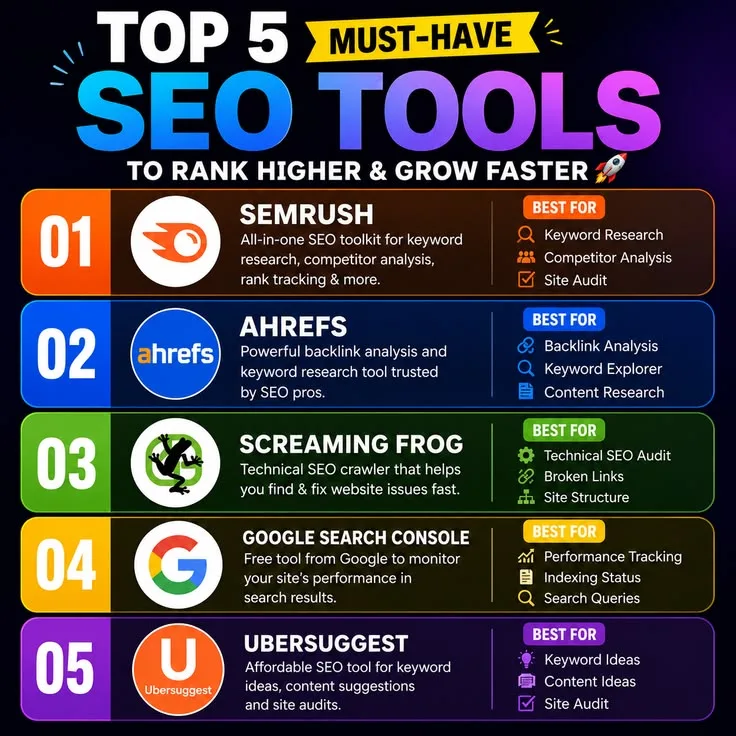
Search visibility often depends on finding pages that already appear for valuable queries but do not earn clicks or rank high enough. Top seo tools make those opportunities visible through search data, helping a site move beyond publishing more content without understanding how existing pages perform.
Marcus Chen had been running his outdoor gear review site for three years before he looked at Google Search Console for the first time. He knew the site had traffic - his email list had grown to 4,000 subscribers, he was earning commissions from affiliate links, and the site had been growing steadily.
But when a consultant he hired for a day audit pulled up Search Console and showed him the data, he saw something that stopped him mid-sentence: the site was appearing in Google search results 800,000 times per month, and only 12,000 of those appearances were resulting in a click.
Dozens of pages were ranking in positions 4 through 10 for high-value queries, close enough to drive meaningful traffic but not quite there. He had been writing new content every week for three years. He had not been optimizing the existing content that was already ranking.
Within six weeks of that conversation, Marcus had used Ahrefs to identify the twelve pages with the best combination of current ranking position and search volume, run each through Surfer SEO to understand what the top-ranking competitors had that his pages lacked, and made targeted updates to every one of them.
Eight of the twelve pages moved into the top three organic positions within two months. His monthly traffic doubled without a single new article. The site had been doing the work all along. He had simply lacked the visibility to see where to direct his attention.
What Marcus experienced is the central challenge of SEO in 2026: the tools exist to make informed, prioritized decisions about where to invest content and optimization effort.
The gap between teams who use them well and teams who do not shows up in traffic, in rankings, and in the compounding return that comes from getting the right pages into the right positions.
This guide covers every major SEO tool category - keyword research, technical audit, backlink analysis, content optimization, and rank tracking - with honest assessments of what each tool actually does well and what it does not.
"The hardest part of SEO is not finding keywords or building links. It is deciding which of the hundred things you could do will actually move the needle. The tools do not make that decision for you, but they show you enough data to make it yourself."
The Non-Negotiable Free Tools
Before spending a dollar on SEO software, every website owner needs three things installed and verified: Google Search Console, Google Analytics 4, and Google PageSpeed Insights. These tools are free, they use official Google data, and they answer the majority of SEO questions a site faces day to day.
Google Search Console
Search Console is the only SEO tool that shows you data directly from Google about how Google sees and ranks your site.[4] No third-party estimation, no clickstream approximation, no data triangulation - this is what Google's systems record about your pages.
The Performance report shows every query your site appeared for in the past 16 months, with impressions (how many times a result was shown), clicks (how many times someone clicked), average position, and click-through rate.
This data is the foundation for every optimization decision: which pages are close to the top three (and therefore worth updating), which queries have high impressions but low CTR (title tag and meta description problems), and which pages have dropped in ranking over time.
The Index Coverage report identifies pages that are indexed, pages that are not, and the reason for each. A page blocked by robots.txt, a page Google chose not to index due to thin content, a page returning a 404 error, a page with a noindex tag - all of these appear with explicit explanations.
For a site that has published content that is not driving traffic, the Coverage report is often the first place to look.
Core Web Vitals shows which pages pass or fail Google's page experience signals: Largest Contentful Paint (loading speed), Interaction to Next Paint (interactivity), and Cumulative Layout Shift (visual stability). Pages failing these signals may face a ranking disadvantage, and the report lists specific URLs grouped by issue type.
Pricing: completely free. No usage limits. Every website needs this.
Google Analytics 4
GA4 tells you what visitors do after they arrive from search. The Search Console shows you clicks; GA4 shows you whether those visitors stayed, engaged, or converted. Understanding the difference between high-traffic pages that generate conversions and high-traffic pages that generate bounces requires GA4.
Key reports for SEO work: Landing Pages (which pages receive organic traffic and what their engagement rates are), Traffic Acquisition (proportion of visitors from organic search vs other channels), and Conversions (if you have configured events to track goals - form submissions, purchases, email signups).
GA4's integration with Search Console allows viewing search queries alongside on-site behavior in a single report, which closes the loop between ranking data and actual business outcomes.
Pricing: free for standard use. Google Analytics 360 for enterprise data volume.
Keyword Research Tools
Ahrefs
Ahrefs is the tool that most professional SEOs would choose if they could only have one.[1] Its backlink index is the most comprehensive available outside enterprise tools, and its keyword research capabilities are built around a metric that matters more than raw search volume: actual clicks.
The Keywords Explorer shows not just how many people search for a keyword but how many of those searches result in a click to any organic result. For many informational queries, Google answers the question directly in the search result through featured snippets, knowledge panels, or "People also ask" boxes.
A keyword with 10,000 monthly searches but only 2,000 organic clicks is far less valuable for content investment than the raw volume suggests. Ahrefs quantifies this directly.
Parent Topic identifies the broader keyword a given search query falls under, helping avoid over-fragmenting content.
If you are targeting "how to tie a bowline knot" and the Parent Topic is "bowline knot", Ahrefs is showing you that Google considers these queries addressed by the same piece of content - important context for deciding whether to write one comprehensive page or separate articles.
The SERP overview for any keyword shows the current top-ranking pages with their Domain Rating, organic traffic, number of backlinks, and the exact URLs that rank.
This is competitive intelligence built directly into keyword research - before writing about a topic, you see who you are competing against and roughly how difficult ranking will be.
Site Explorer covers your own domain and any competitor's: organic keyword rankings, estimated organic traffic, backlink profile (who links to them and why), and the content pages driving the most traffic.
Understanding a competitor's top-traffic pages is often more valuable than raw keyword volume data for identifying content opportunities.
Pricing: Lite $99/month (1 user, 5 projects, 500 tracked keywords), Standard $199/month, Advanced $399/month, Enterprise $449+/month.
Best for: link building research, competitive keyword analysis, understanding click potential rather than just search volume, and finding content opportunities through competitor analysis.
Limitations: no PPC or advertising data, content optimization features are less developed than dedicated tools like Surfer SEO, and the price point is high for sole proprietors in low-competition niches.
Semrush
Semrush's defining characteristic is breadth. Where Ahrefs focuses deeply on SEO and backlink analysis, Semrush extends into paid advertising intelligence, social media management, content marketing tools, and market-level competitor analysis.[2]
For agencies managing clients across SEO and paid search simultaneously, this integration eliminates the need for a separate PPC research tool.
The Keyword Magic Tool contains over 25 billion keywords across 142 country databases, the largest keyword database of any major tool.
Filter by keyword intent (informational, navigational, commercial, transactional), match type, word count, SERP features present, and dozens of other parameters to narrow any keyword universe to the most actionable opportunities.
Advertising Research shows which keywords competitors are bidding on in Google Ads, the actual ad copy they are running, estimated monthly ad spend, and how their paid keyword strategy compares to their organic strategy. For any business running paid search, this competitive intelligence is genuinely valuable.
Traffic Analytics (part of the .Trends add-on) shows estimated traffic trends for any domain over time, alongside the top traffic sources. Compare your traffic trajectory against five competitors on a single chart. This kind of market-level context is not available in Ahrefs at the same depth.
Position Tracking monitors rankings for a set of target keywords daily, showing movement over time with notifications when significant changes occur.
Pricing: Pro $129/month, Guru $249/month, Business $499/month. The .Trends add-on is $200/month additional.
Best for: agencies and marketing teams who need SEO, content marketing, and PPC data in one place. The competitive intelligence features are particularly strong for markets where understanding advertiser behavior informs organic strategy.
Limitations: the backlink data is generally considered less accurate and comprehensive than Ahrefs; the breadth means less depth in individual features compared to specialized tools.
Moz Pro
Moz's primary contribution to the SEO industry is Domain Authority and Page Authority, the 0-100 scores that have become a widely used proxy for a site's ranking capability and individual page strength.[3]
These scores are third-party estimates, not Google metrics, but they have been adopted broadly enough that they function as useful shorthand for relative site strength comparisons.
Keyword Explorer provides a Priority Score that combines search volume, keyword difficulty, and organic click-through opportunity into a single actionable number. Rather than requiring you to manually weigh three separate metrics, the Priority Score provides a practical ranking of which keywords to target first.
The SERP Analysis within Keyword Explorer shows what type of content currently dominates results for a given query - whether featured snippets, video carousels, image packs, or local results appear above organic listings.
This context is important for assessing whether a traditional organic result is achievable or whether the SERP is structured in a way that limits organic visibility.
Link Explorer provides backlink analysis with Moz's own Domain Authority scoring for all discovered links, making it easy to assess whether a potential link opportunity comes from a site with meaningful authority.
Pricing: Starter $99/month, Standard $179/month, Medium $299/month, Large $599/month.
Best for: SEO beginners who find the Priority Score's simplification useful, teams who rely on DA/PA metrics for link prospecting and client reporting, and agencies using Moz's link metrics as standard vocabulary.
Limitations: the backlink database is smaller than Ahrefs or Semrush; some practitioners argue the Domain Authority metric has become so widely gamed (people build links specifically to inflate DA) that it is a less reliable quality signal than it once was.
Pricing is high relative to the depth of data compared to competitors at similar price points.
Ubersuggest
Neil Patel's Ubersuggest occupies the budget tier of keyword research tools and does so competently. The data quality is lower than Ahrefs or Semrush, the backlink index is smaller, and the feature set is narrower - but at $29/month, it covers the core use cases that most small businesses need.
Keyword research, domain overview, backlink analysis, and site audit are all present. Daily query limits apply to free accounts. The paid plans ($29-99/month) remove limits and add historical data, more competitor keywords, and more tracked rankings.
Best for: small businesses and bloggers who need basic keyword research and competitive data without the cost of enterprise tools. A functional starting point before graduating to Ahrefs or Semrush when the budget supports it.
Technical SEO Tools
Screaming Frog SEO Spider
Screaming Frog is a desktop application that crawls websites the way Googlebot does, systematically following links and cataloging every page it finds.[5] The result is a complete inventory of your site's technical health.
A standard crawl identifies: broken internal and external links (404 errors), redirect chains (a URL that redirects to another redirect before reaching the final destination, adding load time and diluting link equity), missing and duplicate title tags, missing and duplicate meta descriptions, missing H1 tags, images without alt text, pages with thin content, canonical tag issues, hreflang errors for international sites, and pages blocked from indexing by robots.txt or noindex tags.
JavaScript rendering allows Screaming Frog to crawl sites built with JavaScript frameworks the way a browser would, revealing content that a raw HTTP crawler would miss. This is critical for React, Next.js, Vue, and Angular sites where content is generated client-side.
Custom extraction uses XPath, CSS path selectors, or regex to pull any on-page data into the crawl report. Extract every price on an e-commerce site. Pull all schema markup. Capture any custom data attribute.
Integration with Google Analytics and Search Console allows importing traffic and impression data alongside crawl results, enabling prioritization by both technical severity and business impact - fixing a canonical issue on a 50-visit-per-month page matters less than the same issue on a 50,000-visit-per-month page.
Pricing: free for up to 500 URLs, $259/year for unlimited URLs.
Best for: technical SEO audits, site migrations, identifying crawl errors, and monitoring site health. The annual license is one of the best value propositions in SEO software.
Limitations: desktop-only (Windows and Mac), not suitable for continuous cloud-based monitoring. Running scheduled crawls requires the software to be open on a local machine.
Content Optimization Tools
Surfer SEO
Surfer SEO approaches content optimization as a competitive analysis problem: to rank for a keyword, your page needs to cover the topic in a way that is consistent with what already ranks.
Surfer analyzes the top-ranking pages and extracts the patterns - related terms, word count ranges, heading structures, image counts - that differentiate them from lower-ranking pages.[6]
The Content Editor provides a real-time score (0-100) as you write. The left panel contains the article being drafted; the right panel shows the terms Surfer identified as important, with checkmarks as each is naturally included in the writing.
The score goes up as coverage improves. An article scoring above 80 is considered well-optimized for the target keyword.
Topical Map generates a content cluster plan: a pillar page topic with all the supporting subtopics that comprehensively address the subject area. This addresses an increasingly important Google signal - topical authority, the idea that sites covering a subject thoroughly rank better than sites with isolated content pieces.
The Audit feature analyzes existing pages and shows exactly what changes would improve their score relative to current competitors. Often the changes needed are modest: adding or removing a few hundred words, including a handful of related terms that appear consistently in top-ranking pages.
Pricing: Essential $89/month (2 seats, 30 articles/month), Scale $129/month (5 seats, 100 articles/month), Scale AI $219/month (includes AI writing assistance).
Best for: content teams targeting competitive keywords where on-page signals are a meaningful ranking factor, and sites with existing content that needs systematic optimization.
Limitations: Surfer's recommendations are reverse-engineered from correlation - what top-ranking pages share - rather than from explicit algorithm guidelines. Over-optimizing for Surfer's term suggestions can produce writing that feels formulaic. Use it as a guide, not a formula.
Clearscope
Clearscope is Surfer's primary competitor in the content grading space and is favored by enterprise content teams for its cleaner interface, tighter Google Docs integration, and more editorial-feeling implementation of NLP-driven content guidance.
The core product is the Content Report: enter a target keyword, and Clearscope returns a list of related terms weighted by relevance, with grades showing how thoroughly your content covers the topic.[7] The grading system (A+ through F) gives writers and editors a concrete benchmark rather than a complex score.
The Google Docs and WordPress integrations via browser extension mean writers can grade content without leaving the tool they write in - a workflow advantage over Surfer's dedicated editor, particularly for teams that prefer writing in existing tools.
Pricing: Essentials $170/month, Business $1,200/month, Enterprise custom.
Best for: enterprise content teams and larger agencies producing high-volume optimized content. The price point is difficult to justify for solo bloggers or small operations.
Keyword Discovery Tools
Answer the Public
Answer the Public visualizes the questions and searches that form around any topic, organized by question type (who, what, when, where, why, how), comparisons (vs, or, like), and prepositions (for, with, without, near).
Enter "email marketing" and see the actual questions people search: "what email marketing software is best for small business," "how does email marketing automation work," "email marketing vs social media marketing," and hundreds of similar queries organized visually.
For content creators and bloggers, this tool generates FAQ section content, long-tail article ideas, and social media content by showing exactly what questions your audience is actively searching. The insights are particularly valuable for service businesses and B2B companies whose customers research decisions extensively.
Pricing: free (limited daily searches), $9/month Starter, $49/month Pro, $99/month Expert.
Best for: identifying question-based keyword opportunities, planning FAQ sections, discovering long-tail content topics that keyword volume tools miss because they focus on aggregate searches rather than specific queries.
Google Keyword Planner
Available free with a Google Ads account (no active ad spend required), Keyword Planner provides keyword ideas, search volume ranges, and seasonal trend data drawn directly from Google's ad auction data.
While the volume ranges shown to non-advertisers are wide ($100-$1,000/month rather than exact figures), the tool's keyword groupings and related term suggestions are directly from Google's understanding of semantic relationships.
Best for: initial keyword universe discovery, seasonal trend analysis, and validating that meaningful search demand exists for a topic before investing in content.
Comparison Table
| Tool | Category | Price | Best For |
|---|---|---|---|
| Google Search Console | Analytics/Monitoring | Free | Rank tracking, crawl errors, official Google data |
| Google Analytics 4 | Analytics | Free | Traffic analysis, conversion tracking |
| Ahrefs Lite | All-in-one SEO | $99/month | Backlink analysis, keyword research, site audit |
| Semrush Pro | All-in-one SEO | $129/month | SEO + PPC intelligence, content marketing |
| Moz Pro Starter | All-in-one SEO | $99/month | Beginners, DA/PA metrics, link prospecting |
| Ubersuggest | Keyword research | $29/month | Small businesses, budget keyword research |
| Screaming Frog | Technical audit | $259/year | Full-site technical crawls, site migrations |
| Surfer SEO Essential | Content optimization | $89/month | On-page scoring, competitor content analysis |
| Clearscope Essentials | Content optimization | $170/month | Enterprise content grading, Google Docs integration |
| Answer the Public Starter | Keyword discovery | $9/month | Question-based keywords, FAQ content |
| Google Keyword Planner | Keyword research | Free | Volume validation, keyword groupings |
Rank Tracking: Monitoring What Changes
Every major paid SEO platform includes rank tracking, but the implementation details matter. Ahrefs, Semrush, and Moz Pro all track keyword positions daily with historical trend charts and movement alerts.
The key features to compare are tracking frequency (daily vs weekly), the ability to track multiple locations and devices separately, and the number of keywords tracked per plan.
For location-based businesses, local rank tracking requires tools like BrightLocal ($29-79/month) or Semrush's local rank tracking features, which show rankings in Google Maps and local pack results separately from regular organic results.
Google Search Console provides average position data for free, though the position is averaged across all queries and locations rather than tracked for specific target keywords. For most small businesses, this is sufficient.
Paid rank tracking is most valuable when you are actively optimizing and need to see movement within days rather than weeks.
Building an SEO Stack That Fits Your Budget
The right SEO tool stack depends on the size of your operation, the competitiveness of your niche, and how central organic search is to your business model.
Solo blogger or small site (under 100 published pieces): Start with Google Search Console and Google Analytics 4 at no cost. Add Ubersuggest at $29/month for keyword research. Run Screaming Frog's free 500-URL crawl quarterly for technical health. Total: $29/month.
Established content site or small business (100-1,000 pieces, active content production): Ahrefs Lite ($99/month) or Semrush Pro ($129/month) plus Surfer SEO Essential ($89/month) for content optimization. Screaming Frog annual license ($259/year). Total: approximately $200-240/month.
Agency or enterprise content team: Semrush Business or Ahrefs Advanced for multi-user access and multiple projects, Clearscope Business for content teams, BrightLocal for any clients with local SEO needs. Total: $500+/month, justified by client billing.
The consistent principle across budget levels: Google Search Console is always the starting point, because it is free and because it provides data no third-party tool can replicate. Every optimization effort should begin with what Search Console shows about how existing content is performing.
What the Research Shows
A 2024 study by Backlinko analyzing 11 million Google search results found that the top three organic results capture 54% of all clicks on a given search results page, with position one alone capturing an average 27.6%.[8]
The implication for SEO investment is precise: moving from position 5 to position 2 on a meaningful keyword is not a marginal improvement - it is a 3-4x increase in traffic from that keyword.
Tools that help identify which existing pages are in positions 4-10 and close to breaking into the top three provide direct, calculable ROI.
The same study found that content comprehensiveness (measured by word count as a proxy for depth) was positively correlated with rankings but that the relationship was not linear - very long pages (over 3,000 words) did not consistently outrank moderately long pages (1,500-2,500 words).
The implication: tools like Surfer SEO are useful for understanding the right depth for a topic rather than simply adding words to every page.
Research from SparkToro and Rand Fishkin on zero-click searches found that in 2024, approximately 60% of Google searches result in no click to any website, with Google answering the query directly.
This makes keyword click data - particularly Ahrefs' "Clicks" metric - more important than raw search volume for evaluating content investment.
High-volume keywords dominated by featured snippets, knowledge panels, and shopping carousels may drive far fewer organic visits than their volume suggests.
Sources & Further Reading
- Ahrefs. "SEO Tools and Resources." ahrefs.com. View source
- Semrush. "Online Marketing Can Be Easy." semrush.com. View source
- Moz. "The SEO software that has your back." moz.com. View source
- Google. "Search Console Help." search.google.com/search-console. View source
- Screaming Frog. "SEO Spider Tool." screamingfrog.co.uk. View source
- Surfer SEO. "Content Intelligence Tool." surferseo.com. View source
- Clearscope. "Content Optimization Platform." clearscope.io. View source
- Backlinko. "We Analyzed 11 Million Google Search Results." backlinko.com. View source
See also: Best Writing Tools in 2026, Best AI Tools for Creators in 2026, Analytics Tools Explained, and Best Productivity Tools in 2026.