
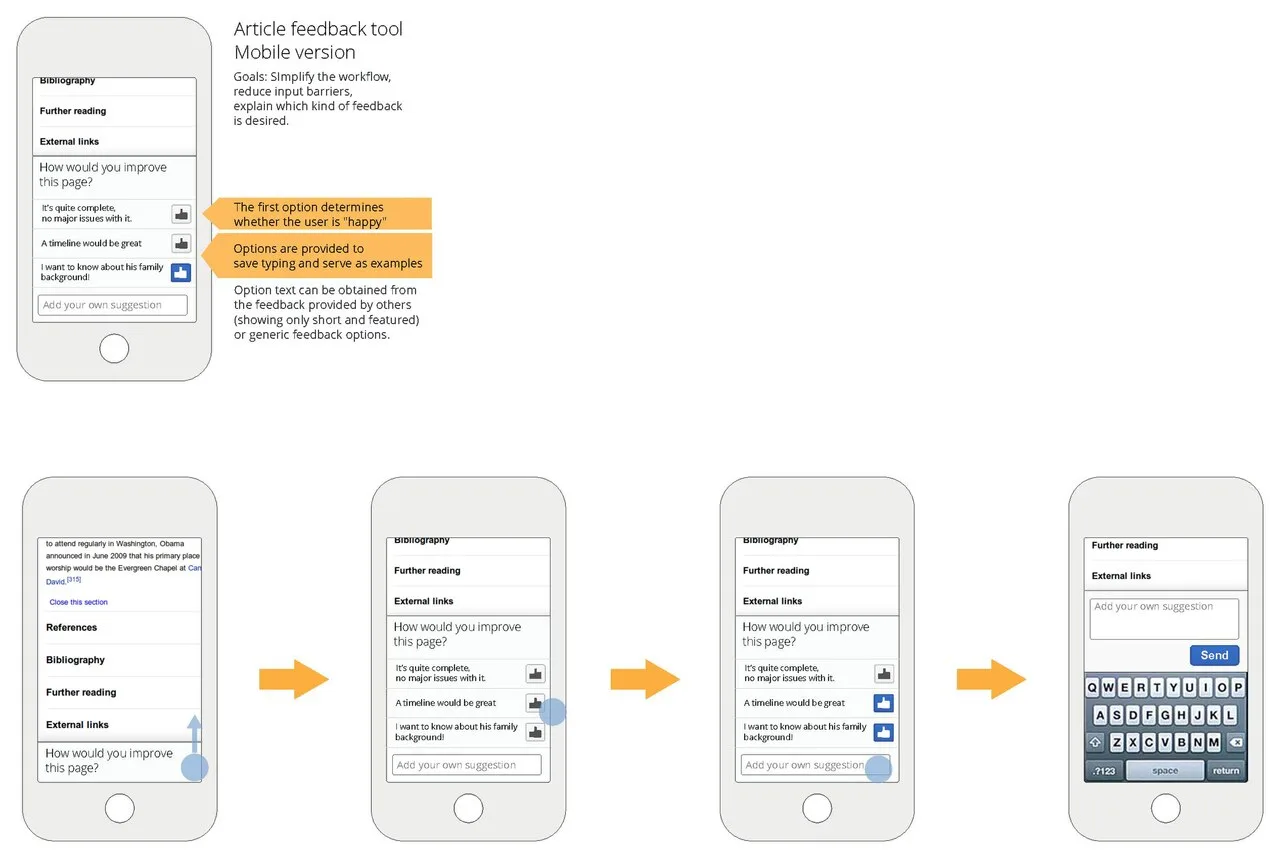
For most of the web's first decade, designers and developers built for desktop computers first. The desktop was where serious work happened, where browsers were capable, and where users presumably sat in chairs with full keyboards and large screens.
Mobile was treated as a stripped-down afterthought, a reduced version of the "real" experience, delivered to users who would presumably return to a proper screen when they needed to do anything important.
That assumption turned out to be catastrophically wrong.
By 2016, mobile devices surpassed desktop computers as the primary means of accessing the internet globally. By 2024, mobile devices accounted for roughly 60 percent of all web traffic worldwide, according to Statcounter. The users who were supposed to return to the desktop had simply never left their phones.
And the web, built for screens that most people had stopped using as their primary access point, was in many cases a terrible experience on the devices they actually used.
Mobile-first design is the response to this reversal. It is a philosophy, a methodology, and in Google's eyes, a technical requirement, and understanding it is no longer optional for anyone who builds digital products.
What Mobile-First Design Actually Means
Mobile-first design is the practice of designing and building digital products for the smallest, most constrained screen and device first, then progressively enhancing the experience for larger screens and more capable hardware. It is the deliberate reversal of the traditional desktop-first workflow.
The concept was articulated and named by designer and author Luke Wroblewski in a 2009 blog post that he later expanded into the book Mobile First (2011, A Book Apart).
Wroblewski's core argument was not merely that designers should remember to make things work on mobile: it was that designing for mobile first produces fundamentally better products for all devices.
His reasoning rested on two observations:
Mobile forces focus. The constraints of a small screen (limited real estate, no hover states, touch rather than mouse, variable connectivity) force designers to strip the experience to its essentials.
When you can only include three things on a screen, you are forced to decide which three things actually matter. The discipline imposed by constraints almost always improves the core experience.
Mobile represents growth. In 2009, Wroblewski's book was essentially predictive. He showed the explosive growth curve of smartphone adoption and argued that the mobile audience was not a subset of the web audience, it was the future of the web audience.
Designing for mobile first meant designing for where users were going, not where they had been.
"Designing for mobile first not only prepares you for the explosive growth and new opportunities, it also forces you to focus." Luke Wroblewski, Mobile First, 2011
Wroblewski's prediction proved accurate well beyond what even he anticipated. By 2023, Ericsson's Mobility Report estimated 6.8 billion smartphone subscriptions globally, representing approximately 85 percent of the world's population.
In markets across South and Southeast Asia, Africa, and Latin America, the smartphone is not one way of accessing the internet: it is essentially the only way for the majority of the population.
Mobile-First vs. Responsive Design: What's the Difference?
These two terms are frequently used interchangeably, but they describe different things.
| Concept | What It Describes | Technical Mechanism |
|---|---|---|
| Mobile-First Design | A philosophy about where you start in the design and development process | Not a specific technology, it's an approach |
| Responsive Design | A technical implementation strategy where layouts adjust fluidly to different screen widths | CSS flexible grids, fluid images, media queries |
| Adaptive Design | Fixed layouts for specific screen size breakpoints, served differently based on device detection | Multiple fixed layouts, server-side device detection |
| Progressive Enhancement | Building a functional baseline experience first, then adding richer features for more capable devices | Layered CSS, JavaScript feature detection |
A site can be responsive without being mobile-first. The most common example is a desktop-first site retrofitted with responsive breakpoints: it technically adjusts to small screens, but the core design decisions (information architecture, navigation structure, content prioritization) were made for desktop and then compressed for mobile.
The result is often a degraded experience: tiny text, touch targets that are too small to tap accurately, navigation menus that collapse awkwardly, and layouts that feel like they are apologizing for being on a phone.
A genuine mobile-first site starts with the mobile layout as the designed state and expands from there.
In CSS terms, this means writing styles for the smallest screen first and using min-width media queries to add complexity as screens grow larger, the reverse of the traditional desktop-first approach that uses max-width media queries to progressively remove features.
The Compression Problem
When design begins at desktop dimensions and is compressed for mobile, specific structural problems tend to emerge.
Nielsen Norman Group research (Budiu, 2015) on mobile usability found that desktop-retrofitted mobile sites produced measurable decreases in task completion rates compared to genuinely mobile-optimized sites. The most common failure modes identified were:
- Navigation patterns designed for hover interaction that have no touch equivalent
- Forms with insufficient field spacing that produce tap errors
- Content hierarchies that make sense at 1440px width but become ambiguous when stacked vertically
- Call-to-action placement optimized for above-the-fold desktop viewing that falls below the thumb's natural reach zone on a phone
These are not implementation bugs that can be fixed by a developer. They are design decisions that produced appropriate outputs for the wrong starting context. Only starting from mobile can eliminate them systematically.
Progressive Enhancement in Practice
Progressive enhancement is the philosophical companion to mobile-first design. Where mobile-first defines where you start, progressive enhancement defines how you build upward.
The approach has three layers:
- Semantic HTML: The content layer that works on any device, browser, and connection. A form, a list of articles, a block of text. No styling required for it to be functional.
- CSS: The presentation layer that enhances visual experience for devices that support it, starting with mobile and adding complexity at larger breakpoints.
- JavaScript: The behavior layer that adds interactivity and rich functionality for devices and browsers that support it.
Applied to mobile-first design, progressive enhancement means: the core task a user needs to accomplish should be achievable on the most constrained device and connection possible. Everything added for more capable environments is genuinely additive, not compensatory.
Why Google Made Mobile-First Indexing Mandatory
Google announced its mobile-first indexing initiative in 2016 and completed the full rollout in 2021. The change means that Google's search crawler now primarily uses the mobile version of a page, rather than the desktop version, to determine how pages are indexed and ranked.
The practical implications are significant:
- If your mobile site contains less content, fewer headings, or fewer links than your desktop site, your rankings may suffer.
- If structured data markup (Schema.org) is present on desktop but missing on mobile, it may not be credited.
- If images are blocked or missing on mobile, they will not contribute to image search or rich results.
For sites where the mobile and desktop versions are identical (which is the case for most modern responsive sites), mobile-first indexing changes little.
For sites that served genuinely different content to mobile users, a common pattern in the 2010s when many companies maintained separate m. subdomains, the change required either merging the sites or ensuring the mobile version was at least as complete as the desktop version.
The business implication is direct. A 2023 analysis by Semrush of over 800,000 URLs found that pages with mobile usability issues (as identified by Google Search Console) ranked on average 4.5 positions lower for matched keywords than mobile-optimized equivalents.
Search visibility and mobile design quality are no longer separable concerns.
Core Web Vitals on Mobile
Core Web Vitals are Google's standardized set of metrics for measuring user experience quality, and they are measured on mobile. The three current metrics are:
- Largest Contentful Paint (LCP): How quickly the main content of the page loads. Target: under 2.5 seconds.
- Cumulative Layout Shift (CLS): How much the page layout unexpectedly shifts as elements load. Target: under 0.1.
- Interaction to Next Paint (INP): How quickly the page responds to user interactions. Target: under 200 milliseconds.
These metrics are collected from real user data via Chrome's user experience report (CrUX) and factored into Google's search ranking algorithm as part of the Page Experience signal.
Because mobile devices are slower, on less reliable connections, and have lower CPU performance than desktops, meeting Core Web Vitals thresholds on mobile is considerably harder than on desktop, and considerably more important given where the majority of users are.
Google's own research (2023) found that pages meeting all Core Web Vitals thresholds see a 24 percent lower abandonment rate than pages that fail them.
For e-commerce, the direct revenue implication is substantial: Vodafone's internal analysis found a 31 percent improvement in sales per visit after improving LCP by 8 percent on their mobile site.
Touch Interaction Patterns That Desktop Design Ignores
One of the most consequential differences between mobile and desktop design is the input mechanism. Desktop design was built around the precision and expressiveness of the mouse cursor: hover states, right-click menus, drag-and-drop, and the ability to target elements as small as a few pixels.
None of these patterns translate reliably to touch.
Touch Target Size
Apple's Human Interface Guidelines recommend a minimum touch target size of 44 x 44 points. Google's Material Design guidelines specify 48 x 48 dp as the minimum. These recommendations exist because the human fingertip covers approximately 44-57 points of screen area, far larger than the typical pixel-precise mouse cursor.
Research by MIT Touch Lab (Srinivasan and LaMotte, 2010) found that the average adult fingertip is 10-14mm wide, covering 45-57 points on a standard mobile display.
Elements that are easy to click with a mouse (small inline links, close buttons on modals, navigation items with insufficient spacing) become frustrating or impossible to tap accurately on a touchscreen.
The WCAG 2.5.5 success criterion (Level AAA) recommends 44x44 CSS pixels as a minimum target size, with 2.5.8 (Level AA in WCAG 2.2) lowering the required minimum to 24x24 pixels but recommending 44x44 as best practice.
Mobile-first design forces these constraints to be addressed from the beginning, rather than retrofitted after the desktop experience is complete.
Gestures and Thumb Reach
Touch interaction introduces gesture-based navigation that has no desktop equivalent: swipe, pinch-to-zoom, long-press, and pull-to-refresh. Mobile-first design considers how users hold their phones, typically in one hand, with the thumb as the primary input, and places frequently used controls within thumb reach zones.
Research by Wroblewski (2011) and later extended by Steven Hoober's eye-tracking and observation studies (How Do Users Really Hold Mobile Devices?, 2013) found that:
- 49 percent of users hold phones in one hand, using their thumb as the primary input
- 36 percent cradle the phone in one hand while tapping with the other
- Only 15 percent use both thumbs in a "landscape typing" grip
This data has direct design implications. The bottom-center and bottom-left portions of a phone screen are the most naturally accessible for right-handed one-handed users. Navigation and primary actions should be placed within the lower half of the screen where thumbs naturally rest.
Content placed in the top corners requires uncomfortable stretching that fatigues users and increases error rates.
No Hover States
CSS hover states, the visual feedback that appears when a mouse cursor moves over an element, do not exist on touchscreens. Designs that rely on hover to reveal navigation menus, tooltips, or additional options will fail silently on mobile.
Mobile-first design requires that all functionality be accessible through tap or explicit gestures, with hover states as a progressive enhancement for pointer devices rather than a primary interaction mechanism.
The CSS @media (hover: hover) query allows targeting these states specifically to pointer devices:
/* Only applies to devices with hover capability (mouse/trackpad) */
@media (hover: hover) {
    .dropdown:hover .dropdown-menu {
        display: block;
    }
}
This pattern, only possible with media queries introduced in CSS Media Queries Level 4, represents the practical implementation of mobile-first hover handling.
The Business Case: Data on Mobile Adoption
| Metric | Value | Source |
|---|---|---|
| Global mobile web traffic share | ~60% | Statcounter, 2024 |
| E-commerce transactions on mobile | ~73% of all e-commerce | Statista, 2024 |
| US adults who use smartphones | 91% | Pew Research, 2023 |
| Time spent on mobile vs. desktop (US) | 4+ hours mobile per day | eMarketer, 2023 |
| Google searches on mobile | Over 60% | Google, 2019 (ongoing) |
| Smartphone subscriptions globally | 6.8 billion | Ericsson Mobility Report, 2023 |
| Mobile-only internet users (US) | 15% of adults | Pew Research, 2023 |
The economic stakes are substantial. Google's research has consistently shown that 53 percent of mobile site visits are abandoned if a page takes longer than 3 seconds to load.
For e-commerce, the correlation between page load speed and conversion rate is direct and well-documented: a one-second improvement in mobile page load time can increase conversions by 20 percent or more, according to case studies published by Google.
Companies that fail to invest in mobile experience are not just losing mobile users: they are losing the majority of their users, and potentially degrading their search visibility in the process.
The financial services firm SOASTA (now part of Akamai) conducted a large-scale analysis of mobile web performance data and found that a 100ms improvement in mobile page load time correlated with a 1.11 percent increase in session-based conversions (McLinden, 2017).
Extrapolated across high-traffic sites, this means that mobile performance is among the highest-ROI technical investments a team can make.
Common Mobile-First Design Mistakes
Understanding mobile-first design is easier than implementing it consistently. Several patterns recur among teams that believe they are implementing mobile-first but are not.
Mistake 1: Starting with desktop wireframes "for clarity"
This is the most common compromise. Teams argue that the desktop layout is easier to wireframe and review, so they design desktop first and promise to "mobile-first" it during development.
The result is that the fundamental architecture, what appears, in what order, at what prominence, is made on the basis of desktop constraints, and mobile becomes a compression exercise rather than a design exercise.
The antidote is straightforward: wireframe at 375px width first. The discomfort of this constraint is the point. Every element that cannot fit must be either removed or deprioritized, and that prioritization decision is the most important design decision a team makes.
Mistake 2: Hiding content on mobile rather than rethinking it
When a desktop design is too content-heavy for mobile, the temptation is to use CSS display: none to hide elements that won't fit.
This approach serves the visual goal while failing the user: hidden content still loads, increasing page weight and load time; and content that is "unimportant enough to hide on mobile" may be revealing that it was never important to begin with.
A 2022 audit by HTTP Archive found that approximately 53 percent of top-1000 websites use display: none to hide content on mobile that is visible on desktop.
The hidden content still constitutes an average of 22 percent of the page's total weight, payload that mobile users pay for in data and load time without receiving any corresponding value.
Mistake 3: Using mobile breakpoints to reduce desktop complexity
Mobile-first CSS adds complexity with min-width media queries: base styles are mobile, and media queries add desktop features. Desktop-first CSS uses max-width queries to remove desktop complexity for mobile. The second approach accumulates overrides and produces progressively more complicated code as mobile edge cases are handled.
It also requires developers to explicitly remove features rather than explicitly add them, which tends to produce more accidental regressions.
Mistake 4: Ignoring performance as a design constraint
Mobile-first design is not just about layout: it includes performance. Large images that load quickly on a 100 Mbps cable connection become unacceptable on a 4G connection with variable bandwidth. Web fonts that add 200ms of latency on desktop add the same latency on mobile but on a slower processor.
Performance budgets, explicit limits on page weight and load time, are a necessary complement to mobile-first design.
Alex Russell, a web platform engineer at Google, proposed the concept of performance budgets as a formal design constraint in 2016: a maximum allowable JavaScript payload, a maximum time-to-interactive target, an image size limit per page.
These budgets, enforced in the build pipeline, prevent the gradual feature accumulation that turns mobile-first sites into effectively desktop-first sites over time.
When Mobile-First Is Not the Right Approach
Mobile-first design is the correct default for most consumer-facing products, but it is not universally appropriate.
Exceptions include:
- Professional data-dense applications: Financial trading platforms, medical imaging viewers, CAD software, and enterprise analytics dashboards are designed for expert users who access them primarily or exclusively on high-resolution desktop monitors with precise mouse input. Forcing a mobile-first design philosophy onto these products produces unnecessary constraint without benefit.
- Internal enterprise tools with exclusively desktop users: If usage data shows that zero or near-zero users access a tool on mobile, designing mobile-first imposes design constraints that serve nobody.
- Creative tools: Complex creative applications (video editing, 3D modeling, professional audio production) rely on desktop interaction patterns that have no meaningful mobile equivalent.
The key is to make this judgment from actual usage data, not assumption. Many organizations have discovered that their "desktop-only enterprise tool" was being accessed on mobile by executives who needed to approve requests while traveling, and was delivering a terrible experience as a result.
| Product Type | Recommended Approach | Rationale |
|---|---|---|
| Consumer content sites | Mobile-first | Majority of traffic is mobile |
| E-commerce | Mobile-first | 73% of transactions on mobile (Statista, 2024) |
| News and media | Mobile-first | Mobile dominates content consumption |
| SaaS dashboards | Data-dependent | Check actual usage split before deciding |
| Enterprise admin tools | Desktop-first acceptable | Typically specialist, desktop-only users |
| CAD / video / professional tools | Desktop-first | No meaningful mobile equivalent exists |
| B2B marketing sites | Mobile-first | Google's mobile-first indexing applies universally |
Implementing Mobile-First: A Practical Starting Point
For teams transitioning from desktop-first to mobile-first workflows, the shift requires changes at every stage of the process:
Discovery and research: Include mobile-specific user research. Observe how users actually hold and use their phones. Identify the tasks most commonly performed on mobile versus desktop. Use analytics to segment traffic, session depth, and conversion by device before the first wireframe is drawn.
Information architecture: Define content priority before choosing layout. On mobile, content must stack vertically, the order of that stack represents a forced prioritization decision. Make that decision intentionally. This often reveals that existing desktop hierarchies contained redundancy that the mobile constraint forces out.
Design: Begin wireframes and high-fidelity designs at 375px width (the standard width for most modern smartphones in portrait orientation). Expand to larger breakpoints after the mobile design is stable. Many teams find it useful to design at 375px, 768px, and 1440px as the three canonical breakpoints.
CSS: Write base styles for mobile. Use min-width media queries exclusively for layout changes. Set a performance budget and include it in the definition of "done." A practical starting budget: total page weight under 500KB on first load, time-to-interactive under 3 seconds on a simulated 4G connection.
Testing: Test on real devices, not just browser DevTools emulation. DevTools emulation is useful but does not replicate actual touch behavior, GPU performance, or network conditions of a real device.
Maintain a small physical device lab of 3-5 devices representing the range of hardware your users use, not the latest flagship, but also the budget Android device that represents a significant share of your lower-income user base.
Analytics: Segment all engagement, conversion, and performance metrics by device type. A conversion rate of 3 percent overall may conceal a 5 percent desktop conversion rate and a 1 percent mobile conversion rate: two completely different problems requiring different solutions. Without device segmentation, these problems are invisible.
The Cultural Shift Required
Mobile-first design is ultimately more about culture than technique. The CSS patterns and breakpoint strategies are learnable in a day. The harder change is organizational: moving from a product culture that implicitly treats desktop as "real" and mobile as a port.
Research by the consultancy McKinsey Digital (2020) found that companies that adopted mobile-first approaches as an organizational design principle, not just a development technique, showed 3-4x higher rates of digital product revenue growth compared to peers that treated mobile as a downstream consideration.
The difference was not technical; it was architectural: these companies made mobile user experience a first-class citizen of the product development process from discovery through delivery.
Yelp, which redesigned its iOS and Android apps using mobile-first principles in 2017, reported that the new apps produced a 67 percent increase in photo-viewing and a 30 percent increase in mobile reviews written, not because the content changed, but because the experience was designed for the actual device on which users were engaging.
"Mobile is not a technology problem. It is a prioritization problem. It forces you to answer the question: what does this product actually do that matters?" Karen McGrane, Content Strategy for Mobile, 2012
Mobile-first design is not a style or an aesthetic. It is a structural commitment to starting where most users actually are, and building outward from there. The constraints it imposes are not limitations: they are the discipline that makes products better.