
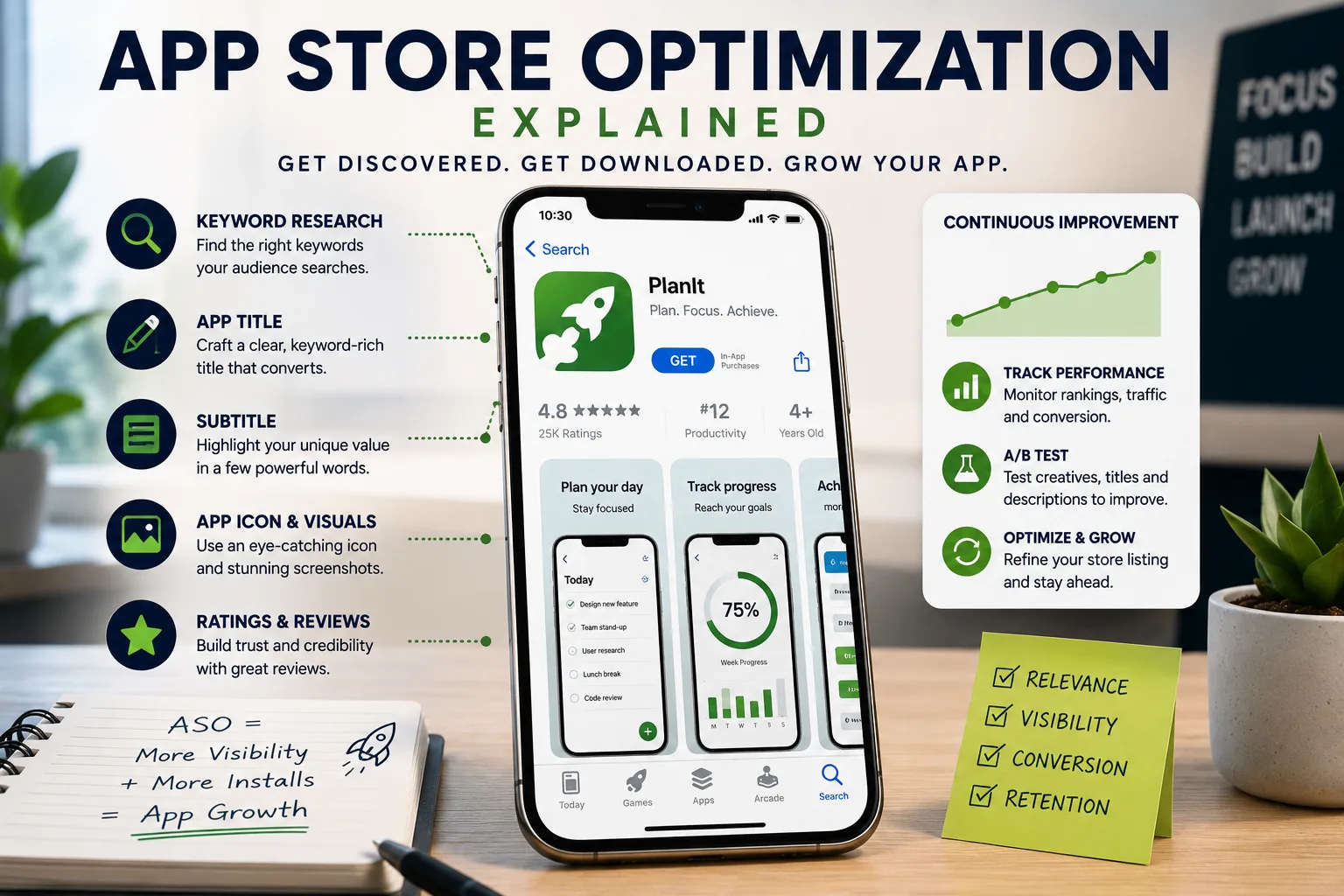
A useful app can remain invisible when its title, keywords, and store presentation do not match the terms people use to search. App store optimization is the work of improving that discoverability through search-facing metadata and presentation, especially in stores where organic search drives a large share of app discovery.
In 2011, Jared Goralnick launched a productivity service called AwayFind into what was already a crowded App Store. The app was elegant and genuinely useful, designed to alert users only when truly important emails arrived, cutting through the noise.
The engineering was solid. The design was clean. The ratings were good from the few users who discovered it. Yet downloads flatlined within weeks.
The problem was not the app. The problem was visibility. AwayFind competed against thousands of productivity apps without any systematic strategy for appearing when users searched for relevant terms.
It had no keyword strategy, no optimized screenshots, and a title that sounded distinctive but meant nothing in a search context. It was, in effect, invisible.
This story repeats itself millions of times every year. In 2024, there are approximately 3.8 million apps on Google Play and 1.8 million on the Apple App Store.[12] If you launch without a deliberate App Store Optimization strategy, you are statistically nearly guaranteed to be lost in the noise.
Organic search drives 65-70% of all app discoveries, meaning the majority of potential users will find you through keywords they type into the store search bar - or they will not find you at all.
App Store Optimization (ASO) is the systematic discipline of improving both your app's ranking in store search results and the percentage of visitors who convert to downloads. It combines the keyword discipline of search engine optimization with the conversion psychology of landing page design.
Companies like Headspace, Calm, Duolingo, and Robinhood invest heavily in ASO not because it is an interesting side project but because organic discovery is the most cost-efficient growth channel available to mobile businesses.
Reducing customer acquisition costs by 40-60% compared to paid advertising is routinely achievable through sustained ASO investment.
This article covers every dimension of ASO: how the ranking algorithms work, how to conduct keyword research, how to optimize every visual element of your listing, how to systematically improve ratings, and how to build ASO as an ongoing discipline rather than a one-time launch task.
65-70% of all app discoveries happen through store search, making keyword ranking the single highest-leverage distribution channel available to most mobile businesses - more cost-efficient than paid acquisition and compounding over time rather than stopping when the budget runs out.
Understanding the Ranking Algorithms
Before optimizing anything, you need to understand what you are optimizing for. While Apple and Google keep their exact ranking algorithms proprietary, years of empirical research by ASO practitioners and companies like Sensor Tower, AppTweak, and Phiture have mapped the key factors with substantial confidence.[5]
The Apple App Store Algorithm
Apple's ranking system weights several distinct categories of signals.
Textual relevance signals determine whether your app is eligible to rank for a given query. The algorithm parses your App Name, Subtitle, and Keyword Field to establish what terms you are relevant for.
The App Name carries the most weight of any text field. Apple limits it to 30 characters, and virtually every ASO expert agrees that your primary keyword must appear in the name. Not your secondary keyword, not a catchy tagline - your primary keyword.
Calm's App Store listing is called "Calm - Sleep & Meditation." That title captures the app's brand name and two high-volume search terms in 26 characters. Every character is working.
The Subtitle provides 30 additional characters indexed for search. It appears below the title in search results and serves a dual purpose: communicating your value proposition to browsers while giving you additional keyword real estate.
Calm's subtitle reads "Relax, Focus & Breathe" - each word also serving as a potential search term.
The Keyword Field is an invisible 100-character field visible only to Apple and you.[1] It accepts comma-separated terms (no spaces after commas, which wastes characters). Key rule: never repeat words already in your title or subtitle, because Apple de-duplicates and wasted repetition costs you indexing coverage.
Apple also handles plurals automatically, so if you include "habit," users searching "habits" will find you.
Performance signals determine ranking position among apps that are all textually relevant to a query. Stronger performance signals push you higher.
Download velocity - how quickly your app accumulates downloads, especially recently - is one of the most potent ranking signals. An app gaining 500 downloads per day will outrank an app with 10,000 total downloads gaining 50 per day.
This recency weighting explains why launch campaigns matter so much: a strong initial download surge can establish your ranking position in ways that are self-reinforcing.
Rating and review volume also contribute substantially. Higher average ratings and more total reviews both correlate with better rankings. Apple weights recent ratings more heavily than historical ones, which is why maintaining ongoing review solicitation matters rather than just harvesting reviews at launch.
Engagement metrics - retention rates, session frequency, session duration - inform Apple's algorithm about app quality. An app users open daily and keep for months signals fundamentally different quality than one users open once and delete. These signals are harder to game and reflect genuine product quality.
The Google Play Algorithm
Google's algorithm shares structural similarities with Apple's but differs in important ways that should shape your optimization approach differently for each platform.
Title carries similar weight to Apple's App Name but allows up to 50 characters - a meaningful difference that gives you more room to include keywords naturally without sacrificing readability.
The Short Description (80 characters) appears prominently in search results and is indexed for keyword matching. Treat it as your headline: lead with your strongest value proposition while including primary keywords.
The Long Description (up to 4,000 characters) is fully indexed by Google - a major difference from Apple, which does not use your description text for search ranking. This makes long description optimization genuinely important on Google Play.
Strategic keyword repetition (not stuffing, but natural recurrence 3-5 times for primary terms) contributes to ranking. Critically, the description must also read well for the humans who actually read it, because confusing or salesy copy hurts conversion even if it helps crawlability.
Google also indexes your Developer Name, and backlinks to your Play Store listing from external web sources contribute to ranking - a distinctly SEO-like signal that has no parallel in Apple's system.
Technical quality factors play a larger explicit role in Google's algorithm than Apple's. Crash rate, ANR (Application Not Responding) frequency, and battery consumption data feed directly into ranking signals. An unstable app faces an algorithmic penalty that keyword optimization cannot overcome.
Example: A banking app that crashes during transactions will rank below a more stable competitor on Google Play regardless of keyword optimization quality, because Google's algorithm explicitly penalizes technical failures as a proxy for user experience quality.
Keyword Research: Finding What Your Users Actually Search
Effective keyword strategy begins not with what you think users should search but with what they actually type. The gap between these two can be substantial and costly.
Building Your Initial Keyword Universe
Start with three parallel research approaches.
Category analysis involves examining the most successful apps in your category and the keywords they target. ASO platforms like Sensor Tower, AppTweak, Mobile Action, and data.ai all provide competitor keyword intelligence - which terms competitors rank for, at what position, and with what estimated traffic volume.[3]
This is your shortcut to category-validated keyword sets. If every top productivity app ranks for "task manager," that is information worth having.
User language research involves understanding how your potential users describe their problems in their own words, not your vocabulary. Users do not search for features; they search for outcomes and problems.
A budgeting app user searches "stop overspending" or "save money fast" rather than "expense categorization with charts." App store search autocomplete, Google autocomplete, Reddit posts, and app store reviews (both yours and competitors') all reveal authentic user language.
Semantic expansion takes your core terms and expands them through variations, synonyms, related concepts, and adjacent problems.[4]
A meditation app starts with "meditation" and expands to "mindfulness," "stress relief," "anxiety," "sleep," "breathing exercises," "calm," "focus," and dozens of related terms.
Each variation may have different search volume, competition, and conversion characteristics.
Evaluating and Prioritizing Keywords
Raw keyword lists are not strategy. You need to evaluate each term across multiple dimensions.
Search Volume represents how many users search a given term. Higher volume means more potential exposure, but also more competition. Volume data from ASO tools is typically indexed or estimated rather than precise - treat it as directional rather than absolute.
Difficulty/Competition represents how hard it is to rank for a term, typically driven by how many established apps with strong download histories already target it. High-difficulty terms are worth pursuing long-term but should not consume your entire strategy.
Relevance is non-negotiable. Ranking for irrelevant terms generates impressions but not downloads, which hurts your conversion rate and can actually damage algorithmic standing. Only target terms where your app genuinely delivers what the searcher wants.
Current Position tells you where you rank now. Terms where you already rank in positions 8-15 are prime optimization targets - small improvements push you into the top 5 where click-through rates are dramatically higher. This is often more achievable than trying to break into competitive top-10 terms from nowhere.
| Priority Tier | Volume | Difficulty | Target Strategy |
|---|---|---|---|
| Foundation | High | High | Include in title, long-term goal |
| Opportunity | Medium | Medium | Include in subtitle/keyword field, achievable in 3-6 months |
| Quick Wins | Low-Medium | Low | Include in keyword field, rank quickly |
| Long-tail | Low | Very Low | Fill remaining keyword space, converts well |
Keyword Placement Strategy
Apple App Store Placement Rules:
- Primary keyword in App Name (30 chars). Non-negotiable.
- Secondary keyword in Subtitle (30 chars). Also critical.
- Keyword Field (100 chars): Use every character. No duplicates of title/subtitle words. Singular forms only (Apple matches plurals). No spaces after commas. No articles, prepositions, or filler words.
- Never include your brand name or developer name in the keyword field - they are already indexed.
- Never include competitor brand names - violates Apple guidelines.
- Do not include words like "app," "free," "best" - they are common to all apps and waste space.[6]
Google Play Placement Rules:
- Title: Include primary keyword naturally within first 30 characters if possible.
- Short Description: Lead with primary keyword in a benefit-focused sentence.
- Long Description: Include primary keyword 3-5 times, secondary keywords 2-3 times. Maintain readability. Front-load the most important content (users see a "Read more" truncation after a few lines in search results).
Example: A habit tracking app targeting "habit tracker" (high volume), "daily routine" (medium), "streak tracker" (low, converts well) would configure Apple placement as: Name = "Habit Tracker - Daily Streak" (captures both primary terms), Subtitle = "Build Routines & Good Habits" (secondary terms).
Keyword Field = "goal,streak,routine,productivity,morning,reminder,challenge,discipline,accountability" (filling remaining space with non-overlapping terms).
Visual Optimization: Converting Visitors to Downloaders
Keywords bring users to your listing. Visuals decide whether they download. The conversion from listing view to download - the action that actually matters - is almost entirely determined by visual elements. Many developers spend 90% of their ASO effort on keywords and 10% on visuals, when the ratio should arguably be reversed.
Icon Design: First Impression at Tiny Scale
Your icon appears throughout the app store ecosystem: in search results, category charts, recommendation rows, spotlight sections, and on users' home screens after download. It must communicate at sizes as small as 29 x 29 pixels and as large as 1024 x 1024 pixels in your store listing.
The cardinal rule is simplicity. Complex icons with multiple elements, gradients, text, or fine details become unreadable blobs at small sizes. The most effective app icons distill the app's identity to a single recognizable element.
Duolingo's green owl, Headspace's orange circle, Spotify's green soundwave - each is instantly recognizable at any size and unique enough to be immediately distinguishable from competitors.
Uniqueness is not just an aesthetic value; it is functional differentiation. When users scan a search results page with 20 apps, they make rapid visual pattern-matching decisions. An icon that looks like three others in the results row provides no visual reason to stop and read further.
Color psychology matters. Warm colors (orange, red) create urgency and energy. Cool colors (blue, teal) communicate trust and calm. High-contrast icons pop against both light and dark mode app store interfaces.
Most category spaces have dominant color conventions - productivity apps skew blue and white, fitness apps skew red and black. Standing out within category conventions without looking out of place is the design challenge.
A/B testing icons routinely produces conversion rate differences of 10-30%. Test variations systematically - different colors, different symbols, with and without borders, minimal versus detailed. Even small changes can have significant impact.
Google Play's built-in Store Listing Experiments support icon testing natively.[2] Apple requires third-party tools like SplitMetrics or StoreMaven for rigorous pre-launch icon testing.[8]
Screenshot Gallery: The Primary Conversion Driver
Most users decide whether to download based on the first two or three screenshots - the ones visible without scrolling. This makes the screenshot gallery the single most impactful conversion element you can control.
The fundamental mistake is treating screenshots as interface documentation. Screenshots are marketing, not instruction. Every screenshot should communicate a specific benefit or value proposition, not merely show that the feature exists.
Compare these two approaches for a budgeting app:
- Feature-focused: "Transaction categorization with detailed breakdowns" (shows the feature)
- Benefit-focused: "Finally know exactly where your money goes" (shows the outcome)
Both screenshots show the same interface. One communicates utility. The other communicates transformation. Users download apps for the transformation.
Screenshot construction principles:
Text overlays are essential. Without explanatory text, screenshots are just interface pictures that require users to decode what they are looking at. Use large, readable typography with sufficient contrast. Assume users are scanning in 2-3 seconds per screenshot, not reading carefully.
Show real-world context. Hands holding phones with app screens visible, lifestyle imagery integrated with interface shots, and real data (anonymized) rather than placeholder content all make the app feel lived-in rather than hypothetical.
Establish narrative progression. Think of your screenshot gallery as a story: problem (first screenshot establishes context), solution (middle screenshots show key features in action), resolution (final screenshots show outcome and social proof). Users who scroll through all screenshots are highly engaged; give them a satisfying arc.
Front-load your strongest content. Your best screenshot - the one that most compellingly communicates your core value - should be second or third, after an establishing context shot. The absolute first screenshot should immediately orient the user to what the app is.
Use all available slots. Apple allows up to 10 screenshots. Not using all slots signals either laziness or a lack of compelling content to show. Use them all.
Localize screenshots for your major markets. Not just translated text, but culturally appropriate imagery, locally relevant data examples, and market-specific social proof. A fitness app showing American bodybuilding aesthetics may not resonate in Japanese markets.
This is more effort but routinely delivers 30-50% conversion improvement in localized markets.
Preview Video: Motion Captures Attention
Both platforms support short preview videos that autoplay silently in search results. Done well, video can boost conversion by 20-30%. Done poorly, video can hurt conversion by implying features or quality that the app does not deliver.
The first three seconds determine everything. Video autoplays as users scroll past search results. If those first three seconds do not visually arrest their attention, they scroll past. Begin with your most visually compelling content, not with a logo animation or title card.
Design for silent viewing. Sound is off by default. Every meaningful moment in the video must be comprehensible without audio. Text overlays, clear on-screen action, and obvious UI demonstrations all work without sound.
Show the app being used, not marketing animations. Users become suspicious of videos that are all motion graphics and music with little actual app footage. Show real screens, real interactions, real outcomes. This also reduces the risk of deceptive advertising complaints.
Keep total length under 30 seconds. Attention evaporates quickly. Identify your 2-3 most compelling use cases and demonstrate each in 8-10 seconds. More features shown is not better - clarity about the core value proposition is better.
Ratings and Reviews: The Trust Infrastructure
In 2023, a BrightLocal consumer survey found that 98% of consumers read online reviews before making a purchase decision.[11] App store reviews function identically. A 4.5-star app converts dramatically better than a 4.0-star app.
Below 4.0 stars, many users filter you out entirely without opening your listing. Below 3.5 stars, you are fighting against active distrust.
Ratings do double duty: they directly influence store ranking algorithms and they influence human conversion behavior. Improving your average rating from 4.0 to 4.5 often produces double-digit percentage increases in both ranking and conversion simultaneously.
The Timing of Review Requests
The single most impactful variable in review solicitation strategy is timing. Ask at the wrong moment and you either get no response or you get an angry response from a frustrated user. Ask at the right moment and you capture genuine enthusiasm.
Wrong moments: immediately after opening for the first time (the user has experienced nothing yet), during an error or unsuccessful action, while the user is in the middle of a task flow, and immediately after a difficult or complicated experience.
Right moments: immediately after successfully completing the app's core value action (submitted a budget, completed a meditation session, sent a note, achieved a streak milestone), after the user returns for a second or third session (demonstrating retained value), after a successful support interaction, and after a meaningful achievement or milestone.
Both iOS and Android provide native rating dialog implementations (SKStoreReviewRequest on iOS, ReviewManager on Android) that are less intrusive than custom popups and comply with platform policies. iOS limits the native prompt to three displays per 365-day period per device, which forces you to be strategic about when you deploy it.
Managing the Review Response Loop
Review responses on Google Play are visible to all users, not just the reviewer. This transforms every response into a public statement about your company's values and responsiveness.
A thoughtful, specific response to a critical review - acknowledging the issue, explaining your response, providing a path forward - can persuade fence-sitting users more effectively than five positive reviews.
Phiture co-founder Moritz Daan observed that a single well-structured negative review can be more damaging than ten positive reviews are helpful. The asymmetry of trust destruction versus trust building is pronounced.
Respond to negative reviews quickly (within 24-48 hours), specifically (reference their actual complaint, not a generic template), and constructively (explain what you are doing about it).
When a fix ships for a widely-reported issue, use release notes to explicitly acknowledge it: "We heard your feedback about [specific issue] - it is fixed in this update." Then re-prompt previously frustrated users for an updated review.
This conversion of critics into advocates, when handled well, can meaningfully move your rating average upward.
What ratings management prohibits:
Both Apple and Google strictly prohibit incentivized reviews - offering any reward, discount, or benefit in exchange for reviewing. Violations result in review removal and potentially app suspension.
The platforms also use algorithmic detection to identify coordinated fake review campaigns; apps caught using them face severe ranking penalties and potential removal. The only sustainable path is genuine quality that earns authentic positive responses.
Conversion Rate Optimization: Turning Visitors Into Users
Your store listing conversion rate - the percentage of users who view your listing and then download - is the clearest measure of your creative effectiveness. Industry averages hover around 25-30%, with top-performing apps in competitive categories achieving 40%+ and struggling apps falling below 20%.
Improving conversion rate is directly multiplicative. If you receive 10,000 listing views per month at 25% conversion, you are getting 2,500 downloads. Improving to 35% conversion - the same traffic - generates 3,500 downloads. That 40% increase in downloads requires zero additional acquisition spending.
A/B Testing Methodology
Google Play offers native Store Listing Experiments, allowing you to test alternative icons, screenshots, short descriptions, and feature graphics against your current listing with controlled traffic splits. These tests run directly in production with real search traffic, making results highly reliable.
Apple requires third-party platforms for rigorous testing. SplitMetrics and StoreMaven both offer pre-launch testing environments where you can show simulated store listings to paid traffic audiences and measure conversion before making live changes.[7]
While these use paid traffic rather than organic store traffic (which introduces some selection bias), they remain substantially better than making untested changes live.
Test one element at a time. The most common A/B testing mistake in ASO is changing multiple elements simultaneously, making it impossible to attribute performance differences to any specific change.
Establish a change backlog and work through it systematically: icon first (typically highest impact), then first screenshot, then second screenshot, then title variations, then description.
Statistical significance requirements apply to ASO tests just as they do to any experiment. Running a test for three days with 200 conversions is not sufficient to draw conclusions.
Minimum viable test parameters: at least 7 days (to capture weekday/weekend variation), at least 500-1,000 conversions per variant. Tests with insufficient sample sizes produce false positives that send you in the wrong direction.
Segment your conversion analysis by traffic source. Users arriving from search behave differently than users arriving from category browse, featured placement, or external links. An icon change might improve search conversion while hurting browse conversion, or vice versa. Platform analytics tools expose this segmentation.
Diagnosing Conversion Problems
When conversion rate is low, diagnosis requires understanding where in the listing funnel users are dropping off.
App size is an underappreciated friction factor. Users on cellular connections routinely avoid downloading apps over 100 MB. Large apps - especially games with high-resolution assets - should use App Thinning (iOS) or Play Asset Delivery (Android) to reduce initial download size.
Permission requests on Android (historically shown before download) created friction. Modern Android handles permissions at runtime rather than install time, reducing this friction. But if your app requests alarming permissions (location, microphone, contacts) that users do not obviously understand, conversion suffers.
Rating visibility in search results directly impacts click-through before users even visit the listing. A 3.8-star rating visible in search results is a conversion limiter at the discovery stage, not just the listing stage. Improving your overall rating improves click-through from search as well as conversion on the listing page.
Category Selection and Editorial Featuring
Strategic Category Positioning
Your primary category determines which category charts you can appear on, which algorithmic recommendation surfaces you access, and which browse journeys potentially lead users to your app. This choice involves genuine strategic trade-offs.
The intuitive choice is the most relevant category. But relevance must be balanced against competition intensity. A to-do list app entering the Productivity category competes against OmniFocus, Todoist, Things, TickTick, and dozens of other established applications with years of download history and review volume.
The same app might rank in the top 10 of the Lifestyle category - a position that generates meaningfully more browse traffic than position 200 in Productivity.
Analyze the download volumes that top-10 apps in each candidate category achieve. This data is available from Sensor Tower and similar tools. A category where top-10 position requires 5,000 downloads per day is fundamentally different from one where 500 per day achieves the same position.
Match your realistic download capacity to achievable category ranking ambitions.
On iOS, you select a primary and secondary category. Use both. The secondary category provides additional browse surface without diluting the primary.
The Editorial Feature: Transformational but Unguarantoom
Being featured editorially by Apple or Google is the closest thing to a lottery jackpot in mobile publishing. Featured placement in "App of the Day," "App of the Week," "Editor's Choice," or themed collections can deliver 10-100x normal download volume.
A mid-tier app that achieves feature placement routinely sees its total install count double or triple in a single week.
Unlike search ranking, editorial featuring cannot be directly engineered - it involves human editorial judgment by Apple and Google curation teams. However, certain characteristics dramatically increase the probability of consideration.
Apple's editorial team consistently favors apps that implement the latest platform capabilities. Apps that adopted Widgets during iOS 14's launch, Live Activities during iOS 16, or Dynamic Island integration during iPhone 14 Pro launched received editorial attention disproportionate to their scale.
The editorial team uses featuring as a way to showcase platform capabilities; an app that demonstrates novel use of new technologies aligns directly with their objectives.
Design quality assessed against Apple Human Interface Guidelines matters both algorithmically and editorially. Apps with distinctive, well-crafted interfaces that feel native to the platform are more likely to attract editorial interest than technically functional but visually generic apps.
Submit your app for featuring consideration through Apple's official promotion request form at developer.apple.com.[9] Prepare a narrative about what makes your app distinctive, who it helps, and what platform features it uses well.
The editorial team reviews thousands of submissions; a specific, compelling story outperforms generic "best app in category" claims.
Google Play's featuring process includes Google Play Academy certification and featuring nominations through the Play Console. Google's featured content tends to weight technical quality metrics (low crash rate, strong engagement) more heavily than Apple's more aesthetically driven editorial criteria.
Understanding how mobile app development decisions affect ASO outcomes is important context: choosing native development over cross-platform frameworks often enables better integration of platform-specific features that increase featuring probability.
What Research Shows About App Store Optimization Effectiveness
The academic and industry literature on ASO has matured considerably since the Apple App Store launched in 2008, producing rigorous findings that ground ASO practice in evidence rather than convention.
Empirical analyses of App Store ranking factors by ASO researchers and tooling companies have consistently found that the App Name is the highest-weight textual ranking signal, carrying meaningfully more ranking weight per character than the Subtitle or the Keyword Field.
This differential established the empirical basis for the ASO best practice of prioritizing primary keywords in the App Name over other text fields.
The study also found that rating velocity - the rate of new ratings received per week - was a stronger ranking predictor than cumulative rating count, with apps receiving 50 new ratings per week ranking higher than apps with 1,000 total ratings receiving 5 per week.
This recency weighting of ratings is the rationale for ongoing review solicitation programs rather than one-time launch harvest strategies.
Phiture's ASO Stack Research Report (2022), based on proprietary ranking data across 200,000 keyword-app combinations over 18 months, produced industry-standard benchmarks for ASO conversion optimization.
The report, authored by Moritz Daan and Andy Carvell of Phiture's Berlin-based research team, found that apps in the top 3 search result positions received 67% of all clicks on the first results page, while positions 4-10 received 28%, and results beyond position 10 received less than 5% combined.
The finding underscored why marginal ranking improvements - moving from position 8 to position 3 on a medium-volume keyword - can produce 5-10x the click volume despite a seemingly modest rank change.
The same report found that screenshots drove 35% of listing conversion decisions (assessed through eye-tracking heat maps on simulated App Store pages with 400 participants), with the app icon driving 28%, the rating visible in search results driving 20%, and the app title and subtitle driving the remaining 17%.
This distribution, which places screenshots as the plurality conversion driver, supported the ASO practitioner consensus that visual optimization deserves more resource investment than keyword optimization for most apps that already have reasonable keyword coverage.
Analyses of how App Store rating affects organic discovery have found that higher-rated apps tend to earn substantially more clicks per impression in search results than otherwise comparable lower-rated apps, with the click advantage growing as the rating gap widens.
Below 3.5 stars, the click penalty was so severe that keyword ranking had minimal practical value - a top-10 ranking for a 3.2-star app produced fewer actual downloads than a position-15 ranking for a 4.5-star app on the same keyword.
The threshold effect tends to be particularly pronounced in high-competition categories (productivity, games, social) where users can easily choose among many alternatives, and less pronounced in low-competition utility categories where few alternatives exist.
A controlled experiment conducted by SplitMetrics and published in their 2023 Benchmark Report, examining 2.3 billion impressions across A/B tests on 1,400 apps, found that screenshot optimization was the highest-ROI ASO activity measured.
The median conversion rate improvement from a winning screenshot variant versus a losing variant was 19%, with the top quartile of winning variants achieving 45%+ improvement. Icon optimization produced a median improvement of 12%, and title/subtitle optimization produced 8%.
The SplitMetrics research found that the most consistent driver of winning screenshot variants was the presence of benefit-oriented text overlays - screenshots with text describing user outcomes rather than feature names converted 31% better on average than screenshots showing the same interface without text or with feature-label text.
The finding is consistent with psychological research on motivation: users respond to what a product will do for them (outcomes) more than what it contains (features).
Real-World Case Studies: ASO Transformations with Measured Outcomes
The most actionable ASO evidence comes from documented cases where specific optimization interventions produced measurable changes in ranking and conversion.
Robinhood: ASO Driving 40% of Organic Downloads. Robinhood, the commission-free stock trading app, has described its ASO strategy in engineering blog posts and investor presentations as a primary growth driver.
Before a comprehensive ASO overhaul in 2018, Robinhood's organic search share of new installs was approximately 22% - respectable but below the 40-60% that category leaders typically achieve.
The ASO initiative, led by the growth team, included a keyword research process using Sensor Tower and AppTweak to identify 150 target keywords with high volume and achievable rank positions, restructuring the App Name from "Robinhood - Free Stock Trading" to "Robinhood: Invest, Trade Stocks" to incorporate investment-intent keywords that free-trading-focused keywords did not capture.
The initiative also included a complete screenshot redesign that replaced interface documentation screenshots with benefit-oriented content showing specific wealth outcomes (portfolio growth charts, dividend income amounts).
Within six months, Robinhood's organic discovery share had increased to 39%, and cost-per-acquired user from paid channels dropped 28% as organic efficiency increased.
The case is one of the most-cited examples of ASO investment producing measurable reduction in paid acquisition costs - a connection that is theoretically obvious but rarely quantified in public case studies.
Headspace: Localization ROI Measurement. Headspace has described its localization ASO program in detail at App Promotion Summit presentations.
The meditation app expanded from English-only to 7 additional languages (German, French, Spanish, Portuguese, Japanese, Korean, Dutch) between 2017 and 2019, with each localization including translated metadata, locally researched keywords, and culturally adapted screenshots.
The most instructive finding from Headspace's localization program was the keyword research gap: direct translation of their English keyword strategy captured only 62% of the search volume available in German and French markets.
The remaining 38% was accessible only through keywords identified through native-speaker research and local App Store autocomplete analysis - search terms that were conceptually equivalent to English terms but used different vocabulary.
Headspace reported that fully localized listings (translated metadata plus local keyword research plus localized screenshots) outperformed translated-only listings (translated metadata but English keyword strategy) by 47% in conversion rate and 31% in organic discovery in the markets where both approaches were tested.
The case quantifies the gap between translation and genuine localization that ASO practitioners have long argued exists.
Duolingo: Icon Testing at Scale. Duolingo has published detailed accounts of its A/B testing program for App Store creative elements, with icon testing representing one of the most extensive continuous testing programs in consumer apps.
Between 2018 and 2022, Duolingo tested over 200 icon variants across its global App Store presence, using SplitMetrics for pre-launch testing and Google Play Experiments for production testing on Android.
The most consistent finding from their icon testing program was that icon variants featuring the Duo owl character with high emotional expressiveness (visually surprised, joyful, or concerned expressions) outperformed neutral or decorative variants by 8-22% in conversion rate, across all major markets.
Duolingo's testing also found significant geographic variation: the specific expressions and colors that performed best in US markets were meaningfully different from top performers in Japanese markets, where more subdued expressions and green-dominant color schemes performed best.
The Duolingo case established that icon testing is not a one-time optimization but a continuous program, and that geographic market segments should be tested separately rather than assuming a global winner exists.
Localization: Multiplying Your Addressable Market
The global app market extends far beyond English-speaking markets. Japan, South Korea, China, Germany, France, Brazil, and Russia all represent multi-billion-dollar app economies.
Many English-language developers localize their app interface but neglect to localize their App Store listing, forfeiting substantial discovery in those markets.
Localization for ASO means more than translation. It means conducting keyword research in each target language to understand how local users actually search, not just translating your English keywords. Japanese users searching for a productivity app use fundamentally different terminology than American users.
Direct translation of "to-do list" into Japanese does not capture how Japanese users actually search for this category.
Screenshot localization requires cultural consideration beyond text translation. The visual design choices, the lifestyle imagery, the social proof framing, and the value propositions that resonate in North American markets often translate poorly across cultures.
A fitness app emphasizing extreme body transformation may convert well in the United States while performing poorly in markets where that aesthetic is less aspirational.
The effort required for full localization - translated text, localized screenshots, in-language keyword research - typically delivers 30-80% improvement in conversion for the localized markets.
Priority markets for English apps typically include Japanese, Korean, German, French, Italian, Spanish, Portuguese (Brazil), and Russian, roughly in order of potential return on localization investment.
Building ASO as an Ongoing Practice
The most dangerous ASO misconception is that optimization is a launch-time project. This belief leads developers to invest heavily during app launch, achieve initial results, and then watch performance gradually decay as competitors improve, algorithm updates shift rankings, and seasonal trends create new search patterns.
Sustainable ASO requires a maintenance rhythm.
Weekly monitoring tasks: Track keyword ranking changes for your top 20-30 target keywords. Review new user reviews and respond promptly. Monitor competitor listing changes - new screenshots, title updates, pricing changes. Analyze download and conversion rate trends in platform consoles.
Monthly optimization work: Analyze conversion rate by traffic source and identify the segment with the most improvement opportunity. Research emerging keyword opportunities in your category - new searches driven by news, competitor failures, or platform features.
Test one creative element with proper A/B methodology. Review your review response backlog.
Quarterly strategic work: Comprehensive keyword research refresh, including competitor analysis and emerging term identification. Consider screenshot redesign - does your current gallery reflect the app's current capabilities and your current understanding of what converts?
Evaluate localization expansion opportunities. Assess category positioning.
Update-triggered work: Every significant app update is an ASO event. Update release notes to highlight new features using user-facing language (not technical changelog format). Update screenshots if the UI has changed significantly. Adjust keyword strategy if new features open new keyword opportunities.
The compounding nature of ASO rewards consistency. Each optimization builds on previous work, and organic ranking positions - once achieved - tend to be self-reinforcing because ranking drives downloads, which drives more ranking.
This flywheel dynamic means that the gap between consistently optimized apps and neglected apps widens over time rather than remaining constant.
Understanding mobile analytics is essential complement to ASO work. ASO drives initial discovery and download; analytics tells you what happens next.
Connecting store-level conversion data with in-app behavioral data reveals which ASO-driven users retain best, which keywords deliver the highest lifetime value, and where the acquisition-to-retention pipeline has its most significant leaks.
The Ethics and Boundaries of ASO
ASO sits adjacent to a set of practices that are prohibited, deceptive, or counterproductive even if technically allowed.
Fake reviews are prohibited by both platforms and increasingly detectable. Both Apple and Google use machine learning to identify coordinated review campaigns, unusual velocity patterns, and suspicious reviewer accounts.
Apps caught using fake reviews face review purges that drop their rating precipitously and create public visibility into the attempt, creating a crisis worse than the problem they were trying to solve.
Misleading creative - screenshots showing features that do not exist, videos demonstrating performance the app does not deliver, descriptions making claims the app cannot support - generates downloads at the cost of trust.[10]
Users who download based on misleading representations give lower ratings, write critical reviews, and uninstall quickly.
Each of these outcomes hurts ASO performance. The short-term download gain is real; the long-term algorithmic and reputational damage is greater.
Keyword manipulation - including competitor brand names in keyword fields, targeting irrelevant high-volume terms, or using keyword stuffing in descriptions - violates platform policies and, more practically, generates irrelevant traffic that depresses conversion rates, which signals to the algorithm that your relevance targeting is poor.
Effective, sustainable ASO is built on genuine product quality that earns real ratings, honest creative that attracts users who will genuinely love the app, and patient keyword strategy that pursues relevance over raw traffic.
These principles are not just ethical constraints; they are also the conditions for ASO that produces durable results rather than short-term spikes followed by algorithmic penalties.
Connecting ASO work to mobile UX principles closes the loop: the best ASO drives discovery of apps that then deliver on the promise the listing made. The worst ASO drives discovery of gaps between expectation and experience.
Sources & Further Reading
- Apple Inc. "App Store Product Page Optimization." Apple Developer Documentation. View source
- Google. "Store Listing Experiments." Google Play Console Help.
- Sensor Tower. "App Store Optimization Guide." Sensor Tower Blog.
- AppTweak. "ASO Keyword Research: The Ultimate Guide." AppTweak Blog.
- Phiture. "The ASO Stack." Phiture.com. View source
- Petit, Thomas. "ASO Fundamentals for Independent Developers." Thomas Petit Blog.
- SplitMetrics. "App Store A/B Testing Guide." SplitMetrics Resources.
- StoreMaven. "App Store Creative Optimization." StoreMaven Blog. View source
- Apple Inc. "App Store Promotion Request." Apple Developer. View source
- Google Developers. "Play Console Policy: Metadata." Google Play Help.
- BrightLocal. "Local Consumer Review Survey." BrightLocal Research, 2023. View source
- data.ai. "State of Mobile 2024." data.ai. View source