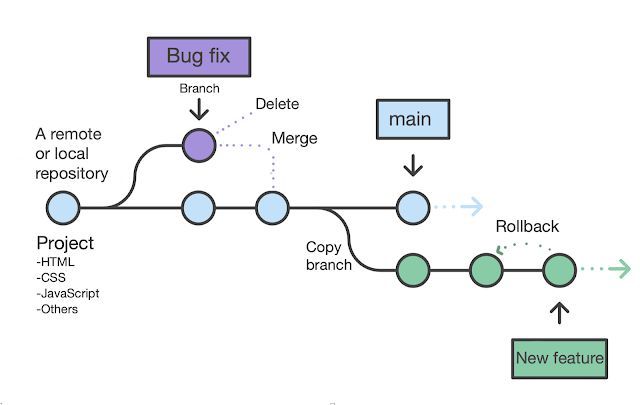
In 2005, Linux kernel development faced a crisis. The team had been using a proprietary version control system called BitKeeper under a free license. When that license was revoked, Linus Torvalds spent two weeks building a replacement.
That replacement, Git, became the most widely used version control system in the world, fundamentally changing how software teams collaborate.
"I'm an egotistical bastard, and I name all my projects after myself. First Linux, now git."
Linus Torvalds
But Git's dominance obscures a deeper question: How does version control actually work? When you type git commit, what happens behind the scenes? How does Git track file history across thousands of commits? How do branches work? How does merging determine what changes to combine and which create conflicts?
Understanding version control at a technical level reveals elegant solutions to hard problems: how to efficiently store thousands of versions of thousands of files, how to enable multiple developers to work independently yet merge their work safely, and how to maintain a complete audit trail without prohibitive storage costs.
The principles extend beyond Git. While implementation details vary, most modern version control systems, Git, Mercurial, Subversion, solve similar problems. Understanding how one works provides insight into them all.
This analysis examines version control architecture from first principles: the data structures that store history, the algorithms that enable branching and merging, the tradeoffs between centralized and distributed systems, and the technical reasons why certain operations are fast while others are slow.
| Feature | Centralized VCS (SVN) | Distributed VCS (Git) |
|---|---|---|
| Repository location | Single server | Every developer has full copy |
| Offline capability | Limited (need server for history) | Full (commit, branch, merge offline) |
| Network dependency | Required for most operations | Not required; sync when ready |
| Single point of failure | Yes (server) | No (every clone is a backup) |
| Branching cost | Expensive (copies directory) | Cheap (just a pointer to a commit) |
| Common use case | Legacy enterprise systems | Open source, modern software teams |
The Core Problem: Tracking Change Over Time
What Version Control Must Solve
The fundamental challenge: Multiple people modifying shared files over time need to:
- See who changed what and when (attribution and audit trail)
- Revert to previous versions (undo mistakes)
- Work simultaneously without overwriting each other's changes (parallel development)
- Merge independent work back together (integration)
- Branch to experiment safely (parallel alternate histories)
- Store all history without prohibitive disk usage (efficiency)
Naive Approaches (And Why They Fail)
Approach 1: File naming conventions (document_v1.txt, document_v2.txt, document_final.txt, document_final_ACTUALLY.txt)
Problems:
- No structured metadata (who, when, why)
- Naming degrades over time
- No way to see differences between versions
- Merging requires manual comparison
- Storage explodes (complete copy per version)
Approach 2: Centralized file copies (server directory with timestamped copies)
Problems:
- Still manually organizing copies
- No atomic grouping (commit might include changes to 50 files: how do you know they're related?)
- No branching support
- Merging still manual
Approach 3: Delta storage (store first version completely, then only differences)
Better: Uses less storage. Centralized VCS like Subversion use this approach.
Problems:
- Checking out old versions requires applying many deltas (slow)
- Branching complex (which deltas apply to which branch?)
- Merging requires reconstructing files from deltas
What we need: A system that:
- Groups related changes atomically (commits)
- Stores complete history efficiently
- Makes branching and merging fast and safe
- Operates independently on each developer's machine (distributed systems)
- Verifies integrity (detect corruption)
Git's architecture solves all of these.
Git's Core Architecture: Content-Addressable Storage
The Big Idea: Everything is a Hash
Git's fundamental design: Every piece of content is identified by the SHA-1 hash of its content. This is called content-addressable storage: content is the address.
Example:
Content: "Hello, world!
"
SHA-1: af5626b4a114abcb82d63db7c8082c3c4756e51b
That 40-character hex string is the "name" of the content. Store the content at .git/objects/af/5626b4a114abcb82d63db7c8082c3c4756e51b (Git splits into directory and file for filesystem efficiency).
Properties of content-addressable storage:
1. Deduplication: Identical content produces identical hash. If 50 files contain the exact same content, Git stores it once. Saving the same file in different commits doesn't duplicate it.
2. Integrity verification: Content can't change without changing hash. If storage corrupts, you know immediately (hash won't match content). Can't tamper with history without detection.
3. Efficient comparison: Different hash = different content. Don't need to compare file contents; just compare hashes (cheap).
4. Location independence: Content identified by hash, not filename. Moving or renaming files doesn't create storage overhead.
The Four Object Types
Git stores everything as objects identified by SHA-1 hashes. There are four types:
1. Blob Objects (File Contents)
What it stores: Raw file contents. No filename, no metadata, just bytes.
Example: File hello.txt containing "Hello, world!
" becomes blob object af5626b4....
Structure:
blob 14\0Hello, world!
(Type, size, null byte, content)
Key insight: Blobs are anonymous content. Multiple files with identical content reference the same blob. Renaming a file doesn't create new blobs.
2. Tree Objects (Directory Structure)
What it stores: Directory listing: what files and subdirectories exist, their names, permissions, and which blob/tree they point to.
Example:
100644 blob af5626b4... hello.txt
100755 blob 95d09f2b... script.sh
040000 tree 3c4e9cd3... subdirStructure: Each entry specifies:
- File mode (permissions)
- Type (blob or tree)
- SHA-1 hash of referenced object
- Filename
Key insight: Trees represent snapshots of directory state. Each commit references a tree representing the complete project state at that moment.
3. Commit Objects (History and Metadata)
What it stores: Metadata about a change: author, timestamp, message, parent commit(s), and tree representing project state.
Example:
tree 3c4e9cd3...
parent a11bef03...
author John Doe <john@example.com> 1610000000 -0800
committer John Doe <john@example.com> 1610000000 -0800

Add hello world scriptStructure:
- Tree reference (project state)
- Parent commit(s) (history)
- Author and committer (who and when)
- Message (why)
Key insight: Commits form a directed acyclic graph (DAG). Each commit points to parent(s), creating history chain. Merge commits have multiple parents.
4. Tag Objects (Named References)
What it stores: Annotated tags: permanent names for specific commits, including tagger, date, message.
Structure:
object a11bef03...
type commit
tag v1.0.0
tagger Jane Doe <jane@example.com> 1610000000 -0800

Release version 1.0.0
Key insight: Tags are named commits. Unlike branches (which move), tags are fixed references.
How These Objects Relate
Commit A (dad4a98)
  |
  ├─ tree (72f7e5b) ──────┐
  └─ parent: [none]       │
                          ↓
                    Tree (72f7e5b)
                      ├─ hello.txt → blob (af5626b4)
                      └─ readme.md → blob (3b18e512)

Commit B (b8ef023)
  |
  ├─ tree (9d2ac3f) ──────┐
  └─ parent: dad4a98       │
                          ↓
                    Tree (9d2ac3f)
                      ├─ hello.txt → blob (af5626b4) [unchanged]
                      ├─ readme.md → blob (c421e90f) [modified]
                      └─ new.txt → blob (5f2e091b)   [added]
What happens when you commit:
- Git creates blobs for modified files
- Git creates tree(s) representing current directory structure
- Git creates commit object linking tree and parent commit
- Git updates current branch reference to new commit
Storage efficiency: If hello.txt didn't change between commits, both commits' trees reference the same blob. No duplication.
Branches: Just Pointers
The Simplicity of Branches
Misconception: Branches are containers that hold commits or copies of code.
Reality: A branch is a 41-byte text file containing a commit hash.
"Branching in Git is one of its killer features, and because of this, it encourages workflows that branch and merge often, even multiple times in a day."
Scott Chacon, author of Pro Git
Example: .git/refs/heads/main contains:
b8ef023a7c9d5e4f3b1a6c2d8e0f7b4a5c9d6e8fThat's it. The branch main is a pointer to commit b8ef023....
HEAD (.git/HEAD) points to the current branch:
ref: refs/heads/mainOperations
Creating a branch: Write new file .git/refs/heads/feature with current commit hash. Done. That's why creating branches is instant in Git.
Switching branches: Update HEAD to point to different branch. Update working directory to match that commit's tree. Fast (Git only modifies changed files).
Committing: Create commit object, update current branch pointer to new commit. Previous commit becomes parent.
The mental model: Commits form the history graph. Branches are movable labels attached to commits. When you commit, the current branch label moves to the new commit.
Before commit:
  main → C3 → C2 → C1

After commit on main:
  main → C4 → C3 → C2 → C1
Why Branches are Lightweight
In centralized VCS like Subversion, branching copies the entire repository. This is expensive and slow.
In Git, branching creates a 41-byte pointer. That's it. No copying files. No network operations. Instant.
This makes branching cheap enough to use liberally, branch for every feature, experiment, or bug fix. Delete branches when done. No overhead.
Merging: Combining Divergent Histories
The Three-Way Merge Algorithm
Setup: You have two branches that diverged from a common ancestor:
        D---E  (feature)
       /
  A---B---C    (main)
Commits B, D, and E all modified the same file. How do we merge?
Naive approach: Compare feature's current state to main's current state. Apply differences.
Problem: Can't tell which changes came from which branch. Did feature remove a line, or did main add it?
Three-way merge solution: Use the common ancestor (B) as reference.
Algorithm:
- Find common ancestor (B) using commit graph
- Compare ancestor to main's tip (C): see what changed
- Compare ancestor to feature's tip (E): see what changed
- Combine both change sets:
- If only one branch modified a region: use that version
- If both branches modified different regions: combine both
- If both branches modified same region differently: conflict
Example:
Ancestor (B):
Line 1: original
Line 2: original
Line 3: original
Main (C):
Line 1: changed in main
Line 2: original
Line 3: original
Feature (E):
Line 1: original
Line 2: original
Line 3: changed in feature
Merged result:
Line 1: changed in main       [from main]
Line 2: original              [unchanged]
Line 3: changed in feature    [from feature]
Both changes applied successfully because they modified different lines.
When Conflicts Occur
Conflict example:
Ancestor (B):
def calculate(x):
    return x * 2
Main (C):
def calculate(x):
    return x * 3  # Changed multiplier
Feature (E):
def calculate(x):
return x + 10 # Changed to additionConflict: Both branches modified the same line differently. Git can't automatically decide which to use.
Git's conflict markers:
def calculate(x):
<<<<<<< HEAD
    return x * 3  # Changed multiplier
=======
    return x + 10  # Changed to addition
>>>>>>> feature
Resolution required: Human must decide: keep one change, combine both somehow, or write something entirely new.
Fast-Forward Merges
Special case: One branch contains all commits of the other:
  A---B---C  (main)

            D---E  (feature)
Main is ancestor of feature. "Merging" feature into main just means moving main's pointer to E. No merge commit needed. This is a fast-forward.
After fast-forward:
  A---B---C---D---E  (main, feature)
Git does this automatically when possible (unless you specify --no-ff to force merge commit).
Distributed vs. Centralized Architecture
Centralized Version Control (Subversion, CVS)
Architecture: Single central server stores repository. Developers have working copies, not full repositories.
Operations:
- Commit: Sends changes to server. Requires network. Fails if server down.
- Update: Fetches latest from server.
- Branch: Creates server-side branch (often expensive operation).
- Merge: Server computes merge.
Workflow:
- Update working copy from server
- Make changes locally
- Commit changes to server (conflicts resolved here)
Limitations:
- Requires network for most operations
- Single point of failure (server)
- Slow over slow networks
- Branching often expensive
Distributed Version Control (Git, Mercurial)
Architecture: Every developer has complete repository, including full history.
Operations:
- Commit: Creates commit in local repository. Instant. Works offline.
- Push: Sends commits to remote repository (when you choose).
- Pull/Fetch: Gets commits from remote repository.
- Branch/Merge: Entirely local operations. Fast.
Workflow:
- Clone repository (get complete history)
- Make changes, commit locally (repeatedly, offline if desired)
- Fetch others' changes when ready
- Merge local work with fetched changes
- Push integrated result to remote
Advantages:
- Most operations fast (local disk, not network)
- Work offline (flights, trains, poor connections)
- Full history available locally (blame, log, diff, all instant)
- No single point of failure (every clone is full backup)
- Flexible workflows (multiple remotes, pull requests, etc.)
The key difference: In centralized systems, the repository is the central server. In distributed systems, every clone is a complete repository. The "central" server (GitHub, GitLab) is just one more clone that teams agree to treat as canonical.
How Common Operations Work Internally
Clone
What happens:
- Git creates
.gitdirectory - Fetches all objects (blobs, trees, commits, tags) from remote
- Creates remote-tracking branches (
origin/main, etc.) - Checks out default branch (usually
main)
Why it's efficient: Git uses pack files: compressed deltas of similar objects. Cloning transfers compressed pack, not individual objects. Smart protocol negotiates what's needed.
Network efficiency: If cloning from local filesystem or fast network, cloning is fast. Over slow connections, initial clone can be slow (getting complete history), but subsequent operations are fast (local).
Add (Staging)
What happens:
- Git computes SHA-1 of file content
- Stores content as blob object in
.git/objects/ - Updates index (
.git/index) to reference new blob
The index (staging area): A binary file listing what will be in next commit. Maps filenames to blob hashes and metadata.
Why staging exists: Allows you to craft commits carefully, stage some changes, not others. Working directory is messy; staging area is curated; commits are permanent.
Commit
What happens:
- Git creates tree object from current index (staged files)
- Git creates commit object referencing:
- New tree object
- Parent commit (current branch's commit)
- Author/committer metadata
- Commit message
- Git writes commit object to object database
- Git updates current branch reference to new commit
Why it's fast: All data already in object database (from git add). Just creating commit object and updating pointer.
Branch
What happens:
- Git writes new file
.git/refs/heads/branch-namecontaining current commit hash
That's it. Creating 100 branches takes milliseconds. They're just pointers.
Checkout (Switch)
What happens:
- Git reads tree object for target commit
- Compares to current working directory
- Updates modified files
- Updates
.git/HEADto point to new branch
Optimization: Git only modifies files that changed between commits. If switching between similar branches, most files unchanged, checkout is fast.
Uncommitted changes: Git preserves uncommitted changes during checkout if they don't conflict. Otherwise, requires clean working directory or stashing changes.
Merge
What happens:
- Git finds common ancestor using commit graph (merge base)
- Git computes diff from ancestor to each branch tip
- Git applies both diffs to working directory:
- Clean merge: Create merge commit with two parents
- Conflict: Mark conflicted files, halt merge
- User resolves conflicts, stages resolution, commits
Fast-forward: If one branch contains the other, just move pointer (no merge commit).
Merge commit: Has two parents, representing integration of divergent histories.
Push
What happens:
- Git determines which commits local has that remote doesn't
- Git sends missing objects (commits, trees, blobs) to remote
- Git updates remote branch reference
Safety: Push fails if remote branch moved since your last fetch (someone else pushed). Must fetch, merge, then push. Prevents overwriting others' work.
Force push: Overwrites remote branch regardless. Dangerous: loses others' commits. Use only on personal branches.
Pull
Equivalent to: git fetch (download commits) + git merge (integrate them).
What happens:
- Fetch downloads commits from remote, updates remote-tracking branches (
origin/main) - Merge integrates remote commits into your current branch
Alternative: git pull --rebase does fetch + rebase instead of merge. Replays your local commits on top of remote commits, avoiding merge commits.
Rebase: Rewriting History
What Rebase Does
Setup:
        C---D  (feature)
       /
  A---B---E---F  (main)
You created feature from B, but main has moved forward (commits E and F added).
Merge approach: Creates merge commit combining D and F:
        C---D
       /
  A---B---E---F---M  (merged)
Rebase approach: Replays C and D on top of F:
A---B---E---F---C'---D' (rebased)How Rebase Works
Algorithm:
- Find common ancestor (B)
- Save all commits from current branch since ancestor (C, D)
- Reset current branch to target (F)
- Apply saved commits one by one on top of target
- Each application creates new commit (C', D') with same changes but different parent
The catch: C' and D' are new commits (different hashes) even though they represent the same changes. You've rewritten history.
When to Rebase
Good use case: Update feature branch with latest main:
git checkout feature
git rebase main
Before: feature forked from old main. After: feature based on current main. Keeps history linear.
Good use case: Clean up local commits before pushing:
git rebase -i HEAD~5 # Interactive rebase last 5 commitsCombine commits, reword messages, reorder, drop commits. Make history readable before sharing.
When NOT to Rebase
Never rebase commits that you've already pushed and others might have based work on.
"The golden rule of rebasing: never use it on public branches."
Atlassian Git Tutorial
Why: Rebase creates new commits. If others based work on original commits, your rebase orphans their work. Chaos ensues.
Golden rule: Rebase local commits before pushing. Don't rebase pushed commits unless they're on a personal branch no one else uses.
Conflict Resolution Mechanics
Why Conflicts Occur
Conflict = same region modified differently in both branches.
"Region" usually means lines of text, but depends on merge strategy. For binary files, any change in both branches = conflict.
Git's Conflict Format
<<<<<<< HEAD
Content from current branch
=======
Content from merging branch
>>>>>>> branch-name
Conflict markers:
<<<<<<< HEAD: Start of current branch's version=======: Separator>>>>>>> branch-name: End of merging branch's version
Resolution Process
1. Identify conflicts: git status lists conflicted files.
2. Edit files: Open conflicted files, resolve conflicts:
- Choose one version
- Combine both versions
- Write something entirely new
- Remove conflict markers
3. Stage resolution: git add conflicted-file marks it resolved.
4. Complete merge: git commit (for merge) or git rebase --continue (for rebase).
Merge Tools
Manual resolution: Edit files in text editor.
Merge tools: Visual tools showing three-way diff:
- Base (common ancestor)
- Ours (current branch)
- Theirs (merging branch)
- Result (merged output)
Tools: vimdiff, meld, kdiff3, p4merge, IDE integrations.
Configuration:
git config --global merge.tool meld
git mergetool  # Launch configured tool
Prevention Strategies
1. Smaller, more frequent merges: Less divergence = fewer conflicts.
2. Modular code: Different people work on different files.
3. Communication: Coordinate when editing same code.
4. Testing: Automated tests catch integration issues before merge.
Storage Efficiency and Garbage Collection
How Git Stays Efficient
Problem: Storing complete snapshots for every commit should consume enormous disk space.
Solution combination:
1. Content deduplication: Identical blobs stored once, referenced multiple times.
2. Pack files: Git periodically runs garbage collection, compressing loose objects into pack files: large files containing many objects with delta compression.
Delta compression: Instead of storing complete files, store first version completely, then deltas (differences) for subsequent versions. Similar to what centralized systems do, but Git applies it as optimization, not core architecture.
3. Shallow clones: git clone --depth 1 fetches only recent commits, not full history. Useful for CI/CD where history isn't needed.
4. Sparse checkout: Check out subset of files in large repositories. Fetches only needed blobs.
Garbage Collection
Command: git gc
What it does:
- Compresses loose objects into pack files
- Removes unreachable objects (commits not referenced by any branch or tag)
- Optimizes pack files for better compression
When it runs: Automatically during certain operations (push, fetch) if many loose objects accumulate.
Manual trigger: git gc --aggressive for maximum compression (slower, rarely needed).
Advanced Concepts
Reflog: History of HEAD
What it tracks: Every time HEAD moves (commit, checkout, reset, merge), Git records it in reflog.
Why it matters: You can recover "lost" commits. Even if you reset to old commit, reflog remembers recent HEAD positions.
Command: git reflog
Output:
a11bef0 HEAD@{0}: commit: Add feature
b8ef023 HEAD@{1}: checkout: moving from main to feature
dad4a98 HEAD@{2}: commit: Initial commitRecovery: git reset --hard HEAD@{1} goes back to that state.
Expiration: Reflog entries expire after 90 days for reachable entries and 30 days for unreachable entries (configurable). Unreachable commits are eventually garbage collected.
Detached HEAD
Normal state: HEAD points to branch, which points to commit.
HEAD → main → commitDetached HEAD: HEAD points directly to commit, not branch.
HEAD → commitWhen it happens: git checkout <commit-hash>
Implication: Commits made in detached HEAD aren't on any branch. If you checkout another branch, they become unreachable (except via reflog).
Fix: Create branch from detached HEAD: git branch new-branch
Cherry-Pick
What it does: Apply changes from specific commit to current branch.
Command: git cherry-pick <commit-hash>
How it works:
- Git computes diff between commit and its parent
- Git applies that diff to current branch
- Git creates new commit with same changes (different hash, different parent)
Use case: Backporting bug fix from main to release branch without merging all main's changes.
Bisect
What it does: Binary search through commits to find which introduced a bug.
Process:
git bisect startgit bisect bad(mark current commit as bad)git bisect good <old-commit>(mark old working commit as good)- Git checks out middle commit
- Test if bug present:
git bisect goodorgit bisect bad - Repeat until Git identifies first bad commit
Efficiency: Finds bad commit among 1000 commits in ~10 steps (log₂1000 ≈ 10).
Key Takeaways
Git's core architecture:
- Content-addressable storage: Everything identified by SHA-1 hash of content, enables deduplication, integrity checking, efficient comparison
- Four object types: Blobs (file contents), trees (directory structure), commits (history + metadata), tags (named references)
- Commits form DAG: Each commit points to parent(s), creating history graph; branches are movable pointers to commits
- Snapshots, not deltas: Each commit represents complete project state (tree), not diffs; delta compression applied later as optimization
Why Git operations are fast:
- Local operations: Most commands query local disk, not network
- Lightweight branches: Just 41-byte pointer files, created instantly
- Index staging: Staging pre-computes objects needed for commit; commit itself is fast
- Content deduplication: Unchanged files between commits reference same blobs; no storage overhead
Branching and merging:
- Branches are pointers: Creating, deleting, switching branches is cheap pointer manipulation
- Three-way merge: Uses common ancestor to determine what changed on each branch; combines non-overlapping changes, conflicts on overlapping
- Fast-forward: When possible, moves pointer instead of creating merge commit
- Rebase rewrites history: Replays commits on new base, creating new commits; useful for cleanup but dangerous on shared branches
Distributed architecture advantages:
- Every clone is full repository: Complete history available locally; no central dependency
- Work offline: Commit, branch, merge, view history, all without network
- No single point of failure: Every clone is backup
- Flexible workflows: Multiple remotes, pull requests, fork-and-PR model all enabled by distributed nature
Conflict resolution:
- Conflicts occur when same region modified differently: Git can't automatically decide which version to use
- Three-way diff shows context: Ancestor, ours, theirs, helps understand what each branch changed
- Manual resolution required: Human judgment needed to decide how to integrate conflicting changes
- Prevention through communication and modularity: Smaller, more frequent merges reduce conflicts
Storage efficiency:
- Content deduplication: Identical content stored once regardless of how many files/commits reference it
- Pack files and delta compression: Periodic garbage collection compresses objects using deltas
- Shallow clones: Fetch only recent history when full history not needed
- Garbage collection: Removes unreachable objects, compresses loose objects into packs
Advanced capabilities:
- Reflog: Safety net tracking HEAD movements; recover "lost" commits
- Cherry-pick: Apply specific commits to different branches
- Bisect: Binary search to identify commit that introduced bug
- Interactive rebase: Rewrite local history before sharing, combine, reorder, edit commits
The fundamental insight: Git's architecture, content-addressable storage with commits forming a DAG, elegantly solves version control's core problems. The complexity comes from powerful features (branching, merging, rebasing) built on this simple foundation.
"Version control is one of the most important tools in a programmer's toolbox. Without it, you're navigating in the dark."
Martin Fowler, Chief Scientist at ThoughtWorks
What Research Shows About Version Control Systems
The empirical research on version control adoption and its effects on software quality is surprisingly thin compared to the centrality of version control in modern practice, but several important studies have documented both adoption patterns and outcomes.
Christian Bird, Nachiappan Nagappan, Premkumar Devanbu, Harald Gall, and Brendan Murphy published "Does Distributed Development Affect Software Quality?
An Empirical Case Study of Windows Vista" (Communications of the ACM, 2009), which examined how geographic distribution of development teams affected software quality in the Windows Vista codebase.
The research found that geographic distribution itself made little difference to defect rates once organizational factors were accounted for, a result that challenged the common assumption that distributed teams inherently produce lower-quality code.
Version control systems that enable asynchronous collaboration - particularly distributed systems like Git - support this kind of distributed work by making the history of changes and their authorship transparent, which helps distributed teams coordinate despite not sharing a physical location.
Research on code churn and defect prediction, most notably Nagappan and Ball's "Use of Relative Code Churn Measures to Predict System Defect Density" (ICSE 2005), examined how the commit history in version control systems could be used to predict future defects.
The research found that files with high "churn" - frequent changes - were significantly more likely to contain defects than stable files, and that the patterns visible in version history were predictive of future quality problems.
This research established version control history as not just an audit trail but a predictive signal for code health.
The transition from centralized to distributed version control systems was studied empirically by de Alwis and Sillito in "Why Are Software Projects Moving from Centralized to Decentralized Version Control Systems?" (ICSE Workshop on Cooperative and Human Aspects of Software Engineering, 2009).
Their research found that the primary driver of migration to Git was not technical superiority but workflow flexibility: distributed systems enabled developers to commit, branch, and experiment locally without network access and without affecting the shared repository.
The branching and local commit model was particularly valued by open-source projects with geographically dispersed contributors.
Linus Torvalds's design decisions for Git - particularly content-addressable storage and the immutable commit object structure - were informed by his frustration with the limitations of existing systems for Linux kernel development.
In a 2007 Google Tech Talk, Torvalds explained that his primary design goals were correctness (ensuring that any corruption of repository data would be detectable) and performance for the specific workflows of large distributed open-source projects.
The SHA-1 based addressing system was chosen specifically because it makes tampering with history detectable: any modification to a commit object changes its hash, making the manipulation visible to any subsequent verification.
Real-World Case Studies in Version Control
The Linux kernel's version control history is itself a research resource. The kernel repository, hosted on kernel.org and mirrored on GitHub, contains more than 1 million commits across three decades of development. Researchers including Daniel German, Michael W. Godfrey, and Bram Adams have published extensively using the Linux commit history as a dataset.
Their research on commit patterns, code ownership, and the relationship between commit frequency and software quality has contributed to the broader understanding of how version control practices affect software outcomes at scale.
The GitHub migration of the industry, beginning around 2008 when GitHub launched, provides a natural experiment in version control tooling adoption.
GitHub's social features - pull requests, issue tracking, public forking - transformed Git from a technical tool for distributed development into a social platform for software collaboration.
Ryan Tomayko, one of GitHub's early employees, documented how pull requests changed the code review process: by making a branch visible and commentable before merging, GitHub transformed code review from a synchronous activity into an asynchronous one, enabling distributed teams to collaborate on code changes across time zones.
The pull request model is now the universal workflow for team software development worldwide.
Microsoft's Git adoption, documented by Brian Harry on the Visual Studio engineering blog, required migrating the Windows codebase - one of the largest monorepos in existence, containing tens of millions of lines of code across hundreds of thousands of files - to Git.
The standard Git client could not handle the Windows repository size; Microsoft had to build the Virtual File System for Git (now GVFS or Scalar), which provides Git semantics over large repositories by only downloading file contents when accessed.
Microsoft's engineering on large-repository Git performance contributed significantly to Git's usability for enterprise-scale codebases.
The Android Open Source Project (AOSP) uses a tool called Repo, built on top of Git, to manage development across hundreds of Git repositories simultaneously. The Android codebase spans multiple hardware platforms, vendors, and product lines, requiring coordination mechanisms that a single Git repository cannot provide.
Google's Repo tool, combined with Gerrit (their code review system), enables tens of thousands of contributors - Google employees, hardware partners, and open source contributors - to collaborate on a shared codebase without a central server becoming a bottleneck.
The design reflects a genuine engineering challenge: coordinating contribution at a scale beyond what any single version control system was designed to handle.
Key Metrics and Evidence in Version Control Practice
The Stack Overflow Developer Survey has tracked version control adoption annually since the mid-2010s, and in recent years has consistently found Git used by well over 90% of professional developers - among the highest adoption figures for any tool in the survey's history.
The near-universal adoption reflects a shift that occurred over roughly a decade, from a market that was meaningfully fragmented among Git, Subversion, Mercurial, and TFS earlier in the 2010s. The speed of Git's adoption is among the fastest of any developer tool in history.
Research on defect prediction was published by Foyzur Rahman and Premkumar Devanbu in "How, and Why, Process Metrics are Better" (ICSE 2013), which found that process metrics derived from version control history, such as the number of prior changes and authors touching a file, were better predictors of defects than product metrics like code complexity or size.
This is consistent with a broader, related principle in software engineering: smaller, more focused units of change are generally easier to understand, review, and verify than large, multi-concern changes.
Teams that enforce small commit norms through code review culture or automated checks tend to benefit from both effects: a more reviewable change and a cleaner signal in the process metrics that version control history makes visible.
The adoption of trunk-based development versus long-lived feature branches was studied as part of the DORA research program, published in the State of DevOps Reports from 2015 through 2023.
The research consistently found that elite-performing teams practiced trunk-based development with short-lived branches (typically less than one day), while low-performing teams maintained long-lived feature branches (often weeks or months).
The finding is counterintuitive to many developers who equate branch longevity with caution: in practice, longer branches accumulate integration debt that manifests as difficult merges and increased defect rates, while short branches force continuous integration that catches problems immediately.
Research on code review and version control interaction, published by Shane McIntosh, Yasutaka Kamei, Bram Adams, and Ahmed E. Hassan in "The Impact of Code Review Coverage and Code Review Participation on Software Quality" (MSR 2014), studied the code review practices of three open-source projects (Qt, VTK, and ITK) using their version control histories as data.
The research found that files with low code review coverage (few commits reviewed before merging) had significantly higher defect rates than well-reviewed files, and that this effect was consistent across projects and was not explained by file complexity alone.
The finding quantifies the defect prevention value of code review in version-controlled codebases.
Branching Strategies in Practice: Research on Workflow Design and Team Outcomes
The choice of branching strategy is one of the most consequential architectural decisions a software team makes about its version control workflow. Research comparing different branching models has produced consistent findings that challenge the intuitive preference for long-lived feature branches.
The DevOps Research and Assessment (DORA) program, founded by Nicole Forsgren, Jez Humble, and Gene Kim and subsequently acquired by Google, has conducted the most comprehensive empirical study of software delivery performance practices.
The State of DevOps Reports published annually from 2014 through 2023 surveyed tens of thousands of technology professionals and measured four key delivery metrics: deployment frequency, lead time for changes, change failure rate, and time to restore service.
The 2019 report, which accompanied the book "Accelerate: The Science of Lean Software and DevOps" (Forsgren, Humble, Kim; IT Revolution Press, 2018), found that elite-performing teams consistently practiced trunk-based development with branches merged within a day, or worked directly in trunk, while low-performing teams tended to have branches that persisted for days or weeks.
The research controlled for team size, industry, and organization type, and the branching duration effect was one of the strongest and most consistent predictors of software delivery performance identified across the report's subgroup analyses.
The mechanism connecting branch longevity to performance is integration debt: changes accumulating on long-lived branches diverge from the main codebase over time, making eventual merges progressively more difficult.
Paul Hammant, who has documented and popularized the practice of trunk-based development extensively at trunkbaseddevelopment.com, describes the phenomenon as "merge hell" - the situation where a team's feature branches have diverged so far from each other and from main that the merge effort consumes a significant fraction of developer time.
Organizations practicing trunk-based development with feature flags (allowing incomplete features to be merged but hidden from users) are, per the DORA research cited above, associated with dramatically higher deployment frequency than those with long-lived branches, with DORA reports finding elite performers deploying far more often than low performers (the 2019 report cited 208 times more frequent deployment).
Research on code review and its interaction with branching strategies was conducted by Alberto Bacchelli and Christian Bird in "Expectations, Outcomes, and Challenges of Modern Code Review" (ICSE 2013), a study of code review practices at Microsoft that combined observations and interviews with 17 developers, a survey of 165 managers and 873 programmers, and a manual analysis of 570 review comments.
The researchers found that the primary benefit of code review was knowledge transfer and finding alternative solutions rather than defect detection (which developers expected to be the primary benefit).
The study also found that review latency - the time between submitting code for review and receiving feedback - was the most frequently cited frustration with the review process, and that long-lived branches exacerbated latency by making reviewers responsible for larger and more complex diffs.
The research supported shorter-lived branches from a code review quality perspective: smaller, more focused reviews receive more thorough feedback and are completed faster than large, multi-concern reviews.
Sebastian Elbaum, Gregg Rothermel, and John Penix published research on continuous integration testing effectiveness ("Techniques for Improving Regression Testing in Continuous Integration Development Environments," FSE 2014), studying Google's internal CI systems and developing techniques for selecting and prioritizing regression tests to make continuous integration more cost-effective at scale.
The broader case for CI is straightforward even without a precise time-to-detection comparison: running the test suite on every merge to a shared trunk surfaces integration failures far sooner than discovering them only when a long-lived branch is finally merged, when the faster feedback loop reduces the total time spent debugging integration problems.
Monorepo vs. Multi-Repo: Version Control at Organizational Scale
The question of whether to store an organization's code in a single repository (monorepo) or multiple repositories (multi-repo or polyrepo) is one of the most debated architectural decisions in version control practice. Research and documented experience from major technology organizations provide evidence relevant to this decision.
Google's monorepo, described by Rachel Potvin and Josh Levenberg in "Why Google Stores Billions of Lines of Code in a Single Repository" (Communications of the ACM, 2016), contained approximately 2 billion lines of code in 9 million source files, with a history of 35 million commits, as of January 2015.
The repository is used by approximately 25,000 Google engineers, with about 16,000 commits per day by humans across all of Google's products except Android (which uses a separate multi-repo structure managed by the Repo tool).
Potvin and Levenberg documented the benefits Google attributes to the monorepo approach: unified versioning (all code uses a single version of each dependency, eliminating diamond dependency problems), large-scale refactoring across repository boundaries (tools like Rosie can apply changes across millions of files atomically), code sharing visibility (any engineer can see and reuse any internal library), and simplified dependency management.
The paper also documented the engineering investment required: Google built a custom version control system (Piper), a distributed build system (Blaze, open-sourced as Bazel), and a code search and indexing system (Code Search; Kythe is the open-source code-indexing project) specifically to manage the monorepo at their scale.
Facebook (now Meta) similarly uses a monorepo for the majority of their backend and mobile code, described by Michal Vjeux in public presentations at React conferences and documented in the Phabricator code review documentation.
Facebook's experience was that the monorepo enabled large-scale infrastructure refactoring - such as migrating tens of thousands of code files from one framework to another - in a way that would be extremely difficult with separate repositories, because the migration could be done in a single atomic commit across all affected code rather than requiring coordinated releases across multiple repository boundaries.
The counter-case for multi-repo organization is documented by Netflix and Amazon, both of which use service-oriented architectures where each service is maintained in its own repository.
Netflix's engineering blog posts document that the multi-repo approach aligns with their organizational philosophy of team autonomy: each service team owns their repository, controls their release schedule, and can adopt new tooling independently without waiting for organization-wide consensus.
Amazon's two-pizza team model, described by Werner Vogels in multiple AWS re:Invent presentations, similarly emphasizes team autonomy as a prerequisite for high-velocity development, and separate repositories reinforce team ownership boundaries.
Research by Ciera Jaspan, Matthew Jorde, Andrea Knight, Caitlin Sadowski, Edward K. Smith, Collin Winter, and Emerson Murphy-Hill at Google, published as "Advantages and Disadvantages of a Monolithic Repository: A Case Study at Google" (ICSE-SEIP 2018), surveyed Google engineers about their experiences with the monorepo.
The study found that engineers broadly credited the monorepo with making code reuse easier, supporting large-scale refactoring, and reducing the dependency version conflicts they had experienced at prior multi-repo employers, though the specific percentages sometimes cited for these findings could not be located in the paper's published materials.
The study also documented real tensions: some engineers reported the monorepo made it harder to control access to sensitive code, and some cited longer build and test times from the need to search a large code graph for dependencies.
The paper concluded that the monorepo model provides substantial benefits for organizations that invest in the tooling required to manage it at scale, but that the tooling investment is itself substantial and may not be appropriate for smaller organizations.
Sources & Further Reading
Chacon, S., & Straub, B. (2014). Pro Git (2nd ed.). Apress. Available: View source DOI: 10.1007/978-1-4842-0076-6
Torvalds, L. (2007). "Tech Talk: Linus Torvalds on git." Google TechTalks. Available: View source
Loeliger, J., & McCullough, M. (2012). Version Control with Git (2nd ed.). O'Reilly Media. DOI: 10.5555/2371221
Spinellis, D. (2005). "Version Control Systems." IEEE Software 22(5): 108-109. DOI: 10.1109/MS.2005.140
de Alwis, B., & Sillito, J. (2009). "Why Are Software Projects Moving from Centralized to Decentralized Version Control Systems?" Proceedings of ICSE Workshop on Cooperative and Human Aspects on Software Engineering. DOI: 10.1109/CHASE.2009.5071408
Bird, C., Rigby, P. C., Barr, E. T., Hamilton, D. J., German, D. M., & Devanbu, P. (2009). "The Promises and Perils of Mining Git." Proceedings of the 6th IEEE International Working Conference on Mining Software Repositories. DOI: 10.1109/MSR.2009.5069475
O'Sullivan, B. (2009). Mercurial: The Definitive Guide. O'Reilly Media. Available:
Collins-Sussman, B., Fitzpatrick, B. W., & Pilato, C. M. (2008). Version Control with Subversion. O'Reilly Media. Available: View source
Pilato, C. M., Collins-Sussman, B., & Fitzpatrick, B. W. (2004). "Version Control with Subversion." Available: View source
Git Documentation. "Git Internals - Git Objects." Available: View source
Hamano, J. C. (Git maintainer). Various technical discussions in Git mailing list archives. Available: View source
Fowler, M. "Version Control Tools." MartinFowler.com. View source
Atlassian. "Git Tutorials: Merging vs. Rebasing." Atlassian Git Tutorial. View source
Torvalds, L. "Tech Talk: Linus Torvalds on Git." Google Tech Talk, 2007. View source
Perez De Rosso, S., & Jackson, D. (2013). "What's Wrong with Git? A Conceptual Design Analysis." Proceedings of the 2013 ACM International Symposium on New Ideas, New Paradigms, and Reflections on Programming & Software (Onward!).
Zolkifli, N. N., Ngah, A., & Deraman, A. (2018). "Version Control System: A Review." Procedia Computer Science, 135, 408–415.