
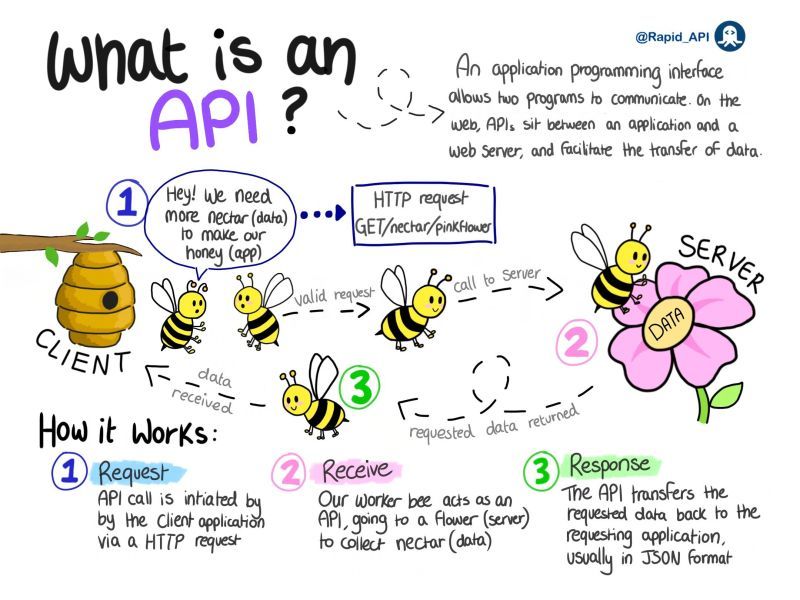
An API is a contract that specifies available operations, expected inputs, outputs, errors, and access rules while hiding the provider's internal implementation. How APIs work rests on that stable boundary, which lets systems evolve independently. Web APIs commonly use HTTP, while operating-system, library, database, RPC, REST, GraphQL, and SOAP interfaces serve different communication needs.
The modern internet runs on APIs. Every time you check the weather on your phone, make a payment online, log into a service with your Google account, or ask a voice assistant a question, dozens of Application Programming Interfaces are quietly orchestrating the exchange of data between systems.
Yet despite their ubiquity, the inner workings of APIs remain opaque to many developers who use them daily, treated as black boxes where requests go in and responses come out.
This article peels back every layer. We will trace the history of APIs from early system-level calls to the sprawling web service ecosystems of today, dissect the HTTP protocol that underpins most modern APIs, examine the REST architectural style and its competitors, explore authentication mechanisms from simple keys to complex OAuth flows, and investigate the infrastructure that keeps APIs reliable at scale.
By the end, you will not merely use APIs --- you will understand them at the level of the bytes on the wire.
What Exactly Is an API at a Technical Level?
At its most fundamental, an API (Application Programming Interface) is a contract. It defines a set of rules, protocols, and data structures that allow one piece of software to communicate with another.
The word interface is the operative term: just as a car's steering wheel provides an interface between the driver and the complex mechanical systems beneath the hood, an API provides an interface between a software consumer and the internal logic of a software provider.
"An API that isn't comprehensible isn't usable." - James Gosling, creator of the Java programming language
More precisely, an API specifies:
- What operations are available (the endpoints or functions you can call)
- What inputs each operation expects (parameters, request bodies, headers)
- What outputs each operation produces (response bodies, status codes, headers)
- What errors can occur and how they are reported
- What rules govern access (authentication, rate limits, permissions)
The provider's internal implementation --- its database schema, business logic, programming language, server architecture --- is entirely hidden. The consumer interacts only through the defined interface.
This principle of encapsulation is what makes APIs so powerful: systems can evolve independently as long as the contract remains stable.
The Spectrum of API Types
Not all APIs are web APIs. The term encompasses several distinct categories:
Operating System APIs --- System calls like
read(),write(), andfork()in Unix/Linux, or the Win32 API in Windows. These allow applications to request services from the OS kernel.Library and Framework APIs --- The public methods and classes exposed by a software library. When you call
numpy.array()in Python orstd::vectorin C++, you are using a library API.Database APIs --- Protocols like ODBC, JDBC, or database-specific wire protocols that allow applications to send queries and receive results from database management systems.
Remote Procedure Call (RPC) APIs --- Interfaces that allow a program to execute a function on a remote system as if it were local. Technologies like XML-RPC, JSON-RPC, gRPC, and CORBA fall into this category.
Web APIs --- HTTP-based interfaces that allow communication between systems over the internet. These include REST APIs, GraphQL APIs, and SOAP web services. This is the category most people mean when they say "API" in modern software development.
This article focuses primarily on web APIs, though the principles of contract-based communication, encapsulation, and structured data exchange apply across all types.
A Brief History: From System Calls to Web Services
The concept of programmatic interfaces is as old as software itself. In the 1960s and 1970s, operating systems like Multics and Unix formalized the notion of system calls --- a well-defined boundary between user-space programs and kernel-space functionality.
The C standard library, formalized in 1989, provided one of the earliest widely adopted library APIs.
The 1990s brought the internet era, and with it the need for systems to communicate across network boundaries.
Early approaches included CORBA (Common Object Request Broker Architecture), which attempted to create a universal object-oriented RPC mechanism, and DCOM (Distributed Component Object Model), Microsoft's answer to the same problem. Both were powerful but notoriously complex.
In 1998, XML-RPC emerged as a simpler alternative, encoding function calls as XML documents transmitted over HTTP.
This evolved into SOAP (Simple Object Access Protocol), which added a formal envelope structure, error handling, and eventually an entire stack of WS-* specifications for security, transactions, and routing. SOAP dominated enterprise integration through the early 2000s.
The tide turned around 2000 when Roy Fielding published his doctoral dissertation describing the REST (Representational State Transfer) architectural style. Rather than inventing a new protocol, REST embraced HTTP itself as the application protocol, using its native methods, status codes, and headers.
Early adopters like Flickr (2004), Amazon Web Services (2006), and Twitter (2006) demonstrated that REST APIs could be simpler to build, easier to understand, and more scalable than their SOAP predecessors.
Today, REST remains the dominant paradigm for web APIs, though newer approaches like GraphQL (introduced by Facebook in 2015) and gRPC (released by Google in 2016) have carved out significant niches.
The API economy has exploded: companies like Stripe, Twilio, and Plaid have built billion-dollar businesses by offering APIs as their primary product.
HTTP Fundamentals: The Foundation of Web APIs
Before we can understand web APIs, we must understand the protocol that carries them. HTTP (Hypertext Transfer Protocol) was originally designed for transferring HTML documents, but its simplicity and extensibility made it the natural choice for general-purpose client-server communication.
The Request-Response Model
HTTP operates on a strict request-response cycle. Here is what happens during a typical API call, broken down step by step:
DNS Resolution --- The client resolves the API's hostname (e.g.,
api.example.com) to an IP address using the Domain Name System.TCP Connection --- The client establishes a TCP connection to the server on port 443 (for HTTPS) or port 80 (for HTTP). This involves the classic three-way handshake: SYN, SYN-ACK, ACK.
TLS Handshake --- For HTTPS (which all production APIs should use), the client and server negotiate an encrypted connection. This involves certificate verification, cipher suite negotiation, and key exchange. The TLS handshake adds one to two round-trips of latency.
Request Transmission --- The client sends an HTTP request consisting of a request line (method + path + HTTP version), headers (metadata key-value pairs), and optionally a body (the payload).
Server Processing --- The server receives the request, routes it to the appropriate handler, validates inputs, executes business logic, queries databases or other services, and constructs a response.
Response Transmission --- The server sends an HTTP response consisting of a status line (HTTP version + status code + reason phrase), headers, and optionally a body.
Connection Management --- With HTTP/1.1's persistent connections (or HTTP/2's multiplexing), the TCP connection may remain open for subsequent requests, avoiding the overhead of repeated handshakes.
This entire cycle --- from DNS lookup to response receipt --- typically completes in 50 to 500 milliseconds for a well-optimized API, though complex operations may take longer.
HTTP Methods in Detail
HTTP defines several methods (also called verbs) that indicate the desired action on a resource. Web APIs use these methods to map CRUD (Create, Read, Update, Delete) operations onto HTTP:
GET --- Retrieves a representation of a resource. GET requests must be safe (they do not modify server state) and idempotent (making the same request multiple times has the same effect as making it once). GET requests should not have a request body.
GET /api/v1/users/42 HTTP/1.1
Host: api.example.com
Accept: application/json
Authorization: Bearer eyJhbGciOiJIUzI1NiIs...
POST --- Creates a new resource or triggers a process. POST is neither safe nor idempotent: submitting the same POST request twice may create two resources.
The request body contains the data for the new resource.
POST /api/v1/users HTTP/1.1
Host: api.example.com
Content-Type: application/json
Authorization: Bearer eyJhbGciOiJIUzI1NiIs...

{
  "name": "Alice Chen",
  "email": "alice@example.com",
  "role": "developer"
}
PUT --- Replaces an entire resource with the provided representation.
PUT is idempotent: sending the same PUT request multiple times results in the same resource state. The client must send the complete resource representation.
PUT /api/v1/users/42 HTTP/1.1
Host: api.example.com
Content-Type: application/json

{
  "name": "Alice Chen",
  "email": "alice.chen@newdomain.com",
  "role": "senior-developer"
}
PATCH --- Applies a partial modification to a resource.
Unlike PUT, the client sends only the fields that should change. PATCH is not necessarily idempotent (though it often is in practice).
PATCH /api/v1/users/42 HTTP/1.1
Host: api.example.com
Content-Type: application/json

{
  "role": "senior-developer"
}
DELETE --- Removes a resource. DELETE is idempotent: deleting an already-deleted resource should not produce an error (or should return the same status).
DELETE /api/v1/users/42 HTTP/1.1
Host: api.example.com
Authorization: Bearer eyJhbGciOiJIUzI1NiIs...
Less commonly used in APIs but still important are HEAD (identical to GET but returns only headers, not the body --- useful for checking if a resource exists or has changed), OPTIONS (returns the allowed methods for a resource, important for CORS preflight requests), and TRACE (echoes back the request for debugging, rarely enabled in production).
HTTP Headers: The Metadata Layer
Headers carry metadata about the request or response. They are key-value pairs separated by colons. Some critical headers for API communication include:
- Content-Type --- Specifies the media type of the body. For JSON APIs, this is typically
application/json. For form submissions,application/x-www-form-urlencoded. For file uploads,multipart/form-data. - Accept --- Tells the server what media types the client can handle. Content negotiation allows the same endpoint to return JSON, XML, or other formats based on this header.
- Authorization --- Carries credentials for authentication (API keys, Bearer tokens, Basic auth).
- Cache-Control --- Directs caching behavior for intermediaries and clients.
- ETag and If-None-Match --- Enable conditional requests for cache validation.
- X-Request-ID --- A unique identifier for request tracing across distributed systems (by convention, not a standard header).
Custom headers prefixed with X- were traditionally used for application-specific metadata, though RFC 6648 deprecated this convention in favor of unprefixed names registered through proper channels. In practice, many APIs still use X- prefixed headers.
REST Architectural Principles in Depth
REST (Representational State Transfer) is not a protocol or a standard --- it is an architectural style defined by a set of constraints. Roy Fielding described these constraints in his 2000 doctoral dissertation, drawing on the principles that made the World Wide Web successful.
Understanding these constraints is essential to understanding why REST APIs are designed the way they are.
"REST is not a standard. It is an architectural style, and it is entirely possible to implement it poorly. Just using HTTP does not make something RESTful." - Roy Fielding, creator of the REST architectural style
The Six Constraints of REST
1. Client-Server Separation
The client and server are independent components that communicate through the API interface. The client does not need to know about the server's data storage, and the server does not need to know about the client's user interface. This separation allows each to evolve independently.
2. Statelessness
Each request from the client must contain all the information the server needs to process it. The server does not store any session state between requests. If authentication is needed, the client must include credentials with every request. If the client is paginating through results, it must include the page number with each request.
Why statelessness matters: Stateless servers are dramatically easier to scale. Any server in a cluster can handle any request, because no server holds state that another server lacks. Load balancers can route requests freely. If a server fails, no session data is lost.
This constraint is the single most important factor in REST's scalability.
3. Cacheability
Responses must declare whether they are cacheable or not, using HTTP headers like Cache-Control, Expires, and ETag. Caching reduces the number of requests that reach the server, improving performance and reducing load. A well-designed caching strategy can handle enormous traffic with modest server resources.
4. Uniform Interface
This is the most distinctive constraint of REST and comprises four sub-constraints:
Resource identification through URIs --- Every resource (a user, an order, an article) has a unique identifier expressed as a URI. The URI identifies the resource, not the operation:
/users/42identifies user 42, regardless of whether you are reading, updating, or deleting them.Resource manipulation through representations --- Clients interact with resources by exchanging representations (typically JSON or XML documents). The representation is not the resource itself; it is a snapshot of the resource's state at a point in time.
The client manipulates the resource by sending modified representations back to the server.
Self-descriptive messages --- Each message (request or response) contains enough information to describe how to process it. The
Content-Typeheader tells the recipient how to parse the body. The HTTP method tells the server what action the client wants. Status codes tell the client what happened.Hypermedia as the Engine of Application State (HATEOAS) --- Responses should include hyperlinks that tell the client what actions are available next.
For example, a response containing a user resource might include links to the user's orders, the user's profile photo, and the endpoint for updating the user. This allows clients to discover the API's capabilities dynamically rather than hard-coding URLs.
In practice, HATEOAS is the least-adopted REST constraint. Most so-called REST APIs are actually what Richardson's maturity model calls "Level 2" --- they use HTTP methods and status codes correctly but do not include hypermedia controls.
Purists argue these should be called "HTTP APIs" rather than "REST APIs," but the terminology has become entrenched.
5. Layered System
A client cannot tell whether it is connected directly to the origin server or to an intermediary like a load balancer, CDN, or API gateway. This allows infrastructure layers to be added transparently for load balancing, caching, security enforcement, and monitoring.
6. Code on Demand (Optional)
The server can optionally extend client functionality by sending executable code (such as JavaScript). This is the only optional constraint in REST and is rarely relevant to API design.
REST in Practice: Resource-Oriented Design
A well-designed REST API organizes its endpoints around resources (nouns), not actions (verbs). Resources are identified by URIs following a consistent hierarchical structure:
/users                     # Collection of users
/users/42                  # Individual user
/users/42/orders           # Collection of orders for user 42
/users/42/orders/7         # Individual order 7 for user 42
/users/42/orders/7/items   # Items in order 7
Operations are expressed through HTTP methods, not URL paths. Compare:
| Approach | Bad (RPC-style) | Good (REST-style) |
|---|---|---|
| Get all users | GET /getUsers | GET /users |
| Get one user | GET /getUserById?id=42 | GET /users/42 |
| Create user | POST /createUser | POST /users |
| Update user | POST /updateUser | PUT /users/42 |
| Delete user | POST /deleteUser?id=42 | DELETE /users/42 |
The REST-style approach leverages HTTP's built-in semantics, making the API more predictable and self-documenting.
API Design: Endpoints, URLs, and Payloads
Good API design is part engineering and part art. It requires balancing consistency, simplicity, flexibility, and performance. Let us examine the key design decisions.
URL Structure and Naming Conventions
URLs should be predictable, readable, and consistent. Common conventions include:
- Use plural nouns for collection endpoints:
/users,/orders,/articles - Use lowercase with hyphens for multi-word resources:
/blog-posts,/line-items(notblogPostsorblog_postsin URLs) - Use path parameters for resource identifiers:
/users/{id} - Use query parameters for filtering, sorting, and pagination:
/users?role=admin&sort=created_at&page=2&per_page=25 - Avoid deep nesting beyond two levels:
/users/42/ordersis fine;/users/42/orders/7/items/3/reviewsis hard to work with
Query Parameters for Filtering and Pagination
For endpoints that return collections, query parameters provide flexibility without endpoint proliferation:
GET /api/v1/articles?status=published&author=42&tag=javascript
    &sort=-published_at&page=3&per_page=20
    &fields=id,title,summary,published_at
This single endpoint supports:
- Filtering by status, author, and tag
- Sorting by published date (the
-prefix indicates descending order) - Pagination with page number and page size
- Sparse fieldsets to reduce response payload size
Pagination deserves special attention. The two most common strategies are:
Offset-based pagination (
?page=3&per_page=20) --- Simple but suffers from drift when items are inserted or deleted between requests. Performance degrades for large offsets because the database must count through all preceding rows.Cursor-based pagination (
?after=eyJpZCI6MTAwfQ&limit=20) --- Uses an opaque cursor (typically a base64-encoded reference to the last item seen) to fetch the next batch. More performant for large datasets and immune to drift, but does not support jumping to an arbitrary page.
Request and Response Body Design
JSON is the de facto standard for API payloads. A well-designed response wraps the resource data in a consistent envelope:
{
  "data": {
    "id": 42,
    "type": "user",
    "attributes": {
      "name": "Alice Chen",
      "email": "alice@example.com",
      "role": "developer",
      "created_at": "2024-03-15T09:30:00Z",
      "updated_at": "2024-11-02T14:22:00Z"
    },
    "relationships": {
      "organization": {
        "data": { "id": 7, "type": "organization" },
        "links": { "related": "/api/v1/organizations/7" }
      }
    }
  },
  "meta": {
    "request_id": "req_abc123def456"
  }
}
For collection responses, pagination metadata is essential:
{
  "data": [ ... ],
  "meta": {
    "total_count": 1847,
    "page": 3,
    "per_page": 20,
    "total_pages": 93
  },
  "links": {
    "self": "/api/v1/users?page=3&per_page=20",
    "first": "/api/v1/users?page=1&per_page=20",
    "prev": "/api/v1/users?page=2&per_page=20",
    "next": "/api/v1/users?page=4&per_page=20",
    "last": "/api/v1/users?page=93&per_page=20"
  }
}
Data Formats: JSON, XML, and Beyond
JSON (JavaScript Object Notation)
JSON has become the lingua franca of web APIs.
Its popularity stems from several factors: it is human-readable, maps naturally to data structures in most programming languages, is less verbose than XML, and is natively supported by JavaScript (the language of the browser). A typical JSON payload looks like this:
{
  "id": 42,
  "name": "Alice Chen",
  "email": "alice@example.com",
  "active": true,
  "tags": ["developer", "team-lead"],
  "address": {
    "street": "123 Main St",
    "city": "Portland",
    "state": "OR",
    "zip": "97201"
  }
}
JSON supports six data types: strings, numbers, booleans, null, arrays, and objects.
Notably absent are date/time types (dates are conventionally represented as ISO 8601 strings like "2024-11-02T14:22:00Z"), binary data (must be base64-encoded into strings), and comments (JSON is strictly data, not configuration, though JSON5 and JSONC add comment support).
JSON serialization --- the process of converting in-memory objects to JSON text --- and deserialization --- the reverse process --- are handled by libraries in every major language. In Go, the encoding/json package uses struct tags to control field naming.
In Python, the json module handles dictionaries natively. In JavaScript, JSON.parse() and JSON.stringify() are built into the language.
XML (Extensible Markup Language)
XML was the dominant data interchange format before JSON's rise. It remains common in enterprise systems, SOAP web services, and specific domains like healthcare (HL7) and finance (FIX, FpML).
XML's strengths include a formal schema language (XSD), namespace support for avoiding naming collisions, and powerful transformation tools (XSLT, XPath).
<?xml version="1.0" encoding="UTF-8"?>
<user id="42">
  <name>Alice Chen</name>
  <email>alice@example.com</email>
  <active>true</active>
  <tags>
    <tag>developer</tag>
    <tag>team-lead</tag>
  </tags>
  <address>
    <street>123 Main St</street>
    <city>Portland</city>
    <state>OR</state>
    <zip>97201</zip>
  </address>
</user>
The same data in XML is significantly more verbose than in JSON, which increases bandwidth usage and parsing time.
For most modern web APIs, JSON is the preferred choice.
Protocol Buffers and Binary Formats
For high-performance, low-latency communication, binary formats offer substantial advantages. Protocol Buffers (protobuf), developed by Google, define messages using a schema language:
message User {
  int32 id = 1;
  string name = 2;
  string email = 3;
  bool active = 4;
  repeated string tags = 5;
  Address address = 6;
}
The schema is compiled into language-specific code for serialization and deserialization. The binary encoding is dramatically smaller and faster to parse than JSON or XML.
Protocol Buffers are the native serialization format for gRPC and are widely used in internal microservice communication where human readability is less important than performance.
Other binary formats include MessagePack (a binary JSON-compatible format), Avro (popular in the Apache ecosystem), and FlatBuffers (optimized for zero-copy access).
API Authentication: Securing the Interface
Authentication answers the question: who is making this request? Authorization, which builds on authentication, answers: what are they allowed to do? Both are critical for any API that manages sensitive data or performs actions with consequences.
Understanding how API authentication typically works requires examining several distinct mechanisms, each with different trade-offs.
API Keys
The simplest authentication mechanism is the API key: a unique string assigned to each client, included with every request. API keys are typically sent as a query parameter or a custom header:
GET /api/v1/weather?city=Portland&api_key=sk_live_abc123def456Or more securely as a header:
GET /api/v1/weather?city=Portland HTTP/1.1
X-API-Key: sk_live_abc123def456
API keys are simple to implement and easy for developers to use, making them popular for public APIs with low security requirements (weather data, geocoding, public datasets). However, they have significant limitations:
- They identify the application, not the user --- there is no way to know which end-user initiated a request
- If compromised, they grant full access until revoked
- They are often accidentally committed to public code repositories
- They provide no mechanism for fine-grained permissions
OAuth 2.0
OAuth 2.0 is the industry-standard protocol for delegated authorization. It allows a user to grant a third-party application limited access to their resources on another service without sharing their password. The protocol defines four roles:
- Resource Owner --- The user who owns the data
- Client --- The third-party application requesting access
- Authorization Server --- The service that authenticates the user and issues tokens
- Resource Server --- The API that holds the protected resources
The most common OAuth 2.0 flow for web applications is the Authorization Code Flow:
The client redirects the user to the authorization server's login page, including a
client_id,redirect_uri, requestedscope, and a randomstateparameter (for CSRF protection).The user authenticates with the authorization server (enters username and password) and consents to the requested permissions.
The authorization server redirects the user back to the client's
redirect_uriwith a short-lived authorization code.The client exchanges the authorization code for an access token (and optionally a refresh token) by making a server-to-server request to the authorization server's token endpoint, including the
client_secret.The client includes the access token in the
Authorizationheader of subsequent API requests:
GET /api/v1/user/profile HTTP/1.1
Authorization: Bearer eyJhbGciOiJSUzI1NiIsInR5cCI6IkpXVCJ9...- When the access token expires (typically after 15 minutes to one hour), the client uses the refresh token to obtain a new access token without requiring the user to log in again.
Other OAuth 2.0 flows include:
- Client Credentials Flow --- For server-to-server communication where no user is involved. The client authenticates directly with its
client_idandclient_secret. - Device Authorization Flow --- For devices with limited input capabilities (smart TVs, CLI tools). The device displays a code, and the user authenticates on a separate device.
- Authorization Code Flow with PKCE --- An enhanced version of the authorization code flow for public clients (mobile apps, single-page applications) that cannot securely store a
client_secret. PKCE (Proof Key for Code Exchange) adds a cryptographic challenge to prevent authorization code interception.
JWT (JSON Web Tokens)
JWT is not an authentication mechanism itself but a token format commonly used with OAuth 2.0 and other authentication systems. A JWT is a compact, URL-safe string consisting of three base64url-encoded parts separated by dots:
header.payload.signatureThe header specifies the algorithm and token type:
{
  "alg": "RS256",
  "typ": "JWT"
}
The payload contains claims (assertions about the user and token):
{
  "sub": "user_42",
  "name": "Alice Chen",
  "email": "alice@example.com",
  "role": "admin",
  "iat": 1699000000,
  "exp": 1699003600,
  "iss": "auth.example.com",
  "aud": "api.example.com"
}
The signature is computed by signing the encoded header and payload with a secret key (HMAC) or private key (RSA, ECDSA).
The resource server verifies the signature using the shared secret or the authorization server's public key.
The key advantage of JWTs is that they are self-contained: the resource server can validate the token and extract user information without making a database query or calling the authorization server. This reduces latency and eliminates a point of failure.
The trade-off is that JWTs cannot be revoked before expiration without maintaining a blacklist, which partially negates the statelessness benefit.
Session-Based Authentication
Before token-based approaches became dominant, web applications used session cookies. After successful login, the server creates a session record (stored in memory, a database, or a cache like Redis), generates a unique session ID, and sends it to the client as an HTTP cookie:
Set-Cookie: session_id=abc123def456; HttpOnly; Secure; SameSite=Strict; Path=/The browser automatically includes this cookie with subsequent requests. The server looks up the session ID in its session store to identify the user.
This approach works well for traditional web applications but is less suitable for APIs consumed by mobile apps, third-party services, or single-page applications where cookies may not be available or desirable.
HTTP Status Codes: A Full Taxonomy
HTTP status codes are three-digit numbers returned by the server to indicate the outcome of a request. They are not arbitrary choices --- each code has a specific semantic meaning defined in the HTTP specification.
Using them correctly is essential for building APIs that clients can interact with reliably and programmatically. Understanding what these codes mean and why they matter separates competent API design from amateur efforts.
Status codes are grouped into five classes:
1xx --- Informational
These indicate that the server has received the request and is continuing to process it. They are rarely encountered in API work.
- 100 Continue --- The server has received the request headers and the client should proceed to send the body. Used with the
Expect: 100-continueheader for large uploads. - 101 Switching Protocols --- The server is switching to a different protocol (e.g., upgrading an HTTP connection to WebSocket).
2xx --- Success
These indicate that the request was successfully received, understood, and accepted.
- 200 OK --- The standard success response. The body contains the requested data (for GET) or the result of the operation (for POST, PUT, PATCH).
- 201 Created --- A new resource was successfully created (typically in response to POST). The response should include a
Locationheader with the URI of the new resource. - 202 Accepted --- The request has been accepted for processing, but processing is not yet complete. Used for asynchronous operations where the result will be available later.
- 204 No Content --- The request succeeded, but there is no content to return. Commonly used for successful DELETE operations.
3xx --- Redirection
These indicate that the client must take additional action to complete the request.
- 301 Moved Permanently --- The resource has been permanently moved to a new URI (given in the
Locationheader). Clients should update their bookmarks. - 304 Not Modified --- Used with conditional requests (If-None-Match, If-Modified-Since). The resource has not changed since the last request, so the client can use its cached copy.
- 307 Temporary Redirect --- The resource is temporarily at a different URI. Unlike 301, the client should continue using the original URI for future requests and must preserve the HTTP method.
4xx --- Client Errors
These indicate that the request was malformed or cannot be fulfilled due to client-side issues.
- 400 Bad Request --- The request is syntactically invalid or contains bad data. The response body should explain what is wrong.
- 401 Unauthorized --- Authentication is required but was not provided or is invalid. Despite the name, this is about authentication, not authorization.
- 403 Forbidden --- The client is authenticated but does not have permission to access the resource. This is about authorization.
- 404 Not Found --- The requested resource does not exist. This is also sometimes used to hide the existence of resources from unauthorized users (returning 404 instead of 403).
- 405 Method Not Allowed --- The HTTP method is not supported for the requested resource (e.g., trying to DELETE a read-only resource).
- 409 Conflict --- The request conflicts with the current state of the resource (e.g., trying to create a user with an email that already exists).
- 422 Unprocessable Entity --- The request is syntactically valid but semantically incorrect (e.g., a JSON body that parses correctly but fails business validation rules).
- 429 Too Many Requests --- The client has exceeded the API's rate limit. The response should include a
Retry-Afterheader indicating when the client can try again.
5xx --- Server Errors
These indicate that the server failed to fulfill a valid request.
- 500 Internal Server Error --- A generic error indicating something went wrong on the server. The response should not expose internal details (stack traces, database errors) in production.
- 502 Bad Gateway --- The server, acting as a gateway or proxy, received an invalid response from an upstream server.
- 503 Service Unavailable --- The server is temporarily unable to handle requests (due to maintenance or overload). Should include a
Retry-Afterheader. - 504 Gateway Timeout --- The server, acting as a gateway or proxy, did not receive a timely response from an upstream server.
A well-designed API uses specific status codes rather than returning 200 for everything and embedding error information in the body. Specific status codes allow clients to implement generic error-handling logic (retry on 503, re-authenticate on 401, show validation errors on 422) without parsing response bodies.
Error Handling Patterns
Returning the right status code is necessary but not sufficient. The response body for error responses should provide enough detail for the client to understand the problem and take corrective action.
A widely adopted error response format includes:
{
  "error": {
    "code": "VALIDATION_FAILED",
    "message": "The request body contains invalid data.",
    "details": [
      {
        "field": "email",
        "code": "INVALID_FORMAT",
        "message": "Must be a valid email address."
      },
      {
        "field": "age",
        "code": "OUT_OF_RANGE",
        "message": "Must be between 0 and 150."
      }
    ],
    "request_id": "req_abc123def456",
    "documentation_url": "https://api.example.com/docs/errors#VALIDATION_FAILED"
  }
}
Key principles for API error responses:
- Use machine-readable error codes (like
VALIDATION_FAILED) in addition to human-readable messages. Clients can switch on error codes without brittle string matching. - Include field-level details for validation errors so the client's UI can highlight specific form fields.
- Include a request ID for correlation. When a user reports a problem, support staff can look up the request ID in server logs to diagnose the issue.
- Link to documentation so developers can quickly find detailed information about the error and how to fix it.
- Never expose internal details like stack traces, SQL queries, or file paths in production. These are security vulnerabilities.
Best practice: Define a consistent error schema and use it across every endpoint in your API. Inconsistent error formats force clients to implement special-case handling for different endpoints, which is fragile and frustrating.
Rate Limiting: Protecting APIs from Abuse and Overload
Rate limiting restricts the number of requests a client can make within a given time window.
It serves several critical purposes: protecting the API from abuse (intentional or accidental), ensuring fair access among multiple consumers, preventing cascading failures when downstream services are under stress, and managing infrastructure costs.
Understanding how rate limits protect APIs requires examining the algorithms that implement them.
Rate Limiting Algorithms
Token Bucket
The token bucket algorithm maintains a bucket of tokens for each client. The bucket has a maximum capacity (the burst limit) and is refilled at a constant rate (the sustained rate). Each request consumes one token. If the bucket is empty, the request is rejected.
For example, a bucket with a capacity of 100 tokens and a refill rate of 10 tokens per second allows a burst of 100 requests followed by a sustained rate of 10 requests per second. This algorithm is popular because it naturally accommodates short bursts while enforcing a long-term average rate.
Sliding Window Log
The sliding window log algorithm records the timestamp of every request in a sorted set. When a new request arrives, the algorithm removes all entries older than the window duration, counts the remaining entries, and allows the request only if the count is below the limit.
For example, with a limit of 100 requests per minute, the algorithm checks how many requests the client has made in the last 60 seconds. This approach is precise but requires storing every request timestamp, which can be memory-intensive for high-volume APIs.
Sliding Window Counter
The sliding window counter algorithm is a memory-efficient approximation. It divides time into fixed windows (e.g., one-minute intervals) and tracks the count for the current and previous window. The effective count is calculated as a weighted average based on how far into the current window the request falls.
If the previous window had 80 requests, the current window has 30 requests, and we are 25% into the current window, the effective count is: 80 * 0.75 + 30 = 90. If the limit is 100, the request is allowed.
Fixed Window Counter
The simplest approach: count requests in fixed time windows (e.g., every minute). The counter resets at window boundaries. The drawback is that a client can make twice the limit in quick succession by making requests at the end of one window and the start of the next.
Rate Limit Headers
Well-designed APIs communicate rate limit status through response headers:
HTTP/1.1 200 OK
X-RateLimit-Limit: 1000
X-RateLimit-Remaining: 847
X-RateLimit-Reset: 1699003600
Retry-After: 30- X-RateLimit-Limit --- The maximum number of requests allowed in the current window.
- X-RateLimit-Remaining --- The number of requests remaining in the current window.
- X-RateLimit-Reset --- The Unix timestamp when the current window resets.
- Retry-After --- (On 429 responses) The number of seconds to wait before retrying.
Clients should implement exponential backoff when they receive 429 responses: wait 1 second, then 2 seconds, then 4 seconds, and so on, with random jitter to prevent thundering herd problems when many clients retry simultaneously.
API Versioning Strategies
APIs evolve. New features are added, old features are deprecated, data formats change. Versioning provides a mechanism for introducing breaking changes without disrupting existing clients. There are several common strategies, each with trade-offs:
URI Path Versioning
GET /api/v1/users/42
GET /api/v2/users/42
The version number is embedded directly in the URL path. This is the most common approach, used by Twitter, Stripe, and Google. Its advantages are clarity and simplicity: the version is immediately visible in every request.
Its disadvantage is that version changes require updating every URL, and it violates the REST principle that URIs should identify resources, not representations.
Query Parameter Versioning
GET /api/users/42?version=2The version is specified as a query parameter. This keeps the resource URI clean but makes the version less prominent and harder to enforce consistently.
Header Versioning
GET /api/users/42 HTTP/1.1
Accept: application/vnd.example.v2+json
The version is specified in the Accept header using a custom media type. This is the most RESTful approach (it is content negotiation for different representations of the same resource) but is less discoverable and harder to test in a browser.
No Explicit Versioning (Evolutionary Design)
Some APIs, like those following the Robustness Principle ("be conservative in what you send, liberal in what you accept"), avoid explicit versioning by making only backward-compatible changes: adding new fields without removing old ones, adding new endpoints without changing existing ones.
This works well for simple APIs but becomes difficult to maintain for complex systems with many clients.
In practice, URI path versioning with a commitment to maintaining each version for a defined period (e.g., 12 to 24 months after the next version is released) provides the best balance of clarity and manageability.
SOAP vs REST vs GraphQL vs gRPC: A Comprehensive Comparison
The landscape of API paradigms is richer than REST alone. Understanding the alternatives and when to use each is critical knowledge for any systems architect.
SOAP (Simple Object Access Protocol)
SOAP is a protocol, not an architectural style. It uses XML exclusively for message encoding, defines a rigid envelope structure, and typically runs over HTTP (though it can use other transports). SOAP APIs are described by WSDL (Web Services Description Language) documents, which allow automated code generation.
SOAP's strengths include built-in standards for security (WS-Security), transactions (WS-AtomicTransaction), and reliable messaging (WS-ReliableMessaging). These make it popular in enterprise environments, particularly in banking, healthcare, and government systems where formal contracts and guaranteed delivery are requirements.
SOAP's weaknesses are verbosity (XML envelopes add significant overhead), complexity (the WS-* specification stack is enormous), and poor suitability for web and mobile clients.
GraphQL
GraphQL, developed by Facebook and open-sourced in 2015, takes a fundamentally different approach. Instead of multiple endpoints with fixed response shapes, GraphQL exposes a single endpoint where the client specifies exactly what data it needs using a query language:
query {
  user(id: 42) {
    name
    email
    orders(last: 5) {
      id
      total
      items {
        product {
          name
          price
        }
        quantity
      }
    }
  }
}
This query retrieves a user's name, email, and their last five orders with item details --- all in a single request.
With REST, this might require three separate requests (one for the user, one for their orders, and one for the items of each order), a problem known as under-fetching.
Conversely, a REST endpoint that returns the user with all related data for every request suffers from over-fetching when the client only needs the user's name.
GraphQL's strengths include precise data fetching, strong typing (defined by a schema), excellent developer tooling (introspection, auto-generated documentation), and the ability to evolve the schema without versioning (new fields are additive; deprecated fields are annotated).
GraphQL's challenges include complexity in server-side implementation (especially the N+1 query problem with nested resolvers), difficulty in caching (POST requests to a single endpoint defeat URL-based caching), and the potential for expensive queries that can overwhelm the server if not carefully constrained.
gRPC (Google Remote Procedure Call)
gRPC is a high-performance RPC framework that uses Protocol Buffers for serialization and HTTP/2 for transport. It is designed for low-latency, high-throughput communication between microservices.
gRPC's strengths include:
- Binary serialization --- Protocol Buffers are dramatically smaller and faster to serialize/deserialize than JSON
- HTTP/2 multiplexing --- Multiple requests can be sent over a single TCP connection without head-of-line blocking
- Streaming --- gRPC supports client streaming, server streaming, and bidirectional streaming
- Code generation --- Service definitions in
.protofiles generate client and server code in multiple languages - Deadlines and cancellation --- Built-in support for request timeouts that propagate across service boundaries
gRPC's limitations are primarily around browser compatibility (browsers cannot make gRPC calls directly without a proxy like gRPC-Web), human readability (binary payloads are opaque without tooling), and ecosystem maturity (fewer tools, libraries, and community resources compared to REST).
Comparison Table
| Feature | REST | SOAP | GraphQL | gRPC |
|---|---|---|---|---|
| Protocol | HTTP | XML over HTTP/SMTP/etc. | HTTP (POST) | HTTP/2 |
| Data Format | JSON (typically) | XML only | JSON | Protocol Buffers |
| Typing | Optional (OpenAPI) | WSDL (strict) | Schema (strict) | Proto files (strict) |
| Caching | HTTP caching (excellent) | Difficult | Difficult (single endpoint) | Difficult (binary) |
| Streaming | Limited (SSE, WebSocket) | Not native | Subscriptions | Native (bidirectional) |
| Browser Support | Native | Libraries required | Native (HTTP) | Requires gRPC-Web proxy |
| Best For | Public APIs, web/mobile | Enterprise integration | Complex client data needs | Internal microservices |
| Learning Curve | Low | High | Medium | Medium-High |
Webhooks and Event-Driven APIs
Traditional REST APIs use a pull model: the client periodically requests data to check for changes. This approach, called polling, is inefficient when changes are infrequent. If a client polls every 30 seconds but changes occur once an hour, 119 out of 120 requests return unchanged data, wasting bandwidth and server resources.
Webhooks invert this model. Instead of the client asking the server "has anything changed?", the server proactively notifies the client when something happens. The client registers a callback URL with the API, and the server sends an HTTP POST request to that URL whenever a relevant event occurs:
POST https://myapp.example.com/webhooks/stripe HTTP/1.1
Content-Type: application/json
Stripe-Signature: t=1699000000,v1=abc123...

{
  "id": "evt_1234567890",
  "type": "payment_intent.succeeded",
  "created": 1699000000,
  "data": {
    "object": {
      "id": "pi_1234567890",
      "amount": 2000,
      "currency": "usd",
      "status": "succeeded"
    }
  }
}
Webhook Security
Because anyone could potentially send a POST request to your webhook endpoint, verification is critical:
- Signature verification --- The API provider includes a cryptographic signature (typically HMAC-SHA256) of the payload in a header. The receiving server computes the expected signature using a shared secret and rejects requests where the signatures do not match.
- Timestamp validation --- Include a timestamp in the signature to prevent replay attacks (re-sending a previously valid webhook). Reject webhooks where the timestamp is more than a few minutes old.
- IP allowlisting --- Some providers publish the IP addresses from which webhooks originate, allowing firewall rules to block requests from other sources.
Event-Driven Architecture with Message Queues
For more sophisticated event-driven systems, APIs may integrate with message brokers like Apache Kafka, RabbitMQ, or cloud-native services like AWS EventBridge and Google Pub/Sub. These provide:
- Guaranteed delivery --- Messages are persisted and retried until acknowledged
- Fan-out --- A single event can be delivered to multiple consumers
- Ordering --- Messages within a partition/queue are delivered in order
- Backpressure --- Consumers process messages at their own pace without overwhelming the producer
Server-Sent Events (SSE) provide another pattern for real-time updates. The client opens a long-lived HTTP connection, and the server pushes events as they occur. SSE is simpler than WebSockets (it uses standard HTTP and supports automatic reconnection) but only supports server-to-client communication.
API Documentation: OpenAPI and Swagger
An undocumented API is an unusable API. Good documentation is as important as good implementation. The OpenAPI Specification (formerly known as Swagger Specification) is the industry standard for describing RESTful APIs in a machine-readable format.
"Documentation is a love letter that you write to your future self, and to every developer who will ever use your API." - Danielle Man, API evangelist and author
An OpenAPI document (written in YAML or JSON) describes every aspect of an API:
openapi: 3.1.0
info:
  title: User Management API
  version: 2.1.0
  description: API for managing user accounts and profiles.
paths:
  /users:
    get:
      summary: List all users
      parameters:
        - name: role
          in: query
          schema:
            type: string
            enum: [admin, developer, viewer]
        - name: page
          in: query
          schema:
            type: integer
            default: 1
      responses:
        '200':
          description: A paginated list of users
          content:
            application/json:
              schema:
                type: object
                properties:
                  data:
                    type: array
                    items:
                      $ref: '#/components/schemas/User'
                  meta:
                    $ref: '#/components/schemas/PaginationMeta'
    post:
      summary: Create a new user
      requestBody:
        required: true
        content:
          application/json:
            schema:
              $ref: '#/components/schemas/CreateUserRequest'
      responses:
        '201':
          description: User created successfully
        '422':
          description: Validation failed
components:
  schemas:
    User:
      type: object
      properties:
        id:
          type: integer
        name:
          type: string
        email:
          type: string
          format: email
        role:
          type: string
          enum: [admin, developer, viewer]
The OpenAPI specification enables a rich ecosystem of tools:
- Swagger UI and Redoc --- Generate interactive documentation where developers can read descriptions, examine schemas, and make live API calls directly from the browser.
- Code generators --- Tools like OpenAPI Generator produce client SDKs in dozens of languages from an OpenAPI document, ensuring consistent, type-safe API consumption.
- Mock servers --- Generate a fake API server from the specification for frontend development and testing before the real backend is ready.
- Validation --- Automatically validate incoming requests and outgoing responses against the schema, catching contract violations early.
- Testing --- Generate test suites that exercise every endpoint with valid and invalid inputs.
Documentation should be treated as a first-class artifact, maintained alongside the code. Many teams adopt a design-first approach: write the OpenAPI specification before writing any code, review it with consumers, and then implement the API to match the specification.
This front-loads design decisions and catches issues when changes are cheap.
Advanced Topics in API Architecture
Content Negotiation
A single endpoint can serve multiple representations of the same resource through content negotiation. The client specifies preferred formats via the Accept header:
GET /api/v1/reports/42 HTTP/1.1
Accept: application/pdf
GET /api/v1/reports/42 HTTP/1.1
Accept: text/csvGET /api/v1/reports/42 HTTP/1.1
Accept: application/jsonThe server examines the Accept header and returns the appropriate representation. If the server cannot produce any of the requested formats, it returns 406 Not Acceptable.
Idempotency Keys
For operations that are not naturally idempotent (like payment processing), idempotency keys allow clients to safely retry requests without causing duplicate side effects. The client generates a unique key (typically a UUID) and includes it with the request:
POST /api/v1/payments HTTP/1.1
Idempotency-Key: 550e8400-e29b-41d4-a716-446655440000
Content-Type: application/json

{
  "amount": 2000,
  "currency": "usd",
  "source": "tok_visa"
}
The server stores the result associated with the idempotency key.
If the same key is seen again, the server returns the stored result instead of processing the payment again. This is critical for payment APIs (Stripe pioneered this pattern) where network failures can leave the client uncertain about whether a request was processed.
Pagination Deep Dive
Beyond basic offset and cursor pagination, several advanced patterns exist:
Keyset pagination --- Uses the natural ordering of a field (like an auto-incrementing ID or timestamp) as the cursor:
GET /api/v1/events?after_id=1000&limit=50. This is the most performant approach for large datasets, as the database can use an index scan starting from the specified key.Time-based pagination --- Useful for event streams:
GET /api/v1/events?since=2024-11-01T00:00:00Z&until=2024-11-02T00:00:00Z. The client controls the time window, and the server returns all events within it.Seek pagination --- A generalization of keyset pagination that supports arbitrary sort orders by encoding the last seen values of all sort fields in the cursor.
CORS (Cross-Origin Resource Sharing)
When a web application running on app.example.com makes an API request to api.example.com, the browser enforces the Same-Origin Policy and blocks the request unless the API explicitly allows it through CORS headers.
The browser first sends a preflight request (an OPTIONS request) to the API:
OPTIONS /api/v1/users HTTP/1.1
Origin: https://app.example.com
Access-Control-Request-Method: POST
Access-Control-Request-Headers: Content-Type, Authorization
The API responds with headers indicating what is allowed:
HTTP/1.1 204 No Content
Access-Control-Allow-Origin: https://app.example.com
Access-Control-Allow-Methods: GET, POST, PUT, DELETE
Access-Control-Allow-Headers: Content-Type, Authorization
Access-Control-Max-Age: 86400
If the preflight response permits the request, the browser proceeds with the actual API call.
CORS configuration is a frequent source of confusion and bugs, particularly when the allowed origins, methods, or headers do not match what the client is sending.
API Gateways
An API gateway sits between clients and backend services, providing a single entry point for all API traffic. Gateways handle cross-cutting concerns that would otherwise be duplicated across every service:
- Request routing --- Directing requests to the appropriate backend service based on the URL path
- Authentication and authorization --- Validating tokens and enforcing permissions before requests reach backend services
- Rate limiting --- Enforcing per-client and per-endpoint rate limits
- Request/response transformation --- Converting between formats, adding or removing headers, aggregating responses from multiple services
- Logging and monitoring --- Capturing request metadata, response times, and error rates for observability
- SSL termination --- Handling TLS encryption at the gateway so backend services can communicate over plain HTTP internally
Popular API gateway solutions include Kong, AWS API Gateway, Apigee (Google), Azure API Management, and Traefik.
Practical End-to-End Example
To bring all of these concepts together, let us trace a complete real-world API interaction. Imagine a mobile application that allows users to place food orders.
Step 1: Authentication
The user opens the app and logs in. The app sends credentials to the authentication endpoint:
POST /api/v1/auth/login HTTP/1.1
Host: api.foodorder.example.com
Content-Type: application/json

{
  "email": "alice@example.com",
  "password": "correct-horse-battery-staple"
}
The server validates the credentials, generates a JWT, and returns it:
HTTP/1.1 200 OK
Content-Type: application/json

{
  "data": {
    "access_token": "eyJhbGciOiJSUzI1NiIs...",
    "refresh_token": "dGhpcyBpcyBhIHJlZn...",
    "token_type": "Bearer",
    "expires_in": 3600
  }
}
Step 2: Browsing the Menu
The app fetches the restaurant's menu:
GET /api/v1/restaurants/15/menu?category=pizza&available=true HTTP/1.1
Host: api.foodorder.example.com
Authorization: Bearer eyJhbGciOiJSUzI1NiIs...
Accept: application/json
Response:
HTTP/1.1 200 OK
Content-Type: application/json
Cache-Control: public, max-age=300
X-RateLimit-Limit: 1000
X-RateLimit-Remaining: 997

{
  "data": [
    {
      "id": 201,
      "name": "Margherita Pizza",
      "description": "Fresh mozzarella, basil, tomato sauce",
      "price": 14.99,
      "currency": "USD",
      "available": true,
      "preparation_time_minutes": 20
    },
    {
      "id": 205,
      "name": "Pepperoni Pizza",
      "description": "Classic pepperoni with mozzarella",
      "price": 16.99,
      "currency": "USD",
      "available": true,
      "preparation_time_minutes": 20
    }
  ],
  "meta": {
    "total_count": 8,
    "category": "pizza"
  }
}
Note the Cache-Control header: the menu can be cached for 5 minutes, reducing load on the server for a resource that changes infrequently.
Step 3: Placing an Order
The user selects items and places an order:
POST /api/v1/orders HTTP/1.1
Host: api.foodorder.example.com
Authorization: Bearer eyJhbGciOiJSUzI1NiIs...
Content-Type: application/json
Idempotency-Key: 7f3b4c2d-1a9e-4b8f-8c3d-5e6f7a8b9c0d

{
  "restaurant_id": 15,
  "items": [
    { "menu_item_id": 201, "quantity": 1 },
    { "menu_item_id": 205, "quantity": 2 }
  ],
  "delivery_address": {
    "street": "456 Oak Avenue",
    "city": "Portland",
    "state": "OR",
    "zip": "97201"
  },
  "payment_method_id": "pm_card_visa_4242"
}
Response:
HTTP/1.1 201 Created
Content-Type: application/json
Location: /api/v1/orders/8842

{
  "data": {
    "id": 8842,
    "status": "confirmed",
    "restaurant_id": 15,
    "items": [
      {
        "menu_item_id": 201,
        "name": "Margherita Pizza",
        "quantity": 1,
        "unit_price": 14.99,
        "subtotal": 14.99
      },
      {
        "menu_item_id": 205,
        "name": "Pepperoni Pizza",
        "quantity": 2,
        "unit_price": 16.99,
        "subtotal": 33.98
      }
    ],
    "subtotal": 48.97,
    "tax": 4.41,
    "delivery_fee": 3.99,
    "total": 57.37,
    "estimated_delivery": "2024-11-02T19:45:00Z",
    "created_at": "2024-11-02T19:05:00Z"
  },
  "links": {
    "self": "/api/v1/orders/8842",
    "cancel": "/api/v1/orders/8842/cancel",
    "track": "/api/v1/orders/8842/tracking"
  }
}
Notice the 201 Created status code, the Location header pointing to the new resource, the Idempotency-Key on the request (ensuring a network retry does not create a duplicate order), and the HATEOAS-style links telling the client what actions are available next.
Step 4: Real-Time Tracking via Webhook
Rather than having the mobile app poll for order status updates, the backend sends webhooks to the app's notification service as the order progresses:
POST https://notifications.foodorder.example.com/webhooks HTTP/1.1
Content-Type: application/json
X-Webhook-Signature: sha256=a1b2c3d4e5f6...

{
  "event": "order.status_updated",
  "order_id": 8842,
  "new_status": "out_for_delivery",
  "driver": {
    "name": "Carlos M.",
    "eta_minutes": 12
  },
  "timestamp": "2024-11-02T19:33:00Z"
}
The notification service verifies the webhook signature, then pushes a notification to the user's mobile device.
This example demonstrates the complete lifecycle of an API interaction: authentication with JWTs, resource retrieval with caching, resource creation with idempotency protection, proper status codes and response structures, and event-driven updates via webhooks.
Security Best Practices for API Design
API security extends beyond authentication. A defense-in-depth approach includes:
Always use HTTPS --- Never transmit credentials or sensitive data over unencrypted HTTP. Use HSTS (HTTP Strict Transport Security) headers to prevent downgrade attacks.
Validate all input --- Never trust client-supplied data. Validate types, lengths, formats, and ranges on every field. Use parameterized queries to prevent SQL injection. Sanitize output to prevent XSS in APIs that return HTML.
Implement rate limiting --- As discussed in depth above, rate limiting protects against both abuse and accidental overload.
Use the principle of least privilege --- API tokens should grant only the permissions needed for their purpose. OAuth scopes allow fine-grained access control: a token with
read:ordersscope cannot create or delete orders.Log and monitor --- Track all authentication attempts, authorization failures, and unusual patterns. Alert on anomalies like sudden spikes in 401 responses or requests from unexpected geographic regions.
Rotate credentials regularly --- API keys, client secrets, and signing keys should be rotated on a schedule. Design your system to support multiple active keys during rotation periods.
Set appropriate CORS policies --- Do not use
Access-Control-Allow-Origin: *for APIs that require authentication. Whitelist specific origins that should have access.Protect against replay attacks --- Use nonces, timestamps, or idempotency keys to ensure that intercepted requests cannot be replayed by an attacker.
Performance and Scalability Considerations
APIs serving millions of requests per day must be designed with performance at every layer:
Connection pooling --- Database and HTTP connections are expensive to establish. Connection pools maintain a set of pre-established connections that are reused across requests, eliminating per-request connection overhead.
Response compression --- Compressing response bodies with gzip or Brotli can reduce payload sizes by 60-80%, significantly reducing bandwidth usage and transfer time. The client indicates support via the Accept-Encoding header, and the server responds with the Content-Encoding header.
Caching at multiple levels --- CDN caching for static or slowly-changing responses, HTTP caching via Cache-Control and ETag headers, application-level caching in Redis or Memcached for expensive computations or frequently-accessed data, and database query caching.
Asynchronous processing --- Long-running operations (report generation, batch imports, video transcoding) should not block the API response. Instead, accept the request with a 202 Accepted status, process the work asynchronously, and provide a polling endpoint or webhook for the client to check the result.
Horizontal scaling --- The statelessness constraint of REST enables horizontal scaling: add more server instances behind a load balancer to handle increased traffic. Each server is identical and can handle any request independently.
Database optimization --- Efficient database queries, proper indexing, read replicas for scaling read-heavy workloads, and connection pooling are often the biggest factors in API performance. An API is only as fast as its slowest dependency.
Testing APIs
Thorough API testing encompasses several strategies:
- Unit tests --- Test individual functions and handlers in isolation, mocking external dependencies.
- Integration tests --- Test the full request-response cycle against a running server with a test database.
- Contract tests --- Verify that the API conforms to its OpenAPI specification. Tools like Dredd and Schemathesis automate this.
- Load tests --- Simulate concurrent users to find performance bottlenecks and determine capacity. Tools like k6, Locust, and Apache JMeter are widely used.
- Security tests --- Automated scanning for common vulnerabilities (OWASP Top 10), fuzzing with malformed inputs, and manual penetration testing.
Postman and similar tools allow developers to build collections of API requests that serve as both documentation and executable test suites. Collections can be shared across teams and integrated into CI/CD pipelines.
The Future of APIs
Several trends are shaping the evolution of APIs:
AI-native APIs --- Large language model providers like OpenAI, Anthropic, and Google expose their models through APIs that accept natural language prompts and return generated text, code, or structured data.
These APIs are driving new patterns around streaming responses (server-sent events for token-by-token delivery), function calling (the model requests the client to execute specific functions), and structured output (guaranteed JSON schema conformance).
API-first development --- Organizations increasingly treat APIs as products, designing them before implementing backends or frontends. This shifts focus from "what can the server do?" to "what do consumers need?" and results in more thoughtful, usable interfaces.
Federated APIs --- Technologies like Apollo Federation allow multiple teams to expose their services as a single, unified GraphQL schema. Consumers see one API; behind the scenes, queries are distributed across independent services.
AsyncAPI --- Just as OpenAPI standardized the description of REST APIs, the AsyncAPI specification provides a standard format for describing event-driven APIs (webhooks, message queues, WebSocket connections).
The fundamental principles, however, remain constant: clear contracts, encapsulation of implementation details, structured data exchange, and robust error handling. APIs are the connective tissue of modern software, and understanding them deeply is not optional for any serious developer.
"The API is the user interface for developers. And if you don't put thought into making it easy, you will fail." - Jeff Atwood, co-founder of Stack Overflow
What Research and Industry Reports Show
API design and usage has been studied extensively from both theoretical and empirical perspectives, producing actionable findings for practitioners.
Roy Fielding's Architectural Dissertation (2000): Roy Fielding's doctoral dissertation at UC Irvine, "Architectural Styles and the Design of Network-Based Software Architectures," introduced the REST architectural style and the six constraints that define it (client-server, statelessness, cacheability, uniform interface, layered system, and code on demand).
Fielding derived these constraints not from intuition but from systematic analysis of what architectural properties are necessary and sufficient to achieve scalability, simplicity, and independent evolution of client and server components.
The dissertation's key finding - that statelessness is the single most important constraint for enabling scalability, because it eliminates server-side session management and allows any server to handle any request - has been validated repeatedly in production deployments.
REST's subsequent dominance over SOAP and other WS-* standards reflects empirical confirmation of Fielding's theoretical analysis.
Martin Fowler on API Patterns and Microservices: Martin Fowler's work on enterprise application patterns, documented in Patterns of Enterprise Application Architecture (2002) and in collaborations on Microservices (with James Lewis, 2014), provides the architectural context for modern API design.
Fowler and Lewis's microservices article, one of the most widely read technical articles in software architecture, argued based on industry case studies that small, independently deployable services communicating via well-defined APIs provide organizational and technical benefits - faster deployment cycles, independent scaling, technology flexibility - that outweigh the added complexity of distributed systems.
This analysis directly drove the API-centric architectures that define modern cloud-native development.
Leonard Richardson's REST Maturity Model: Leonard Richardson's 2008 presentation at QCon San Francisco introduced the Richardson Maturity Model, which stratifies REST API implementations into four levels (0 through 3) based on their adherence to REST constraints.
Level 0 (single URI, single HTTP method) through Level 3 (full HATEOAS - Hypermedia as the Engine of Application State) provides a concrete taxonomy for API design maturity.
Research using this model consistently finds that most production APIs achieve Level 2 (multiple URIs and HTTP methods) but few reach Level 3, and that the gap between Level 2 and full REST is acceptable for most use cases - a pragmatic finding that influenced industry adoption of "REST-ish" rather than purist REST design.
IBM API Economy Research: IBM's research on the API economy, drawing on analysis of thousands of enterprise API programs, found that organizations treating APIs as products - with dedicated API teams, version management, developer experience investment, and usage analytics - achieve significantly higher adoption rates and longer API lifespans than those treating APIs as implementation details.
IBM's 2020 API Economy report found that companies with mature API programs generated 12 to 20 percent of their revenue through API-enabled partnerships and integrations.
This finding reframes APIs from technical artifacts to business assets, driving investment in API design quality, documentation, and developer experience.
Stripe's API Design Research: Stripe's public documentation and engineering blog provide some of the most detailed empirical research on API design outcomes available.
Stripe's finding that idempotency keys - unique identifiers that allow clients to safely retry requests without fear of duplicate processing - dramatically reduce support tickets related to double-charges influenced widespread adoption of idempotency as an API design pattern.
Stripe also documented the finding that versioning strategies based on additive changes (new optional fields, new endpoints) rather than breaking changes produce dramatically better developer experience, with developers who experience a breaking API change being significantly less likely to adopt subsequent versions of the API.
The OWASP API Security Project: The Open Web Application Security Project's API Security Top 10, first published in 2019 and updated in 2023, documents the most critical API security risks based on analysis of real breaches.
The list - which includes Broken Object Level Authorization (BOLA), Broken Authentication, Excessive Data Exposure, and Lack of Rate Limiting - reflects systematic analysis of how APIs fail in production.
Research conducted for the OWASP API Security project found that API-specific vulnerabilities were responsible for a growing proportion of data breaches, and that the attack patterns differed significantly from traditional web application attacks, requiring API-specific security testing approaches.
Real-World Case Studies
Twitter's API Ecosystem and the Value of API Products: Twitter's public API, introduced in 2006, became one of the most significant API-driven ecosystems in internet history.
By 2012, third-party applications accessing Twitter's API accounted for a large share of Twitter activity, creating a developer ecosystem that included thousands of applications.
Twitter's API story is also a case study in API governance: when Twitter restricted its API in 2012 and 2023, the developer ecosystem contracted sharply, demonstrating that API policies - rate limits, access tiers, terms of service - are at least as important as technical design in determining an API's ecosystem success or failure.
The Facebook Cambridge Analytica API Failure (2018): The Cambridge Analytica incident, in which political data firm Cambridge Analytica obtained data on 87 million Facebook users without their explicit consent, originated from Facebook's Graph API.
Facebook's API allowed third-party apps to access not only the data of users who had installed the app, but also the friends of those users - a design decision that maximized developer utility at the expense of user privacy and consent.
The incident is a case study in API design decisions with unintended consequences: the "friends data" API feature was introduced to enable social features in third-party apps, but its scope was not adequately constrained by access control policies.
After the incident, Facebook removed friend data access from third-party APIs, demonstrating retroactive application of least privilege principles that should have been applied during original API design.
Stripe's API Version Management: Stripe's API versioning approach, which maintains backward compatibility across multiple API versions simultaneously and continues to support deprecated versions for years, is studied as a model for API lifecycle management.
Stripe's engineering team documented their finding that breaking changes - even clearly necessary ones - cost more in developer migration effort than the cumulative cost of maintaining backward compatibility.
Stripe uses a date-based versioning scheme (API versions named by date) rather than semantic versioning, and gates behavioral changes behind version flags that each customer must explicitly opt into.
This approach, documented in Stripe's engineering blog, has been influential in API design across the industry and is cited in API design guides from companies including Twilio, GitHub, and AWS.
The Log4Shell API Exposure (2021): The Log4Shell vulnerability (CVE-2021-44228) in Apache Log4j is, in part, an API security case study. The vulnerability was in Log4j's JNDI lookup feature - an API that allowed log messages to trigger remote resource lookups.
The API feature was designed to enable dynamic log formatting but had no access controls restricting what URLs could be queried or what code could be loaded from remote servers.
When attackers discovered that log messages could trigger JNDI lookups via HTTP headers that applications logged, they could induce servers to load and execute arbitrary Java code from attacker-controlled servers.
The core problem was an API feature with an attack surface that developers were not aware they were exposing: any application that logged user-supplied data (virtually all Java applications) was potentially vulnerable through data paths the developers had never considered as attack vectors.
Key Security Metrics and Evidence
Quantitative data on API usage, failure rates, and security outcomes provides benchmarks for API program assessment.
API Traffic Growth: Akamai's State of the Internet research has reported that API calls account for a large majority of web requests - on the order of 80 percent - a figure that reflects the shift from human-browsed web pages to machine-to-machine API calls.
Mobile applications, IoT devices, microservices, and third-party integrations collectively generate orders of magnitude more API calls than humans generate page views. This growth has made API security a critical concern, as the attack surface exposed through APIs now dwarfs that exposed through traditional web applications.
API Security Breach Prevalence: Salt Security's 2023 State of API Security report, based on data from Salt's customer deployments across thousands of organizations, found that 94 percent of organizations experienced API security incidents in the preceding 12 months.
The most common incident types were data scraping (automated extraction of data through legitimate API endpoints), account takeover via API, and denial-of-service through excessive API calls.
The report found that authentication failures were involved in 78 percent of API security incidents - consistent with OWASP's finding that Broken Authentication is a top API risk.
REST vs. GraphQL Performance Trade-offs: Research from production deployments at Facebook, GitHub, and Twitter comparing REST and GraphQL APIs found that GraphQL reduces data over-fetching (retrieving more data than needed) by approximately 40 to 60 percent in typical use cases, while REST APIs are simpler to cache and monitor.
Facebook's published analysis of their GraphQL adoption found that GraphQL reduced the number of round trips required for complex UI screens from 3 to 5 REST calls to a single GraphQL query, improving mobile app performance on high-latency connections by 15 to 30 percent.
These findings have driven selective GraphQL adoption for mobile-facing and high-complexity APIs while REST remains dominant for simpler CRUD operations.
API Versioning and Deprecation Timelines: Industry experience with large API programs suggests that production API versions commonly remain in service for several years from release to complete retirement.
APIs with breaking changes introduced within the first two years of release have developer adoption rates approximately 40 percent lower than APIs that maintain backward compatibility for their first major lifecycle.
This empirical finding supports long deprecation windows and investment in backward compatibility as sound economic decisions, not merely developer experience considerations.
Rate Limiting Effectiveness: Cloudflare's research on rate limiting and API abuse, published in their annual DDoS threat reports, found that APIs without rate limiting receive on average 15 times more unwanted traffic than APIs with properly configured rate limiting.
Properly configured rate limiting - with per-client limits, graduated responses (slow down before blocking), and monitoring - reduces automated scraping and credential stuffing attacks against APIs by over 85 percent without significantly impacting legitimate usage.
The finding supports rate limiting as a high-value, low-cost API security control.
Sources & Further Reading
Fielding, R. T. (2000). Architectural Styles and the Design of Network-Based Software Architectures. Doctoral dissertation, University of California, Irvine. View source
Richardson, L. and Ruby, S. (2013). RESTful Web APIs: Services for a Changing World. O'Reilly Media. View source
Mozilla Developer Network. HTTP Documentation. View source
OpenAPI Initiative. OpenAPI Specification v3.1.0. View source
Internet Engineering Task Force. RFC 7231: Hypertext Transfer Protocol (HTTP/1.1): Semantics and Content. View source
Internet Engineering Task Force. RFC 6749: The OAuth 2.0 Authorization Framework. View source
Jones, M. et al. RFC 7519: JSON Web Token (JWT). View source
GraphQL Foundation. GraphQL Specification. View source
Google. gRPC Documentation. View source
Stripe. API Design Patterns and Best Practices. View source
Lauret, A. (2019). The Design of Web APIs. Manning Publications. View source
AsyncAPI Initiative. AsyncAPI Specification. View source
Internet Engineering Task Force. RFC 6585: Additional HTTP Status Codes (429 Too Many Requests). View source
Masse, M. (2011). REST API Design Rulebook. O'Reilly Media. View source
Atwood, J. "API Design Principles." Coding Horror, 2008. View source
Richardson, L., Amundsen, M., & Ruby, S. (2013). RESTful Web APIs. O'Reilly Media.
Jacobson, D., Brail, G., & Woods, D. (2011). APIs: A Strategy Guide. O'Reilly Media.
Sandoval, J. (2018). Hands-On RESTful API Design Patterns and Best Practices. Packt Publishing.
Geewax, J. J. (2021). API Design Patterns. Manning Publications.
Ploeg, N. (2018). Designing Distributed Systems. O'Reilly Media.
Newman, S. (2021). Building Microservices (2nd ed.). O'Reilly Media.
Wiggins, A. "The Twelve-Factor App." 2012. View source