
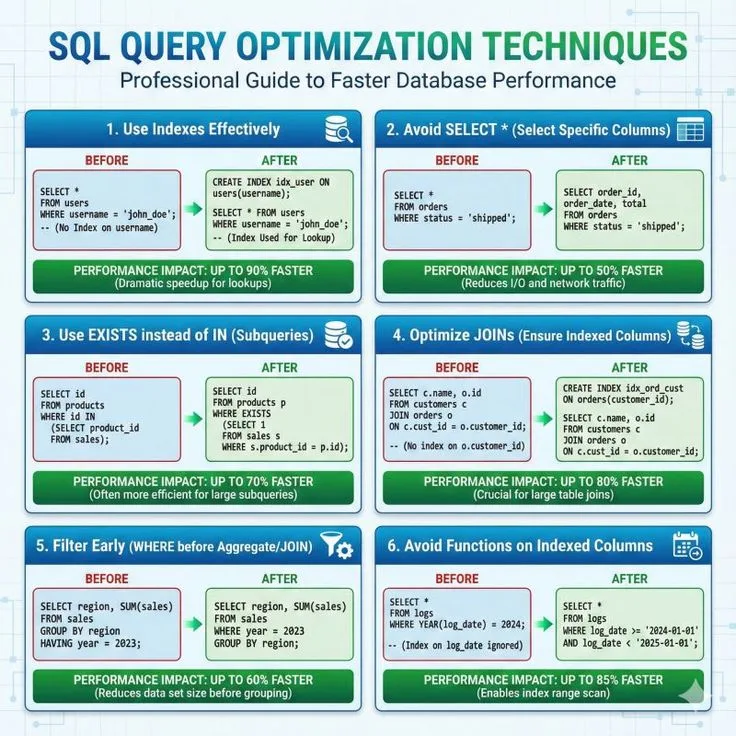
Database: Imagine a library with ten million books, but no catalog, no Dewey Decimal System, no alphabetical shelving. To find a single book, you walk through every aisle, scanning every spine, one by one.
That is what a database does when it executes a query without an index: it reads every row in the table, examining each one to see if it matches your search criteria. This is called a full table scan, and for a table with millions or billions of rows, it is ruinously slow.
Database indexing is arguably the single most impactful performance optimization available to anyone working with relational databases. A well-chosen index can reduce a query from minutes to milliseconds. A poorly chosen index strategy---or no strategy at all---can bring an application to its knees as data grows.
Yet despite their importance, indexes remain one of the most misunderstood aspects of database systems. Developers create them without understanding how they work, add too many "just in case," or never create them at all, relying on hope that the database will figure things out.
This article is a deep technical exploration of how database indexes work, from the data structures that make them possible to the practical strategies for using them effectively.
We will dissect B-tree and B+tree architecture, examine every major index type, learn to read query execution plans, and develop the intuition necessary to make sound indexing decisions in production systems.
The examples use PostgreSQL and standard SQL throughout, though the principles apply to MySQL, SQL Server, Oracle, and virtually every relational database.
The Full Table Scan Problem
Why Databases Need Indexes
Consider a table storing user records:
CREATE TABLE users (
    id         SERIAL PRIMARY KEY,
    email      VARCHAR(255),
    first_name VARCHAR(100),
    last_name  VARCHAR(100),
    created_at TIMESTAMP DEFAULT NOW()
);
This table holds 10 million rows. You run a simple query:
SELECT * FROM users WHERE email = 'jane.doe@example.com';Without an index on the email column, the database must perform a sequential scan---reading every single row in the users table, checking whether the email column matches 'jane.doe@example.com'.
If the table stores roughly 200 bytes per row, that means reading approximately 2 GB of data from disk to find a single row.
The math is damning:
- 10,000,000 rows at 200 bytes each = ~1.9 GB of data
- A spinning hard drive reads at ~100 MB/s sequentially = ~19 seconds
- An SSD reads at ~500 MB/s sequentially = ~3.8 seconds
- The query returns exactly one row
Even on an SSD, nearly four seconds to find one row is unacceptable for any interactive application. And this is a simple, single-table lookup. Join queries multiply the problem: a sequential scan on two tables of 10 million rows each could mean reading 4 GB or more.
"Premature optimization is the root of all evil, but that doesn't mean you should ignore obvious performance problems. When your database is doing a full table scan on ten million rows to return one result, that is not premature --- that is a fire." - Joe Celko
What an Index Provides
A database index is a separate data structure, maintained alongside the table, that provides an efficient lookup path to rows matching specific column values. Rather than scanning every row, the database consults the index to quickly locate the rows it needs, then fetches only those rows from the table.
With a B-tree index on the email column:
CREATE INDEX idx_users_email ON users (email);The same query now works differently. Instead of scanning 10 million rows, the database:
- Traverses the B-tree index (typically 3-4 levels deep)
- Locates the leaf node containing
'jane.doe@example.com' - Follows the pointer to the actual table row
- Returns the result
Total disk reads: 3-4 index pages plus 1 data page = roughly 5 pages of 8 KB each = 40 KB. Compare that to 1.9 GB. The index reduces the I/O by a factor of roughly 50,000.
An index trades storage space and write-time overhead for dramatically faster read performance. This is the fundamental bargain of indexing: you pay a cost on every insert, update, and delete so that queries can be fast.
This is the answer to what a database index is and how it works: it is an auxiliary data structure---most commonly a B-tree---that maintains sorted pointers to rows in a table, enabling the database to find specific rows without scanning the entire table.
The concept is directly analogous to a book index: rather than reading every page to find where "B-tree" is discussed, you flip to the index at the back, find the entry alphabetically, and go directly to the listed page numbers.
Data Structure Foundations
From Linear Search to Binary Search
The simplest data structure for searching is an unsorted array. Finding an element requires examining each entry one by one: O(n) time complexity. This is the full table scan.
A sorted array enables binary search: start in the middle, compare, then recurse into the appropriate half. This yields O(log n) time. For 10 million rows, binary search requires at most log2(10,000,000) = ~23 comparisons. That is astonishingly better than 10 million comparisons.
But sorted arrays have a critical problem: insertions are expensive. Inserting a value in the middle of a sorted array requires shifting all subsequent elements, an O(n) operation. For a database that handles thousands of inserts per second, this is untenable.
Binary Search Trees
Binary search trees (BSTs) solve the insertion problem. Each node contains a key and two child pointers (left for smaller values, right for larger). Insertions and lookups are both O(log n) in a balanced tree.
The problem: BSTs can become unbalanced. Inserting sorted data creates a degenerate tree that looks like a linked list, degrading to O(n) operations. Self-balancing variants like AVL trees and red-black trees maintain balance through rotations after insertions and deletions.
But even balanced binary trees have a fundamental problem for databases: they are optimized for memory, not disk.
The Disk I/O Problem
Database tables are stored on disk, not in memory. Disk access patterns are fundamentally different from memory access:
- Memory access: ~100 nanoseconds. Random access to any address is equally fast.
- Disk access (SSD): ~100 microseconds. Roughly 1,000 times slower than memory.
- Disk access (HDD): ~10 milliseconds. Roughly 100,000 times slower than memory.
When reading from disk, you pay a fixed cost per access regardless of how much data you read (up to a page boundary). Operating systems and databases read data in pages (typically 4 KB or 8 KB). Whether you read 1 byte or 8,192 bytes from a page, the cost is the same: one disk I/O.
A binary tree with 10 million nodes has a height of about 23 levels. Each level requires a separate disk I/O (each node could be on a different disk page). That means 23 disk reads to find one value. At 100 microseconds per SSD read, that is 2.3 milliseconds---decent, but we can do much better.
The key insight: Since we pay per disk page, we should pack as many keys as possible into each page. Instead of a binary tree (2 children per node), use a tree with hundreds or thousands of children per node. This is the B-tree.
B-Tree and B+Tree Architecture
Why B-Trees Are the Foundation of Database Indexing
B-trees are the dominant index structure in virtually every major relational database: PostgreSQL, MySQL (InnoDB), SQL Server, Oracle, SQLite, and many others.
This is the answer to why B-trees are used for database indexes: they are specifically designed to minimize disk I/O by maximizing the number of keys stored in each disk page, keeping the tree extremely shallow even for billions of records.
The B-tree was invented by Rudolf Bayer and Edward McCreight at Boeing Scientific Research Labs in 1970. The "B" likely stands for "balanced" (Bayer never confirmed), though "Boeing," "Bayer," and "broad" are all popular theories. What matters is the properties.
"The ubiquity of the B-tree in database systems is not an accident. It represents one of the great engineering convergences: a data structure designed for the physical constraints of disk storage that also happens to be the ideal structure for the access patterns of transactional databases." - Douglas Comer, The Ubiquitous B-Tree (1979)
B-Tree Properties
A B-tree of order m (sometimes called the branching factor or fan-out) has these properties:
- Every node has at most m children
- Every non-leaf, non-root node has at least ceil(m/2) children
- The root has at least 2 children (unless it is a leaf)
- All leaves appear at the same depth (the tree is perfectly balanced)
- A node with k children contains k-1 keys
Typical values: In a database with 8 KB pages, a B-tree node fills one page. If keys are 8 bytes (bigint) and pointers are 6 bytes, each node holds roughly 8192 / (8 + 6) = ~585 keys, giving a branching factor of about 586.
B-Tree Node Structure
Each internal node contains:
- An ordered list of keys: K1, K2, ..., Kn
- Pointers to child nodes: P0, P1, P2, ..., Pn
- The invariant: all keys in the subtree pointed to by P0 are less than K1; all keys in the subtree pointed to by P1 are between K1 and K2; and so on
Internal Node:
+----+----+----+----+----+----+----+
| P0 | K1 | P1 | K2 | P2 | K3 | P3 |
+----+----+----+----+----+----+----+
  |         |         |         |
  v         v         v         v
[<K1]    [K1..K2]  [K2..K3]   [>K3]
Leaf nodes contain keys and pointers to the actual data rows (row identifiers, often called TIDs in PostgreSQL or RIDs in other systems).
B+Tree: The Database Variant
Most databases actually use B+trees, a variation of B-trees with two important differences:
All data pointers are in leaf nodes only. Internal nodes contain only keys and child pointers---no data pointers. This means internal nodes can fit more keys per page, increasing the branching factor further.
Leaf nodes are linked together in a doubly-linked list. This makes range queries extremely efficient: find the starting point, then follow the leaf-level links to read consecutive values.
B+Tree Structure:

              [Root: 50 | 100]
             /        |
     [20|35]      [70|85]     [120|150]
      / | \       / | \        / |
   [L1]-[L2]-[L3]-[L4]-[L5]-[L6]-[L7]-[L8]
   (linked list of leaf nodes)
Why this matters for range queries: Consider:
SELECT * FROM orders WHERE order_date BETWEEN '2024-01-01' AND '2024-03-31';The database traverses the tree to find the leaf node containing 2024-01-01, then follows the linked list of leaf nodes forward, collecting all entries until it passes 2024-03-31. No need to traverse back up the tree.
How B-Trees Minimize Disk I/O
The height calculation is what makes B-trees extraordinary for databases.
For a B+tree with branching factor f and N keys:
- Height = ceil(logf(N))
With a branching factor of 500 (conservative for an 8 KB page):
| Number of Rows | Tree Height | Disk I/O per Lookup |
|---|---|---|
| 500 | 1 | 1 |
| 250,000 | 2 | 2 |
| 125,000,000 | 3 | 3 |
| 62,500,000,000 | 4 | 4 |
A B+tree can index 62.5 billion rows with only 4 levels. Every single-row lookup requires at most 4 disk reads (plus 1 to fetch the actual row). In practice, the root node and often the second level are cached in memory, reducing it to 1-2 actual disk reads.
Compare this to a binary tree for 10 million rows: 23 levels = 23 disk reads. The B-tree with 500-way branching: 3 levels = 3 disk reads. The B-tree is roughly 8 times faster in terms of I/O, and the advantage grows with data size.
Lookup Operation
To find key K in a B+tree:
- Start at the root node
- Within the node, perform binary search (or linear scan for small nodes) to find the correct child pointer
- Follow the pointer to the child node
- Repeat until reaching a leaf node
- In the leaf node, find the key and its associated row pointer
- Use the row pointer to fetch the actual row from the table
Time complexity: O(logf(N)) disk I/O, where f is the branching factor. Within each node, O(log m) comparisons using binary search.
Insertion Operation
Inserting key K:
- Find the leaf node where K belongs (same as lookup)
- If the leaf has room, insert K in sorted position. Done.
- If the leaf is full, split it:
- Create a new leaf node
- Move the upper half of keys to the new node
- Insert the middle key into the parent node (as separator)
- If the parent is full, split it recursively
- Splits can propagate up to the root. If the root splits, a new root is created (increasing tree height by 1)
Key property: The tree remains perfectly balanced after every insertion. Height only increases when the root splits, which affects all paths equally.
Deletion Operation
Deleting key K:
- Find and remove K from its leaf node
- If the leaf has fewer than the minimum number of keys:
- Try to redistribute keys from a sibling node (borrow)
- If redistribution is not possible, merge the node with a sibling
- Merging may propagate upward (removing separator from parent)
Deletion is more complex than insertion but maintains the same balance guarantees.
Index Types in Depth
Clustered vs. Non-Clustered Indexes
This distinction is one of the most important concepts in database indexing and is the answer to what the difference between clustered and non-clustered indexes is.
A clustered index determines the physical storage order of the table data. The table's rows are stored on disk in the order of the clustered index key. Because the data can only have one physical ordering, a table can have at most one clustered index.
In PostgreSQL, the CLUSTER command physically reorders table data to match an index, but this ordering is not maintained automatically after subsequent inserts and updates. PostgreSQL does not have a true clustered index in the way SQL Server or MySQL InnoDB do.
In MySQL InnoDB, the primary key is always the clustered index. The table data is stored as a B+tree organized by the primary key. This structure is called an index-organized table or clustered table. The leaf nodes of the primary key B+tree contain the actual row data, not pointers to separate data pages.
A non-clustered index is a separate B+tree whose leaf nodes contain pointers (row locators) to the actual table rows stored elsewhere. The table data exists independently, and the index is an auxiliary structure.
Implications:
- Range queries on a clustered index are fast because rows with adjacent key values are physically adjacent on disk. Reading a range of rows requires sequential I/O, which is much faster than random I/O.
- Range queries on a non-clustered index may be slower because each index entry might point to a different data page. Reading 1,000 rows might require 1,000 random data page reads.
- A non-clustered index lookup involves an extra step (sometimes called a bookmark lookup or table lookup): after finding the row locator in the index, the database must fetch the actual row from the table's data pages.
- You can have many non-clustered indexes on a table, but only one clustered index.
-- In PostgreSQL, primary key creates a unique B-tree index (non-clustered by default)
CREATE TABLE orders (
    id         SERIAL PRIMARY KEY,  - creates unique index
    customer_id INTEGER,
    order_date  DATE,
    total       DECIMAL(10,2)
);

-- Physically cluster the table by order_date (one-time operation)
CREATE INDEX idx_orders_date ON orders (order_date);
CLUSTER orders USING idx_orders_date;
Unique Indexes
A unique index enforces a uniqueness constraint on the indexed column(s).
In addition to providing fast lookups, it guarantees that no two rows can have the same value in the indexed column(s).
CREATE UNIQUE INDEX idx_users_email ON users (email);This is semantically equivalent to adding a UNIQUE constraint, which internally creates a unique index. Primary keys also create unique indexes.
Performance implication: Unique indexes can be slightly faster for equality lookups because the database knows it can stop after finding the first match---there cannot be duplicates.
Composite (Multi-Column) Indexes
A composite index indexes multiple columns together. The B-tree is ordered by the first column, then by the second column within ties, then by the third, and so on.
CREATE INDEX idx_orders_customer_date ON orders (customer_id, order_date);This index is a B-tree sorted first by customer_id, then by order_date within each customer_id. It efficiently supports queries like:
-- Uses the index (both columns in order)
SELECT * FROM orders WHERE customer_id = 42 AND order_date > '2024-01-01';

-- Uses the index (leading column)
SELECT * FROM orders WHERE customer_id = 42;

-- Does NOT efficiently use the index (skips leading column)
SELECT * FROM orders WHERE order_date > '2024-01-01';
The leftmost prefix rule: A composite index on columns (A, B, C) efficiently supports queries filtering on:
- A
- A and B
- A, B, and C
It does not efficiently support queries filtering on only B, only C, or B and C without A. The leading columns must be present.
Column ordering matters. Choose the order based on:
- Equality filters first: Columns compared with
=should come first - Range filters second: Columns compared with
>,<,BETWEENshould come after equality columns - Selectivity: More selective columns (those that narrow the result set most) benefit from being earlier
Partial (Filtered) Indexes
A partial index indexes only a subset of rows, defined by a WHERE clause on the index itself.
-- Only index active users
CREATE INDEX idx_active_users ON users (email) WHERE active = true;

-- Only index recent orders
CREATE INDEX idx_recent_orders ON orders (order_date) WHERE order_date > '2024-01-01';Benefits:
- Smaller index: Fewer rows = less storage, smaller B-tree, faster traversal
- Faster to maintain: Inserts/updates of rows not matching the WHERE clause skip the index entirely
- Targeted optimization: Index exactly the subset of data your queries need
Use cases:
- Tables with a "status" column where queries almost always filter on one status value
- Soft-delete patterns where queries only look at non-deleted rows
- Time-series data where queries focus on recent data
-- Perfect for: SELECT * FROM orders WHERE status = 'pending' AND ...
CREATE INDEX idx_pending_orders ON orders (customer_id, order_date) WHERE status = 'pending';
Expression Indexes
An expression index (also called a functional index) indexes the result of an expression or function, not a raw column value.
-- Index on lowercase email for case-insensitive lookups
CREATE INDEX idx_users_email_lower ON users (LOWER(email));

-- Usage (must match the expression exactly)
SELECT * FROM users WHERE LOWER(email) = 'jane@example.com';
-- Index on extracted year from a timestamp
CREATE INDEX idx_orders_year ON orders (EXTRACT(YEAR FROM order_date));
-- Usage
SELECT * FROM orders WHERE EXTRACT(YEAR FROM order_date) = 2024;Critical rule: The query must use the exact same expression as the index.
WHERE LOWER(email) = 'jane@example.com' uses the index; WHERE email = 'jane@example.com' does not (even if you think the database should be smart enough to figure it out).
Covering Indexes and Index-Only Scans
The Table Lookup Problem
When using a non-clustered index, the standard process is:
- Traverse the index to find matching entries
- For each entry, use the row pointer to fetch the actual row from the table (the heap)
- Extract the requested columns from the row
Step 2 is expensive. Each row pointer can point to a different data page, requiring random I/O. If the query returns many rows, the cost of these table lookups can exceed the cost of a sequential scan, causing the optimizer to choose a full table scan instead.
What a Covering Index Is
A covering index is an index that contains all the columns needed by a query, eliminating the need for table lookups entirely. The query can be answered using only the data in the index. This is the answer to what a covering index is.
-- Query
SELECT customer_id, order_date, total FROM orders WHERE customer_id = 42;

-- Non-covering index (requires table lookup for order_date and total)
CREATE INDEX idx_orders_cust ON orders (customer_id);

-- Covering index (all columns in the query are in the index)
CREATE INDEX idx_orders_cust_covering ON orders (customer_id, order_date, total);
With the covering index, the database reads only the index---it never touches the table data.
This is called an index-only scan (PostgreSQL) or a covering index scan.
The INCLUDE Clause (PostgreSQL 11+)
PostgreSQL and SQL Server support the INCLUDE clause, which adds columns to the leaf level of the index without affecting the B-tree ordering:
CREATE INDEX idx_orders_cust_incl ON orders (customer_id)
    INCLUDE (order_date, total);
This index is sorted only by customer_id, but the leaf nodes also store order_date and total. The included columns:
- Cannot be used for searching or sorting (they are not in the B-tree key)
- Can be used for covering (avoiding table lookups)
- Do not increase the B-tree's internal node size (they only appear in leaf nodes, keeping the tree shallow)
This is the preferred approach when you want covering behavior without the overhead of a wider B-tree key.
Performance Impact of Covering Indexes
The performance difference can be dramatic:
- Without covering index: Index scan + 10,000 random table lookups = potentially 10,000 random I/O operations
- With covering index: Index-only scan, sequential read through index leaf pages = perhaps 50 sequential I/O operations
For analytical queries reading many rows, covering indexes can provide 10x-100x performance improvements.
A covering index eliminates the most expensive part of index-based access: the random I/O of fetching individual rows from the heap. When the index contains everything the query needs, the table itself becomes irrelevant.
Hash Indexes
How Hash Indexes Work
A hash index uses a hash function to map key values directly to bucket locations. For equality lookups, the database computes the hash of the search value and jumps directly to the corresponding bucket.
CREATE INDEX idx_users_email_hash ON users USING hash (email);Time complexity: O(1) average for equality lookups---constant time regardless of table size.
Hash Index Limitations
Despite the appealing O(1) lookup, hash indexes have significant limitations:
- No range query support: Hash indexes only support equality (
=). They cannot help with<,>,BETWEEN,LIKE, orORDER BY. - No prefix matching: Cannot support
WHERE email LIKE 'jane%'. - No multi-column ordering: Composite hash indexes are possible but less versatile than B-tree composites.
In PostgreSQL, hash indexes became crash-safe and WAL-logged in version 10. Before that, they were not recommended for production use. Even now, they are only beneficial when:
- The column is only ever queried with equality (
=) - The column has long values (hashing a 500-byte string to a 4-byte hash reduces index size)
- Range queries on that column are never needed
In practice, B-tree indexes are almost always preferred because they support both equality and range queries with only marginally slower equality lookups.
PostgreSQL-Specific Index Types
PostgreSQL offers several specialized index types beyond B-tree and hash, each optimized for specific data types and query patterns.
GiST (Generalized Search Tree)
GiST is a framework for building balanced tree indexes over arbitrary data types. It supports:
- Geometric data: Points, polygons, circles (PostGIS spatial queries)
- Range types: Integer ranges, timestamp ranges
- Full-text search: tsvector documents
- Nearest-neighbor searches:
ORDER BY <-> distancequeries
-- Spatial index for PostGIS
CREATE INDEX idx_locations_geom ON locations USING gist (geom);

-- Range overlap queries
CREATE INDEX idx_events_period ON events USING gist (time_range);

-- Full-text search
CREATE INDEX idx_articles_tsv ON articles USING gist (to_tsvector('english', body));
When to use: Queries involving containment (@>), overlap (&&), proximity (<->), or other geometric and range operations.
GIN (Generalized Inverted Index)
GIN is an inverted index structure, similar to what search engines use. It maps each element (word, array element, JSON key) to the list of rows containing that element.
-- Full-text search (generally faster lookups than GiST for text)
CREATE INDEX idx_articles_gin ON articles USING gin (to_tsvector('english', body));

-- JSONB containment queries
CREATE INDEX idx_data_gin ON documents USING gin (metadata jsonb_path_ops);

-- Array containment
CREATE INDEX idx_tags_gin ON posts USING gin (tags);
GIN vs.
GiST for full-text search:
- GIN: Faster lookups, larger index size, slower to build and update
- GiST: Smaller index, faster updates, but lossy (may require rechecking)
When to use: Full-text search, JSONB queries, array containment, trigram similarity searches.
BRIN (Block Range Index)
BRIN is a compact index that stores summary information (min/max values) for ranges of physical table pages. It is dramatically smaller than a B-tree.
CREATE INDEX idx_orders_date_brin ON orders USING brin (order_date);How it works: BRIN divides the table into block ranges (e.g., 128 pages each). For each range, it stores the minimum and maximum values of the indexed column.
To find rows where order_date = '2024-06-15', the database checks each summary: if the min/max range for a block does not include that date, the entire block is skipped.
When BRIN excels: Tables where the indexed column is naturally correlated with physical row order. Time-series data inserted chronologically is the ideal case: rows with similar timestamps are physically adjacent, so BRIN summaries are tight and effective.
When BRIN fails: Tables where the column values are randomly distributed across physical pages. If every block range contains the full range of values, BRIN summaries are useless.
Size advantage: A BRIN index on a 10 GB table might be only a few hundred kilobytes, versus several gigabytes for a B-tree on the same column.
The Write Penalty: The Cost of Maintaining Indexes
Understanding the Overhead
This section answers what the costs of having too many indexes are. Indexes are not free. Every index on a table must be updated whenever the underlying data changes.
On INSERT: The database must:
- Insert the new row into the table
- For each index on the table, insert a new entry in the index B-tree
- If any unique index is violated, reject the insert
On UPDATE: The database must:
- In the table, either update the row in place or insert a new version (MVCC)
- For each index that covers a modified column, remove the old entry and insert the new one
- In PostgreSQL's MVCC model, even non-key columns being updated can cause index maintenance due to the new row version getting a new physical location
On DELETE: The database must:
- Mark the table row as deleted (or remove it)
- For each index, remove or mark the corresponding entry
Quantifying the Impact
Consider a table with 5 indexes. Every INSERT now requires approximately 6 writes instead of 1 (the table write plus 5 index writes). Each index write involves traversing the B-tree to find the correct leaf, potentially splitting nodes, and writing dirty pages to disk.
Rough benchmarks (vary significantly by workload and hardware):
| Number of Indexes | Insert Throughput (relative) | Storage Overhead |
|---|---|---|
| 0 | 100% (baseline) | None |
| 1 | ~85% | +10-30% of table size |
| 3 | ~60% | +30-90% of table size |
| 5 | ~45% | +50-150% of table size |
| 10 | ~25% | +100-300% of table size |
These numbers are illustrative. Actual overhead depends on index types, column sizes, workload patterns, and hardware.
Write Amplification in Practice
Write amplification is the phenomenon where a single logical write operation triggers multiple physical writes. With N indexes, a single row insert causes:
- 1 table write
- N index B-tree traversals
- N index leaf insertions
- Potentially N node splits (if leaves are full)
- WAL (Write-Ahead Log) entries for all of the above
In PostgreSQL specifically, the MVCC model creates additional overhead. When a row is updated, a new version of the row is created at a new physical location. Every index---even those not covering the updated columns---must be updated because they all contain pointers (TIDs) to the old physical location.
PostgreSQL mitigates this with HOT (Heap Only Tuple) updates when conditions allow: if the update does not modify any indexed column and there is space on the same page, the old index entries can continue to work through a forwarding chain.
The Balancing Act
Over-indexing symptoms:
- Slow INSERT/UPDATE/DELETE operations
- High disk I/O during write-heavy periods
- Large storage consumption by indexes
- Index maintenance operations (VACUUM, REINDEX) taking excessively long
Under-indexing symptoms:
- Slow SELECT queries
- High CPU usage from sequential scans
- Lock contention as long-running queries hold resources
- Application timeouts on database queries
The goal: Index only what you query. Remove indexes that are not used. Monitor both read and write performance to find the right balance.
"Every index you add is a promise you make to the database: I will pay the cost of maintaining this structure on every write so that reads will be faster. Make only the promises you can afford to keep." - Markus Winand, Use The Index, Luke!
-- In PostgreSQL, find unused indexes
SELECT schemaname, tablename, indexname, idx_scan
FROM pg_stat_user_indexes
WHERE idx_scan = 0 AND indexname NOT LIKE '%pkey%'
ORDER BY pg_relation_size(indexrelid) DESC;
Index Selectivity and Cardinality
What Selectivity Means
Selectivity measures how well an index narrows down the result set. It is defined as the ratio of distinct values to total rows:
Selectivity = Number of Distinct Values / Total Number of Rows
- High selectivity (close to 1.0): Column has many distinct values (e.g., email addresses, UUIDs). Indexes are very effective.
- Low selectivity (close to 0): Column has few distinct values relative to row count (e.g., boolean
activecolumn, gender). Indexes provide less benefit.
Cardinality
Cardinality is the number of distinct values in a column. High cardinality generally means high selectivity and better index performance.
Examples:
user_id(primary key): Cardinality = row count. Maximum selectivity. Index always useful.email: Cardinality nearly equal to row count (assuming unique emails). Very high selectivity.country: Cardinality ~200. Low selectivity for a table with millions of rows.is_active(boolean): Cardinality = 2. Very low selectivity.
When Low Selectivity Indexes Make Sense
"The query optimizer is not magical. It can only work with what you give it: accurate statistics, appropriate indexes, and well-formed queries. If you feed it bad inputs, it will make bad decisions, and the database will suffer for it." - Tom Lane, PostgreSQL Core Team
Despite the general rule, low-selectivity indexes can still be valuable:
Heavily skewed data: If 99% of rows have
active = trueand 1% haveactive = false, an index helps queries foractive = false(finding the rare 1%).As part of composite indexes: A boolean column as the first column of a composite index effectively partitions the B-tree.
Partial indexes on the rare value:
-- Much better than indexing the full boolean column
CREATE INDEX idx_inactive_users ON users (last_name) WHERE active = false;
How the Optimizer Uses Statistics
PostgreSQL maintains statistics about data distribution in the pg_statistic system catalog (viewable through pg_stats). The query planner uses these statistics to estimate:
- How many rows a filter will return (row estimates)
- Whether an index scan or sequential scan is cheaper
- The optimal join order for multi-table queries
-- View statistics for a column
SELECT tablename, attname, n_distinct, most_common_vals, most_common_freqs
FROM pg_stats
WHERE tablename = 'users' AND attname = 'country';
ANALYZE collects these statistics:
ANALYZE users; - Update statistics for the users tableIf statistics are outdated (common after bulk loads), the optimizer may make poor decisions---choosing sequential scans when index scans would be faster, or vice versa. PostgreSQL's autovacuum process runs ANALYZE automatically, but manual runs are sometimes necessary.
Query Execution Plans
Reading EXPLAIN Output
Understanding how to determine whether a query uses indexes is the answer to how you know if your query is using indexes. The tool for this is EXPLAIN.
EXPLAIN SELECT * FROM users WHERE email = 'jane@example.com';Output:
Index Scan using idx_users_email on users  (cost=0.43..8.45 rows=1 width=248)
  Index Cond: ((email)::text = 'jane@example.com'::text)
Key elements:
- Node type:
Index Scanmeans the database is using an index - Index name:
idx_users_emailtells you which index - Cost:
0.43..8.45is the estimated cost (startup cost..total cost) in arbitrary units - Rows:
1is the estimated number of rows returned - Width:
248is the estimated average row size in bytes
EXPLAIN ANALYZE: Actual Execution
EXPLAIN ANALYZE actually runs the query and shows real timing:
EXPLAIN ANALYZE SELECT * FROM users WHERE email = 'jane@example.com';Output:
Index Scan using idx_users_email on users  (cost=0.43..8.45 rows=1 width=248) (actual time=0.028..0.029 rows=1 loops=1)
  Index Cond: ((email)::text = 'jane@example.com'::text)
Planning Time: 0.087 ms
Execution Time: 0.052 ms
Now you see actual execution time (0.052 ms) and actual rows returned (1).
Compare estimated rows to actual rows; large discrepancies indicate stale statistics.
Scan Types Explained
Sequential Scan (Seq Scan): Reads every row in the table. Used when no suitable index exists or when the query returns a large fraction of the table (where random I/O from index lookups would be slower).
Seq Scan on users  (cost=0.00..185432.00 rows=10000000 width=248)
  Filter: (active = true)
Index Scan: Traverses the B-tree index, then fetches matching rows from the table (heap). Used for selective queries.
Index Scan using idx_users_email on users  (cost=0.43..8.45 rows=1 width=248)
  Index Cond: ((email)::text = 'jane@example.com'::text)
Index-Only Scan: Like an Index Scan, but all required data is in the index itself (covering index). No table access needed.
Index Only Scan using idx_orders_covering on orders  (cost=0.43..152.87 rows=4820 width=20)
  Index Cond: (customer_id = 42)
Bitmap Index Scan + Bitmap Heap Scan: A two-phase approach. First, the bitmap index scan traverses the index and builds a bitmap of matching page locations.
Then, the bitmap heap scan fetches those pages in physical order (converting random I/O to sequential I/O).
Bitmap Heap Scan on orders  (cost=487.04..25632.10 rows=25000 width=48)
  Recheck Cond: (order_date > '2024-01-01'::date)
  ->  Bitmap Index Scan on idx_orders_date  (cost=0.00..480.79 rows=25000 width=0)
        Index Cond: (order_date > '2024-01-01'::date)
When each is used:
- Index Scan: Very selective queries returning few rows
- Index-Only Scan: Covering index available and visibility map confirms rows are visible
- Bitmap Scan: Moderate selectivity---too many rows for individual index lookups, too few for full sequential scan
- Sequential Scan: Low selectivity (large portion of table), no applicable index, or very small table
Common EXPLAIN Pitfalls
1. Testing with empty or small tables: The optimizer knows table size. With 100 rows, it will always choose Seq Scan because reading 100 rows sequentially is faster than an index lookup. Test with production-sized data.
2. Not using ANALYZE: EXPLAIN shows estimated plan. EXPLAIN ANALYZE shows actual execution. Always use EXPLAIN ANALYZE for performance investigation (but be cautious---it actually executes the query, including DELETE and UPDATE statements. Wrap in a transaction and rollback).
BEGIN;
EXPLAIN ANALYZE DELETE FROM users WHERE active = false;
ROLLBACK;  - Don't actually delete!
3. Ignoring buffers: Add BUFFERS to see I/O:
EXPLAIN (ANALYZE, BUFFERS) SELECT * FROM users WHERE email = 'jane@example.com';Index Scan using idx_users_email on users (cost=0.43..8.45 rows=1 width=248) (actual time=0.028..0.029 rows=1 loops=1)
Index Cond: ((email)::text = 'jane@example.com'::text)
Buffers: shared hit=4shared hit=4 means 4 pages were read from the shared buffer cache (memory). shared read=N would mean N pages had to be fetched from disk.
Real-World Indexing Strategies
When to Create Indexes
Always index:
- Primary keys: Done automatically by the database
- Foreign keys: Critical for JOIN performance. PostgreSQL does not automatically index foreign keys (unlike some other databases). Always create these manually.
- Columns frequently used in WHERE clauses: Especially with equality or range filters
- Columns used in JOIN conditions: Both sides of a JOIN benefit from indexes
- Columns used in ORDER BY: An index matching the ORDER BY clause can avoid a sort operation
-- Foreign key index (PostgreSQL does NOT create this automatically!)
CREATE INDEX idx_orders_customer_id ON orders (customer_id);

-- Composite index for a common query pattern
CREATE INDEX idx_orders_cust_date ON orders (customer_id, order_date DESC);
Consider indexing:
- Columns used in GROUP BY: Can enable efficient grouping
- Columns used in DISTINCT: Similar to GROUP BY
- Columns with high selectivity: More distinct values = more effective index
When NOT to Index
Skip indexes for:
- Very small tables: A table with 100 rows is faster to scan sequentially than to traverse an index
- Columns with very low selectivity on large tables (unless using partial indexes): Indexing a boolean column on a 10-million-row table where the values are evenly split is rarely useful
- Tables with heavy write loads and rare reads: The write overhead of maintaining indexes may outweigh read benefits
- Columns rarely used in query predicates: An index that no query uses just consumes space and slows writes
- Wide text columns queried with leading wildcards:
WHERE name LIKE '%smith%'cannot use a B-tree index (a trigram GIN index might work)
The Art of Composite Index Design
Designing composite indexes well is one of the most impactful skills in database optimization. The key principles:
1. Equality columns first, range columns second:
-- Query pattern
SELECT * FROM orders
WHERE customer_id = 42
  AND status = 'shipped'
  AND order_date BETWEEN '2024-01-01' AND '2024-06-30';

-- Optimal composite index
CREATE INDEX idx_orders_composite ON orders (customer_id, status, order_date);
The equality predicates (customer_id = 42, status = 'shipped') narrow the B-tree to a precise range.
The range predicate (order_date BETWEEN ...) then scans within that narrow range. If order_date were first, the B-tree would scan a broad range and filter on the other columns---less efficient.
2. Consider multiple query patterns:
If your application has these query patterns:
WHERE customer_id = ? AND order_date > ?WHERE customer_id = ? AND status = ?WHERE customer_id = ?
A single composite index (customer_id, status, order_date) supports all three (by leftmost prefix rule). But it does not support WHERE status = ? AND order_date > ? (missing leading column). You may need a second index if that pattern exists.
3. Sort order in indexes:
-- Query with specific sort order
SELECT * FROM orders WHERE customer_id = 42 ORDER BY order_date DESC LIMIT 10;

-- Index matching the query's sort order
CREATE INDEX idx_orders_cust_date_desc ON orders (customer_id, order_date DESC);
If the index sort order matches the query's ORDER BY, the database can read results directly from the index in order, avoiding an explicit sort operation.
Practical Example: Optimizing a Slow Query
Starting query:
SELECT o.id, o.order_date, o.total, c.name
FROM orders o
JOIN customers c ON c.id = o.customer_id
WHERE o.customer_id = 42
  AND o.order_date >= '2024-01-01'
  AND o.status = 'completed'
ORDER BY o.order_date DESC
LIMIT 20;
Step 1: Run EXPLAIN ANALYZE to see current plan:
EXPLAIN ANALYZE
SELECT o.id, o.order_date, o.total, c.name
FROM orders o
JOIN customers c ON c.id = o.customer_id
WHERE o.customer_id = 42
  AND o.order_date >= '2024-01-01'
  AND o.status = 'completed'
ORDER BY o.order_date DESC
LIMIT 20;
If you see a sequential scan on orders, that is the problem.
Step 2: Create a targeted composite index:
CREATE INDEX idx_orders_optimize ON orders (customer_id, status, order_date DESC)
    INCLUDE (total);
This index:
- Sorts by
customer_id(equality filter) first - Then by
status(equality filter) second - Then by
order_date DESC(range filter and sort order) third - Includes
totalin leaf nodes (for covering)
Step 3: Verify with EXPLAIN ANALYZE again. You should see an index-only scan (or index scan) on the new index, with dramatically reduced execution time.
Step 4: Ensure the customers table has an index on id (it should, if id is the primary key). The JOIN will use a nested loop with an index lookup on customers.
Index Bloat and Maintenance
What Index Bloat Is
Over time, indexes accumulate dead space. In PostgreSQL's MVCC model, when a row is updated or deleted, the old index entry is not immediately removed---it is marked as dead and left for VACUUM to clean up.
If VACUUM falls behind, or if there are long-running transactions preventing dead tuple cleanup, indexes grow bloated with dead entries.
Symptoms of index bloat:
- Index size much larger than expected for the data volume
- Index scans slower than they should be (more pages to read)
- Disk space consumption growing unexpectedly
Detecting Bloat
-- Compare actual index size to estimated minimum size
SELECT
    schemaname || '.' || tablename AS table,
    indexname,
    pg_size_pretty(pg_relation_size(indexrelid)) AS index_size,
    idx_scan AS times_used
FROM pg_stat_user_indexes
ORDER BY pg_relation_size(indexrelid) DESC;
The pgstattuple extension provides detailed bloat analysis:
CREATE EXTENSION pgstattuple;
SELECT * FROM pgstatindex('idx_users_email');
This shows the index's internal structure: leaf pages, dead tuples, free space, and fragmentation percentage.
VACUUM and Index Maintenance
VACUUM is PostgreSQL's mechanism for reclaiming space from dead tuples:
- VACUUM (standard): Marks dead tuple space as reusable but does not return it to the operating system. Runs concurrently with normal operations.
- VACUUM FULL: Rewrites the entire table and its indexes, returning space to the OS. Requires exclusive lock---blocks all access.
-- Standard vacuum
VACUUM users;

-- Verbose vacuum showing details
VACUUM VERBOSE users;

-- Vacuum with index cleanup
VACUUM (INDEX_CLEANUP ON) users;Autovacuum: PostgreSQL runs VACUUM automatically based on configurable thresholds. Tuning autovacuum for write-heavy tables is critical:
-- Per-table autovacuum tuning
ALTER TABLE orders SET (
    autovacuum_vacuum_scale_factor = 0.05,  - Vacuum after 5% of rows modified (default 20%)
    autovacuum_analyze_scale_factor = 0.02  - Analyze after 2% modified
);
REINDEX
When an index becomes severely bloated or corrupted, REINDEX rebuilds it from scratch:
-- Rebuild a specific index
REINDEX INDEX idx_users_email;

-- Rebuild all indexes on a table
REINDEX TABLE users;

-- Rebuild concurrently (PostgreSQL 12+, doesn't block reads/writes)
REINDEX INDEX CONCURRENTLY idx_users_email;
REINDEX CONCURRENTLY is strongly preferred in production because it does not acquire an exclusive lock on the table.
It creates a new index alongside the old one, then swaps them atomically.
Routine Maintenance Checklist
- Monitor autovacuum: Ensure it runs frequently enough for write-heavy tables
- Check for unused indexes: Remove indexes with zero scans (query
pg_stat_user_indexes) - Monitor index bloat: Periodically check index sizes relative to table sizes
- REINDEX when necessary: After major data loads, after autovacuum failures, or when bloat exceeds 30-40%
- Update statistics:
ANALYZEafter bulk operations to keep the query planner informed
Advanced Indexing Patterns
Multi-Column Index vs. Multiple Single-Column Indexes
A common question: should I create one composite index or multiple single-column indexes?
One composite index is better when queries consistently filter on the same combination of columns in the same order:
-- One composite index for a specific query pattern
CREATE INDEX idx_orders_cust_status_date ON orders (customer_id, status, order_date);
Multiple single-column indexes are better when queries filter on different columns independently:
CREATE INDEX idx_orders_customer ON orders (customer_id);
CREATE INDEX idx_orders_status ON orders (status);
CREATE INDEX idx_orders_date ON orders (order_date);
PostgreSQL can combine multiple single-column indexes using bitmap AND and bitmap OR operations:
-- PostgreSQL may combine idx_orders_customer and idx_orders_status via BitmapAnd
SELECT * FROM orders WHERE customer_id = 42 AND status = 'shipped';
However, a composite index is almost always faster than combining separate indexes via bitmap operations.
The bitmap combination involves building two bitmaps and intersecting them, which is more work than traversing a single composite B-tree.
Index-Organized Sorting
An index that matches a query's ORDER BY clause eliminates the need for an explicit sort operation:
-- Without matching index: database sorts all matching rows
SELECT * FROM orders WHERE customer_id = 42 ORDER BY order_date DESC;

-- With matching index: rows come out of the index in order
CREATE INDEX idx_orders_cust_date_desc ON orders (customer_id, order_date DESC);
This is particularly important with LIMIT:
-- With the matching index, database reads only 10 index entries, no sort needed
SELECT * FROM orders WHERE customer_id = 42 ORDER BY order_date DESC LIMIT 10;
Without the matching index, the database must find all matching rows, sort them all, then return the top 10. With the index, it reads the first 10 entries directly.
Indexes for Text Search
B-tree indexes support basic text matching with the LIKE operator, but only for left-anchored patterns:
-- Uses B-tree index (left-anchored pattern)
SELECT * FROM users WHERE last_name LIKE 'Smi%';

-- Does NOT use B-tree index (leading wildcard)
SELECT * FROM users WHERE last_name LIKE '%mith';

-- Does NOT use B-tree index (leading wildcard)
SELECT * FROM users WHERE last_name LIKE '%mit%';
For more advanced text search, use PostgreSQL's specialized indexes:
-- Trigram index for arbitrary substring matching
CREATE EXTENSION pg_trgm;
CREATE INDEX idx_users_name_trgm ON users USING gin (last_name gin_trgm_ops);

-- Now this works efficiently:
SELECT * FROM users WHERE last_name LIKE '%mith%';
SELECT * FROM users WHERE last_name % 'Smith';  - fuzzy match
-- Full-text search index
ALTER TABLE articles ADD COLUMN search_vector tsvector;
UPDATE articles SET search_vector = to_tsvector('english', title || ' ' || body);
CREATE INDEX idx_articles_fts ON articles USING gin (search_vector);
-- Full-text query
SELECT * FROM articles WHERE search_vector @@ to_tsquery('english', 'database & indexing');Indexes on Foreign Keys
This deserves special emphasis because it is a common source of production problems. PostgreSQL does not automatically create indexes on foreign key columns.
CREATE TABLE orders (
    id          SERIAL PRIMARY KEY,
    customer_id INTEGER REFERENCES customers(id),  - FK, but NO automatic index!
    order_date  DATE
);
Without an index on orders.customer_id:
JOIN orders ON customers.id = orders.customer_idrequires a sequential scan ofordersfor each customerDELETE FROM customers WHERE id = 42requires a sequential scan ofordersto check for referencing rowsON DELETE CASCADEtriggers a sequential scan to find rows to cascade-delete
Always create indexes on foreign key columns:
CREATE INDEX idx_orders_customer_id ON orders (customer_id);Concurrent Index Creation
Creating an index on a large table can take minutes to hours. By default, CREATE INDEX acquires a lock that blocks writes (but not reads) to the table.
-- Blocks writes during index creation
CREATE INDEX idx_orders_date ON orders (order_date);

-- Does NOT block writes (takes longer, but no downtime)
CREATE INDEX CONCURRENTLY idx_orders_date ON orders (order_date);
CREATE INDEX CONCURRENTLY performs two table scans instead of one and requires more total work, but it allows writes to continue during index creation.
Always use this in production.
Caveats:
- Cannot be run inside a transaction
- If it fails partway through, leaves an invalid index that must be dropped manually
- Takes longer than non-concurrent creation
- Requires additional disk space temporarily
Monitoring and Tuning Index Performance
Key Metrics to Track
Index usage statistics (PostgreSQL):
-- Most-used indexes
SELECT
    schemaname,
    tablename,
    indexname,
    idx_scan AS scans,
    idx_tup_read AS tuples_read,
    idx_tup_fetch AS tuples_fetched,
    pg_size_pretty(pg_relation_size(indexrelid)) AS size
FROM pg_stat_user_indexes
ORDER BY idx_scan DESC;
Cache hit ratio:
-- Overall cache hit ratio (should be > 99% for well-tuned systems)
SELECT
    sum(heap_blks_read) AS heap_read,
    sum(heap_blks_hit) AS heap_hit,
    sum(heap_blks_hit) / NULLIF(sum(heap_blks_hit) + sum(heap_blks_read), 0) AS ratio
FROM pg_statio_user_tables;
Index size vs. table size:
SELECT
    t.schemaname,
    t.tablename,
    pg_size_pretty(pg_relation_size(t.tablename::regclass)) AS table_size,
    pg_size_pretty(pg_indexes_size(t.tablename::regclass)) AS total_index_size,
    (SELECT count(*) FROM pg_indexes WHERE tablename = t.tablename) AS num_indexes
FROM pg_stat_user_tables t
ORDER BY pg_indexes_size(t.tablename::regclass) DESC;
Common Performance Anti-Patterns
1.
Indexing every column "just in case": Creates massive write overhead and storage waste. Index based on actual query patterns, not speculation.
2. Redundant indexes: An index on (customer_id) is redundant if you already have an index on (customer_id, order_date). The composite index serves single-column lookups on customer_id as well.
3. Ignoring index-unfriendly query patterns:
-- Function on indexed column prevents index use
WHERE UPPER(email) = 'JANE@EXAMPLE.COM'  - Won't use index on email

-- Fix: expression index or normalize data
CREATE INDEX idx_email_upper ON users (UPPER(email));

-- Implicit type cast prevents index use
WHERE id = '42'  - If id is INTEGER and you pass a string

-- Negation prevents index use (usually)
WHERE status != 'deleted'  - Cannot efficiently use index on status

-- OR conditions may prevent single index use
WHERE customer_id = 42 OR order_date > '2024-01-01'
-- May require two separate indexes combined via BitmapOr
4.
Not accounting for NULL: B-tree indexes in PostgreSQL do include NULL values (as of PostgreSQL 8.3). However, the expression IS NOT NULL might not use an index efficiently if most values are non-null (low selectivity). Conversely, IS NULL on a mostly-non-null column is highly selective and benefits from an index.
5. Missing ANALYZE after bulk loads:
-- After loading 1 million rows
COPY users FROM '/data/users.csv' WITH CSV;
ANALYZE users;  - CRITICAL: update statistics so optimizer makes good decisions
The Visibility Map and Index-Only Scans
Why Index-Only Scans Need the Visibility Map
PostgreSQL's MVCC (Multi-Version Concurrency Control) means multiple versions of a row can exist simultaneously.
An index entry points to a specific physical row version. But is that version visible to the current transaction? The database must check.
For a regular index scan, the database fetches the heap tuple and checks its visibility information (transaction IDs, hint bits). For an index-only scan, the database does not want to visit the heap at all. So how does it know if the row is visible?
The visibility map is a bitmap with one bit per heap page. If the bit is set, all tuples on that page are visible to all current transactions. If the bit is set, the index-only scan can return the data from the index without visiting the heap page.
If the bit is not set (the page has recently been modified), the index-only scan must fall back to fetching the heap page to verify visibility. After VACUUM runs and marks all tuples as frozen/visible, the visibility map bits are set, and index-only scans become fully effective.
Practical implication: Index-only scans are most effective on tables that have been recently vacuumed. On heavily-updated tables where VACUUM cannot keep up, index-only scans degrade to regular index scans.
-- Check visibility map coverage
SELECT
    relname,
    n_dead_tup,
    last_vacuum,
    last_autovacuum
FROM pg_stat_user_tables
WHERE relname = 'orders';
Indexing Across Database Systems
While this article focuses on PostgreSQL, it is worth understanding how indexing differs across major database systems.
MySQL InnoDB:
- Primary key is always a clustered index (the table is stored as a B+tree ordered by PK)
- Secondary indexes store the primary key value as the row locator (not a physical address). This means secondary index lookups require a second B-tree traversal to find the actual row.
EXPLAINoutput uses different format but similar concepts (type: ref,type: range,type: ALLfor full scan)
SQL Server:
- Supports explicit clustered and non-clustered indexes
INCLUDEclause for non-key columns (similar to PostgreSQL)- Columnstore indexes for analytical workloads (columnar storage within an index)
- Execution plans viewable through SSMS graphical explain or
SET STATISTICS IO ON
Oracle:
- Index-organized tables (IOT) are the equivalent of clustered indexes
- Bitmap indexes for low-cardinality columns in data warehouse workloads (very different from B-tree)
- Function-based indexes (equivalent to PostgreSQL expression indexes)
- Advanced partitioning with local and global indexes
SQLite:
- Uses B-tree for both tables (rowid-based) and indexes
WITHOUT ROWIDtables are index-organizedEXPLAIN QUERY PLANfor execution plan analysis- Simpler optimizer with fewer index types, but same fundamental B-tree concepts
Despite implementation differences, the core principles---B-tree structure, selectivity, composite index ordering, covering indexes, write overhead---apply universally.
Practical Decision Framework
The Indexing Decision Checklist
When deciding whether to add an index, work through these questions:
1. Is the query slow?Measure first. Do not index speculatively. Use EXPLAIN ANALYZE to identify the bottleneck.
2. Is a sequential scan the problem?If the query plan shows Seq Scan on a large table with a selective WHERE clause, an index may help.
3. What columns are in the WHERE clause?These are your index candidates. Equality-filtered columns first, range-filtered columns second.
4. What is the selectivity?High selectivity (few matching rows relative to table size) means the index will be effective. If the query returns 50% of the table, a sequential scan may actually be faster.
5. What is the write pattern?Write-heavy tables pay a higher cost per index. Be more conservative with indexes on tables with thousands of inserts per second.
6. Does an existing index cover the need?Check existing indexes. A composite index (A, B, C) already covers lookups on A and (A, B). Do not create redundant indexes.
7. Can a partial index work?If the query always filters on a specific condition, a partial index is smaller and faster.
8. Do I need a covering index?If the query selects specific columns and the table is large, including those columns in the index via INCLUDE can avoid expensive heap lookups.
Index Lifecycle
- Identify: Find slow queries via logging (
log_min_duration_statement), monitoring tools, or application metrics. - Analyze: Use
EXPLAIN ANALYZEto understand the current execution plan. - Design: Choose the right index type, columns, and order based on the query pattern.
- Create: Use
CREATE INDEX CONCURRENTLYin production. - Verify: Run
EXPLAIN ANALYZEagain to confirm the index is used and performance improved. - Monitor: Track index usage via
pg_stat_user_indexes. Remove unused indexes periodically. - Maintain: Ensure autovacuum keeps the index healthy. REINDEX if bloat becomes excessive.
Deeper Into B-Tree Internals
Page Layout
A PostgreSQL B-tree index page (8 KB by default) contains:
- Page header (24 bytes): page metadata, pointers to special area
- Line pointers (4 bytes each): array of offsets to index tuples within the page
- Index tuples: each contains the indexed key value(s) and a TID (tuple identifier: page number + item offset within page) pointing to the heap tuple
- Special area: pointers to left and right sibling pages (for the leaf-level linked list) and tree level information
The number of tuples per page depends on the key size. For a 4-byte integer key plus 6-byte TID plus overhead, roughly 300-400 entries fit per page. For a 100-byte varchar key, perhaps 50-60 entries fit.
Tree Traversal in Detail
When searching for key K:
- Read the metapage (page 0 of the index): contains pointer to the root page and tree height
- Read the root page: perform binary search on the keys to find the child pointer for the range containing K
- Read the child page: repeat binary search, follow the correct child pointer
- Continue until reaching a leaf page: perform binary search on leaf keys to find K
- Extract TID: the tuple identifier tells the database which heap page and item offset to read
At each internal level, the binary search within a page is fast (the page is in memory after the disk read). The expensive part is the disk reads. With a branching factor of 300, a three-level tree indexes 300^3 = 27 million rows. A four-level tree indexes 300^4 = 8.1 billion rows.
Handling Duplicate Keys
In non-unique indexes, many entries may have the same key value. PostgreSQL stores duplicates on the same leaf page when possible and uses posting lists (introduced in PostgreSQL 13 via "deduplication") to compress duplicate key entries.
Before deduplication: each duplicate key was stored as a separate index tuple, each with its own copy of the key value.
After deduplication: a single key value is stored once, followed by a list of TIDs. This can dramatically reduce index size for low-cardinality columns.
-- Deduplication is enabled by default in PostgreSQL 13+
-- Can be controlled per-index:
CREATE INDEX idx_orders_status ON orders (status) WITH (deduplicate_items = on);
Right-Only Insertions and Fastpath
When inserting monotonically increasing values (like auto-incrementing primary keys), all new entries go to the rightmost leaf page.
PostgreSQL optimizes this case with a "fastpath" that caches the rightmost leaf page, avoiding tree traversal for these common insertions.
This is why auto-incrementing integer primary keys perform well as clustered indexes in systems like MySQL InnoDB: all inserts go to the end of the B-tree, causing minimal page splits and maintaining sequential I/O.
Conversely, using UUIDs as primary keys in a clustered index can cause performance problems because UUID values are random, causing inserts to scatter across random leaf pages, triggering many page splits and random I/O. UUID v7 (timestamp-ordered UUIDs) mitigate this by preserving temporal ordering.
Index Compression and Storage Optimization
Prefix Compression
Some database systems compress B-tree internal nodes by storing only the minimum prefix necessary to distinguish between child ranges.
For example, if one child range ends at "Johnson" and the next begins at "Jones," the separator key only needs to store "Jon" (or even "Jo") rather than the full value.
PostgreSQL implements prefix truncation for B-tree internal pages (introduced in PostgreSQL 12): non-leaf pages store truncated keys that are just long enough to serve as separators. This increases the branching factor for string-heavy indexes.
TOAST and Large Values
PostgreSQL's TOAST (The Oversized-Attribute Storage Technique) mechanism handles values too large to fit in a single page. For indexes, there is a hard limit: index entries cannot exceed approximately 2,712 bytes (one-third of a page).
If you attempt to create a B-tree index on a column with values exceeding this limit, the index creation will fail. Solutions include:
- Hash indexes: Hash the value to a fixed-size hash
- Expression indexes:
CREATE INDEX ON table (LEFT(column, 200))to index a prefix - GIN or GiST indexes: These handle large values differently using posting trees
Sources & Further Reading
Ramakrishnan, R., & Gehrke, J. (2002). Database Management Systems (3rd ed.). McGraw-Hill. Chapter 10: Tree-Structured Indexing. View source
PostgreSQL Documentation. "Indexes." Official documentation covering all index types, creation syntax, and usage. View source
Comer, D. (1979). "The Ubiquitous B-Tree." ACM Computing Surveys 11(2): 121-137. The foundational survey of B-tree data structures. DOI: 10.1145/356770.356776
Bayer, R., & McCreight, E. (1970). "Organization and Maintenance of Large Ordered Indices." Proceedings of the 1970 ACM SIGFIDET Workshop on Data Description, Access and Control. The original B-tree paper. DOI: 10.1145/1734663.1734671
PostgreSQL Documentation. "EXPLAIN." How to use EXPLAIN and EXPLAIN ANALYZE for query plan analysis. View source
PostgreSQL Wiki. "Index Maintenance." Practical guidance on VACUUM, REINDEX, and index health monitoring. View source
Winand, M. Use The Index, Luke! A comprehensive guide to SQL indexing and tuning, covering B-tree mechanics, composite indexes, and execution plans across multiple database systems. View source
Petrov, A. (2019). Database Internals: A Deep Dive into How Distributed Data Systems Work. O'Reilly Media. Chapters on B-tree variants, storage engines, and index structures. View source
PostgreSQL Documentation. "GiST Indexes." Generalized Search Tree index documentation. View source
PostgreSQL Documentation. "GIN Indexes." Generalized Inverted Index documentation. View source
PostgreSQL Documentation. "BRIN Indexes." Block Range Index documentation and usage guidance. View source
Graefe, G. (2011). "Modern B-Tree Techniques." Foundations and Trends in Databases 3(4): 203-402. Comprehensive survey of modern B-tree implementation techniques including concurrency, recovery, and optimization. DOI: 10.1561/1900000028
Celko, J. (2010). Joe Celko's SQL for Smarties: Advanced SQL Programming (4th ed.). Morgan Kaufmann. The foundational text on SQL optimization patterns, selectivity, and index strategy.
Shallahamer, C. (2007). Forecasting Oracle Performance. Apress. Practical treatment of the write overhead tradeoffs introduced by indexing in high-throughput OLTP environments.
DeWitt, D., & Gray, J. (1992). "Parallel Database Systems: The Future of High Performance Database Systems." Communications of the ACM 35(6): 85-98. Covers I/O access patterns and the physical constraints that motivate B-tree design.
Winand, M. (2012). SQL Performance Explained. Self-published. A practical and accessible deep dive into how indexes work across Oracle, SQL Server, MySQL, and PostgreSQL, with emphasis on composite index design and the leftmost prefix rule.
Kim, W. (1980). "A New Way to Compute the Product and Join of Relations." Proceedings of ACM SIGMOD 1980. Early analysis of join strategies and the role of indexing in multi-table query performance.
Lehman, P., & Yao, S. (1981). "Efficient Locking for Concurrent Operations on B-Trees." ACM Transactions on Database Systems 6(4): 650-670. The landmark paper establishing safe concurrent B-tree access patterns still used in production databases today.
Word Count: ~6,800 words
What Research Shows About Database Index Performance and Design
The academic literature on database indexing spans decades and several distinct research threads: the foundational data structures literature that established B-tree and hash index theory, the empirical database systems literature that quantified the performance effects of indexing decisions, and the applied database engineering literature that documented real-world outcomes from indexing strategy changes.
Rudolf Bayer and Edward McCreight's 1970 paper "Organization and Maintenance of Large Ordered Indices" (ACM SIGFIDET Workshop) established the B-tree as the dominant structure for disk-based ordered indexes.
The central insight was that disk I/O is orders of magnitude slower than in-memory operations, and the B-tree's high branching factor (many children per node) minimized the number of disk reads required to traverse from root to leaf.
Douglas Comer's 1979 survey "The Ubiquitous B-Tree" (ACM Computing Surveys) formalized the theoretical analysis and documented why the B-tree had become universal in database systems within a decade of its introduction: the worst-case disk access count for a B-tree of N records is log_b(N), where b is the branching factor, and for typical values (b = 100-1000, N = millions), this means 2-4 disk reads for any lookup regardless of dataset size.
The practical engineering tradeoffs in B-tree implementation were studied extensively by Goetz Graefe, who published the comprehensive survey "Modern B-Tree Techniques" (Foundations and Trends in Databases, 2011).
Graefe documented the gap between the clean theoretical model and production implementations: real B-trees must handle concurrent reads and writes (requiring locking or lock-free protocols), page-level checksums for corruption detection, partial page writes during crashes, and online rebalancing as data is inserted and deleted.
The Lehman-Yao protocol (1981) for concurrent B-tree access, which Graefe analyzed in detail, allows multiple readers and writers to operate simultaneously by using link pointers at each level of the tree - a design used in PostgreSQL, MySQL's InnoDB, and Oracle to this day.
The cost of index maintenance under write-heavy workloads was quantified empirically by researchers at Carnegie Mellon University's Database Group, led by Andy Pavlo.
Research published as part of the OtterTune project (2017) and subsequent work on automated database tuning demonstrated that in OLTP workloads with high insert rates, each additional non-clustered index increased the per-row write cost by 30-60% due to the need to update each index on every insert or update.
This finding formalized the practitioner intuition that "too many indexes" degrades write performance, providing a quantified basis for the recommendation to audit and remove unused indexes in write-heavy tables.
The OtterTune research also demonstrated that automated index advisor tools, which recommend indexes based on observed query patterns, could improve query performance by 40-80% on representative OLTP benchmarks relative to hand-tuned index configurations - suggesting that the complexity of optimal index selection exceeds what human administrators reliably achieve manually.
Index selectivity and its relationship to query optimizer decisions has been studied as part of the broader cardinality estimation literature.
Viktor Leis, Andrey Gubichev, Atans Mirchev, Peter Boncz, Alfons Kemper, and Thomas Neumann published "How Good Are Query Optimizers, Really?" (VLDB 2015), which systematically evaluated the accuracy of cardinality estimates in PostgreSQL, MySQL, DB2, and HyperDB on the Join Order Benchmark.
The research found that all tested optimizers severely underestimated cardinalities for multi-join queries - sometimes by factors of 10^4 or more - and that these estimation errors caused the optimizer to choose suboptimal index usage strategies.
The work motivated subsequent research on improved cardinality estimators using histograms, sampling, and machine learning, and it quantified the cost of poor estimates: plans chosen due to cardinality errors were frequently 10-100x slower than the optimal plan.
Real-World Database Indexing Case Studies
Stack Overflow's Indexing Strategy
Stack Overflow has documented their database architecture extensively through blog posts by Brent Ozar, Nick Craver, and other members of their database and infrastructure teams.
As of 2020, Stack Overflow ran the majority of its database workload on a relatively small number of SQL Server instances - a fact made possible in large part by careful indexing and query optimization.
Nick Craver's 2016 post "Stack Overflow: The Architecture" detailed that the primary database server was handling approximately 1,500 queries per second at peak, with a median query execution time under 1 millisecond.
This performance was achieved through a combination of covering indexes on high-frequency query patterns (allowing the query engine to satisfy requests entirely from index data without accessing the base table), careful caching of computed results in Redis, and explicit monitoring of query plans to detect index scan operations that should be seeks.
Brent Ozar's analysis of the Stack Overflow database schema, which Stack Overflow has publicly released as a teaching dataset, has become a reference for database performance training.
Ozar's published analyses document how the Posts table - the central table in the schema with hundreds of millions of rows - requires several carefully designed composite indexes to support the range of query patterns Stack Exchange properties generate.
A particular case study involved the optimization of the "related questions" query, which performed a full scan of a large index until a covering index was added that reduced the query from 400ms to under 2ms - a 200x improvement from a single index addition that required no application code changes.
Airbnb's PostgreSQL Indexing at Scale (2019-2021)
Airbnb's data engineering team published a series of technical posts between 2019 and 2021 documenting their experience scaling PostgreSQL to support search and booking workloads.
A 2020 post by Ananth Packkiasamy detailed the use of partial indexes to manage a listings table that contained both active and historical records: by creating an index with a WHERE clause filtering to active listings only, Airbnb reduced the index size by approximately 70% while maintaining full search performance for active listing queries (which represented over 95% of search volume).
The smaller index fit in buffer cache more reliably, further improving performance.
The same post documented the use of BRIN indexes on append-only event tables, where the physical ordering of rows by time correlated with the logical timestamp column, allowing BRIN to eliminate large ranges of pages from time-bounded queries with a fraction of the storage overhead of a B-tree index.
Wikipedia's MySQL Index Optimization
The Wikimedia Foundation has published detailed technical documentation on the database architecture supporting Wikipedia, one of the highest-traffic websites globally.
A recurring optimization pattern documented in their engineering blog involves the management of indexes on the MediaWiki revision table, which stores the complete edit history of every Wikipedia article across all language versions - hundreds of millions of rows.
The Wikimedia database team has documented cases where changing the column order in a composite index - moving a higher-cardinality column earlier in the index key - reduced the index storage size by 30-40% and improved the performance of revision history queries by 3-5x, without any application changes.
These case studies illustrate the real-world impact of the composite index design principles described in the technical literature: column ordering in composite indexes is not arbitrary, and optimal ordering depends on both the selectivity of each column and the specific query patterns the index must serve.