
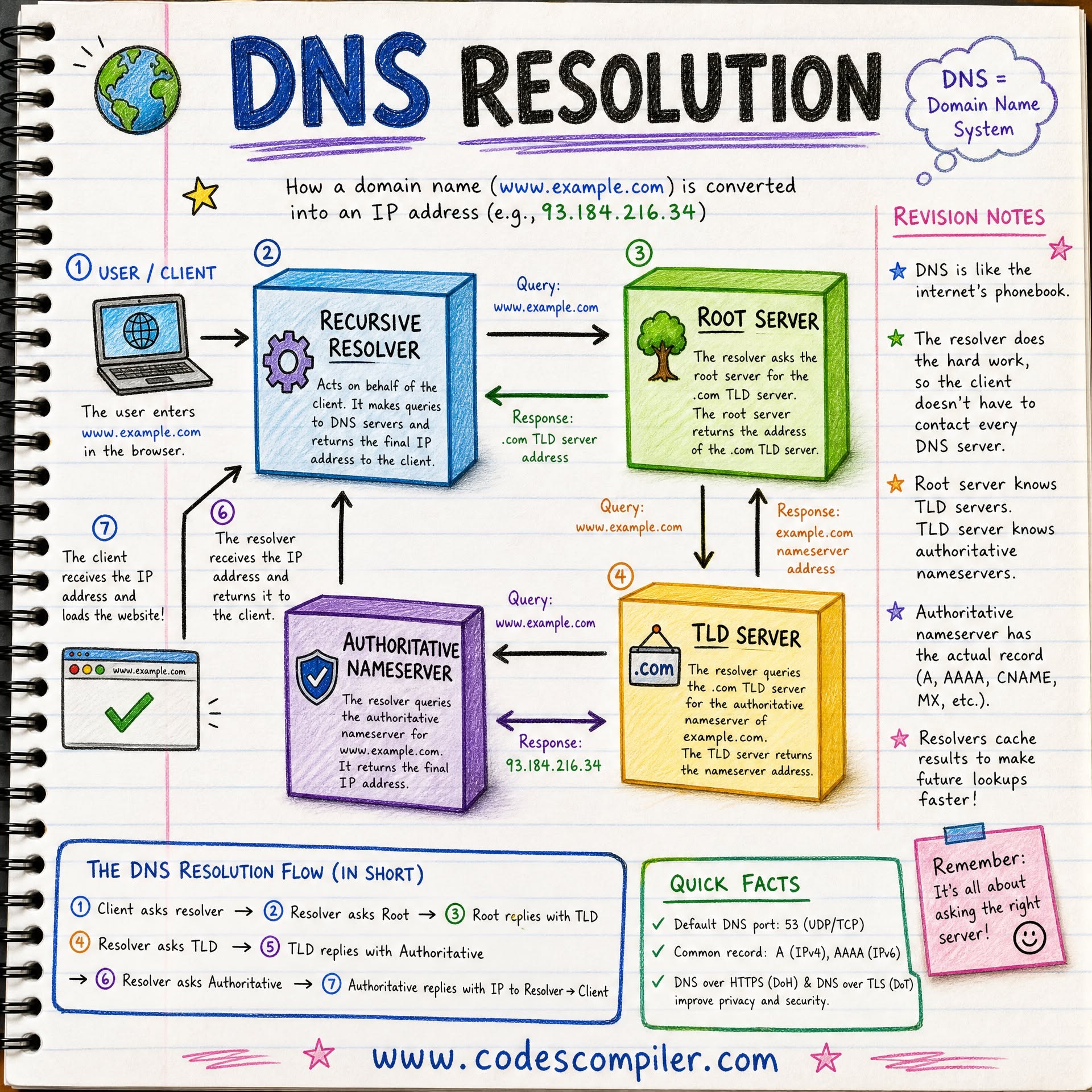
Process: In the early 1980s, the internet had a phonebook problem. Every computer on the network needed to know the address of every other computer it wanted to talk to, and that information was maintained in a single text file called HOSTS.TXT, hosted at the Stanford Research Institute.
As the network grew from dozens of machines to hundreds, then thousands, the system buckled under its own weight. The file was updated once or twice a week by hand, downloads consumed increasing bandwidth, naming collisions became frequent, and the process simply could not scale to a global network.
In 1983, Paul Mockapetris published RFC 882 and RFC 883, proposing a new system: the Domain Name System, or DNS. The design was elegant in its ambition - a hierarchical, distributed database that could translate human-readable names like www.example.com into the numeric IP addresses computers need to route packets.
That system, refined over four decades but fundamentally unchanged in architecture, now handles an estimated tens of trillions of queries per day and underpins virtually every interaction on the modern internet.
When you type a URL into your browser and press Enter, you trigger one of the most intricate choreographies in computing: a series of queries and responses that traverse a global hierarchy of servers, often completing in under 50 milliseconds.
Understanding how DNS resolution works is not just academic - it is essential knowledge for anyone who operates websites, manages networks, troubleshoots connectivity issues, or cares about the performance and security of internet infrastructure.
This article traces the DNS resolution process from first principles: the history that motivated its design, the hierarchical structure that enables it to scale, the step-by-step mechanics of how a domain name becomes an IP address, the caching strategies that make it fast, the record types that make it versatile, the security mechanisms that protect it, and the attacks that threaten it.
By the end, you will understand not just what DNS does, but how and why it works the way it does.
From HOSTS.TXT to a Distributed System: The History of DNS
The HOSTS.TXT Era
Before DNS, name resolution on the ARPANET relied on a flat file maintained by the Network Information Center (NIC) at SRI International. This file, called HOSTS.TXT, was essentially a plain text mapping of hostnames to IP addresses:
# HOSTS.TXT - circa 1982
10.0.0.73   SRI-NIC
10.1.0.13   UTAH-CS
10.2.0.11   BBN-TENEXB
Every administrator who wanted to add or change a hostname had to email the NIC, wait for the file to be updated, and then every machine on the network had to download the new copy via FTP.
By 1982, the ARPANET had grown to several hundred hosts, and the problems were severe:
- Bandwidth waste: Every host downloading the full file consumed increasing network resources
- Naming conflicts: No formal structure prevented two organizations from claiming the same name
- Consistency lag: Days could pass between a change request and its availability across the network
- Single point of failure: If SRI's host was unreachable, no one could get an updated file
- Flat namespace: No hierarchy meant every name had to be globally unique, an increasingly impossible constraint
The Birth of DNS
Paul Mockapetris, then at the Information Sciences Institute at USC, was tasked with designing a replacement. His solution, published in November 1983 as RFC 882 (Domain Names: Concepts and Facilities) and RFC 883 (Domain Names: Implementation and Specification), introduced several revolutionary concepts:
- Hierarchical namespace: Instead of a flat list, names would be organized in a tree structure (e.g.,
cs.stanford.edu), allowing decentralized management - Distributed database: No single server would hold all the data; instead, different organizations would be authoritative for their own portions of the namespace
- Caching: Resolvers would remember answers for a configurable period, dramatically reducing query load
- Delegation: Authority over portions of the namespace could be delegated to other servers, enabling the system to scale without central coordination
These RFCs were later superseded by RFC 1034 and RFC 1035 in 1987, which remain the foundational specifications for DNS to this day. The system was designed to be extensible, and over the following decades, dozens of additional RFCs have added new record types, security extensions, and operational refinements.
"The domain system is a mixture of functions and data types which are an official protocol and functions and data types which are still experimental.
Since the domain system is intentionally extensible, new data types and experimental behavior should always be expected in parts of the system beyond the official protocol." - RFC 1034, Section 1.3
Key Milestones in DNS Evolution
- 1984: The first DNS name servers deployed on the ARPANET; the
.com,.edu,.gov,.mil,.org, and.nettop-level domains established - 1985: The first
.comdomain registered:symbolics.com(March 15, 1985) - 1998: ICANN (Internet Corporation for Assigned Names and Numbers) created to coordinate DNS policy and the root zone
- 1999: DNSSEC (DNS Security Extensions) first specified in RFC 2535
- 2008: The Kaminsky vulnerability revealed fundamental weaknesses in DNS security, accelerating DNSSEC deployment
- 2010: The root zone signed with DNSSEC for the first time
- 2012: ICANN's new generic TLD program launched, eventually adding over 1,200 new TLDs like
.app,.dev, and.blog - 2018: DNS over HTTPS (DoH) and DNS over TLS (DoT) gained significant adoption, encrypting DNS queries for the first time
The DNS Hierarchy: A Tree of Authority
Understanding the Tree Structure
The DNS hierarchy structure is an inverted tree, with the root at the top and increasingly specific labels extending downward. Every domain name you encounter is a path through this tree, read from the most specific label on the left to the root on the right.
Consider the fully qualified domain name (FQDN) www.example.com. - note the trailing dot, which represents the root. This name consists of four labels:
.                    (root)
|
com.                 (top-level domain)
|
example.com.         (second-level domain)
|
www.example.com.     (subdomain / host)
Each level of this hierarchy is managed by different entities, and zone delegation is the mechanism by which authority flows downward through the tree.
The root zone delegates .com to Verisign, Verisign delegates example.com to whoever registered that domain, and that domain owner can further delegate subdomains as they see fit.
The Root Zone
At the apex of the hierarchy sit the root name servers, operated by 12 organizations designated by IANA (Internet Assigned Numbers Authority). They are identified by the letters A through M:
| Letter | Operator | Location Strategy |
|---|---|---|
| A | Verisign | Anycast (global) |
| B | USC-ISI | Los Angeles + Anycast |
| C | Cogent Communications | Anycast (global) |
| D | University of Maryland | Anycast |
| E | NASA Ames Research Center | Anycast |
| F | Internet Systems Consortium (ISC) | Anycast (global) |
| G | U.S. Department of Defense | Anycast |
| H | U.S. Army Research Lab | Anycast |
| I | Netnod (Sweden) | Anycast (global) |
| J | Verisign | Anycast (global) |
| K | RIPE NCC | Anycast (global) |
| L | ICANN | Anycast (global) |
| M | WIDE Project (Japan) | Anycast (global) |
Although there are only 13 logical root server identities (a constraint imposed by the maximum size of a DNS UDP response packet), anycast routing means each identity is served by hundreds of physical servers distributed worldwide. As of 2024, there are over 1,700 root server instances globally.
We will examine anycast in more detail in a later section.
"The root server system is one of the most elegant pieces of distributed engineering ever deployed.
Thirteen logical identities, served by over a thousand physical machines across 130 countries, coordinated by nothing more than BGP routing and a shared commitment to answering questions correctly." - Paul Vixie, Internet Systems Consortium
The root servers do not know the IP address of www.example.com. What they do know is which servers are authoritative for each top-level domain. When a resolver asks the root for www.example.com, the root responds with a referral pointing to the .com TLD servers.
Top-Level Domain (TLD) Servers
TLD servers sit one level below the root and are authoritative for domains within their TLD. TLDs fall into several categories:
- Generic TLDs (gTLDs):
.com,.org,.net,.info,.biz, and the newer gTLDs like.app,.dev,.io - Country-code TLDs (ccTLDs):
.uk,.de,.jp,.au,.br- generally two-letter codes based on ISO 3166-1 - Infrastructure TLD:
.arpa- used for reverse DNS lookups and other infrastructure purposes - Sponsored TLDs:
.edu,.gov,.mil- restricted to specific communities
The .com TLD, operated by Verisign, is by far the largest, with over 160 million registered domains. Its TLD servers handle enormous query volumes and respond with referrals to the authoritative name servers for each second-level domain.
Authoritative Name Servers
At the bottom of the delegation chain sit the authoritative name servers for individual domains. These servers hold the actual DNS records - the A records, MX records, CNAME records, and others - that map names to values.
When a resolver finally reaches the authoritative server for example.com and asks for the A record of www.example.com, it gets the definitive answer: the IP address.
Organizations can operate their own authoritative name servers (running software like BIND, NSD, Knot DNS, or PowerDNS), or they can use managed DNS services provided by companies like Cloudflare, AWS Route 53, Google Cloud DNS, or NS1.
Zone Delegation in Practice
Zone delegation works through NS (Name Server) records. At each level of the hierarchy, NS records point to the servers authoritative for the next level down. The root zone contains NS records for each TLD:
com.    IN    NS    a.gtld-servers.net.
com.    IN    NS    b.gtld-servers.net.
...
The .com zone contains NS records for each registered domain:
example.com.    IN    NS    ns1.example.com.
example.com.    IN    NS    ns2.example.com.
And the example.com zone contains the actual records:
www.example.com. IN A 93.184.216.34This delegation model is what allows DNS to scale. No single server needs to know everything. Each server is responsible only for its zone and knows where to refer queries for zones beneath it.
The Resolution Process: Step by Step
What Happens When You Type a URL in Your Browser
When you type a URL in your browser - say, https://www.example.com/page - and press Enter, a remarkable sequence of events unfolds before a single byte of the web page is transferred. The browser must first determine the IP address of www.example.com, and this is where DNS resolution begins.
Let us trace every step of this process with a concrete example.
Step 1: The Browser Cache
The browser first checks its own DNS cache. Modern browsers maintain an in-memory cache of recent DNS lookups. If you visited www.example.com recently (within the TTL of the cached record), the browser already knows the IP address and skips the entire resolution process.
In Google Chrome, you can inspect this cache by navigating to chrome://net-internals/#dns. Firefox maintains a similar cache accessible through about:networking#dns.
If the browser cache contains a valid (non-expired) entry, resolution completes in microseconds. If not, the browser proceeds to the next level.
Step 2: The Operating System Cache and Hosts File
The browser hands the resolution request to the operating system's stub resolver - a lightweight DNS client built into every major OS. Before making any network queries, the stub resolver checks two local sources:
The hosts file: A direct descendant of the original HOSTS.TXT, still present on every modern operating system:
- Linux/macOS:
/etc/hosts - Windows:
C:\Windows\System32\drivers\etc\hosts
Entries in this file override DNS entirely:
127.0.0.1 localhost 93.184.216.34 www.example.com- Linux/macOS:
The OS DNS cache: The operating system maintains its own resolver cache, independent of any browser cache. On Windows, this is managed by the DNS Client service. On macOS, it is handled by
mDNSResponder. On Linux,systemd-resolvedornscdmay provide caching.
If either source provides an answer, the lookup completes without any network traffic. If not, the stub resolver constructs a DNS query and sends it to the configured recursive resolver.
Step 3: The Recursive Resolver
The stub resolver sends a UDP query (typically on port 53) to the recursive DNS resolver configured in the system's network settings. This resolver might be:
- Your ISP's resolver: Automatically configured via DHCP when you connect to the network
- A public resolver: Manually configured to use services like Google Public DNS (8.8.8.8), Cloudflare DNS (1.1.1.1), or Quad9 (9.9.9.9)
- A local network resolver: Operated by your organization's IT department
The recursive resolver is the workhorse of DNS. Its job is to take the client's simple question - "What is the IP address of www.example.com?" - and chase down the answer by querying the DNS hierarchy on the client's behalf.
This is the fundamental difference between recursive and authoritative DNS: the recursive resolver asks questions and chases referrals; the authoritative server provides answers for the zones it owns.
The recursive resolver first checks its own cache. Because it handles queries for thousands or millions of clients, its cache is often warm with popular domains. If www.example.com has been queried recently by any client, the resolver can return the cached answer immediately.
If the answer is not cached, the resolver begins the iterative resolution process.
Step 4: Querying the Root Servers
The recursive resolver sends a query to one of the root name servers: "What is the A record for www.example.com?"
The root server does not know the answer, but it knows who might. It responds with a referral - a list of name servers authoritative for the .com TLD, along with their IP addresses (called glue records):
;; AUTHORITY SECTION:
com.            172800    IN    NS    a.gtld-servers.net.
com.            172800    IN    NS    b.gtld-servers.net.
com.            172800    IN    NS    c.gtld-servers.net.

;; ADDITIONAL SECTION:
a.gtld-servers.net.
172800    IN    A    192.5.6.30
b.gtld-servers.net.    172800    IN    A    192.33.14.30
The resolver now knows to ask the .com TLD servers.
Step 5: Querying the TLD Servers
The resolver sends the same query to one of the .com TLD servers: "What is the A record for www.example.com?"
The TLD server also does not have the final answer, but it knows which name servers are authoritative for example.com. It responds with another referral:
;; AUTHORITY SECTION:
example.com.    172800    IN    NS    ns1.example.com.
example.com.    172800    IN    NS    ns2.example.com.

;; ADDITIONAL SECTION:
ns1.example.com.    172800    IN    A    199.43.135.53
ns2.example.com.    172800    IN    A    199.43.133.53
Step 6: Querying the Authoritative Server
The resolver now queries one of example.com's authoritative name servers: "What is the A record for www.example.com?"
This time, the server has the definitive answer:
;; ANSWER SECTION:
www.example.com.    86400    IN    A    93.184.216.34
The authoritative server responds with the IP address 93.184.216.34 and a TTL (time to live) of 86400 seconds (24 hours).
Step 7: Response Delivery and Caching
The recursive resolver does several things with this answer:
- Caches the result for the duration specified by the TTL (86400 seconds in this case)
- Caches the intermediate referrals (the NS records for
.comandexample.com, along with their glue records) - Returns the answer to the stub resolver on your machine
The stub resolver passes the IP address back to the browser, which can now initiate a TCP connection to 93.184.216.34 on port 443 (for HTTPS), perform a TLS handshake, and finally request the web page.
The entire process - from the moment you press Enter to the moment the browser has an IP address - typically takes between 10 and 200 milliseconds for an uncached query. Cached queries resolve in under a millisecond.
A Visual Summary of the Full Resolution Path
Browser Cache (miss)
       |
       v
OS Cache / hosts file (miss)
       |
       v
Stub Resolver --query--> Recursive Resolver (cache miss)
                                |
                                |--query--> Root Server
                                |<--referral-- (go ask .com TLD)
                                |
                                |--query--> .com TLD Server
                                |<--referral-- (go ask ns1.example.com)
                                |
                                |--query--> ns1.example.com (Authoritative)
                                |<--answer-- 93.184.216.34
                                |
                          Recursive Resolver (caches answer)
                                |
       <-------answer-----------+
       |
Browser connects to 93.184.216.34
Recursive Resolvers: The Workhorses of DNS
How Recursive Resolvers Work
A recursive resolver (also called a recursive name server or full-service resolver) accepts queries from clients and performs the iterative work of chasing referrals through the DNS hierarchy.
The term "recursive" refers to the fact that the client asks one question and expects a complete answer - the resolver handles all the intermediate steps.
In practice, most recursive resolvers rarely need to start from the root for common domains. Because they serve many clients, their caches are populated with:
- Root server referrals: The NS records and addresses for root servers almost never expire (TTLs are typically 48 hours and constantly refreshed)
- TLD referrals: The NS records for
.com,.org,.net, and other popular TLDs are nearly always cached - Popular domain records: Frequently queried domains like
google.com,facebook.com, oramazon.comstay cached almost permanently due to constant refresh
This means most resolutions require only one or two queries to authoritative servers, not the full four-step process described above. The caching hierarchy makes DNS remarkably efficient.
Popular Public Recursive Resolvers
Several organizations operate free, public recursive DNS resolvers that anyone can use:
Google Public DNS (8.8.8.8 and 8.8.4.4): Launched in 2009, Google's resolver is the most widely used public DNS service in the world. It supports DNSSEC validation, DNS over HTTPS, and DNS over TLS. Google logs queries temporarily for debugging and security analysis.
Cloudflare DNS (1.1.1.1 and 1.0.0.1): Launched on April 1, 2018 (chosen for the memorable IP address), Cloudflare's resolver emphasizes privacy and speed. It commits to never logging client IP addresses to disk and purges query logs within 24 hours. Independent audits verify these claims.
It consistently ranks as one of the fastest public resolvers worldwide.
Quad9 (9.9.9.9): A nonprofit resolver launched in 2017, Quad9 integrates threat intelligence feeds to block queries for known malicious domains. It provides a layer of protection against phishing, malware, and command-and-control traffic at the DNS level.
OpenDNS (208.67.222.222 and 208.67.220.220): Now owned by Cisco, OpenDNS offers optional content filtering and enterprise DNS security features. It was one of the first public DNS alternatives, predating Google Public DNS by several years.
ISP Resolvers vs. Public Resolvers
By default, most consumer internet connections use the ISP's recursive resolver, configured automatically via DHCP. There are several reasons one might switch to a public resolver:
- Performance: Public resolvers often have lower latency due to extensive anycast deployments and large caches
- Privacy: ISP resolvers can log and monetize DNS query data; some public resolvers commit to minimal logging
- Security: Some public resolvers offer DNSSEC validation and malware blocking that ISP resolvers may not
- Reliability: Public resolvers operated by large infrastructure companies often have better uptime than ISP resolvers
- Censorship circumvention: In some regions, ISP resolvers are required to block access to certain domains; public resolvers may not apply the same restrictions (though this varies by jurisdiction)
DNS Record Types in Detail
DNS records are the fundamental units of information stored in zone files on authoritative name servers. Each record has a name, a type, a class (almost always IN for Internet), a TTL, and record-specific data.
Understanding the different types of DNS records is essential for managing domains, configuring email, setting up services, and troubleshooting resolution issues.
Essential Record Types
A Record (Address Record)
The A record maps a domain name to an IPv4 address. This is the most common and fundamental DNS record type.
www.example.com. 3600 IN A 93.184.216.34A single domain can have multiple A records, each pointing to a different IP address. Resolvers typically return all of them, and the client (or resolver) selects one - this is one mechanism for DNS-based load balancing.
AAAA Record (IPv6 Address Record)
The AAAA record (pronounced "quad-A") is the IPv6 equivalent of the A record. As the internet transitions from IPv4 to IPv6, AAAA records are increasingly important.
www.example.com. 3600 IN AAAA 2606:2800:220:1:248:1893:25c8:1946Modern resolvers query for both A and AAAA records simultaneously, and the client's network stack determines which to use based on available connectivity - a process sometimes called Happy Eyeballs (RFC 6555).
CNAME Record (Canonical Name Record)
A CNAME record creates an alias from one domain name to another. Instead of directly providing an IP address, it says "look up this other name instead."
blog.example.com. 3600 IN CNAME example.wordpress.com.When a resolver encounters a CNAME, it must restart the resolution process for the target name. CNAME records have important restrictions:
- A CNAME record cannot coexist with other record types for the same name
- A CNAME record cannot be placed at the zone apex (e.g.,
example.com.) because the zone apex must have SOA and NS records, which would conflict
These restrictions have led to the development of vendor-specific alternatives like ALIAS, ANAME, and CNAME-flattening, which resolve the CNAME at the authoritative server and return the resulting A/AAAA records directly.
MX Record (Mail Exchange Record)
MX records specify the mail servers responsible for accepting email for a domain. Each MX record includes a priority value (lower numbers indicate higher preference) and the hostname of the mail server.
example.com.     3600    IN    MX    10    mail1.example.com.
example.com.     3600    IN    MX    20    mail2.example.com.
example.com.
3600    IN    MX    30    mail-backup.example.com.
When sending an email to user@example.com, the sending mail server queries the MX records for example.com, then attempts delivery to the servers in priority order - first mail1, then mail2 if mail1 is unreachable, then mail-backup as a last resort.
NS Record (Name Server Record)
NS records identify the authoritative name servers for a zone. They are the glue that holds the DNS hierarchy together through delegation.
example.com.    86400    IN    NS    ns1.example.com.
example.com.    86400    IN    NS    ns2.example.com.
Best practice mandates at least two NS records for redundancy, and many organizations use three or more, often distributed across different networks and geographic regions.
TXT Record (Text Record)
TXT records store arbitrary text data associated with a domain. Originally intended for human-readable notes, they have become critical infrastructure for domain verification and email authentication:
- SPF (Sender Policy Framework): Specifies which servers are authorized to send email for a domain
example.com. 3600 IN TXT "v=spf1 mx ip4:192.0.2.0/24 -all" - DKIM (DomainKeys Identified Mail): Publishes public keys for email signature verification
- DMARC (Domain-based Message Authentication): Specifies policy for handling emails that fail SPF/DKIM
- Domain verification: Services like Google Workspace, Microsoft 365, and Let's Encrypt use TXT records to verify domain ownership
SOA Record (Start of Authority)
Every DNS zone must have exactly one SOA record at its apex. The SOA record contains administrative information about the zone:
example.com.    86400    IN    SOA    ns1.example.com. admin.example.com. (
                                    2024010101    ; Serial number
                                    3600          ; Refresh interval
                                    900           ; Retry interval
                                    604800        ; Expire time
                                    86400         ; Minimum TTL / Negative caching TTL
                                    )
The SOA record specifies the primary name server, the responsible party's email address (with @ replaced by .), a serial number used for zone transfer synchronization, and various timing parameters that control how secondary servers refresh their copies of the zone.
Specialized Record Types
SRV Record (Service Record)
SRV records specify the location (hostname and port) of specific services. Unlike A records, which only provide an IP address, SRV records include priority, weight, port, and target.
_sip._tcp.example.com.     3600    IN    SRV    10 60 5060 sipserver.example.com.
_sip._tcp.example.com.     3600    IN    SRV    10 40 5060 sipbackup.example.com.
SRV records are used by protocols like SIP (voice over IP), XMPP (messaging), LDAP, and Kerberos.
They enable clients to discover which server and port to connect to for a given service.
PTR Record (Pointer Record)
PTR records provide reverse DNS - mapping IP addresses back to hostnames. They are stored in special zones under the .arpa TLD:
- IPv4: The IP address
93.184.216.34is looked up as34.216.184.93.in-addr.arpa. - IPv6: Each hexadecimal digit is reversed and separated by dots under
ip6.arpa.
34.216.184.93.in-addr.arpa. 86400 IN PTR www.example.com.Reverse DNS is used for email server verification (many mail servers reject messages from IPs without valid PTR records), network diagnostics, and security logging.
CAA Record (Certification Authority Authorization)
CAA records specify which Certificate Authorities (CAs) are permitted to issue TLS/SSL certificates for a domain. This is a security measure that prevents unauthorized certificate issuance.
example.com.     3600    IN    CAA    0 issue "letsencrypt.org"
example.com.     3600    IN    CAA    0 issuewild "letsencrypt.org"
example.com.
3600    IN    CAA    0 iodef "mailto:security@example.com"
Since 2017, all CAs are required to check CAA records before issuing certificates. If a CAA record exists and the CA is not listed, it must refuse to issue.
Record Types Summary Table
| Record Type | Purpose | Example Value | Common Use |
|---|---|---|---|
| A | Maps name to IPv4 address | 93.184.216.34 | Web servers, any IPv4 service |
| AAAA | Maps name to IPv6 address | 2606:2800:220:1:... | IPv6-enabled services |
| CNAME | Alias to another name | example.cdn.net. | CDN integration, service aliases |
| MX | Mail server for domain | 10 mail.example.com. | Email delivery routing |
| NS | Authoritative name servers | ns1.example.com. | Zone delegation |
| TXT | Arbitrary text data | "v=spf1 mx -all" | SPF, DKIM, domain verification |
| SOA | Zone authority info | Serial, timers, admin contact | Zone management |
| SRV | Service location | 10 60 5060 sip.example.com. | Service discovery (SIP, XMPP) |
| PTR | Reverse DNS (IP to name) | www.example.com. | Email verification, diagnostics |
| CAA | Certificate authority authorization | 0 issue "letsencrypt.org" | TLS certificate control |
DNS Caching: Performance at Every Level
Why Caching Matters
Without caching, every single DNS lookup would require multiple round trips through the hierarchy - root server, TLD server, authoritative server - adding hundreds of milliseconds to every web request. DNS caching is what transforms a hierarchical database designed for correctness into a system that also delivers speed.
DNS caching improves performance by storing query results at multiple levels so that repeated lookups for the same domain name can be answered instantly from local memory rather than requiring network round trips.
The cache operates at every layer of the resolution chain, and understanding how it works is essential for both performance optimization and troubleshooting.
Cache Levels
Level 1: Browser Cache
Every modern web browser maintains an in-memory DNS cache. When the browser needs to resolve a domain, it checks this cache first. Entries are stored for the duration of the DNS record's TTL, though some browsers impose their own maximum cache time (Chrome, for example, caps DNS cache entries at one minute regardless of the TTL).
Level 2: Operating System Cache
The OS stub resolver maintains a system-wide DNS cache shared by all applications. On Windows, the DNS Client service (dnscache) manages this. On macOS, mDNSResponder handles caching. On Linux, systemd-resolved provides caching when enabled. You can inspect and flush these caches:
# Windows: View DNS cache
ipconfig /displaydns

# Windows: Flush DNS cache
ipconfig /flushdns

# macOS: Flush DNS cache
sudo dscacheutil -flushcache; sudo killall -HUP mDNSResponder

# Linux (systemd-resolved): View cache statistics
resolvectl statistics

# Linux (systemd-resolved): Flush cache
resolvectl flush-caches
Level 3: Recursive Resolver Cache
The recursive resolver's cache is the most impactful because it serves many clients. A large ISP's resolver might serve millions of users, meaning a single cached response for google.com eliminates millions of individual lookups to Google's authoritative servers.
The resolver caches not just final answers but also intermediate referrals - the NS records for TLDs and second-level domains. This means most resolutions skip the root and TLD steps entirely.
Level 4: Authoritative Server Hints
While not "caching" in the traditional sense, authoritative servers can optimize by preloading zone data into memory. Modern authoritative server software like NSD loads entire zones into RAM at startup, ensuring responses are served from memory rather than disk.
TTL: The Cache Clock
TTL (Time to Live) is the mechanism that controls how long a cached DNS record remains valid. Every DNS record includes a TTL value, specified in seconds by the zone administrator.
www.example.com.    3600    IN    A    93.184.216.34
                    ^^^^
                    TTL = 3600 seconds = 1 hour
When a resolver caches this record, it starts a countdown from 3600 seconds. When the TTL expires, the cached entry is discarded, and the next query for this record will trigger a fresh lookup.
Common TTL values and their tradeoffs:
- 300 seconds (5 minutes): Used for records that change frequently or when you anticipate upcoming changes. Results in more queries to authoritative servers but faster propagation of updates.
- 3600 seconds (1 hour): A common middle ground. Reasonable cache benefit with acceptable propagation delay.
- 86400 seconds (24 hours): Used for stable records that rarely change. Minimizes authoritative server load but means changes take up to a day to propagate.
- 172800 seconds (48 hours): Common for NS records and other infrastructure records that change very infrequently.
Negative Caching
DNS also caches negative results - the knowledge that a domain does not exist. When an authoritative server responds with NXDOMAIN (non-existent domain), the resolver caches this negative result according to the TTL specified in the zone's SOA record (the minimum TTL field).
Negative caching prevents resolvers from repeatedly querying for domains that don't exist, which is especially important for mitigating denial-of-service attacks that generate queries for random non-existent subdomains.
Cache Poisoning Prevention
Because caching is so central to DNS, corrupting the cache is a powerful attack vector. We will examine this in the security section, but it is worth noting here that the integrity of the entire DNS system depends on caches accurately reflecting authoritative data.
Mechanisms like random source ports, query ID randomization, and DNSSEC all serve to protect cache integrity.
DNS Propagation: Why Changes Take Time
How DNS Propagation Works
DNS propagation is the process by which changes to DNS records become visible across the internet. When you update a DNS record - for instance, changing the A record for www.example.com from one IP address to another - the change takes effect immediately on the authoritative name server.
However, every resolver and client that has the old record cached will continue using the old value until their cached copy expires.
This is not a "propagation" in the active sense - there is no mechanism that pushes updates from authoritative servers to resolvers. Instead, it is a passive process: old cached entries gradually expire, and fresh queries fetch the new data.
The time it takes for the entire internet to see the new record depends on the TTL of the old record.
The Propagation Timeline
If the A record for www.example.com had a TTL of 86400 (24 hours), then after you change the record:
- Immediately: Anyone whose cache has already expired (or who has never queried the domain) sees the new IP
- Within minutes: Clients with recently expired caches refresh and see the new IP
- Within hours: Most caches refresh as TTLs expire
- Up to 24 hours: The last caches - those that cached the old record moments before the change - finally expire and refresh
In practice, the vast majority of the internet sees changes well before the full TTL expires, because most caches are not at their maximum age at the moment of the change.
TTL Strategies for Planned Changes
Experienced DNS administrators use TTL manipulation to minimize propagation delays for planned changes:
Step 1: Lower the TTL in advanceDays or weeks before the planned change, reduce the TTL from its normal value (e.g., 86400) to a short value (e.g., 300 seconds). Wait for the old TTL period to pass so all caches refresh with the new, short TTL.
Step 2: Make the changeWith short TTLs in effect, the change propagates across the internet within minutes rather than hours.
Step 3: Restore the TTLAfter confirming the change is working correctly, increase the TTL back to its normal value to reduce query load on the authoritative servers.
# Normal operation (weeks before change)
www.example.com.    86400    IN    A    93.184.216.34

# Preparation phase (48 hours before change)
www.example.com.    300      IN    A    93.184.216.34

# The change (after old TTL has expired everywhere)
www.example.com.
300      IN    A    198.51.100.42

# Post-verification (once change is confirmed working)
www.example.com.    86400    IN    A    198.51.100.42
Common Propagation Pitfalls
- Forgetting to pre-lower TTLs: Making a change when TTLs are 24+ hours means a long wait
- Some resolvers ignore TTLs: A small number of resolvers enforce minimum TTLs (e.g., refusing to cache for less than 30 seconds or overriding short TTLs with longer ones), which can delay propagation
- Multiple levels of caching: Even if the resolver refreshes, the browser or OS cache may hold stale data
- Glue records at the registrar: Changes to name server delegation (NS records) require updates at the registrar level, which can introduce additional delays independent of DNS TTLs
Authoritative Name Servers: Zone Files and SOA Records
Zone Files
The authoritative name server stores its data in zone files - text files that define all the DNS records for a given zone. The zone file format was standardized in RFC 1035 and remains the canonical representation of DNS zone data.
A typical zone file for example.com looks like this:
$TTL 86400
$ORIGIN example.com.

@    IN    SOA    ns1.example.com.  admin.example.com.
(
                  2024010101    ; Serial
                  3600          ; Refresh
                  900           ; Retry
                  604800        ; Expire
                  86400         ; Minimum TTL
                  )

; Name servers
@         IN    NS     ns1.example.com.
@         IN    NS     ns2.example.com.

; Glue records
ns1       IN    A      199.43.135.53
ns2       IN    A      199.43.133.53

; Web servers
@         IN    A      93.184.216.34
www       IN    CNAME  example.com.

; Mail
@         IN    MX     10 mail.example.com.
mail      IN    A      93.184.216.40

; Email authentication
@         IN    TXT    "v=spf1 mx ip4:93.184.216.0/24 -all"

; Certificate authority
@         IN    CAA    0 issue "letsencrypt.org"
The $TTL directive sets the default TTL for records that don't specify one.
The $ORIGIN directive defines the base domain. The @ symbol represents the zone apex (in this case, example.com.).
Primary and Secondary Servers
Traditionally, authoritative DNS uses a primary/secondary (formerly called master/slave) architecture:
- Primary server: Holds the writable copy of the zone file. Zone edits are made here.
- Secondary server(s): Hold read-only copies of the zone, synchronized from the primary via zone transfers (AXFR for full transfers, IXFR for incremental transfers).
The SOA record's serial number is key to this synchronization. When the primary's serial number is higher than the secondary's copy, the secondary knows it needs to refresh. The refresh, retry, and expire values in the SOA control the timing of this synchronization.
Modern managed DNS services often abstract this model away, using distributed databases and API-driven zone management instead of traditional zone files and zone transfers. But the underlying DNS protocol behavior remains the same.
DNS Security: Protecting the System
The Security Challenge
DNS was designed in an era when the internet was a small, trusted network of researchers. The original protocol includes no authentication, no encryption, and no integrity verification.
Every DNS query and response travels in plaintext, and there is no built-in mechanism to verify that a response actually came from a legitimate server. This makes DNS vulnerable to a range of attacks.
DNSSEC: Authenticating DNS Responses
DNS Security Extensions (DNSSEC) add cryptographic signatures to DNS records, allowing resolvers to verify that a response has not been tampered with and genuinely comes from the authoritative server for the zone.
How DNSSEC works:
- The zone administrator generates a key pair (public and private keys) for the zone
- Each DNS record set in the zone is signed with the private key, producing an RRSIG (Resource Record Signature) record
- The public key is published as a DNSKEY record in the zone
- A hash of the public key is published as a DS (Delegation Signer) record in the parent zone
- This creates a chain of trust from the root zone (which is signed and whose keys are widely known) down through TLDs to individual domains
When a DNSSEC-validating resolver receives a response, it:
- Retrieves the RRSIG record alongside the answer
- Retrieves the DNSKEY record for the zone
- Verifies the RRSIG using the DNSKEY
- Validates the DNSKEY against the DS record in the parent zone
- Follows the chain of trust up to the root
If validation fails at any step, the resolver returns a SERVFAIL error rather than an unverified answer.
DNSSEC limitations:
- Does not encrypt queries or responses (only authenticates them)
- Adds complexity to zone management (key rotation, signing)
- Increases response sizes (additional records)
- NSEC/NSEC3 records for authenticated denial of existence can enable zone enumeration
- Adoption remains incomplete - as of 2024, fewer than 10% of
.comdomains are DNSSEC-signed
"DNS was designed for a world that no longer exists. It assumes that every participant is trustworthy, that packets cannot be forged, and that the network path is honest. DNSSEC is our retrofit --- our attempt to add authentication to a system that was never designed to have it." - Dan Kaminsky
DNS over HTTPS (DoH)
DNS over HTTPS encrypts DNS queries by sending them as HTTPS requests to a DoH-compatible resolver. The DNS message is encoded in the HTTP request body or URL query parameter, and the entire exchange is protected by TLS.
GET https://dns.cloudflare.com/dns-query?dns=AAABAAAB...
Accept: application/dns-messageBenefits:
- Prevents eavesdropping on DNS queries by ISPs, network operators, or attackers
- Prevents DNS query manipulation by middleboxes
- Uses standard HTTPS infrastructure (port 443), making it difficult to block
Criticisms:
- Centralizes DNS resolution in a few large providers (most DoH implementations point to Cloudflare, Google, or a few others)
- Bypasses enterprise DNS filtering and monitoring
- Makes network-level parental controls and security filtering more difficult
- Adds latency for the initial HTTPS connection setup
DNS over TLS (DoT)
DNS over TLS encrypts DNS queries by wrapping the standard DNS protocol in a TLS connection on port 853. Unlike DoH, it uses a dedicated port, making it easier for network administrators to identify (and potentially block) encrypted DNS traffic.
Client ──TLS on port 853──> Recursive ResolverDoT provides the same privacy benefits as DoH but is more transparent to network management systems. Both DoH and DoT are supported by major public resolvers.
Comparing DNS Security Mechanisms
DNSSEC, DoH, and DoT protect against different threats:
- DNSSEC: Protects data integrity - ensures the answer has not been forged. Does not protect privacy.
- DoH/DoT: Protects privacy - encrypts queries so observers cannot see what you are looking up. Does not verify the authenticity of the answer.
For comprehensive protection, both DNSSEC and encrypted transport should be used together.
DNS Attacks: Threats to the System
DNS Cache Poisoning
Cache poisoning (also called DNS spoofing) is an attack where a malicious actor injects fraudulent DNS records into a resolver's cache.
If successful, users querying the poisoned resolver receive incorrect IP addresses, potentially directing them to attacker-controlled servers for phishing, malware distribution, or traffic interception.
How it works:
- An attacker sends a flood of forged DNS responses to a recursive resolver, each claiming to be from the authoritative server
- Each forged response contains a malicious answer (e.g., mapping
bank.comto the attacker's IP) - The forged responses must match the resolver's pending query - same query name, type, and a transaction ID that matches
The Kaminsky Attack (2008): Security researcher Dan Kaminsky discovered that the standard DNS transaction ID (a 16-bit field, giving only 65,536 possible values) was trivially guessable.
By forcing the resolver to look up random non-existent subdomains (which wouldn't be cached), an attacker could make unlimited poisoning attempts. This was one of the most significant DNS vulnerabilities ever discovered.
Mitigations:
- Source port randomization: Resolvers now use random source UDP ports for each query, adding approximately 16 more bits of entropy that an attacker must guess
- Transaction ID randomization: Combined with source port randomization, this makes spoofing extremely difficult
- DNSSEC: Cryptographically verifies responses, making poisoned responses detectable
- Response rate limiting: Limits the rate of identical responses from authoritative servers
DNS Amplification Attacks
DNS amplification is a type of distributed denial-of-service (DDoS) attack that exploits DNS's use of UDP (a connectionless protocol) and the fact that DNS responses are often much larger than queries.
How it works:
- The attacker sends DNS queries to open resolvers with the source IP address spoofed to the victim's IP
- The queries are crafted to elicit large responses (e.g., requesting ANY records or DNSSEC-signed responses)
- The resolvers send their large responses to the victim's IP address
- The victim is overwhelmed by a flood of unsolicited DNS responses
Amplification factor: A 60-byte query can generate a 4,000+ byte response, giving an amplification factor of 65x or more. With thousands of open resolvers, an attacker with modest bandwidth can generate enormous floods.
Mitigations:
- BCP 38 (ingress filtering): Network operators should filter spoofed source addresses
- Response Rate Limiting (RRL): Authoritative servers limit the rate of identical responses to the same IP
- Closing open resolvers: Recursive resolvers should only serve their intended clients, not the entire internet
DNS Hijacking
DNS hijacking redirects DNS queries or responses through malicious infrastructure. This can occur at several levels:
- Router hijacking: Malware on a home router changes the DNS server settings, redirecting all queries to an attacker-controlled resolver
- Man-in-the-middle: An attacker on the network path intercepts DNS queries and returns forged responses
- Registrar hijacking: An attacker gains access to the domain registrar account and changes the authoritative name server delegation
- BGP hijacking: An attacker announces IP routes that divert traffic intended for legitimate DNS servers
Registrar hijacking is particularly dangerous because it changes the delegation at the TLD level, affecting all resolvers regardless of their security posture. Notable incidents include the 2018 DNSpionage campaign and the 2019 Sea Turtle attacks, both attributed to nation-state actors.
DNS Tunneling
DNS tunneling encodes arbitrary data within DNS queries and responses, using the DNS protocol as a covert communication channel. Because DNS traffic is rarely blocked (networks need it to function), it can bypass firewalls and exfiltrate data from otherwise locked-down environments.
Detection relies on anomaly analysis: unusually long subdomain labels, high query rates, unusual record types (TXT with encoded data), and queries to suspicious domains.
Anycast Routing for DNS
What is Anycast?
Anycast is a network addressing and routing methodology where the same IP address is announced from multiple physical locations. When a packet is sent to an anycast address, the network routes it to the nearest (in terms of BGP routing distance) instance.
Anycast and DNS
Anycast is fundamental to modern DNS infrastructure. The root name servers were among the earliest and most important adopters: all 13 root server identities use anycast, allowing hundreds of physical servers worldwide to share the same IP addresses.
How it works for DNS:
- Multiple DNS server instances in different geographic locations all announce the same IP address via BGP
- When a resolver sends a query to that IP, the internet's routing infrastructure delivers it to the nearest instance
- The nearest instance responds, and the response follows the normal routing path back
Benefits:
- Reduced latency: Queries are answered by the geographically closest server
- DDoS resilience: Attack traffic is distributed across all instances rather than concentrated on one
- Automatic failover: If an instance goes down, BGP routing automatically directs traffic to the next nearest instance
- Load distribution: Query traffic is naturally balanced across instances based on network topology
Example: Cloudflare's authoritative DNS and 1.1.1.1 resolver operate from over 300 cities worldwide, all using anycast. A query from Tokyo is answered by a server in Tokyo; a query from London is answered by a server in London. The client has no awareness of this - it simply sends a query to the same IP address.
DNS Load Balancing and Failover
Round-Robin DNS
The simplest form of DNS load balancing is round-robin DNS: configuring multiple A records for the same name, each pointing to a different server.
www.example.com.    300    IN    A    192.0.2.1
www.example.com.    300    IN    A    192.0.2.2
www.example.com.    300    IN    A    192.0.2.3
Most DNS resolvers rotate the order of records in each response, so different clients connect to different servers. However, round-robin DNS has significant limitations:
- No health checking: If one server goes down, its A record remains in DNS, and clients will still be directed to it
- Uneven distribution: Caching means some resolvers send all their clients to the same server for the duration of the TTL
- No awareness of server load: A heavily loaded server receives the same share of traffic as an idle one
Intelligent DNS Load Balancing
Modern DNS-based load balancing goes far beyond round-robin. Services like AWS Route 53, Cloudflare Load Balancing, and NS1 offer:
- Health checks: The DNS service monitors backend servers and removes unhealthy ones from responses
- Geographic routing (GeoDNS): Responses vary based on the client's location, directing users to the nearest data center
- Weighted routing: Different servers receive different proportions of traffic based on configured weights
- Latency-based routing: The DNS service measures latency from its edges to each backend and routes clients to the lowest-latency option
- Failover: A primary server is returned normally; if health checks detect failure, a secondary server's IP is returned instead
DNS Failover in Practice
A typical failover configuration might look like this conceptually:
Primary: 192.0.2.1 (US East data center)
Secondary: 198.51.100.1 (US West data center)
Health check: HTTPS GET /health every 30 seconds

Normal operation:
  www.example.com → 192.0.2.1 (TTL 60)

Primary failure detected:
  www.example.com → 198.51.100.1 (TTL 60)

Primary recovery detected:
  www.example.com → 192.0.2.1 (TTL 60)
The low TTL (60 seconds) ensures that failover takes effect quickly, at the cost of increased query volume to the authoritative server.
Common DNS Debugging Tools
When DNS resolution fails or behaves unexpectedly, several command-line tools are indispensable for diagnosis.
dig (Domain Information Groper)
dig is the most powerful and widely used DNS debugging tool, available on Linux, macOS, and Windows (via BIND utilities or WSL).
# Basic query
dig www.example.com

# Query specific record type
dig example.com MX

# Query specific name server
dig @8.8.8.8 www.example.com

# Trace the full resolution path (simulates iterative resolution)
dig +trace www.example.com

# Short output format
dig +short www.example.com

# Show all record types
dig example.com ANY

# Check DNSSEC signatures
dig +dnssec example.com
The +trace option is particularly valuable: it starts at the root servers and follows referrals step by step, showing exactly how the resolution process unfolds.
This is invaluable for diagnosing delegation issues.
Example dig output:
; <<>> DiG 9.18.18 <<>> www.example.com
;; global options: +cmd
;; Got answer:
;; ->>HEADER<<- opcode: QUERY, status: NOERROR, id: 54321
;; flags: qr rd ra; QUERY: 1, ANSWER: 1, AUTHORITY: 0, ADDITIONAL: 1

;; QUESTION SECTION:
;www.example.com.
IN      A

;; ANSWER SECTION:
www.example.com.    86400   IN      A       93.184.216.34

;; Query time: 23 msec
;; SERVER: 1.1.1.1#53(1.1.1.1) (UDP)
;; WHEN: Mon Jan 01 12:00:00 UTC 2024
;; MSG SIZE  rcvd: 60
Key fields to examine:
- status: NOERROR (success), NXDOMAIN (domain doesn't exist), SERVFAIL (server failure)
- flags:
qr(query response),rd(recursion desired),ra(recursion available),aa(authoritative answer) - ANSWER SECTION: The actual DNS records returned
- Query time: How long the resolution took
nslookup
nslookup is a simpler DNS lookup tool available on virtually every operating system, including Windows where dig is not installed by default.
# Basic lookup
nslookup www.example.com

# Query specific server
nslookup www.example.com 8.8.8.8

# Look up specific record type
nslookup -type=MX example.com

# Look up name servers
nslookup -type=NS example.com

# Reverse DNS lookup
nslookup 93.184.216.34
While less detailed than dig, nslookup is useful for quick checks, especially on Windows systems.
host
The host command provides a simplified interface for DNS lookups on Unix-like systems.
# Basic lookup
host www.example.com

# Verbose output
host -v www.example.com

# Specific record type
host -t MX example.com

# Use specific name server
host www.example.com 8.8.8.8

# Reverse DNS
host 93.184.216.34
Practical Debugging Scenarios
Scenario 1: Website unreachable after DNS change
# Check what the authoritative server returns
dig @ns1.example.com www.example.com

# Check what your resolver returns (may be cached)
dig www.example.com

# Check the TTL on the cached record
dig www.example.com | grep -i ttl

# Trace the full resolution path
dig +trace www.example.com
If the authoritative server returns the new IP but your resolver returns the old one, the issue is caching.
Wait for the TTL to expire, or flush your local DNS cache.
Scenario 2: Email not being delivered
# Check MX records
dig example.com MX

# Verify the mail server resolves
dig mail.example.com A

# Check SPF record
dig example.com TXT

# Check reverse DNS for the mail server
dig -x 93.184.216.40
Scenario 3: Verifying DNSSEC
# Check if domain is signed
dig +dnssec example.com

# Check DS record at parent
dig DS example.com @a.gtld-servers.net

# Validate the chain of trust
dig +trace +dnssec example.com
Advanced DNS Concepts
DNS and Content Delivery Networks
CDNs like Cloudflare, Akamai, and Amazon CloudFront use DNS as a traffic steering mechanism.
When a user queries a CDN-served domain, the CDN's authoritative DNS server returns the IP address of the edge server closest to the user. This is often implemented using a combination of:
- GeoDNS: Mapping the resolver's IP address to a geographic region and returning the nearest edge
- Latency-based routing: Measuring actual latency from DNS edges to user populations
- CNAME chains: The origin domain CNAMEs to a CDN-managed domain, which then resolves to edge IPs
For example, when www.example.com is served through a CDN:
www.example.com.     300    IN    CNAME    www.example.com.cdn.cloudflare.net.
www.example.com.cdn.cloudflare.net.    300    IN    A    104.18.25.46
The CDN's authoritative server for cloudflare.net dynamically selects the A record based on where the query is coming from, ensuring optimal performance.
EDNS Client Subnet (ECS)
One challenge with GeoDNS is that the authoritative server sees the recursive resolver's IP address, not the end user's. If a user in Tokyo uses Google's 8.8.8.8 resolver, and the query reaches the authoritative server from a Google node in the US, the GeoDNS response will be optimized for the US, not Tokyo.
EDNS Client Subnet (RFC 7871) addresses this by allowing the recursive resolver to include a portion of the client's IP address (typically the first 24 bits for IPv4) in the DNS query. The authoritative server can then make GeoDNS decisions based on the client's actual location.
; Query with ECS
;; OPT PSEUDOSECTION:
; EDNS: version: 0, flags: do; udp: 512
; CLIENT-SUBNET: 203.0.113.0/24/0
This is a privacy tradeoff: better routing accuracy at the cost of revealing partial client IP information to authoritative servers.
DNS Rebinding
DNS rebinding is an attack where a malicious domain initially resolves to a legitimate IP address, then changes to resolve to a private/internal IP address (like 192.168.1.1). This can bypass same-origin policy protections in browsers, potentially allowing a malicious website to interact with devices on the user's local network.
Mitigations include DNS pinning (browsers caching the IP for the duration of the page session), filtering private IP addresses in DNS responses, and network-level protections that block external DNS responses containing internal IP addresses.
The DNS Flag Day Movement
The DNS community has organized several DNS Flag Days to encourage the deprecation of obsolete workarounds and the adoption of modern standards:
- DNS Flag Day 2019 (February 1): Removed workarounds for non-compliant EDNS implementations
- DNS Flag Day 2020 (October 1): Encouraged proper support for DNS message sizes and TCP fallback
These coordinated efforts have helped clean up years of accumulated technical debt in DNS implementations worldwide.
DNS over QUIC (DoQ)
The newest DNS transport protocol, DNS over QUIC (RFC 9250), uses the QUIC transport protocol to encrypt DNS queries. QUIC provides several advantages over TCP+TLS (used by DoT) and HTTPS (used by DoH):
- Faster connection establishment: QUIC's 0-RTT and 1-RTT handshakes reduce latency
- Stream multiplexing without head-of-line blocking: Multiple DNS queries can be in flight without one slow response delaying others
- Connection migration: DNS sessions survive network changes (e.g., switching from Wi-Fi to cellular)
DoQ is still in early adoption but represents the likely future of encrypted DNS transport.
Real-World DNS Architecture Examples
Large-Scale Website DNS
A major website like example-large-corp.com might have a DNS architecture that looks like this:
- Registrar: Domain registered at a registrar like Cloudflare Registrar or GoDaddy
- Authoritative DNS: Managed by a provider like AWS Route 53, with multiple NS records for redundancy
- GeoDNS: Users in different regions are directed to different data centers
- Health checks: DNS provider monitors each data center and removes unhealthy ones from responses
- Short TTLs: 60-300 seconds to enable fast failover
- CAA records: Restricting certificate issuance to a specific CA
- SPF, DKIM, DMARC: Full email authentication chain in TXT records
Email Authentication DNS Records
Modern email authentication relies heavily on DNS. A properly configured domain has:
; SPF: Specifies authorized senders
example.com.     IN    TXT    "v=spf1 include:_spf.google.com ip4:192.0.2.0/24 -all"

; DKIM: Public key for signature verification
selector._domainkey.example.com.
IN    TXT    "v=DKIM1; k=rsa; p=MIGfMA0GCS..."

; DMARC: Policy for handling authentication failures
_dmarc.example.com.
IN    TXT    "v=DMARC1; p=reject; rua=mailto:dmarc@example.com"
Together, these records form a defense against email spoofing that relies entirely on DNS for key distribution and policy publication.
Multi-CDN DNS Strategy
Organizations that use multiple CDNs for resilience might configure DNS like this:
; Primary CDN (weighted 70%)
www.example.com.     60    IN    CNAME    primary.cdn-a.net.

; During failover, switch to:
www.example.com.
60    IN    CNAME    backup.cdn-b.net.
Intelligent DNS platforms can automatically shift traffic between CDNs based on performance, availability, and cost metrics, using DNS as the traffic steering mechanism.
The Future of DNS
DNS has proven remarkably durable as a protocol, but it continues to evolve. Several trends are shaping its future:
Encrypted DNS becoming default: Major browsers and operating systems are adopting DoH and DoT as default configurations, moving DNS privacy from an opt-in feature to a baseline expectation. Apple's iOS and macOS support system-wide encrypted DNS profiles.
Android has built-in support for Private DNS (DoT). Windows 11 includes native DoH support.
"The shift to encrypted DNS is as significant as the shift from HTTP to HTTPS was for the web. It is not just a privacy win; it is a fundamental change in the trust model of the internet's oldest and most critical infrastructure." - Nick Sullivan, Cloudflare
Decentralized naming systems: Blockchain-based alternatives like the Ethereum Name Service (ENS) and Handshake propose decentralized alternatives to DNS's hierarchical trust model.
While they address concerns about centralized control, they face significant challenges in performance, scalability, and interoperability with existing infrastructure.
HTTPS records (SVCB/HTTPS): The new HTTPS DNS record type (RFC 9460) allows domains to advertise HTTPS capabilities directly in DNS, including supported protocols, ports, and TLS parameters. This eliminates the need for HTTP-to-HTTPS redirects and enables faster, more secure connections.
example.com. 300 IN HTTPS 1 . alpn="h2,h3" ipv4hint="192.0.2.1"Oblivious DNS over HTTPS (ODoH): A protocol that separates the client's identity from the DNS query content by routing through a proxy.
The proxy knows who the client is but not what they queried; the resolver knows what was queried but not who asked. This provides stronger privacy than standard DoH.
Continued automation: Tools like Let's Encrypt's DNS-01 challenge, which uses DNS TXT records for automated certificate issuance, and infrastructure-as-code platforms that manage DNS records programmatically, are making DNS management increasingly automated and reducing human error.
Sources & Further Reading
Mockapetris, P. (1987). "Domain Names - Concepts and Facilities." RFC 1034, Internet Engineering Task Force. Available: View source
Mockapetris, P. (1987). "Domain Names - Implementation and Specification." RFC 1035, Internet Engineering Task Force. Available: View source
Arends, R., Austein, R., Larson, M., Massey, D., & Rose, S. (2005). "DNS Security Introduction and Requirements." RFC 4033, Internet Engineering Task Force. Available: View source
Hoffman, P. & McManus, P. (2018). "DNS Queries over HTTPS (DoH)." RFC 8484, Internet Engineering Task Force. Available: View source
Hu, Z., Zhu, L., Heidemann, J., Mankin, A., Wessels, D., & Hoffman, P. (2016). "Specification for DNS over Transport Layer Security (TLS)." RFC 7858, Internet Engineering Task Force. Available: View source
Kaminsky, D. (2008). "It's The End Of The Cache As We Know It." Black Hat USA 2008 Presentation. Available: View source
Liu, C. & Albitz, P. (2006). DNS and BIND (5th ed.). O'Reilly Media. Available: View source
IANA Root Servers. "Root Server Technical Operations." Available: View source
Cloudflare. "What is DNS?" Cloudflare Learning Center. Available: View source
Huitema, C., Dickinson, S., & Mankin, A. (2022). "DNS over Dedicated QUIC Connections." RFC 9250, Internet Engineering Task Force. Available: View source
Contavalli, C., van der Gaast, W., Lawrence, D., & Kumari, W. (2016). "Client Subnet in DNS Queries." RFC 7871, Internet Engineering Task Force. Available: View source
Schwartz, B., Bishop, M., & Nygren, E. (2023). "Service Binding and Parameter Specification via the DNS (SVCB and HTTPS Resource Records)." RFC 9460, Internet Engineering Task Force. Available: View source
Vixie, P. (1995). "DNS and BIND Security Issues." USENIX Security Symposium. Early analysis of DNS security vulnerabilities and the architectural choices that created them, by one of the system's principal implementors.
Mockapetris, P. (2007). "RFC 1034 at 20: Then and Now." Internet Computing, IEEE 11(1): 89-92. Retrospective by DNS's original designer on the design decisions that shaped the system and their long-term consequences.
Bernstein, D. J. (2009). "DNSCurve: Usable Security for DNS." Proposal for an alternative approach to DNS security using elliptic-curve cryptography, offering context for the design tradeoffs in DNSSEC.
Wessels, D., & Fomenkov, M. (2003). "Wow, That's a Lot of Packets." Proceedings of the Passive and Active Measurement Workshop. Empirical study of DNS query traffic patterns that informed later caching and TTL design guidance.
Paxson, V. (1996). "End-to-End Routing Behavior in the Internet." ACM SIGCOMM Computer Communication Review 26(4): 25-38. Analysis of routing reliability that contextualizes why DNS redundancy and anycast deployment strategies developed as they did.
Cloudflare Research. (2018). "The History of the Root Servers." Cloudflare Blog. A detailed account of how the 13 root server identities came to use anycast, expanding from a handful of physical machines to over 1,700 globally.
Word Count: ~7,200 words
What Research Shows About DNS Performance, Caching, and Security
DNS research spans several distinct areas: performance and latency measurement, caching behavior and its effect on CDN and load balancing, and security vulnerabilities and their mitigations. Each has generated significant findings with direct practical implications.
Ramesh Sitaraman, Mangesh Kasbekar, Woody Lichtenstein, and Manish Jain published "Overlay Networks: An Akamai Perspective" (chapter in "Recent Advances in Networking," 2014), which included detailed analysis of how DNS-based traffic management - returning different IP addresses to resolvers in different geographic locations - enabled CDN providers to direct users to nearby cache nodes.
The research described how DNS-based traffic management gives CDN providers fine-grained control over which cache node serves a given user, an approach that can meaningfully reduce round-trip time for geographically distant users compared to routing everyone to a single origin server.
However, the accuracy of DNS-based geographic routing depends critically on the location of the recursive resolver relative to the end user: when users configure their devices to use a distant public resolver (such as Google's 8.8.8.8 from a resolver located far from the user), DNS-based geographic routing returns answers appropriate for the resolver's location, not the user's location, degrading CDN performance.
This problem motivated the development of the EDNS Client Subnet (ECS) extension (RFC 7871, 2016), which allows resolvers to include a partial representation of the client's IP address in queries to authoritative servers, enabling geographic routing based on the actual user location.
The Kaminsky vulnerability, discovered by Dan Kaminsky in 2008 and coordinated among major DNS implementors before public disclosure at DEF CON 16, remains the most significant DNS security incident in the protocol's history.
Kaminsky's research showed that the 16-bit transaction ID field in DNS query and response messages, combined with the predictable use of fixed or sequential source ports, allowed an attacker to inject a forged response into a resolver's cache before the legitimate response arrived - a cache poisoning attack.
The attack required only that the attacker be able to send packets faster than the legitimate authoritative server and that the resolver reuse short TTL records.
Kaminsky's coordinated disclosure resulted in an emergency patch from all major DNS resolver vendors implementing port randomization (expanding the source port space from effectively 16 bits to 32+ bits), making brute-force cache poisoning approximately 65,000 times harder.
DNSSEC was the long-term solution, as it authenticates responses cryptographically rather than relying on transaction IDs, but widespread DNSSEC deployment has been slow: signing rates vary enormously depending on how they are measured (most gTLDs themselves are signed, but only a small percentage of individual domains within a TLD like .com are signed), and estimates of resolver-side validation likewise vary widely by measurement methodology, but end-to-end validated resolution remains a minority of global DNS traffic.
DNS query latency across the global infrastructure has been studied by researchers using measurement platforms like CAIDA's network infrastructure, which tracks internet-scale addressing and routing behavior relevant to how DNS traffic actually traverses the network.
In general, uncached DNS resolution time depends heavily on geographic distance to the authoritative server and the number of recursive referrals required, which is why caching and anycast deployment matter so much for real-world DNS performance.
Negative caching (caching of NXDOMAIN responses for non-existent names) was found to be critical for resolver performance: without negative caching, repeated queries for mistyped or non-existent domains would repeatedly traverse the full resolution chain.
RFC 2308 (1998) formalized negative caching requirements, but the research documented that many authoritative servers failed to set appropriate negative TTL values, leading to excessive queries for known-nonexistent names.
Researchers studying resolver caching behavior, including work by Tobias Fiebig on DNS measurement, have found that effective TTLs observed in the wild are often much shorter than the hours or days that nominal TTL values suggest, because many operators deliberately set low TTLs to enable rapid DNS-based failover.
The research found that this widespread use of short TTLs imposed a substantial query load on the DNS infrastructure: resolvers handling large user populations must re-resolve millions of names every few minutes, consuming bandwidth and computational resources at authoritative nameservers.
The tradeoff between TTL length and failover responsiveness remains one of the central operational decisions in DNS management.
Real-World DNS Case Studies: Failures, Security Incidents, and Infrastructure Design
The 2016 Dyn DDoS Attack
On October 21, 2016, Dyn - a major managed DNS provider whose infrastructure handled DNS resolution for clients including Twitter, Reddit, Netflix, GitHub, Airbnb, and hundreds of other major websites - was struck by a distributed denial-of-service attack that rendered large portions of the internet inaccessible for approximately six hours.
The attack, conducted using the Mirai botnet (a network of compromised IoT devices), directed an estimated 1.2 terabits per second of traffic at Dyn's infrastructure, overwhelming their resolution capacity.
The incident demonstrated a critical architectural vulnerability: because Dyn's clients depended on a single DNS provider for authoritative name service, a successful attack on the provider could take down all of those clients simultaneously.
The Dyn attack motivated widespread adoption of multi-provider DNS strategies, where organizations maintain authoritative DNS records with two or more independent providers so that a single provider outage cannot cause a complete DNS outage.
The attack also prompted the IETF and ISOC to publish updated guidance on DNS resilience and the importance of anycast deployment for DNS infrastructure.
Facebook's Six-Hour Outage (October 4, 2021)
On October 4, 2021, Facebook, Instagram, and WhatsApp were completely inaccessible for approximately six hours due to a BGP route withdrawal that removed the network paths to Facebook's authoritative DNS servers.
The incident was precipitated by a configuration change to Facebook's backbone routers that unintentionally caused all BGP advertisements for Facebook's IP address ranges to be withdrawn from the global routing table.
The consequence for DNS was that recursive resolvers worldwide, attempting to resolve facebook.com, were unable to reach the authoritative nameservers at the addresses specified by .com's TLD records - the connections simply timed out.
Facebook's own internal systems, which relied on the same infrastructure, could not be used to diagnose or remediate the problem, requiring engineers to physically access data centers.
The Facebook post-mortem, published on the company's engineering blog, described how the DNS configuration and BGP configuration were interdependent in a way that made the combined failure catastrophic and difficult to remediate.
The incident reinforced the importance of out-of-band management access to critical infrastructure that operates independently of the systems being managed.
Cloudflare 1.1.1.1 and the Privacy-Focused Resolver
Cloudflare launched 1.1.1.1, a public recursive resolver positioned as privacy-respecting and performance-optimized, on April 1, 2018.
The launch was conducted in partnership with APNIC, an internet registry that legitimately controlled the 1.1.1.1 address space (which had previously received miscellaneous traffic from misconfigured systems worldwide).
Cloudflare published detailed technical blog posts on the resolver's architecture, including the use of DNS-over-HTTPS and DNS-over-TLS to encrypt queries between clients and the resolver, preventing ISPs or network intermediaries from observing users' DNS queries.
Independent measurement services that benchmark public DNS resolvers have generally found 1.1.1.1 to be among the fastest globally, competitive with or faster than Google's 8.8.8.8 and typically faster than many ISP-provided resolvers, a performance advantage attributable to Cloudflare's extensive global anycast deployment across hundreds of data centers.
By 2023, Cloudflare reported handling well over 1 trillion DNS queries per day through 1.1.1.1 (by some measures exceeding 2 trillion), making it one of the largest public recursive resolvers by query volume.
The .io DNS Zone Instability (2017)
The .io country-code top-level domain, widely used by technology companies as a domain for developer tools and APIs, experienced a partial zone outage in September 2017 when two of its authoritative nameservers began returning incorrect NXDOMAIN responses, causing resolution failures for a meaningful share of .io lookups.
The outage was traced to a combination of domain registration lapse and hosting provider changes affecting the nameservers listed in the root zone. The incident affected thousands of websites and services using .io domains, and resolution failed for users whose resolvers had expired cached responses or had never cached them.
The .io outage illustrated a structural vulnerability in ccTLD governance: country-code TLDs are administered by entities designated by the relevant country's government, and the operational quality of that administration varies significantly.
The incident contributed to increased scrutiny of nameserver diversity requirements in domain registration policies and prompted discussion of whether ccTLD operators should be required to meet the same minimum nameserver geographic diversity standards applied to gTLDs under ICANN's Consensus Policy.