
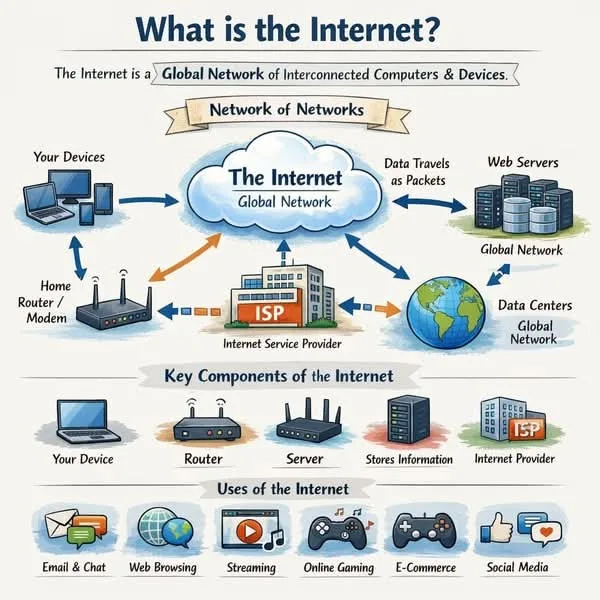
Data moves across the internet as packets, routed independently among interconnected networks that share TCP/IP and other common protocols. The foundation of internet connectivity includes physical cables, routers, addressing, DNS, transport protocols, and data centers. This decentralized design lets many operators exchange traffic without a central controller, while latency and last-mile infrastructure affect the experience of using it.
The internet works by breaking data into small packets, routing each packet independently through a global network of interconnected computers using a shared set of addressing and transmission rules called TCP/IP, and reassembling the packets into usable data at the destination.
It is a decentralized network of networks - tens of thousands of independent networks operated by ISPs, universities, governments, and corporations, all voluntarily interconnected and agreeing to exchange traffic using common standards.
There is no center, no single point of control, and no master switch. This architecture, originally designed with military resilience in mind, is what has allowed the internet to scale from four research computers in 1969 to connecting over 5.4 billion people today.
When you load a web page, watch a video, or send an email, the underlying process involves dozens of discrete steps - DNS lookups, TCP handshakes, packet routing across multiple networks, encryption and decryption, and content delivery from servers that may be thousands of kilometers away - all completing in fractions of a second.
Understanding how these pieces fit together transforms the internet from a mysterious utility into a comprehensible system of engineering decisions, each with specific purposes and trade-offs.
This article traces exactly what happens when you type a URL into a browser, explains the key protocols and infrastructure that make it work, and gives you a clear model of the layers of technology your data passes through every time you go online.
"The internet is the first thing that humanity has built that humanity doesn't understand, the largest experiment in anarchy that we have ever had." - Eric Schmidt, former CEO of Google (2003)
Key Definitions
Protocol: A set of rules that governs how data is formatted, transmitted, and received. Protocols allow devices from different manufacturers and running different software to communicate reliably. The internet depends on dozens of protocols working in concert.
IP address: A numerical label assigned to every device connected to a network. IPv4 addresses are 32-bit numbers (e.g., 192.168.1.1), providing approximately 4.3 billion unique addresses.
IPv6 addresses are 128-bit (e.g., 2001:0db8:85a3::8a2e:0370:7334), providing approximately 340 undecillion addresses (3.4 x 10^38) - enough to assign a unique address to every atom on the surface of the Earth.
Packet: A small unit of data (typically 1,500 bytes or less for Ethernet networks) that includes the payload (actual data), source and destination IP addresses, and sequencing information. Breaking data into packets allows multiple communications to share the same network links simultaneously.
Router: A device that forwards packets between networks, reading destination IP addresses and deciding the best next hop for each packet. The global internet contains millions of routers, each making independent forwarding decisions.
Latency: The time delay between sending data and receiving a response. Measured in milliseconds, it is a key factor in internet performance distinct from bandwidth (the raw data transfer capacity of a connection, measured in bits per second).
The Physical Infrastructure
Cables and Connections
The internet is primarily carried over physical cables, not satellites or wireless signals. Fiber optic cables - thin strands of glass that carry data as pulses of light - form the backbone. Submarine fiber optic cables crisscross the ocean floors, connecting continents.
The TeleGeography Submarine Cable Map (updated annually) shows over 550 active or planned submarine cables as of 2024, carrying over 95% of all international internet traffic.
These cables are remarkable engineering achievements. A modern transatlantic cable like Amitie, completed in 2022 and jointly funded by Microsoft, Meta, and Aqua Comms, can carry over 400 terabits per second - enough to transmit the entire Library of Congress in a fraction of a second.
The cables themselves are roughly the diameter of a garden hose, armored against anchors and fishing trawls in shallow water and laid bare on the ocean floor in deep water.
They are vulnerable to natural disasters, ship anchors, and even shark bites - a problem serious enough that Google coats some of its submarine cables in Kevlar-like material.
At the local level, the last mile connection to homes and businesses uses various technologies: fiber optic (fastest, most expensive to deploy), coaxial cable (cable internet), copper telephone lines (DSL), or wireless radio links (fixed wireless, cellular LTE/5G).
The last mile is often the bottleneck in internet performance for end users. According to the Federal Communications Commission (FCC), approximately 24 million Americans still lack access to broadband internet, primarily in rural areas where the economics of last-mile infrastructure are challenging.
Data Centers
Websites and internet services run on servers housed in data centers - large facilities filled with thousands of computers, with redundant power, cooling, and network connectivity. Major cloud providers (Amazon Web Services, Microsoft Azure, Google Cloud) operate data centers on every inhabited continent.
A single hyperscale data center facility may occupy over 100,000 square meters and consume 50 megawatts of electricity or more - as much as a small city.
The International Energy Agency (IEA) estimated in 2024 that data centers worldwide consume approximately 1-1.5% of global electricity - a figure projected to grow significantly with the expansion of artificial intelligence workloads. Cooling these facilities alone accounts for roughly 40% of their energy consumption.
| Layer | Protocol/Technology | Function | Example |
|---|---|---|---|
| Application | HTTP/HTTPS, DNS, SMTP, FTP | User-facing services and data formatting | Your browser requesting a web page |
| Transport | TCP, UDP, QUIC | Reliable or fast delivery, packet sequencing, error checking | TCP ensures all packets arrive in order |
| Internet | IP (IPv4, IPv6) | Addressing and routing across networks | IP address routes packet from New York to London |
| Network access | Ethernet, Wi-Fi, fiber optic, 5G | Physical transmission of bits over a medium | Wi-Fi radio signal from router to laptop |
The Protocol Stack: TCP/IP
IP: Addressing and Routing
The Internet Protocol (IP) is the fundamental addressing scheme of the internet. Every device connected to the internet has an IP address. IP defines how packets are formatted with source and destination addresses, and how routers should forward them.
IP routing is stateless and hop-by-hop: each router on the path to the destination looks at the packet's destination IP address, consults its routing table, and forwards the packet to the next router that is closer to the destination.
Routers dynamically maintain routing tables using protocols like BGP (Border Gateway Protocol), which propagates reachability information across the internet's tens of thousands of independent networks, each called an Autonomous System (AS).
BGP was designed in 1989 by Kirk Lougheed and Yakov Rekhter and remains the glue that holds the internet's routing together - despite being famously described as held together by "the good intentions of network operators."
IPv4, defined by Jon Postel in RFC 791 (1981), uses 32-bit addresses providing about 4.3 billion unique addresses - a number that seemed inexhaustible in 1981 but proved insufficient as the internet grew. The last blocks of IPv4 addresses were allocated by IANA in 2011.
IPv6, standardized in RFC 2460 (1998), uses 128-bit addresses providing a virtually inexhaustible address space. Adoption of IPv6 has been gradual; as of 2024, Google reports that approximately 45% of connections to its services use IPv6 - up from 10% in 2016 - with both protocols coexisting through various transition mechanisms.
TCP: Reliable Delivery
IP alone does not guarantee reliable delivery - packets can be dropped, duplicated, or arrive out of order. TCP (Transmission Control Protocol), defined by Vint Cerf and Bob Kahn in their foundational 1974 paper and standardized in RFC 793 (1981), sits above IP and provides reliable, ordered delivery.
Before data is transferred, TCP performs a three-way handshake: the client sends a SYN packet to the server, the server responds with SYN-ACK, and the client sends ACK. This establishes a connection. Data is then transmitted in numbered segments, and the receiver acknowledges each one.
If an acknowledgment is not received within a timeout period, the segment is retransmitted. The receiver reassembles segments in order, regardless of what order they arrived.
TCP also implements flow control (slowing transmission if the receiver's buffer is full) and congestion control (slowing transmission if the network is congested, detected by packet loss or round-trip time increases).
The original congestion control algorithm was developed by Van Jacobson in 1988 after a series of "congestion collapse" events nearly brought the early internet to a halt.
Modern variants like BBR (Bottleneck Bandwidth and Round-trip propagation time), developed by Google in 2016, use more sophisticated models to optimize throughput. These mechanisms make TCP highly reliable but introduce overhead and latency compared to UDP.
UDP: Fast, Unreliable Delivery
UDP (User Datagram Protocol), defined in RFC 768 (1980), sends packets without establishing a connection, without acknowledgment, and without retransmission. What arrives, arrives; what is lost, is lost. This makes UDP faster and lower-latency than TCP, at the cost of reliability.
UDP is appropriate when real-time performance matters more than perfect delivery: video calls, live streaming, online gaming, DNS queries. A dropped frame in a video call is better than a delayed one; a retransmission would arrive too late to be useful.
QUIC (Quick UDP Internet Connections), developed by Jim Roskind at Google and standardized by the IETF as HTTP/3 in RFC 9000 (2021), runs over UDP but implements reliability and security at the application layer, providing TCP-like reliability with lower latency.
QUIC eliminates the separate TLS handshake by building encryption into the transport protocol itself, reducing the initial connection setup from two to three round trips (TCP + TLS) to just one. It now carries a significant portion of global web traffic - Cloudflare reported that over 30% of its HTTP traffic used HTTP/3 as of 2023.
For more on how algorithms manage data flows, see how algorithms work.
DNS: The Internet's Address Book
How DNS Resolution Works
Every time you visit a website, your browser first needs to know the IP address of the server hosting it. Domain names like "www.example.com" are human-readable but computers communicate via IP addresses. DNS (Domain Name System) resolution converts one to the other.
The system was designed by Paul Mockapetris in 1983 (RFC 882/883) and remains one of the most critical infrastructure components of the internet.
The process involves a hierarchy of DNS servers:
- Your browser checks its local cache for a recent DNS lookup for this domain
- If not cached, your operating system asks a DNS resolver - typically your ISP's DNS server or a configured public resolver like Google (8.8.8.8) or Cloudflare (1.1.1.1)
- The resolver checks its own cache
- If not cached, the resolver queries a root name server - one of 13 sets of servers (operated by organizations including ICANN, Verisign, NASA, and the U.S. Department of Defense) that know which name servers are authoritative for each top-level domain (.com, .org, .uk, etc.)
- The root server directs the resolver to the TLD (top-level domain) name server for .com
- The TLD name server directs the resolver to the authoritative name server for example.com
- The authoritative name server returns the IP address
- The resolver caches the result (respecting the TTL - Time to Live value set by the domain owner) and returns it to your browser
This entire process typically takes 20-120 milliseconds on the first lookup. Subsequent requests use the cache and resolve in under 1 millisecond.
DNS Security
DNS was designed in 1983 without security in mind and remains a significant attack vector. DNS spoofing (cache poisoning) involves inserting false records into a resolver's cache, redirecting users to malicious servers.
The Kaminsky Attack, discovered by security researcher Dan Kaminsky in 2008, demonstrated that virtually every DNS implementation was vulnerable to cache poisoning, prompting an emergency industry-wide patch effort.
DNSSEC (DNS Security Extensions) uses cryptographic signatures to verify the authenticity of DNS records, but adoption has been slow - only about 30% of top-level domains are fully signed as of 2024.
DDoS attacks targeting DNS infrastructure can make major websites appear unreachable. In October 2016, a massive DDoS attack against Dyn, a DNS service provider, made dozens of major websites including Twitter, Reddit, and Netflix unavailable to users in the US and Europe for several hours.
The attack was carried out using the Mirai botnet - a network of compromised IoT devices (security cameras, routers, DVRs) that generated traffic exceeding 1.2 Tbps.
For more on how these vulnerabilities are discovered and addressed, see how phishing attacks work.
What Happens When You Type a URL
The Complete Journey
Typing "" and pressing Enter triggers a precise sequence of steps:
1. DNS lookup. Your browser resolves "www.example.com" to an IP address through the DNS process described above. If cached, this takes less than 1ms; if not, 20-120ms.
2. TCP connection. Your browser initiates a TCP connection to the server's IP address on port 443 (the default port for HTTPS). This involves the three-way SYN/SYN-ACK/ACK handshake, taking one round-trip time (RTT).
3. TLS handshake. For HTTPS, the browser and server perform a TLS handshake: they agree on encryption algorithms, the server presents its digital certificate (proving its identity, issued by a trusted Certificate Authority like Let's Encrypt, DigiCert, or Sectigo), and they establish a shared encryption key.
With TLS 1.3 (standardized in RFC 8446, 2018), this adds one round trip of latency - down from two in TLS 1.2.
4. HTTP request. The browser sends an HTTP GET request over the encrypted connection: "GET /article HTTP/2 Host: www.example.com". This includes headers indicating the browser type, accepted content formats, cookies, and other metadata.
5. Server processing. The server receives the request, processes it (fetching from a database if dynamic content, executing application code), and prepares a response. Server-side processing time varies from under 1ms for cached static files to hundreds of milliseconds for complex database queries.
6. HTTP response. The server sends the response: a status code (200 OK for success), headers (content type, caching instructions, server information), and the response body (HTML, JSON, or other content). The response is broken into TCP segments and IP packets.
7. Packet routing. Packets travel from the server through its local network, to its ISP, across backbone networks (potentially traversing multiple autonomous systems and internet exchange points), to your ISP, and finally to your router and device.
Each router makes independent forwarding decisions based on destination IP address. A traceroute from New York to London typically traverses 12-18 hops.
8. Browser rendering. Your browser receives and reassembles the packets, parsing the HTML and making additional requests for referenced resources (CSS files, JavaScript, images, fonts).
These may trigger additional DNS lookups, TCP connections, and HTTP requests - a single modern web page may make 50-100 individual requests loading resources totaling several megabytes. The HTTP Archive reports that the median web page size exceeded 2.3 MB in 2024.
The total time from pressing Enter to a rendered page on a performant website over a fast connection: typically 200-500 milliseconds. For a poorly optimized site on a slow connection, this can stretch to 5-10 seconds or more.
ISPs and Backbone Networks
The Network Hierarchy
The internet's physical network is organized in tiers. Tier 1 networks are the backbone providers - major telecommunications companies like AT&T, Lumen Technologies (formerly CenturyLink), NTT, Telia, and Cogent that operate the highest-capacity long-haul fiber networks.
Tier 1 networks peer with each other without payment (settlement-free peering) because the exchange of traffic is roughly equal and mutually beneficial. There are approximately 15-20 Tier 1 networks globally.
Tier 2 ISPs purchase transit capacity from Tier 1 providers while also peering with some networks. Tier 3 ISPs - the consumer ISPs most people use - typically purchase transit from Tier 2 providers and provide the last-mile connection to homes and businesses.
Peering and Internet Exchange Points
Rather than routing all traffic through paid transit, many networks choose to interconnect directly at Internet Exchange Points (IXPs) - neutral facilities where multiple networks physically connect their equipment and exchange traffic at low cost.
Amsterdam's AMS-IX and London's LINX are among the world's largest IXPs, each handling peak traffic exceeding 10 terabits per second. Frankfurt's DE-CIX is the world's largest by peak traffic volume.
When Netflix peers directly with a major ISP, Netflix content travels directly from Netflix's servers to the ISP's network without traversing intermediate networks. This reduces Netflix's transit costs and improves streaming quality for the ISP's customers.
Netflix's Open Connect program places dedicated caching servers inside ISP networks, serving over 95% of Netflix traffic from within the viewer's own ISP network.
Content Delivery Networks (CDNs)
Why CDNs Transform Web Performance
The speed of light imposes hard limits on internet latency. Data traveling from a server in California to a user in Berlin must cover approximately 9,000 km.
At the speed of light through fiber (about 200,000 km/s due to the refractive index of glass), this one-way trip takes a minimum of 45 milliseconds. A round trip is at minimum 90ms, before any processing time.
CDNs (Content Delivery Networks) solve this by pre-positioning content geographically close to users. A user in Berlin requesting a video from a CDN node in Frankfurt experiences latency of perhaps 5-10ms rather than 90ms. The CDN node serves cached content without the request reaching the origin server at all for static assets.
Cloudflare operates servers in over 310 cities across 120 countries. Akamai, the pioneer of CDN technology founded in 1998 by MIT mathematician Tom Leighton and graduate student Danny Lewin, has over 350,000 servers in 135 countries.
When a CDN is configured for a website, most of its static content - images, CSS, JavaScript, video files - is served from whichever CDN node is geographically closest to the requesting user.
The scale of CDN usage is enormous: Akamai alone delivers between 15-30% of all web traffic globally. During major streaming events, CDN capacity is the difference between a smooth viewing experience and a crashed website.
CDN Caching and Cache Invalidation
CDNs cache content based on HTTP headers set by the origin server. A Cache-Control: max-age=31536000 header tells the CDN to cache the content for one year. When origin content changes, the CDN must be explicitly told to invalidate (purge) the cached version - otherwise users would continue receiving stale content.
Cache invalidation strategy is one of the more complex aspects of web performance engineering.
It is famously described in a quote attributed to Phil Karlton: "There are only two hard things in Computer Science: cache invalidation and naming things." Modern solutions include content-addressed URLs (where the filename includes a hash of the content, so any change automatically creates a new URL) and stale-while-revalidate strategies that serve cached content immediately while fetching fresh content in the background.
For more on how artificial intelligence uses similar distributed computing principles, see how artificial intelligence learns.
Practical Takeaways
Understanding DNS makes troubleshooting easier. Many apparent internet outages are DNS failures - the server is reachable but cannot be located by name. Switching to a reliable public DNS resolver like Cloudflare (1.1.1.1) or Google (8.8.8.8) resolves many such issues immediately.
HTTPS is not optional for any legitimate website. Plain HTTP exposes data in transit to anyone monitoring the network, including on public Wi-Fi. Check for the padlock icon and "https://" before entering any sensitive information. As of 2024, over 95% of Chrome page loads use HTTPS, according to Google's Transparency Report.
CDNs account for a majority of global internet traffic. Understanding how they work helps explain why a website hosted on a server in one country loads quickly worldwide, and why cache clearing is sometimes needed after a site update.
Your ISP is a significant chokepoint. The quality, reliability, and bandwidth of your ISP's last-mile connection is typically the limiting factor in home internet performance, regardless of how fast the backbone networks are. This is why fiber-to-the-home connections consistently outperform cable and DSL in both speed and latency.
IPv6 adoption is necessary and inevitable. IPv4 addresses are exhausted; IPv6 is the long-term foundation of internet addressing. Understanding IPv6 is increasingly important for network engineers and anyone involved in infrastructure planning.
For more on how the technologies that run on top of the internet protect your data, see how to protect your privacy online.
Sources & Further Reading
- Cerf, V., & Kahn, R. (1974). A Protocol for Packet Network Intercommunication. IEEE Transactions on Communications, 22(5), 637-648. DOI: 10.1109/TCOM.1974.1092259
- Berners-Lee, T. (1989). Information Management: A Proposal. CERN. View source
- Mockapetris, P. (1987). Domain Names - Implementation and Specification. RFC 1035. IETF. View source
- Postel, J. (1981). Transmission Control Protocol. RFC 793. IETF. View source
- Iyengar, J., & Thomson, M. (2021). QUIC: A UDP-Based Multiplexed and Secure Transport. RFC 9000. IETF. View source
- TeleGeography. (2024). Submarine Cable Map. PriMetrica Inc. View source
- Cloudflare. (2024). How the Internet Works - Learning Center.View source
- IETF. (2018). The Transport Layer Security (TLS) Protocol Version 1.3. RFC 8446. View source
- HTTP Archive. (2024). State of the Web Report.View source
- Akamai Technologies. (2024). State of the Internet Connectivity Report.View source
- International Energy Agency. (2024). Electricity 2024: Data Centres and AI.View source
- Google. (2024). IPv6 Adoption Statistics.View source