
Protecting: In 2019, journalist Kashmir Hill conducted an experiment: she blocked all traffic to the five major tech companies - Amazon, Facebook, Google, Microsoft, and Apple - from her home network.[7] The results were jarring. Not just her own services stopped working.
She discovered that these companies' infrastructure was embedded in thousands of websites and apps she used regularly. Blocking Amazon Web Services took down large swaths of the internet. Blocking Facebook broke login systems on sites that had nothing to do with Facebook.
The experience illustrated something most people have not fully processed: the internet as we experience it is not just delivered through these companies. It is built on them.
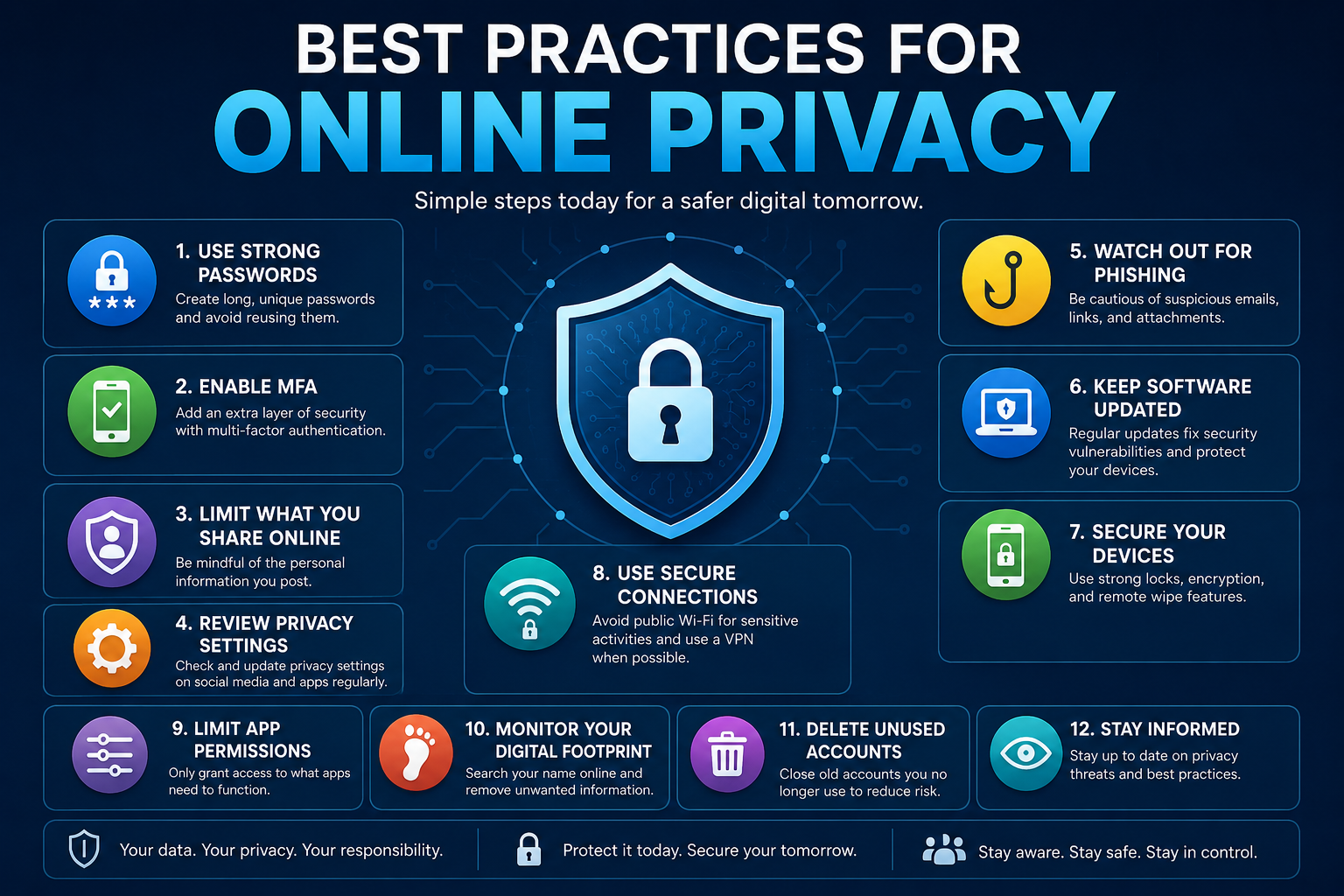
This does not mean privacy protection is hopeless. It means that protecting your privacy online requires understanding the actual threat model - who is collecting your data, what they do with it, and which protective measures have genuine impact versus security theater.
The good news is that a focused set of practical steps, requiring neither technical expertise nor paranoia, can dramatically reduce your exposure.
This guide covers what actually works.
Understanding Who Collects Your Data and Why
Privacy protection starts with understanding your adversaries. Not everyone has the same threat model, and the protective measures appropriate for a journalist in an authoritarian country differ substantially from those appropriate for an ordinary consumer trying to reduce commercial tracking.
The most common data collectors and their motivations:
Commercial data brokers and advertisers: These entities collect behavioral data - websites visited, purchases made, search queries, location history - to build profiles used for targeted advertising. This is by far the most pervasive form of data collection affecting ordinary users.
It is largely legal, often disclosed in privacy policies almost no one reads, and financially significant: the global digital advertising industry exceeded $600 billion in 2023.
Platform companies (Meta, Google, Microsoft, Apple): These companies collect extensive data about your behavior across their own services and, through tracking pixels and SDKs, across much of the rest of the internet.
Their business models vary - Google and Meta primarily monetize through advertising; Apple positions privacy as a differentiator - but all collect significant amounts of behavioral data.
Cybercriminals: Motivated by financial gain, cybercriminals pursue passwords, financial information, and account access. Their methods include phishing, credential stuffing (using leaked passwords from one breach to access other accounts), and malware.
Data breach exposure: Many individuals' personal data is exposed not through active targeting but through breaches at companies holding their information - health insurers, retailers, financial institutions, government agencies. You can have excellent personal security hygiene and still have data exposed through third-party breaches.
Understanding your threat model means asking: who is most likely to seek my data, what would they do with it, and what is my actual risk? The protective measures that matter most depend on the answers.
The Most Effective Privacy Protections: What the Evidence Shows
Not all privacy measures are equal. Some widely-discussed steps have minimal practical impact; others have substantial, measurable effect. Understanding the difference helps you prioritize.
Research published by Güunes Acar, Claudia Diaz, and colleagues at imec-COSIC, KU Leuven and later extended by the Electronic Frontier Foundation in their Cover Your Tracks project (2020-2023) measured the actual effectiveness of common browser-based privacy measures against fingerprinting.[6] Their findings showed that:
- Standard browser privacy settings (third-party cookie blocking, private/incognito mode) reduced tracking significantly but did not prevent fingerprinting - the practice of identifying users via their browser configuration, fonts, and hardware characteristics even without cookies[1]
- Privacy-focused browsers (Firefox with strict settings, Brave) reduced fingerprinting substantially but not completely
- The most effective fingerprinting protection required both browser choice and configuration, with Brave's anti-fingerprinting mode providing near-complete protection in their test suite
A parallel research effort by Steven Englehardt and Arvind Narayanan at Princeton University's Center for Information Technology Policy, published as the OpenWPM web privacy measurement study (2016, with ongoing updates), crawled over 1 million websites to measure tracking behavior.[2]
Their findings, updated through 2023, established that:
- Third-party tracking (trackers embedded on sites you visit that belong to other companies) was present on 92% of the top 1 million websites
- Google operated trackers on approximately 75% of websites studied
- Fingerprinting scripts were present on roughly 30% of the top 10,000 websites, and fingerprinting was used even on pages the user would not expect to be commercial
"The scale of third-party tracking means that browsing with default browser settings - even in private mode - leaves a comprehensive behavioral trail with dozens of third parties per session." - Narayanan & Englehardt, Princeton CITP, 2023
Browser and Search Engine: Your First Line of Defense
Your browser and search engine choices have a larger impact on privacy than almost any other single decision.
Browser recommendations:
| Browser | Privacy Default | Fingerprinting Protection | Ease of Use | Best For |
|---|---|---|---|---|
| Brave | Excellent | Strong (built-in) | Easy | Most users wanting high privacy |
| Firefox | Good (with setup) | Moderate | Easy | Users wanting open-source + extensions |
| Chrome | Poor | Weak | Easy | Not recommended for privacy |
| Safari | Moderate | Moderate (ITP) | Easy | Apple ecosystem users |
| Tor Browser | Maximum | Maximum | Harder | High-risk users, journalists |
For most users, Brave offers the best balance of strong default privacy, ease of use, and compatibility. It blocks ads and trackers by default, implements aggressive anti-fingerprinting, and requires no configuration.
Search engine recommendations:
- DuckDuckGo: No search tracking, no search history, no profile building. Slightly less accurate than Google for obscure queries but entirely adequate for most searches.
- Brave Search: Independent index (not Google or Bing data), strong privacy defaults, growing accuracy.
- Startpage: Returns Google results without sending your identity to Google. A useful middle option if you need Google's accuracy.
Passwords, Authentication, and Account Security
Password security is where the most measurable harm occurs. Credential theft enables account takeovers that can cascade into financial fraud, reputational damage, and loss of access to critical services.
The fundamental rules:
Unique passwords for every account. The most important single habit. When a site is breached - and sites are breached constantly - attackers use the leaked credentials to attempt access on other services (credential stuffing). A unique password per site means a breach of one service cannot compromise your others.
A password manager makes this possible. No human can remember 150 unique strong passwords. Password managers generate, store, and autofill them. Recommended options:
- Bitwarden: Open source, audited, free for individuals, cross-platform. Best default recommendation.
- 1Password: Excellent UX, strong security model, paid ($3/month)
- Dashlane: Good interface, includes dark web monitoring, paid
Two-factor authentication (2FA) on every account that offers it. 2FA requires a second verification step beyond your password - typically a time-based code from an authenticator app. Even if your password is stolen, an attacker cannot access your account without the second factor.
Use an authenticator app (Google Authenticator, Authy, or built into Bitwarden) rather than SMS-based 2FA wherever possible. SMS codes are vulnerable to SIM-swapping attacks where criminals social-engineer your carrier into redirecting your phone number.
Email Privacy: Reducing Your Exposure
Email is a significant privacy exposure surface: it contains sensitive personal and professional information, it is used as the identity anchor for most online accounts, and standard email protocols transmit metadata that reveals communication patterns.
Email provider choices:
| Provider | Encryption | Data Use | Privacy Jurisdiction |
|---|---|---|---|
| Gmail | Transport only | Ad targeting | US |
| Outlook/Hotmail | Transport only | Ad targeting | US |
| ProtonMail | End-to-end (between PM users) | None | Switzerland |
| Tutanota | End-to-end (between Tuta users) | None | Germany |
| Fastmail | Transport only, privacy-focused | None | Australia |
For users with elevated privacy needs, ProtonMail provides the strongest protection: messages between ProtonMail users are end-to-end encrypted, and ProtonMail cannot read your mail. The limitation is that end-to-end encryption only applies when both parties use ProtonMail.
Email aliases: Services like SimpleLogin and addy.io let you create unlimited email aliases that forward to your real inbox. Use a unique alias for every site you sign up with. If an alias starts receiving spam, it tells you which service sold your address, and you can disable that alias without changing your real email.
Mobile Privacy: What Your Phone Reveals
Your smartphone is the most privacy-intrusive device most people own. It knows your location continuously, your communication patterns, your app usage, your sleep schedule, and often your physical health data.
Key mobile privacy steps:
Audit app permissions. Go through your apps and revoke unnecessary permissions: location access for apps that do not need it, microphone and camera access for apps you do not want having it, contacts access for apps that should not need it.
Both iOS and Android now show you how often apps are accessing sensitive permissions - review this periodically.
Disable advertising IDs. Both iOS (Settings > Privacy > Tracking) and Android (Settings > Privacy > Ads) allow you to opt out of cross-app behavioral tracking and reset your advertising identifier. This meaningfully reduces targeted advertising.
Use a VPN on untrusted networks. On public Wi-Fi, a VPN encrypts your traffic and prevents local eavesdropping. Recommended options: Mullvad (no logs, cash payment option), ProtonVPN (audited, Swiss jurisdiction), or IVPN.
Review what data your phone sends to the manufacturer. Both Apple and Google collect telemetry. iOS's "Improve iPhone & Watch" settings and Android's usage data sharing can be disabled in settings.
Research on the Privacy-Behavior Gap and What Closes It
One of the most consistent findings in privacy research is the privacy paradox: users report caring about privacy but do not take protective action. Understanding why this gap exists helps explain what interventions actually change behavior.
Research by Laura Brandimarte, Alessandro Acquisti, and George Loewenstein at Carnegie Mellon University's Heinz College, published in Psychological Science (2013) and extended in subsequent work, identified a key driver: users consistently underestimate the scope of data collection because they cannot see it happening.[3]
Unlike physical surveillance (a camera in a room), digital data collection is invisible, which attenuates the psychological discomfort that would otherwise motivate protective action.
A 2022 study by Yaxing Yao, Justin Baranowski, and colleagues at George Mason University, published in CHI 2022, tested five different privacy intervention designs - warning labels, friction, transparency reports, privacy dashboards, and opt-out defaults - across 3,400 participants.[4] The study found that:
- Opt-out defaults (privacy-protective by default, requiring action to share data) were the most effective single intervention, increasing privacy-protective choices by 32-47% depending on context
- Transparency interventions showing users exactly what data was collected significantly increased protective behavior even when the act of collecting was not changed
- Warning labels were the least effective intervention, producing minimal behavior change
A major 2023 study by Yixin Zou, Shawn Danino, and colleagues at the University of Michigan School of Information, published in IEEE Security & Privacy, surveyed 1,006 Americans on their privacy knowledge and behavior.[5] Only 20% of respondents could correctly identify what information their smartphones tracked.
However, users who completed a 10-minute informational intervention about actual data collection practices showed a 63% increase in taking at least one concrete protective action within 30 days - confirming that information, when made concrete and specific, does change behavior.
"Privacy protection is not primarily an attitude problem. It is a knowledge problem. Users who understand specifically what data is collected and specifically what it enables take substantially more protective action." - Zou et al., University of Michigan, 2023
A Practical Privacy Improvement Checklist
Implementing every privacy protection at once is overwhelming. This sequenced checklist prioritizes by impact and effort.
High impact, low effort (do these first):
- Install a password manager and start creating unique passwords for new accounts
- Enable 2FA on your email account and financial accounts
- Switch your default search engine to DuckDuckGo or Brave Search
- Install Brave browser or configure Firefox with uBlock Origin
High impact, moderate effort:
- Switch browser on mobile to Brave
- Audit and revoke unnecessary mobile app permissions
- Disable advertising ID on your phone
- Create email aliases for new signups going forward
Moderate impact, ongoing habit:
- Use a VPN when on public Wi-Fi
- Check HaveIBeenPwned.com for your email addresses; change passwords for any breached accounts
- Review your Google account activity and data settings annually
- Delete apps you no longer use (they continue collecting data)
For higher-risk situations:
- Consider ProtonMail for sensitive communications
- Use Signal for messaging instead of standard SMS
- Review what Google, Meta, and Apple data dashboards say they have collected about you
Why Privacy Is Structurally Difficult: The Economics of Surveillance
The practical advice in this guide works. But following it can feel like swimming against a current. That feeling has a cause, and understanding it matters - not to induce hopelessness, but because knowing why privacy protection is structurally hard is what allows you to be realistic about what individual action can and cannot accomplish.
The attention economy: your data is the product
The dominant business model of the consumer internet is built on a fundamental exchange: you receive a free service, and in return the company collects data about your behavior, which it uses to sell targeted advertising. This is not a flaw in the system - it is the system.
The services that billions of people use daily - search, email, social media, maps, video - were built on the assumption that behavioral surveillance is the revenue model.
This creates a structural misalignment. The company's financial incentive is to collect as much data as possible, retain it as long as possible, and use it in as many ways as possible. Your privacy interest is the precise opposite. These two goals cannot be simultaneously maximized.
When the service is free, the business model is the answer to the question of whose interests win.
Network effects that entrench surveillance
Targeted advertising only works at scale. An advertiser who wants to reach left-handed guitarists in their 30s needs a platform with enough users to make that segment commercially viable.
This creates a self-reinforcing dynamic: the platforms with the most users attract the most advertising revenue, which funds better services, which attract more users. Winner-take-all dynamics consolidate surveillance into a small number of extremely large platforms.
The network effect operates on advertisers too. Agencies move their spending to platforms where the data is richest and the targeting is most precise - which further rewards the companies that have collected the most. New entrants cannot easily compete because they lack the data flywheel that makes targeting accurate.
Privacy-respecting alternatives face a structurally higher bar: they must compete on quality against incumbents subsidized by surveillance revenue.
The principal-agent problem in privacy
In economics, a principal-agent problem arises when one party (the agent) is supposed to act in the interests of another (the principal), but their own incentives point in a different direction. Privacy is a textbook case.
You are the principal. The company is the agent, nominally bound by privacy policies that describe how your data will be handled. But the company's profit motive - the actual force shaping its decisions - is not aligned with your privacy interest.
Privacy policies are not contracts negotiated between equals. They are terms the company writes, can change unilaterally, and which you agree to by continuing to use a service you depend on. The agent has written the rules governing the agent's behavior.
This is why privacy advocacy that relies on companies "doing the right thing" has historically been ineffective without external pressure from regulation or competitive threat.
Information asymmetry and the privacy paradox
Companies know exactly what they collect: every click, every dwell time, every purchase, every location ping, every search query. They have engineering teams dedicated to making this collection comprehensive and accurate.
Users, by contrast, have no visibility into what is collected, how it is stored, how long it is retained, who it is shared with, or how it is used in decisions affecting them.
This information asymmetry is the root cause of the phenomenon researchers call the privacy paradox - the consistent finding that users report caring about privacy but do not take protective action. The paradox dissolves once you understand the asymmetry: it is not that users are irrational or hypocritical.
It is that invisible data collection does not trigger the same psychological response as visible surveillance. You cannot protect yourself from what you cannot see.
The "just read the privacy policy" response to this problem is not a solution - it is an illustration of the problem. Researchers at Carnegie Mellon University calculated that reading every privacy policy an average American encounters in a year would require 76 full work days.
The policies are long, deliberately complex, written in legal language, and subject to change. Privacy policy length has increased substantially over the decades that the internet has grown - not because users demanded more detail, but because longer, more complex policies provide better legal cover while ensuring near-zero comprehension.
"Surveillance capitalism unilaterally claims human experience as free raw material for translation into behavioral data.
Although some of these data are applied to product or service improvement, the rest are declared as a proprietary behavioral surplus, fed into advanced manufacturing processes known as 'machine intelligence,' and fabricated into prediction products that anticipate what you will do now, soon, and later." - Shoshana Zuboff, The Age of Surveillance Capitalism, 2019
Why regulation has been limited
Data privacy regulation exists - GDPR in Europe, CCPA in California, sector-specific rules in the US for healthcare and financial data - and it has produced real improvements. But regulation has significant structural limitations.
Data is hard to define as property, which complicates legal frameworks built around ownership. Surveillance crosses jurisdictions continuously: your data may be collected by a company in one country, processed in another, and sold to advertisers in a third.
Harmonizing regulations across jurisdictions is slow, technically complex, and politically contested. Meanwhile, the companies most affected by privacy regulation have the resources to hire substantial legal and lobbying operations to slow, weaken, and shape any legislation that threatens their data collection business.
The regulatory gap is not primarily a failure of political will. It is a consequence of the complexity of the problem matching poorly against the pace and scale of legislative and enforcement institutions.
Why individual action still matters
None of this structural analysis should produce fatalism. The argument that "individual action is pointless because the problem is structural" is itself a kind of learned helplessness that happens to be very convenient for the entities that benefit from surveillance.
Privacy is not binary. It exists on a spectrum. Every tracker blocked, every alias used, every unnecessary permission revoked, every account deleted that you no longer need - these reduce your exposure in meaningful, cumulative ways.
The goal is not perfect privacy (which is unachievable while participating in modern digital life) but meaningfully better privacy than the default configuration provides.
Individual action also has aggregate effects. When enough users adopt privacy-protective browsers, the market signal influences product decisions. When users demand encryption, companies build it. Behavior in aggregate shapes the economics.
The attention economy is not a law of nature - it is a business model, and business models respond to the market conditions users collectively create.
The structural limits are real. They mean that individual action alone cannot solve the privacy problem. But individual action reduces your personal exposure now, and at scale, it shifts the conditions that allow the surveillance economy to function.
Sources & Further Reading
- Acar, G., Eubank, C., Englehardt, S., Juarez, M., Narayanan, A., & Diaz, C. (2014, updated 2023). The Web Never Forgets: Persistent Tracking Mechanisms in the Wild. ACM CCS.
- Englehardt, S., & Narayanan, A. (2016, ongoing). Online Tracking: A 1-million-site Measurement and Analysis. ACM CCS 2016. Princeton CITP. View source
- Brandimarte, L., Acquisti, A., & Loewenstein, G. (2013). Misplaced Confidences: Privacy and the Control Paradox. Social Psychological and Personality Science. Carnegie Mellon University. DOI: 10.1177/1948550612455931
- Yao, Y., Baranowski, J., Forget, A., Acquisti, A., & Cranor, L. (2022). Comparing Effectiveness of Privacy Notice Designs. CHI 2022. George Mason University. View source
- Zou, Y., Danino, S., & Schaub, F. (2023). Privacy Knowledge and Protective Behavior in US Adults. IEEE Security & Privacy. University of Michigan. View source
- Electronic Frontier Foundation. (2023). Cover Your Tracks: Browser Fingerprinting Study. EFF. View source
- Hill, K. (2019). I Cut the 'Big Five' Tech Giants From My Life. It Was Hell. Gizmodo/Vice. View source