
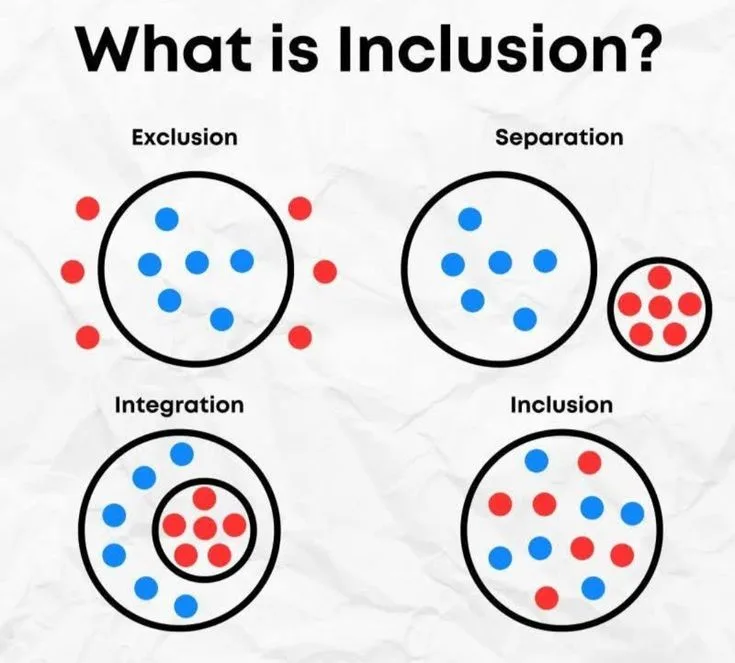
What is inclusive design? It is a methodology that considers the full range of human diversity throughout design, treating exclusion as a problem to solve rather than an afterthought. It is broader than accessibility, though closely related, and differs from universal design by accepting that different users may need different solutions. Designing for permanent disabilities can also help people facing temporary or situational limitations.
In 1945, a disabled veteran returning from World War II approached a curb on his wheelchair. The curb was not designed to stop him: it was simply never designed with him in mind. He had to navigate off the curb into the street, or wait for someone to help, or go around.
Decades later, advocates with disabilities fought for changes to urban infrastructure. The curb cut (the sloped ramp at sidewalk corners) was mandated by law. Wheelchair users could now navigate curbs independently.
Then something unexpected happened. People who had no disability started using the curb cuts constantly. Parents with strollers. Cyclists. Delivery workers with hand trucks. Tourists pulling rolling luggage. Elderly people who found the ramp easier than the step.
A feature designed specifically for disabled users had improved the experience of the entire built environment. This is now called the curb cut effect, and it is one of the most important arguments for inclusive design.
What Inclusive Design Is
Inclusive design is a design methodology that considers the full range of human diversity (in ability, language, age, culture, gender, and economic situation) throughout the design process, not as a corrective afterthought.
The traditional approach to product design begins with assumptions about a typical user and then, sometimes, adapts for users who differ from that assumption. Inclusive design begins with a different premise: diversity is not a special case. It is the baseline condition of any audience that includes human beings.
The Microsoft Inclusive Design team, which has published extensively on the methodology, defines it as:
"A methodology that enables and draws on the full range of human diversity. Most importantly, this means including and learning from people with a range of perspectives."
Inclusive design is not the same as accessibility, though the two are closely related. Accessibility focuses specifically on enabling people with disabilities to access products and environments.
Inclusive design is broader: it asks who is excluded and why, and treats exclusion as a design failure to be solved rather than an unfortunate limitation to be accommodated.
Universal Design vs. Inclusive Design
The term universal design predates inclusive design and emerged primarily in architecture and physical environment planning.
Universal design, as developed by architect Ronald Mace and colleagues at North Carolina State University in the 1980s, aims to create environments and products that can be used by all people, to the greatest extent possible, without the need for adaptation or specialized design.
The seven principles of universal design are:
- Equitable use
- Flexibility in use
- Simple and intuitive use
- Perceptible information
- Tolerance for error
- Low physical effort
- Size and space for approach and use
The key difference: Universal design seeks a single design solution that works for the widest possible range of users.
Inclusive design acknowledges that no single solution is optimal for everyone and that the value of inclusive design lies in the process: understanding who is excluded, why, and what design decisions could reduce that exclusion, not in achieving a universal solution.
In software and digital product design, the inclusive design framing is generally more appropriate than universal design. A screen reader mode and a visual interface are different solutions for different users; inclusive design embraces this rather than insisting on one solution that serves both imperfectly.
Disability, Diversity, and Scale
Understanding the business and ethical case for inclusive design starts with understanding scale.
The World Health Organization's 2023 Global Report on Health Equity estimates that approximately 1.3 billion people, or 16% of the global population, live with some form of significant disability. This is the world's largest minority group.
In the United States:
- 26% of adults (1 in 4) live with some form of disability (CDC, 2023)
- 11.4 million adults have vision disability
- 13.3 million adults have hearing disability
- 17.1 million adults have cognitive disability affecting daily functioning
- 22.3 million adults have mobility disability
These are not edge cases. They are a quarter of the adult population.
Situational and Temporary Exclusion
Microsoft's inclusive design framework introduces a distinction that extends the relevance of accessibility beyond people with permanent disabilities:
Permanent disability: A person who has lost an arm.
Temporary impairment: A person with a broken arm in a cast.
Situational limitation: A new parent holding a baby. A person carrying grocery bags. Someone in a car who cannot look at their screen.
One-handed smartphone use is relevant to all three groups. Designing for the permanent case creates solutions that work for a far larger population experiencing the equivalent limitation temporarily or situationally.
This framing matters because it demonstrates that accessible design is not a special accommodation for a small group: it is good design for the many ways human beings are limited at any given moment.
| Exclusion Type | Example | Affected Population |
|---|---|---|
| Permanent | No arm (limb difference) | ~57,000 U.S. adults |
| Temporary | Arm in cast | ~2 million U.S. adults at any time |
| Situational | Holding a baby, carrying bags | Hundreds of millions |
The Curb Cut Effect: Inclusive Design Benefits Everyone
The curb cut story is the archetypal example of inclusive design spillover, but the pattern recurs across virtually every domain.
Captions and Subtitles
Closed captions were developed for deaf and hard-of-hearing viewers. Today, captions are used by a dramatically wider population:
- Viewers watching in noisy environments (bars, gyms, public transit)
- Language learners improving comprehension
- Viewers watching in quiet environments without disturbing others
- Viewers with attention difficulties who find visual text reinforcement helpful
- Non-native speakers who read faster than they process speech
Studies suggest that 80% of people who use captions do not identify as deaf or hard of hearing. A feature designed for 6% of the population is routinely used by the majority.
Voice Control and Voice Assistants
Voice control for computers was initially developed as an accessibility technology for users with motor disabilities who could not use keyboards.
Today, Siri, Google Assistant, Amazon Alexa, and similar technologies are used by hundreds of millions of people daily (cooking, driving, multitasking), none of whom primarily identify as disabled users.
Audiobooks
Audiobooks were originally designed for blind users. Today, audiobooks are a mainstream entertainment and education format, with the global audiobook market exceeding $6 billion annually.
SMS and Text Messaging
Bell Laboratories developed early text communication technologies with deaf users explicitly in mind. Short message formats that worked without audio became, through mobile telephony, one of the most widely used communication methods in human history.
"When we design for inclusion, we discover that inclusion is good design. Every time." (Kat Holmes, Mismatch: How Inclusion Shapes Design, 2018)
WCAG: The Web Accessibility Standard
For digital products, the most important technical framework for inclusive design is the Web Content Accessibility Guidelines (WCAG), maintained by the World Wide Web Consortium (W3C).
WCAG is organized around four principles, often abbreviated POUR:
Perceivable: Information and user interface components must be presentable to users in ways they can perceive. No content should be invisible to all of a user's senses.
Operable: User interface components and navigation must be operable. Users must be able to interact with the interface through the modalities available to them.
Understandable: Information and the operation of the user interface must be understandable. Content and interfaces should not be unnecessarily confusing or require specialized knowledge.
Robust: Content must be robust enough to be reliably interpreted by a wide variety of user agents, including assistive technologies.
The Three Levels
WCAG defines three compliance levels, each building on the previous:
Level A (Minimum): Addresses the most basic web accessibility features. Non-compliance makes content fundamentally inaccessible. Examples: all images have text alternatives; all form fields have labels; no content flashes more than three times per second (seizure risk).
Level AA (Standard): The broadly accepted legal compliance standard, required by the Americans with Disabilities Act (ADA, as interpreted by courts and DOJ), Section 508 of the U.S. Rehabilitation Act, the EU Web Accessibility Directive, and the UK Equality Act.
Examples: color is not the only means of conveying information; minimum contrast ratio of 4.5:1 for normal text; no keyboard traps; visible focus indicators.
Level AAA (Enhanced): The highest accessibility standard. Not required for most content but represents best-practice accessibility. Examples: sign language interpretation for audio; 7:1 contrast ratio; no time limits.
WCAG 2.2 and the Coming WCAG 3.0
WCAG 2.2, released in 2023, added several new success criteria, including focus appearance requirements and authentication without cognitive function tests. WCAG 3.0 is under development with a substantially different structure, moving from binary pass/fail to a scoring model, but remains years from finalization.
The practical standard for most organizations is WCAG 2.1 Level AA, which remains the most widely cited legal requirement globally.
Common Accessibility Failures and How to Fix Them
WebAIM (Web Accessibility In Mind) conducts an annual survey of the top 1 million websites. The 2023 WebAIM Million report found that 96.3% of home pages had detectable WCAG failures. The most common:
| Failure Type | Percentage of Sites Affected |
|---|---|
| Low-contrast text | 83.6% |
| Missing image alt text | 58.2% |
| Missing form input labels | 45.0% |
| Empty links | 44.6% |
| Missing document language | 17.1% |
| Empty buttons | 27.5% |
These are not obscure technical failures. They are basic design choices (foreground and background color, text on buttons, labels on form fields) that routinely exclude users with visual and cognitive disabilities.
Practical Fixes
Low contrast text: Ensure text meets minimum contrast ratios. Use contrast-checking tools (WebAIM Contrast Checker, browser developer tools, Figma plugins). The AA requirement is 4.5:1 for normal text, 3:1 for large text.
Missing alt text: Every image that conveys information needs a text alternative. Decorative images should have empty alt attributes (alt="") so screen readers skip them. Alt text should describe the purpose, not just the appearance.
Form labels: Every form input needs a visible label (<label> element) associated with it. Placeholder text is not a substitute: it disappears when the user types and has insufficient contrast.
Keyboard navigation: Every interactive element must be reachable and operable with keyboard alone. Tabbing order must be logical. Focus state must be visually visible.
Semantic HTML: Using correct HTML elements for their intended purpose (buttons for actions, links for navigation, headings for structure) enables screen readers to interpret page structure. A <div> styled to look like a button does not function as a button for assistive technology users.
The Legal Landscape
Inclusive design is increasingly a legal requirement, not merely a best practice.
United States
The Americans with Disabilities Act (ADA) and Section 508 of the Rehabilitation Act are the primary federal accessibility laws. While originally enacted before the web existed, courts and the Department of Justice have consistently interpreted ADA coverage to include websites and digital services.
ADA web accessibility lawsuits have grown dramatically: from approximately 2,300 federal lawsuits in 2019 to over 4,000 in 2023. Defendants include retailers, restaurants, hospitality companies, healthcare providers, and financial services firms.
Section 508 specifically governs technology purchased or used by federal agencies, effectively requiring that any technology company selling to the federal government meet accessibility standards.
Europe
The EU Web Accessibility Directive (effective 2018) requires accessibility for public sector websites and apps. The European Accessibility Act (effective 2025) extends mandatory accessibility requirements to private sector products including banking services, e-commerce, transport, and telecommunications.
Australia, Canada, and Others
Most developed economies have equivalent legislation. The AODA in Ontario, Canada; the Disability Discrimination Act in Australia; and similar laws create a global accessibility compliance landscape.
Inclusive Design in Practice: The Process
Inclusive design is not primarily a checklist. It is a process orientation that integrates diversity consideration throughout design, research, and development.
Research with Diverse Participants
The most important single practice in inclusive design is including people with disabilities and diverse characteristics in user research. This means:
- Recruiting participants across disability categories (motor, visual, auditory, cognitive, neurological)
- Paying participants fairly for their expertise
- Designing research protocols that are accessible themselves
- Not treating disability experience as a special subcase but as core user research
Many design teams never speak with a disabled user. When they first do, they typically learn that their product's most significant usability problems were not the accessibility-specific issues they expected but fundamental design problems that had simply been masked by the informal user testing they had been doing with non-disabled users.
Shift Left: Accessibility in Design, Not Testing
The most expensive place to address accessibility failures is in testing after the product is built. Retrofitting inaccessible products is typically three to five times more expensive than building accessibly from the start.
Shift left means addressing accessibility at the design phase:
- Designers use accessibility plugins in Figma to check contrast, focus order, and semantic structure
- Design systems include accessible component variants as the default
- Accessibility requirements are written into user stories and acceptance criteria
- Developers use linting tools that flag accessibility violations as they write code
Automated Testing Has Limits
Automated accessibility testing tools (Axe, WAVE, Lighthouse) can identify approximately 30-40% of WCAG failures. The remaining 60-70% require manual testing, including screen reader testing with real assistive technology.
The most commonly missed issues in automated testing:
- Screen reader announcements that are technically present but confusing
- Focus management in single-page applications
- Cognitive accessibility problems (complexity, confusing language)
- Motor accessibility problems (small touch targets, complex gestures)
Automated testing is a necessary baseline, not a sufficient accessibility program.
The Business Case for Inclusive Design
The ethical case for inclusive design is straightforward: excluding people from products and services they need is harmful. But the business case is also strong.
Market Size
1.3 billion people globally have significant disabilities. The Return on Disability Group estimates that people with disabilities and their families control approximately $13 trillion in annual disposable income globally. The U.S. alone: $490 billion in discretionary income.
Inaccessible products exclude this market entirely. Accessible products do not merely comply with the law: they serve customers who might otherwise be entirely unable to engage.
Retention and Loyalty
Users who can successfully use a product return. Users who encounter barriers abandon. For users with disabilities, accessible products are not a nice feature: they are the difference between usable and unusable. Accessible products generate disproportionate loyalty from this market segment because alternatives are often inaccessible.
SEO and Technical Quality
Many accessibility best practices are also search engine optimization best practices:
- Alt text on images helps both screen reader users and image search indexing
- Semantic HTML structure helps both screen readers and search engine crawlers
- Descriptive link text helps both users and crawlers understand link context
- Fast load times (often improved by accessibility-focused performance work) help both user experience and search rankings
A well-structured, accessible site is a technically healthy site.
Legal Risk Reduction
With over 4,000 ADA web accessibility lawsuits filed annually in the U.S. alone, accessible design is risk management. The cost of a single accessibility lawsuit settlement typically exceeds the cost of a comprehensive accessibility program.
Inclusive Design Beyond Disability
Inclusive design encompasses more than disability accessibility, though that is its most technically developed area.
Age: Products designed for young adults with high digital literacy often exclude both very young users and older users. 73% of people aged 65+ use the internet, but abandonment rates for complex digital tasks are significantly higher in older cohorts.
Language: Global products that assume English literacy, or that support only right-to-left or left-to-right text but not both, exclude users on the basis of language.
Literacy and cognitive load: Products designed for high-literacy users exclude people with lower literacy levels, cognitive disabilities, learning differences, and people reading in a second language. Plain language principles (short sentences, common words, active voice) serve these users and improve comprehension for everyone.
Economic access: Products that assume broadband internet access, latest-generation devices, or ability to pay for premium tiers exclude users on economic grounds. Designing for constrained bandwidth and lower-specification devices expands access and often improves performance universally.
Cultural assumptions: Design that assumes specific cultural contexts (gestures, color meanings, metaphors, navigation conventions) can exclude users from different cultural backgrounds.
Summary
- Inclusive design considers human diversity throughout the design process, treating exclusion as a design failure
- Universal design seeks one solution for all; inclusive design accepts different solutions and emphasizes the design process
- 1.3 billion people (16% of global population) have significant disabilities: they are not an edge case
- The curb cut effect demonstrates that features designed for disabled users routinely benefit everyone: captions, voice control, audiobooks, curb ramps
- WCAG defines three levels (A, AA, AAA); Level AA is the standard legal requirement in the U.S., EU, and most developed economies
- 96.3% of the top 1 million websites have WCAG failures; the most common are low contrast, missing alt text, and unlabeled form fields
- Legal risk is real: ADA accessibility lawsuits exceed 4,000 per year in the U.S.
- The business case includes market access (1.3B users), user loyalty, SEO benefit, and legal compliance
- Best practice is to shift left: address accessibility at the design phase, include disabled users in research, and build accessible defaults into design systems