
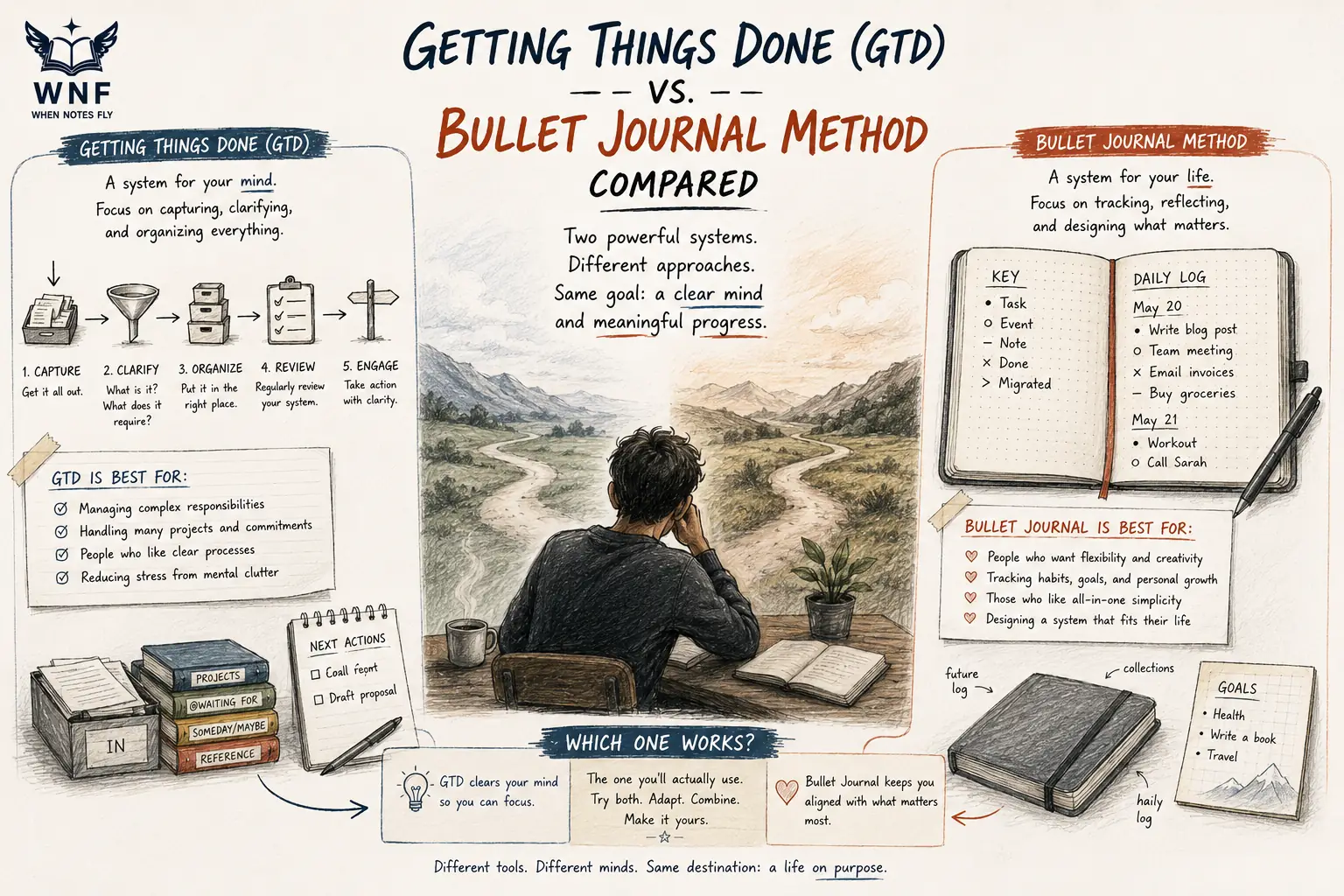
Two Methods, Two Philosophies
David Allen's Getting Things Done (2001, revised 2015) and Ryder Carroll's Bullet Journal Method (codified in The Bullet Journal Method, 2018, after emerging online in 2013) are the two most widely adopted personal productivity systems among knowledge workers and creative professionals.
GTD has been implemented across Fortune 500 companies and has sold well over a million copies since 2001. Bullet Journal has built a global community of several million practitioners, largely through Carroll's original video and a vibrant online culture of adaptations.
The systems solve overlapping problems through opposite philosophies. GTD is a workflow engine designed for high-volume information intake. It assumes you have too many commitments to hold in memory and provides a machine for processing them.
Bullet Journal is a reflection tool designed for intentional attention. It assumes the problem is not volume but mindfulness about what deserves your time.
"Your mind is for having ideas, not holding them."
- David Allen, Getting Things Done, 2001
"The Bullet Journal Method is designed to help you track the past, order the present, and design the future."
- Ryder Carroll, The Bullet Journal Method, 2018
What Each System Actually Does
Getting Things Done: The Five-Step Workflow
Allen's framework is a pipeline with five stages.[1]
- Capture. Every commitment, idea, reminder, and request goes into an external inbox. Paper, app, email, folder: anywhere trusted.
- Clarify. Each inbox item is processed: is it actionable? If no, trash, reference, or someday-maybe. If yes, is it one step or a project? What is the next physical action?
- Organize. Items are sorted into context lists (calls, errands, at-computer, agendas) and projects lists.
- Reflect. Weekly review. Every list is examined. Stale items are removed. Projects are advanced.
- Engage. Work is selected by context, time available, energy level, and priority.
The system's core insight is the distinction between capture and action. Capturing commitments external to working memory frees cognitive capacity for actual thinking. The weekly review is the maintenance ritual that keeps the system trusted.
Bullet Journal: The Rapid Logging System
Carroll's framework uses a blank notebook and a shorthand symbol set.[2]
- Task: a dot.
- Event: a circle.
- Note: a dash.
- Completed: an X through the task dot.
- Migrated: a greater-than arrow (moved forward).
- Scheduled: a less-than arrow (moved back to future).
The structural elements are:
- Index. First few pages, listing every collection with page numbers.
- Future Log. Six to twelve month overview for dated commitments.
- Monthly Log. Calendar overview and task list for the current month.
- Daily Log. The daily working page, with tasks, events, and notes as they arise.
- Collections. Topic-specific pages (books to read, project plans, meeting notes).
The ritual is migration. At the end of each month, incomplete tasks are reviewed: migrated forward if still relevant, struck out if no longer important, scheduled if for later. The act of rewriting is deliberate friction.
Side-by-Side Comparison
| Dimension | Getting Things Done | Bullet Journal |
|---|---|---|
| Primary medium | Digital preferred (apps like OmniFocus, Todoist) | Analog (paper notebook) |
| Volume tolerance | High (thousands of open loops) | Moderate (hundreds) |
| Cognitive model | External memory extension | Deliberate reflection |
| Setup time | Days to weeks | Minutes |
| Learning curve | Steep | Gentle |
| Maintenance cost | Weekly review (60 to 90 minutes) | Monthly migration (20 to 40 minutes) |
| Creative affordance | Low (structured) | High (flexible) |
| Search capability | Excellent (digital) | Poor (paper) |
| Portability | Excellent (mobile apps) | Good (notebook) |
| Distraction risk | Moderate (apps near social media) | Very low |
| Best for | Executives, managers, consultants | Creatives, students, reflective workers |
The table clarifies the central tradeoff. GTD scales with volume but requires infrastructure. Bullet Journal scales with intentionality but breaks under heavy load.
The Decision Framework
Question 1: What is your daily input volume?
More than 100 inbox items per day (emails, Slack messages, requests, ideas): GTD. The machine is built for that throughput.
Fewer than 50: either works. Bullet Journal may feel more satisfying.
Question 2: Do you prefer writing or typing?
Typing, mobile-first: GTD with a digital app (Todoist, OmniFocus, Things, TickTick).
Writing, tactile preference: Bullet Journal. The friction is the feature.
Question 3: How much do you value reflection vs processing?
Reflection (what matters, what to drop): Bullet Journal.
Processing (getting it out of my head): GTD.
Question 4: How chaotic is your work?
High chaos, many projects, many contexts (consultant, executive, parent with career): GTD. The context lists and weekly review stabilize the chaos.
Low to moderate chaos, focused role (writer, designer, academic): Bullet Journal. The daily log is sufficient.
Question 5: What is your failure mode?
Forgetting commitments: GTD. The capture habit prevents the drop.
Doing too much without thinking: Bullet Journal. The migration ritual forces reflection.
Research on Both Systems
GTD Research
Francis Heylighen and Clement Vidal at the Free University of Brussels published a 2008 analysis of GTD in Long Range Planning, arguing that the method aligns with cognitive load theory.[5] Holding unresolved commitments in working memory consumes attention resources. Externalizing them reduces the cognitive tax.
The Zeigarnik effect, documented by Bluma Zeigarnik in 1927, shows that unresolved tasks occupy cognitive resources until closed or captured.
Masicampo and Baumeister's 2011 paper in the Journal of Personality and Social Psychology, titled "Consider It Done! Plan Making Can Eliminate the Cognitive Effects of Unfulfilled Goals," found that making a specific plan for an unfinished task, not merely writing it down, reduces the Zeigarnik effect to a level statistically equivalent to completing the task.[3]
The finding provides direct experimental support for GTD's clarify step, where each captured item is turned into a defined next action, more precisely than for capture alone.
Kelly McGonigal's The Willpower Instinct (2011) sits in the same tradition of self-regulation research that GTD draws on, and its broader argument, that willpower is a limited resource best conserved rather than relied on for moment-to-moment decisions, offers a compatible rationale for GTD's emphasis on externalizing commitments rather than holding them in mind.[8]
Bullet Journal Research
Direct research on the Bullet Journal Method is sparse, but several adjacent bodies of research support its mechanisms.
Writing by hand has been shown to improve memory and comprehension compared to typing. Mueller and Oppenheimer's 2014 paper in Psychological Science found that students who took notes by hand retained more conceptual information than those who typed, attributed to the slower pace forcing summarization rather than transcription.[4]
The act of crossing off completed tasks has a measurable dopamine effect documented in reward-learning research. Ellen Langer's mindfulness research at Harvard (decades of papers from 1974 to present) supports the broader principle that deliberate attention to present activity improves both performance and satisfaction.
Teresa Amabile's progress principle research at Harvard Business School, published in The Progress Principle (2011), found that the single most motivating factor in knowledge work is making visible progress on meaningful work.[6] Bullet Journal's daily log makes that progress tangible in a way digital checkbox systems often obscure.
"However large or small the tangible value of rewards for good work may be, and however formal or informal the recognition for such work, people feel respected when their efforts are acknowledged."
- Teresa Amabile and Steven Kramer, The Progress Principle, 2011
Common Hybrid Implementations
Many practitioners combine elements. The most common patterns:
Pattern 1: Digital GTD, Analog Bullet Journal for Daily Log
All commitments captured into a digital GTD system (Todoist or OmniFocus). Each morning, the day's top 3 to 6 tasks are transcribed into a bullet journal daily log. The notebook handles reflection, quick notes, and meeting scribbles. The app handles the long tail of commitments.
This pattern works for users who like the volume handling of GTD but want the tactile reflection of bullet journaling. It adds minor transcription friction in exchange for better daily focus.
Pattern 2: Bullet Journal Core, Digital Calendar
All tasks and projects in a bullet journal. Time-based commitments (meetings, appointments, flights) in a digital calendar that syncs across devices.
This pattern works for users whose main input is their own thinking rather than external demands. The notebook is the working memory; the calendar is the time machine.
Pattern 3: GTD Contexts with Bullet Journal Weekly Review
All capture and task lists digital. Weekly review conducted analog, in a notebook, with handwritten reflection on the week's patterns.
This pattern adds contemplation to GTD's machinery. The handwritten review tends to produce more insight than a mouse-clicked list inspection.
What Each System Gets Wrong
GTD Weaknesses
Setup cost. Installing GTD takes weeks. Most people abandon the system during the install, before it delivers benefits.
Maintenance collapse. If the weekly review is skipped for three weeks, the system becomes untrusted and collapses. Users revert to reactive email.
No prioritization. GTD does not tell you what matters. It only tells you what exists. Users can work the system perfectly while working on the wrong things.
App trap. The productivity app market has captured much of the GTD population. Users spend hours tweaking their app configuration instead of doing work.
Bullet Journal Weaknesses
Scale ceiling. Past a few hundred active commitments, a paper notebook becomes impossible to search or update. Large project portfolios fragment across collections.
No cross-device access. The notebook is wherever it is. Mobile capture is weak. Sharing is impossible.
Aesthetic drift. Online bullet journal culture has shifted heavily toward elaborate art projects. Users who mistake aesthetics for utility spend hours decorating pages instead of working.
Migration fatigue. Rewriting tasks monthly is the system's intentional friction, but some tasks get migrated for six straight months before the user admits they will never be done.
Role-Specific Recommendations
For Executives and Managers
GTD. The volume of commitments and contexts is too high for a paper system. Digital capture from multiple channels (email, Slack, meetings) is essential. The weekly review is a non-negotiable for staying on top of delegation and tracking.
For Students and Academics
Bullet Journal for the personal side (habits, class prep, reading), GTD-light for large projects (thesis, multi-semester research). The daily reflection value of bullet journaling compounds with learning.
For Writers and Creatives
Bullet Journal, often supplemented with a tool like Scrivener or Ulysses for the actual writing. The daily log captures ideas and the migration ritual separates the ones worth pursuing.
For Entrepreneurs and Founders
GTD for commitments, Bullet Journal for strategic reflection. Founder life generates too much volume for paper alone. Strategic reflection needs more depth than a task app.
For Consultants
GTD. Client contexts, project phases, and travel logistics demand the context-list structure. Bullet Journal cannot handle the parallel-project load of most consulting work.
For Software Engineers
Either works. Engineers with product management responsibilities tend toward GTD. Pure individual contributors often prefer Bullet Journal for personal life and GitHub Issues or Linear for work tasks.
How to Migrate From One to the Other
Migrating from GTD to Bullet Journal means exporting active tasks and projects, setting up the notebook's index and logs, and running a parallel week before fully switching, though volume above roughly 200 active tasks will strain a notebook. Migrating the other way means processing the notebook like a GTD inbox, choosing a digital tool, and running a full weekly review within a week, while making sure not to lose the reflective habit the notebook provided.
Moving from GTD to Bullet Journal
- Export all projects and active tasks from the digital system.
- Set up the notebook with index, future log, monthly log, and daily log.
- Transcribe active projects as collections.
- Archive completed projects digitally rather than copying them.
- Run a parallel week where both systems are maintained, then switch.
The main risk is volume. If the export produces more than 200 active tasks, the notebook will struggle. Consider the hybrid approaches above.
Moving from Bullet Journal to GTD
- Read through the notebook's indexes and identify all active projects and commitments.
- Pick a digital tool (Todoist for gentle, OmniFocus for rigorous, Things for Mac-only beauty).
- Process the notebook as if it were a GTD inbox: clarify, organize, defer.
- Keep the notebook for meeting notes and daily reflection during transition.
- Run a full weekly review in the new system within seven days.
The main risk is abandoning the reflection ritual. GTD's weekly review is processing, not reflection. Some migrants lose the thinking value they had in the notebook and later re-integrate a reflection journal.
Tools and Supporting Resources
For productivity assessments, baseline cognitive testing helps distinguish whether the bottleneck is system design or attention capacity.
For teams that need shared systems, consider the organizational question separately. GTD does not define team collaboration. Bullet Journal is explicitly personal. Team productivity is a different problem, typically handled by Linear, Asana, Notion, or similar tools.
For remote workers, the question of environment also matters. Both systems work better when the physical or digital environment supports them. A notebook on a cluttered desk gets lost. An app on a phone full of social media gets neglected.
"The point of a note-taking system... is not just to store information, but to package it into a form that can travel across time and space to reach an audience that needs it."[7]
- Tiago Forte, Building a Second Brain, 2022
Learning Curve, Longevity, and Practical Details
Bullet Journal has the shorter on-ramp: the basic rapid logging system can be learned in an afternoon, while GTD takes days to install fully and weeks to internalize as habit. Both systems, though, have high long-term retention rates among practitioners who make it past that initial setup.
GTD's most common failure mode is a skipped weekly review, which lets the whole system fall out of trust; Bullet Journal's is aesthetic drift or migration fatigue, where the ritual of rewriting tasks becomes a chore rather than a genuine act of reflection.
GTD does not require digital tools. David Allen himself used paper for decades before digital tools matured, though running the system on paper alone adds friction and limits the volume it can handle.
For those who do go digital, OmniFocus (Mac, iOS) is the most feature-complete option, Todoist is the gentlest and most cross-platform, Things is the most visually polished, and TickTick is the strongest free option; Allen's own recommendation for the weekly review is 60 to 90 minutes, though experienced practitioners often complete one in 30 to 45 minutes.
Bullet Journal, for its part, is more than a disguised to-do list: its migration ritual, index structure, and deliberate reflection are what separate it from a linear list, and users who treat it as one tend to miss its actual thinking benefits. It also works fine as a single system for both work and personal life, since the index structure handles the separation through collections, though some practitioners prefer separate notebooks for each, trading portability for sharper focus.
Sources & Further Reading
Allen, D. (2015). Getting Things Done: The Art of Stress-Free Productivity (revised edition). Penguin Books. View source
Carroll, R. (2018). The Bullet Journal Method: Track the Past, Order the Present, Design the Future. Portfolio. View source
Masicampo, E. J., & Baumeister, R. F. (2011). Consider it done! Plan making can eliminate the cognitive effects of unfulfilled goals. Journal of Personality and Social Psychology, 101(4), 667-683. DOI: 10.1037/a0024192
Mueller, P. A., & Oppenheimer, D. M. (2014). The pen is mightier than the keyboard: Advantages of longhand over laptop note taking. Psychological Science, 25(6), 1159-1168. DOI: 10.1177/0956797614524581
Heylighen, F., & Vidal, C. (2008). Getting Things Done: The science behind stress-free productivity. Long Range Planning, 41(6), 585-605. DOI: 10.1016/j.lrp.2008.09.004
Amabile, T., & Kramer, S. (2011). The Progress Principle: Using Small Wins to Ignite Joy, Engagement, and Creativity at Work. Harvard Business Review Press.
Forte, T. (2022). Building a Second Brain: A Proven Method to Organize Your Digital Life and Unlock Your Creative Potential. Atria Books. View source
McGonigal, K. (2011). The Willpower Instinct: How Self-Control Works, Why It Matters, and What You Can Do to Get More of It. Avery.