
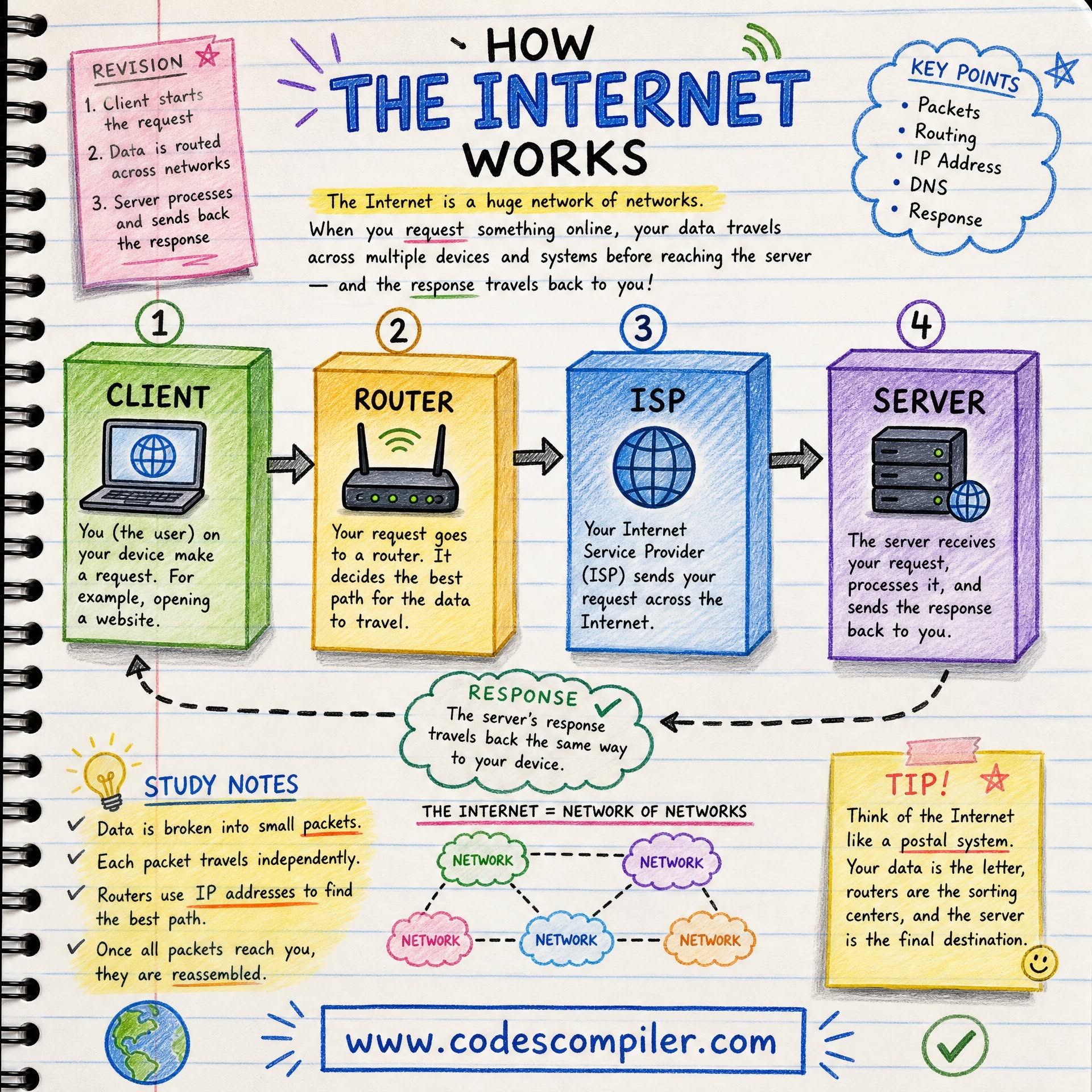
The internet is a decentralized network of networks that use shared protocols to move data in small packets. How the internet works depends on physical connections, IP addressing, routers, and routing tables that forward packets along available paths. Protocols such as TCP add reliability by ordering, checking, and retransmitting data when the underlying network does not guarantee delivery.
You are reading this article because data traveled from a server somewhere in the world to the device in your hands in a fraction of a second.
That journey involved undersea cables, dozens of network routers, cryptographic protocols, and a global naming system that your device consulted before making the first connection. None of it required your intervention, and none of it required a central authority to coordinate it.
The internet is the most complex technical infrastructure ever built, and it works through a combination of physical infrastructure and software protocols that have been stable for decades. This guide explains how.
What the Internet Actually Is
The internet is not a cloud, a satellite network, or a single system owned by any company or government. It is a network of networks: millions of independent networks - home routers, corporate intranets, university systems, data centers, mobile carriers - that have agreed to connect to each other using a common set of communication rules.
The physical infrastructure includes:
- Undersea fiber optic cables: approximately 500 cable systems spanning 1.3 million kilometers of ocean floor, carrying roughly 95% of international internet traffic. When a ship's anchor cuts a major undersea cable, regions of the internet can slow or fail.
- Terrestrial fiber: cables running beneath roads and cities, connecting data centers, exchanges, and buildings.
- Last-mile connections: the final link to homes and businesses - coaxial cable, DSL telephone lines, fiber to the premises, or mobile wireless.
- Wireless links: cellular towers, WiFi access points, and satellite links (increasingly from low-Earth orbit systems like Starlink) provide connections where cables are impractical.
Data travels across this infrastructure as packets: small chunks of data, typically 1,500 bytes or less, each wrapped in a header that contains addressing information telling the network where to send it.
Packets: The Core Concept
Packet switching is the fundamental architectural decision that makes the internet work.
An alternative architecture, circuit switching, establishes a dedicated connection between two endpoints for the duration of a communication - this is how traditional telephone calls work. Circuit switching reserves bandwidth along the entire path; if no one is talking, the reserved capacity sits idle.
The internet uses packet switching instead. Each message is broken into packets. Each packet is addressed and sent independently. Different packets from the same message may take entirely different paths through the network and arrive out of order. The receiving end reassembles them into the original message.
The advantages are enormous: the network makes efficient use of available capacity, because bandwidth is only consumed when packets are actually in transit; the network is resilient, because if one path is unavailable, packets route around it; and the network can serve millions of simultaneous users sharing the same physical infrastructure.
The ARPANET, the 1960s US military research network that became the ancestor of the internet, was explicitly designed around packet switching partly for resilience: a network without a central coordinating node cannot be taken down by destroying that node.
IP Addresses and the Internet Protocol
Every device connected to the internet has an IP address: a numerical label that uniquely identifies it on the network. IP addresses work like postal addresses: they allow routers to figure out where to send each packet.
IPv4 addresses, the original system, look like four numbers separated by dots: 192.168.1.1. With 32 bits, IPv4 can represent approximately 4.3 billion unique addresses - a number that seemed enormous in 1983 and is now exhausted.
The solution is IPv6, which uses 128-bit addresses and can accommodate 340 undecillion unique devices, which should be sufficient for some time.
When you connect your laptop to WiFi, your router assigns it a private IP address (typically starting with 192.168.x.x). This private address is visible only within your home network. Your router has a public IP address assigned by your internet service provider, which is how the outside world can reach your network.
Routing: How Packets Find Their Way
A router is a device whose job is to forward packets toward their destination. The internet is composed of hundreds of thousands of routers, each making forwarding decisions based on a routing table - a constantly updated map of which paths lead to which networks.
When a packet arrives at a router, the router reads the destination IP address, consults its routing table, and forwards the packet to the next router on the best available path. This process repeats at each router along the way - sometimes dozens of routers - until the packet reaches its destination.
Routers communicate with each other constantly using routing protocols (BGP - Border Gateway Protocol - governs routing between major networks) to maintain up-to-date information about the state of the network and the best available paths.
When a link fails or a new path becomes available, this information propagates through the routing system and routers update their tables accordingly.
You can observe this in action with the traceroute command (Windows: tracert), which shows you the sequence of routers a packet passes through to reach a destination.
TCP: Reliability on Top of Unreliability
IP delivers packets to their destination, but it provides no guarantee that packets will arrive, arrive in order, or arrive without corruption. This is by design: keeping the network layer simple makes it more flexible and efficient.
TCP (Transmission Control Protocol) sits on top of IP and provides reliability guarantees for applications that need them.
TCP works through several mechanisms:
Sequencing: each packet is numbered. The receiver can detect out-of-order packets and hold them until the missing ones arrive, then reassemble the original message in the correct sequence.
Acknowledgment: the receiver sends acknowledgments (ACKs) back to the sender confirming received packets. If the sender does not receive an ACK within a timeout period, it retransmits the packet.
Checksums: each packet includes a checksum - a mathematical fingerprint of its contents. The receiver recalculates the checksum; if it does not match, the packet was corrupted in transit and is discarded. The sender will retransmit.
Flow control: TCP prevents a fast sender from overwhelming a slow receiver by limiting how much data can be in flight at once, adjusting based on the receiver's buffer capacity.
Congestion control: TCP detects network congestion (packet loss, increasing delays) and reduces its sending rate to avoid overwhelming routers.
The combined result is that TCP gives applications a reliable, ordered, byte-stream abstraction over an unreliable underlying network. Your web browser, email client, and file transfer tools use TCP.
Not all applications need TCP's reliability. Video streaming, voice calls, and online games often use UDP (User Datagram Protocol) instead. UDP offers no reliability guarantees - packets can be lost or arrive out of order - but it has much lower overhead.
For a voice call, a dropped packet is better handled by briefly degrading audio quality than by waiting for a retransmission that would arrive too late to be useful.
DNS: The Internet's Address Book
Computers use IP addresses. Humans remember names. DNS (Domain Name System) bridges this gap.
DNS is a distributed database: a hierarchical system of servers that collectively store the mappings between domain names and IP addresses. No single server knows all mappings; instead, responsibility is delegated in a tree structure.
At the root are 13 sets of root name servers (actually hundreds of physical servers distributed globally) that know where to find the authoritative servers for each top-level domain (.com, .org, .uk, etc.).
Below those are the TLD servers, which know where to find the authoritative servers for each registered domain. At the bottom are the authoritative name servers for each domain, which hold the actual IP address records.
How a DNS Lookup Works
When you type www.example.com in your browser:
- Your device checks its local DNS cache. If it recently looked up this name, it uses the cached result.
- If not cached, it queries a recursive resolver - typically one operated by your ISP or a public service like Google (8.8.8.8) or Cloudflare (1.1.1.1).
- The recursive resolver checks its cache. If not found, it queries the root name servers, asking: "Who handles .com?"
- The root servers direct it to the .com TLD servers.
- The .com TLD servers direct it to the authoritative name servers for example.com.
- The authoritative servers return the IP address for www.example.com.
- The recursive resolver returns this address to your device and caches it for future use.
The whole process typically takes 20-120 milliseconds. DNS responses are cached at multiple levels to reduce lookup time for frequently visited domains.
DNS is so fundamental that attacks against it can take down internet access for entire regions. In 2016, an attack on DNS provider Dyn took down major sites including Twitter, Reddit, and Netflix for hours.
HTTP and HTTPS: The Language of the Web
The World Wide Web - the system of pages and links we use daily - operates using HTTP (HyperText Transfer Protocol). HTTP defines how browsers and servers communicate.
An HTTP conversation is a request-response cycle:
- The browser sends an HTTP request: a structured text message specifying the method (GET, POST, PUT, DELETE), the URL path, the HTTP version, and headers carrying additional information (cookies, accepted content types, browser identity).
- The server sends an HTTP response: a status code (200 OK, 404 Not Found, 302 Redirect, etc.), headers, and the response body (the HTML, image, or other resource requested).
HTTP is stateless: each request is independent. The server does not remember previous requests from the same client. Cookies and session tokens were invented to work around this: small pieces of data stored by the browser and sent with each request to maintain the appearance of a continuous session.
HTTPS and TLS Encryption
HTTP transmits everything in plain text. Anyone on the same network - at a coffee shop WiFi, at an ISP's routing equipment - can read the contents of HTTP requests and responses. This is obviously unacceptable for passwords, payment information, and private communications.
HTTPS is HTTP transmitted over a TLS (Transport Layer Security) encrypted connection. TLS provides three things:
Encryption: data in transit is encrypted so that interceptors cannot read it.
Authentication: digital certificates issued by trusted Certificate Authorities (CAs) allow browsers to verify they are actually communicating with the claimed server and not an impostor.
Integrity: a message authentication code ensures that data has not been altered in transit.
The TLS handshake - the process of establishing an encrypted connection - uses public-key cryptography. The server has a private key (kept secret) and a public key (distributed openly in its certificate).
The browser uses the public key to securely exchange a session key that both parties then use for symmetric encryption of the actual data.
The mathematical relationship between public and private keys means that the private key is needed to decrypt what the public key encrypted, but the private key cannot be derived from the public key.
HTTPS is now the default for virtually all websites. Browsers mark HTTP sites as "Not Secure" and search engines penalize them. The free Let's Encrypt Certificate Authority has made obtaining TLS certificates trivially easy, eliminating the cost barrier that previously kept small sites on HTTP.
What Happens When You Type a URL
Let us trace the complete journey of typing https://www.example.com/article and pressing Enter.
| Step | What Happens | Protocol |
|---|---|---|
| 1 | Browser checks DNS cache for example.com | Local cache |
| 2 | DNS recursive lookup if not cached | DNS over UDP/TCP |
| 3 | Browser gets IP address: 93.184.216.34 | DNS response |
| 4 | Browser opens TCP connection to port 443 | TCP three-way handshake |
| 5 | TLS handshake: exchange keys, verify certificate | TLS |
| 6 | Encrypted connection established | TLS |
| 7 | Browser sends GET /article HTTP/2 request | HTTP/2 over TLS |
| 8 | Server processes request, retrieves content | Server-side |
| 9 | Server sends HTTP 200 response with HTML | HTTP/2 over TLS |
| 10 | Browser parses HTML, finds linked resources | Browser rendering |
| 11 | Browser fetches CSS, JS, images (often in parallel) | HTTP/2 over TLS |
| 12 | Browser renders the page | Browser rendering |
The entire sequence, for a well-optimized site on a fast connection, takes under 500 milliseconds. Much of that time is determined by the physical speed of light through fiber optic cables: a round trip from London to New York takes roughly 70 milliseconds regardless of software optimizations.
The Web vs. the Internet
The terms "web" and "internet" are often used interchangeably but they are different things.
The internet is the underlying network infrastructure: the physical cables, the routers, the IP addressing system, and the TCP/IP protocols that govern data transmission.
The World Wide Web is an application that runs on top of the internet. It is the system of pages, links, and resources accessed via HTTP/HTTPS using web browsers. The web was invented by Tim Berners-Lee at CERN in 1989; the internet had existed for two decades before the web was built on top of it.
Email, voice calls, file transfer, gaming, and streaming are all also applications that run on the internet without using the web's HTTP/HTML protocols. The internet is the infrastructure; the web is one of many things built on that infrastructure.
Who Controls the Internet?
No single entity controls the internet. Its governance is distributed among several organizations with different responsibilities.
ICANN (Internet Corporation for Assigned Names and Numbers) manages the DNS root zone - the top-level structure of domain names - and coordinates IP address allocation through regional registries.
IETF (Internet Engineering Task Force) develops and maintains internet standards (RFCs - Requests for Comments), including TCP/IP, HTTP, and TLS.
Internet service providers control their own network segments and, through interconnection agreements, the exchange points where networks connect.
Governments regulate internet infrastructure within their jurisdictions and, in some cases, control or restrict access.
This distributed structure is both the internet's greatest strength and its greatest governance challenge. No one can turn it off, but no one is responsible for ensuring it serves all of humanity's needs.
Why the Internet Is Designed the Way It Is
The internet's architecture reflects choices made in the 1970s and 1980s that remain influential today.
The end-to-end principle: intelligence lives at the edges of the network (in the devices at the ends) rather than in the middle. Routers move packets; they do not inspect or modify content.
This made the network simple, fast, and flexible - and created the foundation for innovation, since anyone could build a new application on top of the network without changing the network itself.
Decentralization: no single point of control or failure. The ARPANET was designed partly for military resilience, but decentralization also means no single authority can censor or control communications, which has significant civil liberties implications.
Layering: separate protocols handle separate concerns (IP handles routing, TCP handles reliability, HTTP handles web content). Each layer can evolve independently.
These design choices produced an infrastructure of extraordinary resilience, flexibility, and reach. They also created challenges: security was not a core design principle, so it has been added on top in layers. Privacy was not a core design principle, so surveillance is technically easy.
These tensions continue to shape internet policy and technical development decades after the original design decisions were made.