
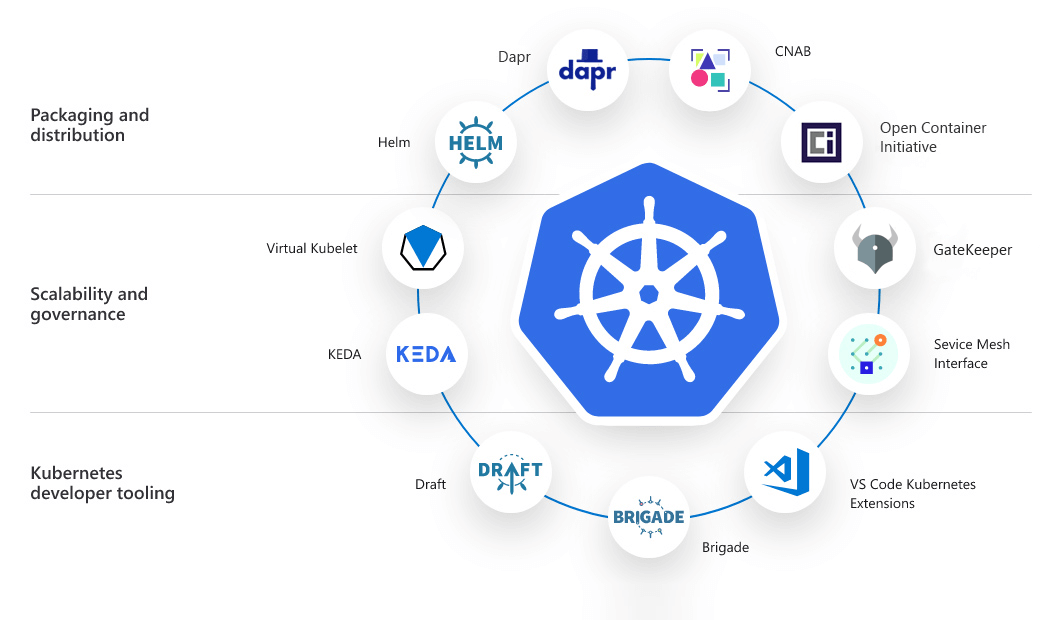
Kubernetes is the dominant platform for running containerized applications at scale. Originally developed at Google and open-sourced in 2014, it is now maintained by the Cloud Native Computing Foundation (CNCF) and used by companies ranging from Spotify and Airbnb to the New York Times.
If you work in software - whether you write code, manage infrastructure, or make technology decisions - understanding what Kubernetes does and why it exists is increasingly essential knowledge.
This article explains Kubernetes from first principles: the problem it solves, the core concepts that make it work, how it compares to Docker, the managed services that simplify its operation, the real-world data on adoption, and the honest answer to whether you actually need it.
The Problem Kubernetes Solves
To understand Kubernetes, start with containers. A container is a lightweight, isolated package that bundles an application with everything it needs to run: code, runtime, libraries, and configuration.
Containers solve the classic "it works on my machine" problem by ensuring consistent environments from a developer's laptop to a production server.
Docker popularized containers around 2013, and teams quickly discovered a new problem: running one container is easy. Running three hundred containers reliably across a fleet of servers is very hard.
Consider what production software actually requires:
- If a container crashes, something needs to restart it automatically.
- If traffic spikes, you need more instances; when it drops, you want fewer to save cost.
- New versions need to be deployed without downtime.
- Containers need to find and talk to each other even as they start, stop, and move across machines.
- Secrets and configuration must be distributed without baking them into container images.
Before Kubernetes, organizations cobbled together scripts, configuration management tools, and custom schedulers to handle these tasks. Google had been running containerized workloads internally since 2003 using a system called Borg, which at its peak managed hundreds of thousands of jobs across dozens of clusters.[1]
When they open-sourced a redesigned version - Kubernetes - the industry quickly adopted it as the standard answer to container orchestration.
The name itself is instructive. Kubernetes is the Greek word for "helmsman" or "governor" - the person who steers a ship. The container-as-shipping-container metaphor runs deep in this space: Docker is the shipping container, Kubernetes is the vessel and crew that moves those containers at scale.
"Kubernetes was born from Google's Borg system. We took everything we learned over a decade of running production workloads for Google Search, Gmail, and YouTube, and made it available to the rest of the industry." - Joe Beda, co-creator of Kubernetes, speaking at KubeCon 2018
The Scale of the Problem
To appreciate why Kubernetes exists, consider the operational reality of running modern software at scale. A typical large-scale web application might comprise dozens of microservices, each running multiple container instances across geographically distributed regions.
The 2023 CNCF Annual Survey found that 96% of organizations are using or evaluating Kubernetes, up from 84% in 2019.[2] Among organizations in production, the median cluster size was growing year-over-year as teams consolidated workloads onto fewer, larger clusters.
Without an orchestration layer, the operational cost of managing containers manually grows roughly linearly with the number of containers.
With Kubernetes, teams gain a self-healing system that manages routine operational tasks automatically - restarts, scaling, scheduling, rolling updates - allowing engineers to focus on the behavior of their applications rather than the mechanics of keeping them running.
Core Concepts: The Kubernetes Object Model
Kubernetes uses a declarative model. You describe the desired state of your application in configuration files (typically YAML), submit them to the cluster, and Kubernetes continuously works to make the actual state match what you declared. If a container dies, Kubernetes notices the discrepancy and starts a new one.
This reconciliation loop is the conceptual heart of Kubernetes. It means the system is always working toward a goal, not just executing a script. An operator named the controller manager runs continuously, observing cluster state and issuing API calls to bring reality in line with the declared specification.
Pods
A pod is the smallest deployable unit in Kubernetes. It wraps one or more containers that share a network namespace and storage volumes.[8] In practice, most pods contain a single application container, with optional sidecar containers for logging, monitoring, or service mesh proxies.
Pods are ephemeral by design. They are not permanent - they are created, destroyed, and replaced constantly. This is why you almost never interact with pods directly in production; you work with higher-level objects that manage pods on your behalf.
The IP address of a pod is assigned at creation and released when the pod is deleted, which means you cannot rely on pod IP addresses for stable communication.
Deployments
A Deployment is the standard way to run stateless applications in Kubernetes. You specify what container image to run, how many replicas you want, and what resources each pod should receive. Kubernetes creates the pods, monitors them, and replaces any that fail.
Deployments also handle rolling updates. When you push a new image version, Kubernetes gradually replaces old pods with new ones, ensuring that some healthy instances are always available. If the new version fails its health checks, Kubernetes automatically rolls back.
The update strategy is configurable: you can control the maximum number of pods that can be unavailable at once (maxUnavailable) and the maximum number of extra pods that can be created during the update (maxSurge).
Services
Since pods are ephemeral and their IP addresses change, Kubernetes provides a stable abstraction called a Service. A Service defines a consistent endpoint - a hostname and port - and load-balances traffic across all healthy pods that match a label selector.
There are several Service types:
| Service Type | What It Does | Typical Use Case |
|---|---|---|
| ClusterIP | Internal-only endpoint, accessible within the cluster | Inter-service communication |
| NodePort | Exposes a port on every node in the cluster | Development, simple external access |
| LoadBalancer | Provisions a cloud load balancer with an external IP | Production external traffic |
| ExternalName | Maps the Service to an external DNS name | Integrating external databases |
| Headless | Returns pod IPs directly, no load balancing | StatefulSets, direct pod addressing |
ConfigMaps and Secrets
ConfigMaps store non-sensitive configuration as key-value pairs. Secrets store sensitive data like passwords and API keys, encoded (not encrypted by default, though encryption at rest can be configured with a KMS provider).
Both can be injected into pods as environment variables or mounted as files, keeping configuration separate from container images.
The distinction matters for security auditing: Secrets can be governed differently from ConfigMaps.
Kubernetes RBAC (Role-Based Access Control) can grant access to Secrets on a need-to-know basis, and external secret management tools like HashiCorp Vault, AWS Secrets Manager, and the External Secrets Operator allow Kubernetes Secrets to be synchronized from more secure external stores.
Namespaces
Namespaces are virtual clusters within a physical cluster. They allow teams to partition resources, apply different access controls, and manage resource quotas - useful in organizations where multiple teams share a single cluster.
By default, Kubernetes ships with four namespaces: default, kube-system (for system components), kube-public, and kube-node-lease. In practice, teams create additional namespaces corresponding to environments (dev, staging, production) or teams.
Ingress
An Ingress is a rule-based routing layer that sits in front of Services. It allows a single external IP to route traffic to many different services based on the hostname or URL path, typically terminating TLS as well.
Popular Ingress controllers include nginx-ingress, Traefik, and the cloud-provider-native options (AWS ALB Ingress Controller, Google Cloud Load Balancer).
Kubernetes 1.18 introduced the IngressClass resource to enable multiple Ingress controllers to coexist in a single cluster.
Persistent Volumes
Stateless applications are straightforward in Kubernetes, but databases and other stateful workloads require persistent storage that survives pod restarts and rescheduling. PersistentVolumes (PVs) are cluster-level storage resources, and PersistentVolumeClaims (PVCs) are requests for storage made by pods.
The Container Storage Interface (CSI) is the standard plugin interface through which cloud storage systems (AWS EBS, GCP Persistent Disk, Azure Managed Disks) integrate with Kubernetes storage.
How Kubernetes Architecture Works
A Kubernetes cluster has two main layers: the control plane and the worker nodes.[3]
The Control Plane
The control plane is the brain of the cluster. Its key components are:
- API Server: The front door to the cluster. All commands - whether from kubectl, a CI/CD pipeline, or an internal controller - go through the API server. It is the only component that communicates with etcd, making it the authoritative gateway for all state changes.
- etcd: A distributed key-value store that holds the entire cluster state. Think of it as the cluster's database. etcd uses the Raft consensus algorithm to maintain consistent state across multiple nodes; in production clusters, etcd is typically run with three or five members to maintain availability during node failures.
- Scheduler: Assigns newly created pods to worker nodes based on available resources and constraints. The scheduler considers node capacity, affinity and anti-affinity rules, taints and tolerations, and topology spread constraints when making placement decisions.
- Controller Manager: Runs a set of controllers (including the Deployment controller, ReplicaSet controller, and Node controller) that watch the cluster state and take action to reconcile it with the desired state.
- Cloud Controller Manager: When running in a public cloud, this optional component integrates Kubernetes with cloud-provider APIs for provisioning load balancers, persistent volumes, and managing node lifecycle.
Worker Nodes
Worker nodes are the machines that actually run your applications. Each node runs:
- kubelet: An agent that communicates with the control plane and manages the pods on that node. The kubelet watches the API server for pods assigned to its node, starts them via the container runtime, and reports their health back to the control plane.
- kube-proxy: Manages networking rules on the node to route traffic to the correct pods. In most modern clusters, kube-proxy works at the iptables or IPVS layer to implement the virtual IP abstraction that Services provide.
- A container runtime (most commonly containerd) that actually starts and stops containers. containerd implements the Container Runtime Interface (CRI) that Kubernetes uses to manage container lifecycle.
High Availability Considerations
In production clusters, the control plane itself must be highly available. This means running multiple API server instances behind a load balancer, running etcd as a three- or five-node cluster, and replicating the scheduler and controller manager in leader-election mode.[9]
Cloud-managed Kubernetes services handle all of this automatically; self-managed clusters require explicit planning.
Kubernetes vs Docker: Clearing Up the Confusion
A common misconception is that Kubernetes and Docker are competing products. They are not.
Docker solves the packaging and single-host execution problem. When you write a Dockerfile and build an image, you are using Docker. When you run docker run or docker compose up on your laptop, you are using Docker.
Kubernetes solves the multi-host orchestration problem. It uses a container runtime (often containerd, the same engine underlying Docker) to run containers, but its value is in the scheduling, networking, scaling, and self-healing logic that operates at the cluster level.
"Docker is how you build and run one container. Kubernetes is how you run ten thousand containers reliably across a hundred machines, without losing sleep over it."
You can use Docker to build your images and Kubernetes to run them in production - and this is exactly what most organizations do.
It is worth noting that Kubernetes deprecated the Docker runtime (dockershim) in version 1.20 (2020) and removed it in 1.24 (2022). This does not mean Docker images stop working; it means Kubernetes now speaks to containerd directly rather than via Docker's shim layer.
Your Docker-built images, which conform to the Open Container Initiative (OCI) image spec, continue to run without modification.
The OCI (Open Container Initiative), a Linux Foundation project established in 2015, standardized the image format and runtime specification so that images built with any OCI-compliant tool can run on any OCI-compliant runtime. This standards layer is what makes the Docker-build / Kubernetes-run workflow seamless.
Managed Kubernetes Services
Running Kubernetes yourself - managing the control plane, handling upgrades, ensuring high availability - is a significant operational burden. The major cloud providers offer managed Kubernetes services that handle the control plane for you.
| Service | Provider | Notable Feature | Launched |
|---|---|---|---|
| Amazon EKS | AWS | Deep integration with IAM, VPC, and AWS services | 2018 |
| Google GKE | Google Cloud | Autopilot mode, original Kubernetes maintainer | 2015 |
| Azure AKS | Microsoft Azure | Active Directory integration, Windows node support | 2018 |
| DigitalOcean Kubernetes | DigitalOcean | Simpler pricing, good for smaller teams | 2019 |
| Linode LKE | Akamai Cloud | Budget-friendly managed offering | 2020 |
| Civo | Civo | k3s-based, fast cluster provisioning | 2021 |
With these services, you provision a cluster, define your node pools, and deploy your applications. The cloud provider ensures the API server stays available and handles Kubernetes version upgrades. You pay for the worker nodes (virtual machines) you use; the control plane is typically free or low-cost.
GKE Autopilot goes further by removing node management entirely. You never provision or right-size nodes; you just deploy workloads and pay per pod's CPU and memory usage.[6]
According to Google's internal data, Autopilot achieves significantly higher resource utilization than self-managed node pools because the scheduler can bin-pack workloads across a shared node pool rather than over-provisioning per tenant.
AWS Fargate for EKS provides a similar serverless node abstraction on AWS, though the pricing model and integration patterns differ from GKE Autopilot. Both represent the direction managed Kubernetes is heading - progressively abstracting away the infrastructure.
Key Kubernetes Capabilities in Practice
Horizontal Scaling
The Horizontal Pod Autoscaler (HPA) automatically adjusts the number of pod replicas based on CPU usage, memory pressure, or custom metrics from sources like Prometheus. Combined with cluster autoscaling (which adds or removes nodes automatically), Kubernetes can scale an application from 2 to 200 instances and back within minutes.
The Vertical Pod Autoscaler (VPA) takes a complementary approach: instead of adding more pod replicas, it adjusts the CPU and memory requests of individual pods to right-size them based on observed usage.
VPA is particularly useful for workloads that are difficult to horizontally scale, such as single-threaded applications or those with large in-memory state.
The KEDA (Kubernetes Event-Driven Autoscaler) project, now a CNCF project, extends autoscaling to event-driven workloads. KEDA can scale deployments based on queue depth in Kafka, SQS, RabbitMQ, Azure Service Bus, and many other event sources - scaling to zero when there are no messages, and scaling up as backlogs accumulate.
Health Checks and Self-Healing
Kubernetes supports three types of health checks:
- Liveness probes: If this fails, restart the container.
- Readiness probes: If this fails, stop sending traffic to this pod until it recovers.
- Startup probes: For slow-starting applications, prevents the liveness probe from firing before the application has had time to initialize.
This means a memory-leaking application that becomes unresponsive will be automatically restarted, and a pod that is still initializing will not receive traffic until it reports ready.
For long-running services, the combination of liveness and readiness probes with appropriate thresholds is essential for achieving reliable uptime without alert fatigue.
Rolling Deployments and Rollbacks
When you update a Deployment's image, Kubernetes performs a rolling update by default - bringing up new pods before terminating old ones, ensuring zero downtime. If the new pods fail their readiness checks, the rollout pauses and you can roll back to the previous version with a single command: kubectl rollout undo deployment/my-app.
More sophisticated deployment strategies are possible with tools built on top of Kubernetes:
- Blue-green deployments: Maintain two identical production environments, switch traffic atomically from one to the other
- Canary deployments: Route a small percentage of traffic to the new version before rolling it out fully
- Traffic mirroring: Send shadow copies of production traffic to a new version without affecting users
Argo Rollouts and Flagger are two popular tools that implement these strategies using Kubernetes primitives.
StatefulSets for Stateful Applications
Databases and message queues need stable network identities and persistent storage.
StatefulSets provide ordered pod creation (pod-0, pod-1, pod-2 in sequence), stable hostnames that persist across restarts, and persistent volume claims that survive pod restarts - enabling databases like PostgreSQL, Cassandra, MySQL, and Kafka to run in Kubernetes.
However, running databases in Kubernetes adds operational complexity compared to managed database services. For most organizations, the right answer is to run stateless applications in Kubernetes and use managed database services (Amazon RDS, Google Cloud SQL, PlanetScale) for persistent data.
Jobs and CronJobs
Not all Kubernetes workloads are long-running services. Jobs run a pod to completion - useful for data migration scripts, batch processing, and one-time tasks. CronJobs schedule Jobs on a cron schedule, providing a Kubernetes-native way to run periodic tasks without external scheduling infrastructure.
Observability in Kubernetes
A cluster running hundreds of containers across dozens of nodes generates enormous amounts of operational data. Effective observability requires instrumentation across three pillars: metrics, logs, and traces.
Prometheus has become the de facto standard for metrics collection in Kubernetes environments.[11] It scrapes metrics endpoints exposed by applications and Kubernetes components, stores them in a time-series database, and supports a powerful query language (PromQL) for analysis and alerting.
Grafana provides dashboarding on top of Prometheus and other data sources. The kube-state-metrics service exposes Kubernetes object state (pod status, deployment health, node conditions) as Prometheus metrics, making it easy to alert on cluster health.
Fluentd and Fluent Bit are the most widely deployed log forwarding solutions for Kubernetes, aggregating container logs and shipping them to centralized storage in Elasticsearch, Loki, Splunk, or cloud-native logging services.
The challenge of log management in Kubernetes is that pods are ephemeral - when a pod is deleted, its local logs are lost. A centralized logging pipeline ensures that all logs are captured and retained independently of pod lifecycle.
OpenTelemetry, a CNCF project, is the emerging standard for distributed tracing and application instrumentation.[10] It provides vendor-neutral SDKs and agents for instrumenting applications and collecting trace data, which can then be sent to Jaeger, Zipkin, Tempo, or commercial observability platforms.
Security in Kubernetes
Kubernetes clusters have a large attack surface, and security requires attention at multiple layers.
RBAC and Service Accounts
Kubernetes Role-Based Access Control (RBAC) governs who can perform what operations on which resources. Roles define permissions (get, list, create, delete on specific resource types), and RoleBindings bind roles to subjects (users, groups, or service accounts).
The principle of least privilege applies: workloads should run with service accounts that have only the permissions their specific function requires.
Network Policies
By default, all pods in a Kubernetes cluster can communicate with all other pods. NetworkPolicies define rules that restrict this communication, implementing micro-segmentation at the pod level. Enforcing NetworkPolicies requires a network plugin (CNI) that supports them - Calico, Cilium, and Weave Net are among the popular options.
Pod Security
Pod Security Admission (which replaced the deprecated PodSecurityPolicy in Kubernetes 1.25) enforces security standards at the namespace level. The built-in standards are privileged (unrestricted), baseline (minimally restrictive), and restricted (heavily restricted, following best practices).
The restricted profile prevents containers from running as root, requiring privilege escalation, or mounting sensitive host paths.
Supply Chain Security
The security of container images themselves is critical. Container image scanning tools (Trivy, Snyk, Clair) scan images for known CVEs before they are deployed.[4]Image signing with tools like Cosign ensures that only images from trusted sources can run in the cluster.
Admission controllers - webhooks that are called before any resource is created in the cluster - can enforce custom policies, such as requiring all images to have a valid signature from your CI/CD system.
When You Need Kubernetes - and When You Don't
Kubernetes solves real problems, but it introduces real complexity. The honest answer on whether you need it depends on scale and organizational context.
Signs you might benefit from Kubernetes
- You run more than five distinct services, each with multiple instances
- You need independent scaling of different components
- Your team already has DevOps/platform engineering expertise
- You deploy many times per day and need zero-downtime rollouts[5]
- You need workload isolation between multiple teams sharing infrastructure
- Your team is large enough to justify dedicated platform engineering investment
Signs you probably don't need Kubernetes yet
- You have a monolith or a small number of services
- Your team has no prior Kubernetes experience
- You are a startup with fewer than ten engineers
- Your traffic is modest and predictable
- You are happy with a managed platform (Heroku, Railway, Render, Fly.io)
"For most early-stage companies, Kubernetes is a solution to a scaling problem they do not yet have. Introducing it prematurely creates a maintenance burden that slows development without meaningful benefit." - Kelsey Hightower, former Principal Engineer at Google, frequently noted this in his talks on Kubernetes adoption.
The alternatives worth considering before Kubernetes include:
- Docker Compose on a single large VM for small-scale deployments
- AWS ECS or Fargate for teams already in AWS who want container orchestration without Kubernetes complexity
- Fly.io or Railway for developer-friendly platforms that handle scaling without Kubernetes knowledge
- AWS App Runner or Google Cloud Run for containerized HTTP workloads with fully serverless scaling
Total Cost of Ownership
A study by the CNCF found that organizations moving from managed VMs to Kubernetes typically reduced their infrastructure costs by 25-40% for workloads with variable demand, primarily through improved resource utilization.
However, this saving is partially offset by the engineering time required to operate the cluster - estimates range from one to three full-time engineers for a mid-sized production cluster.
The ROI calculation depends on the organization's scale, existing expertise, and the nature of their workloads.
The Kubernetes Ecosystem
Kubernetes is the center of a large ecosystem of tools:
| Category | Tool | Purpose |
|---|---|---|
| Package management | Helm | Bundle and deploy Kubernetes manifests as versioned, configurable charts |
| GitOps | Argo CD | Continuously sync cluster state with a Git repository |
| GitOps | Flux CD | Lightweight GitOps operator from Weaveworks |
| Monitoring | Prometheus + Grafana | Metrics collection, alerting, and dashboarding |
| Service mesh | Istio | mTLS, traffic management, observability between services |
| Service mesh | Linkerd | Lighter-weight service mesh, simpler operations |
| Certificates | Cert-Manager | Automate TLS certificates via Let's Encrypt or internal CAs |
| Secrets | External Secrets Operator | Sync secrets from Vault, AWS SM, GCP SM to Kubernetes Secrets |
| Policy | OPA/Gatekeeper | Enforce custom admission control policies |
| Cost | Kubecost | Track and allocate Kubernetes costs by namespace and team |
Mastering Kubernetes means progressively learning these surrounding tools, which is part of why the learning curve is steep. The CNCF Cloud Native Landscape tracks over 1,000 projects and products in this ecosystem - a testament to the platform's centrality in modern infrastructure.[7]
The CNCF Graduation Process
Not all projects in the ecosystem carry equal weight. The CNCF operates a maturity model with three stages: Sandbox (early-stage, experimental), Incubating (growing adoption, defined governance), and Graduated (widely adopted, production-ready).
Graduated projects include Kubernetes itself, Prometheus, Envoy, Argo, Flux, and OpenTelemetry. Evaluating tools in the context of their CNCF maturity stage helps organizations choose stable, well-governed projects.
The Road to Production: A Realistic Timeline
Organizations new to Kubernetes frequently underestimate the time required to reach a genuinely production-ready deployment. A realistic progression typically looks like:
Months 1-2: Learn the basics. Deploy a simple application. Understand pods, deployments, services, and ingress. Use a managed service (EKS, GKE, AKS) to avoid control plane complexity.
Months 3-4: Add observability (Prometheus, Grafana, log aggregation). Configure health checks and resource limits properly. Establish a GitOps workflow with Argo CD or Flux.
Months 5-6: Harden security. Configure RBAC. Implement NetworkPolicies. Scan images. Configure Pod Security standards. Set up proper secret management.
Months 7-12: Advanced capabilities. Autoscaling. Multi-environment promotion workflows. Cost optimization. Disaster recovery testing.
This timeline reflects a team with dedicated time and some prior infrastructure experience. Teams without prior Kubernetes exposure will take longer, and underestimating this is a primary cause of failed Kubernetes adoption initiatives.
Summary
Kubernetes is the dominant platform for running containerized applications at scale. It solves the orchestration problem: keeping hundreds or thousands of containers running, healthy, and correctly networked across many machines, without constant manual intervention.
Its core concepts - pods, deployments, services, and ingress - form a declarative model where you describe desired state and Kubernetes continuously reconciles reality to match it.
Managed services from AWS, Google, and Microsoft have significantly lowered the barrier to running Kubernetes in production, and Autopilot and Fargate-style serverless node models are pushing that barrier further.
The critical question is not "is Kubernetes impressive?" (it is) but "does my organization have the scale and expertise where Kubernetes complexity is worth the benefits?" For many teams the honest answer is not yet - but understanding Kubernetes is increasingly a baseline expectation in modern software infrastructure.
Sources & Further Reading
- Burns, B., Grant, B., Oppenheimer, D., Brewer, E., & Wilkes, J. (2016). Borg, Omega, and Kubernetes. ACM Queue, 14(1).
- CNCF. (2023). Annual Survey 2023. Cloud Native Computing Foundation. cncf.io.
- Hightower, K., Burns, B., & Beda, J. (2019). Kubernetes: Up and Running (2nd ed.). O'Reilly Media.
- Rice, L. (2020). Container Security. O'Reilly Media.
- Kim, G., Humble, J., Debois, P., & Willis, J. (2016). The DevOps Handbook. IT Revolution Press.
- Google Cloud. (2023). GKE Autopilot: Architecture and Cost Model. cloud.google.com.
- CNCF. (2023). Cloud Native Landscape. landscape.cncf.io.
- Luksa, M. (2017). Kubernetes in Action. Manning Publications.
- Sayfan, G. (2020). Mastering Kubernetes (3rd ed.). Packt Publishing.
- OpenTelemetry Authors. (2024). OpenTelemetry Documentation. opentelemetry.io.
- Prometheus Authors. (2024). Prometheus Documentation. prometheus.io.
Further Reading
- Helm Authors. (2024). Helm Documentation. helm.sh.