
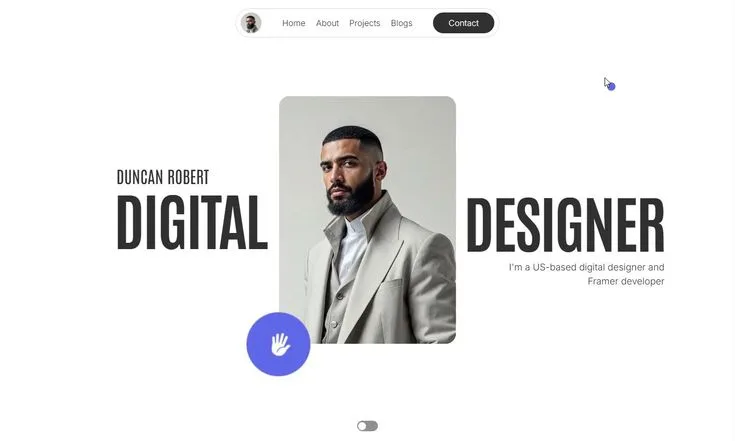
The UX design portfolio is simultaneously the most important and most misunderstood part of getting a job in design. Every job posting says it. Every bootcamp emphasises it.
And yet the most common portfolio mistakes - showing only finished screens, writing vague process descriptions, including too many projects, hiding your actual contribution behind passive language - are made by the majority of candidates, including experienced ones who should know better.
The reason these mistakes persist is that most designers build portfolios to impress other designers rather than to answer the questions that hiring managers are actually asking. Hiring managers evaluating a UX design portfolio are not looking for visual beauty.
They are looking for evidence that the designer can solve problems - that they understand user needs, make reasoned decisions, iterate based on feedback, and connect their design work to real outcomes. A portfolio that answers those questions clearly will outperform a visually stunning portfolio that does not, every time.
This article is a practical guide to building a UX portfolio that secures interviews: what to include, how to structure case studies, what tools to use for the portfolio site itself, the most common mistakes and how to avoid them, and how to get feedback that actually improves the work before you start applying.
"I have reviewed hundreds of junior UX portfolios. The best ones have two things in common: the designer talked to real users, and they are honest about what they would do differently. Those two things alone put a portfolio in the top 10% of what I see."
- Vitaly Friedman, co-founder of Smashing Magazine, at UX London 2023[3]
Key Definitions
Case Study: A written and visual account of a single design project, documenting the problem, the process, the decisions made, and the outcome.[9] The standard format for demonstrating UX process in a portfolio.
Distinguished from a 'project showcase' - which shows only finished outputs - by the inclusion of process documentation and reasoning.
Process Documentation: Visual and written artefacts that show how a design evolved: early sketches, wireframe iterations, research synthesis documents, testing notes, and before/after comparisons. The evidence of thinking, not just the result.
Portfolio Site: The digital presentation layer for portfolio work. Can be a dedicated website, a Notion page, a PDF, or a hosted platform. The platform matters less than the quality and clarity of the content it displays.
Design Challenge: A problem-solving exercise, either take-home or live, in which a designer responds to a brief. Often used as part of the interview process to supplement portfolio review.
Outcome: The measurable or demonstrable result of design work - improved task completion rate in usability testing, reduced support tickets, increased conversion rate, faster user onboarding, or qualitative feedback indicating improved satisfaction. Outcomes are the hardest part of student or bootcamp portfolios to produce genuinely.
What Hiring Managers Actually Evaluate
Before discussing format, tools, or project selection, it is essential to establish what a UX portfolio is for.[5] It is not an art gallery. It is not a Behance page. It is a demonstration of how you think.
The single question every hiring manager is asking as they review your portfolio is: 'Does this person think like a UX designer?' That means: Do they understand user problems? Do they use research to inform design decisions, rather than just describing research they did?
Do they understand trade-offs and constraints? Can they communicate their reasoning clearly?
A portfolio that answers these questions with polished screens but no supporting explanation fails, regardless of how good the screens look. A portfolio that answers them with rough process work but clear, insightful writing succeeds. In practice, the best portfolios combine both - they are visually literate and intellectually rigorous.
Nielsen Norman Group's 2024 hiring manager survey found that 87% of UX hiring managers cite 'evidence of process and reasoning' as the primary criterion for advancing a portfolio to interview, compared to 43% who cite 'visual quality.' The ratio is instructive.[1]
Process literacy is twice as important as visual craft in an initial portfolio review.
Portfolio Format: How Many Projects, How Much Depth
| Format | Projects | Depth Per Case Study | Best For |
|---|---|---|---|
| Minimum viable portfolio | 2 case studies | Full depth (problem, research, decisions, outcomes) | Early stage, first applications |
| Standard portfolio | 3 case studies | Full depth | Most entry-to-mid-level positions |
| Agency / consultancy portfolio | 3 deep + 2-3 brief | Deep case studies + short sector summaries | Roles valuing breadth of industry experience |
| Senior designer portfolio | 2-3 deep + project list | Deep case studies emphasising strategy and impact | Senior IC or design leadership roles |
| Confidential work portfolio | 2-3 case studies (redacted) | Anonymised or summary format + password protection | Post-NDA professional work |
Two to three deeply documented case studies are more effective than five to eight shallow ones.[7] Hiring managers at product companies typically spend three to five minutes on an initial portfolio review. In that time, they can evaluate two case studies with genuine depth.
An additional six projects do not add value - they add noise, and they dilute the impression of quality with quantity.
The exception is for designers applying to agencies or consultancies, where breadth of industry experience is valued. Even here, three strong case studies supplemented by two or three brief project summaries is preferable to eight equal-depth projects.
Quality over quantity is not a cliche - it is the consistent recommendation of every experienced UX hiring manager who has published guidance on portfolio evaluation, from the NN/g reports to Julie Zhuo's writing to the hundreds of design hiring managers on LinkedIn who post regular feedback.[2]
The Case Study Structure That Works
Opening Context
Every case study should begin with context: what was the product, what was the business problem or opportunity, who were the users, and what constraints did you work within? One paragraph. Hiring managers who do not understand the context by the end of the first paragraph stop reading carefully.
Specifically: avoid starting case studies with 'I was given a brief to redesign the X app.' Start by explaining what problem users had with the existing product, or what opportunity the project was addressing. Problem-first framing signals that the designer is oriented toward user needs, not just execution tasks.
Research Section
Describe what research you did and - critically - what you learned from it. The research section is where most portfolios fail.
Describing research methods ('I conducted five user interviews') without reporting what those interviews revealed ('Interviews showed that users did not understand the difference between X and Y, which led us to redesign the information architecture around Z') misses the entire point.
If the research genuinely changed your understanding of the problem or shaped a specific design decision, say so explicitly. If it confirmed what you already suspected, say that too - honesty about what research actually does in context is more credible than claiming every study produced revelatory insights.
Strong research sections include: the methods used and why you chose them, the key findings and how you synthesised the data, and a clear statement of how findings informed the design direction. Affinity maps, journey maps, and key insight summaries are all appropriate process artefacts to include.
Design Process Section
Show the evolution of the design through sketches, low-fidelity wireframes, and iterations. Document decisions: 'We chose this navigation structure rather than [alternative] because [reason].' Annotate wireframes to explain the logic behind layout decisions, not just what they look like.
Process documentation does not require pristine production-quality sketches. A photograph of a whiteboard sketch from a design session, captioned with what problem it was addressing and what decision it led to, is more compelling than a perfectly rendered illustration of a process that looks too clean to be real.
What the process section must convey: that the current design is not the first idea you had, that you considered alternatives and made trade-offs, and that iterations were driven by feedback or insight rather than aesthetics alone.
Testing and Validation Section
Describe how you validated or tested the design - even if the validation was informal. A five-person guerrilla usability test conducted in a coffee shop is legitimate research.[11] An expert evaluation against Nielsen's ten usability heuristics is a real method.[6]
Cognitive walkthrough with two stakeholders counts. The section does not need to describe a formal usability lab - it needs to demonstrate that the design was exposed to actual humans before being called finished.
If you found problems in testing, include them. Showing that you identified usability issues, revised the design, and tested again is evidence of the iteration process that professional designers use.
Showing only the final, problem-free design is less credible - it implies either that the design was perfect from the start (unlikely) or that problems were not looked for (worse).
Outcomes and Reflection
Close each case study with the outcome - what happened as a result of the design - and an honest reflection on what you would do differently. For professional work, outcomes might include measurable metrics.
For student or bootcamp projects where real deployment did not occur, describe what usability testing revealed about design quality and what open questions remain.
Strong outcome language: 'Task completion rate for new users increased from 62% to 84% between prototype iteration 1 and prototype iteration 3. The primary change driving this improvement was removing the required account creation step from the onboarding flow.'
Weak outcome language: 'Users responded positively to the redesign and found it more intuitive.'
The reflection section is where senior designers distinguish themselves most clearly. A reflection that says 'I would prioritise a longitudinal study to understand how usage patterns change over three months' signals methodological maturity that 'this project taught me a lot about UX' emphatically does not.
What to Include When You Have No Professional Experience
Hiring managers understand that entry-level candidates lack professional project experience. What they cannot accept is a portfolio with no evidence of real user interaction.
Practice projects are acceptable if they demonstrate actual research - not assumed user needs, but conversations with real people, usability tests, or analysis of real behavioural data. A redesign of an existing product you use daily, grounded in interviews with five real users about their frustrations, is legitimate portfolio material.
Volunteer work produces real projects. Organisations like Catchafire, VolunteerMatch, and Code for America post design requests from non-profits. Designing a real flow for a real organisation, with real users and a real deployment outcome, is more compelling than any number of practice redesigns.
Bootcamp projects can work if they were built around genuine user research rather than assumed personas. The difference between a bootcamp project that gets you interviews and one that does not is whether you spoke to actual users and allowed what they said to change your design.
Including three case studies with genuine depth is more effective than including eight superficial ones. More projects do not signal more experience - they signal poor judgment about quality.
Common Portfolio Mistakes and How to Fix Them
Showing Only Final Screens
This is the single most common mistake and the one that most reliably gets portfolios screened out. Final screens without context look like a Dribbble showcase, not a UX portfolio.[10] Fix: add at least one section of process documentation to each case study - a wireframe, a sketch, an affinity map photo, a comparative analysis.
Hiding Your Contribution
Passive language ('the team decided,' 'a decision was made,' 'the research showed') makes it impossible for hiring managers to understand what you specifically contributed.
Use first-person language that clearly attributes your work: 'I designed the navigation structure after identifying that users in our research expected a task-based rather than feature-based organisation.'
Describing Fake Research
Including a persona with a stock photo and a made-up name, accompanied by fabricated pain points that suspiciously match your design's features, signals immediately that the research was invented post-hoc to justify predetermined decisions.
Experienced hiring managers recognise fabricated research. Fix: do real research, however small - three user interviews, a competitive analysis, a review of existing product analytics, or a round of usability testing on an existing product.
Including Every Project You Have Ever Done
A junior designer who includes eight projects is telling the hiring manager that they cannot judge quality. Fix: cut mercilessly to the two or three projects where you did the most rigorous work and can speak most confidently in an interview.[8]
No Connection to Outcomes
'The redesign improved the user experience' is not an outcome. 'Usability testing showed that task completion time for the primary task decreased from 4.2 minutes to 2.1 minutes between the first and final prototype iterations' is an outcome.
Fix: be specific and quantitative wherever possible; if quantitative outcomes are not available, describe qualitative indicators of improvement honestly.
Portfolio Site Usability Failures
Your portfolio site is itself a design artefact. Slow load times, broken links, navigation that makes it hard to find case studies, and pages that do not render on mobile are all signals about your design quality that hiring managers will notice - often before they have read a word of your content.
Fix: test your portfolio on multiple devices and in multiple browsers before applying. Have a non-designer friend navigate to a specific case study and observe where they hesitate.
Portfolio Site Tools
The platform on which you host your portfolio matters less than the content within it. That said, platform choice does send signals.
Figma or Framer: Popular among designers who want to demonstrate visual and interaction design skills through the portfolio site itself. Framer allows for impressive interactive presentations. The risk is over-investing in the presentation layer at the expense of content depth.
Notion: Simple, clean, and fast to build and update. Increasingly common for UX portfolios because it renders well on all devices and supports mixed content (text, images, embedded prototypes, video walkthroughs). Less visually distinctive but low-maintenance and easy to keep current.
Webflow: Powerful for designers comfortable with visual web development. Produces highly customised, visually distinct portfolio sites. High time investment to build and maintain.
Squarespace and Adobe Portfolio: Reliable, well-designed templates that require minimal setup. Appropriate for designers who want to focus on content rather than portfolio site craft. Can look generic if no customisation is applied.
Password-protected PDF: Acceptable and sometimes necessary for portfolios containing confidential client work. Used as a secondary document alongside a portfolio site, not as a replacement.
Whatever platform you choose, ensure: the site loads quickly on mobile, the navigation to individual case studies is clear, and there is a contact method and a downloadable resume on the landing page. Basic usability in your own portfolio site is a credibility test.
Getting Feedback Before Applying
Portfolio feedback from working designers is one of the highest-leverage investments an aspiring UX designer can make before applying. A two-hour review from an experienced designer who actively reviews portfolios can surface problems in positioning, case study structure, and content clarity that self-review misses.
ADPList (adplist.org) offers free mentorship from experienced designers who have explicitly offered to give feedback.[4] Many are willing to do portfolio reviews. The platform connects aspiring designers with mentors globally and has facilitated over a million mentorship sessions as of 2024.
LinkedIn outreach to designers whose work you respect, asking specifically for thirty minutes of portfolio feedback, is more successful than you might expect. Most designers remember needing this and are willing to help when the request is specific and the ask is reasonable.
Local UXPA and IxDA chapter meetings provide access to practising designers who give informal feedback in community settings. These in-person connections often lead to more sustained mentoring relationships than cold outreach.
When seeking feedback, ask specific questions rather than 'What do you think of my portfolio?' Ask: 'Does the case study for [project] clearly explain the user problem?' and 'Is my contribution visible or is the language too passive?' Specific questions produce specific, actionable feedback.
Presenting Your Portfolio in Interviews
The portfolio review is only half the battle. The portfolio interview - where you walk a hiring manager through one or two case studies in real time - is where decisions are actually made. Many designers who have strong portfolios perform poorly in interviews because they have not practised presenting them.
Prepare a 5-minute version and a 15-minute version of each case study. The 5-minute version covers: the problem, the key research insight that shaped the design, the most important decision you made and why, and the outcome. The 15-minute version adds process detail, shows more iterations, and goes deeper into research methodology.
Lead with the problem, not the design. Start every portfolio walkthrough with the problem you were solving, not with the screens you produced. Designers who open with 'Here is the final design' before establishing why the design was needed signal the wrong orientation.
Anticipate 'why' questions. For every design decision in your portfolio, prepare to answer 'why did you choose this approach rather than alternatives?' If you cannot answer this, the decision was not fully thought through - or your documentation of it needs work.
Practice out loud. Presenting your portfolio confidently to a camera or a practice partner before real interviews removes most of the anxiety from the actual conversation. The ability to explain your design process fluently is a direct signal of your communication ability, which is among the most important skills in any UX role.
Maintaining Your Portfolio Over Time
Portfolio maintenance is easier when done continuously rather than in bursts. Designers who update their portfolios only during job searches typically find the documentation process overwhelming and produce worse work under deadline pressure.
A sustainable approach: spend one hour per quarter reviewing your portfolio. Remove any case study that no longer represents your best work. Update outcomes sections as you learn more about how deployed designs performed. Add brief project summaries for completed work that does not yet have a full case study.
The portfolio you show at your next job search should look substantially better than the one you used for your previous search. That progression is itself a signal of professional growth.
Practical Takeaways
Build your portfolio to answer the question 'Does this person think like a UX designer?' - not 'Does this person produce beautiful screens.' Every case study structure decision should serve that goal.
Start with depth, not coverage. Write one genuinely excellent case study before adding a second.
The discipline of writing up a single project rigorously - with real research, documented process, testing evidence, and an honest outcome - teaches you more about portfolio construction than building three superficial case studies simultaneously.
Do real research. The gap between a portfolio that gets interviews and one that does not is almost always whether the designer spoke to actual users. Even three 20-minute conversations with people who use a product you are studying is enough to generate genuine insight that transforms a practice project into a credible case study.
Get feedback from working designers before you apply. The combination of self-review and peer review from non-designers will not catch the problems that an experienced hiring manager sees immediately.
Sources & Further Reading
- Nielsen Norman Group. (2024). UX Portfolio Reviews: What We Look For. nngroup.com/articles
- Zhuo, J. (2019). The Making of a Manager. Portfolio/Penguin.
- Friedman, V. (2023). Portfolio Workshop: What Makes a Standout UX Case Study. UX London Conference Proceedings.
- ADPList. (2024). Mentorship and Portfolio Review Report 2024. adplist.org
- Interaction Design Foundation. (2024). How to Create a UX Portfolio. interaction-design.org
- Nielsen, J. (2020). 10 Usability Heuristics for User Interface Design. nngroup.com/articles
- Springboard. (2024). The Complete Guide to a UX Design Portfolio. springboard.com/blog
- CareerFoundry. (2024). UX Design Portfolio: Examples and Best Practices. careerfoundry.com
- Smashing Magazine. (2023). What Makes a Great UX Portfolio Case Study. smashingmagazine.com
- Dribbble. (2024). State of Design Report 2024. dribbble.com/resources/design-industry-trends
- Buley, L. (2013). The User Experience Team of One. Rosenfeld Media.
Further Reading
- Figma. (2024). Figma Community Portfolio Templates. figma.com/community