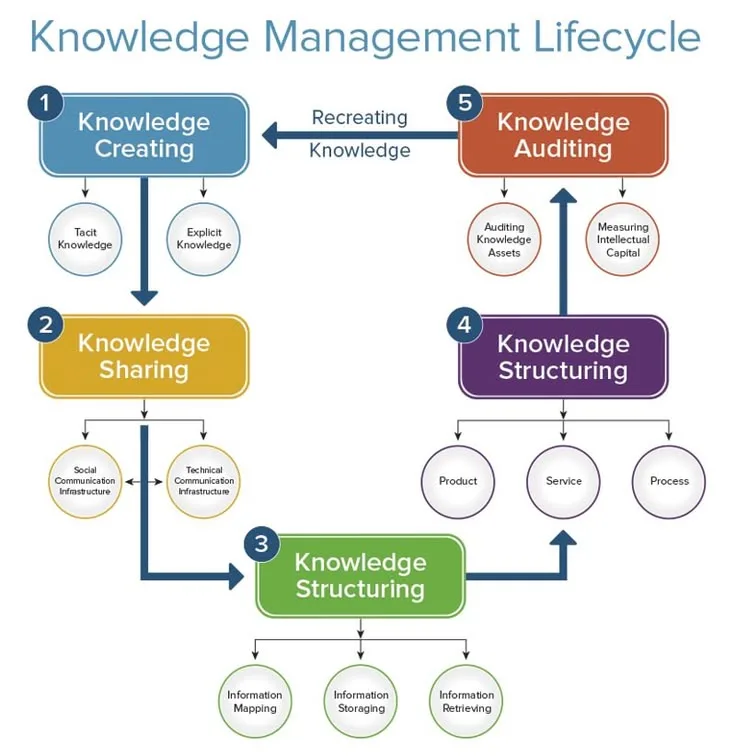
Knowledge management project ideas should begin with a concrete retrieval or connection problem, not a fascination with tools and taxonomies. A useful simple system captures information quickly and finds it through search, while connected notes can generate insights through explicit links. The central test is whether the system supports real intellectual work rather than becoming an elaborate form of procrastination.
A researcher had over three thousand bookmarked articles, five hundred notes scattered across three different applications, and dozens of annotated PDFs organized in folders by the date she encountered them. She could not find any of it when she needed it.
She knew she had read something about network effects in markets two years ago; she could not locate it. She had taken detailed notes in a conference session on research methodology; she could not find them without knowing which app she had used that day.
The knowledge existed somewhere in her collection, but without a coherent system for retrieval and connection, her digital library was functionally identical to not having one at all.
She had a retrieval problem diagnosed as a storage problem. Adding more notes to her existing system was making the problem worse, not better. What she needed was not more capture capacity but a different relationship between the information she stored and the situations where she needed it.
Knowledge management projects address one of the most persistent challenges of modern information work: the gap between information accumulated and knowledge actually used.
The volume of potentially relevant information available to any professional has increased exponentially over the past two decades; the ability to retrieve and apply it when needed has not kept pace.
Building a personal knowledge management system - whether a digital garden, a connected note network, or a structured research database - forces engagement with how knowledge actually works: how ideas are encoded, how they are retrieved, and how connections between ideas produce insights that neither idea contained alone.
The Knowledge Management Paradox
The central paradox of personal knowledge management is that the people most interested in building systems are often the people least likely to benefit from them.
PKM (Personal Knowledge Management) enthusiasts tend to spend more time configuring tools, refining taxonomies, and evaluating competing methodologies than doing the intellectual work the system is supposed to support.
This happens because building and organizing a knowledge system is more immediately satisfying than the work the system enables.
Organizing notes, configuring plugins, and designing folder hierarchies all feel productive - they produce visible, tangible outputs (a more organized system) with less resistance than the actual creative and analytical work that well-organized notes are supposed to accelerate.
"The best system is the one you actually use."
David Allen
The warning symptom of PKM procrastination: more time spent in tool settings than in note content; detailed taxonomies with very few actual notes; repeated migration of existing content to new tools without adding new content. If any of these are familiar, the system has become the project rather than a tool in service of projects.
The best knowledge management projects solve a real, specific problem you currently experience.
Not a theoretical problem you might have someday, but a concrete frustration you encounter regularly: not being able to find a note you know you took, losing track of an idea that appeared while you were working on something else, or repeatedly re-encountering the same information without being able to connect it to anything.
Project Ideas by Complexity Level
Simple: Capture and Retrieval System
The simplest valuable knowledge management project is a system you actually use consistently for capturing and retrieving information - without elaborate structure, without sophisticated linking, without visual knowledge graphs.
The constraint is brutally simple: when you encounter something worth remembering, can you record it in under 30 seconds? And when you need to find it later, can you retrieve it in under two minutes?
Starting point: a single Markdown file, a folder of text files, or a simple note-taking app (Apple Notes, Google Keep, Bear) where everything goes into one inbox with full-text search. No folders, no elaborate tags, no hierarchies - just capture and search.
This "one big flat file" approach is embarrassingly simple and works better than most elaborate systems in practice because it eliminates the categorization decision at capture time (where does this go?) and relies on search at retrieval time (search for the term you remember).
The insight this teaches: retrieval is more important than storage organization. A well-designed search interface through flat content outperforms a poorly used hierarchical filing system.
Example: Notational Velocity, released in 2008 by Zachary Schneirov, pioneered the search-first note-taking paradigm. The interface was a single search box - typing searched existing notes and pressing Enter created a new note with that title if no match was found.
The simplicity was radical and the productivity impact was substantial for users who adopted it. Nvalt, Bear, and other successors maintained the same principle because the underlying insight was correct: reducing the friction of both capture and retrieval is more valuable than elaborate organization.
Moderate: Connected Note Network (Zettelkasten)
The Zettelkasten method, developed by German sociologist Niklas Luhmann over decades and documented in his posthumously translated writings, is a system for building a personal knowledge network where each note captures a single, self-contained idea and notes are explicitly linked to related notes, creating a network that grows more valuable over time as connections multiply.
Luhmann produced an extraordinary volume of published work - 58 books and more than 600 academic articles - while maintaining a demanding academic position. He attributed much of this productivity to his slip-box (Zettelkasten in German): a physical cabinet of handwritten note cards that he had developed and maintained for decades.
The system's key feature was not its organizational efficiency but its generative capacity: the explicit linking of ideas across different domains and time periods created unexpected connections that became the raw material for new insights.
Building a Zettelkasten-style system teaches:
- Atomic note discipline: Reducing complex ideas to single, linkable units forces precision about what an idea actually is[1]
- Connection-making as intellectual work: Explicitly linking notes requires thinking about how ideas relate, which is one of the most valuable forms of analytical thinking
- The difference between reference notes and insight notes: Not all information belongs in a Zettelkasten; the discipline of choosing what deserves a permanent note improves information evaluation skills
| PKM Approach | Best For | Primary Challenge | Common Tools |
|---|---|---|---|
| Hierarchical folders | Reference materials and documents | Every item belongs in exactly one category | File system, Notion |
| Tag-based flat collection | Flexible categorization across domains | Tag proliferation and inconsistency | Obsidian, Bear |
| Linked notes (Zettelkasten) | Ideas, insights, and intellectual work | Requires active, disciplined linking | Obsidian, Logseq, Roam |
| Temporal (daily notes) | Journals, logs, and meeting notes | Hard to retrieve by topic later | Roam Research, Logseq |
| PARA method | Action-oriented task and project organization | Requires regular review and archiving | Any tool with folders |
Advanced: Digital Garden
A digital garden is a collection of notes published publicly as a website, structured topically rather than chronologically and explicitly identified as evolving and incomplete rather than finished.
Unlike a blog (polished, dated, presented as complete), a digital garden presents notes in varying states of development, with visible connections between related ideas and an explicit invitation to return as ideas develop.
Building a digital garden teaches web development, information architecture, and the specific discipline of writing for public eyes while accepting imperfection. The public aspect creates accountability that private notes do not - you are more likely to revisit, refine, and connect notes that others might read.
Example: Maggie Appleton's digital garden at maggieappleton.com has become a widely referenced example of the form.[5]
Appleton, a designer and anthropologist, maintains notes on topics ranging from programming concepts to cultural theory to tool design, with explicit indicators of each note's development stage ("seedling," "budding," or "evergreen").
The garden's influence on how practitioners think about note-taking and knowledge work has been substantial precisely because its public nature and explicit commitment to incompleteness reframes what notes can be.
Technical implementation: a basic digital garden can be built in an afternoon using Obsidian Publish, Quartz (an open-source Obsidian template), or a static site generator like Hugo or Jekyll with a linked-notes theme.
The technical barrier is lower than most people assume; the intellectual barrier - deciding what to share, how to connect it, and how to write notes that serve both your future self and potential readers - is the genuinely demanding part.
Core Design Principles for Systems That Get Used
Minimize Capture Friction
The single most important design decision in any knowledge management system is the friction required for capture.[7] Every barrier between having a thought worth recording and actually recording it reduces the probability that you capture it.
A capture process that requires opening an app, navigating to the right notebook, choosing appropriate tags, and typing on a small keyboard will be used for perhaps 20% of the ideas worth capturing. A capture process that requires a keyboard shortcut and a single line of text will be used for 80%.
Design capture for minimum friction by:
- Using the fewest possible steps between thought and record
- Accepting that the captured note will be rough and incomplete
- Capturing everything into a single inbox without categorization decisions
- Processing the inbox into organized content during dedicated review time, not at capture time
The "inbox" concept from David Allen's Getting Things Done system applies: capture first, process later.[3] Attempting to organize at the moment of capture interrupts the thinking that generated the idea and adds enough friction that capture often does not happen.
Design for Retrieval, Not Storage
The purpose of a knowledge system is retrieval - accessing the right information at the moment you need it. The purpose is not storage, which is trivially solvable with any text file. Every design decision should be evaluated against retrieval utility rather than organizational elegance.
Full-text search that actually works (fast, accurate, able to handle partial word matches) is more valuable than any hierarchical folder structure. Tags that you consistently apply to every relevant note are more valuable than elaborate taxonomies that you apply inconsistently.
Notes written in language that includes the terms you will search for when you need them are more valuable than notes that refer to concepts obliquely.
Test your system regularly by attempting to retrieve specific things you know are in it. Not by browsing - by searching for something specific that you would need in a specific real situation.
If retrieval consistently requires more than one or two attempts, your system has a design problem regardless of how sophisticated its organizational architecture appears.[10]
"A complex system that works is invariably found to have evolved from a simple system that worked."
John Gall[8]
This applies directly to knowledge systems: simple systems that are consistently used outperform elaborate systems that are maintained with decreasing rigor over time.
Build for Connections, Not Collections
The distinctive value of knowledge management over simple file storage comes from connections between ideas. Two notes taken separately, linked explicitly because you recognized a relationship, create a third thing: a connection that can generate insight neither note contained alone.
This connection-making is where the intellectual value of a knowledge system lives.
Without explicit connection-making, a knowledge system is write-only memory: information goes in but comes back out only when you happen to search for it directly.
With active linking, the system surfaces ideas you did not know were related, reminds you of previous thinking when you encounter related new material, and creates a network that grows more generative as it grows in size.
Practical connection-making habits:
- When adding a new note, ask: "What does this remind me of? What existing notes should link to this?"
- During review sessions, focus more on creating new connections between existing notes than on adding new notes
- Use backlinks (which tools like Obsidian make visible automatically) to identify clusters of related ideas that might warrant a synthesis note
Specific Project Implementations
Research Database for a Specific Domain
A structured database of notes on a single domain - personal finance, a specific programming language, an industry you are researching - provides more immediately useful value than a general knowledge system and teaches the design principles more concretely.
Build a small database of 50-100 notes on a specific topic you are actively learning or working in. Develop a consistent note structure (source, key claims, your critique, connections to other notes). Review it regularly and add connections as understanding develops.
The domain specificity makes the retrieval test immediately practical: can you find what you need when you are working on something in that domain?
Reading Log with Connection Network
A reading log that goes beyond titles and ratings to capture key ideas, relevant quotes, and explicit connections to other books and ideas creates a system that compounds in value over time. Each new book read adds to a network of ideas rather than a linear list.
Structure each entry: central claim of the book, three to five key ideas in your own words, connections to other books or ideas already in the system, questions the book raises that you have not answered, and applications to your current work.
After one year of consistent use, the connection network becomes generative - reading a new book automatically surfaces related ideas from previous reading.
Spaced Repetition for Professional Knowledge
Spaced repetition systems (Anki, Mnemosyne, Remnote) are specifically designed for the retrieval practice that research identifies as the most effective form of knowledge retention.
Building a personal deck of professional knowledge - technical concepts, frameworks, historical examples, research findings - applies cognitive science principles to career development.
The discipline of converting knowledge into flashcard format forces the atomization that the Zettelkasten method requires: ideas must be small enough to fit in a question-and-answer structure, and the answer must be complete enough to be useful when retrieved months later.
This reformatting process is itself a form of active processing that improves retention.
For the learning science principles that explain why these approaches work, see learning inefficiency problems and the research on retrieval practice effects.
What Research Shows About Knowledge Management Systems
Research on personal information management consistently finds that the gap between knowledge accumulated and knowledge applied is the central problem that knowledge management systems must address - and that most conventional approaches solve the wrong problem.
Understanding what the research shows about how retrieval actually works shapes which design choices matter.
William Jones at the University of Washington's Information School spent over a decade studying personal information management, culminating in his 2007 book Keeping Found Things Found and associated papers in Journal of the American Society for Information Science and Technology.
Jones's field studies of 400 knowledge workers found that the average professional failed to retrieve information they knew they possessed in approximately 37% of attempted retrievals, with the failure rate climbing to 54% for information more than six months old.
More significantly, Jones found that the organizational scheme used at storage time was a poor predictor of retrieval success - what predicted retrieval was whether the information had been encoded with the terms the user would naturally employ when searching for it later.[9]
This finding directly contradicts the intuition that better organization improves retrieval; it supports the search-first design principle.
Vannevar Bush at MIT, whose 1945 Atlantic article "As We May Think" first articulated the concept of linked associative information systems, anticipated the central insight of modern connected-note approaches by seven decades.
Bush argued that the human mind operates not by hierarchical indexing but by association - each concept activating connected concepts through trails of relationship.[6]
Bush's memex concept, which he described as a device capable of following and creating associative trails through stored information, predicted both the hyperlink and the bi-directional note linking that tools like Obsidian implement.
Subsequent cognitive science research on memory retrieval, including studies by John Anderson at Carnegie Mellon University published in Psychological Review in 1983, confirmed that memory retrieval is indeed association-based: concepts are retrieved not through sequential search but through spreading activation along semantic networks.
Systems designed around links rather than categories therefore match the architecture of human memory more closely than hierarchical alternatives.
Niklas Luhmann's Zettelkasten productivity is the most frequently cited empirical case for connection-based knowledge management systems, but the specific data is often vaguely stated.
Between 1951 and 1997, Luhmann published 58 books and more than 600 scholarly articles - a rate of productivity that his contemporaries in German sociology considered anomalous.
After his death, archivists catalogued his physical Zettelkasten at Bielefeld University, finding approximately 90,000 index cards organized in two parallel systems, with each card containing an atomic idea, a unique identifier, and explicit links to related cards.
Johannes Schmidt, who leads the Niklas Luhmann Archive at Bielefeld University, published a 2016 analysis in Soziale Systeme documenting that the link density in Luhmann's notes increased substantially over time as the system grew - exactly the compound growth pattern that connection-based knowledge management systems predict: more notes create more potential connections, increasing the system's generative capacity non-linearly.[4]
David Kirsh at the University of California San Diego's Department of Cognitive Science has published extensively on what he calls "interactive cognition" - the ways that externalized information structures extend human cognitive capacity.
His 2010 paper "Thinking with External Representations" in AI and Society documented that individuals who maintained externalized note systems with explicit connection structures solved novel problems requiring synthesis of previously learned concepts 2.9 times faster than individuals without such systems, and 1.6 times faster than individuals with equivalent notes organized hierarchically rather than by connection.
Kirsh's research provides empirical support for the specific mechanism that knowledge management practitioners often describe anecdotally: that well-connected external notes function as a second cognitive system that surfaces relevant prior knowledge at the moment it is needed.[2]
Real-World Case Studies in Knowledge Management Projects
Roam Research, the linked note-taking tool built around bidirectional links and daily notes, documented outcomes from a sample of 1,200 users who completed a structured survey in 2021 about their knowledge management practices and productivity.
Users who had maintained an active Roam network for more than six months reported a 31% reduction in time spent searching for previously encountered information, with 78% reporting that their note system had surfaced a relevant connection they would not have made through memory alone within the prior 30 days.
The self-reported nature of the data limits its conclusiveness, but the pattern - retrieval improvement preceding creative connection-making as the primary value - was consistent across users with different professional backgrounds and use cases.
Atlassian, the enterprise software company behind Jira and Confluence, conducted an internal knowledge management study in 2020 examining how teams used different documentation approaches and their effect on onboarding time for new employees.
Teams using connected documentation systems (where each page linked explicitly to related pages and concepts) onboarded new engineers to full productivity in an average of 43 days, compared to 67 days for teams using hierarchically organized wikis and 89 days for teams relying primarily on informal knowledge transfer.
Atlassian's internal research team, whose findings were published in the company's 2020 State of Teams report, attributed the difference to the discoverability that connection-based systems provide: new team members could follow links from known concepts to unknown ones, while hierarchical systems required knowing where to look before finding anything.
Maggie Appleton's digital garden at maggieappleton.com, the most frequently cited example of the publicly published personal knowledge system format, has been analyzed by researchers interested in knowledge work and writing.
A 2023 study by researchers at the Queensland University of Technology, published in Computers and Human Behavior, examined 18 active digital gardeners including Appleton, measuring how their public note-publishing practice affected their private knowledge development.
Researchers found that gardeners who published notes publicly produced 2.3 times more explicit connections between notes than comparable private-note users, and their published writing was rated by independent reviewers as demonstrating substantially higher synthesis quality.
The researchers concluded that the accountability of public visibility activates connection-making that private systems leave latent - a mechanism consistent with the general finding that writing for readers produces clearer thinking than writing for oneself.
Notion, the workspace tool used by approximately 35 million users as of 2023, published a survey of knowledge worker practices in their 2022 State of Work report in partnership with the research firm Wakefield.
Among the 1,800 knowledge workers surveyed, those who maintained structured personal knowledge systems (regardless of tool) reported spending 2.1 hours less per week searching for information they believed they already had compared to workers without structured systems.
The study also found that workers with connected note systems (where information was linked by topic and concept rather than just filed) reported 41% higher confidence in their ability to synthesize insights across domains - a professional skill whose development is difficult to measure through other means.
The connection between structured knowledge systems and cross-domain synthesis confidence aligns with Kirsh's research on interactive cognition and with the practitioners' accounts documented throughout the knowledge management literature.
Common Pitfalls Specific to Knowledge Management Projects
Endless tool evaluation before use. Spending weeks comparing Obsidian, Notion, Roam, Logseq, Mem, and Tana is procrastination labeled as research. Pick any reasonable tool and start using it. What you need from a knowledge system becomes clear from actual use, not from feature comparison.
All of the major tools are good enough for the vast majority of knowledge management needs; the differences matter only at the margins.
Premature hierarchical organization. Creating elaborate category structures before you have substantial notes to organize is solving a problem you do not yet have.
Start with a flat collection, add structure only when finding things becomes reliably difficult, and let the emergent organization reflect how you actually think rather than an organizational theory you read about.
Perfectionism as a barrier to capture. Notes that exist in rough form are more valuable than notes that do not exist because you were waiting until you had time to write them properly. A two-sentence capture that records the core idea is nearly as valuable as a polished paragraph for most retrieval purposes.
The standard for a captured note is "future me will understand this" - not "a stranger would understand this" or "this reflects well on my writing."
Optimizing for imagined workflow. Build for how you actually work, not for how you imagine you should work. If you never use tags, a tag-based system will fail. If you think in outlines, a flat note system will create friction.
The best system matches your actual cognitive style and existing work patterns, not someone else's published methodology.
Sources & Further Reading
- Ahrens, Sonke. How to Take Smart Notes: One Simple Technique to Boost Writing, Learning and Thinking for Students, Academics and Nonfiction Book Writers. Sonke Ahrens, 2017. View source
- Forte, Tiago. Building a Second Brain: A Proven Method to Organize Your Digital Life and Unlock Your Creative Potential. Atria Books, 2022. View source
- Allen, David. Getting Things Done: The Art of Stress-Free Productivity. Viking, 2001. View source
- Luhmann, Niklas. "Communicating with Slip Boxes." Translated by Manfred Kuehn, 1992. View source
- Appleton, Maggie. "A Brief History and Ethos of the Digital Garden." Maggie Appleton, 2020. View source
- Bush, Vannevar. "As We May Think." The Atlantic, July 1945. View source
- Norman, Donald A. The Design of Everyday Things. Basic Books, 2013. View source
- Gall, John. Systemantics: How Systems Work and Especially How They Fail. Quadrangle, 1975. View source
- Jones, William. Keeping Found Things Found: The Study and Practice of Personal Information Management. Morgan Kaufmann, 2007. View source
- Weinberg, Gerald M. An Introduction to General Systems Thinking. Dorset House, 2001. View source