
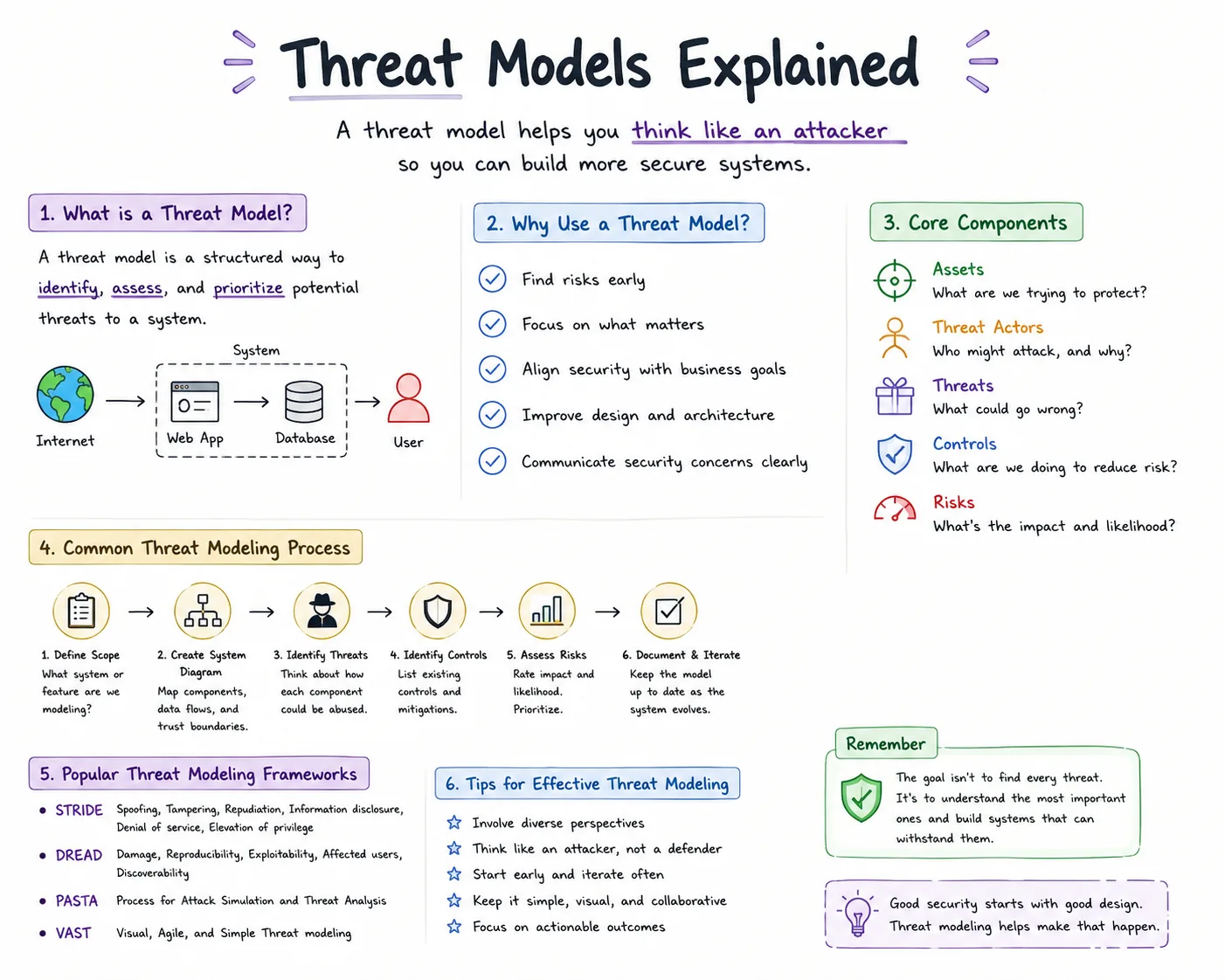
Security improves when likely attacks are considered while systems are designed, rather than only after vulnerabilities are found. Threat models explained as a structured practice identify valuable assets, plausible attackers, attack paths, risks, and proportionate defenses. They help teams direct limited resources, share risk assumptions, choose mitigations, and revisit those choices as the system changes.
In 1999, Microsoft faced a crisis. Security vulnerabilities in Windows were being exploited faster than patches could be released.
The company realized their reactive approach, fixing vulnerabilities after discovery, wasn't working. They needed to think like attackers before building systems, not after.
This led Microsoft to develop formal threat modeling practices: structured approaches to identifying what could go wrong, who might attack, how they'd attack, and what defenses would matter most. The results were dramatic.
Security vulnerabilities in Windows decreased significantly not because developers wrote perfect code, but because they designed systems with threats in mind from the beginning.
Threat modeling is the practice of systematically identifying and analyzing security threats to a system. It answers fundamental questions: What are we protecting? From whom?
Against what attacks? Which risks matter most? How should we defend?
Without threat modeling, security becomes reactive and scattershot: you protect against random threats, miss critical vulnerabilities, and waste resources on low-impact risks.
With threat modeling, security becomes strategic and focused: you understand your specific threats, prioritize where defenses matter, and make informed tradeoffs.
This analysis examines how threat modeling works: identifying assets and threats, assessing risks, applying frameworks like STRIDE, prioritizing defenses, and maintaining threat models as systems evolve.
What Threat Modeling Is (and Isn't)
The Core Concept
Threat modeling: Structured analysis answering:
- What are we building? (system architecture)
- What can go wrong? (threats)
- What should we do about it? (mitigations)
- Did we do a good job? (validation)
The output: Documentation of threats, their likelihood and impact, and chosen mitigations, guiding security investments.
"The question is not whether it is possible for the system to be broken, but whether it is worth the effort to break it." - Bruce Schneier
What Threat Modeling Is NOT
Not penetration testing: Pen testing simulates attacks on existing systems. Threat modeling happens before or during development, identifying threats before they become vulnerabilities.
Not compliance checkbox: Real threat modeling considers actual risks to your specific system, not generic "best practices" or compliance requirements (though it can inform compliance).
Not one-time activity: Threat landscapes evolve. New features add attack surface. Threat models must be living documents, updated as systems change.
Not just for software: Threat modeling applies to physical security, business processes, supply chains: anywhere threats exist.
Not paranoia: The goal isn't imagining every possible threat (impossible). It's systematically identifying plausible threats and making informed decisions about which to address.
Why It Matters
Limited resources: You can't protect everything perfectly. Threat modeling helps allocate security budget to highest-impact defenses.
Proactive vs. reactive: Finding and fixing vulnerabilities during design is 10-100x cheaper than fixing them in production after exploitation.
Shared understanding: Threat modeling creates common language between developers, security teams, and business stakeholders about risks and tradeoffs.
Better design: Thinking about attacks early leads to architectures that are secure by design rather than secured by afterthoughts.
Assets: What You're Protecting
Identifying Assets
Assets: Anything valuable that requires protection. Not just data, also systems, services, reputation, and intellectual property.
Examples:
- Data: Customer PII, financial records, trade secrets, credentials, health information
- Services: Availability of critical applications, API uptime, payment processing
- Reputation: Brand trust, customer confidence
- Operations: Manufacturing processes, logistics systems
- Intellectual property: Source code, algorithms, business methods
The question: If an attacker compromised X, what would be the impact? High-impact assets deserve more protection.
Asset Classification
Criticality levels:
- Critical: Compromise causes severe harm (financial loss, regulatory penalty, existential threat)
- High: Significant harm (major operational disruption, data breach)
- Medium: Moderate harm (minor disruption, limited data exposure)
- Low: Minimal harm (public information, non-critical functions)
Example classification for e-commerce system:
- Critical: Payment processing credentials, customer payment information
- High: Customer account data (addresses, order history), inventory management system
- Medium: Marketing analytics, product descriptions
- Low: Public product catalog, blog content
Why classify: Helps prioritize which threats to focus on. Threats to critical assets get immediate attention; threats to low-value assets might be accepted.
Threat Actors: Who Might Attack
Understanding Attackers
Threat actor: Individual or group that might attack your system. Different actors have different capabilities, motivations, and targets.
"Amateurs hack systems, professionals hack people." - Bruce Schneier
Common Threat Actor Categories
1. Script Kiddies
Profile: Low-skill attackers using automated tools and published exploits.
Capabilities: Can exploit known vulnerabilities using existing tools. Can't develop novel attacks or bypass sophisticated defenses.
Motivation: Curiosity, bragging rights, opportunistic financial gain.
Targets: Low-hanging fruit: unpatched systems, default credentials, common misconfigurations.
Defense priority: Low to medium. Basic security hygiene (patches, strong passwords, common hardening) defeats this threat.
2. Cybercriminals
Profile: Financially motivated attackers, often organized.
Capabilities: Moderate to high skill. Develop or purchase exploits. Use ransomware, phishing campaigns, credential theft, fraud.
Motivation: Money. They attack systems with financial value or ransomware potential.
Targets: Financial services, healthcare (ransomware), e-commerce (payment data), any organization that will pay ransom.
Defense priority: High for organizations with valuable data or low tolerance for downtime. Requires robust security programs, incident response, and backup strategies.
3. Hacktivists
Profile: Politically or ideologically motivated attackers.
Capabilities: Varies: some low-skill, some sophisticated. Often collaborate in groups (Anonymous, etc.).
Motivation: Political statement, embarrassment of target, exposure of perceived wrongdoing.
Targets: Organizations whose actions or policies they oppose, including governments, corporations, controversial industries.
Defense priority: Depends on organization's political profile. Controversial organizations face higher hacktivist risk.
4. Nation-State Actors (APTs)
Profile: Government-sponsored attackers with significant resources.
Capabilities: Very high skill. Develop zero-day exploits, conduct long-term campaigns, bypass most defenses.
Motivation: Espionage, intellectual property theft, infrastructure disruption, geopolitical advantage.
Targets: Government agencies, defense contractors, critical infrastructure, strategic industries (tech, energy, finance).
Defense priority: Critical for high-value targets. Requires advanced security, threat intelligence, assumption that attackers will eventually gain access (defense in depth, monitoring, incident response).
5. Malicious Insiders
Profile: Employees, contractors, or partners with legitimate access who abuse it.
Capabilities: High: they already have access, understand systems, know where valuable data lives.
Motivation: Financial gain, revenge, ideology, coercion.
Targets: Data they can access, systems they manage, processes they participate in.
Defense priority: High. Insider threats are hard to defend against with perimeter security. Requires access controls, activity monitoring, data loss prevention, trust but verify.
6. Competitors (Industrial Espionage)
Profile: Corporate actors seeking competitive advantage.
Capabilities: Varies. May hire skilled attackers or use insiders.
Motivation: Steal trade secrets, learn strategies, gain market advantage.
Targets: Research and development, strategic plans, customer lists, pricing information.
Defense priority: High for companies with valuable intellectual property or competitive secrets.
Threat Actor Assessment
For your specific system, ask:
- Which actors would be motivated to attack us?
- What capabilities do they have?
- What are they trying to accomplish?
- How much resource will they invest?
Example: A small retail website faces cybercriminals (payment data) and script kiddies (opportunistic). It probably doesn't face nation-states (not strategically valuable).
Understanding relevant threat actors helps focus defenses on plausible threats rather than hypothetical scenarios.
Attack Vectors: How Systems Get Compromised
What Are Attack Vectors?
Attack vector: The method or path an attacker uses to gain unauthorized access or cause harm.
Common Attack Vectors
1. Phishing and Social Engineering
How it works: Tricking users into revealing credentials, clicking malicious links, or installing malware through psychological manipulation.
Examples:
- Email pretending to be from IT asking for password
- Fake login page harvesting credentials
- Phone calls impersonating support to extract information
Why effective: Humans are the weakest link. Technical defenses don't stop users willingly providing access.
Mitigations: Security awareness training, email filtering, MFA (mitigates compromised passwords), anti-phishing technology.
2. Unpatched Vulnerabilities
How it works: Exploiting known security flaws in software that haven't been patched.
Examples:
- Old operating system versions with public exploits
- Web server vulnerabilities like Heartbleed
- Third-party library vulnerabilities
Why effective: Many organizations are slow to patch. Attackers know what vulnerabilities exist and have ready-made exploits.
Mitigations: Patch management processes, vulnerability scanning, automated updates where possible, risk-based patching prioritization.
3. Weak Authentication
How it works: Gaining access through weak passwords, default credentials, or lack of multi-factor authentication.
Examples:
- Brute-forcing weak passwords
- Using default admin/admin credentials on devices
- Compromising accounts without MFA through phishing
Why effective: Users choose weak passwords, reuse passwords across sites, and resist MFA friction.
Mitigations: Strong password policies, MFA enforcement, password managers, monitoring for credential stuffing attacks.
4. Misconfigured Systems
How it works: Exploiting systems configured insecurely, often through default settings or human error.
Examples:
- Publicly accessible databases without authentication
- S3 buckets with public read permissions
- Overly permissive firewall rules
- Debug modes left enabled in production
Why effective: Configuration is complex. Secure defaults aren't always configured securely. Cloud services make it easy to accidentally expose resources.
Mitigations: Security baselines, automated configuration scanning, infrastructure-as-code review, least-privilege access policies.
5. Supply Chain Attacks
How it works: Compromising trusted third parties (software vendors, contractors, service providers) to gain access to targets.
Examples:
- Malicious code injected into software updates (SolarWinds attack)
- Compromised third-party libraries
- Vendor access credentials stolen
- Hardware backdoors
Why effective: Organizations trust their vendors and don't scrutinize updates or third-party code as rigorously.
Mitigations: Vendor security assessments, software supply chain security, monitoring third-party access, code signing verification.
6. Web Application Vulnerabilities
How it works: Exploiting common web application flaws to inject code, steal data, or manipulate functionality.
Examples:
- SQL injection (manipulating database queries)
- Cross-site scripting (XSS: injecting malicious scripts)
- Cross-site request forgery (CSRF: forcing unwanted actions)
- Insecure deserialization
Why effective: Web applications are complex, handle user input, and often have security flaws.
Mitigations: Secure coding practices, input validation, parameterized queries, web application firewalls, security testing (SAST/DAST).
7. Physical Access
How it works: Gaining physical access to devices, facilities, or infrastructure to bypass digital security.
Examples:
- Stealing laptops or phones with unencrypted data
- Accessing data centers
- Plugging malicious USB devices into workstations
- Dumpster diving for documents
Why effective: Physical security often weaker than digital security. Once physical access achieved, many digital controls bypassed.
Mitigations: Physical access controls, full-disk encryption, device management, secure disposal processes, visitor management.
The STRIDE Framework
What is STRIDE?
STRIDE: Mnemonic for systematic threat identification, developed by Microsoft. Helps ensure you consider all major threat categories.
"If you think technology can solve your security problems, then you don't understand the problems and you don't understand the technology." - Bruce Schneier
The Six Threat Categories
S - Spoofing Identity
What it is: Pretending to be someone or something else.
Examples:
- Attacker impersonates legitimate user
- Malicious server pretending to be legitimate service
- Forged email headers
Mitigations:
- Strong authentication (MFA)
- Digital signatures
- Certificate validation
- Authentication tokens
T - Tampering with Data
What it is: Unauthorized modification of data.
Examples:
- Modifying data in transit (man-in-the-middle)
- Changing database records
- Altering log files to hide activity
- Injecting malicious code
Mitigations:
- Encryption in transit and at rest
- Digital signatures
- Integrity checks (checksums, hashes)
- Access controls
- Audit logging
R - Repudiation
What it is: Denying having performed an action.
Examples:
- User claims they didn't make a transaction
- Administrator denies making configuration change
- Attacker covering tracks by deleting logs
Mitigations:
- Comprehensive logging
- Digital signatures (non-repudiation)
- Audit trails with timestamps
- Secure log storage
I - Information Disclosure
What it is: Exposing information to unauthorized parties.
Examples:
- Data breach exposing customer information
- Sensitive data in error messages
- Unencrypted data transmission
- Overly verbose API responses
Mitigations:
- Encryption
- Access controls
- Data classification and handling
- Principle of least privilege
- Error handling that doesn't leak information
D - Denial of Service
What it is: Making a system unavailable to legitimate users.
Examples:
- DDoS attacks overwhelming servers
- Resource exhaustion attacks
- Algorithmic complexity attacks
- Ransomware encrypting systems
Mitigations:
- Rate limiting
- Load balancing
- DDoS protection services
- Resource quotas
- Redundancy and failover
- Backups
E - Elevation of Privilege
What it is: Gaining permissions you shouldn't have.
Examples:
- Exploiting vulnerabilities to get admin access
- Privilege escalation attacks
- Bypassing authorization checks
- Exploiting misconfigured permissions
Mitigations:
- Principle of least privilege
- Role-based access control
- Regular permission audits
- Input validation
- Security testing
- Separation of duties
Using STRIDE
Process:
- For each system component (service, data store, process, data flow)
- Ask: "Could an attacker accomplish S/T/R/I/D/E here?"
- For each identified threat, determine if existing controls mitigate it
- For unmitigated threats, decide: prevent, detect, respond, or accept
Example: User Login Process
Component: Web login form
STRIDE analysis:
- Spoofing: Attacker could guess passwords → Mitigate: Strong password policy, MFA, account lockout
- Tampering: Attacker could modify credentials in transit → Mitigate: HTTPS encryption
- Repudiation: User could deny logging in → Mitigate: Login audit logs
- Information Disclosure: Error messages might reveal valid usernames → Mitigate: Generic error messages
- Denial of Service: Attacker could brute-force, locking accounts → Mitigate: Rate limiting, CAPTCHA
- Elevation of Privilege: Vulnerability might allow bypassing authentication → Mitigate: Security testing, code review
Risk Assessment and Prioritization
Assessing Risk
Risk = Likelihood × Impact
Likelihood factors:
- How motivated are attackers?
- How difficult is the attack?
- What skill level required?
- What existing defenses exist?
Impact factors:
- Financial loss
- Data exposure (how much, how sensitive?)
- Operational disruption (how long, how critical?)
- Regulatory penalties
- Reputational damage
Risk Matrix
| Low Impact | Medium Impact | High Impact | |
|---|---|---|---|
| High Likelihood | Medium Risk | High Risk | Critical Risk |
| Medium Likelihood | Low Risk | Medium Risk | High Risk |
| Low Likelihood | Low Risk | Low Risk | Medium Risk |
Critical risks: Address immediately. High likelihood and high impact.
High risks: Prioritize for mitigation. Either high likelihood or high impact.
Medium risks: Address as resources permit. Balance against other priorities.
Low risks: Accept or monitor. Not worth significant investment.
Prioritization Strategies
1. Risk-based: Address highest risks first (likelihood × impact).
2. Cost-benefit: Prioritize high-impact threats with low-cost mitigations.
3. Quick wins: Implement easy mitigations first to reduce attack surface quickly.
4. Defense in depth: Layer defenses so multiple controls must fail for attack to succeed.
5. Accept risk: Explicitly decide some risks are acceptable given cost to mitigate.
Documentation
Record for each identified threat:
- Description of threat
- Attack vector
- Affected assets
- Likelihood and impact assessment
- Existing mitigations
- Proposed additional mitigations
- Risk acceptance decision
- Owner responsible for mitigation
This creates audit trail and ensures threats don't get forgotten.
Practical Threat Modeling Process
Step 1: Scope Definition
Define what you're modeling: Entire system? Specific feature? Data flow?
Create architecture diagram showing:
- Components (services, databases, APIs)
- Data flows
- Trust boundaries (where privilege/context changes)
- External entities (users, third-party services)
Example: E-commerce checkout flow diagram would show: web frontend, API server, payment gateway, database, user browser, admin interface.
Step 2: Threat Identification
Use framework (STRIDE, PASTA, etc.) to systematically identify threats.
Brainstorm session: Gather developers, security team, architects. Walk through architecture asking "what could go wrong?"
Consider each component: For every service, data store, API endpoint, ask about S/T/R/I/D/E threats.
Document threats: Create list of identified threats with descriptions.
Step 3: Risk Assessment
For each threat:
- Rate likelihood (1-5 or Low/Med/High)
- Rate impact (1-5 or Low/Med/High)
- Calculate risk priority
Consider existing controls: If strong mitigations already exist, likelihood decreases.
Step 4: Mitigation Planning
For each significant threat, decide:
- Prevent: Remove the vulnerability (e.g., input validation prevents injection)
- Detect: Can't prevent but can detect and respond (e.g., intrusion detection)
- Respond: Have incident response plan (e.g., backup and recovery for ransomware)
- Accept: Risk is low enough to accept (document why)
Define mitigations: What specific controls will address the threat? Who implements? By when?
Step 5: Validation
Review threat model with:
- Security experts (did we miss threats?)
- Architects (is model accurate?)
- Developers (are mitigations feasible?)
Test assumptions: Security testing validates threat model assumptions.
Update as needed: Threat modeling is iterative.
Maintaining Threat Models
When to Update
Trigger events:
- Adding new features (new attack surface)
- Integrating third-party services (new trust boundaries)
- Architecture changes (different threat landscape)
- Security incidents (validate threat model against reality)
- New threat intelligence (emerging attack techniques)
- Regulatory changes (new requirements)
- Annual minimum review
Continuous Threat Modeling
Problem with traditional approach: Create detailed threat model during design, then never update it. Model becomes outdated.
Better approach: Lightweight continuous threat modeling: consider threats in every design discussion, code review, and architecture change.
Questions to ask regularly:
- What trust boundaries does this cross?
- What sensitive data does this handle?
- What could an attacker do with this access?
- What existing threats does this affect?
Tools: Integrate threat modeling into development process, including threat modeling sections in design docs, security review checkboxes in code reviews.
"Security is a process, not a product." - Bruce Schneier
Common Pitfalls
1. Boil the Ocean
Mistake: Trying to identify every possible threat, getting overwhelmed, never finishing.
Better: Start with high-level threats, focus on critical assets, iterate.
2. One-and-Done
Mistake: Create threat model once, file it away, never update.
Better: Treat as living document, update with system changes.
3. Purely Theoretical
Mistake: Identify threats but don't assess likelihood. Spend resources on implausible threats.
Better: Consider real threat actors and their capabilities. Focus on plausible threats.
4. Security Theater
Mistake: Threat modeling becomes compliance checkbox rather than genuine risk analysis.
Better: Focus on understanding actual risks to your specific system.
5. Ivory Tower
Mistake: Security team does threat modeling alone without input from developers who understand system.
Better: Collaborative process involving security, development, architecture, and operations.
6. Analysis Paralysis
Mistake: Perfect threat model before implementing anything.
Better: Sufficient threat modeling to guide initial design, refine as you build.
"The three golden rules to ensure computer security are: do not own a computer; do not power it on; and do not use it." - Robert Morris
Key Takeaways
Threat modeling fundamentals:
- Structured approach to identifying what can go wrong with a system
- Answers: What are we building? What can go wrong? What should we do? Did we do good?
- Proactive (during design) rather than reactive (after exploitation)
- Prioritizes limited security resources on highest-impact defenses
Core components:
- Assets: What you're protecting (data, services, reputation, IP)
- Threat actors: Who might attack (script kiddies, cybercriminals, nation-states, insiders)
- Attack vectors: How attacks happen (phishing, unpatched vulns, weak auth, misconfigurations)
- Threats: Specific ways system could be compromised
- Mitigations: Defenses addressing identified threats
STRIDE framework:
- Systematic approach covering six threat categories
- Spoofing identity, Tampering with data, Repudiation, Information disclosure, Denial of service, Elevation of privilege
- Apply to each system component to ensure comprehensive threat coverage
- Risk = Likelihood × Impact
- Prioritize critical risks (high likelihood and high impact) first
- Consider cost-benefit of mitigations
- Accept risks explicitly when mitigation cost exceeds value
- Document decisions for audit trail
Practical process:
- Define scope and create architecture diagram
- Identify threats systematically using framework
- Assess risk (likelihood and impact) for each threat
- Plan mitigations (prevent, detect, respond, or accept)
- Validate with security experts and testing
- Update as system evolves
Maintenance:
- Living document, not one-time deliverable
- Update when adding features, changing architecture, after incidents
- Continuous lightweight threat modeling better than heavy periodic updates
- Security is process, not event
Common pitfalls to avoid:
- Trying to be comprehensive instead of focused on likely threats
- One-time exercise instead of ongoing practice
- Purely theoretical without considering real attackers
- Compliance checkbox instead of genuine risk analysis
- Security team working in isolation instead of collaboration
- Analysis paralysis instead of pragmatic sufficiency
The fundamental insight: Perfect security is impossible with limited resources. Threat modeling helps you understand which threats actually matter for your specific system and threat landscape, enabling focused investment in defenses that provide the most security value.
What Research and Industry Reports Show
Empirical research on threat modeling effectiveness is extensive, and the data consistently supports structured approaches over intuitive or ad hoc methods.
Microsoft's SDL Research: When Microsoft introduced its Security Development Lifecycle (SDL) company-wide beginning in 2004 - a response to the security crisis of the early 2000s that included mandatory threat modeling for all products - the company tracked outcomes systematically.
By 2008, Microsoft reported that products developed under the SDL had approximately 50 to 60 percent fewer security vulnerabilities post-deployment than those developed before SDL's introduction.
The SDL's mandatory threat modeling phase was identified as one of the highest-impact components, because it moved vulnerability discovery from post-deployment (expensive to fix) to pre-implementation (cheap to fix).
Adam Shostack, one of the primary architects of Microsoft's threat modeling methodology, documented these findings in Threat Modeling: Designing for Security (Wiley, 2014).
NIST's Cybersecurity Framework and Threat Intelligence: NIST Special Publication 800-154, "Guide to Data-Centric System Threat Modeling," provides a methodology that extends traditional system-level threat modeling to focus on data flows and classification.
NIST's research found that data-centric threat models consistently identified risks that system-centric models missed - particularly around data exfiltration paths that cross system boundaries and are invisible in any single system's threat model.
The framework has been adopted by federal agencies under Executive Order 14028 (2021), which mandated zero trust architecture and updated threat modeling practices across the federal government.
The MITRE ATT&CK Framework: MITRE's ATT&CK (Adversarial Tactics, Techniques, and Common Knowledge) framework, developed from systematic analysis of real-world attack data and first published publicly in 2015, provides empirical grounding for threat modeling that earlier frameworks lacked.
Where STRIDE asks "what could an attacker do," ATT&CK documents what adversaries actually do, based on observed incident data contributed by security vendors, researchers, and government agencies.
The framework now documents over 500 techniques across 14 tactic categories, each backed by real-world incident data.
Organizations that use ATT&CK to ground their threat models in observed adversary behavior report significantly higher rates of threat coverage, identifying real threats that hypothetical analysis would miss.
Bruce Schneier on Threat Modeling Process: Bruce Schneier's foundational work on security engineering, particularly in Secrets and Lies (2000) and subsequent essays, argues that effective threat modeling requires explicit adversary modeling - not just listing what could go wrong, but characterizing who would want to cause harm and what resources they would bring.
His analysis of security failures across decades consistently shows that organizations systematically underestimate adversary sophistication and adaptability.
Schneier's "security theater" concept - security measures that create the appearance of protection without substantively reducing risk - applies directly to threat modeling that identifies generic threats without grounding them in the actual threat actors relevant to a specific organization.
Gene Spafford on Worm Propagation and Threat Modeling: Gene Spafford's analysis of the 1988 Morris Worm - the first major internet worm, which infected approximately 6,000 machines representing roughly 10 percent of the connected internet at the time - established foundational concepts for how threat models must account for propagation dynamics.
Spafford documented that the worm's designers had not anticipated the scale of impact, which resulted from the interaction of multiple independently minor vulnerabilities.
This finding supports a key threat modeling principle: threat models must consider how vulnerabilities interact and amplify, not merely individual weaknesses in isolation.
The Verizon DBIR's Threat Intelligence Contribution: The Verizon Data Breach Investigations Report provides the most comprehensive empirical data for calibrating threat likelihood in risk-based threat models.
The DBIR's pattern analysis - categorizing breaches into nine incident patterns including web application attacks, social engineering, lost and stolen assets, and system intrusion - allows organizations to compare their own profile to industry data and adjust their threat models accordingly.
A healthcare organization's threat model should weight ransomware and insider threats heavily based on DBIR healthcare sector data; a financial services organization's model should weight social engineering and credential theft.
Real-World Case Studies
Microsoft's Threat Modeling Origin (1999-2002): The formal development of threat modeling as a discipline at Microsoft began as a direct response to catastrophic security failures.
Windows 2000, released in December 1999, shipped with hundreds of security vulnerabilities that were actively exploited.
Microsoft's Bill Gates issued a "Trustworthy Computing" memo in January 2002 that halted Windows development for two months to focus on security review - a disruption with enormous financial cost.
The SDL that resulted included a mandatory threat modeling process for all products, using the STRIDE framework developed by Praerit Garg and Loren Kohnfelder internally.
The measurable improvement in post-deployment security metrics justified the investment and established threat modeling as a standard industry practice.
The story is significant because it demonstrates both the cost of proceeding without threat modeling and the effectiveness of implementing it systematically.
The Twitter Account Takeover (2020): On July 15, 2020, attackers compromised the Twitter accounts of Barack Obama, Joe Biden, Elon Musk, Bill Gates, Apple, Uber, and dozens of other high-profile accounts, posting Bitcoin scam messages.
The attack vector was phone-based social engineering of Twitter employees - attackers called Twitter's internal support line posing as colleagues from the IT department, used the social engineering to obtain access to Twitter's internal admin tools, and then used those tools to bypass account authentication entirely.
The attack succeeded in part because Twitter's threat model for privileged internal tools did not adequately characterize the social engineering threat to employees with tool access.
A complete STRIDE analysis of the admin tool access flow would have identified the spoofing threat (employees impersonating IT) and the elevation of privilege threat (using social engineering to obtain admin capabilities), leading to controls like callback verification and out-of-band authentication that were not in place.
The SolarWinds Attack as a Threat Modeling Failure (2020): The SolarWinds attack represents a threat modeling failure at multiple levels.
First, SolarWinds' own threat model for its build and development environment apparently did not adequately characterize a sophisticated nation-state actor attempting to infiltrate the build process - the specific technique (modifying build scripts to inject SUNBURST into compiled binaries) was not explicitly covered by industry threat modeling frameworks at the time.
Second, the 18,000 organizations that installed the tampered update had threat models that did not account for software supply chain compromise as a significant attack vector.
Third, the downstream detection failure reflected threat models that focused on external attack traffic and did not model the behavior of legitimate, signed software acting maliciously from inside the network.
The attack catalyzed widespread revision of threat models to explicitly include software supply chain as a high-likelihood attack vector for organizations using commercial IT management software.
Log4Shell Threat Model Lessons (2021): The Log4Shell vulnerability (CVE-2021-44228) in Apache Log4j, disclosed December 9, 2021, received the maximum CVSS score of 10.0 and was under active exploitation within hours.
The vulnerability - which allowed remote code execution via a crafted log message - affected an estimated 3 billion devices because Log4j was embedded in an enormous proportion of Java-based software.
The threat modeling lesson is about software composition: organizations that had conducted asset-level threat modeling without accounting for transitive dependencies, libraries embedded in software embedded in other software, found themselves unable to quickly answer the basic question "which of our systems are affected."
Organizations with software bill of materials (SBOM) practices could identify their Log4j exposure in hours; those without spent days or weeks on discovery while exploitation was underway.
Key Security Metrics and Evidence
Quantitative data on threat modeling outcomes provides concrete evidence for the practice's value.
Cost Savings from Proactive Threat Modeling: IBM's research on the cost to remediate security defects at different lifecycle stages is consistent with the Ponemon Institute's independent findings: defects identified in the design phase cost an average of 30 times less to remediate than those identified post-deployment.
For a typical enterprise software project, systematic threat modeling that identifies 10 high-severity vulnerabilities during design rather than post-deployment represents a savings of several million dollars in remediation costs alone - before accounting for breach costs if those vulnerabilities had been exploited.
Threat Coverage Improvement: Research published at the IEEE Symposium on Security and Privacy found that organizations using structured threat modeling frameworks (STRIDE, PASTA, or similar) identified an average of 2.1 times as many relevant threats as those using informal brainstorming approaches.
The study, conducted across 30 development teams, found that the largest coverage gaps in informal approaches were in the Repudiation and Elevation of Privilege categories - threats that are systematically underweighted without structured frameworks.
MITRE ATT&CK Coverage Rates: Organizations that explicitly map their defensive controls to ATT&CK techniques discover, on average, that they have coverage for approximately 35 to 40 percent of ATT&CK techniques - even when they believed their security program was comprehensive.
The gap analysis provided by ATT&CK-based threat modeling consistently identifies blind spots in detection and response capabilities.
Organizations that conduct ATT&CK-based purple team exercises (red team attackers using ATT&CK techniques against blue team defenders) show measurable detection rate improvements of 25 to 45 percent within 12 months.
Insider Threat Detection Improvement: The CERT Division of Carnegie Mellon University's research on insider threats, drawing on hundreds of real cases, found that organizations with insider threat programs that included behavioral threat modeling - defining what abnormal behavior patterns would indicate insider threat risk - detected insider threats 92 days faster on average than organizations without such programs.
Earlier detection correlated directly with reduced impact: cases detected before data exfiltration was complete cost an average of 71 percent less than cases detected after.
Frequency of Threat Model Updates: Research by the Cloud Security Alliance found that 52 percent of organizations that had created threat models had not updated them in more than 12 months, and 23 percent had never updated them after initial creation.
Organizations with stale threat models were significantly more likely to experience security incidents involving attack vectors that had emerged since the threat model was created - supply chain attacks, new exploitation techniques for cloud services, and credential stuffing attacks using recently leaked credentials.
The data supports treating threat model maintenance as a continuous operational practice rather than a one-time design activity.
Sources & Further Reading
Shostack, A. (2014). Threat Modeling: Designing for Security. Wiley. DOI: 10.1002/9781119154761
Howard, M., & LeBlanc, D. (2003). Writing Secure Code (2nd ed.). Microsoft Press.
Swiderski, F., & Snyder, W. (2004). Threat Modeling. Microsoft Press. DOI: 10.5555/983600
OWASP. "Threat Modeling." OWASP Foundation. Available: View source
Hernan, S., Lambert, S., Ostwald, T., & Shostack, A. (2006). "Uncover Security Design Flaws Using The STRIDE Approach." MSDN Magazine. Microsoft.
UcedaVelez, T., & Morana, M. M. (2015). Risk Centric Threat Modeling: Process for Attack Simulation and Threat Analysis. Wiley. DOI: 10.1002/9781118988374
Schneier, B. (1999). "Attack Trees." Dr. Dobb's Journal. Available: View source
Xiong, W., & Lagerström, R. (2019). "Threat Modeling: A Systematic Literature Review." Computers & Security 84: 53-69. DOI: 10.1016/j.cose.2019.03.010
MITRE. "ATT&CK Framework." MITRE Corporation. Available: View source [Framework describing real-world adversary tactics and techniques]
NIST. (2012). "Guide for Conducting Risk Assessments." NIST Special Publication 800-30 Revision 1. DOI: 10.6028/NIST.SP.800-30r1
Torr, P. (2005). "Demystifying the Threat Modeling Process." IEEE Security & Privacy 3(5): 66-70. DOI: 10.1109/MSP.2005.119
Microsoft. "SDL Threat Modeling Tool." Available: View source
Schneier, B. (2000). Secrets and Lies: Digital Security in a Networked World. Wiley.
Anderson, R. (2020). Security Engineering: A Guide to Building Dependable Distributed Systems (3rd ed.). Wiley.
NIST. (2018). "Framework for Improving Critical Infrastructure Cybersecurity." NIST Cybersecurity Framework Version 1.1. DOI: 10.6028/NIST.CSWP.04162018
McGraw, G. (2006). Software Security: Building Security In. Addison-Wesley Professional.
Stallings, W., & Brown, L. (2018). Computer Security: Principles and Practice (4th ed.). Pearson.
Howard, M., & Lipner, S. (2006). The Security Development Lifecycle. Microsoft Press.
Word Count: 6,847 words